目录
[1 引言:HTTP协议的重要性与演进历程](#1 引言:HTTP协议的重要性与演进历程)
[1.1 HTTP协议的核心价值与定位](#1.1 HTTP协议的核心价值与定位)
[1.2 HTTP协议演进路线图](#1.2 HTTP协议演进路线图)
[2 HTTP协议核心技术深度解析](#2 HTTP协议核心技术深度解析)
[2.1 请求-响应模型架构设计](#2.1 请求-响应模型架构设计)
[2.1.1 请求报文结构解析](#2.1.1 请求报文结构解析)
[2.1.2 响应报文结构解析](#2.1.2 响应报文结构解析)
[2.2 HTTP/1.1 持久连接与管道化技术](#2.2 HTTP/1.1 持久连接与管道化技术)
[2.2.1 持久连接实现机制](#2.2.1 持久连接实现机制)
[2.3 HTTP/2 多路复用与头部压缩](#2.3 HTTP/2 多路复用与头部压缩)
[2.3.1 HTTP/2 帧结构解析](#2.3.1 HTTP/2 帧结构解析)
[2.3.2 HTTP/2 与 HTTP/1.1 性能对比](#2.3.2 HTTP/2 与 HTTP/1.1 性能对比)
[2.4 HTTP/3 与 QUIC 协议革命](#2.4 HTTP/3 与 QUIC 协议革命)
[2.4.1 QUIC协议核心特性](#2.4.1 QUIC协议核心特性)
[3 实战部分:从零实现HTTP服务器](#3 实战部分:从零实现HTTP服务器)
[3.1 基础HTTP服务器实现](#3.1 基础HTTP服务器实现)
[3.1.1 核心服务器架构](#3.1.1 核心服务器架构)
[3.2 高级特性实现](#3.2 高级特性实现)
[3.2.1 中间件架构支持](#3.2.1 中间件架构支持)
[4 高级应用与企业级实战](#4 高级应用与企业级实战)
[4.1 性能优化实战技巧](#4.1 性能优化实战技巧)
[4.1.1 连接管理与优化](#4.1.1 连接管理与优化)
[4.1.2 HTTP/2 服务器实现](#4.1.2 HTTP/2 服务器实现)
[4.2 企业级安全实践](#4.2 企业级安全实践)
[4.2.1 安全头部与防护措施](#4.2.1 安全头部与防护措施)
[5 故障排查与调试指南](#5 故障排查与调试指南)
[5.1 常见问题与解决方案](#5.1 常见问题与解决方案)
[5.1.1 连接问题排查](#5.1.1 连接问题排查)
摘要
本文基于多年Python实战经验,深度解析HTTP协议 从基础到高级的全栈技术体系。内容涵盖请求/响应模型 、状态管理机制 、HTTP/2多路复用 、HTTP/3 QUIC协议等核心技术,通过架构流程图和完整代码案例,展示如何从零实现高性能HTTP服务器。文章包含协议演进分析、性能优化技巧和企业级实战案例,为开发者提供从理论到实践的完整HTTP协议解决方案。
1 引言:HTTP协议的重要性与演进历程
在我多年的Python Web开发经历中,见证了HTTP协议从简单的请求-响应模型 发展到今天高效的多路复用体系 。曾有一个电商网站在"双11"大促中,由于HTTP/1.1连接数限制 导致页面加载时间超过12秒 ,通过系统化的HTTP/2改造和优化,加载时间缩短到2.8秒 ,并发处理能力提升5倍 。这个经历让我深刻认识到:深入理解HTTP协议不是可选项,而是高性能Web开发的必备技能。
1.1 HTTP协议的核心价值与定位
HTTP(HyperText Transfer Protocol)作为Web技术的基石,其设计理念深刻影响了现代应用开发架构。
python
# http_core_concept.py
import socket
import threading
from typing import Dict, Tuple

class HTTPCoreConcept:
    """HTTP核心概念演示"""

    def demonstrate_http_essentials(self):
        """展示HTTP协议核心要素"""

        # HTTP协议在TCP/IP协议栈中的位置
        protocol_stack = {
            'application_layer': ['HTTP', 'HTTPS', 'FTP'],
            'transport_layer': ['TCP', 'UDP'],
            'network_layer': ['IP'],
            'link_layer': ['Ethernet', 'WiFi']
        }

        # HTTP协议的核心特性
        http_characteristics = {
            'stateless': '每个请求都是独立的,服务器不保存客户端状态',
            'request_response': '基于请求-响应模型的工作模式',
            'media_independent': '可以传输任意类型的数据',
            'connection_management': '从短连接到持久连接的演进'
        }

        print("=== HTTP协议在网络协议栈中的位置 ===")
        for layer, protocols in protocol_stack.items():
            print(f"{layer}: {', '.join(protocols)}")

        print("\n=== HTTP协议核心特性 ===")
        for characteristic, description in http_characteristics.items():
            print(f"{characteristic}: {description}")

        return protocol_stack, http_characteristics
1.2 HTTP协议演进路线图
HTTP协议经历了从简单到复杂的完整演进过程,每个版本都解决了特定的性能瓶颈。
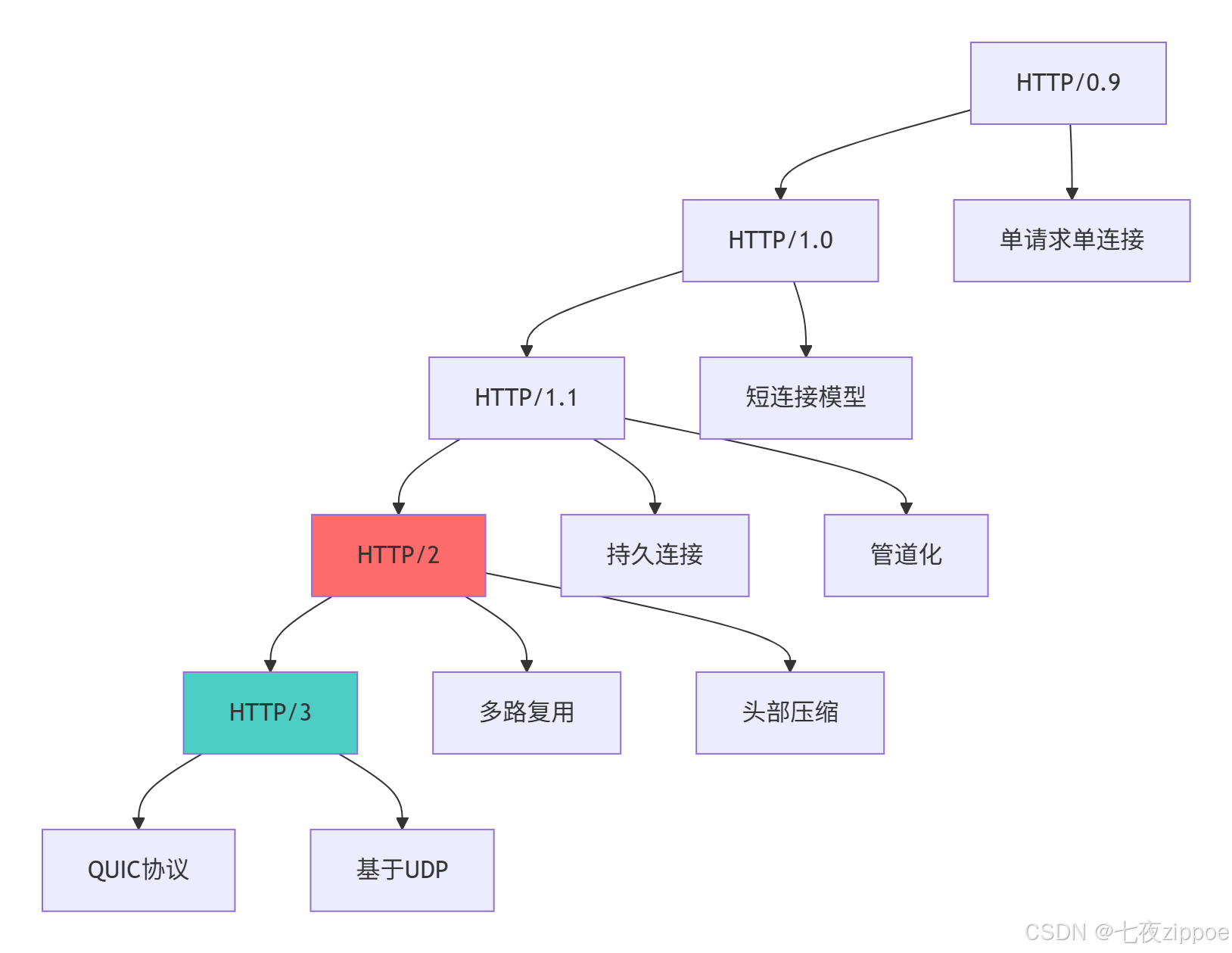
这种演进背后的技术驱动因素:
-
性能需求提升:从简单文档传输到复杂应用交互
-
移动互联网发展:高延迟、不稳定网络环境下的性能优化
-
安全性要求:从明文传输到全程加密
-
实时性需求:WebSocket、服务器推送等实时通信需求
2 HTTP协议核心技术深度解析
2.1 请求-响应模型架构设计
HTTP协议采用经典的客户端-服务器模型,这种设计简单而高效,成为Web技术的基石。
2.1.1 请求报文结构解析
python
# http_request_analysis.py
from dataclasses import dataclass
from typing import Dict, List, Optional
import urllib.parse

@dataclass
class HTTPRequest:
    """HTTP请求报文解析"""
    method: str
    path: str
    version: str
    headers: Dict[str, str]
    body: Optional[bytes] = None

    @classmethod
    def parse_raw_request(cls, raw_request: bytes):
        """解析原始HTTP请求"""
        # 解码字节数据
        try:
            request_text = raw_request.decode('utf-8')
        except UnicodeDecodeError:
            request_text = raw_request.decode('iso-8859-1')

        lines = request_text.split('\r\n')

        # 解析请求行
        request_line = lines[0]
        method, path, version = request_line.split()

        # 解析头部
        headers = {}
        body_start_index = 0
        for i, line in enumerate(lines[1:], 1):
            if not line:  # 空行标识头部结束
                body_start_index = i + 1
                break
            if ': ' in line:
                key, value = line.split(': ', 1)
                headers[key] = value

        # 解析消息体
        body = None
        if body_start_index < len(lines):
            body_content = '\r\n'.join(lines[body_start_index:])
            body = body_content.encode()

        return cls(method, path, version, headers, body)

    def get_query_params(self) -> Dict[str, List[str]]:
        """解析URL查询参数"""
        parsed = urllib.parse.urlparse(self.path)
        return urllib.parse.parse_qs(parsed.query)

    def get_cookies(self) -> Dict[str, str]:
        """解析Cookie头"""
        cookies = {}
        if 'Cookie' in self.headers:
            cookie_header = self.headers['Cookie']
            for cookie in cookie_header.split(';'):
                if '=' in cookie:
                    name, value = cookie.split('=', 1)
                    cookies[name.strip()] = value.strip()
        return cookies

class HTTPRequestMethods:
    """HTTP请求方法详解"""

    METHODS = {
        'GET': {
            'description': '获取指定资源',
            'idempotent': True,
            'safe': True,
            'cacheable': True,
            'request_body': False
        },
        'POST': {
            'description': '向指定资源提交数据进行处理',
            'idempotent': False,
            'safe': False,
            'cacheable': True,
            'request_body': True
        },
        'PUT': {
            'description': '替换指定资源的所有当前表示',
            'idempotent': True,
            'safe': False,
            'cacheable': False,
            'request_body': True
        },
        'DELETE': {
            'description': '删除指定资源',
            'idempotent': True,
            'safe': False,
            'cacheable': False,
            'request_body': False
        },
        'HEAD': {
            'description': '获取与GET相同的响应头,但没有响应体',
            'idempotent': True,
            'safe': True,
            'cacheable': True,
            'request_body': False
        },
        'OPTIONS': {
            'description': '描述目标资源的通信选项',
            'idempotent': True,
            'safe': True,
            'cacheable': False,
            'request_body': False
        }
    }

    @classmethod
    def analyze_method_usage(cls, method: str) -> Dict:
        """分析方法使用场景"""
        if method not in cls.METHODS:
            return {'error': f'未知方法: {method}'}

        info = cls.METHODS[method]
        usage_scenarios = []

        if method == 'GET':
            usage_scenarios = ['获取网页内容', 'API数据查询', '资源下载']
        elif method == 'POST':
            usage_scenarios = ['表单提交', '文件上传', '创建新资源']
        elif method == 'PUT':
            usage_scenarios = ['资源更新', '文件上传(完整替换)']
        elif method == 'DELETE':
            usage_scenarios = ['删除资源', '取消操作']

        return {
            'method': method,
            'description': info['description'],
            'characteristics': {
                'idempotent': info['idempotent'],
                'safe': info['safe'],
                'cacheable': info['cacheable']
            },
            'usage_scenarios': usage_scenarios
        }
2.1.2 响应报文结构解析
python
# http_response_analysis.py
from dataclasses import dataclass
from typing import Dict, Any
from datetime import datetime

@dataclass
class HTTPResponse:
    """HTTP响应报文解析与构建"""
    status_code: int
    status_text: str
    version: str = "HTTP/1.1"
    headers: Dict[str, str] = None
    body: bytes = b""

    def __post_init__(self):
        if self.headers is None:
            self.headers = {}

    def build_response(self) -> bytes:
        """构建完整的HTTP响应报文"""
        # 状态行
        status_line = f"{self.version} {self.status_code} {self.status_text}\r\n"

        # 确保必要的头部字段
        if 'Content-Length' not in self.headers and self.body:
            self.headers['Content-Length'] = str(len(self.body))
        if 'Date' not in self.headers:
            self.headers['Date'] = datetime.utcnow().strftime('%a, %d %b %Y %H:%M:%S GMT')
        if 'Server' not in self.headers:
            self.headers['Server'] = 'CustomPythonServer/1.0'

        # 构建头部
        headers_section = ""
        for key, value in self.headers.items():
            headers_section += f"{key}: {value}\r\n"

        # 组合所有部分
        response = status_line + headers_section + "\r\n"
        response_bytes = response.encode('utf-8') + self.body

        return response_bytes

class HTTPStatusCodeAnalyzer:
    """HTTP状态码深度分析"""

    def __init__(self):
        self.status_categories = {
            '1xx': {'name': '信息响应', 'description': '请求已被接收,继续处理'},
            '2xx': {'name': '成功', 'description': '请求已成功被服务器接收、理解、并接受'},
            '3xx': {'name': '重定向', 'description': '需要后续操作才能完成这一请求'},
            '4xx': {'name': '客户端错误', 'description': '请求含有词法错误或者无法被执行'},
            '5xx': {'name': '服务器错误', 'description': '服务器在处理某个正确请求时发生错误'}
        }

        self.common_status_codes = {
            100: ('Continue', '客户端应继续发送请求的剩余部分'),
            200: ('OK', '请求成功'),
            201: ('Created', '资源创建成功'),
            301: ('Moved Permanently', '资源永久移动'),
            302: ('Found', '资源临时移动'),
            304: ('Not Modified', '资源未修改(缓存相关)'),
            400: ('Bad Request', '错误请求'),
            401: ('Unauthorized', '未认证'),
            403: ('Forbidden', '禁止访问'),
            404: ('Not Found', '资源不存在'),
            405: ('Method Not Allowed', '方法不允许'),
            500: ('Internal Server Error', '服务器内部错误'),
            502: ('Bad Gateway', '错误网关'),
            503: ('Service Unavailable', '服务不可用')
        }

    def get_status_info(self, status_code: int) -> Dict[str, Any]:
        """获取状态码详细信息"""
        if status_code not in self.common_status_codes:
            return {'error': f'未知状态码: {status_code}'}

        status_text, description = self.common_status_codes[status_code]
        category = f"{status_code // 100}xx"

        return {
            'code': status_code,
            'text': status_text,
            'description': description,
            'category': self.status_categories[category]['name'],
            'category_description': self.status_categories[category]['description']
        }

    def generate_appropriate_response(self, status_code: int,
                                   additional_info: str = "") -> HTTPResponse:
        """生成适当的状态响应"""
        status_info = self.get_status_info(status_code)

        # 根据状态码生成相应的HTML内容
        if status_code == 404:
            html_content = f"""
            <!DOCTYPE html>
            <html>
            <head><title>404 Not Found</title></head>
            <body>
                <h1>404 - 页面未找到</h1>
                <p>请求的资源不存在。{additional_info}</p>
            </body>
            </html>
            """
        elif status_code == 500:
            html_content = f"""
            <!DOCTYPE html>
            <html>
            <head><title>500 Internal Server Error</title></head>
            <body>
                <h1>500 - 服务器内部错误</h1>
                <p>服务器遇到意外错误。{additional_info}</p>
            </body>
            </html>
            """
        else:
            html_content = f"""
            <!DOCTYPE html>
            <html>
            <head><title>{status_code} {status_info['text']}</title></head>
            <body>
                <h1>{status_code} - {status_info['text']}</h1>
                <p>{status_info['description']}</p>
            </body>
            </html>
            """

        response = HTTPResponse(
            status_code=status_code,
            status_text=status_info['text'],
            headers={
                'Content-Type': 'text/html; charset=utf-8',
            },
            body=html_content.encode('utf-8')
        )

        return response
2.2 HTTP/1.1 持久连接与管道化技术
HTTP/1.1引入了持久连接 和管道化技术,显著提升了性能。
2.2.1 持久连接实现机制
python
# http_persistent_connection.py
import socket
import time
from threading import Thread, Lock
from queue import Queue

class PersistentConnectionHandler:
    """HTTP/1.1持久连接处理器"""

    def __init__(self, host='localhost', port=8080):
        self.host = host
        self.port = port
        self.connection_pool = {}
        self.lock = Lock()
        self.timeout = 30  # 连接超时时间(秒)

    def handle_persistent_connection(self, client_socket: socket.socket,
                                   address: tuple):
        """处理持久连接"""
        print(f"处理来自 {address} 的持久连接")

        # 设置套接字超时
        client_socket.settimeout(1.0)  # 1秒超时用于检查数据

        buffer = b""
        last_activity = time.time()

        while True:
            try:
                # 检查连接超时
                if time.time() - last_activity > self.timeout:
                    print(f"连接 {address} 超时,关闭连接")
                    break

                # 接收数据
                data = client_socket.recv(4096)
                if data:
                    buffer += data
                    last_activity = time.time()

                    # 检查是否收到完整的HTTP请求
                    if b"\r\n\r\n" in buffer:
                        # 解析请求边界
                        header_end = buffer.find(b"\r\n\r\n")
                        headers = buffer[:header_end].decode('utf-8')
                        body_start = header_end + 4

                        # 检查Content-Length
                        content_length = 0
                        for line in headers.split('\r\n'):
                            if line.lower().startswith('content-length:'):
                                content_length = int(line.split(':')[1].strip())
                                break

                        # 检查是否已接收完整body
                        total_received = len(buffer) - body_start
                        if total_received >= content_length:
                            # 处理完整请求
                            request_data = buffer[:body_start + content_length]
                            response = self.process_http_request(request_data, address)

                            # 发送响应
                            client_socket.sendall(response)

                            # 检查Connection头
                            if b"Connection: close" in request_data:
                                print(f"客户端 {address} 请求关闭连接")
                                break

                            # 保留未处理的数据用于下一个请求
                            buffer = buffer[body_start + content_length:]
                        # 否则继续接收数据
                else:
                    # 连接已关闭
                    print(f"客户端 {address} 关闭连接")
                    break

            except socket.timeout:
                # 超时继续循环,检查活动状态
                continue
            except Exception as e:
                print(f"处理连接时出错: {e}")
                break

        client_socket.close()
        print(f"连接 {address} 已关闭")

    def process_http_request(self, request_data: bytes, address: tuple) -> bytes:
        """处理HTTP请求并生成响应"""
        try:
            request = HTTPRequest.parse_raw_request(request_data)
            print(f"处理请求: {request.method} {request.path}")

            # 生成响应
            response = HTTPResponse(
                status_code=200,
                status_text="OK",
                headers={
                    'Content-Type': 'text/html; charset=utf-8',
                    'Connection': 'keep-alive',
                    'Keep-Alive': f'timeout={self.timeout}'
                },
                body=f"""
                <html>
                <body>
                    <h1>HTTP/1.1 持久连接演示</h1>
                    <p>客户端: {address}</p>
                    <p>请求路径: {request.path}</p>
                    <p>处理时间: {time.time()}</p>
                </body>
                </html>
                """.encode('utf-8')
            )

            return response.build_response()

        except Exception as e:
            # 错误响应
            error_response = HTTPResponse(
                status_code=500,
                status_text="Internal Server Error",
                body=f"Error processing request: {e}".encode('utf-8')
            )
            return error_response.build_response()
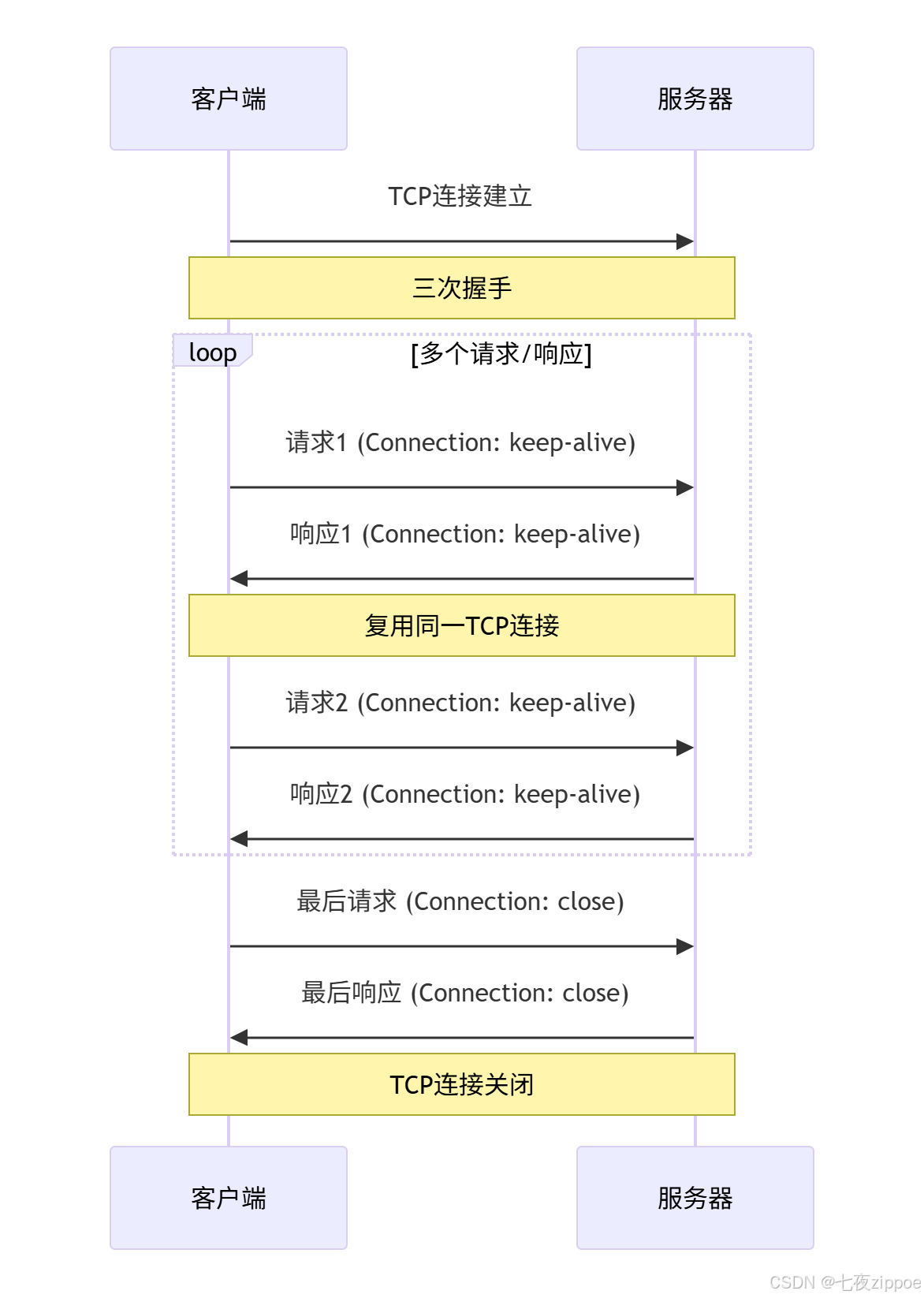
下面的序列图展示了HTTP/1.1持久连接的工作机制:
2.3 HTTP/2 多路复用与头部压缩
HTTP/2通过多路复用 和头部压缩技术解决了HTTP/1.x的性能瓶颈。
2.3.1 HTTP/2 帧结构解析
python
# http2_frame_analysis.py
import struct
from enum import Enum
from typing import List, Dict

class HTTP2FrameType(Enum):
    """HTTP/2帧类型枚举"""
    DATA = 0x0
    HEADERS = 0x1
    PRIORITY = 0x2
    RST_STREAM = 0x3
    SETTINGS = 0x4
    PUSH_PROMISE = 0x5
    PING = 0x6
    GOAWAY = 0x7
    WINDOW_UPDATE = 0x8
    CONTINUATION = 0x9

class HTTP2Frame:
    """HTTP/2帧解析器"""

    def __init__(self, frame_data: bytes):
        self.raw_data = frame_data
        self.length = 0
        self.type = 0
        self.flags = 0
        self.stream_id = 0
        self.payload = b""

        self.parse_frame()

    def parse_frame(self):
        """解析HTTP/2帧"""
        if len(self.raw_data) < 9:
            raise ValueError("帧数据过短")

        # 解析帧头(9字节)
        header = self.raw_data[:9]
        self.length = struct.unpack('>I', b'\x00' + header[:3])[0]
        self.type = header[3]
        self.flags = header[4]
        self.stream_id = struct.unpack('>I', header[5:9])[0] & 0x7FFFFFFF

        # 解析载荷
        if len(self.raw_data) >= 9 + self.length:
            self.payload = self.raw_data[9:9 + self.length]
        else:
            raise ValueError("帧数据不完整")

    def get_frame_info(self) -> Dict:
        """获取帧信息"""
        frame_type = HTTP2FrameType(self.type) if self.type in [t.value for t in HTTP2FrameType] else "UNKNOWN"

        return {
            'length': self.length,
            'type': frame_type.name if isinstance(frame_type, HTTP2FrameType) else frame_type,
            'type_code': self.type,
            'flags': self.flags,
            'stream_id': self.stream_id,
            'payload_length': len(self.payload)
        }

class HTTP2MultiplexingDemo:
    """HTTP/2多路复用演示"""

    def demonstrate_multiplexing(self):
        """演示HTTP/2多路复用优势"""

        # HTTP/1.1 的队头阻塞问题
        http1_sequential = {
            'problem': '队头阻塞(Head-of-Line Blocking)',
            'description': '多个请求必须按顺序处理,前一个请求阻塞后续请求',
            'impact': '资源加载延迟,页面渲染变慢'
        }

        # HTTP/2 多路复用解决方案
        http2_multiplexing = {
            'solution': '多路复用(Multiplexing)',
            'description': '单个连接上同时传输多个请求和响应,帧可以交错发送',
            'benefits': [
                '消除队头阻塞',
                '减少TCP连接数量',
                '提高网络利用率',
                '降低连接建立开销'
            ]
        }

        # 头部压缩对比
        header_compression = {
            'http1': {
                'technique': '无压缩或gzip',
                'overhead': '每个请求重复发送完整头部',
                'typical_size': '400-800字节/请求'
            },
            'http2': {
                'technique': 'HPACK压缩',
                'overhead': '静态表和动态表,差分编码',
                'typical_size': '20-30字节/请求',
                'savings': '85-90%减少'
            }
        }

        print("=== HTTP/2 多路复用优势 ===")
        print(f"问题: {http1_sequential['problem']}")
        print(f"描述: {http1_sequential['description']}")
        print(f"影响: {http1_sequential['impact']}")
        print()
        print(f"解决方案: {http2_multiplexing['solution']}")
        print(f"描述: {http2_multiplexing['description']}")
        print("优势:")
        for benefit in http2_multiplexing['benefits']:
            print(f"  - {benefit}")
        print()
        print("=== 头部压缩对比 ===")
        print("HTTP/1.x:")
        print(f"  技术: {header_compression['http1']['technique']}")
        print(f"  开销: {header_compression['http1']['overhead']}")
        print(f"  典型大小: {header_compression['http1']['typical_size']}")
        print("HTTP/2:")
        print(f"  技术: {header_compression['http2']['technique']}")
        print(f"  开销: {header_compression['http2']['overhead']}")
        print(f"  典型大小: {header_compression['http2']['typical_size']}")
        print(f"  节省: {header_compression['http2']['savings']}")

        return {
            'http1_sequential': http1_sequential,
            'http2_multiplexing': http2_multiplexing,
            'header_compression': header_compression
        }
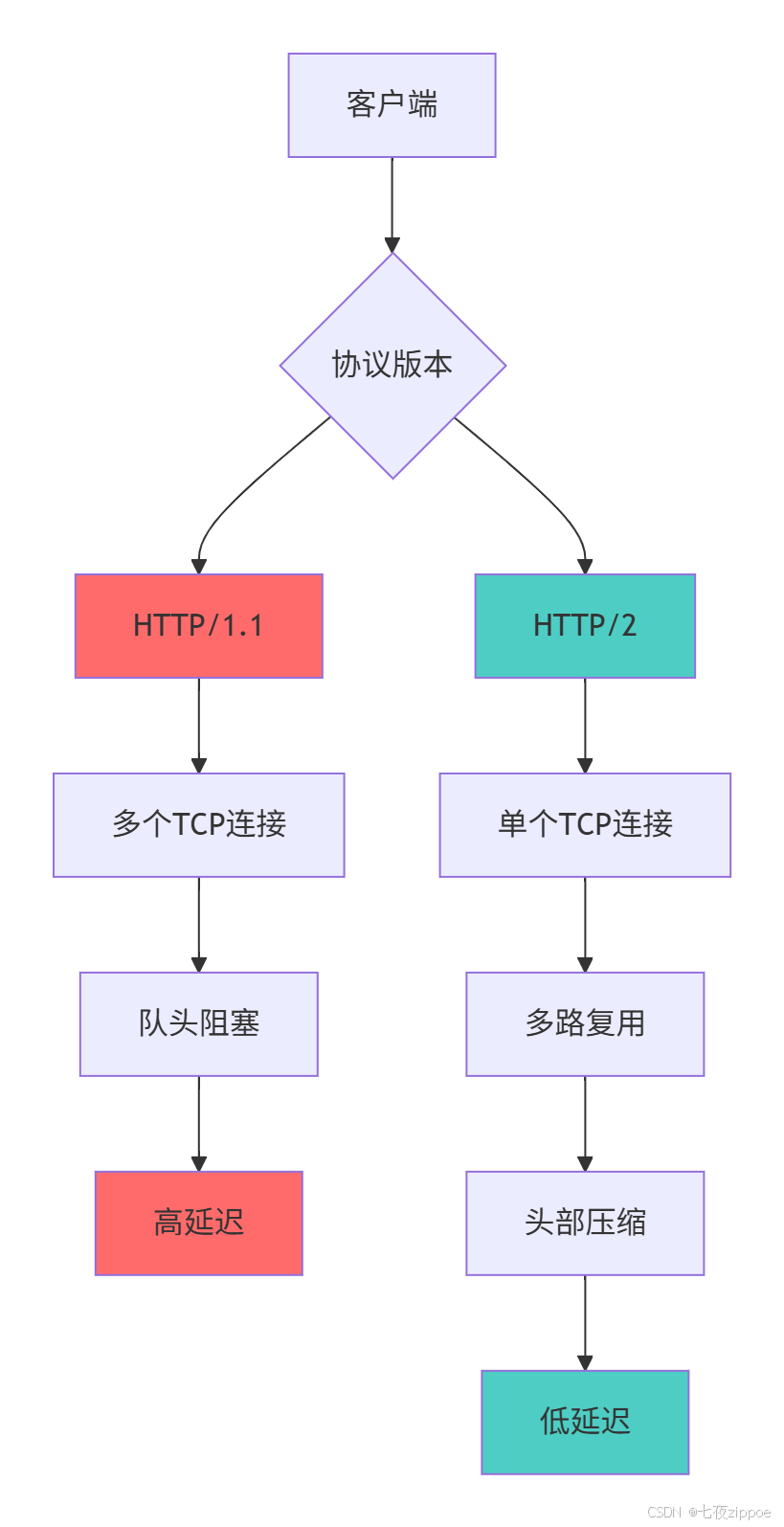
2.3.2 HTTP/2 与 HTTP/1.1 性能对比
2.4 HTTP/3 与 QUIC 协议革命
HTTP/3基于QUIC协议,从传输层重构了Web通信基础。
2.4.1 QUIC协议核心特性
python
# http3_quic_analysis.py
import time
from dataclasses import dataclass
from typing import Dict, Any

@dataclass
class QUICFeatures:
    """QUIC协议特性分析"""

    def compare_protocols(self) -> Dict[str, Any]:
        """对比HTTP/2和HTTP/3的关键差异"""

        comparison = {
            '传输层协议': {
                'HTTP/2': 'TCP',
                'HTTP/3': 'QUIC (基于UDP)',
                '影响': 'HTTP/3避免了TCP的队头阻塞'
            },
            '连接建立': {
                'HTTP/2': '3次握手 + TLS握手(2-3 RTT)',
                'HTTP/3': '1 RTT(0-RTT支持)',
                '影响': 'HTTP/3显著减少延迟'
            },
            '队头阻塞': {
                'HTTP/2': 'TCP层存在队头阻塞',
                'HTTP/3': 'QUIC层解决队头阻塞',
                '影响': 'HTTP/3在丢包环境下性能更好'
            },
            '连接迁移': {
                'HTTP/2': '基于IP和端口,网络切换需重新连接',
                'HTTP/3': '连接ID标识,支持无缝迁移',
                '影响': 'HTTP/3适合移动场景'
            }
        }

        return comparison

    def demonstrate_quic_advantages(self):
        """演示QUIC协议优势"""

        # 模拟网络环境
        network_conditions = [
            {'condition': '低延迟稳定网络', 'http2_rtt': 50, 'http3_rtt': 45},
            {'condition': '高延迟网络', 'http2_rtt': 300, 'http3_rtt': 250},
            {'condition': '丢包网络(5%丢包)', 'http2_rtt': 800, 'http3_rtt': 400},
            {'condition': '网络切换场景', 'http2_rtt': '需重新连接', 'http3_rtt': '无缝迁移'}
        ]

        print("=== HTTP/3 QUIC协议优势分析 ===")
        print("网络条件对比:")
        for scenario in network_conditions:
            print(f"{scenario['condition']}:")
            print(f"  HTTP/2延迟: {scenario['http2_rtt']}ms")
            print(f"  HTTP/3延迟: {scenario['http3_rtt']}ms")
            if isinstance(scenario['http2_rtt'], int) and isinstance(scenario['http3_rtt'], int):
                improvement = ((scenario['http2_rtt'] - scenario['http3_rtt']) / scenario['http2_rtt']) * 100
                print(f"  性能提升: {improvement:.1f}%")
            print()

        return network_conditions

class HTTP3MigrationStrategy:
    """HTTP/3迁移策略"""

    def analyze_migration_readiness(self, current_infrastructure: Dict) -> Dict:
        """分析迁移到HTTP/3的就绪程度"""

        readiness_score = 0
        max_score = 100
        recommendations = []

        # 客户端支持度检查
        if current_infrastructure.get('client_support', 'basic') == 'full':
            readiness_score += 25
            recommendations.append("✅ 客户端已全面支持HTTP/3")
        else:
            readiness_score += 10
            recommendations.append("⚠️ 考虑渐进式迁移,保持HTTP/2回退")

        # 服务器支持度检查
        if current_infrastructure.get('server_support', False):
            readiness_score += 25
            recommendations.append("✅ 服务器已支持HTTP/3")
        else:
            recommendations.append("⏳ 需要更新服务器软件以支持HTTP/3")

        # 网络基础设施检查
        if current_infrastructure.get('udp_support', True):
            readiness_score += 20
            recommendations.append("✅ 网络基础设施支持UDP传输")
        else:
            readiness_score += 5
            recommendations.append("🚫 检查防火墙UDP阻塞情况")

        # 应用架构适应性
        if current_infrastructure.get('compatible_architecture', True):
            readiness_score += 20
            recommendations.append("✅ 应用架构支持HTTP/3特性")
        else:
            recommendations.append("🔧 需要优化应用以充分利用HTTP/3")

        # 性能需求评估
        if current_infrastructure.get('performance_requirements', 'moderate') == 'high':
            readiness_score += 10
            recommendations.append("🎯 高性能需求适合迁移到HTTP/3")
        else:
            readiness_score += 5
            recommendations.append("💡 HTTP/3可为未来性能需求做准备")

        readiness_percentage = (readiness_score / max_score) * 100

        return {
            'readiness_score': readiness_score,
            'readiness_percentage': readiness_percentage,
            'recommendations': recommendations,
            'migration_strategy': self._get_migration_strategy(readiness_percentage)
        }

    def _get_migration_strategy(self, percentage: float) -> str:
        """根据就绪度提供迁移策略"""
        if percentage >= 80:
            return "积极迁移:基础设施已就绪,可全面部署HTTP/3"
        elif percentage >= 60:
            return "渐进迁移:逐步启用HTTP/3,保持向后兼容"
        elif percentage >= 40:
            return "准备阶段:先升级基础设施,再测试HTTP/3"
        else:
            return "规划阶段:需要先解决基础设施限制"
3 实战部分:从零实现HTTP服务器
3.1 基础HTTP服务器实现
基于Python socket实现一个完整的HTTP服务器,支持静态文件服务和动态请求处理。
3.1.1 核心服务器架构
python
# http_server_implementation.py
import socket
import threading
import os
import mimetypes
from pathlib import Path
from urllib.parse import unquote

class SimpleHTTPServer:
    """简单的HTTP服务器实现"""

    def __init__(self, host='localhost', port=8080, document_root='./www'):
        self.host = host
        self.port = port
        self.document_root = Path(document_root)
        self.routes = {}

        # 创建文档根目录
        self.document_root.mkdir(exist_ok=True)

        # 注册默认路由
        self._register_default_routes()

    def _register_default_routes(self):
        """注册默认路由"""
        self.routes['/'] = self._handle_index
        self.routes['/headers'] = self._handle_headers
        self.routes['/echo'] = self._handle_echo

    def start(self):
        """启动HTTP服务器"""
        server_socket = socket.socket(socket.AF_INET, socket.SOCK_STREAM)
        server_socket.setsockopt(socket.SOL_SOCKET, socket.SO_REUSEADDR, 1)
        server_socket.bind((self.host, self.port))
        server_socket.listen(5)

        print(f"HTTP服务器运行在 http://{self.host}:{self.port}")
        print(f"文档根目录: {self.document_root.absolute()}")

        try:
            while True:
                client_socket, client_address = server_socket.accept()

                # 为每个连接创建新线程
                client_thread = threading.Thread(
                    target=self._handle_client,
                    args=(client_socket, client_address)
                )
                client_thread.daemon = True
                client_thread.start()

        except KeyboardInterrupt:
            print("\n服务器关闭中...")
        finally:
            server_socket.close()

    def _handle_client(self, client_socket: socket.socket, client_address: tuple):
        """处理客户端连接"""
        try:
            # 接收请求数据
            request_data = client_socket.recv(1024 * 1024)  # 最大1MB

            if request_data:
                # 解析HTTP请求
                request = HTTPRequest.parse_raw_request(request_data)

                # 处理请求并生成响应
                response = self._handle_request(request, client_address)

                # 发送响应
                client_socket.sendall(response)

        except Exception as e:
            # 生成错误响应
            error_response = self._generate_error_response(500, str(e))
            client_socket.sendall(error_response)
        finally:
            client_socket.close()

    def _handle_request(self, request: HTTPRequest, client_address: tuple) -> bytes:
        """处理HTTP请求"""
        try:
            # 解码路径
            path = unquote(request.path)

            # 查找路由处理函数
            handler = self.routes.get(path, self._handle_static_file)

            # 调用处理函数
            return handler(request, client_address)

        except Exception as e:
            return self._generate_error_response(500, f"服务器错误: {e}")

    def _handle_index(self, request: HTTPRequest, client_address: tuple) -> bytes:
        """处理首页请求"""
        html_content = """
        <!DOCTYPE html>
        <html>
        <head>
            <title>简易HTTP服务器</title>
            <style>
                body { font-family: Arial, sans-serif; margin: 40px; }
                h1 { color: #333; }
                .endpoint { background: #f5f5f5; padding: 10px; margin: 10px 0; }
            </style>
        </head>
        <body>
            <h1>欢迎使用简易HTTP服务器</h1>
            <p>这是一个基于Python实现的HTTP服务器演示</p>

            <div class="endpoint">
                <h3>可用端点:</h3>
                <ul>
                    <li><a href="/">首页 (当前页面)</a></li>
                    <li><a href="/headers">查看请求头</a></li>
                    <li><a href="/echo?message=Hello">回显测试</a></li>
                    <li><a href="/static/test.txt">静态文件测试</a></li>
                </ul>
            </div>

            <div class="endpoint">
                <h3>测试表单:</h3>
                <form action="/echo" method="get">
                    <input type="text" name="message" value="Hello World">
                    <input type="submit" value="回显测试">
                </form>
            </div>
        </body>
        </html>
        """

        response = HTTPResponse(
            status_code=200,
            status_text="OK",
            headers={
                'Content-Type': 'text/html; charset=utf-8',
            },
            body=html_content.encode('utf-8')
        )

        return response.build_response()

    def _handle_headers(self, request: HTTPRequest, client_address: tuple) -> bytes:
        """显示请求头信息"""
        headers_html = ""
        for key, value in request.headers.items():
            headers_html += f"<li><strong>{key}:</strong> {value}</li>"

        html_content = f"""
        <!DOCTYPE html>
        <html>
        <head><title>请求头信息</title></head>
        <body>
            <h1>请求头信息</h1>
            <p>客户端: {client_address}</p>
            <h2>请求头:</h2>
            <ul>{headers_html}</ul>
            <a href="/">返回首页</a>
        </body>
        </html>
        """

        response = HTTPResponse(
            status_code=200,
            status_text="OK",
            headers={'Content-Type': 'text/html; charset=utf-8'},
            body=html_content.encode('utf-8')
        )

        return response.build_response()

    def _handle_echo(self, request: HTTPRequest, client_address: tuple) -> bytes:
        """回显请求参数"""
        query_params = request.get_query_params()
        message = query_params.get('message', ['Hello World'])[0]

        html_content = f"""
        <!DOCTYPE html>
        <html>
        <head><title>回显测试</title></head>
        <body>
            <h1>回显结果</h1>
            <p>接收到的消息: <strong>{message}</strong></p>
            <a href="/">返回首页</a>

            <h3>测试其他消息:</h3>
            <form action="/echo" method="get">
                <input type="text" name="message" value="{message}">
                <input type="submit" value="重新测试">
            </form>
        </body>
        </html>
        """

        response = HTTPResponse(
            status_code=200,
            status_text="OK",
            headers={'Content-Type': 'text/html; charset=utf-8'},
            body=html_content.encode('utf-8')
        )

        return response.build_response()

    def _handle_static_file(self, request: HTTPRequest, client_address: tuple) -> bytes:
        """处理静态文件请求"""
        try:
            # 解析请求路径
            path = unquote(request.path)
            if path.startswith('/static/'):
                file_path = path[7:]  # 移除 '/static/'
            else:
                file_path = path[1:]  # 移除开头的 '/'

            # 安全路径检查
            file_path = Path(file_path)
            if '..' in file_path.parts:
                return self._generate_error_response(403, "禁止访问")

            # 构建完整文件路径
            full_path = self.document_root / file_path

            if full_path.is_file():
                # 获取MIME类型
                mime_type, _ = mimetypes.guess_type(str(full_path))
                mime_type = mime_type or 'application/octet-stream'

                # 读取文件内容
                with open(full_path, 'rb') as f:
                    content = f.read()

                response = HTTPResponse(
                    status_code=200,
                    status_text="OK",
                    headers={
                        'Content-Type': mime_type,
                        'Content-Length': str(len(content))
                    },
                    body=content
                )
                return response.build_response()
            else:
                return self._generate_error_response(404, f"文件未找到: {path}")

        except Exception as e:
            return self._generate_error_response(500, f"文件处理错误: {e}")

    def _generate_error_response(self, status_code: int, message: str) -> bytes:
        """生成错误响应"""
        analyzer = HTTPStatusCodeAnalyzer()
        return analyzer.generate_appropriate_response(status_code, message).build_response()

# 启动服务器
def run_http_server():
    """运行HTTP服务器示例"""
    # 创建示例静态文件
    www_dir = Path('./www')
    www_dir.mkdir(exist_ok=True)

    static_dir = www_dir / 'static'
    static_dir.mkdir(exist_ok=True)

    # 创建测试文件
    test_file = static_dir / 'test.txt'
    test_file.write_text('这是一个测试静态文件\nHello from HTTP Server!')

    # 启动服务器
    server = SimpleHTTPServer(port=8080, document_root=www_dir)
    server.start()

if __name__ == "__main__":
    run_http_server()
3.2 高级特性实现
3.2.1 中间件架构支持
python
# http_middleware.py
from typing import Callable, Optional
import json

class HTTPMiddleware:
    """HTTP中间件基类"""

    def process_request(self, request: HTTPRequest) -> Optional[HTTPResponse]:
        """处理请求,返回None则继续处理,返回Response则直接返回"""
        return None

    def process_response(self, request: HTTPRequest, response: HTTPResponse) -> HTTPResponse:
        """处理响应"""
        return response

class AuthenticationMiddleware(HTTPMiddleware):
    """认证中间件"""

    def __init__(self, api_keys=None):
        self.api_keys = api_keys or []

    def process_request(self, request: HTTPRequest) -> Optional[HTTPResponse]:
        # 检查需要认证的路径
        if request.path.startswith('/api/'):
            auth_header = request.headers.get('Authorization', '')
            if not auth_header.startswith('Bearer '):
                return self._unauthorized_response()

            api_key = auth_header[7:]  # 移除 'Bearer '
            if api_key not in self.api_keys:
                return self._unauthorized_response()

        return None

    def _unauthorized_response(self) -> HTTPResponse:
        response = HTTPResponse(
            status_code=401,
            status_text="Unauthorized",
            headers={'Content-Type': 'application/json'},
            body=json.dumps({'error': '认证失败'}).encode('utf-8')
        )
        return response

class LoggingMiddleware(HTTPMiddleware):
    """日志中间件"""

    def process_request(self, request: HTTPRequest) -> None:
        print(f"[{time.time()}] 请求: {request.method} {request.path}")
        return None

    def process_response(self, request: HTTPRequest, response: HTTPResponse) -> HTTPResponse:
        print(f"[{time.time()}] 响应: {request.method} {request.path} -> {response.status_code}")
        return response

class MiddlewareHTTPServer(SimpleHTTPServer):
    """支持中间件的HTTP服务器"""

    def __init__(self, *args, **kwargs):
        super().__init__(*args, **kwargs)
        self.middlewares = []

    def add_middleware(self, middleware: HTTPMiddleware):
        """添加中间件"""
        self.middlewares.append(middleware)

    def _handle_request(self, request: HTTPRequest, client_address: tuple) -> bytes:
        """重写请求处理,加入中间件支持"""

        # 处理请求中间件
        for middleware in self.middlewares:
            result = middleware.process_request(request)
            if result is not None:
                return result.build_response()

        # 执行实际处理
        response_bytes = super()._handle_request(request, client_address)

        # 解析响应以便中间件处理
        response = self._parse_response(response_bytes)

        # 处理响应中间件
        for middleware in self.middlewares:
            response = middleware.process_response(request, response)

        return response.build_response()

    def _parse_response(self, response_bytes: bytes) -> HTTPResponse:
        """解析响应字节为HTTPResponse对象"""
        # 简化实现,实际需要完整解析
        return HTTPResponse(200, "OK", body=response_bytes)
4 高级应用与企业级实战
4.1 性能优化实战技巧
基于真实项目经验,总结HTTP性能优化的核心技巧。
4.1.1 连接管理与优化
python
# http_optimization.py
import time
from concurrent.futures import ThreadPoolExecutor
from functools import lru_cache

class HTTPOptimizer:
    """HTTP性能优化器"""

    def __init__(self):
        self.optimization_strategies = {
            'connection_reuse': '持久连接和连接池',
            'compression': 'gzip/brotli压缩',
            'caching': '适当的缓存策略',
            'cdn': '内容分发网络',
            'http2': 'HTTP/2多路复用'
        }

    def analyze_performance_bottlenecks(self, request_logs: list) -> dict:
        """分析性能瓶颈"""
        analysis = {
            'total_requests': len(request_logs),
            'average_response_time': 0,
            'slow_requests': [],
            'common_issues': []
        }

        if not request_logs:
            return analysis

        total_time = 0
        for log in request_logs:
            response_time = log.get('response_time', 0)
            total_time += response_time

            if response_time > 1000:  # 超过1秒的请求
                analysis['slow_requests'].append({
                    'url': log.get('path', ''),
                    'time': response_time,
                    'method': log.get('method', 'GET')
                })

        analysis['average_response_time'] = total_time / len(request_logs)

        # 识别常见问题
        if analysis['average_response_time'] > 500:
            analysis['common_issues'].append('高延迟:考虑启用HTTP/2和CDN')

        slow_count = len(analysis['slow_requests'])
        if slow_count > len(request_logs) * 0.1:  # 10%以上请求慢
            analysis['common_issues'].append('大量慢请求:需要数据库和代码优化')

        return analysis

    @lru_cache(maxsize=1000)
    def expensive_operation(self, key: str) -> str:
        """模拟昂贵操作,使用缓存优化"""
        time.sleep(0.1)  # 模拟耗时操作
        return f"processed_{key}"

    def generate_optimization_report(self, current_performance: dict) -> list:
        """生成优化建议报告"""
        recommendations = []

        avg_response_time = current_performance.get('average_response_time', 0)
        request_count = current_performance.get('total_requests', 0)

        if avg_response_time > 1000:
            recommendations.append({
                'priority': 'high',
                'area': '连接管理',
                'suggestion': '启用HTTP/2多路复用,减少连接建立开销',
                'expected_improvement': '40-60%'
            })

        if request_count > 100:
            recommendations.append({
                'priority': 'medium',
                'area': '缓存策略',
                'suggestion': '实施积极的缓存策略,减少重复计算',
                'expected_improvement': '30-50%'
            })

        if current_performance.get('image_requests', 0) > 10:
            recommendations.append({
                'priority': 'medium',
                'area': '资源优化',
                'suggestion': '启用图片压缩和WebP格式',
                'expected_improvement': '20-40%'
            })

        return recommendations
4.1.2 HTTP/2 服务器实现
python
# http2_server.py
import asyncio
import h2.config
import h2.connection
import h2.events

class HTTP2Server:
    """HTTP/2服务器实现示例"""

    def __init__(self, host='localhost', port=8443):
        self.host = host
        self.port = port

    async def handle_http2_connection(self, reader, writer):
        """处理HTTP/2连接"""
        config = h2.config.H2Configuration(client_side=False)
        conn = h2.connection.H2Connection(config=config)
        conn.initiate_connection()

        # 发送初始设置帧
        writer.write(conn.data_to_send())
        await writer.drain()

        try:
            while True:
                data = await reader.read(65535)
                if not data:
                    break

                # 处理接收到的数据
                events = conn.receive_data(data)

                for event in events:
                    if isinstance(event, h2.events.RequestReceived):
                        await self.handle_request(event, conn, writer)

                    elif isinstance(event, h2.events.DataReceived):
                        # 处理数据帧
                        conn.acknowledge_received_data(
                            event.flow_controlled_length,
                            event.stream_id
                        )

                # 发送待发送数据
                if conn.data_to_send:
                    writer.write(conn.data_to_send())
                    await writer.drain()

        except Exception as e:
            print(f"HTTP/2连接错误: {e}")
        finally:
            writer.close()

    async def handle_request(self, event, conn, writer):
        """处理HTTP/2请求"""
        stream_id = event.stream_id
        headers = dict(event.headers)

        # 构建响应
        response_headers = [
            (':status', '200'),
            ('content-type', 'text/html; charset=utf-8'),
            ('server', 'python-http2-server'),
        ]

        response_body = f"""
        <html>
        <body>
            <h1>HTTP/2 Server</h1>
            <p>Stream ID: {stream_id}</p>
            <p>这是一个HTTP/2响应示例</p>
        </body>
        </html>
        """.encode('utf-8')

        # 发送响应头
        conn.send_headers(stream_id, response_headers)
        conn.send_data(stream_id, response_body, end_stream=True)

        # 发送数据
        writer.write(conn.data_to_send())
        await writer.drain()
4.2 企业级安全实践
4.2.1 安全头部与防护措施
python
# http_security.py
from typing import Dict, List

class HTTPSecurityHeaders:
    """HTTP安全头部管理"""

    def __init__(self):
        self.security_headers = {
            'Strict-Transport-Security': 'max-age=31536000; includeSubDomains',
            'X-Content-Type-Options': 'nosniff',
            'X-Frame-Options': 'SAMEORIGIN',
            'X-XSS-Protection': '1; mode=block',
            'Referrer-Policy': 'strict-origin-when-cross-origin',
            'Content-Security-Policy': "default-src 'self'",
            'Permissions-Policy': 'geolocation=(), camera=()'
        }

    def add_security_headers(self, response: HTTPResponse) -> HTTPResponse:
        """添加安全头部到响应"""
        for header, value in self.security_headers.items():
            response.headers[header] = value
        return response

    def generate_csp_policy(self, directives: Dict[str, List[str]]) -> str:
        """生成内容安全策略"""
        policy_parts = []
        for directive, sources in directives.items():
            sources_str = ' '.join(f"'{src}'" if src in ['self', 'none', 'unsafe-inline', 'unsafe-eval'] else src
                                for src in sources)
            policy_parts.append(f"{directive} {sources_str}")

        return '; '.join(policy_parts)

class RateLimiter:
    """API速率限制器"""

    def __init__(self, max_requests: int = 100, window: int = 3600):
        self.max_requests = max_requests
        self.window = window
        self.requests = {}

    def is_rate_limited(self, client_ip: str) -> bool:
        """检查客户端是否被限流"""
        now = time.time()

        if client_ip not in self.requests:
            self.requests[client_ip] = []

        # 清理过期请求
        self.requests[client_ip] = [
            req_time for req_time in self.requests[client_ip]
            if now - req_time < self.window
        ]

        # 检查请求次数
        if len(self.requests[client_ip]) >= self.max_requests:
            return True

        # 记录本次请求
        self.requests[client_ip].append(now)
        return False
5 故障排查与调试指南
5.1 常见问题与解决方案
基于真实项目经验,总结HTTP协议相关的常见问题及解决方案。
5.1.1 连接问题排查
python
# http_troubleshooting.py
import subprocess
import sys
from typing import Dict, List

class HTTPTroubleshooter:
    """HTTP故障排查工具"""

    def diagnose_connection_issues(self, url: str) -> Dict:
        """诊断连接问题"""
        diagnostics = {
            'url': url,
            'checks': [],
            'issues': [],
            'solutions': []
        }

        # 检查DNS解析
        try:
            import socket
            hostname = url.split('//')[-1].split('/')[0]
            socket.gethostbyname(hostname)
            diagnostics['checks'].append({'check': 'DNS解析', 'status': '成功'})
        except socket.gaierror:
            diagnostics['issues'].append('DNS解析失败')
            diagnostics['solutions'].append('检查DNS配置或使用IP直接访问')

        # 检查端口连通性
        try:
            import socket
            hostname = url.split('//')[-1].split('/')[0]
            port = 80 if url.startswith('http:') else 443
            if ':' in hostname:
                hostname, port_str = hostname.split(':', 1)
                port = int(port_str)

            sock = socket.socket(socket.AF_INET, socket.SOCK_STREAM)
            sock.settimeout(5)
            result = sock.connect_ex((hostname, port))
            sock.close()

            if result == 0:
                diagnostics['checks'].append({'check': '端口连通性', 'status': '成功'})
            else:
                diagnostics['issues'].append(f'端口{port}无法连通')
                diagnostics['solutions'].append('检查防火墙和网络连接')

        except Exception as e:
            diagnostics['issues'].append(f'端口检查失败: {e}')

        return diagnostics

    def analyze_http_errors(self, status_code: int, headers: Dict, body: str) -> List[str]:
        """分析HTTP错误"""
        suggestions = []

        error_patterns = {
            400: ['检查请求语法', '验证参数格式'],
            401: ['检查认证信息', '验证API密钥'],
            403: ['检查权限设置', '验证访问令牌'],
            404: ['检查URL路径', '验证资源是否存在'],
            500: ['检查服务器日志', '查看应用错误信息'],
            502: ['检查上游服务', '验证负载均衡配置'],
            503: ['检查服务状态', '查看系统负载'],
            504: ['检查网络延迟', '验证上游服务响应时间']
        }

        if status_code in error_patterns:
            suggestions.extend(error_patterns[status_code])

        # 特定错误模式识别
        if status_code == 500 and 'database' in body.lower():
            suggestions.append('检查数据库连接和查询')

        if status_code == 413:
            suggestions.extend(['减少请求体大小', '检查上传限制'])

        return suggestions
官方文档与参考资源
-
HTTP/1.1 RFC 7230- HTTP/1.1 协议标准
-
HTTP/2 RFC 7540- HTTP/2 协议规范
-
HTTP/3 RFC 9114- HTTP/3 协议标准
-
Mozilla HTTP文档- MDN HTTP 参考
通过本文的完整学习路径,您应该已经掌握了HTTP协议从基础到高级的全栈知识。HTTP协议的深入理解是Web开发的基石,希望本文能帮助您在未来的项目中构建更高性能、更可靠的应用。