本文将手把手教你在 Dify 中,通过 Workflow + 大模型解析 + MCP 语音合成插件 ,实现一个
👉「用户输入文本 → 自动解析情感 → 合成语音 → 返回可播放 MP3」的完整流程。
适合人群:
- 正在使用 Dify Workflow
- 想接入 语音合成(TTS)
- 想用 LLM 自动解析参数(情感 / 语速 / 语言)
- 使用 Coze / MCP 语音合成插件
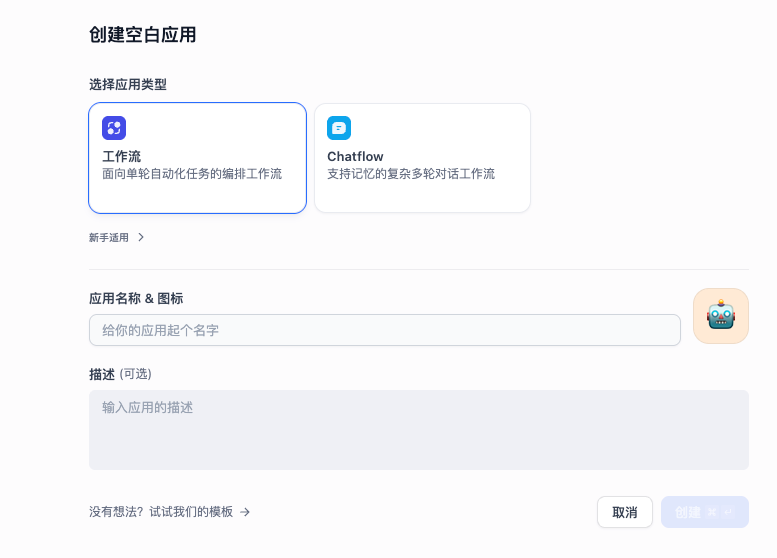
一、创建 Workflow 应用
进入 Dify 控制台 ,新建一个 Workflow 应用,进入可视化工作流编辑界面。
二、第一个节点:用户输入(Start)
作用说明
该节点用于接收用户在聊天框中输入的待语音合成文本。
节点配置
在「用户输入」节点中新增一个字段:
| 配置项 | 值 |
|---|---|
| 字段名 | text |
| 字段类型 | 段落(Paragraph) |
| 是否必填 | 是 |
| 最大长度 | 5000 |
💡 该字段用于接收需要朗读的完整文本内容。
三、第二个节点:LLM(语音参数解析)
节点作用
使用大模型 自动解析用户输入文本,生成语音合成所需参数,例如:
- 朗读文本
- 情感(motion)
- 情感强度
- 语速
- 语言类型
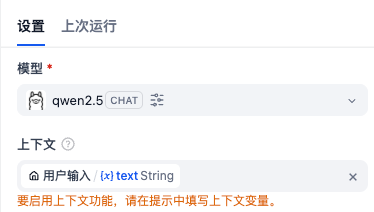
1️⃣ 模型选择
- 模型类型:LLM
- 示例模型:
qwen2.5
2️⃣ 上下文变量配置
在「上下文输入」中,选择用户输入节点的 text 变量:
3️⃣ System 提示词(核心)
bash
你是一个语音合成参数解析器。

请根据用户输入的内容,生成用于语音合成(TTS)的参数。

要求:
1. 从用户输入中{{#1768335663610.text#}}提取要朗读的文本内容 text
2. 判断语音情感 motion(如:neutral / happy / sad / angry / calm)
3. 判断情感强度 emotion_scale,范围 0~1(默认 0.5)
4. 判断语速 speed_ratio(默认 1.0)
5. language 如果未明确说明,返回 "auto"
6. 不要添加多余解释,只返回 JSON

JSON 格式如下:
{
  "text": "",
  "motion": "",
  "emotion_scale": 0.5,
  "speed_ratio": 1.0,
  "language": "auto"
}
4️⃣ Structured Output 配置
在 structured_output 中导入以下 JSON Schema:
json
{
  "text": "",
  "motion": "",
  "emotion_scale": 0.5,
  "speed_ratio": 1.0,
  "language": "auto"
}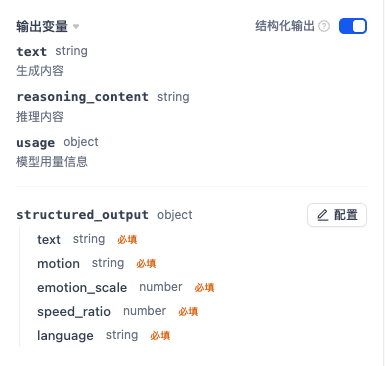
✅ 该步骤非常关键,可保证后续工具节点稳定读取字段
四、第三个节点:speech_synthesis(语音合成)
节点说明
使用 MCP 语音合成插件,根据解析出的参数生成音频(MP3)。
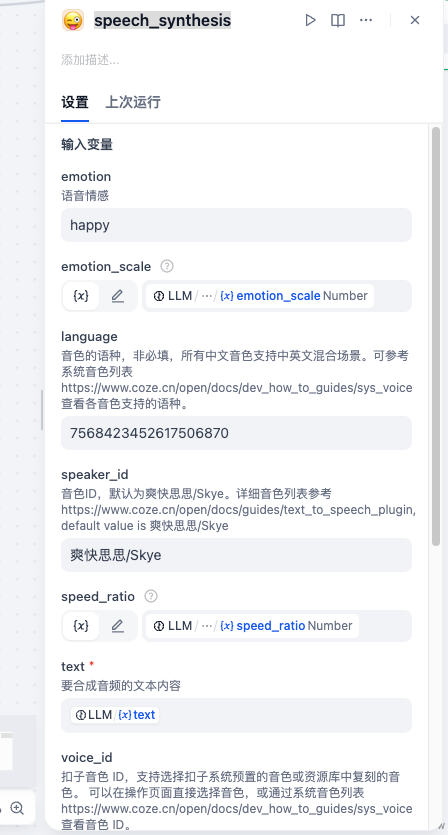
关键参数绑定说明
| 参数 | 来源 |
|---|---|
| text | LLM structured_output.text |
| emotion | 固定或 LLM 解析 |
| emotion_scale | structured_output.emotion_scale |
| speed_ratio | structured_output.speed_ratio |
| language | structured_output.language |
| speaker_id | 默认「爽快思思 / Skye」 |
| voice_id | MCP 系统音色 |
💡 emotion_scale 在 MCP 中范围为 1~5,LLM 中 0~1 可自行换算
五、第四个节点:LLM(解析 MP3 链接)
节点作用
从 speech_synthesis 返回的 JSON 中:
- 提取 MP3 音频链接
- 以 Markdown 播放格式输出到聊天框
上下文选择
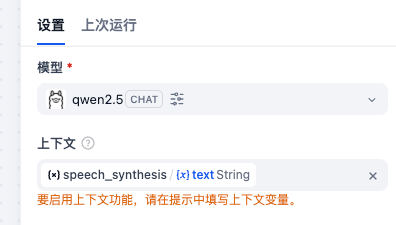
System 提示词
bash
{{#1769414446925.text#}}请从 JSON 中读取 mp3 音频链接(字段通常为
并以 Markdown 的方式输出播放链接。

要求:
1. 不要解释 JSON 内容
2. 不要输出多余文字
3. 只输出最终可用于聊天框展示的 Markdown
4. 如果找不到链接,输出:未生成音频

输出示例格式:
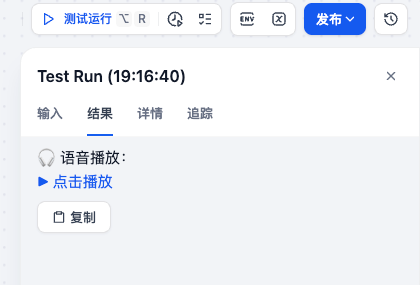
🎧 语音播放:
[▶ 点击播放](MP3_URL)
六、最终效果展示
点击「测试」,用户输入任意文本,即可得到:
- 自动解析情感
- 自动合成语音
- 返回可播放 MP3
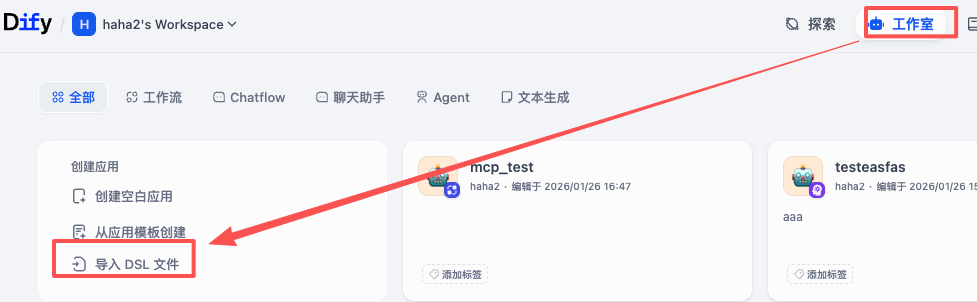
七、Workflow YAML 一键导入
可直接复制以下 YAML,在 Dify 中选择 导入 Workflow
yaml
app:
  description: ''
  icon: 🤖
  icon_background: '#FFEAD5'
  mode: workflow
  name: mcp_test
  use_icon_as_answer_icon: false
dependencies:
- current_identifier: null
  type: marketplace
  value:
    marketplace_plugin_unique_identifier: langgenius/ollama:0.1.1@f3a8b649027d1bd13e67df96f3463a601c16628da4292705528d28d97d96b263
    version: null
kind: app
version: 0.5.0
workflow:
  conversation_variables: []
  environment_variables: []
  features:
    file_upload:
      allowed_file_extensions:
      - .JPG
      - .JPEG
      - .PNG
      - .GIF
      - .WEBP
      - .SVG
      allowed_file_types:
      - image
      allowed_file_upload_methods:
      - local_file
      - remote_url
      enabled: false
      fileUploadConfig:
        audio_file_size_limit: 50
        batch_count_limit: 5
        file_size_limit: 15
        image_file_batch_limit: 10
        image_file_size_limit: 10
        single_chunk_attachment_limit: 10
        video_file_size_limit: 100
        workflow_file_upload_limit: 10
      image:
        enabled: false
        number_limits: 3
        transfer_methods:
        - local_file
        - remote_url
      number_limits: 3
    opening_statement: ''
    retriever_resource:
      enabled: true
    sensitive_word_avoidance:
      enabled: false
    speech_to_text:
      enabled: false
    suggested_questions: []
    suggested_questions_after_answer:
      enabled: false
    text_to_speech:
      enabled: false
      language: ''
      voice: ''
  graph:
    edges:
    - data:
        isInIteration: false
        isInLoop: false
        sourceType: start
        targetType: llm
      id: 1768335663610-source-1768528222096-target
      source: '1768335663610'
      sourceHandle: source
      target: '1768528222096'
      targetHandle: target
      type: custom
      zIndex: 0
    - data:
        isInLoop: false
        sourceType: llm
        targetType: tool
      id: 1768528222096-source-1769414446925-target
      source: '1768528222096'
      sourceHandle: source
      target: '1769414446925'
      targetHandle: target
      type: custom
      zIndex: 0
    - data:
        isInIteration: false
        isInLoop: false
        sourceType: tool
        targetType: llm
      id: 1769414446925-source-1769415778419-target
      selected: false
      source: '1769414446925'
      sourceHandle: source
      target: '1769415778419'
      targetHandle: target
      type: custom
      zIndex: 0
    - data:
        isInIteration: false
        isInLoop: false
        sourceType: llm
        targetType: end
      id: 1769415778419-source-1769416354451-target
      source: '1769415778419'
      sourceHandle: source
      target: '1769416354451'
      targetHandle: target
      type: custom
      zIndex: 0
    nodes:
    - data:
        selected: false
        title: 用户输入
        type: start
        variables:
        - default: ''
          hint: ''
          label: text
          max_length: 100000000
          options: []
          placeholder: ''
          required: true
          type: paragraph
          variable: text
      height: 109
      id: '1768335663610'
      position:
        x: 80
        y: 282
      positionAbsolute:
        x: 80
        y: 282
      selected: false
      sourcePosition: right
      targetPosition: left
      type: custom
      width: 242
    - data:
        context:
          enabled: true
          variable_selector:
          - '1768335663610'
          - text
        model:
          completion_params:
            temperature: 0.7
          mode: chat
          name: qwen2.5
          provider: langgenius/ollama/ollama
        prompt_template:
        - id: 5d284da3-622c-4d83-b0d2-e6b1725e6e5d
          role: system
          text: "你是一个语音合成参数解析器。\n\n请根据用户输入的内容,生成用于语音合成(TTS)的参数。\n\n要求:\n1. 从用户输入中{{#1768335663610.text#}}提取要朗读的文本内容\
            \ text\n2. 判断语音情感 motion(如:neutral / happy / sad / angry / calm)\n3. 判断情感强度\
            \ emotion_scale,范围 0~1(默认 0.5)\n4. 判断语速 speed_ratio(默认 1.0)\n5. language\
            \ 如果未明确说明,返回 \"auto\"\n6. 不要添加多余解释,只返回 JSON\n\nJSON 格式如下:\n{\n  \"text\"\
            : \"\",\n  \"motion\": \"\",\n  \"emotion_scale\": 0.5,\n  \"speed_ratio\"\
            : 1.0,\n  \"language\": \"auto\"\n}\n"
        selected: false
        structured_output:
          schema:
            additionalProperties: false
            properties:
              emotion_scale:
                type: number
              language:
                type: string
              motion:
                type: string
              speed_ratio:
                type: number
              text:
                type: string
            required:
            - text
            - motion
            - emotion_scale
            - speed_ratio
            - language
            type: object
        structured_output_enabled: true
        title: LLM
        type: llm
        vision:
          enabled: false
      height: 88
      id: '1768528222096'
      position:
        x: 382
        y: 282
      positionAbsolute:
        x: 382
        y: 282
      selected: false
      sourcePosition: right
      targetPosition: left
      type: custom
      width: 242
    - data:
        is_team_authorization: true
        paramSchemas:
        - auto_generate: null
          default: null
          form: llm
          human_description:
            en_US: 语音情感
            ja_JP: 语音情感
            pt_BR: 语音情感
            zh_Hans: 语音情感
          label:
            en_US: emotion
            ja_JP: emotion
            pt_BR: emotion
            zh_Hans: emotion
          llm_description: 语音情感
          max: null
          min: null
          name: emotion
          options: []
          placeholder: null
          precision: null
          required: false
          scope: null
          template: null
          type: string
        - auto_generate: null
          default: null
          form: llm
          human_description:
            en_US: 调用emotion设置情感参数后可使用emotion_scale进一步设置情绪值,范围1~5,不设置时默认值为4。 注:理论上情绪值越大,情感越明显。但情绪值1~5实际为非线性增长,可能存在超过某个值后,情绪增加不明显,例如设置3和5时情绪值可能接近。
            ja_JP: 调用emotion设置情感参数后可使用emotion_scale进一步设置情绪值,范围1~5,不设置时默认值为4。 注:理论上情绪值越大,情感越明显。但情绪值1~5实际为非线性增长,可能存在超过某个值后,情绪增加不明显,例如设置3和5时情绪值可能接近。
            pt_BR: 调用emotion设置情感参数后可使用emotion_scale进一步设置情绪值,范围1~5,不设置时默认值为4。 注:理论上情绪值越大,情感越明显。但情绪值1~5实际为非线性增长,可能存在超过某个值后,情绪增加不明显,例如设置3和5时情绪值可能接近。
            zh_Hans: 调用emotion设置情感参数后可使用emotion_scale进一步设置情绪值,范围1~5,不设置时默认值为4。 注:理论上情绪值越大,情感越明显。但情绪值1~5实际为非线性增长,可能存在超过某个值后,情绪增加不明显,例如设置3和5时情绪值可能接近。
          label:
            en_US: emotion_scale
            ja_JP: emotion_scale
            pt_BR: emotion_scale
            zh_Hans: emotion_scale
          llm_description: 调用emotion设置情感参数后可使用emotion_scale进一步设置情绪值,范围1~5,不设置时默认值为4。
            注:理论上情绪值越大,情感越明显。但情绪值1~5实际为非线性增长,可能存在超过某个值后,情绪增加不明显,例如设置3和5时情绪值可能接近。
          max: null
          min: null
          name: emotion_scale
          options: []
          placeholder: null
          precision: null
          required: false
          scope: null
          template: null
          type: number
        - auto_generate: null
          default: null
          form: llm
          human_description:
            en_US: 音色的语种,非必填,所有中文音色支持中英文混合场景。可参考系统音色列表https://www.coze.cn/open/docs/dev_how_to_guides/sys_voice查看各音色支持的语种。
            ja_JP: 音色的语种,非必填,所有中文音色支持中英文混合场景。可参考系统音色列表https://www.coze.cn/open/docs/dev_how_to_guides/sys_voice查看各音色支持的语种。
            pt_BR: 音色的语种,非必填,所有中文音色支持中英文混合场景。可参考系统音色列表https://www.coze.cn/open/docs/dev_how_to_guides/sys_voice查看各音色支持的语种。
            zh_Hans: 音色的语种,非必填,所有中文音色支持中英文混合场景。可参考系统音色列表https://www.coze.cn/open/docs/dev_how_to_guides/sys_voice查看各音色支持的语种。
          label:
            en_US: language
            ja_JP: language
            pt_BR: language
            zh_Hans: language
          llm_description: 音色的语种,非必填,所有中文音色支持中英文混合场景。可参考系统音色列表https://www.coze.cn/open/docs/dev_how_to_guides/sys_voice查看各音色支持的语种。
          max: null
          min: null
          name: language
          options: []
          placeholder: null
          precision: null
          required: false
          scope: null
          template: null
          type: string
        - auto_generate: null
          default: null
          form: llm
          human_description:
            en_US: 音色ID,默认为爽快思思/Skye。详细音色列表参考 https://www.coze.cn/open/docs/guides/text_to_speech_plugin,
              default value is 爽快思思/Skye
            ja_JP: 音色ID,默认为爽快思思/Skye。详细音色列表参考 https://www.coze.cn/open/docs/guides/text_to_speech_plugin,
              default value is 爽快思思/Skye
            pt_BR: 音色ID,默认为爽快思思/Skye。详细音色列表参考 https://www.coze.cn/open/docs/guides/text_to_speech_plugin,
              default value is 爽快思思/Skye
            zh_Hans: 音色ID,默认为爽快思思/Skye。详细音色列表参考 https://www.coze.cn/open/docs/guides/text_to_speech_plugin,
              default value is 爽快思思/Skye
          label:
            en_US: speaker_id
            ja_JP: speaker_id
            pt_BR: speaker_id
            zh_Hans: speaker_id
          llm_description: 音色ID,默认为爽快思思/Skye。详细音色列表参考 https://www.coze.cn/open/docs/guides/text_to_speech_plugin,
            default value is 爽快思思/Skye
          max: null
          min: null
          name: speaker_id
          options: []
          placeholder: null
          precision: null
          required: false
          scope: null
          template: null
          type: string
        - auto_generate: null
          default: null
          form: llm
          human_description:
            en_US: 语速,范围是[0.2,3],默认为1,通常保留一位小数即可, default value is 1
            ja_JP: 语速,范围是[0.2,3],默认为1,通常保留一位小数即可, default value is 1
            pt_BR: 语速,范围是[0.2,3],默认为1,通常保留一位小数即可, default value is 1
            zh_Hans: 语速,范围是[0.2,3],默认为1,通常保留一位小数即可, default value is 1
          label:
            en_US: speed_ratio
            ja_JP: speed_ratio
            pt_BR: speed_ratio
            zh_Hans: speed_ratio
          llm_description: 语速,范围是[0.2,3],默认为1,通常保留一位小数即可, default value is 1
          max: null
          min: null
          name: speed_ratio
          options: []
          placeholder: null
          precision: null
          required: false
          scope: null
          template: null
          type: number
        - auto_generate: null
          default: null
          form: llm
          human_description:
            en_US: 要合成音频的文本内容
            ja_JP: 要合成音频的文本内容
            pt_BR: 要合成音频的文本内容
            zh_Hans: 要合成音频的文本内容
          label:
            en_US: text
            ja_JP: text
            pt_BR: text
            zh_Hans: text
          llm_description: 要合成音频的文本内容
          max: null
          min: null
          name: text
          options: []
          placeholder: null
          precision: null
          required: true
          scope: null
          template: null
          type: string
        - auto_generate: null
          default: null
          form: llm
          human_description:
            en_US: 扣子音色 ID,支持选择扣子系统预置的音色或资源库中复刻的音色。 可以在操作页面直接选择音色,或通过系统音色列表https://www.coze.cn/open/docs/dev_how_to_guides/sys_voice查看音色
              ID。
            ja_JP: 扣子音色 ID,支持选择扣子系统预置的音色或资源库中复刻的音色。 可以在操作页面直接选择音色,或通过系统音色列表https://www.coze.cn/open/docs/dev_how_to_guides/sys_voice查看音色
              ID。
            pt_BR: 扣子音色 ID,支持选择扣子系统预置的音色或资源库中复刻的音色。 可以在操作页面直接选择音色,或通过系统音色列表https://www.coze.cn/open/docs/dev_how_to_guides/sys_voice查看音色
              ID。
            zh_Hans: 扣子音色 ID,支持选择扣子系统预置的音色或资源库中复刻的音色。 可以在操作页面直接选择音色,或通过系统音色列表https://www.coze.cn/open/docs/dev_how_to_guides/sys_voice查看音色
              ID。
          label:
            en_US: voice_id
            ja_JP: voice_id
            pt_BR: voice_id
            zh_Hans: voice_id
          llm_description: 扣子音色 ID,支持选择扣子系统预置的音色或资源库中复刻的音色。 可以在操作页面直接选择音色,或通过系统音色列表https://www.coze.cn/open/docs/dev_how_to_guides/sys_voice查看音色
            ID。
          max: null
          min: null
          name: voice_id
          options: []
          placeholder: null
          precision: null
          required: false
          scope: null
          template: null
          type: string
        params:
          emotion: ''
          emotion_scale: ''
          language: ''
          speaker_id: ''
          speed_ratio: ''
          text: ''
          voice_id: ''
        plugin_id: ''
        plugin_unique_identifier: ''
        provider_icon:
          background: '#FFEAD5'
          content: stuck_out_tongue_winking_eye
        provider_id: '7426655854067351562'
        provider_name: 语音合成
        provider_type: mcp
        retry_config:
          max_retries: 3
          retry_enabled: true
          retry_interval: 1000
        selected: false
        title: speech_synthesis
        tool_configurations: {}
        tool_description: 根据音色和文本合成音频。按照字符数计费,计费项&免费额度说明:https://www.coze.cn/open/docs/coze_pro/asr_tts_fee。使用资源库音色时,计费项为复刻音色文字转语音字数;使用预设音色时,模型为大模型对应系统音色文字转语音字数,小模型对应小模型合成次数
          。
        tool_label: speech_synthesis
        tool_name: speech_synthesis
        tool_node_version: '2'
        tool_parameters:
          emotion:
            type: mixed
            value: happy
          emotion_scale:
            type: variable
            value:
            - '1768528222096'
            - structured_output
            - emotion_scale
          language:
            type: mixed
            value: '7568423452617506870'
          speaker_id:
            type: mixed
            value: 爽快思思/Skye
          speed_ratio:
            type: variable
            value:
            - '1768528222096'
            - structured_output
            - speed_ratio
          text:
            type: mixed
            value: '{{#1768528222096.text#}}'
          voice_id:
            type: mixed
            value: '7566481398970712100'
        type: tool
      height: 114
      id: '1769414446925'
      position:
        x: 689.5789746654016
        y: 205.28909835072767
      positionAbsolute:
        x: 689.5789746654016
        y: 205.28909835072767
      selected: true
      sourcePosition: right
      targetPosition: left
      type: custom
      width: 242
    - data:
        context:
          enabled: true
          variable_selector:
          - '1769414446925'
          - text
        model:
          completion_params:
            temperature: 0.7
          mode: chat
          name: qwen2.5
          provider: langgenius/ollama/ollama
        prompt_config:
          jinja2_variables: []
        prompt_template:
        - edition_type: basic
          id: 40a87e92-4924-48a9-be72-519195bfac4b
          role: system
          text: "{{#1769414446925.text#}}请从 JSON 中读取 mp3 音频链接(字段通常为 \n并以 Markdown\
            \ 的方式输出播放链接。\n\n要求:\n1. 不要解释 JSON 内容\n2. 不要输出多余文字\n3. 只输出最终可用于聊天框展示的 Markdown\n\
            4. 如果找不到链接,输出:未生成音频\n\n输出示例格式:\n\U0001F3A7 语音播放:\n[▶ 点击播放](MP3_URL)"
        selected: false
        structured_output_enabled: true
        title: LLM 2
        type: llm
        vision:
          enabled: false
      height: 88
      id: '1769415778419'
      position:
        x: 1115.51083897085
        y: 194.60531694508558
      positionAbsolute:
        x: 1115.51083897085
        y: 194.60531694508558
      selected: false
      sourcePosition: right
      targetPosition: left
      type: custom
      width: 242
    - data:
        outputs:
        - value_selector:
          - '1769415778419'
          - text
          value_type: string
          variable: text
        selected: false
        title: 输出
        type: end
      height: 88
      id: '1769416354451'
      position:
        x: 1417.51083897085
        y: 194.60531694508558
      positionAbsolute:
        x: 1417.51083897085
        y: 194.60531694508558
      selected: false
      sourcePosition: right
      targetPosition: left
      type: custom
      width: 242
    viewport:
      x: 249.40474601947903
      y: 132.2880216823403
      zoom: 0.5581120532606064
  rag_pipeline_variables: []
八、运行前必备条件
- Dify 已启用 Workflow 模式
- 已配置 Ollama / qwen2.5
- 已安装并授权 MCP 语音合成插件
- 账户具备 TTS 调用额度
参考文档:
👉 https://blog.csdn.net/weixin_46244623/article/details/157396139