一、Rules
1、如何新增
进入Cursor Setting--Rules,点击旁边的add即可新增。
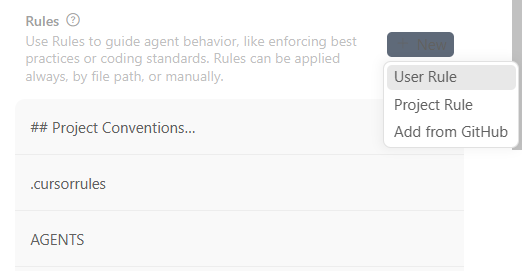
(1)project rules(项目内 rules,强烈推荐)
需要输入文件名和内容
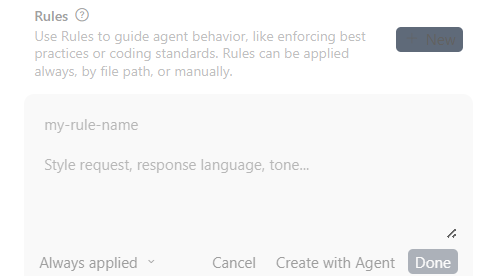
创建后会自动在当前项目下生成目录及文件
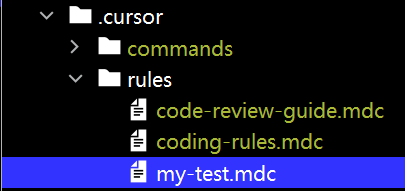
(2)user rule
2、区别
(1)User
作用范围:
-
只对你当前 Cursor 配置 / 当前会话生效
-
偏向「你这个人怎么用 AI」
适合放:
-
你的个人偏好
-
通用风格
-
不涉及具体项目结构的规则
(2)project
作用范围:
-
对整个项目生效
-
对所有文件、所有 prompt 生效
-
非常稳定、可版本控制
适合放:
-
项目结构
-
技术栈约束
-
Controller / Mapper / SQL 规则
-
团队共识
3、demo
(1)review_code_rules
[
  {
    "id": 1,
    "title": "No Chinese characters or symbols",
    "description": "Do not use Chinese characters or symbols in the code.",
    "pattern": "[\\u4e00-\\u9fa5]|[,。!?【】()《》""'']",
    "severity": "error"
  },
  {
    "id": 2,
    "title": "Do not extend MyBatis-Plus ServiceImpl/IService",
    "description": "Classes should not extend ServiceImpl or implement IService.",
    "pattern": "extends\\s+ServiceImpl|implements\\s+IService",
    "severity": "error"
  },
  {
    "id": 3,
    "title": "Wrapper usage restricted to repository layer",
    "description": "MyBatis-Plus Wrapper classes (QueryWrapper, LambdaQueryWrapper) should only be used in repository layer.",
    "pattern": "QueryWrapper<.*>|LambdaQueryWrapper<.*>",
    "severity": "error"
  },
  {
    "id": 4,
    "title": "Mapper injection restricted to repository layer",
    "description": "Do not inject Mapper in service or controller layer; use repository layer instead.",
    "pattern": "@Autowired\\s+private\\s+.*Mapper",
    "severity": "error"
  },
  {
    "id": 5,
    "title": "Do not use RedisTemplate directly",
    "description": "Use CacheClient instead of RedisTemplate for caching operations.",
    "pattern": "RedisTemplate<.*>",
    "severity": "error"
  },
  {
    "id": 6,
    "title": "Do not use System.out/System.err",
    "description": "Use logger for logging, do not print directly.",
    "pattern": "System\\.out\\.println|System\\.err\\.println",
    "severity": "error"
  },
  {
    "id": 7,
    "title": "Main method only in application class",
    "description": "Main method should only exist in the application startup class.",
    "pattern": "public\\s+static\\s+void\\s+main\\s*\\(",
    "severity": "error"
  },
  {
    "id": 8,
    "title": "Do not print stack trace directly",
    "description": "Do not use e.printStackTrace(), use logger to log exceptions instead.",
    "pattern": "e\\.printStackTrace\\(",
    "severity": "error"
  },
  {
    "id": 9,
    "title": "Do not serialize objects in logs with JsonUtil/Jackson2Util",
    "description": "Let SLF4J serialize objects directly in logs instead of using JsonUtil or Jackson2Util.",
    "pattern": "JsonUtil\\.toJson|Jackson2Util\\.toJson",
    "severity": "error"
  },
  {
    "id": 10,
    "title": "Do not arbitrarily change primitive/wrapper types",
    "description": "Keep consistency between primitive types and wrapper types to avoid NPEs or semantic errors.",
    "pattern": "\\bLong\\b|\\bBoolean\\b|\\bInteger\\b|\\blong\\b|\\bboolean\\b|\\bint\\b",
    "severity": "warning"
  },
  {
    "id": 11,
    "title": "Check @Value annotation format",
    "description": "Ensure proper ${} syntax and default value format in @Value annotation.",
    "pattern": "@Value\\([^)]*\\)",
    "severity": "error"
  },
  {
    "id": 13,
    "title": "DynamoDB index annotation must specify attributeName",
    "description": "@DynamoDBIndexHashKey and @DynamoDBIndexRangeKey must have the attributeName parameter.",
    "pattern": "@DynamoDBIndex(Hash|Range)Key\\(\\s*\\)",
    "severity": "error"
  },
  {
    "id": 19,
    "title": "Do not leave commented-out old code",
    "description": "Remove old commented-out code. Use version control to check history if needed.",
    "pattern": "//.*",
    "severity": "warning"
  },
  {
    "id": 20,
    "title": "Do not directly get bean from SpringUtil",
    "description": "Use dependency injection or cached static instance instead of SpringUtil.getBean.",
    "pattern": "SpringUtil\\.getBean",
    "severity": "error"
  },
  {
    "id": 24,
    "title": "Class containing sensitive fields must use @Sensitizable",
    "description": "Any class containing sensitive fields must be annotated with @Sensitizable. If parent class has @Sensitizable, child class must also have it.",
    "pattern": "@Sensitizable",
    "severity": "error"
  },
  {
    "id": 30,
    "title": "Do not use constructor injection for Spring beans",
    "description": "Use field injection with @Autowired or @Resource instead of constructor injection. Do not use @Autowired on constructors.",
    "pattern": "@Autowired\\s+public\\s+\\w+\\s*\\(|@Autowired\\s+private\\s+final|\\bfinal\\s+\\w+\\s+\\w+;\\s*$",
    "severity": "error"
  }
]
(2)open spec文档生成rule
## Project Conventions

### OpenSpec Authoring Conventions
- 语言策略:
  - 对话与生成文档 (proposal.md, design.md, tasks.md, spec.md 描述部分): 使用中文
  - 代码与代码注释: 使用英文
- Requirement 描述格式:
  - 为便于归档, 每条 Requirement 的描述行末尾需包含至少一个 MUST/SHALL 关键字
  - 其余内容保持中文
- Changes 目录命名规范:
  - 格式: `YYYY-mm-dd-{{Feature name}}`
  - 示例: `2026-01-27-user-export`
4、文件格式
任意格式都可以,但是如果写json之类的,cursor不会去解析,它会像读普通文本一样读
-
纯文本
-
英文(强烈推荐)
-
类似 prompt / policy / checklist
-
JSON / YAML(不会解析)
-
Markdown 语法依赖(#、``` 并没有语义)
5、curosr是如何使用rules的
自动合并project rule和user role。项目级 rules 优先级更高、也更稳定。
Cursor 的 rules 本质上是:
在每一次 AI 生成 / 修改代码前,自动拼接进去的一段"隐藏 prompt",它不是配置文件、不是插件规则、也不是编译期机制。
当你在 Cursor 里做这些事时:
-
Cmd / Ctrl + K(Ask / Edit) -
ApplyAI 修改 -
/fix / explain / refactor -
使用 Agent / 自动改代码
Cursor 会在后台做一件事:
最终发送给模型的 prompt =
  系统 prompt
+ 当前文件 / 选中代码
+ 你的自然语言指令
+ 所有匹配到的 rules(拼接成文本)
6、为什么你感觉有时 rules "没生效"
(1)写成"配置文件思维"
不会解析json,模型并不知道 true 是什么意思。
{
  "alwaysUpdateMapperXml": true
}
(2)写成命令但没上下文
Always update all layers."all" 是哪些?controller?mapper?xml?
什么样的 rules 最容易被 Cursor 吃进去?
-
明确触发条件
-
明确影响范围
-
列表化
-
用自然语言
如
This is a Spring Boot project using MyBatis XML.

When adding a new database field:
- Update controller request/response DTOs
- Update service layer
- Update mapper interface
- Update mapper XML
- Do not modify unrelated files
二、skill
1、什么是skill
Cursor 的 Skill = 预定义的、可复用的"任务型 Prompt 模板"。
本质是:
-
一段你事先写好的 Prompt
-
每次点击就会发给 AI
-
可能带变量 / 占位符
2、 和 rules 的本质区别:
-
rules = 背景约束(自动生效)
-
skills = 主动指令(手动触发)
| 维度 | Rules | Skills |
|---|---|---|
| 是否自动生效 | ✅ 是 | ❌ 否 |
| 是否需要点击 | ❌ | ✅ |
| 适合内容 | 项目规范、长期习惯 | 具体任务流程 |
| 是否改写行为 | 约束 AI | 指挥 AI |
| 是否可参数化 | ❌ | ✅(部分) |
👉 不要用 Skill 去写"规范", Skill 里写"一次任务怎么做"
👉 **不要用 rules 去写"流程",**rules 里写"永远成立的事实"
**3、**Skill 什么时候用最合适?
-
数据库字段变更(你这个就很典型)
-
新增一个接口(Controller → Service → Mapper)
-
代码审查
-
自动生成测试
-
按公司规范写注释
这些都是:
重复 + 有固定步骤 + 每次都要你打一堆话
4、如何新增
Cursor Settings → Skills → New Skill
之后填写:
-
Name:技能名
-
Prompt / Instruction:真正的内容
点击new:

demo:
This is a Spring Boot project using MyBatis XML.

Task:
A new database field needs to be added.

Steps:
1. Update the database model / entity if present.
2. Update request and response DTOs.
3. Update controller.
4. Update service.
5. Update mapper interface.
6. Update mapper XML.

Constraints:
- Do not modify unrelated files.
- Follow existing code style.

Input:
{{describe the field and table}}
👉 {``{ }} 是 Skill 常见的"变量占位"用法(Cursor UI 会提示你填)
我这里有几个安装open spec自动生成的skill:
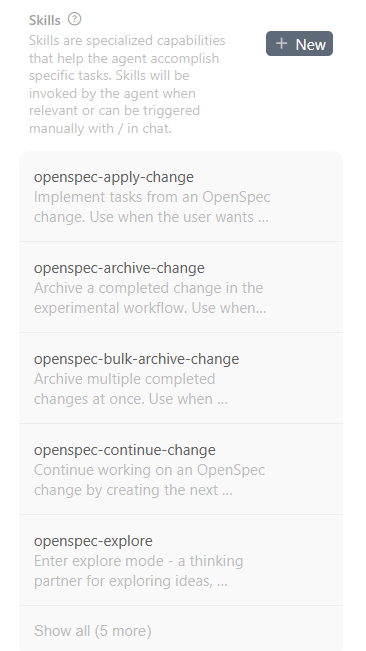
看下第一个apply的:
---
name: openspec-apply-change
description: Implement tasks from an OpenSpec change. Use when the user wants to start implementing, continue implementation, or work through tasks.
license: MIT
compatibility: Requires openspec CLI.
metadata:
  author: openspec
  version: "1.0"
  generatedBy: "1.0.1"
---

Implement tasks from an OpenSpec change.

**Input**: Optionally specify a change name. If omitted, check if it can be inferred from conversation context. If vague or ambiguous you MUST prompt for available changes.

**Steps**

1. **Select the change**

   If a name is provided, use it. Otherwise:
   - Infer from conversation context if the user mentioned a change
   - Auto-select if only one active change exists
   - If ambiguous, run `openspec list --json` to get available changes and use the **AskUserQuestion tool** to let the user select

   Always announce: "Using change: <name>" and how to override (e.g., `/opsx:apply <other>`).

2. **Check status to understand the schema**
   ```bash
   openspec status --change "<name>" --json
   ```
   Parse the JSON to understand:
   - `schemaName`: The workflow being used (e.g., "spec-driven")
   - Which artifact contains the tasks (typically "tasks" for spec-driven, check status for others)

3. **Get apply instructions**

   ```bash
   openspec instructions apply --change "<name>" --json
   ```

   This returns:
   - Context file paths (varies by schema - could be proposal/specs/design/tasks or spec/tests/implementation/docs)
   - Progress (total, complete, remaining)
   - Task list with status
   - Dynamic instruction based on current state

   **Handle states:**
   - If `state: "blocked"` (missing artifacts): show message, suggest using openspec-continue-change
   - If `state: "all_done"`: congratulate, suggest archive
   - Otherwise: proceed to implementation

4. **Read context files**

   Read the files listed in `contextFiles` from the apply instructions output.
   The files depend on the schema being used:
   - **spec-driven**: proposal, specs, design, tasks
   - Other schemas: follow the contextFiles from CLI output

5. **Show current progress**

   Display:
   - Schema being used
   - Progress: "N/M tasks complete"
   - Remaining tasks overview
   - Dynamic instruction from CLI

6. **Implement tasks (loop until done or blocked)**

   For each pending task:
   - Show which task is being worked on
   - Make the code changes required
   - Keep changes minimal and focused
   - Mark task complete in the tasks file: `- [ ]` → `- [x]`
   - Continue to next task

   **Pause if:**
   - Task is unclear → ask for clarification
   - Implementation reveals a design issue → suggest updating artifacts
   - Error or blocker encountered → report and wait for guidance
   - User interrupts

7. **On completion or pause, show status**

   Display:
   - Tasks completed this session
   - Overall progress: "N/M tasks complete"
   - If all done: suggest archive
   - If paused: explain why and wait for guidance

**Output During Implementation**

```
## Implementing: <change-name> (schema: <schema-name>)

Working on task 3/7: <task description>
[...implementation happening...]
✓ Task complete

Working on task 4/7: <task description>
[...implementation happening...]
✓ Task complete
```

**Output On Completion**

```
## Implementation Complete

**Change:** <change-name>
**Schema:** <schema-name>
**Progress:** 7/7 tasks complete ✓

### Completed This Session
- [x] Task 1
- [x] Task 2
...

All tasks complete! Ready to archive this change.
```

**Output On Pause (Issue Encountered)**

```
## Implementation Paused

**Change:** <change-name>
**Schema:** <schema-name>
**Progress:** 4/7 tasks complete

### Issue Encountered
<description of the issue>

**Options:**
1. <option 1>
2. <option 2>
3. Other approach

What would you like to do?
```

**Guardrails**
- Keep going through tasks until done or blocked
- Always read context files before starting (from the apply instructions output)
- If task is ambiguous, pause and ask before implementing
- If implementation reveals issues, pause and suggest artifact updates
- Keep code changes minimal and scoped to each task
- Update task checkbox immediately after completing each task
- Pause on errors, blockers, or unclear requirements - don't guess
- Use contextFiles from CLI output, don't assume specific file names

**Fluid Workflow Integration**

This skill supports the "actions on a change" model:

- **Can be invoked anytime**: Before all artifacts are done (if tasks exist), after partial implementation, interleaved with other actions
- **Allows artifact updates**: If implementation reveals design issues, suggest updating artifacts - not phase-locked, work fluidly