🚀运行效果展示
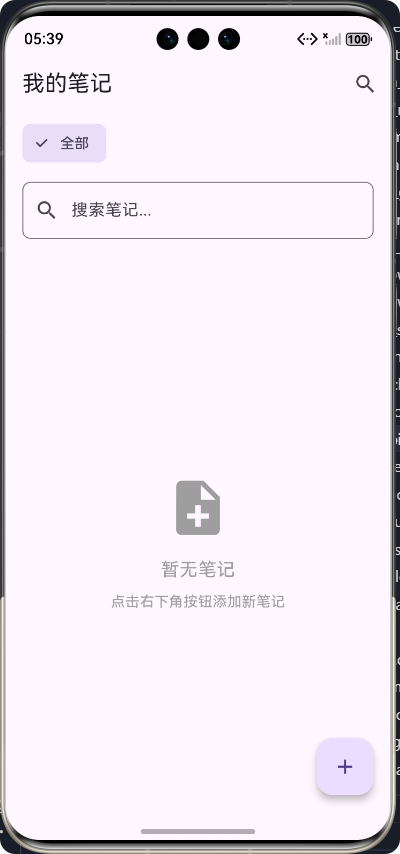
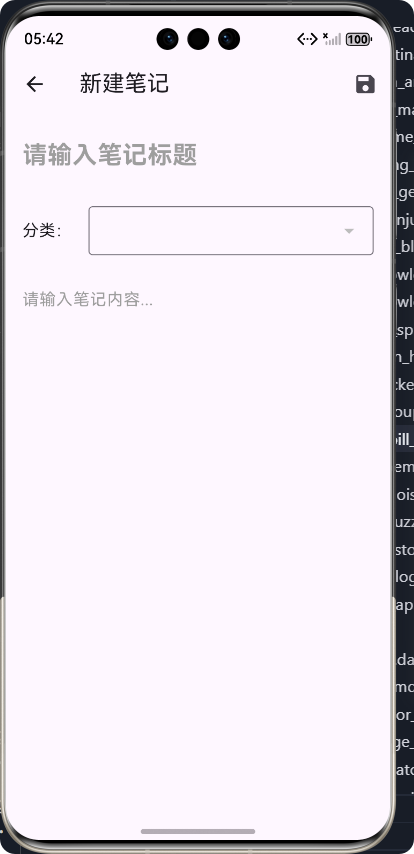
Flutter框架跨平台鸿蒙开发------读书笔记工具APP的开发流程
前言
在数字化时代,读书笔记已经成为人们学习和知识管理的重要工具。随着移动设备的普及,一款功能强大、使用便捷的读书笔记APP成为了许多学习者的刚需。本文将详细介绍如何使用Flutter框架开发一款跨平台的读书笔记工具APP,并实现鸿蒙系统的适配。
Flutter作为Google推出的跨平台UI框架,以其"一次编写,多处运行"的特性,为开发者提供了高效的跨平台开发体验。而鸿蒙系统作为华为自主研发的分布式操作系统,正在逐步扩大其市场份额。将两者结合,开发一款跨平台的读书笔记工具APP,不仅可以满足不同平台用户的需求,也能为开发者带来更广阔的应用场景。
应用介绍
产品定位
本读书笔记工具APP是一款专为学生、教师、职场人士等知识学习者设计的移动应用,旨在帮助用户更高效地管理和整理读书笔记,提升学习效率。
核心功能
- 笔记管理:支持创建、编辑、删除笔记,实现笔记的全生命周期管理。
- 分类管理:提供笔记分类功能,帮助用户按主题或学科组织笔记。
- 搜索功能:支持按标题和内容搜索笔记,快速定位所需信息。
- 收藏功能:支持将重要笔记标记为收藏,方便快速访问。
- 数据存储:使用本地存储,确保笔记数据的安全性和可靠性。
技术特点
- 跨平台兼容:基于Flutter框架开发,支持iOS、Android和鸿蒙等多个平台。
- 响应式布局:适配不同屏幕尺寸的设备,提供一致的用户体验。
- 流畅的动画效果:使用Flutter的动画系统,为用户提供流畅的交互体验。
- 模块化设计:采用模块化的代码结构,提高代码的可维护性和可扩展性。
核心功能实现及代码展示
开发流程图
项目初始化
数据模型设计
存储服务实现
笔记列表页面开发
笔记详情页面开发
搜索和分类功能实现
应用测试和优化
鸿蒙系统适配
1. 数据模型设计
数据模型是应用的基础,我们需要设计合理的模型来存储笔记和分类信息。
Note模型类
dart
/// 笔记模型类
class Note {
  /// 笔记ID
  final String id;

  /// 笔记标题
  String title;

  /// 笔记内容
  String content;

  /// 笔记分类
  String category;

  /// 笔记创建时间
  DateTime createdAt;

  /// 笔记更新时间
  DateTime updatedAt;

  /// 笔记是否收藏
  bool isFavorite;

  /// 构造函数
  Note({
    required this.id,
    required this.title,
    required this.content,
    required this.category,
    required this.createdAt,
    required this.updatedAt,
    this.isFavorite = false,
  });

  /// 从JSON创建Note对象
  factory Note.fromJson(Map<String, dynamic> json) {
    return Note(
      id: json['id'],
      title: json['title'],
      content: json['content'],
      category: json['category'],
      createdAt: DateTime.parse(json['createdAt']),
      updatedAt: DateTime.parse(json['updatedAt']),
      isFavorite: json['isFavorite'] ?? false,
    );
  }

  /// 转换为JSON
  Map<String, dynamic> toJson() {
    return {
      'id': id,
      'title': title,
      'content': content,
      'category': category,
      'createdAt': createdAt.toIso8601String(),
      'updatedAt': updatedAt.toIso8601String(),
      'isFavorite': isFavorite,
    };
  }

  /// 复制方法,用于更新笔记
  Note copyWith({
    String? id,
    String? title,
    String? content,
    String? category,
    DateTime? createdAt,
    DateTime? updatedAt,
    bool? isFavorite,
  }) {
    return Note(
      id: id ?? this.id,
      title: title ?? this.title,
      content: content ?? this.content,
      category: category ?? this.category,
      createdAt: createdAt ?? this.createdAt,
      updatedAt: updatedAt ?? this.updatedAt,
      isFavorite: isFavorite ?? this.isFavorite,
    );
  }
}
NoteCategory模型类
dart
/// 笔记分类模型
class NoteCategory {
  /// 分类ID
  final String id;

  /// 分类名称
  final String name;

  /// 分类颜色
  final String color;

  /// 构造函数
  NoteCategory({
    required this.id,
    required this.name,
    required this.color,
  });

  /// 从JSON创建NoteCategory对象
  factory NoteCategory.fromJson(Map<String, dynamic> json) {
    return NoteCategory(
      id: json['id'],
      name: json['name'],
      color: json['color'],
    );
  }

  /// 转换为JSON
  Map<String, dynamic> toJson() {
    return {
      'id': id,
      'name': name,
      'color': color,
    };
  }
}
2. 存储服务实现
存储服务负责笔记数据的持久化存储和管理,我们使用文件存储的方式实现本地数据持久化。
dart
import 'dart:convert';
import 'dart:io';
import '../models/note_model.dart';

/// 笔记服务类,用于处理笔记的存储和管理
class NoteService {
  /// 存储文件路径
  static const String _notesFilePath = 'notes.json';
  static const String _categoriesFilePath = 'note_categories.json';

  /// 获取笔记存储目录
  Future<Directory> _getStorageDirectory() async {
    final directory = Directory('.');
    return directory;
  }

  /// 保存笔记列表到本地存储
  Future<void> saveNotes(List<Note> notes) async {
    final directory = await _getStorageDirectory();
    final file = File('${directory.path}/$_notesFilePath');
    final notesJson = notes.map((note) => note.toJson()).toList();
    await file.writeAsString(json.encode(notesJson));
  }

  /// 从本地存储加载笔记列表
  Future<List<Note>> loadNotes() async {
    try {
      final directory = await _getStorageDirectory();
      final file = File('${directory.path}/$_notesFilePath');

      if (!file.existsSync()) {
        return [];
      }

      final notesJson = await file.readAsString();
      final notesList = json.decode(notesJson) as List;
      return notesList.map((note) => Note.fromJson(note)).toList();
    } catch (e) {
      print('Error loading notes: $e');
      return [];
    }
  }

  /// 添加新笔记
  Future<Note> addNote(Note note) async {
    final notes = await loadNotes();
    notes.add(note);
    await saveNotes(notes);
    return note;
  }

  /// 更新笔记
  Future<void> updateNote(Note updatedNote) async {
    final notes = await loadNotes();
    final index = notes.indexWhere((note) => note.id == updatedNote.id);

    if (index != -1) {
      notes[index] = updatedNote;
      await saveNotes(notes);
    }
  }

  /// 删除笔记
  Future<void> deleteNote(String noteId) async {
    final notes = await loadNotes();
    notes.removeWhere((note) => note.id == noteId);
    await saveNotes(notes);
  }

  /// 切换笔记收藏状态
  Future<void> toggleFavorite(String noteId) async {
    final notes = await loadNotes();
    final index = notes.indexWhere((note) => note.id == noteId);

    if (index != -1) {
      notes[index] = notes[index].copyWith(
        isFavorite: !notes[index].isFavorite,
        updatedAt: DateTime.now(),
      );
      await saveNotes(notes);
    }
  }

  /// 获取收藏的笔记
  Future<List<Note>> getFavoriteNotes() async {
    final notes = await loadNotes();
    return notes.where((note) => note.isFavorite).toList();
  }

  /// 根据分类获取笔记
  Future<List<Note>> getNotesByCategory(String category) async {
    final notes = await loadNotes();
    return notes.where((note) => note.category == category).toList();
  }

  /// 搜索笔记
  Future<List<Note>> searchNotes(String query) async {
    final notes = await loadNotes();
    final lowercaseQuery = query.toLowerCase();

    return notes.where((note) =>
      note.title.toLowerCase().contains(lowercaseQuery) ||
      note.content.toLowerCase().contains(lowercaseQuery)
    ).toList();
  }

  /// 保存分类列表到本地存储
  Future<void> saveCategories(List<NoteCategory> categories) async {
    final directory = await _getStorageDirectory();
    final file = File('${directory.path}/$_categoriesFilePath');
    final categoriesJson = categories.map((category) => category.toJson()).toList();
    await file.writeAsString(json.encode(categoriesJson));
  }

  /// 从本地存储加载分类列表
  Future<List<NoteCategory>> loadCategories() async {
    try {
      final directory = await _getStorageDirectory();
      final file = File('${directory.path}/$_categoriesFilePath');

      if (!file.existsSync()) {
        // 返回默认分类
        final defaultCategories = [
          NoteCategory(id: '1', name: '默认', color: '#4CAF50'),
          NoteCategory(id: '2', name: '学习', color: '#2196F3'),
          NoteCategory(id: '3', name: '工作', color: '#FF9800'),
          NoteCategory(id: '4', name: '生活', color: '#9C27B0'),
        ];
        await saveCategories(defaultCategories);
        return defaultCategories;
      }

      final categoriesJson = await file.readAsString();
      final categoriesList = json.decode(categoriesJson) as List;
      return categoriesList.map((category) => NoteCategory.fromJson(category)).toList();
    } catch (e) {
      print('Error loading categories: $e');
      return [];
    }
  }
}
3. 笔记列表页面
笔记列表页面是用户与应用交互的主要界面,负责展示笔记列表、提供分类筛选和搜索功能。
dart
import 'package:flutter/material.dart';
import '../models/note_model.dart';
import '../services/note_service.dart';
import 'note_detail_page.dart';
/// 笔记列表页面
class NoteListPage extends StatefulWidget {
const NoteListPage({Key? key}) : super(key: key);
@override
_NoteListPageState createState() => _NoteListPageState();
}
class _NoteListPageState extends State<NoteListPage> {
/// 笔记服务实例
final NoteService _noteService = NoteService();
/// 笔记列表
List<Note> _notes = [];
/// 分类列表
List<NoteCategory> _categories = [];
/// 当前选中的分类
String _selectedCategory = '全部';
/// 搜索关键词
String _searchQuery = '';
/// 是否正在加载
bool _isLoading = true;
@override
void initState() {
super.initState();
_loadNotesAndCategories();
}
/// 加载笔记和分类数据
Future<void> _loadNotesAndCategories() async {
setState(() {
_isLoading = true;
});
try {
// 并行加载笔记和分类
final notesFuture = _noteService.loadNotes();
final categoriesFuture = _noteService.loadCategories();
final notesResult = await notesFuture;
final categoriesResult = await categoriesFuture;
setState(() {
_notes = notesResult;
_categories = categoriesResult;
_isLoading = false;
});
} catch (e) {
print('Error loading data: $e');
setState(() {
_isLoading = false;
});
}
}
/// 筛选笔记
List<Note> _filterNotes() {
var filteredNotes = _notes;
// 按分类筛选
if (_selectedCategory != '全部') {
filteredNotes = filteredNotes.where((note) => note.category == _selectedCategory).toList();
}
// 按搜索关键词筛选
if (_searchQuery.isNotEmpty) {
final lowercaseQuery = _searchQuery.toLowerCase();
filteredNotes = filteredNotes.where((note) =>
note.title.toLowerCase().contains(lowercaseQuery) ||
note.content.toLowerCase().contains(lowercaseQuery)
).toList();
}
// 按更新时间排序
filteredNotes.sort((a, b) => b.updatedAt.compareTo(a.updatedAt));
return filteredNotes;
}
/// 导航到笔记详情页面
void _navigateToNoteDetail({Note? note}) async {
final result = await Navigator.push(
context,
MaterialPageRoute(
builder: (context) => NoteDetailPage(note: note),
),
);
// 如果返回值为true,重新加载笔记列表
if (result == true) {
_loadNotesAndCategories();
}
}
/// 导航到笔记详情页面(用于搜索代理)
void _navigateToNoteDetailForSearch(Note note) {
_navigateToNoteDetail(note: note);
}
/// 切换笔记收藏状态
Future<void> _toggleFavorite(String noteId) async {
await _noteService.toggleFavorite(noteId);
_loadNotesAndCategories();
}
/// 删除笔记
Future<void> _deleteNote(String noteId) async {
showDialog(
context: context,
builder: (context) => AlertDialog(
title: const Text('删除笔记'),
content: const Text('确定要删除这篇笔记吗?'),
actions: [
TextButton(
onPressed: () => Navigator.pop(context),
child: const Text('取消'),
),
TextButton(
onPressed: () async {
await _noteService.deleteNote(noteId);
Navigator.pop(context);
_loadNotesAndCategories();
},
child: const Text('删除'),
),
],
),
);
}
@override
Widget build(BuildContext context) {
final filteredNotes = _filterNotes();
return Scaffold(
appBar: AppBar(
title: const Text('我的笔记'),
actions: [
IconButton(
icon: const Icon(Icons.search),
onPressed: () {
showSearch(
context: context,
delegate: NoteSearchDelegate(
notes: _notes,
onNoteTap: _navigateToNoteDetailForSearch,
),
);
},
),
],
),
body: _isLoading
? const Center(child: CircularProgressIndicator())
: Column(
children: [
// 分类筛选器
Container(
padding: const EdgeInsets.symmetric(horizontal: 16, vertical: 8),
height: 60,
child: ListView.builder(
scrollDirection: Axis.horizontal,
itemCount: _categories.length + 1,
itemBuilder: (context, index) {
final category = index == 0 ? '全部' : _categories[index - 1].name;
final isSelected = _selectedCategory == category;
return Padding(
padding: const EdgeInsets.only(right: 8),
child: ChoiceChip(
label: Text(category),
selected: isSelected,
onSelected: (selected) {
if (selected) {
setState(() {
_selectedCategory = category;
});
}
},
),
);
},
),
),
// 搜索框
Padding(
padding: const EdgeInsets.symmetric(horizontal: 16, vertical: 8),
child: TextField(
decoration: InputDecoration(
hintText: '搜索笔记...',
prefixIcon: const Icon(Icons.search),
border: OutlineInputBorder(
borderRadius: BorderRadius.circular(8),
),
),
onChanged: (value) {
setState(() {
_searchQuery = value;
});
},
),
),
// 笔记列表
Expanded(
child: filteredNotes.isEmpty
? const Center(
child: Column(
mainAxisAlignment: MainAxisAlignment.center,
children: [
Icon(Icons.note_add, size: 64, color: Colors.grey),
SizedBox(height: 16),
Text('暂无笔记', style: TextStyle(fontSize: 18, color: Colors.grey)),
SizedBox(height: 8),
Text('点击右下角按钮添加新笔记', style: TextStyle(color: Colors.grey)),
],
),
)
: ListView.builder(
padding: const EdgeInsets.all(16),
itemCount: filteredNotes.length,
itemBuilder: (context, index) {
final note = filteredNotes[index];
return Card(
elevation: 2,
margin: const EdgeInsets.only(bottom: 12),
child: InkWell(
onTap: () => _navigateToNoteDetail(note: note),
child: Padding(
padding: const EdgeInsets.all(16),
child: Column(
crossAxisAlignment: CrossAxisAlignment.start,
children: [
Row(
mainAxisAlignment: MainAxisAlignment.spaceBetween,
children: [
Expanded(
child: Text(
note.title,
style: const TextStyle(
fontSize: 18,
fontWeight: FontWeight.bold,
),
maxLines: 1,
overflow: TextOverflow.ellipsis,
),
),
IconButton(
icon: Icon(
note.isFavorite ? Icons.star : Icons.star_border,
color: note.isFavorite ? Colors.yellow : null,
),
onPressed: () => _toggleFavorite(note.id),
),
],
),
const SizedBox(height: 8),
Text(
note.content,
style: const TextStyle(color: Colors.grey),
maxLines: 2,
overflow: TextOverflow.ellipsis,
),
const SizedBox(height: 12),
Row(
mainAxisAlignment: MainAxisAlignment.spaceBetween,
children: [
Chip(
label: Text(note.category),
labelStyle: const TextStyle(fontSize: 12),
backgroundColor: Colors.grey[100],
),
Text(
'${note.updatedAt.year}-${note.updatedAt.month.toString().padLeft(2, '0')}-${note.updatedAt.day.toString().padLeft(2, '0')}',
style: const TextStyle(fontSize: 12, color: Colors.grey),
),
],
),
],
),
),
),
);
},
),
),
],
),
floatingActionButton: FloatingActionButton(
onPressed: () => _navigateToNoteDetail(),
child: const Icon(Icons.add),
tooltip: '添加笔记',
),
);
}
}
/// 笔记搜索代理
class NoteSearchDelegate extends SearchDelegate {
final List<Note> notes;
final Function(Note note) onNoteTap;
NoteSearchDelegate({required this.notes, required this.onNoteTap});
@override
List<Widget>? buildActions(BuildContext context) {
return [
IconButton(
icon: const Icon(Icons.clear),
onPressed: () {
query = '';
},
),
];
}
@override
Widget? buildLeading(BuildContext context) {
return IconButton(
icon: const Icon(Icons.arrow_back),
onPressed: () {
close(context, null);
},
);
}
@override
Widget buildResults(BuildContext context) {
final filteredNotes = notes.where((note) =>
note.title.toLowerCase().contains(query.toLowerCase()) ||
note.content.toLowerCase().contains(query.toLowerCase())
).toList();
return ListView.builder(
itemCount: filteredNotes.length,
itemBuilder: (context, index) {
final note = filteredNotes[index];
return ListTile(
title: Text(note.title),
subtitle: Text(note.content, maxLines: 2, overflow: TextOverflow.ellipsis),
onTap: () {
close(context, null);
onNoteTap(note);
},
);
},
);
}
@override
Widget buildSuggestions(BuildContext context) {
final filteredNotes = notes.where((note) =>
note.title.toLowerCase().contains(query.toLowerCase()) ||
note.content.toLowerCase().contains(query.toLowerCase())
).toList();
return ListView.builder(
itemCount: filteredNotes.length,
itemBuilder: (context, index) {
final note = filteredNotes[index];
return ListTile(
title: Text(note.title),
subtitle: Text(note.content, maxLines: 2, overflow: TextOverflow.ellipsis),
onTap: () {
close(context, null);
onNoteTap(note);
},
);
},
);
}
}4. 笔记详情和编辑页面
笔记详情和编辑页面负责笔记的创建、编辑和查看功能,是用户与笔记内容交互的核心界面。
dart
import 'package:flutter/material.dart';
import '../models/note_model.dart';
import '../services/note_service.dart';
import 'dart:math';

/// 笔记详情页面
class NoteDetailPage extends StatefulWidget {
  /// 笔记对象,为null时表示创建新笔记
  final Note? note;

  const NoteDetailPage({Key? key, this.note}) : super(key: key);

  @override
  _NoteDetailPageState createState() => _NoteDetailPageState();
}

class _NoteDetailPageState extends State<NoteDetailPage> {
  /// 笔记服务实例
  final NoteService _noteService = NoteService();

  /// 标题控制器
  final TextEditingController _titleController = TextEditingController();

  /// 内容控制器
  final TextEditingController _contentController = TextEditingController();

  /// 分类列表
  List<NoteCategory> _categories = [];

  /// 当前选择的分类
  String _selectedCategory = '默认';

  /// 是否为编辑模式
  bool _isEditing = false;

  /// 是否正在加载
  bool _isLoading = true;

  @override
  void initState() {
    super.initState();
    _initializeData();
  }

  /// 初始化数据
  Future<void> _initializeData() async {
    setState(() {
      _isLoading = true;
    });

    try {
      // 加载分类数据
      _categories = await _noteService.loadCategories();

      // 如果是编辑现有笔记
      if (widget.note != null) {
        _titleController.text = widget.note!.title;
        _contentController.text = widget.note!.content;
        _selectedCategory = widget.note!.category;
        _isEditing = true;
      } else {
        // 新建笔记,默认分类为"默认"
        _selectedCategory = '默认';
      }

      setState(() {
        _isLoading = false;
      });
    } catch (e) {
      print('Error initializing data: $e');
      setState(() {
        _isLoading = false;
      });
    }
  }

  /// 生成唯一ID
  String _generateId() {
    return Random().nextInt(1000000).toString();
  }

  /// 保存笔记
  Future<void> _saveNote() async {
    final title = _titleController.text.trim();
    final content = _contentController.text.trim();

    if (title.isEmpty) {
      ScaffoldMessenger.of(context).showSnackBar(
        const SnackBar(content: Text('笔记标题不能为空')),
      );
      return;
    }

    try {
      if (_isEditing && widget.note != null) {
        // 更新现有笔记
        final updatedNote = widget.note!.copyWith(
          title: title,
          content: content,
          category: _selectedCategory,
          updatedAt: DateTime.now(),
        );
        await _noteService.updateNote(updatedNote);
      } else {
        // 创建新笔记
        final newNote = Note(
          id: _generateId(),
          title: title,
          content: content,
          category: _selectedCategory,
          createdAt: DateTime.now(),
          updatedAt: DateTime.now(),
          isFavorite: false,
        );
        await _noteService.addNote(newNote);
      }

      // 保存成功,返回上一页
      Navigator.pop(context, true);
    } catch (e) {
      print('Error saving note: $e');
      ScaffoldMessenger.of(context).showSnackBar(
        const SnackBar(content: Text('保存笔记失败,请重试')),
      );
    }
  }

  /// 删除笔记
  Future<void> _deleteNote() async {
    if (widget.note == null) return;

    showDialog(
      context: context,
      builder: (context) => AlertDialog(
        title: const Text('删除笔记'),
        content: const Text('确定要删除这篇笔记吗?'),
        actions: [
          TextButton(
            onPressed: () => Navigator.pop(context),
            child: const Text('取消'),
          ),
          TextButton(
            onPressed: () async {
              try {
                await _noteService.deleteNote(widget.note!.id);
                Navigator.pop(context);
                Navigator.pop(context, true);
              } catch (e) {
                print('Error deleting note: $e');
                ScaffoldMessenger.of(context).showSnackBar(
                  const SnackBar(content: Text('删除笔记失败,请重试')),
                );
              }
            },
            child: const Text('删除'),
          ),
        ],
      ),
    );
  }

  @override
  Widget build(BuildContext context) {
    if (_isLoading) {
      return const Scaffold(
        body: Center(child: CircularProgressIndicator()),
      );
    }

    return Scaffold(
      appBar: AppBar(
        title: Text(_isEditing ? '编辑笔记' : '新建笔记'),
        actions: [
          if (_isEditing)
            IconButton(
              icon: const Icon(Icons.delete),
              onPressed: _deleteNote,
            ),
          IconButton(
            icon: const Icon(Icons.save),
            onPressed: _saveNote,
          ),
        ],
      ),
      body: SingleChildScrollView(
        padding: const EdgeInsets.all(16),
        child: Column(
          crossAxisAlignment: CrossAxisAlignment.start,
          children: [
            // 笔记标题输入
            TextField(
              controller: _titleController,
              decoration: const InputDecoration(
                hintText: '请输入笔记标题',
                border: InputBorder.none,
                hintStyle: TextStyle(fontSize: 24, color: Colors.grey),
              ),
              style: const TextStyle(
                fontSize: 24,
                fontWeight: FontWeight.bold,
              ),
              maxLines: null,
            ),
            const SizedBox(height: 24),

            // 分类选择
            Row(
              children: [
                const Text('分类:', style: TextStyle(fontSize: 16)),
                const SizedBox(width: 16),
                Expanded(
                  child: DropdownButtonFormField<String>(
                    value: _selectedCategory,
                    items: _categories.map((category) {
                      return DropdownMenuItem<String>(
                        value: category.name,
                        child: Text(category.name),
                      );
                    }).toList(),
                    onChanged: (value) {
                      if (value != null) {
                        setState(() {
                          _selectedCategory = value;
                        });
                      }
                    },
                    decoration: const InputDecoration(
                      border: OutlineInputBorder(),
                      contentPadding: EdgeInsets.symmetric(horizontal: 12),
                    ),
                  ),
                ),
              ],
            ),
            const SizedBox(height: 24),

            // 笔记内容输入
            TextField(
              controller: _contentController,
              decoration: const InputDecoration(
                hintText: '请输入笔记内容...',
                border: InputBorder.none,
                hintStyle: TextStyle(color: Colors.grey),
              ),
              style: const TextStyle(fontSize: 16),
              maxLines: null,
              minLines: 10,
            ),

            // 时间信息
            if (_isEditing && widget.note != null)
              Padding(
                padding: const EdgeInsets.only(top: 24),
                child: Column(
                  crossAxisAlignment: CrossAxisAlignment.start,
                  children: [
                    Text(
                      '创建时间:${widget.note!.createdAt.year}-${widget.note!.createdAt.month.toString().padLeft(2, '0')}-${widget.note!.createdAt.day.toString().padLeft(2, '0')} ${widget.note!.createdAt.hour.toString().padLeft(2, '0')}:${widget.note!.createdAt.minute.toString().padLeft(2, '0')}',
                      style: const TextStyle(fontSize: 12, color: Colors.grey),
                    ),
                    Text(
                      '更新时间:${widget.note!.updatedAt.year}-${widget.note!.updatedAt.month.toString().padLeft(2, '0')}-${widget.note!.updatedAt.day.toString().padLeft(2, '0')} ${widget.note!.updatedAt.hour.toString().padLeft(2, '0')}:${widget.note!.updatedAt.minute.toString().padLeft(2, '0')}',
                      style: const TextStyle(fontSize: 12, color: Colors.grey),
                    ),
                  ],
                ),
              ),
          ],
        ),
      ),
    );
  }
}
5. 应用入口配置
应用入口文件负责配置应用的路由和主题,是应用的启动点。
dart
/// 应用入口文件
/// 配置应用路由和主题
import 'package:flutter/material.dart';
import 'package:flutter_shili/pages/note_list_page.dart';

void main() {
  runApp(const MyApp());
}

/// 应用主类
class MyApp extends StatelessWidget {
  /// 构造函数
  const MyApp({super.key});

  @override
  Widget build(BuildContext context) {
    return MaterialApp(
      title: '读书笔记工具',
      theme: ThemeData(
        primarySwatch: Colors.blue,
        visualDensity: VisualDensity.adaptivePlatformDensity,
      ),
      home: const NoteListPage(),
      debugShowCheckedModeBanner: false,
    );
  }
}
开发流程总结
1. 项目初始化
- 使用Flutter CLI创建项目
- 配置项目依赖
- 初始化Git版本控制
2. 需求分析与设计
- 分析用户需求,确定核心功能
- 设计应用架构和数据模型
- 规划UI界面和交互流程
3. 核心功能实现
- 实现数据模型和存储服务
- 开发笔记列表页面
- 开发笔记详情和编辑页面
- 实现搜索和分类功能
4. 测试与优化
- 功能测试:验证所有核心功能是否正常工作
- 性能优化:优化应用启动速度和响应性能
- 兼容性测试:确保应用在不同设备上正常运行
5. 鸿蒙系统适配
- 配置鸿蒙系统的构建环境
- 适配鸿蒙系统的UI组件
- 测试应用在鸿蒙系统上的运行效果
技术亮点
1. 跨平台兼容
- 基于Flutter框架开发,支持iOS、Android和鸿蒙等多个平台
- 使用统一的代码库,减少开发和维护成本
2. 模块化设计
- 采用模块化的代码结构,提高代码的可维护性和可扩展性
- 分离数据模型、存储服务和UI组件,实现关注点分离
3. 响应式布局
- 使用Flutter的响应式布局系统,适配不同屏幕尺寸的设备
- 提供一致的用户体验,无论用户使用何种设备
4. 本地数据存储
- 使用文件存储实现本地数据持久化,确保数据的安全性和可靠性
- 无需网络连接,随时随地访问笔记内容
5. 流畅的用户体验
- 使用Flutter的动画系统,为用户提供流畅的交互体验
- 优化应用性能,确保应用运行流畅
未来展望
1. 功能扩展
- 添加云同步功能,实现多设备数据同步
- 支持Markdown语法,丰富笔记内容格式
- 添加标签功能,提供更灵活的笔记组织方式
2. 技术升级
- 迁移到Flutter 3.0,使用最新的Flutter特性
- 集成Firebase,实现云存储和用户认证
- 优化应用性能,提升用户体验
3. 平台适配
- 进一步优化鸿蒙系统的适配
- 开发Web版本,实现全平台覆盖
- 支持桌面平台,扩展应用使用场景
总结
本文详细介绍了使用Flutter框架开发跨平台鸿蒙读书笔记工具APP的完整流程。从需求分析到功能实现,从测试优化到平台适配,我们一步步构建了一款功能完善、用户体验良好的读书笔记工具。
通过本项目的开发,我们不仅掌握了Flutter框架的核心技术,也了解了鸿蒙系统的适配方法。这款读书笔记工具APP不仅满足了用户的基本需求,也为我们未来的开发工作积累了宝贵经验。
📚 参考资料
欢迎加入开源鸿蒙跨平台社区:https://openharmonycrossplatform.csdn.net