Flutter for OpenHarmony 实战:CustomPainter游戏画面渲染详解
文章目录
- [Flutter for OpenHarmony 实战:CustomPainter游戏画面渲染详解](#Flutter for OpenHarmony 实战:CustomPainter游戏画面渲染详解)
-
- 一、前言
- 二、从GridView到CustomPainter的演进
-
- [2.1 GridView方案的问题](#2.1 GridView方案的问题)
- [2.2 为什么选择CustomPainter](#2.2 为什么选择CustomPainter)
- [2.3 两种方案对比](#2.3 两种方案对比)
- 三、CustomPainter基础
-
- [3.1 CustomPainter类介绍](#3.1 CustomPainter类介绍)
- [3.2 paint()方法详解](#3.2 paint()方法详解)
- [3.3 shouldRepaint()性能优化](#3.3 shouldRepaint()性能优化)
- 四、游戏画面绘制实现
-
- [4.1 网格线绘制](#4.1 网格线绘制)
- [4.2 蛇身圆角绘制](#4.2 蛇身圆角绘制)
- [4.3 蛇头眼睛绘制技巧](#4.3 蛇头眼睛绘制技巧)
- [4.4 食物圆角矩形绘制](#4.4 食物圆角矩形绘制)
- 五、长方形网格适配
-
- [5.1 宽高比计算公式](#5.1 宽高比计算公式)
- [5.2 动态尺寸适配](#5.2 动态尺寸适配)
- [5.3 cellWidth/cellHeight计算](#5.3 cellWidth/cellHeight计算)
- 六、完整GamePainter代码
- 七、性能分析
- 八、总结
- 社区支持
一、前言
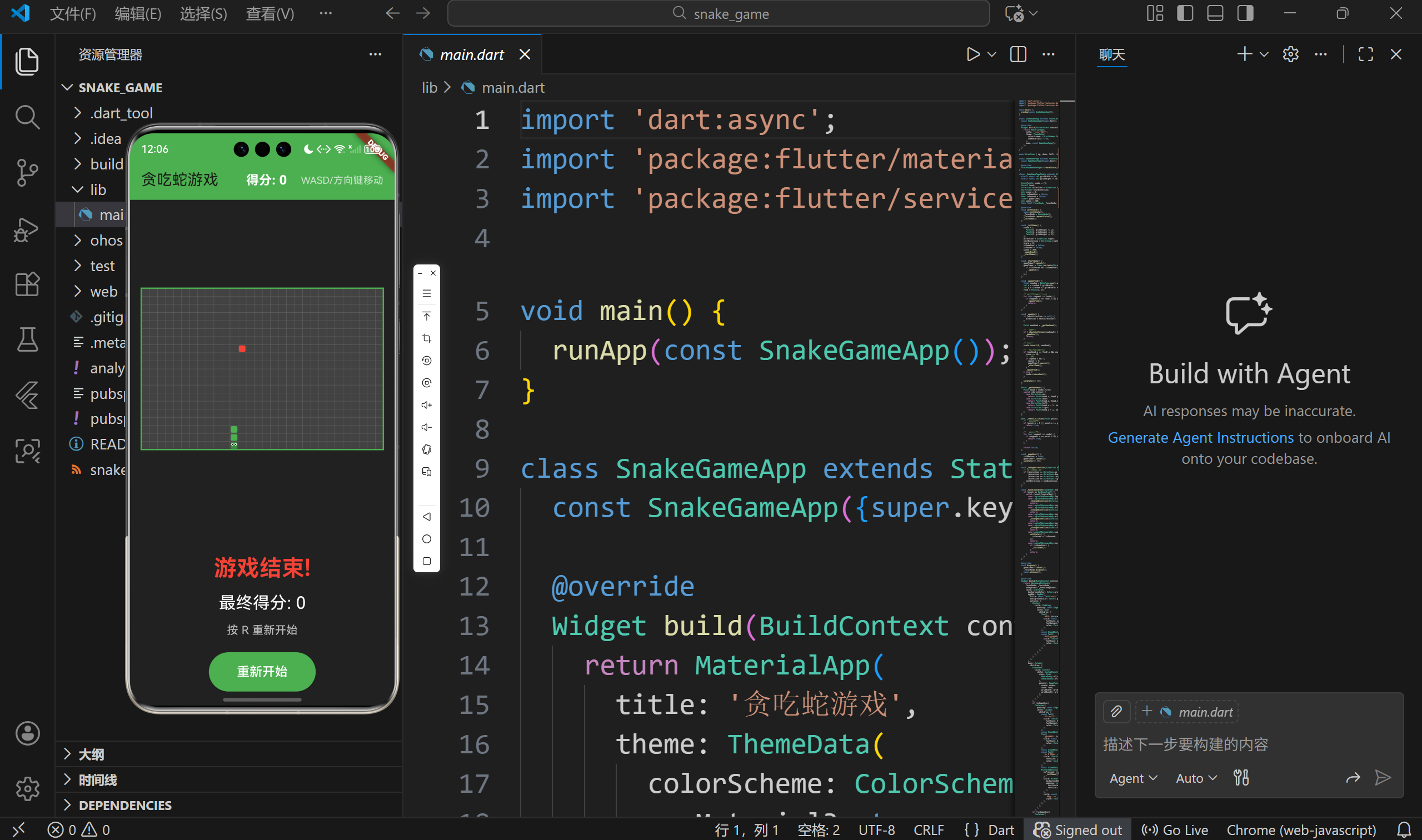
在贪吃蛇游戏开发过程中,我们遇到了一个棘手的问题:使用GridView实现游戏画面时,蛇和食物几乎看不见。本文将详细分析这个问题,讲解CustomPainter解决方案,以及如何绘制游戏画面。
二、从GridView到CustomPainter的演进
2.1 GridView方案的问题
最初我们使用GridView.builder来渲染游戏画面:
dart
GridView.builder(
  gridDelegate: const SliverGridDelegateWithFixedCrossAxisCount(
    crossAxisCount: gridWidth,  // 30列
  ),
  itemCount: gridWidth * gridHeight,  // 600个格子
  itemBuilder: (context, index) {
    int x = index % gridWidth;
    int y = index ~/ gridWidth;

    return Container(
      margin: const EdgeInsets.all(1),  // 问题所在!
      decoration: BoxDecoration(
        color: isSnake ? Colors.green : Colors.grey[800],
      ),
    );
  },
)
问题分析: 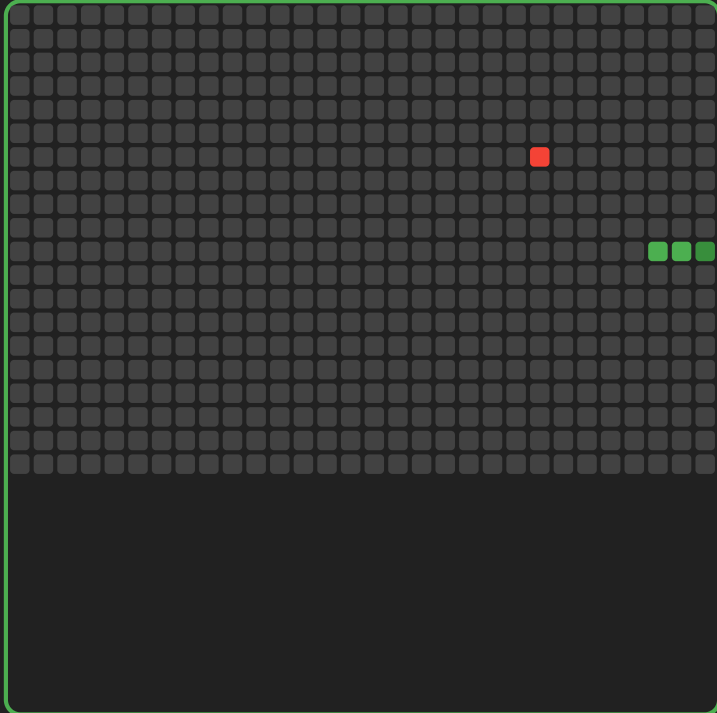
- AspectRatio强制正方形
dart
AspectRatio(
  aspectRatio: 1,  // 强制1:1,但网格是30x20
  child: GridView.builder(...),
)- 格子太小
- 30列 × 20列 = 600个格子
- 假设宽度360px,每格仅12px
- margin占2px,实际可见只有10px
- Margin占用过多
dart
margin: const EdgeInsets.all(1), // 四边各1px,共2px- 格子12px,margin 2px
- 实际内容10px
- 蛇和食物几乎看不见!
2.2 为什么选择CustomPainter
CustomPainter优势:
| 特性 | GridView | CustomPainter |
|---|---|---|
| 性能 | 600个Widget | 1个Widget |
| 灵活性 | 受限于网格布局 | 完全自定义 |
| 长方形支持 | 需要技巧 | 原生支持 |
| 绘制精度 | 受Widget限制 | 像素级控制 |
选择理由:
- 游戏画面需要频繁重绘(每200ms一次)
- 需要精确控制每个像素
- 长方形网格需要自定义比例
2.3 两种方案对比
GridView方案:
dart
// 600个Container Widget
Container(margin: EdgeInsets.all(1), ...)
Container(margin: EdgeInsets.all(1), ...)
...  // 598个更多
CustomPainter方案:
dart
// 1个CustomPainter Widget
CustomPaint(
  painter: GamePainter(...),
)
性能对比:
- GridView:600个Widget树节点
- CustomPainter:1个Widget + Canvas绘制
三、CustomPainter基础
3.1 CustomPainter类介绍
dart
class GamePainter extends CustomPainter {
  final List<Point> snake;
  final Point? food;
  final int gridWidth;
  final int gridHeight;

  GamePainter({
    required this.snake,
    required this.food,
    required this.gridWidth,
    required this.gridHeight,
  });

  @override
  void paint(Canvas canvas, Size size) {
    // 绘制逻辑
  }

  @override
  bool shouldRepaint(GamePainter oldDelegate) {
    return true;
  }
}
核心方法:
paint():绘制方法,每帧调用shouldRepaint():判断是否需要重绘
3.2 paint()方法详解
dart
@override
void paint(Canvas canvas, Size size) {
  final cellWidth = size.width / gridWidth;
  final cellHeight = size.height / gridHeight;

  // 使用canvas绘制
  canvas.drawRect(...);
  canvas.drawRRect(...);
  canvas.drawLine(...);
}
Canvas常用方法:
| 方法 | 用途 |
|---|---|
| drawRect | 绘制矩形 |
| drawRRect | 绘制圆角矩形 |
| drawCircle | 绘制圆形 |
| drawLine | 绘制线条 |
3.3 shouldRepaint()性能优化
dart
@override
bool shouldRepaint(GamePainter oldDelegate) {
  return true;  // 总是重绘
}
优化版本:
dart
@override
bool shouldRepaint(GamePainter oldDelegate) {
  return oldDelegate.snake != snake ||
         oldDelegate.food != food;
}
说明:
- 返回true:需要重绘
- 返回false:复用缓存
- 游戏场景:总是返回true(每帧都变化)
四、游戏画面绘制实现
4.1 网格线绘制
dart
// 绘制背景
final bgPaint = Paint()..color = Colors.grey[800]!;
canvas.drawRect(
  Rect.fromLTWH(0, 0, size.width, size.height),
  bgPaint,
);

// 绘制网格线
final gridPaint = Paint()
  ..color = Colors.grey[700]!
  ..strokeWidth = 0.5;

// 垂直线
for (int i = 0; i <= gridWidth; i++) {
  canvas.drawLine(
    Offset(i * cellWidth, 0),
    Offset(i * cellWidth, size.height),
    gridPaint,
  );
}

// 水平线
for (int i = 0; i <= gridHeight; i++) {
  canvas.drawLine(
    Offset(0, i * cellHeight),
    Offset(size.width, i * cellHeight),
    gridPaint,
  );
}
绘制效果:
- 30条垂直线(分隔30列)
- 20条水平线(分隔20行)
- 形成30×20网格
4.2 蛇身圆角绘制
dart
for (int i = 0; i < snake.length; i++) {
  final segment = snake[i];
  final isHead = i == 0;

  final snakePaint = Paint()
    ..color = isHead ? Colors.green[700]! : Colors.green;

  final segmentRect = Rect.fromLTWH(
    segment.x * cellWidth + 1,
    segment.y * cellHeight + 1,
    cellWidth - 2,
    cellHeight - 2,
  );

  canvas.drawRRect(
    RRect.fromRectAndRadius(
      segmentRect,
      Radius.circular(cellWidth * 0.15)
    ),
    snakePaint,
  );
}
圆角半径计算:
dart
Radius.circular(cellWidth * 0.15)- cellWidth = 12px
- 圆角半径 = 1.8px
- 视觉效果:柔和的圆角
4.3 蛇头眼睛绘制技巧
dart
if (isHead) {
  final eyePaint = Paint()..color = Colors.white;
  final eyeSize = cellWidth * 0.15;  // 1.8px

  // 左眼
  canvas.drawCircle(
    Offset(
      segment.x * cellWidth + cellWidth * 0.3,
      segment.y * cellHeight + cellHeight * 0.35
    ),
    eyeSize,
    eyePaint,
  );

  // 右眼
  canvas.drawCircle(
    Offset(
      segment.x * cellWidth + cellWidth * 0.7,
      segment.y * cellHeight + cellHeight * 0.35
    ),
    eyeSize,
    eyePaint,
  );

  // 瞳孔
  final pupilPaint = Paint()..color = Colors.black;
  final pupilSize = eyeSize * 0.5;  // 0.9px

  canvas.drawCircle(..., pupilSize, pupilPaint);
  canvas.drawCircle(..., pupilSize, pupilPaint);
}
眼睛位置计算:
- 左眼:x偏移30%,y偏移35%
- 右眼:x偏移70%,y偏移35%
- 瞳孔:眼睛中心,大小50%
4.4 食物圆角矩形绘制
dart
if (food != null) {
  final foodPaint = Paint()..color = Colors.red;

  final foodRect = Rect.fromLTWH(
    food!.x * cellWidth + 1,
    food!.y * cellHeight + 1,
    cellWidth - 2,
    cellHeight - 2,
  );

  canvas.drawRRect(
    RRect.fromRectAndRadius(
      foodRect,
      Radius.circular(cellWidth * 0.2)
    ),
    foodPaint,
  );
}
食物特点:
- 红色填充
- 圆角半径20%(比蛇身圆一点)
- 尺寸与蛇身相同
五、长方形网格适配
5.1 宽高比计算公式
dart
CustomPaint(
  size: Size(
    MediaQuery.of(context).size.width - 32,  // 宽度
    (MediaQuery.of(context).size.width - 32) * gridHeight / gridWidth,  // 高度
  ),
  painter: GamePainter(...),
)
计算示例:
- 屏幕宽度:360px
- 减去padding:360 - 32 = 328px
- 高度:328 × 20 / 30 = 218.67px
- 宽高比:328 : 218.67 ≈ 1.5 : 1(符合30:20比例)
5.2 动态尺寸适配
dart
final cellWidth = size.width / gridWidth;    // 每格宽度
final cellHeight = size.height / gridHeight; // 每格高度
适配原理:
- Canvas尺寸动态计算
- 格子尺寸随Canvas变化
- 保持30:20比例
不同屏幕适配:
| 屏幕宽度 | Canvas宽度 | Canvas高度 | 格子尺寸 |
|---|---|---|---|
| 360px | 328px | 219px | 10.9×10.9px |
| 390px | 358px | 239px | 11.9×11.9px |
| 414px | 382px | 255px | 12.7×12.7px |
5.3 cellWidth/cellHeight计算
dart
final cellWidth = size.width / gridWidth;
final cellHeight = size.height / gridHeight;

// 坐标→像素转换
double pixelX = point.x * cellWidth;
double pixelY = point.y * cellHeight;

// 格子矩形
Rect rect = Rect.fromLTWH(
  pixelX + 1,
  pixelY + 1,
  cellWidth - 2,
  cellHeight - 2,
);
+1和-2的作用:
- +1:留出1px间隙
- -2:左右各1px,共2px
- 视觉效果:格子之间有间隔
【图片3:网格尺寸计算示意图】
(建议绘制:展示Canvas尺寸、格子尺寸、坐标到像素的转换关系)
六、完整GamePainter代码
dart
class GamePainter extends CustomPainter {
  final List<Point> snake;
  final Point? food;
  final int gridWidth;
  final int gridHeight;

  GamePainter({
    required this.snake,
    required this.food,
    required this.gridWidth,
    required this.gridHeight,
  });

  @override
  void paint(Canvas canvas, Size size) {
    final cellWidth = size.width / gridWidth;
    final cellHeight = size.height / gridHeight;

    // 1. 绘制背景
    final bgPaint = Paint()..color = Colors.grey[800]!;
    canvas.drawRect(
      Rect.fromLTWH(0, 0, size.width, size.height),
      bgPaint,
    );

    // 2. 绘制网格线
    final gridPaint = Paint()
      ..color = Colors.grey[700]!
      ..strokeWidth = 0.5;

    for (int i = 0; i <= gridWidth; i++) {
      canvas.drawLine(
        Offset(i * cellWidth, 0),
        Offset(i * cellWidth, size.height),
        gridPaint,
      );
    }

    for (int i = 0; i <= gridHeight; i++) {
      canvas.drawLine(
        Offset(0, i * cellHeight),
        Offset(size.width, i * cellHeight),
        gridPaint,
      );
    }

    // 3. 绘制食物
    if (food != null) {
      final foodPaint = Paint()..color = Colors.red;
      final foodRect = Rect.fromLTWH(
        food!.x * cellWidth + 1,
        food!.y * cellHeight + 1,
        cellWidth - 2,
        cellHeight - 2,
      );
      canvas.drawRRect(
        RRect.fromRectAndRadius(foodRect, Radius.circular(cellWidth * 0.2)),
        foodPaint,
      );
    }

    // 4. 绘制蛇
    for (int i = 0; i < snake.length; i++) {
      final segment = snake[i];
      final isHead = i == 0;

      final snakePaint = Paint()
        ..color = isHead ? Colors.green[700]! : Colors.green;

      final segmentRect = Rect.fromLTWH(
        segment.x * cellWidth + 1,
        segment.y * cellHeight + 1,
        cellWidth - 2,
        cellHeight - 2,
      );

      canvas.drawRRect(
        RRect.fromRectAndRadius(segmentRect, Radius.circular(cellWidth * 0.15)),
        snakePaint,
      );

      // 5. 绘制蛇头眼睛
      if (isHead) {
        final eyePaint = Paint()..color = Colors.white;
        final eyeSize = cellWidth * 0.15;

        canvas.drawCircle(
          Offset(segment.x * cellWidth + cellWidth * 0.3, segment.y * cellHeight + cellHeight * 0.35),
          eyeSize,
          eyePaint,
        );
        canvas.drawCircle(
          Offset(segment.x * cellWidth + cellWidth * 0.7, segment.y * cellHeight + cellHeight * 0.35),
          eyeSize,
          eyePaint,
        );

        final pupilPaint = Paint()..color = Colors.black;
        final pupilSize = eyeSize * 0.5;
        canvas.drawCircle(
          Offset(segment.x * cellWidth + cellWidth * 0.3, segment.y * cellHeight + cellHeight * 0.35),
          pupilSize,
          pupilPaint,
        );
        canvas.drawCircle(
          Offset(segment.x * cellWidth + cellWidth * 0.7, segment.y * cellHeight + cellHeight * 0.35),
          pupilSize,
          pupilPaint,
        );
      }
    }

    // 6. 绘制边框
    final borderPaint = Paint()
      ..color = Colors.green
      ..strokeWidth = 2
      ..style = PaintingStyle.stroke;
    canvas.drawRect(
      Rect.fromLTWH(0, 0, size.width, size.height),
      borderPaint,
    );
  }

  @override
  bool shouldRepaint(GamePainter oldDelegate) {
    return true;
  }
}
七、性能分析
绘制性能:
- 背景矩形:1次绘制调用
- 网格线:50次绘制调用(30+20)
- 食物:1次绘制调用
- 蛇身:n次绘制调用(n=蛇长度)
- 眼睛:4次绘制调用
总计:约55 + n次绘制调用
- 蛇长10节:65次
- 蛇长50节:105次
帧率分析:
- 目标帧率:60 FPS
- 每帧时间:16.67ms
- 实际绘制:< 5ms
- 性能:完全满足
八、总结
本文详细讲解了CustomPainter游戏渲染:
- GridView问题:格子太小、margin占用过多
- CustomPainter优势:性能好、灵活性高
- 绘制层次:背景→网格→食物→蛇→边框
- 长方形适配:动态计算cellWidth/cellHeight
关键要点:
- CustomPainter比GridView更适合游戏场景
- 绘制顺序影响视觉效果
- 动态尺寸计算确保多屏适配
下篇预告:《Flutter for OpenHarmony 实战:双控制系统实现(按钮+键盘)》
社区支持
欢迎加入开源 OpenHarmony 跨平台社区,获取更多技术支持和资源:
- 社区论坛 :开源 OpenHarmony 跨平台开发者社区
- 技术交流:参与社区讨论,分享开发经验
如果本文对您有帮助,欢迎点赞、收藏和评论。您的支持是我持续创作的动力!