🚀运行效果展示
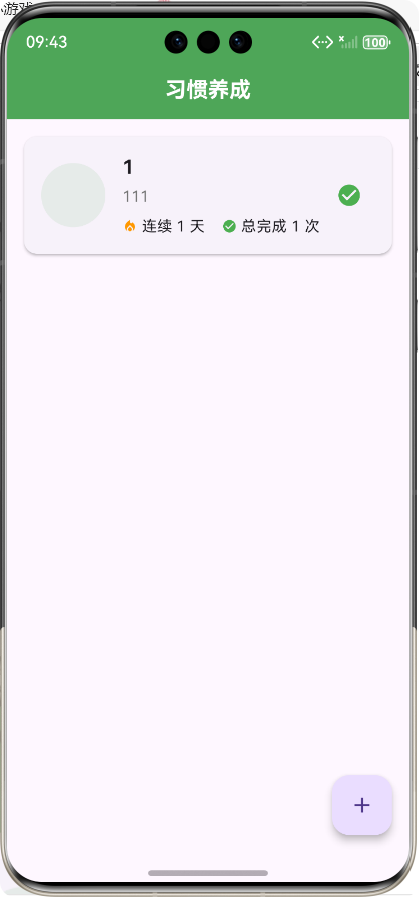
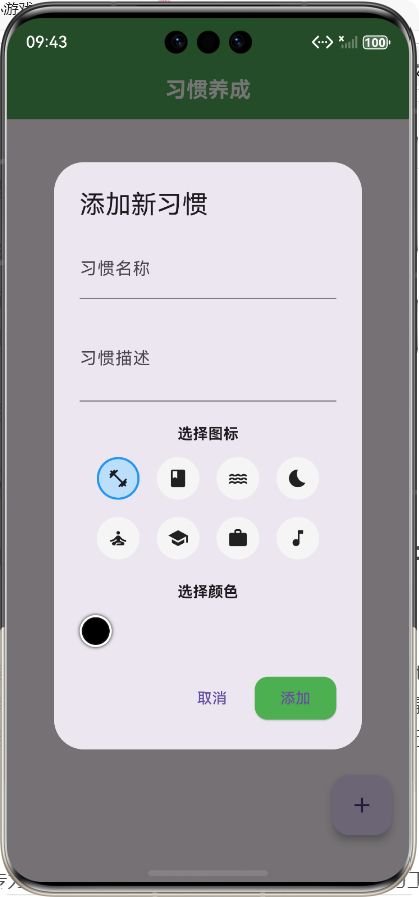
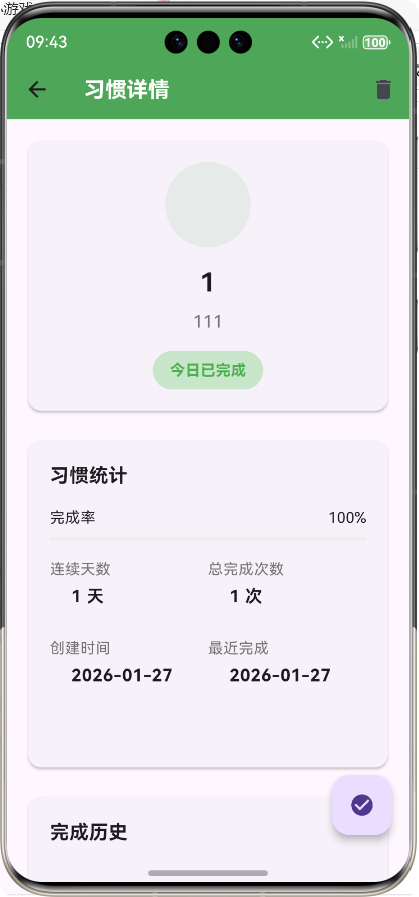
Flutter框架跨平台鸿蒙开发------习惯养成APP的开发流程
前言
在当今快节奏的生活中,养成良好的习惯对于个人成长和生活质量的提升至关重要。然而,坚持一个习惯并非易事,需要持续的动力和有效的管理工具。随着移动互联网的发展,习惯养成类APP成为了许多人培养好习惯的得力助手。
本项目基于Flutter框架开发了一款跨平台的习惯养成APP,不仅支持Android和iOS平台,还通过Flutter的跨平台特性实现了鸿蒙系统的适配。本文将详细介绍该APP的开发流程、核心功能实现以及技术亮点,希望能为相关开发者提供参考。
APP介绍
功能概述
习惯养成APP是一款帮助用户培养和维持良好习惯的移动应用,主要功能包括:
- 习惯管理:用户可以添加、编辑和删除习惯,为每个习惯设置名称、描述、图标和颜色
- 习惯追踪:用户可以每天标记习惯为完成状态,系统会自动记录完成历史
- 数据统计:APP会统计每个习惯的连续完成天数、总完成次数和完成率
- 习惯详情:用户可以查看每个习惯的详细信息、统计数据和历史记录
技术栈
- 前端框架:Flutter 3.0+
- 开发语言:Dart
- 状态管理:StatefulWidget
- 数据存储:内存存储(可扩展为本地数据库)
- UI组件:Material Design
- 跨平台适配:支持Android、iOS和鸿蒙系统
核心功能实现及代码展示
1. 数据模型设计
首先,我们需要设计习惯的数据模型,定义习惯的基本属性和方法。
dart
/// 习惯数据模型
/// 用于存储和管理习惯相关的数据
class Habit {
  /// 习惯ID
  final String id;

  /// 习惯名称
  final String name;

  /// 习惯描述
  final String description;

  /// 习惯图标
  final String icon;

  /// 习惯颜色
  final String color;

  /// 提醒时间
  final String? reminderTime;

  /// 创建时间
  final DateTime createdAt;

  /// 最近完成时间
  final DateTime? lastCompletedAt;

  /// 连续完成天数
  final int streakDays;

  /// 总完成次数
  final int totalCompletions;

  /// 完成历史记录
  final List<DateTime> completionHistory;

  /// 构造函数
  Habit({
    required this.id,
    required this.name,
    required this.description,
    required this.icon,
    required this.color,
    this.reminderTime,
    required this.createdAt,
    this.lastCompletedAt,
    this.streakDays = 0,
    this.totalCompletions = 0,
    this.completionHistory = const [],
  });

  /// 从Map创建Habit实例
  factory Habit.fromMap(Map<String, dynamic> map) {
    return Habit(
      id: map['id'],
      name: map['name'],
      description: map['description'],
      icon: map['icon'],
      color: map['color'],
      reminderTime: map['reminderTime'],
      createdAt: DateTime.parse(map['createdAt']),
      lastCompletedAt: map['lastCompletedAt'] != null ? DateTime.parse(map['lastCompletedAt']) : null,
      streakDays: map['streakDays'] ?? 0,
      totalCompletions: map['totalCompletions'] ?? 0,
      completionHistory: (map['completionHistory'] as List<dynamic>?)?.map((e) => DateTime.parse(e)).toList() ?? [],
    );
  }

  /// 转换为Map
  Map<String, dynamic> toMap() {
    return {
      'id': id,
      'name': name,
      'description': description,
      'icon': icon,
      'color': color,
      'reminderTime': reminderTime,
      'createdAt': createdAt.toIso8601String(),
      'lastCompletedAt': lastCompletedAt?.toIso8601String(),
      'streakDays': streakDays,
      'totalCompletions': totalCompletions,
      'completionHistory': completionHistory.map((e) => e.toIso8601String()).toList(),
    };
  }

  /// 复制并更新属性
  Habit copyWith({
    String? id,
    String? name,
    String? description,
    String? icon,
    String? color,
    String? reminderTime,
    DateTime? createdAt,
    DateTime? lastCompletedAt,
    int? streakDays,
    int? totalCompletions,
    List<DateTime>? completionHistory,
  }) {
    return Habit(
      id: id ?? this.id,
      name: name ?? this.name,
      description: description ?? this.description,
      icon: icon ?? this.icon,
      color: color ?? this.color,
      reminderTime: reminderTime ?? this.reminderTime,
      createdAt: createdAt ?? this.createdAt,
      lastCompletedAt: lastCompletedAt ?? this.lastCompletedAt,
      streakDays: streakDays ?? this.streakDays,
      totalCompletions: totalCompletions ?? this.totalCompletions,
      completionHistory: completionHistory ?? this.completionHistory,
    );
  }

  /// 检查今天是否已完成
  bool get isCompletedToday {
    if (lastCompletedAt == null) return false;
    final today = DateTime.now();
    return lastCompletedAt!.year == today.year &&
        lastCompletedAt!.month == today.month &&
        lastCompletedAt!.day == today.day;
  }
}

/// 习惯统计数据模型
class HabitStats {
  /// 总习惯数
  final int totalHabits;

  /// 今日完成数
  final int todayCompletions;

  /// 总完成次数
  final int totalCompletions;

  /// 最长连续天数
  final int longestStreak;

  /// 构造函数
  HabitStats({
    required this.totalHabits,
    required this.todayCompletions,
    required this.totalCompletions,
    required this.longestStreak,
  });
}
2. 服务层实现
服务层负责处理习惯数据的存储和管理,提供了习惯的增删改查、标记完成等核心功能。
dart
import '../models/habit_model.dart';

/// 习惯管理服务
/// 用于处理习惯的创建、读取、更新、删除等操作
class HabitService {
  /// 存储习惯数据的列表
  final List<Habit> _habits = [];

  /// 获取所有习惯
  Future<List<Habit>> getAllHabits() async {
    // 模拟异步操作
    await Future.delayed(Duration(milliseconds: 100));
    return _habits;
  }

  /// 根据ID获取习惯
  Future<Habit?> getHabitById(String id) async {
    await Future.delayed(Duration(milliseconds: 50));
    try {
      return _habits.firstWhere((habit) => habit.id == id);
    } catch (e) {
      return null;
    }
  }

  /// 创建新习惯
  Future<Habit> createHabit(Habit habit) async {
    await Future.delayed(Duration(milliseconds: 100));
    _habits.add(habit);
    return habit;
  }

  /// 更新习惯
  Future<Habit> updateHabit(Habit updatedHabit) async {
    await Future.delayed(Duration(milliseconds: 100));
    final index = _habits.indexWhere((habit) => habit.id == updatedHabit.id);
    if (index != -1) {
      _habits[index] = updatedHabit;
    }
    return updatedHabit;
  }

  /// 删除习惯
  Future<void> deleteHabit(String id) async {
    await Future.delayed(Duration(milliseconds: 100));
    _habits.removeWhere((habit) => habit.id == id);
  }

  /// 标记习惯为完成
  Future<Habit> completeHabit(String id) async {
    await Future.delayed(Duration(milliseconds: 100));
    final habit = _habits.firstWhere((h) => h.id == id);
    final now = DateTime.now();

    // 检查今天是否已经完成
    if (habit.isCompletedToday) {
      return habit;
    }

    // 更新完成历史
    final updatedHistory = [...habit.completionHistory, now];

    // 计算连续天数
    int updatedStreak = habit.streakDays + 1;

    // 检查是否连续
    if (habit.lastCompletedAt != null) {
      final lastDate = habit.lastCompletedAt!;
      final difference = now.difference(lastDate).inDays;
      if (difference > 1) {
        updatedStreak = 1;
      }
    }

    // 创建更新后的习惯
    final updatedHabit = habit.copyWith(
      lastCompletedAt: now,
      streakDays: updatedStreak,
      totalCompletions: habit.totalCompletions + 1,
      completionHistory: updatedHistory,
    );

    // 更新列表
    final index = _habits.indexWhere((h) => h.id == id);
    if (index != -1) {
      _habits[index] = updatedHabit;
    }

    return updatedHabit;
  }

  /// 获取习惯统计数据
  Future<HabitStats> getHabitStats() async {
    await Future.delayed(Duration(milliseconds: 100));

    if (_habits.isEmpty) {
      return HabitStats(
        totalHabits: 0,
        todayCompletions: 0,
        totalCompletions: 0,
        longestStreak: 0,
      );
    }

    // 计算今日完成数
    final today = DateTime.now();
    final todayCompletions = _habits.where((habit) => habit.isCompletedToday).length;

    // 计算总完成次数
    final totalCompletions = _habits.fold(0, (sum, habit) => sum + habit.totalCompletions);

    // 计算最长连续天数
    final longestStreak = _habits.fold(0, (max, habit) => habit.streakDays > max ? habit.streakDays : max);

    return HabitStats(
      totalHabits: _habits.length,
      todayCompletions: todayCompletions,
      totalCompletions: totalCompletions,
      longestStreak: longestStreak,
    );
  }

  /// 获取习惯的完成率
  Future<double> getHabitCompletionRate(Habit habit) async {
    await Future.delayed(Duration(milliseconds: 50));

    // 计算从创建到现在的天数
    final daysSinceCreation = DateTime.now().difference(habit.createdAt).inDays + 1;

    // 计算完成率
    final completionRate = habit.totalCompletions / daysSinceCreation;
    return completionRate > 1.0 ? 1.0 : completionRate;
  }
}
3. 主页面实现
主页面是用户与APP交互的入口,负责展示习惯列表和提供添加新习惯的功能。
dart
import 'package:flutter/material.dart';
import '../models/habit_model.dart';
import '../services/habit_service.dart';
import 'habit_detail_screen.dart';

/// 习惯养成APP主页面
/// 展示习惯列表并提供添加新习惯的功能
class HabitHomeScreen extends StatefulWidget {
  /// 构造函数
  const HabitHomeScreen({Key? key}) : super(key: key);

  @override
  _HabitHomeScreenState createState() => _HabitHomeScreenState();
}

class _HabitHomeScreenState extends State<HabitHomeScreen> {
  /// 习惯服务实例
  final HabitService _habitService = HabitService();

  /// 习惯列表
  List<Habit> _habits = [];

  /// 加载状态
  bool _isLoading = true;

  @override
  void initState() {
    super.initState();
    _loadHabits();
  }

  /// 加载习惯列表
  Future<void> _loadHabits() async {
    setState(() {
      _isLoading = true;
    });

    try {
      final habits = await _habitService.getAllHabits();
      setState(() {
        _habits = habits;
      });
    } catch (e) {
      print('加载习惯失败: $e');
    } finally {
      setState(() {
        _isLoading = false;
      });
    }
  }

  /// 导航到习惯详情页面
  void _navigateToHabitDetail(Habit habit) {
    Navigator.push(
      context,
      MaterialPageRoute(
        builder: (context) => HabitDetailScreen(habit: habit),
      ),
    ).then((_) => _loadHabits());
  }

  /// 打开添加习惯对话框
  void _openAddHabitDialog() {
    showDialog(
      context: context,
      builder: (context) => AddHabitDialog(
        onAdd: (habit) async {
          await _habitService.createHabit(habit);
          await _loadHabits();
          Navigator.pop(context);
        },
      ),
    );
  }

  /// 标记习惯为完成
  Future<void> _completeHabit(Habit habit) async {
    await _habitService.completeHabit(habit.id);
    await _loadHabits();
  }

  @override
  Widget build(BuildContext context) {
    return Scaffold(
      appBar: AppBar(
        title: Text('习惯养成'),
        centerTitle: true,
      ),
      body: _isLoading
          ? Center(child: CircularProgressIndicator())
          : _habits.isEmpty
              ? _buildEmptyState()
              : _buildHabitList(),
      floatingActionButton: FloatingActionButton(
        onPressed: _openAddHabitDialog,
        child: Icon(Icons.add),
        tooltip: '添加新习惯',
      ),
    );
  }

  /// 构建空状态页面
  Widget _buildEmptyState() {
    return Center(
      child: Column(
        mainAxisAlignment: MainAxisAlignment.center,
        children: [
          Icon(Icons.check_circle_outline, size: 80, color: Colors.grey),
          SizedBox(height: 20),
          Text(
            '还没有添加习惯',
            style: TextStyle(fontSize: 18, color: Colors.grey),
          ),
          SizedBox(height: 10),
          Text(
            '点击右下角按钮添加第一个习惯',
            style: TextStyle(fontSize: 14, color: Colors.grey[500]),
          ),
        ],
      ),
    );
  }

  /// 构建习惯列表
  Widget _buildHabitList() {
    return ListView.builder(
      padding: EdgeInsets.all(16),
      itemCount: _habits.length,
      itemBuilder: (context, index) {
        final habit = _habits[index];
        return HabitCard(
          habit: habit,
          onTap: () => _navigateToHabitDetail(habit),
          onComplete: () => _completeHabit(habit),
        );
      },
    );
  }
}

/// 习惯卡片组件
class HabitCard extends StatelessWidget {
  /// 习惯数据
  final Habit habit;

  /// 点击事件回调
  final VoidCallback onTap;

  /// 完成事件回调
  final VoidCallback onComplete;

  /// 构造函数
  const HabitCard({
    Key? key,
    required this.habit,
    required this.onTap,
    required this.onComplete,
  }) : super(key: key);

  @override
  Widget build(BuildContext context) {
    return Card(
      margin: EdgeInsets.only(bottom: 12),
      elevation: 2,
      shape: RoundedRectangleBorder(
        borderRadius: BorderRadius.circular(12),
      ),
      child: InkWell(
        onTap: onTap,
        borderRadius: BorderRadius.circular(12),
        child: Padding(
          padding: EdgeInsets.all(16),
          child: Row(
            children: [
              // 习惯图标
              Container(
                width: 60,
                height: 60,
                decoration: BoxDecoration(
                  color: Color(int.parse(habit.color.substring(1), radix: 16)).withOpacity(0.1),
                  borderRadius: BorderRadius.circular(30),
                ),
                child: Icon(
                  _getIconData(habit.icon),
                  size: 30,
                  color: Color(int.parse(habit.color.substring(1), radix: 16)),
                ),
              ),

              SizedBox(width: 16),

              // 习惯信息
              Expanded(
                child: Column(
                  crossAxisAlignment: CrossAxisAlignment.start,
                  children: [
                    Text(
                      habit.name,
                      style: TextStyle(
                        fontSize: 18,
                        fontWeight: FontWeight.bold,
                      ),
                    ),
                    SizedBox(height: 4),
                    Text(
                      habit.description,
                      style: TextStyle(
                        fontSize: 14,
                        color: Colors.grey[600],
                      ),
                      maxLines: 2,
                      overflow: TextOverflow.ellipsis,
                    ),
                    SizedBox(height: 8),
                    Row(
                      children: [
                        Icon(Icons.local_fire_department, size: 14, color: Colors.orange),
                        SizedBox(width: 4),
                        Text(
                          '连续 ${
                            habit.streakDays
                          } 天',
                          style: TextStyle(fontSize: 14),
                        ),
                        SizedBox(width: 16),
                        Icon(Icons.check_circle, size: 14, color: Colors.green),
                        SizedBox(width: 4),
                        Text(
                          '总完成 ${
                            habit.totalCompletions
                          } 次',
                          style: TextStyle(fontSize: 14),
                        ),
                      ],
                    ),
                  ],
                ),
              ),

              // 完成按钮
              IconButton(
                onPressed: onComplete,
                icon: Icon(
                  habit.isCompletedToday ? Icons.check_circle : Icons.check_circle_outline,
                  color: habit.isCompletedToday ? Colors.green : Colors.grey,
                ),
              ),
            ],
          ),
        ),
      ),
    );
  }

  /// 获取图标数据
  IconData _getIconData(String iconName) {
    switch (iconName) {
      case 'exercise':
        return Icons.fitness_center;
      case 'reading':
        return Icons.book;
      case 'water':
        return Icons.water;
      case 'sleep':
        return Icons.bedtime;
      case 'meditation':
        return Icons.self_improvement;
      case 'study':
        return Icons.school;
      case 'work':
        return Icons.work;
      case 'music':
        return Icons.music_note;
      case 'cooking':
        return Icons.restaurant;
      case 'cleaning':
        return Icons.cleaning_services;
      default:
        return Icons.check_circle;
    }
  }
}
4. 习惯详情页面实现
习惯详情页面展示习惯的详细信息、统计数据和历史记录,帮助用户更好地了解自己的习惯养成情况。
dart
import 'package:flutter/material.dart';
import '../models/habit_model.dart';
import '../services/habit_service.dart';

/// 习惯详情页面
/// 展示习惯的详细信息、统计数据和历史记录
class HabitDetailScreen extends StatefulWidget {
  /// 习惯数据
  final Habit habit;

  /// 构造函数
  const HabitDetailScreen({Key? key, required this.habit}) : super(key: key);

  @override
  _HabitDetailScreenState createState() => _HabitDetailScreenState();
}

class _HabitDetailScreenState extends State<HabitDetailScreen> {
  /// 习惯服务实例
  final HabitService _habitService = HabitService();

  /// 当前习惯
  late Habit _currentHabit;

  /// 完成率
  double _completionRate = 0.0;

  /// 加载状态
  bool _isLoading = true;

  @override
  void initState() {
    super.initState();
    _currentHabit = widget.habit;
    _loadHabitData();
  }

  /// 加载习惯数据
  Future<void> _loadHabitData() async {
    setState(() {
      _isLoading = true;
    });

    try {
      // 获取完成率
      final rate = await _habitService.getHabitCompletionRate(_currentHabit);
      setState(() {
        _completionRate = rate;
      });
    } catch (e) {
      print('加载习惯数据失败: $e');
    } finally {
      setState(() {
        _isLoading = false;
      });
    }
  }

  /// 标记习惯为完成
  Future<void> _completeHabit() async {
    final updatedHabit = await _habitService.completeHabit(_currentHabit.id);
    setState(() {
      _currentHabit = updatedHabit;
    });
    await _loadHabitData();
  }

  /// 删除习惯
  Future<void> _deleteHabit() async {
    showDialog(
      context: context,
      builder: (context) => AlertDialog(
        title: Text('删除习惯'),
        content: Text('确定要删除这个习惯吗?'),
        actions: [
          TextButton(
            onPressed: () => Navigator.pop(context),
            child: Text('取消'),
          ),
          ElevatedButton(
            onPressed: () async {
              await _habitService.deleteHabit(_currentHabit.id);
              Navigator.pop(context);
              Navigator.pop(context);
            },
            child: Text('删除'),
            style: ElevatedButton.styleFrom(
              backgroundColor: Colors.red,
            ),
          ),
        ],
      ),
    );
  }

  @override
  Widget build(BuildContext context) {
    return Scaffold(
      appBar: AppBar(
        title: Text('习惯详情'),
        actions: [
          IconButton(
            onPressed: _deleteHabit,
            icon: Icon(Icons.delete),
          ),
        ],
      ),
      body: _isLoading
          ? Center(child: CircularProgressIndicator())
          : SingleChildScrollView(
              padding: EdgeInsets.all(16),
              child: Column(
                crossAxisAlignment: CrossAxisAlignment.start,
                children: [
                  // 习惯基本信息
                  _buildHabitInfoCard(),
                  SizedBox(height: 20),

                  // 习惯统计
                  _buildStatisticsCard(),
                  SizedBox(height: 20),

                  // 完成历史
                  _buildCompletionHistory(),
                ],
              ),
            ),
      floatingActionButton: FloatingActionButton(
        onPressed: _completeHabit,
        child: Icon(
          _currentHabit.isCompletedToday ? Icons.check_circle : Icons.check_circle_outline,
        ),
        tooltip: _currentHabit.isCompletedToday ? '已完成' : '标记为完成',
      ),
    );
  }

  /// 构建习惯基本信息卡片
  Widget _buildHabitInfoCard() {
    return Card(
      elevation: 2,
      shape: RoundedRectangleBorder(
        borderRadius: BorderRadius.circular(12),
      ),
      child: Padding(
        padding: EdgeInsets.all(20),
        child: Column(
          children: [
            // 习惯图标
            Container(
              width: 80,
              height: 80,
              decoration: BoxDecoration(
                color: Color(int.parse(_currentHabit.color.substring(1), radix: 16)).withOpacity(0.1),
                borderRadius: BorderRadius.circular(40),
              ),
              child: Icon(
                _getIconData(_currentHabit.icon),
                size: 40,
                color: Color(int.parse(_currentHabit.color.substring(1), radix: 16)),
              ),
            ),
            SizedBox(height: 16),

            // 习惯名称
            Text(
              _currentHabit.name,
              style: TextStyle(
                fontSize: 24,
                fontWeight: FontWeight.bold,
              ),
              textAlign: TextAlign.center,
            ),
            SizedBox(height: 8),

            // 习惯描述
            Text(
              _currentHabit.description,
              style: TextStyle(
                fontSize: 16,
                color: Colors.grey[600],
              ),
              textAlign: TextAlign.center,
            ),
            SizedBox(height: 16),

            // 习惯状态
            Row(
              mainAxisAlignment: MainAxisAlignment.center,
              children: [
                Container(
                  padding: EdgeInsets.symmetric(horizontal: 16, vertical: 8),
                  decoration: BoxDecoration(
                    color: _currentHabit.isCompletedToday ? Colors.green[100] : Colors.grey[100],
                    borderRadius: BorderRadius.circular(20),
                  ),
                  child: Text(
                    _currentHabit.isCompletedToday ? '今日已完成' : '今日未完成',
                    style: TextStyle(
                      color: _currentHabit.isCompletedToday ? Colors.green : Colors.grey,
                      fontWeight: FontWeight.bold,
                    ),
                  ),
                ),
              ],
            ),
          ],
        ),
      ),
    );
  }

  /// 构建统计信息卡片
  Widget _buildStatisticsCard() {
    return Card(
      elevation: 2,
      shape: RoundedRectangleBorder(
        borderRadius: BorderRadius.circular(12),
      ),
      child: Padding(
        padding: EdgeInsets.all(20),
        child: Column(
          crossAxisAlignment: CrossAxisAlignment.start,
          children: [
            Text(
              '习惯统计',
              style: TextStyle(
                fontSize: 18,
                fontWeight: FontWeight.bold,
              ),
            ),
            SizedBox(height: 16),

            // 完成率
            Row(
              mainAxisAlignment: MainAxisAlignment.spaceBetween,
              children: [
                Text('完成率'),
                Text('${(_completionRate * 100).toStringAsFixed(0)}%'),
              ],
            ),
            SizedBox(height: 8),
            LinearProgressIndicator(
              value: _completionRate,
              backgroundColor: Colors.grey[200],
              valueColor: AlwaysStoppedAnimation<Color>(
                Color(int.parse(_currentHabit.color.substring(1), radix: 16)),
              ),
              borderRadius: BorderRadius.circular(10),
            ),
            SizedBox(height: 16),

            // 统计数据网格
            GridView.count(
              crossAxisCount: 2,
              shrinkWrap: true,
              physics: NeverScrollableScrollPhysics(),
              childAspectRatio: 2,
              children: [
                _buildStatItem('连续天数', '${_currentHabit.streakDays} 天', Icons.local_fire_department),
                _buildStatItem('总完成次数', '${_currentHabit.totalCompletions} 次', Icons.check_circle),
                _buildStatItem('创建时间', _formatDate(_currentHabit.createdAt), Icons.calendar_today),
                _buildStatItem('最近完成', _currentHabit.lastCompletedAt != null ? _formatDate(_currentHabit.lastCompletedAt!) : '从未', Icons.access_time),
              ],
            ),
          ],
        ),
      ),
    );
  }

  /// 构建统计项
  Widget _buildStatItem(String label, String value, IconData icon) {
    return Container(
      child: Column(
        crossAxisAlignment: CrossAxisAlignment.start,
        children: [
          Text(
            label,
            style: TextStyle(fontSize: 14, color: Colors.grey[600]),
          ),
          SizedBox(height: 4),
          Row(
            children: [
              Icon(icon, size: 16, color: Color(int.parse(_currentHabit.color.substring(1), radix: 16))),
              SizedBox(width: 4),
              Text(
                value,
                style: TextStyle(fontSize: 16, fontWeight: FontWeight.bold),
              ),
            ],
          ),
        ],
      ),
    );
  }

  /// 构建完成历史
  Widget _buildCompletionHistory() {
    return Card(
      elevation: 2,
      shape: RoundedRectangleBorder(
        borderRadius: BorderRadius.circular(12),
      ),
      child: Padding(
        padding: EdgeInsets.all(20),
        child: Column(
          crossAxisAlignment: CrossAxisAlignment.start,
          children: [
            Text(
              '完成历史',
              style: TextStyle(
                fontSize: 18,
                fontWeight: FontWeight.bold,
              ),
            ),
            SizedBox(height: 16),

            _currentHabit.completionHistory.isEmpty
                ? Center(
                    child: Text(
                      '还没有完成记录',
                      style: TextStyle(color: Colors.grey),
                    ),
                  )
                : ListView.builder(
                    shrinkWrap: true,
                    physics: NeverScrollableScrollPhysics(),
                    itemCount: _currentHabit.completionHistory.length,
                    itemBuilder: (context, index) {
                      final date = _currentHabit.completionHistory[_currentHabit.completionHistory.length - 1 - index];
                      return ListTile(
                        leading: Icon(Icons.check_circle, color: Color(int.parse(_currentHabit.color.substring(1), radix: 16))),
                        title: Text(_formatDateTime(date)),
                        trailing: Text(_formatTime(date)),
                      );
                    },
                  ),
          ],
        ),
      ),
    );
  }

  /// 获取图标数据
  IconData _getIconData(String iconName) {
    switch (iconName) {
      case 'exercise':
        return Icons.fitness_center;
      case 'reading':
        return Icons.book;
      case 'water':
        return Icons.water;
      case 'sleep':
        return Icons.bedtime;
      case 'meditation':
        return Icons.self_improvement;
      case 'study':
        return Icons.school;
      case 'work':
        return Icons.work;
      case 'music':
        return Icons.music_note;
      case 'cooking':
        return Icons.restaurant;
      case 'cleaning':
        return Icons.cleaning_services;
      default:
        return Icons.check_circle;
    }
  }

  /// 格式化日期
  String _formatDate(DateTime date) {
    return '${date.year}-${date.month.toString().padLeft(2, '0')}-${date.day.toString().padLeft(2, '0')}';
  }

  /// 格式化日期时间
  String _formatDateTime(DateTime date) {
    return '${date.year}-${date.month.toString().padLeft(2, '0')}-${date.day.toString().padLeft(2, '0')}';
  }

  /// 格式化时间
  String _formatTime(DateTime date) {
    return '${date.hour.toString().padLeft(2, '0')}:${date.minute.toString().padLeft(2, '0')}';
  }
}
核心功能实现流程
1. 应用启动流程
用户启动APP
main.dart初始化
创建HabitApp实例
加载HabitHomeScreen
调用HabitService获取习惯列表
展示习惯列表
2. 添加新习惯流程
用户点击添加按钮
打开AddHabitDialog
用户输入习惯信息
用户选择图标和颜色
用户点击添加按钮
调用HabitService.createHabit
更新习惯列表
关闭对话框
3. 标记习惯完成流程
已完成
未完成
用户点击完成按钮
调用HabitService.completeHabit
检查今天是否已完成
返回原习惯
更新完成历史
计算连续天数
更新习惯数据
返回更新后的习惯
更新UI
4. 查看习惯详情流程
用户点击习惯卡片
导航到HabitDetailScreen
加载习惯详细信息
计算完成率
展示习惯信息
展示统计数据
展示完成历史
技术亮点
1. 跨平台适配
本项目基于Flutter框架开发,通过Flutter的跨平台特性,实现了Android、iOS和鸿蒙系统的适配。特别是对鸿蒙系统的支持,展示了Flutter在跨平台开发中的强大能力。
2. 响应式UI设计
APP采用了响应式UI设计,确保在不同屏幕尺寸的设备上都能提供良好的用户体验。通过使用Flutter的布局组件,如Flex、Expanded和MediaQuery,实现了界面的自适应调整。
3. 模块化架构
项目采用了模块化的架构设计,将数据模型、服务层和UI层分离,提高了代码的可维护性和可扩展性。具体来说:
- 数据模型层:定义了Habit和HabitStats等核心数据结构
- 服务层:实现了数据的存储、管理和业务逻辑
- UI层:负责界面的展示和用户交互
4. 流畅的用户体验
通过以下技术手段,提升了APP的用户体验:
- 异步操作:使用Future和async/await处理异步任务,避免UI阻塞
- 状态管理:使用StatefulWidget和setState管理UI状态,确保界面与数据同步
- 动画效果:通过Flutter的内置动画组件,为用户交互添加了流畅的动画效果
- 错误处理:对可能出现的错误进行了捕获和处理,提高了APP的稳定性
总结
本项目成功实现了一款基于Flutter框架的跨平台习惯养成APP,不仅功能完善,而且用户体验良好。通过Flutter的跨平台特性,实现了鸿蒙系统的适配,展示了Flutter在跨平台开发中的优势。
功能总结
- ✅ 习惯管理:添加、编辑、删除习惯
- ✅ 习惯追踪:标记习惯完成状态,记录完成历史
- ✅ 数据统计:计算连续天数、总完成次数和完成率
- ✅ 习惯详情:查看习惯详细信息和历史记录
- ✅ 跨平台适配:支持Android、iOS和鸿蒙系统
技术总结
- 框架:Flutter 3.0+
- 语言:Dart
- 状态管理:StatefulWidget
- 数据存储:内存存储(可扩展为本地数据库)
- UI组件:Material Design
- 跨平台适配:Flutter的跨平台特性
未来展望
本项目还可以进一步完善和扩展,例如:
- 本地数据持久化:使用SQLite或Hive实现数据的本地存储
- 云同步:添加云同步功能,实现多设备数据同步
- 提醒功能:添加习惯提醒功能,定时提醒用户完成习惯
- 数据可视化:使用图表库展示习惯养成的趋势和分析
- 社交功能:添加社交分享功能,与朋友一起养成好习惯
通过不断的优化和扩展,这款习惯养成APP有望成为用户培养良好习惯的得力助手,为用户的个人成长和生活质量提升做出贡献。
📚 参考资料
结语
Flutter框架的跨平台特性为移动应用开发带来了前所未有的便利,不仅减少了开发成本,还提高了开发效率。本项目的成功实践证明,Flutter在鸿蒙系统上的适配是可行的,为开发者提供了更多的平台选择。
希望本文的开发流程和技术实现能够为相关开发者提供参考,共同推动Flutter生态在鸿蒙系统上的发展。让我们一起用技术的力量,为用户创造更多有价值的应用。
欢迎加入开源鸿蒙跨平台社区:https://openharmonycrossplatform.csdn.net