
Flutter for OpenHarmony:安全高效地使用网络请求三方库
现代应用离不开网络通信。在 Flutter for OpenHarmony 开发中,虽然 http 和 dio 等主流网络库基于 Dart 标准库 dart:io 实现,理论上具备跨平台能力,但 OpenHarmony 的安全策略、权限模型和网络栈实现仍可能引发连接失败、证书校验异常或权限拒绝等问题。
本文将完整演示如何在 OpenHarmony 设备上安全、稳定、高效地发起网络请求,涵盖:
http与dio的基本使用- JSON 数据解析
- 拦截器与重试机制
- OpenHarmony 特有的网络权限与 HTTPS 配置
- 常见连接问题排查
目录
- [1. 网络库选型:http vs dio](#1. 网络库选型:http vs dio)
- [2. OpenHarmony 网络权限配置(关键!)](#2. OpenHarmony 网络权限配置(关键!))
- [3. 基础请求:GET 与 POST](#3. 基础请求:GET 与 POST)
- [3.1 使用 http 库](#3.1 使用 http 库)
- [3.2 使用 dio 库(推荐)](#3.2 使用 dio 库(推荐))
- [4. JSON 数据解析](#4. JSON 数据解析)
- [5. 高级功能:拦截器与自动重试](#5. 高级功能:拦截器与自动重试)
- [6. OpenHarmony HTTPS 与证书校验](#6. OpenHarmony HTTPS 与证书校验)
- [7. 常见问题与调试技巧](#7. 常见问题与调试技巧)
- [8. 总结](#8. 总结)
1. 网络库选型:http vs dio
| 特性 | http |
dio |
|---|---|---|
| 官方维护 | ✅ 是 | ❌ 社区 |
| 功能丰富度 | 基础 | ✅ 拦截器、重试、取消、下载进度等 |
| OpenHarmony 兼容性 | ✅ 良好 | ✅ 良好(基于 http 封装) |
| 学习成本 | 低 | 中 |
✅ 建议 :新项目优先使用
dio,其拦截器机制便于统一处理认证、日志、错误。
yaml
# pubspec.yaml
dependencies:
  dio: ^5.4.0
  http: ^1.1.0 # 可选,用于对比
2. OpenHarmony 网络权限配置(关键!)
即使代码正确,若未声明网络权限,OpenHarmony 将静默拒绝所有外网请求(无异常抛出,仅超时)。
步骤:
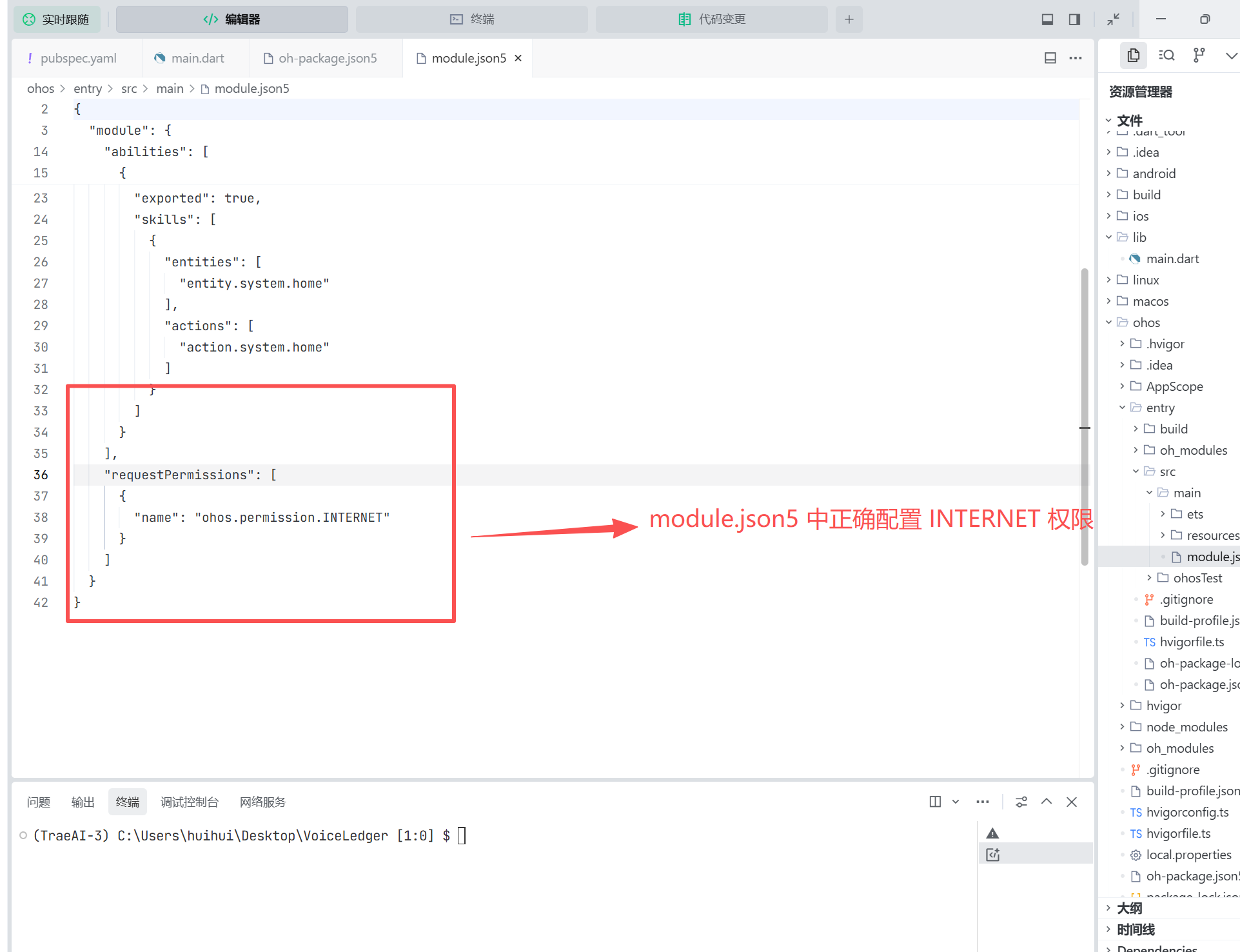
- 在
ohos/src/main/module.json5中添加权限:
json
{
  "module": {
    // ...
  },
  "requestPermissions": [
    {
      "name": "ohos.permission.INTERNET"
    }
  ]
}- 无需动态申请 :
INTERNET权限属于"普通权限",安装即授予。
⚠️ 注意:若请求内网或自签名证书接口,还需配置网络安全策略(见第 6 节)。
3. 基础请求:GET 与 POST
3.1 使用 http 库
dart
import 'package:http/http.dart' as http;

final response = await http.get(Uri.parse('https://api.example.com/users'));
if (response.statusCode == 200) {
  print(response.body);
} else {
  throw Exception('请求失败: ${response.statusCode}');
}
3.2 使用 dio 库(推荐)
dart
import 'package:dio/dio.dart';

final dio = Dio();

// GET
final response = await dio.get('https://api.example.com/users');

// POST with JSON
final response = await dio.post(
  'https://api.example.com/transactions',
  data: {'amount': 35, 'category': '餐饮'},
  options: Options(headers: {'Content-Type': 'application/json'}),
);
✅ 优势 :
dio自动序列化Map为 JSON,无需手动jsonEncode。
4. JSON 数据解析
定义模型类并使用 json_serializable(纯 Dart,兼容 OpenHarmony):
dart
// lib/models/transaction.dart
import 'package:json_annotation/json_annotation.dart';

part 'transaction.g.dart';

@JsonSerializable()
class Transaction {
  final String id;
  final double amount;
  final String category;
  final String? note;

  Transaction({required this.id, required this.amount, required this.category, this.note});

  factory Transaction.fromJson(Map<String, dynamic> json) => _$TransactionFromJson(json);
  Map<String, dynamic> toJson() => _$TransactionToJson(this);
}
解析响应:
dart
final json = response.data as Map<String, dynamic>;
final transaction = Transaction.fromJson(json);
🔧 运行构建命令生成
transaction.g.dart:
bashflutter pub run build_runner build
5. 高级功能:拦截器与自动重试
添加日志与认证拦截器
dart
final dio = Dio(BaseOptions(baseUrl: 'https://api.example.com'));

dio.interceptors.add(InterceptorsWrapper(
  onRequest: (options, handler) {
    options.headers['Authorization'] = 'Bearer $token';
    print('→ ${options.method} ${options.path}');
    return handler.next(options);
  },
  onResponse: (response, handler) {
    print('← ${response.statusCode}');
    return handler.next(response);
  },
  onError: (DioException err, handler) {
    print('✗ 网络错误: ${err.message}');
    return handler.next(err);
  },
));
自动重试机制(网络不稳定时)
dart
dio.interceptors.add(RetryInterceptor(
  dio: dio,
  retries: 2,
  retryDelay: const Duration(seconds: 1),
));
✅ 适用场景:OpenHarmony 设备在弱网环境下(如 IoT 设备)提升成功率。
6. OpenHarmony HTTPS 与证书校验
OpenHarmony 默认严格校验证书有效性(有效期、域名、CA 信任链)。
问题现象:
- 请求自签名 HTTPS 接口 → 抛出
HandshakeException - 使用 IP 地址访问 → 证书域名不匹配
解决方案(仅限开发/测试环境):
dart
final dio = Dio();
(dio.httpClientAdapter as DefaultHttpClientAdapter).onHttpClientCreate =
  (HttpClient client) {
    client.badCertificateCallback = (cert, host, port) => true; // 忽略证书错误
    return client;
  };
🔒 生产环境严禁此操作!应使用有效 CA 签发的证书。
正确做法:
- 使用域名(非 IP)
- 证书包含正确 SAN(Subject Alternative Name)
- 由可信 CA 签发(如 Let's Encrypt)
7. 常见问题与调试技巧
| 问题 | 原因 | 解决方案 |
|---|---|---|
| 请求超时,无错误日志 | 未配置 INTERNET 权限 |
检查 module.json5 |
| HTTPS 证书错误 | 自签名或域名不匹配 | 开发用 badCertificateCallback,生产用正规证书 |
| POST 数据未发送 | 未设置 Content-Type: application/json |
在 Options 中显式声明 |
| OpenHarmony 模拟器无法联网 | 模拟器网络配置问题 | 改用真机测试,或检查 DevEco 网络代理 |
调试命令:
bash
# 查看设备网络日志
hdc shell hilog -t net -L
8. 总结
在 Flutter for OpenHarmony 中使用网络库,需牢记三点:
- 权限先行 :务必在
module.json5中声明ohos.permission.INTERNET - HTTPS 合规:生产环境必须使用有效证书,避免忽略校验
- 优选 dio:利用拦截器统一处理认证、日志、重试,提升健壮性
通过合理配置与错误处理,http 和 dio 均可在 OpenHarmony 设备上稳定运行,为跨端应用提供可靠的网络通信能力。
欢迎加入开源鸿蒙跨平台社区: https://openharmonycrossplatform.csdn.net