esp32 s3-cam见前篇《挑选合适的esp32 s3-cam模块》,原店铺配带的固件,无线掉网,图片更是不见影子。
反复问glm-4.7,得到一份能运行不挂掉的代码,速度慢如蜗牛,图像糊成浆糊。

好在开发板没坏,也没有因为摸索时的胡乱代码而损坏。
环境
esp32最新是3.3.5,网络不好安不上,还是以前的3.0.5 。
开发板型号选择 ESP32S3 Dev Module 。
开启psram为OPI。
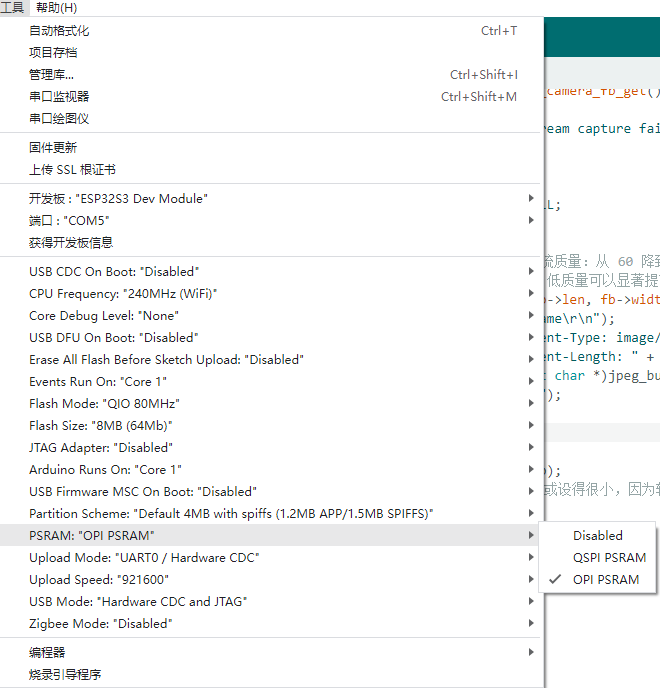
代码能跑起来不是乱码,优化的事情就好办了,可以继续问智谱。
cpp
#include <WiFi.h>
#include <WebServer.h>
#include <esp_camera.h>
#include <driver/i2c.h>

// WiFi credentials
const char* ssid = "fengyu09";
const char* password = "01234567";

WebServer server(80);

// -------------------------------------------------
// 基于原理图的引脚定义
// -------------------------------------------------

#define PWDN_GPIO_NUM     -1
#define RESET_GPIO_NUM    -1
#define XCLK_GPIO_NUM     15
#define SIOD_GPIO_NUM     4
#define SIOC_GPIO_NUM     5

#define Y9_GPIO_NUM       16
#define Y8_GPIO_NUM       17
#define Y7_GPIO_NUM       18
#define Y6_GPIO_NUM       12
#define Y5_GPIO_NUM       10
#define Y4_GPIO_NUM       8
#define Y3_GPIO_NUM       9
#define Y2_GPIO_NUM       11

#define VSYNC_GPIO_NUM    6
#define HREF_GPIO_NUM     7
#define PCLK_GPIO_NUM     13

void setup() {
    Serial.begin(115200);
    Serial.setDebugOutput(true);
    Serial.println();

    // 【优化1】提升 CPU 频率到 240MHz,加快软件压缩速度
    setCpuFrequencyMhz(240);

    camera_config_t config;
    config.ledc_channel = LEDC_CHANNEL_0;
    config.ledc_timer = LEDC_TIMER_0;
    config.pin_d0 = Y2_GPIO_NUM;
    config.pin_d1 = Y3_GPIO_NUM;
    config.pin_d2 = Y4_GPIO_NUM;
    config.pin_d3 = Y5_GPIO_NUM;
    config.pin_d4 = Y6_GPIO_NUM;
    config.pin_d5 = Y7_GPIO_NUM;
    config.pin_d6 = Y8_GPIO_NUM;
    config.pin_d7 = Y9_GPIO_NUM;
    config.pin_xclk = XCLK_GPIO_NUM;
    config.pin_pclk = PCLK_GPIO_NUM;
    config.pin_vsync = VSYNC_GPIO_NUM;
    config.pin_href = HREF_GPIO_NUM;
    config.pin_sccb_sda = SIOD_GPIO_NUM;
    config.pin_sccb_scl = SIOC_GPIO_NUM;
    config.pin_pwdn = PWDN_GPIO_NUM;
    config.pin_reset = RESET_GPIO_NUM;
    config.xclk_freq_hz = 20000000;

    config.pixel_format = PIXFORMAT_RGB565;

    if(psramFound()){
        // 【优化2】降低分辨率:从 SVGA 降为 VGA
        // 800x600 -> 640x480,像素量减少约 36%,压缩速度显著提升
        config.frame_size = FRAMESIZE_VGA;
        config.fb_count = 1; // 软压缩模式下,1个缓冲区足够,省去切换时间
    } else {
        config.frame_size = FRAMESIZE_QVGA;
        config.fb_count = 1;
    }

    esp_err_t err = esp_camera_init(&config);
    if (err != ESP_OK) {
        Serial.printf("Camera init failed with error 0x%x", err);
        return;
    }

    WiFi.begin(ssid, password);
    Serial.println("Connecting to WiFi...");

    while (WiFi.status() != WL_CONNECTED) {
        delay(500);
        Serial.print(".");
    }

    Serial.println("");
    Serial.print("IP address: ");
    Serial.println(WiFi.localIP());

    // 路由:获取单张图片
    server.on("/", []() {
        camera_fb_t * fb = esp_camera_fb_get();
        if (!fb) {
            Serial.println("Camera capture failed");
            server.send(500, "text/plain", "Camera capture failed");
            return;
        }

        uint8_t *jpeg_buf = NULL;
        size_t jpeg_len = 0;

        // 【优化3】降低静态图片质量:从 80 降到 30
        // 质量越低,压缩算法越简单,速度越快
        if (fmt2jpg(fb->buf, fb->len, fb->width, fb->height, PIXFORMAT_RGB565, 30, &jpeg_buf, &jpeg_len)) {

            WiFiClient client = server.client();
            client.print("HTTP/1.1 200 OK\r\n");
            client.print("Content-Type: image/jpeg\r\n");
            client.print("Content-Length: " + String(jpeg_len) + "\r\n");
            client.print("\r\n");
            client.write((const char*)jpeg_buf, jpeg_len);

            free(jpeg_buf);
        } else {
            Serial.println("JPEG compression failed");
            server.send(500, "text/plain", "JPEG compression failed");
        }

        esp_camera_fb_return(fb);
    });

    // 路由:MJPEG 视频流
    server.on("/stream", HTTP_GET, [](){
        WiFiClient client = server.client();
        client.print("HTTP/1.1 200 OK\r\nContent-Type: multipart/x-mixed-replace; boundary=frame\r\n\r\n");

        while(1){
            if(!client.connected()) break;

            camera_fb_t * fb = esp_camera_fb_get();
            if (!fb) {
                Serial.println("Stream capture failed");
                break;
            }

            uint8_t *jpeg_buf = NULL;
            size_t jpeg_len = 0;

            // 【优化3】大幅降低视频流质量:从 60 降到 10-15
            // 视频流对实时性要求高,低质量可以显著提高帧率 (FPS)
            if (fmt2jpg(fb->buf, fb->len, fb->width, fb->height, PIXFORMAT_RGB565, 15, &jpeg_buf, &jpeg_len)) {
                client.print("--frame\r\n");
                client.print("Content-Type: image/jpeg\r\n");
                client.print("Content-Length: " + String(jpeg_len) + "\r\n\r\n");
                client.write((const char *)jpeg_buf, jpeg_len);
                client.print("\r\n");
                free(jpeg_buf);
            }

            esp_camera_fb_return(fb);
            // 这里的 delay 可以去掉或设得很小,因为软压缩本身就很耗时
        }
    });

    server.begin();
    Serial.println("HTTP server started");
}

void loop() {
    server.handleClient();
}
注意针脚定义。
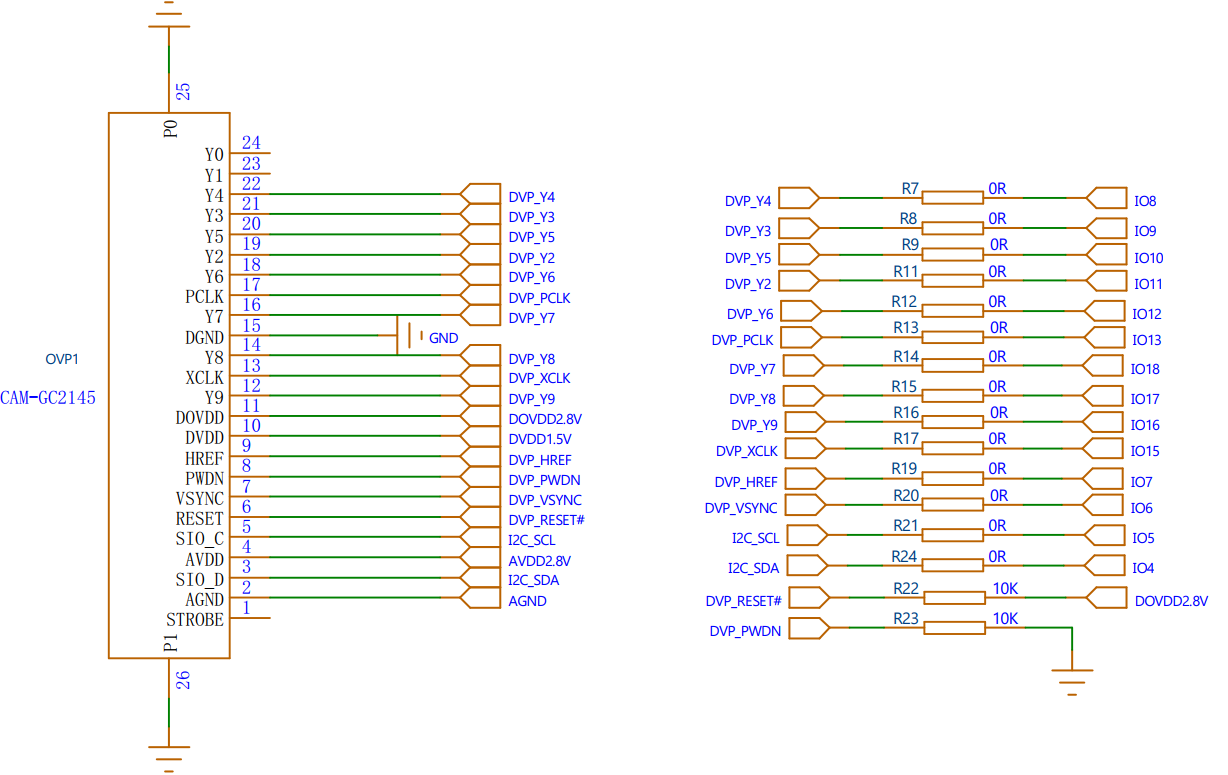
使用单独的充电器,相机速度没什么变化,拿来做家用监控相机,难。