一.意图
复合结构是一种结构设计模式,允许你将物体组合成树状结构,然后将它们视为独立的物体来处理。
将对象组合成树形结构以表示"部分-整体"的层次结构。Composite使得用户对单个对象和组合对象的使用具有一致性(稳定)。------《设计模式》GoF
二.问题
只有当应用的核心模型可以表示为树时,使用复合模式才有意义。
例如,假设你有两种类型的对象:和。A 可以包含多个以及多个较小的 。这些小东西也可以装一些甚至更小的,依此类推。
假设你决定创建一个使用这些类的排序系统。订单中可能包含没有包装的简单产品,也可以是装满产品的盒子......以及其他箱子。你如何确定此类订单的总价?
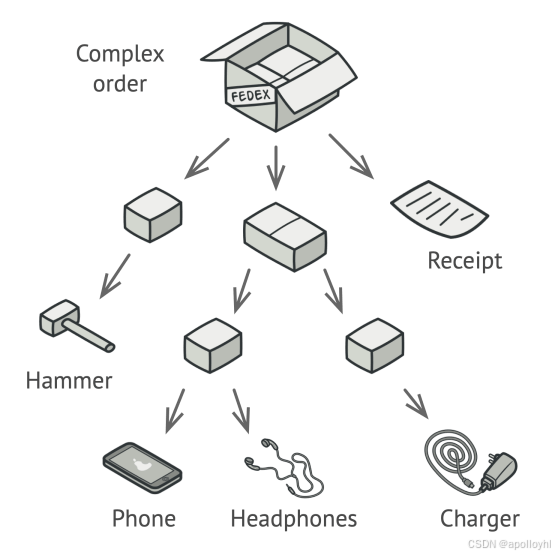
你可以试试直接的方法:拆开所有箱子,检查所有产品,然后计算总额。这在现实世界中是可行的;但在程序中,这并不像运行一个循环那么简单。你必须事先了解盒子的层级和其他复杂细节。所有这些都使得直接的方式要么太尴尬,要么根本不可能。
三.解决方案
复合模式建议你使用并通过一个通用接口作,该界面声明了一种计算总价的方法。
这种方法会如何工作?对于产品,它会直接返回产品的价格。对于盒子,它会逐一查看盒子里的每个物品,询问价格,然后返回该盒子的总价。如果其中一个盒子较小,盒子也会开始查看其内容物,依此类推,直到计算出所有内部组件的价格。盒子甚至可能在最终价格中增加一些额外成本,比如包装成本。

这种方法最大的好处是你无需关注构成树的具体对象类别。你不需要知道一个物品是简单的产品还是复杂的盒子。你可以通过通用接口将它们一视同仁地处理。当你调用方法时,对象本身会将请求传递到树中。
四.结构
五.适合应用场景
1.当你需要实现树状对象结构时,可以使用复合模式。
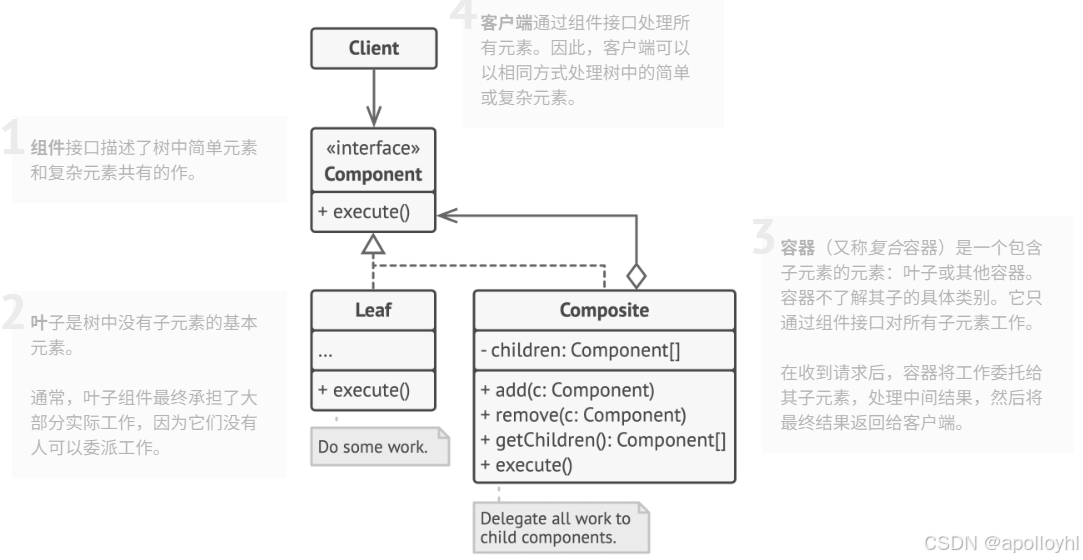
复合图案为你提供了两种基本元素类型,共享共享界面:简单叶子和复杂容器。容器可以由叶子和其他容器组成。这让你可以构建一个嵌套递归对象结构,类似树状结构。
2.当你希望客户端代码统一处理简单和复杂元素时,可以使用该模式。
所有由复合模式定义的元素共享一个公共接口。通过这个接口,客户端无需担心其所处理对象的具体类。
六.实施方法
-
确保你应用的核心模型可以用树状结构来表示。试着把它拆解成简单的元素和容器。记住,容器必须能够同时包含简单元素和其他容器。
-
声明组件接口,并列出适用于简单和复杂组件的方法。
-
创建一个叶类来表示简单元素。一个程序可能有多个不同的叶子类别。
-
创建一个容器类来表示复杂元素。在本类中,提供一个数组字段用于存储子元素的引用。数组必须能够同时存储叶子和容器,所以确保它声明了组件接口类型。
在实现组件接口的方法时,请记住容器应该将大部分工作委托给子元素。
-
最后,定义容器中子元素的添加和移除方法。
请记住,这些作可以在组件接口中声明。这会违反接口隔离原则,因为叶类中的方法将是空的。然而,客户即使在构建树时,也能一视同仁地对待所有元素。
七.优缺点
-
优点:
-
你可以更方便地处理复杂的树结构:利用多态性和递归来为自己谋利。
-
开闭原则。你可以在不破坏现有代码的情况下引入新的元素类型,现有代码现在可以与对象树一起使用
-
-
缺点
- 对于功能差异过大的类,可能很难为它们提供一个通用接口。在某些情况下,你需要对组件界面进行过度概括,这会让理解变得更困难。
八.与其他模式的关系
-
你可以在创建复杂复合树时使用Builder,因为它的构建步骤可以递归地进行编程。
-
责任链常与综合责任链一起使用。在这种情况下,当叶节点组件收到请求时,它可能会通过所有父组件的链条传递到对象树的根节点。
-
你可以用迭代器遍历复合树。
-
你可以用Visitor对整个复合树执行作。
-
你可以将复合树的共享叶节点作为蝇权重实现,以节省内存。
-
Composite和Decorator的结构图相似,因为两者都依赖递归组合来组织开放数量的对象。
Decorator 类似于 Composite ,但只有一个子组件。还有一个显著区别:Decorator 会给包裹物品增加额外责任,而Composite只是"总结"其子对象的结果。
不过,这些模式也可以合作:你可以用 Decorator 扩展复合树中特定对象的行为。
-
大量使用复合材料和装饰器的设计通常可以从Prototype中受益。应用图案可以让你克隆复杂结构,而不是从零重建。
九.示例代码
#include <algorithm>
#include <iostream>
#include <list>
#include <string>
/**
* The base Component class declares common operations for both simple and
* complex objects of a composition.
*/
class Component {
/**
* @var Component
*/
protected:
Component *parent_;
/**
* Optionally, the base Component can declare an interface for setting and
* accessing a parent of the component in a tree structure. It can also
* provide some default implementation for these methods.
*/
public:
virtual ~Component() {}
void SetParent(Component *parent) {
this->parent_ = parent;
}
Component *GetParent() const {
return this->parent_;
}
/**
* In some cases, it would be beneficial to define the child-management
* operations right in the base Component class. This way, you won't need to
* expose any concrete component classes to the client code, even during the
* object tree assembly. The downside is that these methods will be empty for
* the leaf-level components.
*/
virtual void Add(Component *component) {}
virtual void Remove(Component *component) {}
/**
* You can provide a method that lets the client code figure out whether a
* component can bear children.
*/
virtual bool IsComposite() const {
return false;
}
/**
* The base Component may implement some default behavior or leave it to
* concrete classes (by declaring the method containing the behavior as
* "abstract").
*/
virtual std::string Operation() const = 0;
};
/**
* The Leaf class represents the end objects of a composition. A leaf can't have
* any children.
*
* Usually, it's the Leaf objects that do the actual work, whereas Composite
* objects only delegate to their sub-components.
*/
class Leaf : public Component {
public:
std::string Operation() const override {
return "Leaf";
}
};
/**
* The Composite class represents the complex components that may have children.
* Usually, the Composite objects delegate the actual work to their children and
* then "sum-up" the result.
*/
class Composite : public Component {
/**
* @var \SplObjectStorage
*/
protected:
std::list<Component *> children_;
public:
/**
* A composite object can add or remove other components (both simple or
* complex) to or from its child list.
*/
void Add(Component *component) override {
this->children_.push_back(component);
component->SetParent(this);
}
/**
* Have in mind that this method removes the pointer to the list but doesn't
* frees the
* memory, you should do it manually or better use smart pointers.
*/
void Remove(Component *component) override {
children_.remove(component);
component->SetParent(nullptr);
}
bool IsComposite() const override {
return true;
}
/**
* The Composite executes its primary logic in a particular way. It traverses
* recursively through all its children, collecting and summing their results.
* Since the composite's children pass these calls to their children and so
* forth, the whole object tree is traversed as a result.
*/
std::string Operation() const override {
std::string result;
for (const Component *c : children_) {
if (c == children_.back()) {
result += c->Operation();
} else {
result += c->Operation() + "+";
}
}
return "Branch(" + result + ")";
}
};
/**
* The client code works with all of the components via the base interface.
*/
void ClientCode(Component *component) {
// ...
std::cout << "RESULT: " << component->Operation();
// ...
}
/**
* Thanks to the fact that the child-management operations are declared in the
* base Component class, the client code can work with any component, simple or
* complex, without depending on their concrete classes.
*/
void ClientCode2(Component *component1, Component *component2) {
// ...
if (component1->IsComposite()) {
component1->Add(component2);
}
std::cout << "RESULT: " << component1->Operation();
// ...
}
/**
* This way the client code can support the simple leaf components...
*/
int main() {
Component *simple = new Leaf;
std::cout << "Client: I've got a simple component:\n";
ClientCode(simple);
std::cout << "\n\n";
/**
* ...as well as the complex composites.
*/
Component *tree = new Composite;
Component *branch1 = new Composite;
Component *leaf_1 = new Leaf;
Component *leaf_2 = new Leaf;
Component *leaf_3 = new Leaf;
branch1->Add(leaf_1);
branch1->Add(leaf_2);
Component *branch2 = new Composite;
branch2->Add(leaf_3);
tree->Add(branch1);
tree->Add(branch2);
std::cout << "Client: Now I've got a composite tree:\n";
ClientCode(tree);
std::cout << "\n\n";
std::cout << "Client: I don't need to check the components classes even when managing the tree:\n";
ClientCode2(tree, simple);
std::cout << "\n";
delete simple;
delete tree;
delete branch1;
delete branch2;
delete leaf_1;
delete leaf_2;
delete leaf_3;
return 0;
}执行结果
Client: I've got a simple component:
RESULT: Leaf
Client: Now I've got a composite tree:
RESULT: Branch(Branch(Leaf+Leaf)+Branch(Leaf))
Client: I don't need to check the components classes even when managing the tree:
RESULT: Branch(Branch(Leaf+Leaf)+Branch(Leaf)+Leaf)