1.蓝牙标准文档说明
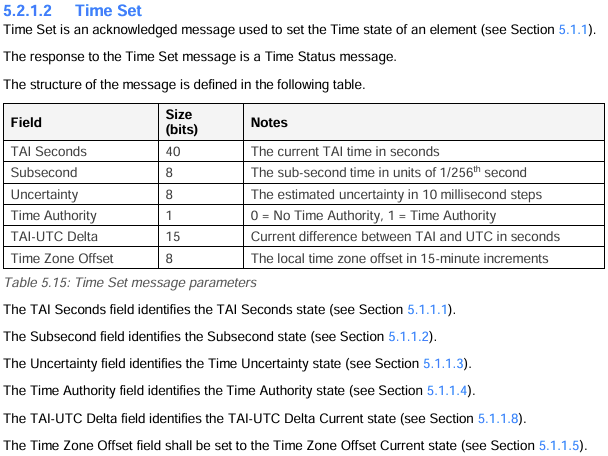

通过手机(src:0x0001)广播设置时间,参数为:86 77 0c 31 00 00 00 00 00 60
python
[15:30:14.526]收←◆[LIB]:rcv access layer,retransaction:0,ttl:10,src:0x0001,dst:0xffff op:0x005c,par_len:10,par:86 77 0c 31 00 00 00 00 00 60 0x310C7786:TAI Seconds
0x60:Time Zone Offset
实际偏移(15分钟单位) = Time_Zone_Byte − 64=0x60-64=96-64=32
32*15=8小时,因此,0x60 表示 UTC+8 ------ 这正是中国标准时间
2.python验证
python
import datetime

#For example, the value 0x20E5369D represents the 2017-06-27T15:30:37 TAI (15:30:00 UTC).
tai_seconds_hex_example = "20E5369D"
#TAI 时间:  2017-06-27 15:30:37 TAI
#UTC 时间:  2017-06-27 15:30:00 UTC
#北京时间:  2017-06-27 23:30:00 (UTC+8)

#[15:30:14.526]收←◆[LIB]:rcv access layer,retransaction:0,ttl:10,src:0x0001,dst:0xffff op:0x005c,par_len:10,par:86 77 0c 31 00 00 00 00 00 60
# 给定的 TAI Seconds 值(十六进制)
tai_seconds_hex = "310c7786"
#TAI 时间:  2026-01-28 07:30:14 TAI
#UTC 时间:  2026-01-28 07:29:37 UTC
#北京时间:  2026-01-28 15:29:37 (UTC+8)

tai_seconds_example = int(tai_seconds_hex_example, 16)  # 转为十进制
tai_seconds = int(tai_seconds_hex, 16)  # 转为十进制

# 蓝牙 Mesh TAI epoch: 2000-01-01 00:00:00 TAI
tai_epoch = datetime.datetime(2000, 1, 1, 0, 0, 0)

# 计算 TAI 时间
tai_time_example = tai_epoch + datetime.timedelta(seconds=tai_seconds_example)
tai_time = tai_epoch + datetime.timedelta(seconds=tai_seconds)

# 当前 TAI - UTC = 37 秒(自 2017 年起)
tai_utc_delta = 37  # seconds

# 转换为 UTC
utc_time_example = tai_time_example - datetime.timedelta(seconds=tai_utc_delta)
utc_time = tai_time

# 转换为北京时间 (UTC+8)
beijing_tz_example = datetime.timezone(datetime.timedelta(hours=8))
beijing_time_example = utc_time_example.replace(tzinfo=datetime.timezone.utc).astimezone(beijing_tz_example)

beijing_tz = datetime.timezone(datetime.timedelta(hours=8))
beijing_time = utc_time.replace(tzinfo=datetime.timezone.utc).astimezone(beijing_tz)

# 输出结果
print("For example, the value 0x20E5369D represents the 2017-06-27T15:30:37 TAI (15:30:00 UTC).")
print("✅ tai_seconds_hex_example 结果:")
print(f"TAI 时间:  {tai_time_example.strftime('%Y-%m-%d %H:%M:%S')} TAI")
print(f"UTC 时间:  {utc_time_example.strftime('%Y-%m-%d %H:%M:%S')} UTC")
print(f"北京时间:  {beijing_time_example.strftime('%Y-%m-%d %H:%M:%S')} (UTC+8)")

print("\n#[15:30:14.526]收←◆[LIB]:rcv access layer,retransaction:0,ttl:10,src:0x0001,dst:0xffff op:0x005c,par_len:10,par:86 77 0c 31 00 00 00 00 00 60 ")
print("✅ tai_seconds_hex 结果:")
print(f"TAI 时间:  {tai_time.strftime('%Y-%m-%d %H:%M:%S')} TAI")
print(f"UTC 时间:  {utc_time.strftime('%Y-%m-%d %H:%M:%S')} UTC")
print(f"北京时间:  {beijing_time.strftime('%Y-%m-%d %H:%M:%S')} (UTC+8)")
3.运行结果
For example, the value 0x20E5369D represents the 2017-06-27T15:30:37 TAI (15:30:00 UTC).
✅ tai_seconds_hex_example 结果:
TAI 时间: 2017-06-27 15:30:37 TAI
UTC 时间: 2017-06-27 15:30:00 UTC
北京时间: 2017-06-27 23:30:00 (UTC+8)
#15:30:14.526收←◆LIB:rcv access layer,retransaction:0,ttl:10,src:0x0001,dst:0xffff op:0x005c,par_len:10,par:86 77 0c 31 00 00 00 00 00 60
✅ tai_seconds_hex 结果:
TAI 时间: 2026-01-28 07:30:14 TAI
UTC 时间: 2026-01-28 07:30:14 UTC
北京时间: 2026-01-28 15:30:14 (UTC+8)
4.总结
示例1中的0x20E5369D,根据国际标准:自 2017 年 1 月 1 日起,TAI − UTC = 37 秒(因 2016 年底加了第 27 次闰秒),所以:UTC = TAI − 37 秒。
示例2中因为传输的参数TAI-UTC Delta为0,就不需要处理闰秒了。北京时间: 2026-01-28 15:30:14 (UTC+8)完美符合串口工具的时间15:30:14.526。