一.string的概念
string字符串其实是更加高级的封装,string字符串中包含大量的语法,这些方法使得字符串的操作变得简单。在C++中,字符串作为一种数据类型,也就是string类型,使用string类型创建的对象就是C++语言的字符串。下面是利用string创建的字符串:当然在使用string创建字符串或者对字符串进行操作时,需要包含<string>头文件
cpp
string s1;
string s2 = "abc";
二.string的常见操作
1.创建字符串
字符串的操作首先需要创建字符串,在创建字符串时,需要用到string关键字。类似于创建变量一样的道理,下面是对字符串的创建:
cpp
#include <iostream>
#include <string> //添加string头⽂件
using namespace std;
int main()
{
 string s1;
 string s2 = "hello world";
 cout << "s1:" << s1 << endl; //s1:
 cout << "s2:" << s2 << endl; //s2:hello world
 return 0;
}
创建字符串的方式和创建内置类型的数据的方式是相同的,只是这里的字符串类型为string。
- string s1表示创建一个空字符串,相当于创建整型int a,但是并没有给a一个初始值。
- string s2 = "hello world"表示创建一个字符串s2,内容是hello world。要注意的是s2中的字符串不再以\0作为结束标志了,这点应该和C语言的字符串区分开来。
下面是s2字符串的存储结构示意图:
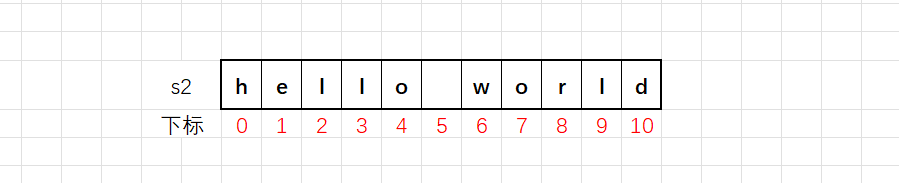
上述图片仅仅是字符串s2的示意图,实际上的string类型的字符串比上述图片复杂的多。当然除了有上面那样创建字符串的方式,还有其他方式,如下:
cpp
string s("hello world"); //等同于string s1 = "hello world";
string s1 = s; //⽤⼀个现成的字符串s,初始化另外⼀个字符串s1
当然C++语言中,string创建的字符串和char类型的数组表示的字符串还有一个区别,string类型的字符串对象可以直接赋值,比如:
cpp
#include <iostream>
#include <string>
using namespace std;
int main()
{
 string s1("hello world");
 string s2("hehe");
 s2 = s1;
 cout << s2 << endl;
 return 0;
}
像上述直接赋值的方式显示出在C++语言中利用string创建字符串,操作起来更加的简便。但是在C语言中定义的字符串,不可以像上述那样直接赋值。
2.字符串的输入
(1)cin函数的方式
下面是使用cin函数给string类型的字符串中输入一个字符串的数据的代码演示:
cpp
#include <iostream>
#include <string>
using namespace std;
int main()
{
 string s;
 //输⼊
 cin >> s;
 //输出
 cout << s << endl;

 return 0;
}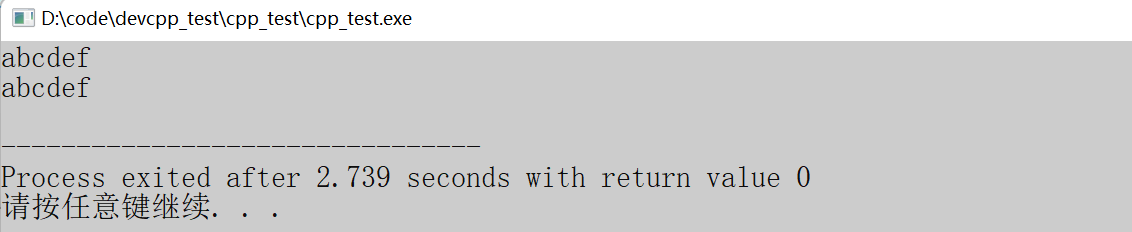
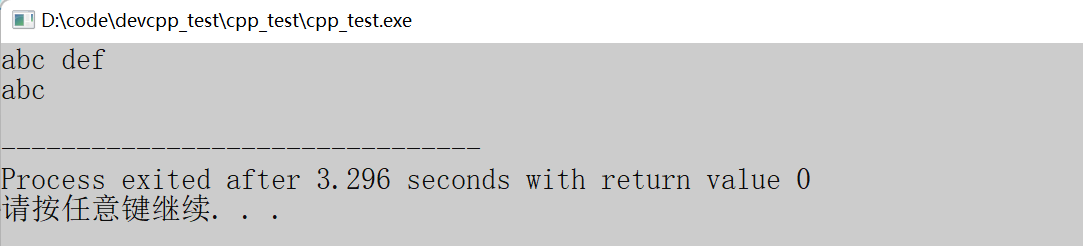
我们通过上面的图片可以得出:cin函数给string类型的字符串输入数据的时候,可以输入不带空格的字符串;可是一旦遇到字符串带有空格的就会读取失败,没有办法正确读取。这该怎么解决呢?C++给出了getline函数:
(2)getline的方式
getline是C++标准库的库函数,用于从输入流中读取一行的文本,将其存储为字符串。getline函数有两种不同的形式,分别对应着字符串的结束方式。
cpp
istream& getline (istream& is, string& str);
istream& getline (istream& is, string& str, char delim);
istream是输入流类型,cin是istream类型的标准输入流对象;ostream是输出流类型,cout是ostream类型的标准输出流对象。getline函数是从输入流读取一行文本信息,所以如果是在标准输入流(键盘)中读取数据,就可以传递cin给函数的第一个参数。
第一种getline函数以换行符作为字符串结束的标志(C语言下定义的字符串),函数的一般格式:
cpp
getline(cin, string str)
//cin -- 表⽰从输⼊流中读取信息
//str 是存放读取到的信息的字符串
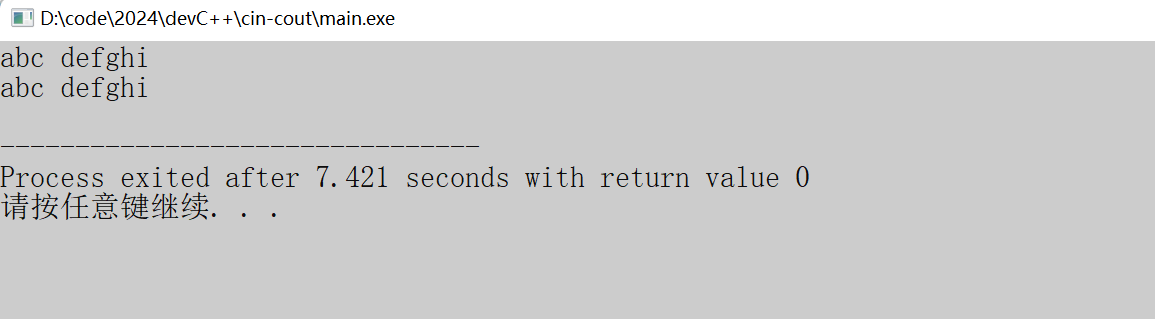
这种形式的getline函数从输入流中读取文本,直到遇到换行符为止,然后将读取的文本(不包含换行符)存储到指定的string类型的变量str中去。下面是详细的代码演示:
cpp
//代码1
#include<iostream>
#include <string>
using namespace std;
int main ()
{
 string name;
 getline (cin, name);
 cout << name << endl;

 return 0;
}
第二种geline函数允许用户自定义字符串的结束标志,它的一般格式:
cpp
getline(cin, string str, char delim)
//cin -- 表⽰从输⼊流中读取信息
//str 是存放读取到的信息的字符串
//delim 是⾃定义的结束标志
这种形式的getline函数从输入流中读取文本,直到遇到用户自己自定义的字符串结束标志为止,然后将读取到的文本存储到指定的string类型的变量str中去。下面是详细的代码演示:
cpp
//代码2
#include<iostream>
#include <string>
using namespace std;
int main ()
{
 string name;
 getline (cin, name, 'q');
 cout << name << endl;

 return 0;
}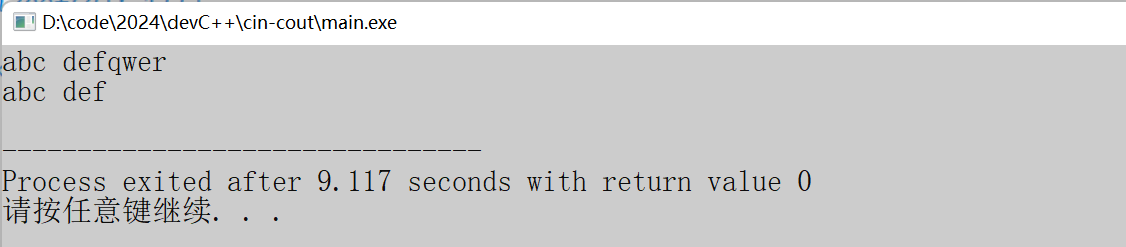
上述代码利用getline函数,获取键盘输入的字符串。通过函数的参数q,使得函数在读取到该字符时,停止读取。所以在输入一串带有q字符的字符串,读取完毕后打印会将包含q在内的后面字符串舍弃掉。
在使用C++中的string类型的字符串时,想要输入的字符串包含空格,那么就需要用到getline函数,所以该函数还是挺重要的,需要提起精神来学这个函数。
3.size
string中提供了成员函数size用于获取字符串的长度。在C++语言中,关于字符串的操作都是包含在string中的所以在调用其内部的函数,需要用到点运算符"."。使用示例:
cpp
#include <iostream>
#include <string> //添加string头⽂件
using namespace std;
int main()
{
 string s;
 string s1 = "hello";
 string s2 = "hello world";
 string s3 = "12ab!~ ";
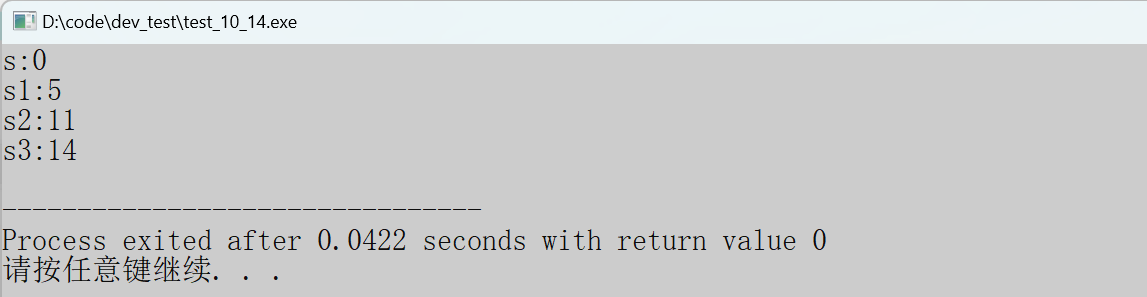
 cout << "s:" << s.size() << endl;
 cout << "s1:" << s1.size() << endl;
 cout << "s2:" << s2.size() << endl;
 cout << "s3:" << s3.size() << endl;
 return 0;
}
前面我们学到的像char、int、double等内置类型的数据在操作的时候,不会使用点操作符的。string是C++提供的一种复杂的封装类型,在string类型的变量中加入了操作这个字符串的各种方法。比如:求字符串的长度、在字符串末尾插入其他字符等操作。所以要对string类型的变量进行各种操作就需要用到点操作符。下面给出size函数使用的代码演示:
cpp
#incldue <iostream>
#include <string>
using namespace std;
int main()
{
 string s = "abcdef";
 int i = 0;
 for(i = 0; i < s.size(); i++)
 {
 cout << s[i] << " ";
 }
 return 0;
}
上述代码可以看出字符串可以利用下标进行每位字符的访问。所以size函数还是有用的。当需要遍历字符串的时候,就需要用到size函数求出字符串的长度,从而作为遍历字符串循环的循环判断条件。
4.迭代器
迭代器是一种对象,它可以用来遍历容器(现在学习的string就是一种容器)中的元素,迭代器的作用类似于指针,或者数组的下标。不过要注意的是:访问迭代器指向的值时,需要用到解引用操作符(*),C++语言中提供了多种迭代器,用于遍历和操作字符串的内容,下面给大家介绍一些常用的迭代器:
(1)迭代器介绍
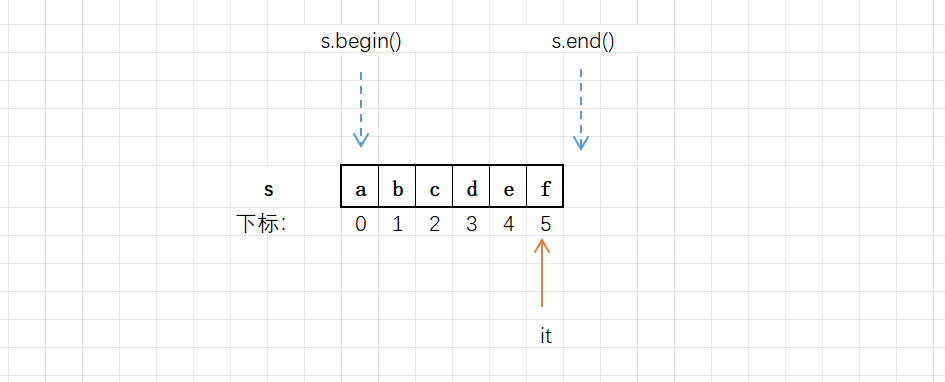
- begin() :返回指向字符串的第一个字符的迭代器,需要一个迭代器的变量来接受。
- end():返回指向字符串最后一个元素的下一个位置的迭代器(该位置不属于本字符串)
- string中begin()和end()返回的迭代器类型是string::iteartor,可以根据这个类型创建迭代器。
下面给出迭代器的详细位置示意图:
cpp
string s = "abcdef";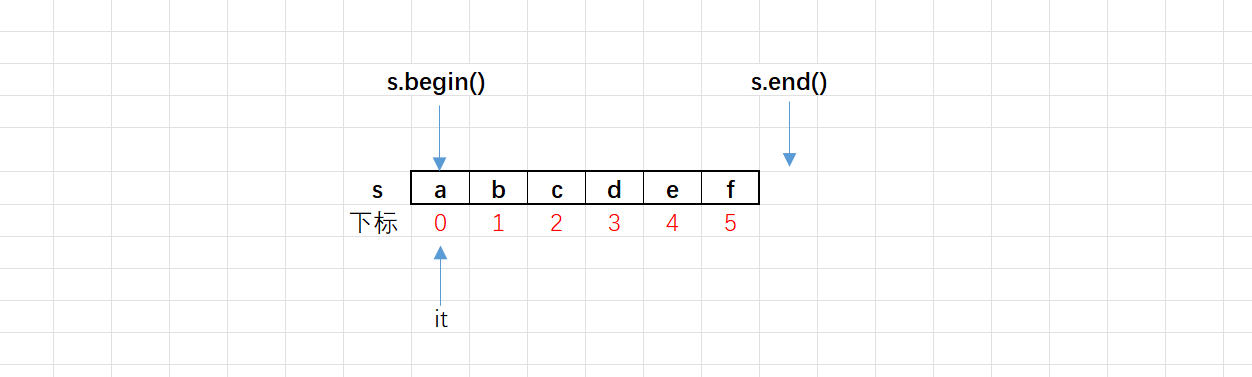
迭代器可以进行大小比较,也可以进行加或减的整数运算。比如:it++:指的是让迭代器前进一步,指向上一个字符的位置;it--指的就是让迭代器后退一步,指向下一个字符的位置;同一个容器的迭代器可以相减,其结果的绝对值是两迭代器之间元素的个数。下面是迭代器相关操作的代码演示:
(2)迭代器使用
cpp
#include <iostream>
#include <string>
using namespace std;
int main()
{
 string s = "abcdef";
 string::iterator it1 = s.begin();
 string::iterator it2 = s.end();
 cout << (it1 < it2) << endl;
 cout << it1 - it2 << endl;
 return 0;
}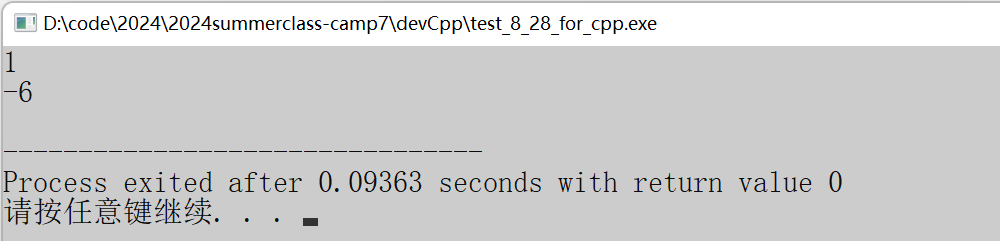
首先通过string创建一个字符串变量s,内容为abcdef。随后通过迭代器的类型创建了两个迭代器,分别指向了字符串的首位置和末位置的下一个位置。最后通过打印两个迭代器相减的值可以得到字符串的字符数。
根据上面的演示,我们可以使用迭代器正序列的遍历字符串,下面是相关的代码演示:
cpp
#include <iostream>
#include <string>
using namespace std;
int main()
{
 string s = "abcdef";
 //auto it 是让编译器⾃动推到it的类型
 for (auto it = s.begin(); it != s.end(); ++it)
 {
 cout << *it << ' ';
 }

 //string::iterator 是正向迭代器类型
 //string::iterator it,是直接创建迭代器,it是针对字符串的迭代器
 for (string::iterator it = s.begin(); it != s.end(); ++it)
 {
 cout << *it << ' ';
 }
 return 0;
}
在循环过程中,使用迭代器遍历字符串的每一个字符,在这期间创建迭代器可以用auto关键字,可以省去写字数较多的string::iterator类型。
通过使用解引用操作符,进行解引用迭代器,从而得到迭代器指向的字符。在此期间迭代器运算可以改变迭代器指向的位置。
当然也可以逆序进行字符串的遍历,下面是相关的代码演示:
cpp
#include <iostream>
#include <string>
using namespace std;
int main()
{
 string s = "abcdef";
 for (string::iterator it = s.end() - 1; it >= s.begin(); --it)
 {
 cout << *it << ' ';
 }
 return 0;
}
通过迭代器找到元素后,改变迭代器指向的元素,是可以直接改变字符串内容的。下面是代码演示:
cpp
#include <iostream>
#include <string>
using namespace std;
int main()
{
 string str = "abcdef";
 cout << str << endl;
 for (string::iterator it = str.begin(); it != str.end(); ++it)
 {
 *it = 'x';
 }
 cout << str << endl;
 return 0;
}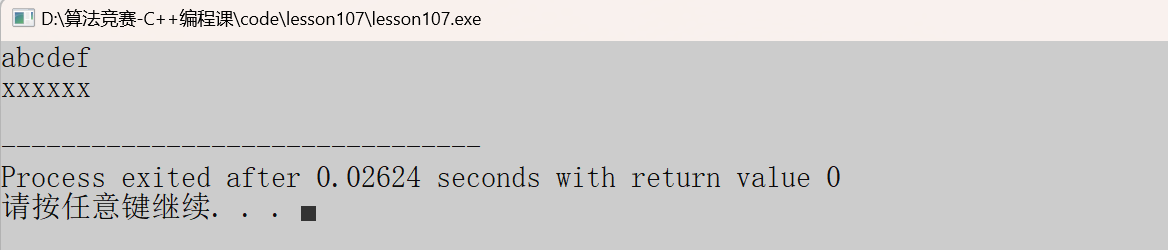
通过循环的方式,利用解引用操作符,将字符串的每一个元素都换成了字符x。所以说迭代器类似于指针变量,会指向字符串的某一个位置,要想得到该位置的数据就需要用到解引用操作符。
5.push_back()
该函数也是string内部的成员函数,其作用是在字符串的末尾插入一个字符,下面是其应用的代码演示:
cpp
#include <iostream>
#include<string> //添加string头⽂件
using namespace std;
int main()
{
 //向空字符串中尾插字符
 string s;
 s.push_back('h');
 s.push_back('e');
 s.push_back('l');
 s.push_back('l');
 s.push_back('o');
 cout << s << endl;
 //向⾮空字符串中尾插字符
 string s1 = "hello ";
 s1.push_back('w');
 s1.push_back('o');
 s1.push_back('r');
 s1.push_back('l');
 s1.push_back('d');
 cout << s1 << endl;
 //批量插⼊字符
 string s2;
 for (char c = 'a'; c <= 'f'; c++)
 {
 s2.push_back(c);
 }
 cout << s2 << endl;
 return 0;
}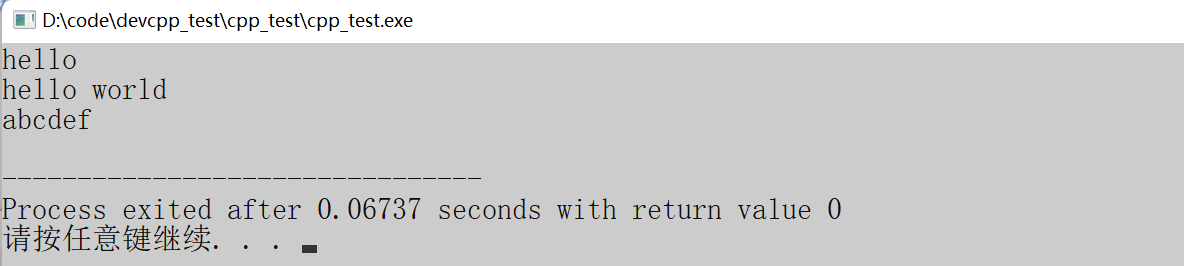
从上述代码可以看出,只需要利用点操作符就可以调用该函数,该函数的参数为需要插入的字符。调用该函数,就会让参数的字符插入到string创建的变量字符串的末尾。
6.字符串的运算
上一点讲述了在字符串后面加一个字符的成员函数,但是大部分情况都需要在字符串的末尾继续添加一个字符串。其实string类型的字符串是支持+和+=运算的。这种运算本质是string重载了operator+=这个操作符。具体请看下面的代码演示:
cpp
#include <iostream>
#include <string> //添加string头⽂件
using namespace std;
int main()
{
 string s = "hello";
 s += " world"; //字符串⽤双引号,等价于 s = s + " world"
 cout << s << endl;

 //除了+=操作,也可以使⽤'+'灵活进⾏字符串拼接
 //1.尾部拼接
 string s1 = "hello";
 cout << s1 + " world" << endl; //s1仍然是"hello"

 s1 = s1 + " world";
 cout << s1 << endl; //s1是"hello world"


 //2.头部拼接
 string s2 = "hello";
 s2 = "world " + s2 ;
 cout << s2 << endl; //s2为:"world hello"

 return 0;
}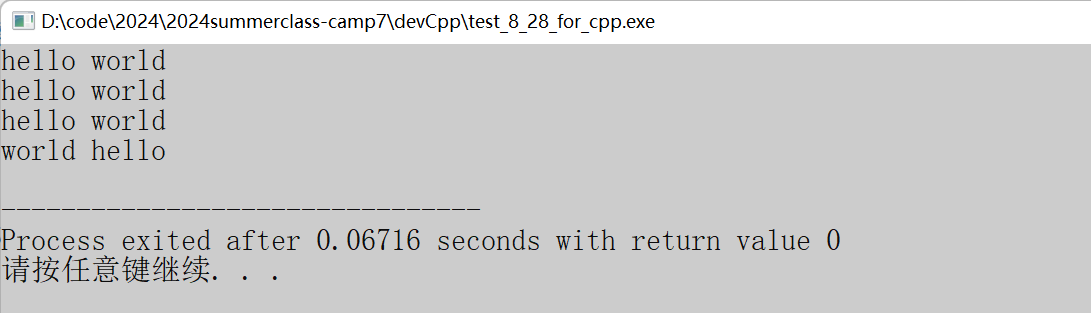
上述代码展示了+和+=在string字符串运算时的区别。前者指的是将字符串后面加上一个字符串;后者是将该字符串末尾加上一个字符串后赋值给自己。
7.pop_back()
该函数用于删除字符串尾部的一个字符。这个成员函数是C++11标准引入的,有些编译器可能不支持,所以需要进行相关的编译器操作(上一章节有讲过)。下面是详细的代码演示:
cpp
#include <iostream>
#include<string>
using namespace std;
int main()
{
 string s = "hello";
 cout << "s:" << s << endl;
 //尾删
 s.pop_back();
 cout << "s:" << s << endl;
 //尾删
 s.pop_back();
 cout << "s:" << s << endl;
 return 0;
}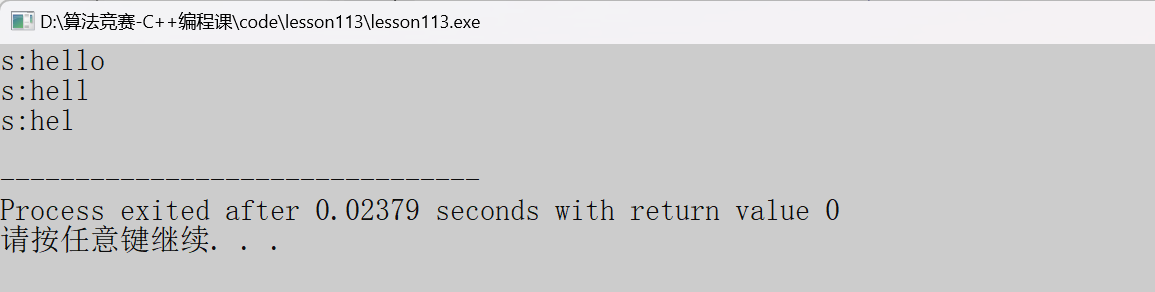
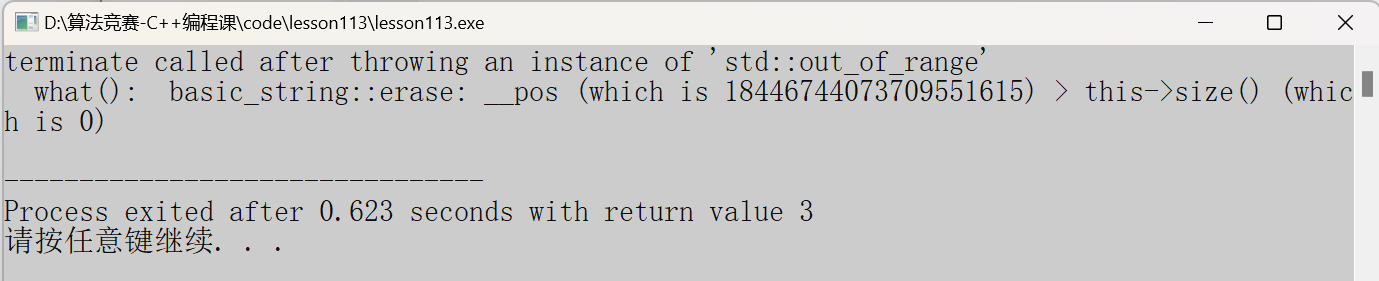
上面代码是字符串的尾删字符时的代码,这里需要注意的是,当字符串为空字符串时,还依然继续尾删字符就会出现程序异常。这种行为是系统未定义的行为,应该避免使用。下面是错误的代码演示:
cpp
#include <iostream>
#include <string> //添加string头⽂件
using namespace std;
int main()
{
 string s;
 s.pop_back();
 return 0;
}
为了避免为空字符串进行尾删,可以将代码修改成下面的形式:
cpp
#include <iostream>
#include<string> //添加string头⽂件
using namespace std;
int main()
{
 string s = "abc";
 while(s.size() > 0) //通过size()函数来控制字符串的⻓度
 {
 s.pop_back();
 }
 return 0;
}
通过size成员函数判断字符串的大小,当字符串的大小大于0的时侯再进行尾删,防止出现上面的系统未定义行为的发生。
8.insert
当我们需要在字符串的中间某个位置插入一个字符串就可以调用insert函数,下面是函数的具体介绍:
cpp
string& insert (size_t pos, const string& str); //pos位置前⾯插⼊⼀个string字符串
string& insert (size_t pos, const char* s); //pos位置前⾯插⼊⼀个C⻛格的字符串
string& insert (size_t pos, size_t n, char c);//pos位置前⾯插⼊n个字符c
第一行:将pos位置前面插入一个string类型的字符串。
第二行:pos前面的位置插入一个C语言风格的字符串。
第三行:pos位置前面插入n个字符c。
上面三行含糊对应着不同的插入方式,下面请看具体的代码演示:
cpp
#include <iostream>
#include <string>
using namespace std;
int main()
{
 string s = "abcdefghi";
 string str = "xxx";
 cout << s << endl;
 s.insert(3, str);
 cout << s << endl;
 return 0;
}
上面代码对应了第一行的函数,将一个string类型的字符串插入3的位置处,随后打印出插入之后的字符串。
cpp
#include <iostream>
#include <string>
using namespace std;
int main()
{
 string s = "abcdefghi";
 cout << s << endl;
 s.insert(3, "xxx");
 cout << s << endl;
 return 0;
}
上述代码对应第二行的函数,将一个具有C语言风格的字符串插入到string类型的字符串的第3个位置处。最后打印出插入之后的字符串。
cpp
#include <iostream>
#include <string>
using namespace std;
int main()
{
 string s = "abcdefghi";
 cout << s << endl;
 s.insert(3, 3, 'x');
 cout << s << endl;
 return 0;
}
上述代码对应第三行的函数,目的是将3个x字符插入字符串下标为3的位置处。
9.find
该函数用于在字符串中查找指定的字符串,并返回字符串第一次出现的位置下标。下面是图片解释: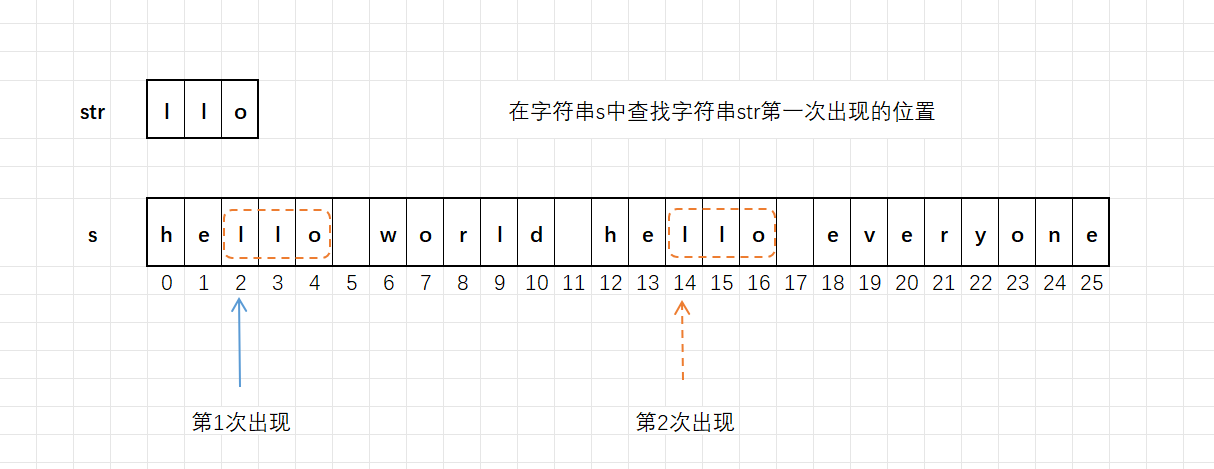
cpp
size_t find (const string& str, size_t pos = 0) const;
//查找string类型的字符串str,默认是从头开始查找,pos可以指定位置开始
size_t find (const char* s, size_t pos = 0) const;
//查找C⻛格的字符串s,默认是从头开始查找,pos可以指定位置开始
size_t find (const char* s, size_t pos, size_t n) const;
//在字符串的pos这个位置开始查找C⻛格的字符串s中的前n个字符,
size_t find (char c, size_t pos = 0) const;
//查找字符c,默认是从头开始,pos可以指定位置开始
若能找到,返回字符串第一次出现的起始位置的下标。
若没有找到,返回整型数值npos。通常判断find()函数的返回值是否等于npos就可以知道是否查找成功。
cpp
//代码1
#include <iostream>
#include <string> //添加string头⽂件
using namespace std;
int main()
{
 string s = "hello world hello everyone";
 string str = "llo";
 //查找string类型的字符串
 size_t n = s.find(str);
 cout << n << endl;

 n = s.find(str, n + 1); //从n+1这个指定位置开始查找
 cout << n << endl;

 //查找C⻛格的字符串
 n = s.find("llo");
 cout << n << endl;

 n = s.find("llo", n + 1); //从n+1这个指定位置开始查找
 cout << n << endl;

 return 0;
}
上述代码展示了find函数的用法,首先第一次函数调用是为了了查找sting类型的str字符串,所以函数的参数直接为str字符串;第二次函数调用是为了再次在s字符串中查找str字符串,所以多了个函数参数,表示在n+1的位置处开始进行查找,将第一次查找的位置掠过;第三次函数调用是为了查找C语言风格的字符串,直接将双引号引起的字符串当作函数的参数即可。
cpp
//代码2
#include <iostream>
#include <string> //添加string头⽂件
using namespace std;
int main()
{
 string s = "hello world hello everyone";
 //在s中,0这个指定位置开始查找"word"中的前3个字符
 size_t n = s.find("word", 0, 3);
 cout << n << endl;

 n = s.find("everyday", n+1, 5);
 cout << n << endl;
 return 0;
}
cpp
//代码3
#include <iostream>
#include <string> //添加string头⽂件
using namespace std;
int main()
{
 string s = "hello world hello everyone";
 size_t n = s.find('o');
 cout << n << endl;

 n = s.find('o', n + 1);
 cout << n << endl;
 return 0;
}
cpp
//查找不到的情况
#include <iostream>
#include <string> //添加string头⽂件
using namespace std;
int main()
{
 string s = "hello world hello everyone";
 string str = "bit";

 size_t n = s.find(str);
 cout << n << endl;

 if(n != string::npos)
 cout << "找到了,位置是:" << n << endl;
 else
 cout << "没有找到" << endl;

 return 0;
}
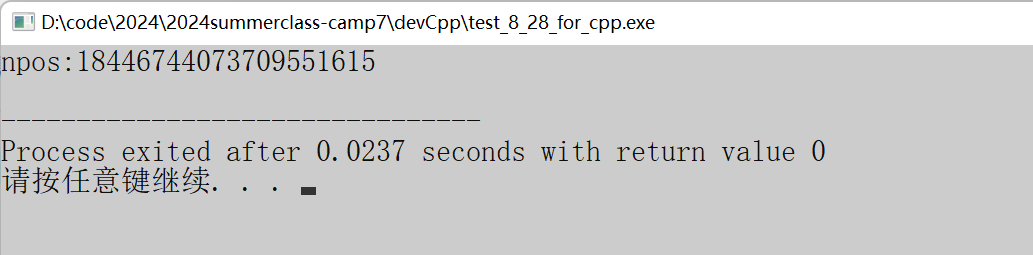
上述代码是查找不到的情况。查找字符串时,有可能找不到,这时候该函数就会返回npos这个整型数值。该数字并不是一个随机数字,而是string中定义的一个静态常量npos。通常会判断find函数的返回值是否等于npos这个整型值来判断是否找到目标字符串。下面是npos静态变量的定义方式:
cpp
static const size_t npos = -1;
cpp
#include <iostream>
#include <string> //添加string头⽂件
using namespace std;
int main()
{
 //注意:npos是string中定义的,使⽤npos需要带上string::指明是string类中的
 cout << "npos:" << string::npos << endl;
 return 0;
}
10.substr()
该函数用于截取字符串指定位置指定长度的字串,函数原型如下:
cpp
string substr (size_t pos = 0, size_t len = npos) const;
//pos 的默认值是0,也就是从下标为0的位置开始截取
//len 的默认值是npos,意思是⼀直截取到字符串的末尾
- substr():如果不传参数,就是从下标为0的位置开始截取,直到结尾,得到的是整个字符串。
- substr(pos):从指定下标pos位置开始截取字串,直到结尾。
- substr(pos,len):从指定下标pos位置开始截取长度为len的字串
下面是两种参数,函数的不同表现:
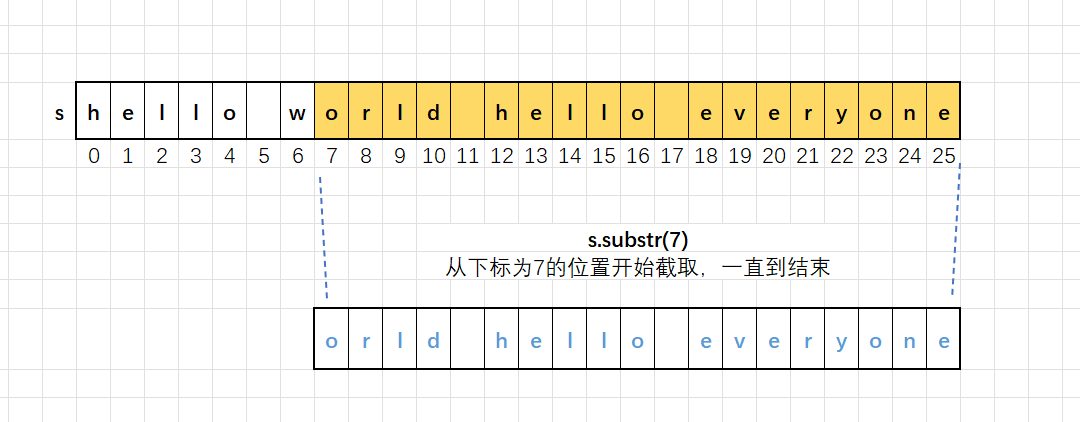
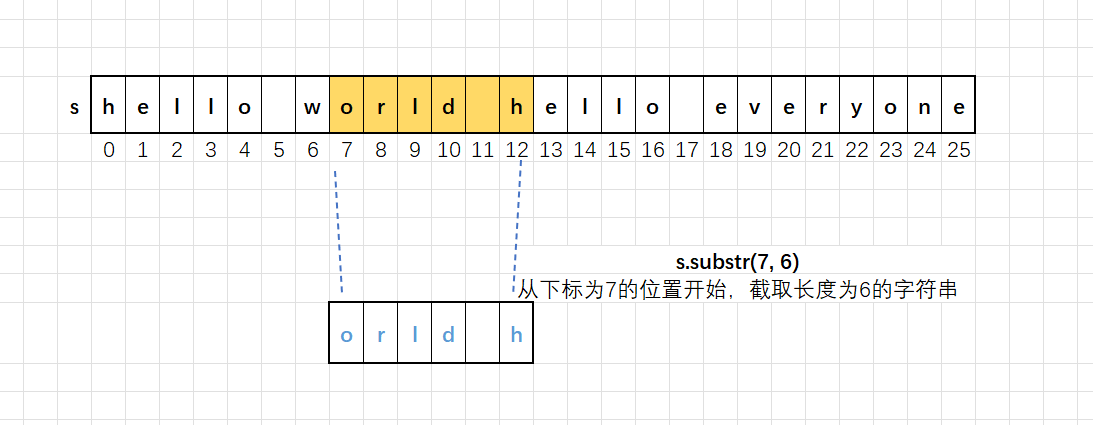
该函数的返回值类型是string,返回的是截取到的字符串,可以使用string类型的字符串接收。具体代码如下:
cpp
#include <iostream>
#include<string> //添加string头⽂件
using namespace std;
int main()
{
 string s = "hello world hello everyone";
 string s1 = s.substr(7);
 cout << s1 << endl;
 string s2 = s.substr(7, 6);
 cout << s2 << endl;
 return 0;
}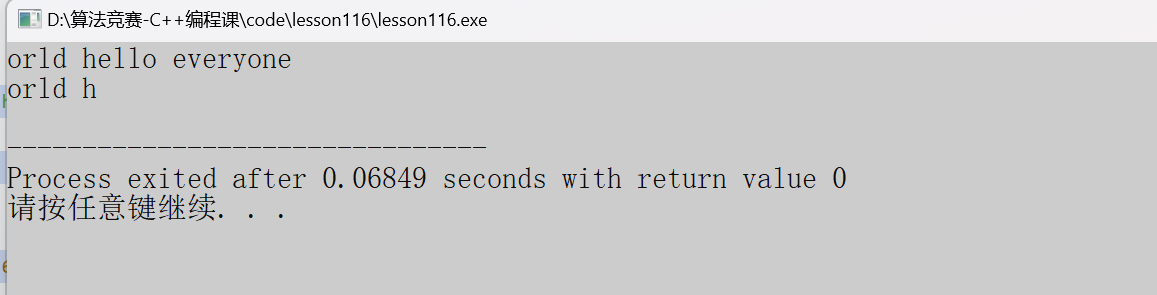
上述代码利用该函数使用不同的参数,达到的效果也不同。第一次调用从下标为7的位置处将字符串开始截取;第二次函数的调用是从下标为7的位置处,截取6个字符。在给函数使用时,往往会与find函数配合使用,find函数负责找到位置,该函数便可以从这个位置处向后获得字符串。下面是相关的代码演示:
cpp
#include <iostream>
#include<string> //添加string头⽂件
using namespace std;
int main()
{
 string s = "hello world hello everyone";
 size_t n = s.find("world");
 string s2 = s.substr(n, 10);
 cout << s2 << endl;
 return 0;
}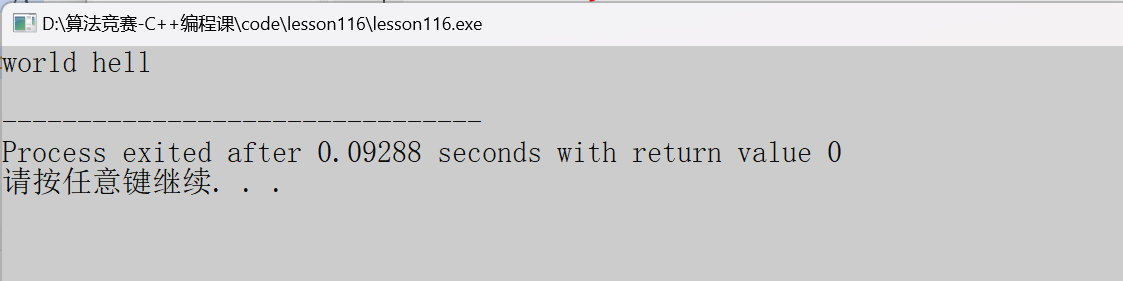
上述代码是该函数和find函数配合使用的情况,在找到字符串的world字符串时,返回第一个字符出现的位置,随后从此处开始截取10个字符。
11.string的关系运算
在实际写代码的过程种,经常会涉及到两个字符比较大小,比如:判断你输入的密码是否正确,就需要将用户输入的字符串与数据库的正确密码作比较。那么string类型的字符串怎么比较大小呢?其实这样理论比较复杂,涉及到了运算符的重载。但是在使用的时候比较方便,下面来详细讲解一下:
(1)支持的关系运算
cpp
string s1 = "abc";
string s2 = "abcd";
char s3[] = "abcdef"; //C⻛格的字符串
//(1) s1 == s2
bool operator== (const string& lhs, const string& rhs);//使⽤⽅式:s1 == s2
bool operator== (const char* lhs, const string& rhs);//使⽤⽅式:s3 == s1
bool operator== (const string& lhs, const char* rhs);//使⽤⽅式:s1 == s3
//(2) s1 != s2
bool operator!= (const string& lhs, const string& rhs);//使⽤⽅式:s1 != s2
bool operator!= (const char* lhs, const string& rhs);//使⽤⽅式:s3 != s1
bool operator!= (const string& lhs, const char* rhs);//使⽤⽅式:s1 != s3
//(3) s1 < s2
bool operator< (const string& lhs, const string& rhs);//使⽤⽅式:s1 < s2
bool operator< (const char* lhs, const string& rhs);//使⽤⽅式:s3 < s1
bool operator< (const string& lhs, const char* rhs);//使⽤⽅式:s1 < s3
//(4) s1 <= s2
bool operator<= (const string& lhs, const string& rhs);//使⽤⽅式:s1 <= s2
bool operator<= (const char* lhs, const string& rhs);//使⽤⽅式:s3 <= s1
bool operator<= (const string& lhs, const char* rhs);//使⽤⽅式:s1 <= s3
//(5) s1 > s2
bool operator> (const string& lhs, const string& rhs);//使⽤⽅式:s1 > s2
bool operator> (const char* lhs, const string& rhs);//使⽤⽅式:s3 > s1
bool operator> (const string& lhs, const char* rhs);//使⽤⽅式:s1 > s3
//(6) s1 >= s2
bool operator>= (const string& lhs, const string& rhs);//使⽤⽅式:s1 >= s2
bool operator>= (const char* lhs, const string& rhs);//使⽤⽅式:s3 >= s1
bool operator>= (const string& lhs, const char* rhs);//使⽤⽅式:s1 >= s3
上述的关系运算符的重载看着比较复杂,但是使用起来非常方便。这里需要注意的是:字符串的比较是遵循字典序进行的,并不是简单的比较字符串的长度。(比较的是对应位置上的ASCII码值),下面举例说明这一道理:
"abc" < "aq":b的ASCII码值是小于q的,所以字符串通过比较下来的结论是:"abc" < "aq"
下面是字符串的运算相关的代码演示:
cpp
#include <iostream>
#include<string>
using namespace std;
int main()
{
 string s1 = "hello world";
 string s2 = "hello";
 if (s1 == (s2 + " world"))
 {
 cout << "s1 == s2" << endl;
 }
 else
 {
 cout << "s1 != s2" << endl;
 }

 return 0;
}
上述代码通过加法操作将两个字符串拼接在一起。这样更加方便,因为s2后面添加的字符串和相较于s1缺少的字符相同,所以最终代码会打印出是s1==s2的字样。
cpp
#include <iostream>
#include <string>
using namespace std;
int main()
{
 string s1 = "abcd";
 string s2 = "abbcdef";
 char s3[] = "bbc";
 if (s1 > s2)
 cout << "s1 > s2" << endl;
 else
 cout << "s1 <= s2" << endl;
 if (s1 == s2)
 cout << "s1 == s2" << endl;
 else
 cout << "s1 != s2" << endl;
 if (s1 <= s3)
 cout << "s1 <= s3" << endl;
 else
 cout << "s1 > s3" << endl;
 return 0;
}
(2)与string相关的函数
<1>stoi/stol
stoi函数是将字符串转化为int类型值的值。
stol函数会将字符串转换为long int类型的值。
下面是两个函数的函数原型:
cpp
int stoi (const string& str, size_t* idx = 0, int base = 10);
long stol (const string& str, size_t* idx = 0, int base = 10);
- str表示被转换的string类型的字符串
- idx指的是一个输出型的参数,也就是这个通过参数会带回一个值。idx是一个指针,需要在函数外创建一个size_t类型的值,传递它的地址给idx,这个参数会带回str中无法匹配的第一个位置处的下标值。
- base表示被解析的字符串的进制值,可以是2.8.10.16或者其它进制值。默认情况下是10,表示10进制数字。如果传递的是2,表示被解析的字符串是二进制数字,最终会转换为10进制的数字。如果传递的是0,会根据字符串的内容信息自动推导进制。比如字符串首位置有0X,就会被认为是16进制,0开头会被认为是8进制,最终都会转换为10进制。
下面是该函数应用的代码演示:
cpp
#include <iostream>
#include<string>
using namespace std;
int main()
{
 size_t pos = 0;
 string s1 = "11x34";
 int ret1 = stoi(s1, &pos, 16);
 cout << ret1 << endl;
 cout << "pos:" << pos << endl;
 string s2 = "11x34";
 int ret2 = stoi(s2, &pos, 2);
 cout << ret2 << endl;
 cout << "pos:" << pos << endl;
 string s3 = "0x11x34";
 int ret3 = stoi(s3, &pos, 0);
 cout << ret3 << endl;
 cout << "pos:" << pos << endl;
 return 0;
}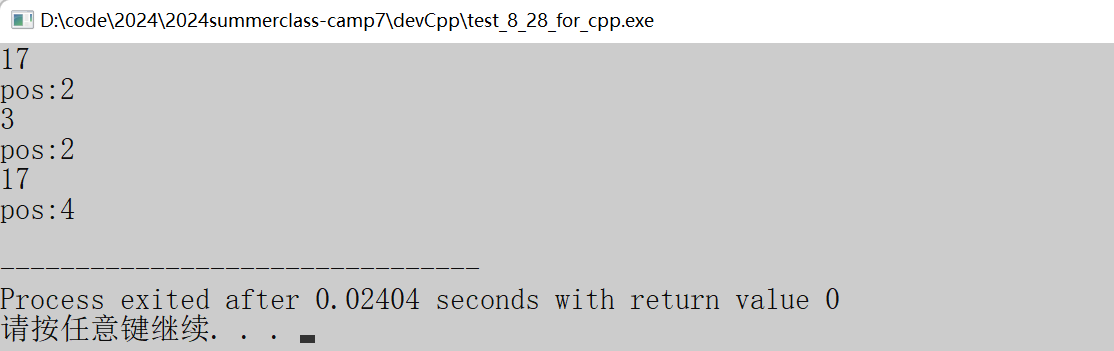
上述代码在第一次函数调用时,将s1字符串16进制的数字转换为10进制的数字,并且第一个不匹配的字符是下标为2的字符。第二次函数调用,将字符串2进制的数字转换为10进制的数字,这次第一个不匹配的字符依然是下标为2的字符;当第三次函数调用需要将这个字符串转换为十进制数字,这里参数为0,通过推断得知字符串为16进制的数字,所以函数会将字符串当作十六进制的数字并转换为10进制的数字。
<2>stod/stof
stod函数会将字符串转换为double类型的值,stof函数会将字符串转换为folat类型的值。两个函数和stoi函数比较的话,参数少了字符串数字进制的参数,其它的数据都是相同的。函数原型如下:
cpp
double stod (const string& str, size_t* idx = 0);
float stof (const string& str, size_t* idx = 0);
cpp
#include <iostream>
#include<string>
using namespace std;
int main()
{
 string s = "3.14x456";
 double ret = stod(s, NULL);
 cout << ret << endl;
 return 0;
}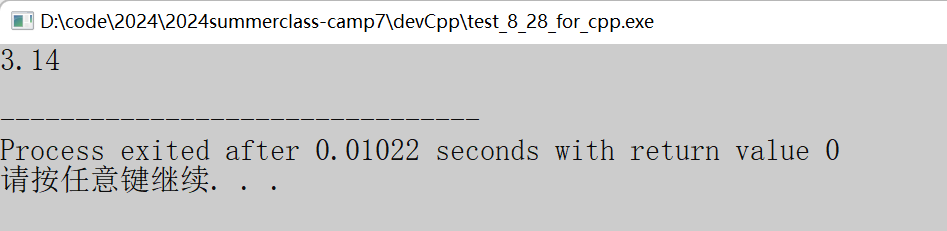
该函数调用,会将字符串s转换为double类型的值。因为x不是浮点类型,所以字符串就会将x之前的数据作为返回值传回。
<3>to_string
该函数可以将数字转换为字符串,这里的数字可以是整型、浮点型的数字。函数原型如下:
cpp
string to_string (int val);
string to_string (long val);
string to_string (long long val);
string to_string (unsigned val);
string to_string (unsigned long val);
string to_string (unsigned long long val);
string to_string (float val);
string to_string (double val);
string to_string (long double val);
cpp
#include <iostream>
#include <string>
using namespace std;
int main()
{
 string pi = "pi is " + to_string(3.14159);
 cout << pi << endl;
 return 0;
}
因为字符串和浮点类型不能直接相加,所以通过该函数将浮点类型的数值变换为字符串类型的值。最后进行两个字符串类型的值进行相加。