文章目录
- kubernetes弹性伸缩
-
- [水平自动伸缩 HPA](#水平自动伸缩 HPA)
- 案例:通过Prometheus及HPA实现kubernetes应用水平自动伸缩
- [垂直自动伸缩 VPA](#垂直自动伸缩 VPA)
-
- 1:部署metircs-server
- 2:升级openssl
- 3:部署VPA
- 案例:VPA应用updateMode:"Off"
- [案例:VPA应用案例 updateMode:"Auto"](#案例:VPA应用案例 updateMode:"Auto")
kubernetes弹性伸缩
水平自动伸缩 HPA
1:介绍
HPA,全称Horizontal Pod Autoscaler,可以基于CPU利用率自动扩容ReplicationController、 Deployment和ReplicaSet中的Pod数量。除了 CPU 利用率,也可以基于其他应程序提供的自定义度量指标来执行自动扩缩。
Pod 自动扩缩不适用于无法扩缩的对象,比如DaemonSet。
Pod 水平自动扩缩特性由KubernetesAPI资源和控制器实现。资源决定了控制器的行为。控制器会周期 性的调整副本控制器或Deployment中的副本数量,以使得Pod 的平均 CPU 利用率与用户所设定的目标 值匹配。
HPA 定期检查内存和CPU等指标,自动调整Deployment中的副本数;
实际生产中,广泛使用这四类指标:
- Resource metrics-CPU核内存利用率指标
- Pod metrics -例如网络利用率和流量
- Object metrics -特定对象的指标,比如Ingress,可以按每秒使用请求数来扩展容器
- Custom metrics -自定义监控,比如通过定义服务响应时间,当响应时间达到一定指标时自动扩容
2:metircs-server部署
metrics-server可以查看资源(CPU、内存、存储)使用
创建metrics-server资源
bash
[root@master ~ 13:47:35]# wget https://github.com/kubernetes-sigs/metrics-server/releases/latest/download/components.yaml -O metrics-server-components.yaml
[root@master ~ 13:48:58]# sed -i 's/registry.k8s.io\/metrics-server/registry.cn-hangzhou.aliyuncs.com\/google_containers/g' metrics-server-components.yaml
[root@master ~ 13:49:20]#  vim metrics-server-components.yaml
       - args:
       - --cert-dir=/tmp
       - --secure-port=10250
       - --kubelet-insecure-tls       #添加

[root@master ~ 13:49:53]#  kubectl apply -f metrics-server-components.yaml
[root@master ~ 13:50:03]# kubectl get pod -n kube-system
NAME                                       READY   STATUS    RESTARTS       AGE
calico-kube-controllers-658d97c59c-hv65v   1/1     Running   7 (42h ago)    9d
calico-node-6qfqq                          1/1     Running   0              4h45m
calico-node-c8z6p                          1/1     Running   0              4h46m
calico-node-qh7q6                          1/1     Running   0              4h45m
coredns-56666d8bb-6pts4                    1/1     Running   2 (42h ago)    44h
coredns-56666d8bb-dwkxn                    1/1     Running   2 (42h ago)    44h
etcd-master                                1/1     Running   7 (42h ago)    9d
kube-apiserver-master                      1/1     Running   17 (28h ago)   9d
kube-controller-manager-master             1/1     Running   7 (42h ago)    9d
kube-proxy-9rvrh                           1/1     Running   2 (42h ago)    44h
kube-proxy-knrxr                           1/1     Running   2 (42h ago)    44h
kube-proxy-td6dh                           1/1     Running   2 (42h ago)    44h
kube-scheduler-master                      1/1     Running   7 (42h ago)    9d
metrics-server-57999c5cf7-vlnx6            1/1     Running   0              84s
#注意看最后一个
3:HPA案例实战
部署应用服务
创建nginx的应用及服务
bash
[root@master ~ 13:51:27]# mkdir k8s_dir
[root@master ~ 14:02:16]# cd k8s_dir
[root@master k8s_dir 14:02:25]# vim nginx-svc.yaml
[root@master k8s_dir 14:04:58]# kubectl apply -f nginx-svc.yaml
deployment.apps/nginx-pod created
service/nginx created
#显示
apiVersion: apps/v1
kind: Deployment
metadata:
  name: nginx-pod
spec:
  replicas: 2
  selector:
    matchLabels:
      app: nginx
  template:
    metadata:
      labels:
        app: nginx
    spec:
      containers:
        - name: c1
          image: nginx:1.26-apline
          imagePullPolicy: IfNotPresent
          ports:
            - containerPort: 80
          resources:
            requests:
              cpu: 200m
              memory: 100Mi
---
apiVersion: v1
kind: Service
metadata:
  name: nginx
spec:
  type: NodePort
  ports:
    - port: 80
      targetPort: 80
      nodePort: 32222
  selector:
    app: nginx
查看资源
bash
[root@master k8s_dir 14:21:36]# kubectl get pod,svc
NAME                             READY   STATUS    RESTARTS   AGE
pod/nginx-pod-7d7db64798-79vbk   1/1     Running   0          81s
pod/nginx-pod-7d7db64798-wnhqk   1/1     Running   0          81s

NAME                 TYPE        CLUSTER-IP      EXTERNAL-IP   PORT(S)        AGE
service/kubernetes   ClusterIP   10.96.0.1       <none>        443/TCP        9d
service/nginx        NodePort    10.100.14.139   <none>        80:32222/TCP   81s
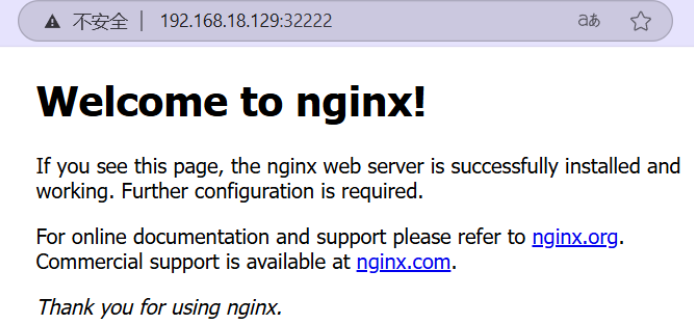
网站访问 http://192.168.18.129:32222/
创建HPA对象
这是一个 HorizontalPodAutoscaler(HPA)对象的配置,它将控制Deployment "nginx"的副本数量。当 CPU使用率超过50%时,HPA将自动增加 Pod 的副本数量,最高不超过10个。
bash
[root@master k8s_dir 14:22:06]# kubectl apply -f nginx-hpa.yaml
horizontalpodautoscaler.autoscaling/nginx-hpa created
#显示
apiVersion: autoscaling/v2
kind: HorizontalPodAutoscaler
metadata:
  name: nginx-hpa
spec:
  scaleTargetRef:
    apiVersion: apps/v1
    kind: Deployment
    name: nginx-pod   ##改为Deployment的实际名称,上一个yaml文件记载的
  #最小副本数
  minReplicas: 1
  #最大副本数
  maxReplicas: 10
  metrics:
    - type: Resource
      resource:
        name: cpu
        #目标类型的利用率
        target:
          type: Utilization
          #当平均CPU利用率超过50%的时,将触发自动伸缩操作
          averageUtilization: 50


#查看hpa
[root@master k8s_dir 14:22:21]# kubectl get hpa
NAME        REFERENCE          TARGETS         MINPODS   MAXPODS   REPLICAS   AGE
nginx-hpa   Deployment/nginx   0%/50%   1         10        0          11s
若scaleTargetRef.name的名字没有对应deployment的名称,则0%会变成
执行压测
安装压力测试工具
bash
[root@master ~ 13:31:18]# yum install -y httpd-tools
bash
[root@master k8s_dir 14:43:07]# ab -c 1000 -n 600000 http://192.168.18.129:32222/
This is ApacheBench, Version 2.3 <$Revision: 1430300 $>
Copyright 1996 Adam Twiss, Zeus Technology Ltd, http://www.zeustech.net/
Licensed to The Apache Software Foundation, http://www.apache.org/

Benchmarking 192.168.18.129 (be patient)
Completed 60000 requests
....#退出后会自动减少成最小副本数
观测pods数量自动扩容,从原来的2个变成9个
资源使用降低后,自动收缩,经过5分钟等待,发现pod的数量变回1个
案例:通过Prometheus及HPA实现kubernetes应用水平自动伸缩
1:metircs-server部署环境
上个案例已经部署完成
2:metallb部署
地址分配
bash
[root@master prom_hpa 09:44:32]# kubectl apply -f https://raw.githubusercontent.com/metallb/metallb/v0.15.2/config/manifests/metallb-native.yaml

[root@master server_dir 09:38:54]# kubectl get pod -n metallb-system
NAME                          READY   STATUS    RESTARTS   AGE
controller-8666ddd68b-khl6s   1/1     Running   0          3d16h
speaker-b688x                 1/1     Running   0          3d16h
speaker-bcdh8                 1/1     Running   0          3d16h
speaker-wg6mz                 1/1     Running   0          3d16h
配置二层网络
bash
#官网文件
[root@master prom_hpa 09:40:36]# vim ippool.yaml
[root@master prom_hpa 09:43:51]# cat ippool.yaml
apiVersion: metallb.io/v1beta1
kind: IPAddressPool
metadata:
  name: first-pool
  namespace: metallb-system
spec:
  addresses:
  - 192.168.18.200-192.168.18.210
开启二层通告
bash
[root@master prom_hpa 09:42:56]# vim l2.yaml
[root@master prom_hpa 09:44:07]# cat l2.yaml
apiVersion: metallb.io/v1beta1
kind: L2Advertisement
metadata:
  name: example
  namespace: metallb-system
应用YAML
bash
[root@master prom_hpa 09:43:37]# kubectl apply -f ippool.yaml -f l2.yaml 查看地址池
bash
[root@master prom_hpa 09:44:11]# kubectl get ipaddresspool -n metallb-system
NAME         AUTO ASSIGN   AVOID BUGGY IPS   ADDRESSES
first-pool   true          false             ["192.168.18.200-192.168.18.210"]
3:ingress nginx部署
域名解析
bash
[root@master prom_hpa 10:16:01]# vim deploy.yaml

spec:
  externalTrafficPolicy: Cluster   #修改为Cluster
  ipFamilies:
  - IPv4
  ipFamilyPolicy: SingleStack

[root@master prom_hpa 10:16:37]# kubectl apply -f deploy.yaml

[root@master prom_hpa 10:16:46]# kubectl get ns
NAME                   STATUS   AGE
default                Active   12d
ingress-nginx          Active   46s    #已经创建
kube-node-lease        Active   12d
kube-public            Active   12d
kube-system            Active   12d
kubernetes-dashboard   Active   11d
metallb-system         Active   3d19h
web-test               Active   6d19h
[root@master prom_hpa 10:41:35]# kubectl get pods,svc -n ingress-nginx
NAME                                            READY   STATUS    RESTARTS   AGE
pod/ingress-nginx-controller-555c8f5ff6-5xwbn   1/1     Running   0          2m59s

NAME                                         TYPE           CLUSTER-IP      EXTERNAL-IP      PORT(S)                      AGE
service/ingress-nginx-controller             LoadBalancer   10.102.70.193   192.168.18.201   80:32549/TCP,443:31643/TCP   2m59s
service/ingress-nginx-controller-admission   ClusterIP      10.104.41.123   <none>           443/TCP                      2m59s
4:Prometheus部署
helm(包管理组建)添加Prometheus仓库
先安装helm,在github上搜索helm
包管理
压缩包进行解压缩,并把命令文件放到系统命令目录
bash
[root@master prom_hpa 10:48:09]# tar -zxvf helm-v3.19.0-linux-amd64.tar.gz
linux-amd64/
linux-amd64/README.md
linux-amd64/LICENSE
linux-amd64/helm
[root@master prom_hpa 10:51:18]# ls
deploy.yaml  helm-v3.19.0-linux-amd64.tar.gz  ippool.yaml  l2.yaml  linux-amd64
[root@master prom_hpa 10:51:26]# cd linux-amd64/
[root@master linux-amd64 10:51:33]# ls
helm  LICENSE  README.md
[root@master linux-amd64 10:51:35]# mv helm /usr/bin/
[root@master linux-amd64 10:51:53]# helm version
version.BuildInfo{Version:"v3.19.0", GitCommit:"3d8990f0836691f0229297773f3524598f46bda6", GitTreeState:"clean", GoVersion:"go1.24.7"}
添加helm包的仓库源(使用魔法工具)
bash
[root@master linux-amd64 11:14:39]# helm repo add prometheus-community https://prometheus-community.github.io/helm-charts
"prometheus-community" has been added to your repositories
查看资源路径
bash
[root@master linux-amd64 11:17:05]# helm repo list
NAME                	URL
prometheus-community	https://prometheus-community.github.io/helm-charts
仓库软件更新
bash
[root@master linux-amd64 11:17:44]# helm repo update查看helm仓库中Prometheus版本
bash
[root@master linux-amd64 11:19:12]# helm search repo prometheus使用helm安装Prometheus全家桶
bash
[root@master prom_hpa 11:19:55]# mkdir promedir
[root@master prom_hpa 11:20:14]# cd promedir
[root@master promedir 11:20:18]# helm show values prometheus-community/kube-prometheus-stack --version 77.6.2 > kube-prometheus-stack.yaml
[root@master promedir 11:22:03]# ls
kube-prometheus-stack.yaml
Prometheus默认只启用对kubernetes集群组件监控,需要关闭,让它可以对所有应用进行服务发现
bash
[root@master promedir 11:22:35]# vim kube-prometheus-stack.yaml
4138     serviceMonitorSelectorNilUsesHelmValues: false #修改为
安装部署Prometheus,命名为kps
bash
[root@master promedir 11:23:40]# helm install kps prometheus-community/kube-prometheus-stack --version 77.6.2 -f ./kube-prometheus-stack.yaml -n monitoring --create-namespace --debug检查创建的pod资源
bash
[root@master promedir 11:29:49]# kubectl --namespace monitoring get pod -l "release=kps"
NAME                                                READY   STATUS    RESTARTS   AGE
kps-kube-prometheus-stack-operator-c9ffdc7d-hhs74   1/1     Running   0          7m12s
kps-kube-state-metrics-bcd5b8dfc-4rsjg              1/1     Running   0          7m12s
kps-prometheus-node-exporter-5m8lt                  1/1     Running   0          7m12s
kps-prometheus-node-exporter-9lpgh                  1/1     Running   0          7m12s
kps-prometheus-node-exporter-trblf                  1/1     Running   0          7m12s
bash
[root@master promedir 11:31:41]# kubectl get svc -n monitoring
NAME                                     TYPE        CLUSTER-IP       EXTERNAL-IP   PORT(S)                      AGE
alertmanager-operated                    ClusterIP   None             <none>        9093/TCP,9094/TCP,9094/UDP   102s
kps-grafana   `grafana yaml文件里写入的服务名`                            ClusterIP   10.105.85.142    <none>        80/TCP                       7m25s
kps-kube-prometheus-stack-alertmanager   ClusterIP   10.97.171.5      <none>        9093/TCP,8080/TCP            7m25s
kps-kube-prometheus-stack-operator       ClusterIP   10.107.238.44    <none>        443/TCP                      7m25s
kps-kube-prometheus-stack-prometheus  `prometheus yaml文件里写入的服务名`   ClusterIP   10.101.18.103    <none>        9090/TCP,8080/TCP            7m25s
kps-kube-state-metrics                   ClusterIP   10.100.52.129    <none>        8080/TCP                     7m25s
kps-prometheus-node-exporter             ClusterIP   10.103.141.163   <none>        9100/TCP                     7m25s
prometheus-operated                      ClusterIP   None             <none>        9090/TCP                     101s
配置Prometheus及grafana通过ingress访问
配置Prometheus,grafana访问
bash
[root@master promedir 11:40:17]# kubectl apply -f prometheus-ingress.yaml -f grafana-ingress.yaml
ingress.networking.k8s.io/prometheus-ingress created
ingress.networking.k8s.io/grafana-ingress created
#显示prometheus-ingress.yaml
apiVersion: networking.k8s.io/v1
kind: Ingress
metadata:
  name: prometheus-ingress
  namespace: monitoring
spec:
  ingressClassName: nginx
  rules:
    - host: prometheus.abner.com
      http:
        paths:
          - backend:
              service:
                name: kps-kube-prometheus-stack-prometheus
                port:
                  number: 9090
            pathType: Prefix
            path: "/" #url: //prometheus.abner.com:9090/

#显示grafana-ingress.yaml
apiVersion: networking.k8s.io/v1
kind: Ingress
metadata:
  name: grafana-ingress
  namespace: monitoring
spec:
  ingressClassName: nginx
  rules:
    - host: grafana.abner.com
      http:
        paths:
          - backend:
              service:
                name: kps-grafana
                port:
                  number: 80
            pathType: Prefix
            path: "/" #url: //grafana.abner.com:80/
查看资源
bash
[root@master promedir 11:40:45]# kubectl get ingress -n monitoring
NAME                 CLASS   HOSTS                  ADDRESS          PORTS   AGE
grafana-ingress      nginx   grafana.abner.com      192.168.18.201   80      20s
prometheus-ingress   nginx   prometheus.abner.com   192.168.18.201   80      20s

#设置域名解析C:\Windows\System32\drivers\etc\hosts
192.168.18.201 grafana.abner.com
192.168.18.201 prometheus.abner.com
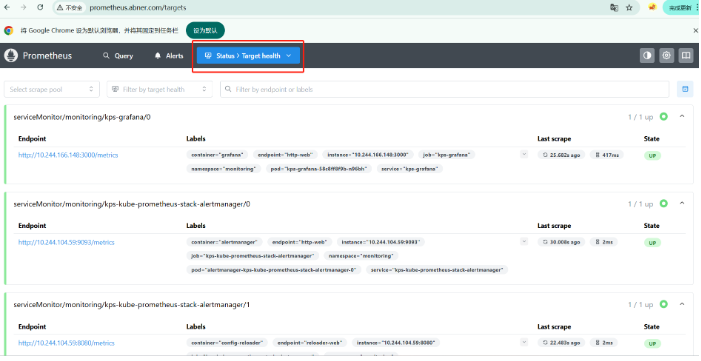
打开浏览器,访问Prometheus首页
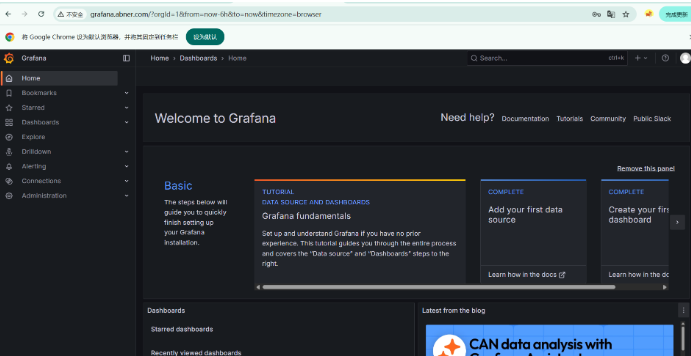
打开浏览器,访问grafana首页
获取用户名和密码
bash
[root@master promedir 11:41:05]# kubectl get secrets kps-grafana -n monitoring -o yaml
apiVersion: v1
data:
  admin-password: cHJvbS1vcGVyYXRvcg==   #密码
  admin-user: YWRtaW4=   #用户名
  ldap-toml: ""
kind: Secret
metadata:
  annotations:
    meta.helm.sh/release-name: kps
    meta.helm.sh/release-namespace: monitoring
  creationTimestamp: "2026-01-26T03:24:28Z"
  labels:
    app.kubernetes.io/instance: kps
    app.kubernetes.io/managed-by: Helm
    app.kubernetes.io/name: grafana
    app.kubernetes.io/version: 12.1.1
    helm.sh/chart: grafana-9.4.5
  name: kps-grafana
  namespace: monitoring
  resourceVersion: "381858"
  uid: 49dd5cd6-9e7b-42c3-ae6f-c5c037254c9a
type: Opaque

#使用base64解析密文
[root@master promedir 11:48:21]# echo -n "cHJvbS1vcGVyYXRvcg==" | base64 --decode
prom-operator
[root@master promedir 11:48:58]# echo -n "YWRtaW4=" | base64 --decode
admin
登录成功
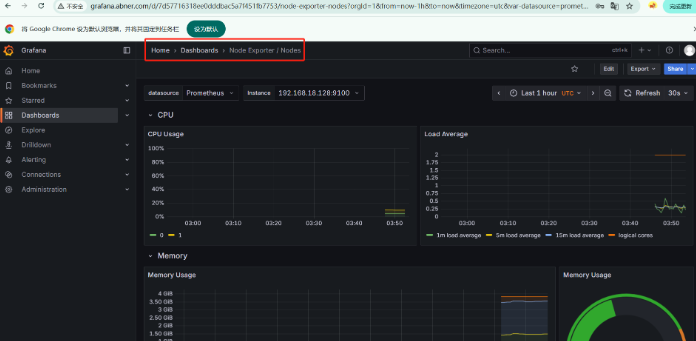
查看对所有node的数据监控
5:部署web类应用nginx
部署nginx应用
在pycharm中安装nginx配置插件,安装完要点击确定
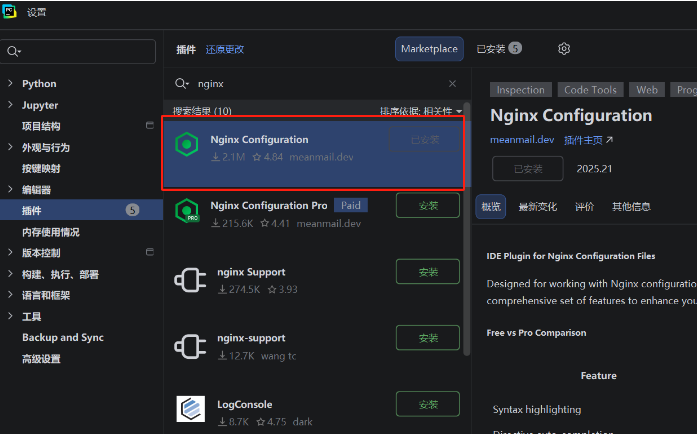
prometheus的时序数据库是tsdb
编写nginx.conf
bash
[root@master prom_hpa 13:53:29]# mkdir nginx_dir
[root@master prom_hpa 13:53:40]# cd nginx_dir/
[root@master nginx_dir 13:53:42]# vim nginx.conf
[root@master nginx_dir 13:58:42]# cat nginx.conf
worker_processes 1;
events { worker_connections 1024; }
http {
    server {
        listen 80;
        location / {
            root /usr/share/nginx/html;
            index index.html;
        }
        location /basic_status {
            stub_status;
            allow 127.0.0.1;
            deny all;
        }
    }
}
创建nginx配置资源
bash
[root@master nginx_dir 14:57:10]# kubectl create configmap nginx-config --from-file nginx.conf
configmap/nginx-config created
查看configmap资源
bash
[root@master promedir 15:24:24]# kubectl get cm
NAME               DATA   AGE
kube-root-ca.crt   1      12d
nginx-config       1      31m
创建应用nginx的YAML
bash
[root@master nginx_dir 14:58:51]# kubectl apply -f nginx-exporter.yaml
deployment.apps/nginx-exporter created
service/nginx-svc created
#显示
apiVersion: apps/v1
kind: Deployment
metadata:
  name: nginx-exporter
spec:
  replicas: 2
  selector:
    matchLabels:
      app: nginx
  template:
    metadata:
      labels:
        app: nginx
    spec:
      containers:
        #主容器
        - name: c1
          image: nginx:1.26-alpine
          imagePullPolicy: IfNotPresent
          ports:
            - containerPort: 80
          volumeMounts:
            - mountPath: /etc/nginx/nginx.conf
              subPath: nginx.conf
              name: nginx-config-volume
          resources:
            requests:
              cpu: 100m
              memory: 100Mi
        #边车容器(prometheus的监控exporter)
        - name: nginx-prometheus-exporter
          image: nginx/nginx-prometheus-exporter:latest
          imagePullPolicy: IfNotPresent
          args: ["-nginx.scrape-uri=http://localhost/basic_status"]
          ports:
            - containerPort: 9113
              name: exporter-port   `后面编写文件时需要标明的监控端口名`
          resources:
            requests:
              cpu: 50m
              memory: 100Mi
      #配置资源
      volumes:
        - name: nginx-config-volume
          configMap:
            name: nginx-config
---
apiVersion: v1
kind: Service
metadata:
  name: nginx-svc
spec:
  type: NodePort
  selector:
    app: nginx
  ports:
    - port: 80
      targetPort: 80
查看资源
bash
[root@master nginx_dir 14:59:29]# kubectl get pod
NAME                              READY   STATUS    RESTARTS   AGE
nginx-exporter-6d4f5f6cdf-gkfr5   2/2     Running   0          9m44s
nginx-exporter-6d4f5f6cdf-pksxl   2/2     Running   0          9m44s
在Prometheus中添加nginx监控配置
bash
[root@master nginx_dir 15:12:02]# cd ..
[root@master prom_hpa 15:12:07]# ls
deploy.yaml                      ippool.yaml  linux-amd64  promedir
helm-v3.19.0-linux-amd64.tar.gz  l2.yaml      nginx_dir
[root@master prom_hpa 15:12:16]# cd promedir/
[root@master promedir 15:12:23]# ls
grafana-ingress.yaml  kube-prometheus-stack.yaml  prometheus-ingress.yaml
[root@master promedir 15:12:24]# vim kube-prometheus-stack.yaml
#添加
     additionalScrapeConfigs:
       - job_name: 'nginx'  # 定义一个抓取任务,名字叫 nginx
         kubernetes_sd_configs:
            - role: pod  # 通过 Kubernetes 的 "pod" 服务发现机制找到目标
         relabel_configs:
            - source_labels: [__meta_kubernetes_pod_container_port_name]
              action: keep
              regex: exporter-port  # 只保留 port 名称为 exporter-port 的容器端口
            - source_labels: [__meta_kubernetes_namespace]
              target_label: namespace  # 把 Pod 的 namespace 写到 time series 的"namespace" 标签上
            - source_labels: [__meta_kubernetes_pod_name]
              target_label: pod
# 把 Pod 名称写到 time series 的 "pod" 标签上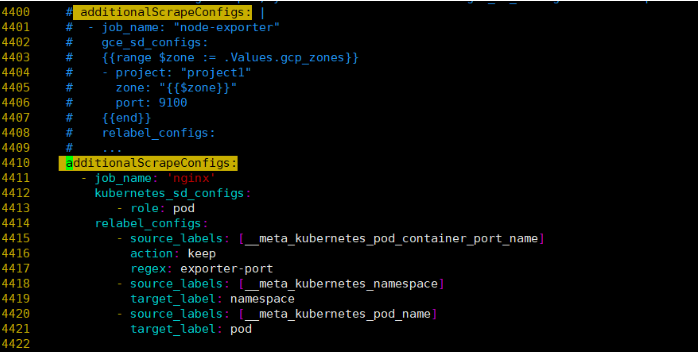
bash
工作逻辑
1:服务发现
kubernetes_sd_configs + role: pod → Prometheus 会去 K8s API 查询所有 Pod。

2:筛选目标
relabel_configs 的第一个规则:
从 Pod 的容器端口名字 (__meta_kubernetes_pod_container_port_name) 取值。
只有当端口名是 exporter-port 时,才保留这个 Pod 的端点。
也就是说,只有标记了 containerPort.name: exporter-port 的 Pod 才会被抓取。

3:加标签
第二条规则:把 Pod 所在的命名空间加到 time series 标签里,叫 namespace。
第三条规则:把 Pod 的名字加到 time series 标签里,叫 pod。
这样做的好处是,Prometheus 在查询/监控的时候可以方便区分 哪个 Pod / 哪个 Namespace 的 nginx 指标。
更新配置(魔法工具)
bash
[root@master promedir 15:23:10]# helm upgrade kps prometheus-community/kube-prometheus-stack --version 77.6.2 -f ./kube-prometheus-stack.yaml -n monitoring
Release "kps" has been upgraded. Happy Helming!
NAME: kps
LAST DEPLOYED: Mon Jan 26 15:23:22 2026
NAMESPACE: monitoring
STATUS: deployed
REVISION: 2
NOTES:
kube-prometheus-stack has been installed. Check its status by running:
  kubectl --namespace monitoring get pods -l "release=kps"

Get Grafana 'admin' user password by running:

  kubectl --namespace monitoring get secrets kps-grafana -o jsonpath="{.data.admin-password}" | base64 -d ; echo

Access Grafana local instance:

  export POD_NAME=$(kubectl --namespace monitoring get pod -l "app.kubernetes.io/name=grafana,app.kubernetes.io/instance=kps" -oname)
  kubectl --namespace monitoring port-forward $POD_NAME 3000

Visit https://github.com/prometheus-operator/kube-prometheus for instructions on how to create & configure Alertmanager and Prometheus instances using the Operator.
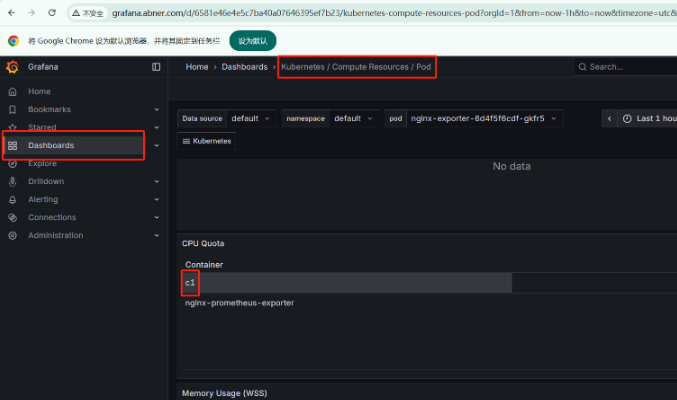
等待2-3分钟刷新Prometheus网页,可以查看到监控nginx应用的状态
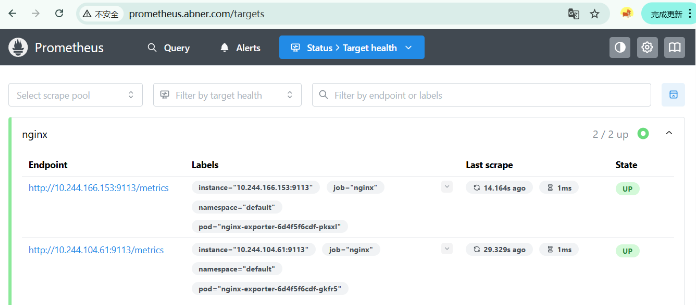
在Prometheus中查看nginx的请求数据
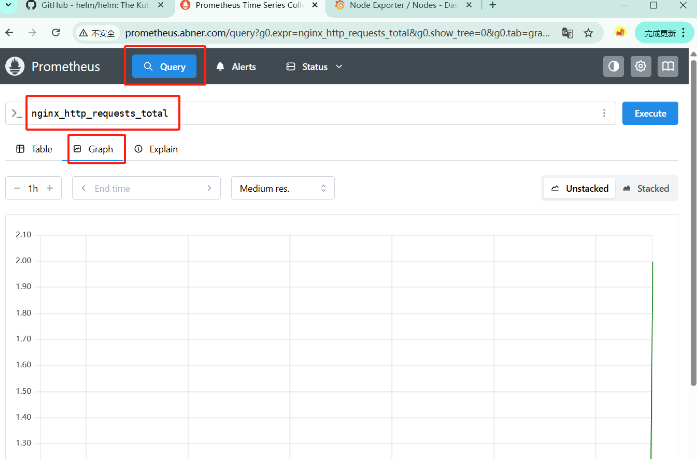
6:Prometheus-adapter
如果目标是使用HPA根据nginx_http_requests_total指标进行自动扩缩容,那么安装和配置 Prometheus-Adapter是必要的。这是因为HPA需要使用Kubernetes自定义指标API来访问这些指标,而Prometheus-Adapter正是用来提供 这个桥接功能的。
Prometheus-Adapter作为一个自定义指标API 服务器,允许Kubernetes集群使用Prometheus作为后 端来获取指标数据。这些数据可以用于Kubernetes中的水平自动扩缩容(HPA)或者KEDA(基于事件驱动自动扩缩容)。
在Kubernetes 生态系统中,Prometheus Adapter是一个重要的组件,用于集成Prometheus 和 Kubernetes的自动伸缩功能。"Adapter"在这里可以翻译为"适配器"。
-
适配器的角色:
Prometheus Adapter 充当了 Prometheus和Kubernetes之间的桥梁或适配器。它使Kubernetes 能够使用prometheus 中收集的指标来做出自动伸缩(如水平 Pod 自动伸缩)的决策。
-
工作原理:
- Prometheus 本身收集和存储了大量的指标数据,但Kubernetes的HPA(Horizontal Pod Autoscaler) 或VPA (vertical PodAutoscaler)无法直接使用这些数据。
- Prometheus Adapter的作用是将Prometheus中的指标转换为Kubernetes可以理解的格式, 并通过Kubernetes自定义指标API提供这些数据。
- 这样,当HPA 或VPA需要根据特定指标(如每秒 HTTP 请求的数量或特定队列的长度)来自动调整 Pod 的数量时,它们可以查询这些由Prometheus Adapter提供的指标。
-
配置和使用:
- 在Prometheus Adapter中,用户需要定义如何从Prometheus查询特定指标,以及如何将这 些指标映射到Kubernetes 可理解的资源上(如 Pod、服务等).
- 一旦配置完成并且Prometheus Adapter正在运行,用户可以在Kubernetes HPA 或VPA配置 中引用这些自定义指标,以实现基于更丰富指标集的自动伸缩策略。
-
实际应用:
- Prometheus Adapter 广泛应用于需要动态伸缩资源以适应不断变化工作负载的Kubernetes 集群中。
- 例如,如果某个服务在流量高峰期间需要更多的Pod 来处理请求,Prometheus Adapter 可 以提供相应的流量指标给HPA,HPA 再根据这些指标来增加Pod 的数量。
bash
[root@master promedir 16:09:31]# helm search repo prometheus-adapter
NAME                                   	CHART VERSION	APP VERSION	DESCRIPTION
prometheus-community/prometheus-adapter	5.2.0        	v0.12.0    	A Helm chart for k8s prometheus adapter
下载适配器YAML
bash
[root@master promedir 16:09:54]# helm show values prometheus-community/prometheus-adapter --version 5.2.0 > prometheus-adapter.yaml修改配置文件
bash
[root@master promedir 17:09:30]# vim prometheus-adapter.yaml
#修改
prometheus:
  # Value is templated
  url: http://kps-kube-prometheus-stack-prometheus.monitoring.svc.cluster.local.   #修改

#添加
startupProbe: {}

rules:
  default: false
  custom:
    - seriesQuery: 'nginx_http_requests_total{job="nginx",namespace!="",pod!=""}'
      resources:
        overrides:
          namespace:
            resource: "namespace"
          pod:
            resource: "pod"
      name:
        matches: "^nginx_http_requests_total$"
        as: "nginx_http_requests"
      metricsQuery: >
        sum(rate(nginx_http_requests_total{<<.LabelMatchers>>}[5m]))
        by (namespace, pod)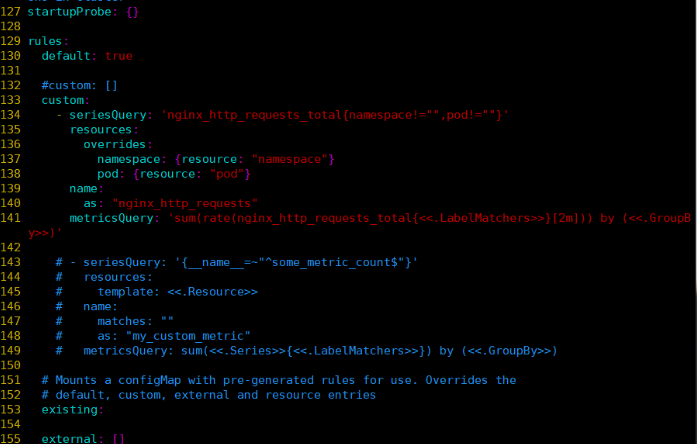
bash
说明:
要在 Prometheus-Adapter的配置文件中添加nginx_http_requests_total指标,需要在values.yam1 文件的rules 部分进行配置。具体来说,这通常是在custom 或external规则数组中添加新规则。

以下是一个示例,展示了如何添加针对
nginx_http_requests_total的自定义规则:
为nginx_http_requests_total指标定义一个seriesQuery 和metricsQuery。这里的关键是正确定义这两个查询,以便Prometheus-Adapter 可以从 prometheus 中正确地提取并转换这个指标。

seriesQuery 定义了 Prometheus Adapter如何查找相关的Prometheus 时间序列。它匹配所有的nginx_http_requests_total时间序列,并且确保包括命名空间和 Pod 名称。
resources 部分定义了如何将Prometheus 标签映射到Kubernetes资源。
name 部分定义了如何转换指标名称。在这个示例中,将xxx_total 转换为xxx。
metricsQuery 定义了实际的Prometheus 查询,rate 函数用于计算每秒的速率。
请注意,这只是一个基本示例,具体配置可能需要根据实际情况进行调整。特别是seriesQuery 和metricsQuery需要根据Prometheus 设置和所需的监控指标进行精确配置。
作用:把 Prometheus 中的 nginx_http_requests_total 转换成一个可供 HPA 使用的自定义指标 nginx_http_requests,表示"每个 Pod 的请求速率 (QPS)"。
bash
#执行安装部署
[root@master promedir 16:33:24]# helm install prometheus-adapter prometheus-community/prometheus-adapter --namespace monitoring --version 5.2.0 -f ./prometheus-adapter.yaml
查看资源
bash
#下载仓库,安装jq工具
[root@master promedir 16:34:23]# wget -O /etc/yum.repos.d/epel.repo https://mirrors.aliyun.com/repo/epel-7.repo
[root@master promedir 16:43:39]# yum install jq -y
使用jq查看
bash
[root@master promedir 16:44:02]# kubectl get --raw "/apis/custom.metrics.k8s.io/v1beta1" | jq
{
 。。。
}

#查看default命名空间pod的每秒请求数
[root@master promedir 17:42:56]# kubectl get --raw "/apis/custom.metrics.k8s.io/v1beta1/namespaces/default/pods/*/nginx_http_requests" | jq
{
  "kind": "MetricValueList",
  "apiVersion": "custom.metrics.k8s.io/v1beta1",
  "metadata": {},
  "items": [
    {
      "describedObject": {
        "kind": "Pod",
        "namespace": "default",
        "name": "nginx-exporter-6d4f5f6cdf-gkfr5",
        "apiVersion": "/v1"
      },
      "metricName": "nginx_http_requests",
      "timestamp": "2026-01-26T09:43:03Z",
      "value": "33m",
      "selector": null
    },
    {
      "describedObject": {
        "kind": "Pod",
        "namespace": "default",
        "name": "nginx-exporter-6d4f5f6cdf-pksxl",
        "apiVersion": "/v1"
      },
      "metricName": "nginx_http_requests",
      "timestamp": "2026-01-26T09:43:03Z",
      "value": "33m",
      "selector": null
    }
  ]
}
7:创建HPA对象并实现自动伸缩
创建hpa资源
bash
[root@master promedir 19:41:54]# kubectl apply -f hpa.yaml
horizontalpodautoscaler.autoscaling/nginx-hpa created
#显示
apiVersion: autoscaling/v2
kind: HorizontalPodAutoscaler
metadata:
  name: nginx-hpa
spec:
  minReplicas: 1
  maxReplicas: 5
  scaleTargetRef:
    apiVersion: apps/v1
    kind: Deployment
    name: nginx-exporter    #需要和之前建的deployment名称相同
  metrics:
    - type: Resource
      resource:
        name: cpu
        target:
          type: Utilization
          averageUtilization: 70

    - type: Resource
      resource:
        name: memory
        target:
          type: AverageValue
          averageValue: 150Mi

    - type: Pods
      pods:
        metric:
          name: nginx_http_requests
        target:
          type: AverageValue
          averageValue: 50m
查看资源
bash
#需要等待一段时间
[root@master promedir 19:42:24]# kubectl get hpa
NAME        REFERENCE                   TARGETS                              MINPODS   MAXPODS   REPLICAS   AGE
nginx-hpa   Deployment/nginx-exporter   0%/70%, 10651648/150Mi + 1 more...   1         5         2          29s

#等待5分钟后自动缩减为1
bash
[root@master promedir 19:45:36]# kubectl describe hpa nginx-hpa
Name:                                                  nginx-hpa
Namespace:                                             default
Labels:                                                <none>
Annotations:                                           <none>
CreationTimestamp:                                     Mon, 26 Jan 2026 19:42:12 +0800
Reference:                                             Deployment/nginx-exporter
Metrics:                                               ( current / target )
  resource cpu on pods  (as a percentage of request):  0% (1m) / 70%
  resource memory on pods:                             10518528 / 150Mi
  "nginx_http_requests" on pods:                       33m / 50m
Min replicas:                                          1
Max replicas:                                          5
Deployment pods:                                       2 current / 2 desired
Conditions:
  Type            Status  Reason              Message
  ----            ------  ------              -------
  AbleToScale     True    ReadyForNewScale    recommended size matches current size
  ScalingActive   True    ValidMetricFound    the HPA was able to successfully calculate a replica count from pods metric nginx_http_requests
  ScalingLimited  False   DesiredWithinRange  the desired count is within the acceptable range
Events:           <none>
进行压测
安装压测工具
bash
yum install httpd-tools -y查看svc,获取nginx访问地址
bash
[root@master promedir 19:48:16]# kubectl get svc
NAME         TYPE        CLUSTER-IP       EXTERNAL-IP   PORT(S)        AGE
kubernetes   ClusterIP   10.96.0.1        <none>        443/TCP        13d
nginx-svc    NodePort    10.104.141.162   <none>        80:31740/TCP   4h52m
打开另一个终端持续性观测pod状态
开始压测
bash
[root@master promedir 19:51:56]# ab -c 1000 -n 1000000 http://10.104.141.162/
This is ApacheBench, Version 2.3 <$Revision: 1430300 $>
Copyright 1996 Adam Twiss, Zeus Technology Ltd, http://www.zeustech.net/
Licensed to The Apache Software Foundation, http://www.apache.org/

Benchmarking 10.104.141.162 (be patient)
结果发现自动扩容为5个pod
bash
#查看pod
Every 2.0s: kubectl get pod                                                Mon Jan 26 19:53:22 2026

NAME                              READY   STATUS    RESTARTS   AGE
nginx-exporter-6d4f5f6cdf-548kw   2/2     Running   0          22s
nginx-exporter-6d4f5f6cdf-dqgf6   2/2     Running   0          37s
nginx-exporter-6d4f5f6cdf-gkfr5   2/2     Running   0          4h54m
nginx-exporter-6d4f5f6cdf-pksxl   2/2     Running   0   	 4h54m
nginx-exporter-6d4f5f6cdf-sbk8x   2/2     Running   0          37s
查看扩容事件
bash
[root@master ~ 19:53:43]# kubectl describe hpa nginx-hpa
Events:
  Type    Reason             Age   From                       Message
  ----    ------             ----  ----                       -------
  Normal  SuccessfulRescale  73s   horizontal-pod-autoscaler  New size: 4; reason: pods metric nginx_http_requests above target
  Normal  SuccessfulRescale  58s   horizontal-pod-autoscaler  New size: 5; reason: pods metric nginx_http_requests above target
一段时间后自动缩容为1个pod
bash
[root@master promedir 19:51:56]# ab -c 1000 -n 1000000 http://10.104.141.162/
#跳出运行结果
垂直自动伸缩 VPA
VPA,全称Vertical Pod Autoscaler,即垂直Pod自动扩缩容,它根据容器资源使用率自动设置CPU和内存 的requests,从而允许在节点上进行适当的调度,以便为每个Pod 提供适当的资源。
它既可以缩小过度请求资源的容器,也可以根据其使用情况随时提升资源不足的容量。有些时候无法通 过增加Pod数来扩容,比如数据库。这时候可以通过VPA 增加Pod使用资源的大小,比如调整Pod的CPU 和内存,进而调整Pod资源使用。
使用VPA的优缺点:
优点:
- Pod资源用其所需,所以集群节点使用效率高;
- Pod 会被安排到具有适当可用资源的节点上;
- 不必运行基准测试任务来确定CPU和内存请求的合适值;
- VPA 可以随时调整CPU和内存请求,无需人为操作,因此可以减少维护时间;
缺点:
- 不能与HPA(Horizontal Pod Autoscaler)一起使用;
1:部署metircs-server
在前面已经部署,此处忽略
2:升级openssl
以下流程在所有节点操作
bash
[root@master vpa 09:43:34]# wget -O /etc/yum.repos.d/epel.repo https://mirrors.aliyun.com/repo/epel-7.repo

#安装
[root@master vpa 09:46:33]# yum install -y openssl-devel openssl11 openssl11-devel
#查看
[root@master vpa 09:47:14]#  which openssl
/usr/bin/openssl
[root@master vpa 09:47:33]# which openssl11
/usr/bin/openssl11

#把原来的删除,新的openssl11建立软连接
[root@master vpa 09:47:47]# rm -rf `which openssl`
[root@master vpa 09:48:27]# ln -s /usr/bin/openssl11 /usr/bin/openssl
[root@master vpa 09:48:35]# ls -l /usr/bin/openssl
lrwxrwxrwx 1 root root 18 1月  27 09:48 /usr/bin/openssl -> /usr/bin/openssl11
#查看版本
[root@master vpa 09:48:41]# openssl version
OpenSSL 1.1.1k  FIPS 25 Mar 2021
3:部署VPA
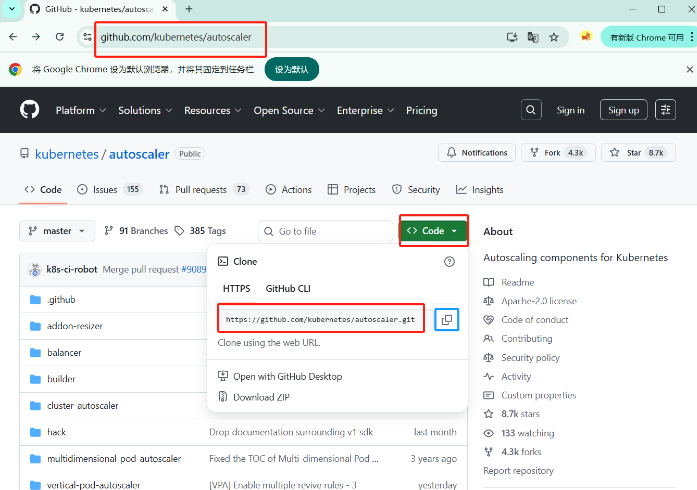
https://github.com/search?q=autoscale\&type=repositories
bash
#准备活动,vpa和hpa不能同时存在
[root@master ~ 09:21:03]# cd prom_hpa/
[root@master prom_hpa 09:21:22]# ls
deploy.yaml                      ippool.yaml  linux-amd64  promedir
helm-v3.19.0-linux-amd64.tar.gz  l2.yaml      nginx_dir
[root@master prom_hpa 09:21:24]# cd promedir/
[root@master promedir 09:21:32]# ls
grafana-ingress.yaml  kube-prometheus-stack.yaml  prometheus-ingress.yaml
hpa.yaml              prometheus-adapter.yaml
[root@master promedir 09:21:35]# kubectl delete -f hpa.yaml
horizontalpodautoscaler.autoscaling "nginx-hpa" deleted
[root@master promedir 09:22:04]# cd ..
[root@master prom_hpa 09:22:07]# cd nginx_dir/
[root@master nginx_dir 09:22:15]# ls
nginx.conf  nginx-exporter.yaml
[root@master nginx_dir 09:22:16]# kubectl delete -f nginx-exporter.yaml
deployment.apps "nginx-exporter" deleted
service "nginx-svc" deleted
克隆项目
bash
[root@master prom_hpa 09:25:40]# mkdir vpa
[root@master prom_hpa 09:25:54]# cd vpa

#克隆
[root@master vpa 09:48:57]# git clone https://github.com/kubernetes/autoscaler.git
正克隆到 'autoscaler'...
remote: Enumerating objects: 236796, done.
remote: Counting objects: 100% (2202/2202), done.
remote: Compressing objects: 100% (1390/1390), done.
remote: Total 236796 (delta 1467), reused 812 (delta 812), pack-reused 234594 (from 2)
接收对象中: 100% (236796/236796), 256.13 MiB | 384.00 KiB/s, done.
处理 delta 中: 100% (154039/154039), done.

#查看
[root@master vpa 09:59:32]# ls
autoscaler
[root@master vpa 09:59:33]# cd autoscaler/vertical-pod-autoscaler/
[root@master vertical-pod-autoscaler 09:59:39]# ls
charts           common  docs  enhancements  go.mod  hack        OWNERS  README.md
cloudbuild.yaml  deploy  e2e   examples      go.sum  MIGRATE.md  pkg     RELEASE.md
[root@master vertical-pod-autoscaler 09:59:42]# ls hack/
api-docs                   local-cluster.md                  verify-codegen.sh
boilerplate.go.txt         run-e2e-locally.sh                verify-deadcode-elimination.sh
convert-alpha-objects.sh   run-e2e.sh                        verify-kubelint.sh
deploy-for-e2e-locally.sh  run-e2e-tests.sh                  verify-toc.sh
deploy-for-e2e.sh          run-integration-locally.sh        verify-vpa-flags.sh
dev-deploy-locally.sh      tag-release.sh                    vpa-apply-upgrade.sh
e2e                        tools                             vpa-down.sh
emit-metrics.py            tools.go                          vpa-process-yaml.sh
generate-api-docs.sh       update-codegen.sh                 vpa-process-yamls.sh
generate-crd-yaml.sh       update-kubernetes-deps-in-e2e.sh  vpa-up.sh
generate-flags.sh          update-kubernetes-deps.sh         warn-obsolete-vpa-objects.sh
lib                        update-toc.sh
[root@master vertical-pod-autoscaler 09:59:47]# bash ./hack/vpa-up.sh
##执行会失败因为,git版本过低,所以需要升级git
升级git
bash
#卸载老版本git
[root@master vpa 09:25:57]# yum remove -y git
安装git依赖环境
bash
[root@master vpa 09:34:25]# yum groupinstall "Development Tools" -y
[root@master vpa 09:40:51]#  yum install gettext-devel perl-CPAN perl-devel zlib-devel curl-devel expat-devel -y
解压缩,并配置安装
bash
#从本地上传文件
[root@master vertical-pod-autoscaler 10:01:38]# tar zxfv git-2.28.0.tar.gz
[root@master vertical-pod-autoscaler 10:02:14]#  cd git-2.28.0/
bash
[root@master git-2.28.0 10:02:31]# make prefix=/usr/local all
[root@master git-2.28.0 10:04:24]# make prefix=/usr/local install
查看git版本
bash
[root@master git-2.28.0 10:04:59]# ln -s /usr/local/bin/git /usr/bin/git
ln: 无法创建符号链接"/usr/bin/git": 文件已存在
#安装环境依赖时会把老版本的git安装下来,所以要将原来的删除

[root@master git-2.28.0 10:16:40]# rm -rf /usr/bin/git
[root@master git-2.28.0 10:17:15]# ln -s /usr/local/bin/git /usr/bin/git
[root@master git-2.28.0 10:17:25]# git --version
git version 2.28.0
安装vpa
bash
[root@master ~ 10:59:22]# cd prom_hpa/vpa/autoscaler/vertical-pod-autoscaler/hack/
[root@master hack 10:59:38]# bash vpa-up.sh
验证查看vpa资源
bash
[root@master vpa 11:35:58]# kubectl get pod -n kube-system
NAME                                       READY   STATUS             RESTARTS        AGE
calico-kube-controllers-658d97c59c-hv65v   1/1     Running            7 (5d16h ago)   13d
calico-node-4rft9                          1/1     Running            0               28m
calico-node-dsbz2                          1/1     Running            0               29m
calico-node-sbjd4                          1/1     Running            0               29m
coredns-56666d8bb-6pts4                    1/1     Running            2 (5d16h ago)   5d18h
coredns-56666d8bb-dwkxn                    1/1     Running            2 (5d16h ago)   5d18h
etcd-master                                1/1     Running            7 (5d16h ago)   13d
kube-apiserver-master                      1/1     Running            17 (5d2h ago)   13d
kube-controller-manager-master             1/1     Running            7 (5d16h ago)   13d
kube-proxy-9rvrh                           1/1     Running            2 (5d16h ago)   5d18h
kube-proxy-knrxr                           1/1     Running            2 (5d16h ago)   5d18h
kube-proxy-td6dh                           1/1     Running            2 (5d16h ago)   5d18h
kube-scheduler-master                      1/1     Running            7 (5d16h ago)   13d
metrics-server-57999c5cf7-vlnx6            1/1     Running            0               3d21h
vpa-admission-controller-cd698f44d-9fshf   1/1     Running            0               7m40s
vpa-recommender-796d45bfdf-b82xr           0/1     ImagePullBackOff   0               8m31s
vpa-updater-7548dbc57d-q75lk               1/1     Running            0               8m44s
案例:VPA应用updateMode:"Off"
在VPA中,updateMode是一个重要的配置选项,它决定了VPA如何应用其提供的资源建议。根据不同 的设置,VPA可以采取不同的策略来更新Pod的资源配置:
- Off
- VPA不会应用任何资源推荐,只是收集和显示数据。
- Initial:
- VPA只会在Pod创建时应用资源推荐。一旦Pod启动,即使后续有新的资源推荐,也不会再进 行调整。
- Recreate:
- 当VPA生成新的资源推荐时,它会终止当前的Pod并重新创建一个新的Pod,新Pod将采用最 新的资源推荐。这种方式会导致服务短暂中断,但能确保立即应用新的资源设置。
- Auto:
- 这是默认模式。在这种模式下,VPA会尝试在线调整运行中的Pod的资源请求和限制,而无需 重启Pod。如果无法在线调整(例如,由于内核或Kubernetes版本的限制),则会选择重新创建 Pod。
创建应用实例
此模式仅获取资源推荐不更新Pod
bash
[root@master vpa 11:40:24]# kubectl apply -f nginx-svc.yaml
deployment.apps/dep-nginx created
service/nginx-svc created
#显示
apiVersion: apps/v1
kind: Deployment
metadata:
  labels:
    app: nginx
  name: dep-nginx
  namespace: default
spec:
  replicas: 2
  selector:
    matchLabels:
      app: nginx
  template:
    metadata:
      labels:
        app: nginx
    spec:
      containers:
        - name: c1
          image: nginx:1.26-alpine
          imagePullPolicy: IfNotPresent
          resources:
            requests:
              cpu: 100m
              memory: 250Mi
---
apiVersion: v1
kind: Service
metadata:
  name: nginx-svc
spec:
  ports:
    - port: 80
      targetPort: 80
  selector:
    app: nginx
查看资源
bash
[root@master vpa 11:41:29]# kubectl get pods,svc
NAME                            READY   STATUS    RESTARTS   AGE
pod/dep-nginx-8f84c6bd7-c7qcx   1/1     Running   0          11s
pod/dep-nginx-8f84c6bd7-pggn2   1/1     Running   0          11s

NAME                 TYPE        CLUSTER-IP     EXTERNAL-IP   PORT(S)   AGE
service/kubernetes   ClusterIP   10.96.0.1      <none>        443/TCP   13d
service/nginx-svc    ClusterIP   10.103.86.20   <none>        80/TCP    11s
bash
[root@master vpa 11:41:40]# kubectl describe pod dep-nginx-8f84c6bd7-c7qcx
...
      cpu:        100m
      memory:     250Mi
...
创建应用vpa资源
bash
[root@master vpa 12:35:25]# kubectl apply -f nginx-vpa-off.yaml
verticalpodautoscaler.autoscaling.k8s.io/nginx-vpa-off create
apiVersion: autoscaling.k8s.io/v1
kind: VerticalPodAutoscaler
metadata:
  name: nginx-vpa-off
spec:
  targetRef:
    apiVersion: "apps/v1"
    kind: Deployment
    name: dep-nginx   #和nginx-svc.yaml文件里的deployment名称相同
  updatePolicy:
    updateMode: "Off"
  resourcePolicy:
    containerPolicies:
      - containerName: "c1"
        minAllowed:
          cpu: "250m"
          memory: "100Mi"
        maxAllowed:
          cpu: "2000m"
          memory: "2048Mi"
查看资源,会看到推荐值:250m 250Mi
bash
#需要等待一段时间
[root@master vpa 12:36:22]# kubectl get vpa
NAME            MODE   CPU    MEM     PROVIDED   AGE
nginx-vpa-off   Off    250m   250Mi   True       72s
压测后查看推荐值是否有变化
bash
[root@master vpa 12:36:09]# kubectl get svc
NAME         TYPE        CLUSTER-IP     EXTERNAL-IP   PORT(S)   AGE
kubernetes   ClusterIP   10.96.0.1      <none>        443/TCP   13d
nginx-svc    ClusterIP   10.103.86.20   <none>        80/TCP    54m
进行压测
bash
[root@master vpa 12:37:49]# ab -c 1000 -n 1000000 http://10.103.86.20/

#推荐值没有发生变化
nginx-vpa-off   Off    250m   250Mi   True	 3m44s
案例:VPA应用案例 updateMode:"Auto"
此模式当目前运行的pod的资源达不到VPA的推销值,就会执行pod驱逐,重新部署新的足够资源的服务
创建vpa资源
bash
##########将Off的那个实验yaml文件delete,再将文件nginx-svc.yaml的memory值修改成50Mi方便进行对比


#警告没有关系
[root@master vpa 13:39:40]# kubectl apply -f vpa-auto.yaml
Warning: UpdateMode "Auto" is deprecated and will be removed in a future API version. Use explicit update modes like "Recreate", "Initial", or "InPlaceOrRecreate" instead. See https://github.com/kubernetes/autoscaler/issues/8424 for more details.
verticalpodautoscaler.autoscaling.k8s.io/nginx-vpa-off created
#显示
apiVersion: autoscaling.k8s.io/v1
kind: VerticalPodAutoscaler
metadata:
  name: nginx-vpa-off
spec:
  targetRef:
    apiVersion: "apps/v1"
    kind: Deployment
    name: dep-nginx   #和nginx-svc.yaml文件里的deployment名称相同
  updatePolicy:
    updateMode: "Auto"
  resourcePolicy:
    containerPolicies:
      - containerName: "c1"
        minAllowed:
          cpu: "250m"
          memory: "150Mi"
        maxAllowed:
          cpu: "2000m"
          memory: "2048Mi"
查看资源
bash
[root@master vpa 13:40:01]# kubectl get vpa
NAME            MODE   CPU    MEM     PROVIDED   AGE
nginx-vpa-off   Auto   250m   250Mi   True       44s
[root@master vpa 13:40:45]# kubectl get pod
NAME                         READY   STATUS    RESTARTS   AGE
dep-nginx-57574958bf-gmb72   1/1     Running   0          3m31s
dep-nginx-57574958bf-hftnl   1/1     Running   0          3m31s
bash
#过了会pod发生的变化,删除后又重新创建和推荐值相同的cpu,memory值
[root@master vpa 13:41:49]# kubectl get pod
NAME                         READY   STATUS    RESTARTS   AGE
dep-nginx-57574958bf-b868f   1/1     Running   0          76s
dep-nginx-57574958bf-k9kk7   1/1     Running   0          16s
[root@master vpa 13:42:27]# kubectl get vpa
NAME            MODE   CPU    MEM     PROVIDED   AGE
nginx-vpa-off   Auto   250m   250Mi   True       4m5s
查看pod资源详细信息发现,使用了推荐值,进行了垂直扩展
bash
#验证新建的pod
[root@master vpa 13:44:06]# kubectl describe pod dep-nginx-57574958bf-b868f
....
      cpu:        250m
      memory:     250Mi
....