
个人主页:ujainu
文章目录
-
- 引言
- [一、为什么选择 Flutter 构建 OpenHarmony 时钟 App?](#一、为什么选择 Flutter 构建 OpenHarmony 时钟 App?)
-
- [1. OpenHarmony 的 UI 开发挑战](#1. OpenHarmony 的 UI 开发挑战)
- [2. Flutter 的跨端优势](#2. Flutter 的跨端优势)
- [二、整体架构:BottomNavigationBar + IndexedStack](#二、整体架构:BottomNavigationBar + IndexedStack)
-
- [为何选择 `IndexedStack`?](#为何选择
IndexedStack?)
- [为何选择 `IndexedStack`?](#为何选择
- 三、四大模块融合的关键工程实践
-
- [1. 全局主题统一:适配 OpenHarmony 深色/浅色模式](#1. 全局主题统一:适配 OpenHarmony 深色/浅色模式)
- [2. 定时器资源管理:防止内存泄漏](#2. 定时器资源管理:防止内存泄漏)
- [3. 模块解耦:零状态共享](#3. 模块解耦:零状态共享)
- [4. 交互反馈:遵循鸿蒙人因设计](#4. 交互反馈:遵循鸿蒙人因设计)
- [四、各模块在 OpenHarmony 上的适配亮点](#四、各模块在 OpenHarmony 上的适配亮点)
-
- [1. 闹钟模块:精准触发 + 系统通知(未来)](#1. 闹钟模块:精准触发 + 系统通知(未来))
- [2. 世界时钟:模拟本地时区](#2. 世界时钟:模拟本地时区)
- [3. 秒表:双表盘绘制](#3. 秒表:双表盘绘制)
- [4. 计时器:Cupertino 滑轮选择器](#4. 计时器:Cupertino 滑轮选择器)
- 五、总代码和运行结果
- [六、总结:Flutter 在 OpenHarmony 生态中的定位](#六、总结:Flutter 在 OpenHarmony 生态中的定位)
引言
随着 OpenHarmony 生态的快速演进,越来越多的开发者开始探索如何在这一新兴操作系统上构建高性能、高体验的应用。而 Flutter 凭借其"一次编写,多端部署"的能力,正成为跨平台开发的重要选择。尤其在 OpenHarmony 3.2 及以上版本中,通过 ArkTS + Flutter 混合开发 或 纯 Flutter 应用容器化部署,已能实现接近原生的流畅体验。
一个完整的系统级应用------时钟(Clock)App,通常包含四大核心功能模块:
- 闹钟(Alarm):定时提醒;
- 世界时钟(World Clock):跨时区时间查看;
- 秒表(Stopwatch):精确计时;
- 计时器(Timer):倒计时任务。
本文将以一个真实项目为例,详细讲解 如何使用 Flutter 开发这四大模块,并将其无缝集成到一个统一的时钟应用中,最终部署运行于 OpenHarmony 设备 。我们将重点剖析 模块融合架构、状态管理、深色模式适配、性能优化 等关键工程实践,并探讨 Flutter 在 OpenHarmony 生态中的定位与优势。
💡 本文价值:不仅教你"如何写",更告诉你"为何这样设计"------这是从"功能实现"迈向"鸿蒙生态级应用开发"的关键跃迁。
一、为什么选择 Flutter 构建 OpenHarmony 时钟 App?
1. OpenHarmony 的 UI 开发挑战
OpenHarmony 原生使用 ArkUI(声明式 UI 框架),虽强大但学习曲线陡峭,且生态工具链仍在完善中。对于已有 Flutter 技术栈的团队,直接迁移成本高。
2. Flutter 的跨端优势
- ✅ 一套代码,多端运行 :iOS、Android、Web、Desktop,以及 OpenHarmony(通过 Flutter Engine 移植);
- ✅ 高性能渲染:Skia 引擎直绘,60fps 流畅动画;
- ✅ 丰富组件库:Material/Cupertino 风格开箱即用;
- ✅ 热重载(Hot Reload):大幅提升开发效率。
📌 现状说明:截至 2026 年初,社区已有多个成功将 Flutter 应用运行于 OpenHarmony 设备的案例(如华为部分 HarmonyOS NEXT 测试设备支持 Flutter 容器)。本文假设目标设备已具备 Flutter 运行环境。
二、整体架构:BottomNavigationBar + IndexedStack
为确保四大模块在 OpenHarmony 设备上切换流畅、状态持久,我们采用如下架构:
dart
class ClockApp extends StatefulWidget {
  @override
  State<ClockApp> createState() => _ClockAppState();
}

class _ClockAppState extends State<ClockApp> {
  int _currentIndex = 0;
  final List<Widget> _pages = [
    const AlarmPage(),        // 闹钟
    const WorldClockPage(),   // 世界时钟
    const StopwatchPage(),    // 秒表
    const TimerMainPage(),    // 计时器
  ];

  @override
  Widget build(BuildContext context) {
    return Scaffold(
      body: IndexedStack(
        index: _currentIndex,
        children: _pages,
      ),
      bottomNavigationBar: BottomNavigationBar(
        currentIndex: _currentIndex,
        onTap: (index) => setState(() => _currentIndex = index),
        items: const [
          BottomNavigationBarItem(icon: Icon(Icons.alarm), label: '闹钟'),
          BottomNavigationBarItem(icon: Icon(Icons.public), label: '世界时钟'),
          BottomNavigationBarItem(icon: Icon(Icons.watch_later), label: '秒表'),
          BottomNavigationBarItem(icon: Icon(Icons.timer), label: '计时器'),
        ],
      ),
    );
  }
}
为何选择 IndexedStack?
- 状态保持:用户在秒表页面开始计时后,切换到闹钟再返回,秒表继续运行;
- 避免重建:OpenHarmony 设备内存资源有限,频繁重建页面会增加 GC 压力;
- 体验一致性:符合鸿蒙"连续性服务"设计理念------用户操作不因页面切换而中断。
三、四大模块融合的关键工程实践
1. 全局主题统一:适配 OpenHarmony 深色/浅色模式
OpenHarmony 系统支持全局深色模式切换。Flutter 应用需主动响应:
dart
class MyApp extends StatelessWidget {
  @override
  Widget build(BuildContext context) {
    return MaterialApp(
      title: '鸿蒙时钟',
      theme: ThemeData(
        brightness: Brightness.light,
        scaffoldBackgroundColor: Colors.white,
        appBarTheme: const AppBarTheme(backgroundColor: Colors.white, foregroundColor: Colors.black),
      ),
      darkTheme: ThemeData(
        brightness: Brightness.dark,
        scaffoldBackgroundColor: Colors.black,
        appBarTheme: const AppBarTheme(backgroundColor: Colors.black, foregroundColor: Colors.white),
      ),
      home: const ClockApp(),
    );
  }
}
各模块内部动态获取主题:
dart
final isDark = Theme.of(context).brightness == Brightness.dark;✅ 效果:当用户在 OpenHarmony 设置中开启深色模式,时钟 App 自动切换,视觉体验与系统一致。
2. 定时器资源管理:防止内存泄漏
每个模块都依赖 Timer 刷新 UI。在资源受限的 OpenHarmony 设备上,内存泄漏会导致应用被系统杀掉。
正确做法(以秒表为例):
dart
class _StopwatchPageState extends State<StopwatchPage> {
  late Timer _timer;

  @override
  void initState() {
    super.initState();
    _timer = Timer.periodic(const Duration(milliseconds: 10), (_) {
      if (_isRunning && mounted) { // 关键:检查 mounted
        setState(() { _elapsedMilliseconds += 10; });
      }
    });
  }

  @override
  void dispose() {
    _timer.cancel(); // 必须释放!
    super.dispose();
  }
}
⚠️ OpenHarmony 特别注意:
- 应用进入后台时,部分设备会限制 Timer 执行;
- 若需后台持续计时,未来可结合 OpenHarmony 的 后台任务 API(通过 Platform Channel 调用 ArkTS)。
3. 模块解耦:零状态共享
四大模块数据模型完全不同,绝不共享状态:
- 闹钟:
List<Alarm>存储在AlarmPage内部; - 世界时钟:城市列表由
WorldClockPage管理; - 秒表/计时器:各自维护独立计时逻辑。
🛡️ 优势:
- 修改闹钟逻辑不影响秒表;
- 单元测试可独立进行;
- 降低 OpenHarmony 应用包体积(无冗余状态管理库如 Provider/Bloc)。
4. 交互反馈:遵循鸿蒙人因设计
虽然使用 Flutter,但交互应贴近 OpenHarmony 用户习惯:
- 提示消息 :使用
SnackBar,文案简洁(如"⏰ 闹钟响起"); - 删除操作 :采用滑动删除(
Dismissible),而非弹窗确认; - 添加按钮:统一使用蓝色 FAB,位置固定于右下角。
🎯 目标:让用户感觉这是一个"原生鸿蒙应用",而非"移植的 Flutter App"。
四、各模块在 OpenHarmony 上的适配亮点
1. 闹钟模块:精准触发 + 系统通知(未来)
- 当前使用
SnackBar模拟提醒; - 未来扩展 :通过 Flutter 插件调用 OpenHarmony 的 通知服务(Notification Kit),实现锁屏弹窗。
2. 世界时钟:模拟本地时区
- 不依赖设备系统时区(OpenHarmony 多设备时区策略复杂);
- 通过 UTC 时间 + 偏移量计算,确保全球时间准确。
3. 秒表:双表盘绘制
- 使用
CustomPainter绘制模拟表盘; - 在 OpenHarmony 平板设备上自动适配大屏布局。
4. 计时器:Cupertino 滑轮选择器
- 虽为 iOS 风格,但在 OpenHarmony 手机上体验良好;
- 支持预设管理,满足高频场景(如"蒸蛋 10 分钟")。
五、总代码和运行结果
dart
import 'dart:async';
import 'package:flutter/material.dart';
import 'package:flutter/cupertino.dart';
import 'dart:math';
void main() {
runApp(const MyApp());
}
class MyApp extends StatelessWidget {
const MyApp({super.key});
@override
Widget build(BuildContext context) {
return MaterialApp(
title: '时钟',
debugShowCheckedModeBanner: false,
theme: ThemeData(
useMaterial3: true,
brightness: Brightness.light,
primarySwatch: Colors.blue,
scaffoldBackgroundColor: Colors.white,
appBarTheme: const AppBarTheme(backgroundColor: Colors.white, foregroundColor: Colors.black),
),
darkTheme: ThemeData(
useMaterial3: true,
brightness: Brightness.dark,
primarySwatch: Colors.blue,
scaffoldBackgroundColor: Colors.black,
appBarTheme: const AppBarTheme(backgroundColor: Colors.black, foregroundColor: Colors.white),
),
home: const ClockApp(),
);
}
}
// ===========================
// 主应用:底部导航容器
// ===========================
class ClockApp extends StatefulWidget {
const ClockApp({super.key});
@override
State<ClockApp> createState() => _ClockAppState();
}
class _ClockAppState extends State<ClockApp> {
int _currentIndex = 0;
final List<Widget> _pages = [
const AlarmPage(),
const WorldClockPage(),
const StopwatchPage(),
const TimerMainPage(),
];
@override
Widget build(BuildContext context) {
return Scaffold(
body: IndexedStack(
index: _currentIndex,
children: _pages,
),
bottomNavigationBar: BottomNavigationBar(
currentIndex: _currentIndex,
onTap: (index) {
setState(() {
_currentIndex = index;
});
},
type: BottomNavigationBarType.fixed,
selectedItemColor: Colors.blue,
unselectedItemColor: Theme.of(context).brightness == Brightness.dark
? Colors.grey[400]
: Colors.grey[600],
items: const [
BottomNavigationBarItem(
icon: Icon(Icons.alarm),
label: '闹钟',
),
BottomNavigationBarItem(
icon: Icon(Icons.public),
label: '世界时钟',
),
BottomNavigationBarItem(
icon: Icon(Icons.watch_later),
label: '秒表',
),
BottomNavigationBarItem(
icon: Icon(Icons.timer),
label: '计时器',
),
],
),
);
}
}
// ===================================================================
// ========== 以下为四个功能页面(按原需求保留并优化) ==========
// ===================================================================
// ===========================
// 1. 闹钟页面
// ===========================
class Alarm {
final String id;
final TimeOfDay time;
final bool enabled;
Alarm({required this.id, required this.time, this.enabled = true});
}
class AlarmPage extends StatefulWidget {
const AlarmPage({super.key});
@override
State<AlarmPage> createState() => _AlarmPageState();
}
class _AlarmPageState extends State<AlarmPage> {
final List<Alarm> _alarms = [];
late Timer _timer;
@override
void initState() {
super.initState();
_timer = Timer.periodic(const Duration(seconds: 1), (_) => _checkAlarms());
}
void _checkAlarms() {
final now = TimeOfDay.now();
for (final alarm in _alarms) {
if (alarm.enabled &&
alarm.time.hour == now.hour &&
alarm.time.minute == now.minute &&
DateTime.now().second == 0) {
_showAlarmNotification(alarm);
}
}
}
void _showAlarmNotification(Alarm alarm) {
ScaffoldMessenger.of(context).showSnackBar(
SnackBar(
content: Text('⏰ 闹钟: ${alarm.time.format(context)}'),
duration: const Duration(seconds: 5),
action: SnackBarAction(
label: '关闭',
onPressed: () {
ScaffoldMessenger.of(context).hideCurrentSnackBar();
},
),
),
);
}
void _addAlarm() async {
final TimeOfDay? picked = await showTimePicker(
context: context,
initialTime: TimeOfDay.now(),
);
if (picked != null) {
setState(() {
_alarms.add(
Alarm(
id: DateTime.now().microsecondsSinceEpoch.toString(),
time: picked,
),
);
});
}
}
void _deleteAlarm(String id) {
setState(() {
_alarms.removeWhere((alarm) => alarm.id == id);
});
}
void _toggleAlarm(String id) {
setState(() {
final index = _alarms.indexWhere((a) => a.id == id);
if (index != -1) {
_alarms[index] = Alarm(
id: _alarms[index].id,
time: _alarms[index].time,
enabled: !_alarms[index].enabled,
);
}
});
}
@override
void dispose() {
_timer.cancel();
super.dispose();
}
@override
Widget build(BuildContext context) {
return Scaffold(
appBar: AppBar(title: const Text('闹钟')),
body: _alarms.isEmpty
? Center(
child: Column(
mainAxisAlignment: MainAxisAlignment.center,
children: const [
Icon(Icons.alarm_off, size: 80, color: Colors.grey),
SizedBox(height: 16),
Text('暂无闹钟', style: TextStyle(fontSize: 18, color: Colors.grey)),
],
),
)
: ListView.builder(
padding: const EdgeInsets.symmetric(horizontal: 16, vertical: 8),
itemCount: _alarms.length,
itemBuilder: (context, index) {
final alarm = _alarms[index];
final isDark = Theme.of(context).brightness == Brightness.dark;
final activeColor = isDark ? Colors.white : Colors.black;
final inactiveColor = isDark ? Colors.grey[400]! : Colors.grey[600]!;
return Dismissible(
key: Key(alarm.id),
direction: DismissDirection.endToStart,
onDismissed: (_) => _deleteAlarm(alarm.id),
background: Container(
alignment: Alignment.centerRight,
padding: const EdgeInsets.only(right: 20),
color: Colors.red,
child: const Icon(Icons.delete, color: Colors.white),
),
child: Card(
child: ListTile(
leading: Text(
alarm.time.format(context),
style: TextStyle(
fontSize: 24,
fontWeight: FontWeight.bold,
color: alarm.enabled ? activeColor : inactiveColor,
),
),
title: Text(
'响铃一次',
style: TextStyle(color: inactiveColor),
),
trailing: Switch(
value: alarm.enabled,
activeColor: Colors.blue,
onChanged: (value) => _toggleAlarm(alarm.id),
),
),
),
);
},
),
floatingActionButton: FloatingActionButton(
onPressed: _addAlarm,
backgroundColor: Colors.blue,
child: const Icon(Icons.add, color: Colors.white),
),
);
}
}
// ===========================
// 2. 世界时钟页面
// ===========================
final List<CityData> _allCities = [
CityData('阿姆斯特丹', 1),
CityData('北京', 8),
CityData('柏林', 1),
CityData('布宜诺斯艾利斯', -3),
CityData('开罗', 2),
CityData('芝加哥', -6),
CityData('达拉斯', -6),
CityData('德里', 5.5),
CityData('迪拜', 4),
CityData('都柏林', 0),
CityData('法兰克福', 1),
CityData('香港', 8),
CityData('伊斯坦布尔', 3),
CityData('雅加达', 7),
CityData('吉隆坡', 8),
CityData('伦敦', 0),
CityData('洛杉矶', -8),
CityData('马德里', 1),
CityData('墨尔本', 10),
CityData('墨西哥城', -6),
CityData('迈阿密', -5),
CityData('莫斯科', 3),
CityData('孟买', 5.5),
CityData('纽约', -5),
CityData('奥斯陆', 1),
CityData('巴黎', 1),
CityData('里约热内卢', -3),
CityData('罗马', 1),
CityData('圣保罗', -3),
CityData('圣彼得堡', 3),
CityData('上海', 8),
CityData('新加坡', 8),
CityData('斯德哥尔摩', 1),
CityData('悉尼', 10),
CityData('东京', 9),
CityData('多伦多', -5),
CityData('温哥华', -8),
CityData('维也纳', 1),
CityData('苏黎世', 1),
];
class CityData {
final String name;
final double utcOffset;
CityData(this.name, this.utcOffset);
}
class DisplayCity {
final String name;
final double utcOffset;
DisplayCity(this.name, this.utcOffset);
String getDescription(double mainUtcOffset) {
final diff = utcOffset - mainUtcOffset;
if (diff == 0) return '本地时间';
if (diff > 0) {
return '早${diff.toStringAsFixed(diff % 1 == 0 ? 0 : 1)}小时';
} else {
return '晚${(-diff).toStringAsFixed((-diff) % 1 == 0 ? 0 : 1)}小时';
}
}
}
class WorldClockPage extends StatefulWidget {
const WorldClockPage({super.key});
@override
State<WorldClockPage> createState() => _WorldClockPageState();
}
class _WorldClockPageState extends State<WorldClockPage> {
late Timer _timer;
final List<DisplayCity> _displayCities = [
DisplayCity('北京', 8),
DisplayCity('伦敦', 0),
DisplayCity('悉尼', 10),
];
bool _isAnalog = true;
DisplayCity _mainCity = DisplayCity('北京', 8);
@override
void initState() {
super.initState();
_timer = Timer.periodic(const Duration(seconds: 1), (_) {
if (mounted) setState(() {});
});
}
@override
void dispose() {
_timer.cancel();
super.dispose();
}
void _addCity() async {
final selected = await showSearch<CityData>(
context: context,
delegate: CitySearchDelegate(_allCities),
);
if (selected != null) {
if (!_displayCities.any((city) => city.name == selected.name)) {
setState(() {
_displayCities.add(DisplayCity(selected.name, selected.utcOffset));
});
ScaffoldMessenger.of(context).showSnackBar(
SnackBar(content: Text('${selected.name} 已添加')),
);
} else {
ScaffoldMessenger.of(context).showSnackBar(
const SnackBar(content: Text('该城市已在列表中')),
);
}
}
}
void _deleteCity(String name) {
setState(() {
_displayCities.removeWhere((city) => city.name == name);
if (_mainCity.name == name && _displayCities.isNotEmpty) {
_mainCity = _displayCities.first;
}
});
}
void _setAsMainCity(DisplayCity city) {
setState(() {
_mainCity = city;
});
}
void _toggleClockType() {
setState(() {
_isAnalog = !_isAnalog;
});
}
String _formatTimeWithSeconds(int hour, int minute, int second) {
return '${hour.toString().padLeft(2, '0')}:${minute.toString().padLeft(2, '0')}:${second.toString().padLeft(2, '0')}';
}
DateTime _getTimeByUtcOffset(double utcOffset) {
final now = DateTime.now();
final localOffset = now.timeZoneOffset.inMilliseconds;
final targetTime = DateTime.fromMillisecondsSinceEpoch(
now.millisecondsSinceEpoch - localOffset + (utcOffset * 3600000).toInt(),
);
return targetTime;
}
@override
Widget build(BuildContext context) {
final isDark = Theme.of(context).brightness == Brightness.dark;
final mainTime = _getTimeByUtcOffset(_mainCity.utcOffset);
final hour = mainTime.hour;
final minute = mainTime.minute;
final second = mainTime.second;
final weekdayNames = ['周一', '周二', '周三', '周四', '周五', '周六', '周日'];
return Scaffold(
appBar: AppBar(title: const Text('世界时钟')),
body: GestureDetector(
onTap: _toggleClockType,
child: Column(
children: [
Container(
alignment: Alignment.center,
padding: const EdgeInsets.all(20),
child: _isAnalog
? CustomPaint(
painter: AnalogClockPainter(hour, minute, second),
size: const Size(300, 300),
)
: Container(
padding: const EdgeInsets.symmetric(horizontal: 24, vertical: 16),
decoration: BoxDecoration(
color: isDark ? Colors.grey[800] : Colors.white,
borderRadius: BorderRadius.circular(16),
boxShadow: [
BoxShadow(
color: isDark ? Colors.black54 : Colors.grey.withOpacity(0.4),
blurRadius: 10,
offset: const Offset(0, 4),
),
],
),
child: Text(
_formatTimeWithSeconds(hour, minute, second),
style: TextStyle(
fontSize: 48,
fontWeight: FontWeight.bold,
color: isDark ? Colors.white : Colors.black,
fontFamily: 'Courier New, monospace',
),
),
),
),
const SizedBox(height: 10),
Text(
'${_mainCity.name} | ${mainTime.month}月${mainTime.day}日 ${weekdayNames[mainTime.weekday - 1]}',
style: const TextStyle(color: Colors.grey, fontSize: 14),
),
const SizedBox(height: 20),
Expanded(
child: ListView.builder(
itemCount: _displayCities.length,
itemBuilder: (context, index) {
final city = _displayCities[index];
final cityTime = _getTimeByUtcOffset(city.utcOffset);
final timeStr = _formatTimeWithSeconds(cityTime.hour, cityTime.minute, cityTime.second);
final isSelected = city.name == _mainCity.name;
return Dismissible(
key: Key(city.name),
direction: DismissDirection.endToStart,
onDismissed: (_) => _deleteCity(city.name),
background: Container(
alignment: Alignment.centerRight,
padding: const EdgeInsets.only(right: 20),
color: Colors.red,
child: const Icon(Icons.delete, color: Colors.white),
),
child: Card(
margin: const EdgeInsets.symmetric(horizontal: 16, vertical: 8),
child: ListTile(
title: Text(
city.name,
style: TextStyle(
fontSize: 20,
fontWeight: FontWeight.bold,
color: isSelected ? Colors.blue : null,
),
),
subtitle: Text(city.getDescription(_mainCity.utcOffset)),
trailing: Text(timeStr, style: const TextStyle(fontSize: 16)),
onTap: () => _setAsMainCity(city),
),
),
);
},
),
),
Align(
alignment: Alignment.bottomCenter,
child: FloatingActionButton(
onPressed: _addCity,
backgroundColor: Colors.blue,
child: const Icon(Icons.add, size: 30),
),
),
],
),
),
floatingActionButtonLocation: FloatingActionButtonLocation.centerFloat,
);
}
}
class CitySearchDelegate extends SearchDelegate<CityData> {
final List<CityData> cities;
CitySearchDelegate(this.cities);
@override
String get searchFieldLabel => '搜索城市';
@override
List<Widget>? buildActions(BuildContext context) {
return [
if (query.isNotEmpty)
IconButton(
icon: const Icon(Icons.clear),
onPressed: () => query = '',
),
];
}
@override
Widget? buildLeading(BuildContext context) {
return IconButton(
icon: const Icon(Icons.arrow_back),
onPressed: () => close(context, CityData('', 0)),
);
}
@override
Widget buildResults(BuildContext context) {
final results = cities.where((city) {
return city.name.toLowerCase().contains(query.toLowerCase());
}).toList();
return _buildCityList(results);
}
@override
Widget buildSuggestions(BuildContext context) {
final suggestions = query.isEmpty
? cities
: cities.where((city) {
return city.name.toLowerCase().startsWith(query.toLowerCase());
}).toList();
return _buildCityList(suggestions);
}
Widget _buildCityList(List<CityData> list) {
return ListView.builder(
itemCount: list.length,
itemBuilder: (context, index) {
final city = list[index];
final offsetStr = city.utcOffset >= 0
? '+${city.utcOffset.toStringAsFixed(city.utcOffset % 1 == 0 ? 0 : 1)}'
: '${city.utcOffset.toStringAsFixed(city.utcOffset % 1 == 0 ? 0 : 1)}';
return ListTile(
title: Text(city.name),
subtitle: Text('UTC $offsetStr'),
onTap: () => close(context, city),
);
},
);
}
}
class AnalogClockPainter extends CustomPainter {
final int hour;
final int minute;
final int second;
AnalogClockPainter(this.hour, this.minute, this.second);
@override
void paint(Canvas canvas, Size size) {
final center = Offset(size.width / 2, size.height / 2);
final radius = size.width / 2 - 10;
for (int i = 0; i < 60; i++) {
final angle = i * 6.0;
final start = center + Offset(cos(angle * pi / 180) * (radius - 10), sin(angle * pi / 180) * (radius - 10));
final end = center + Offset(cos(angle * pi / 180) * radius, sin(angle * pi / 180) * radius);
final paint = Paint()
..color = i % 5 == 0 ? Colors.black : Colors.grey[400]!
..strokeWidth = i % 5 == 0 ? 4 : 2;
canvas.drawLine(start, end, paint);
}
for (int i = 1; i <= 12; i++) {
final angle = (i - 3) * 30.0;
final x = center.dx + cos(angle * pi / 180) * (radius - 40);
final y = center.dy - sin(angle * pi / 180) * (radius - 40);
final text = TextSpan(text: i.toString(), style: const TextStyle(fontSize: 16));
final metrics = TextPainter(text: text, textAlign: TextAlign.center, textDirection: TextDirection.ltr)
..layout(minWidth: 0, maxWidth: 20);
metrics.paint(canvas, Offset(x - 10, y - 10));
}
final hourAngle = (hour % 12) * 30.0 + minute * 0.5;
final hourX = center.dx + cos((hourAngle - 90) * pi / 180) * radius * 0.5;
final hourY = center.dy + sin((hourAngle - 90) * pi / 180) * radius * 0.5;
final hourPaint = Paint()..color = Colors.black..strokeWidth = 8;
canvas.drawLine(center, Offset(hourX, hourY), hourPaint);
final minuteAngle = minute * 6.0;
final minX = center.dx + cos((minuteAngle - 90) * pi / 180) * radius * 0.7;
final minY = center.dy + sin((minuteAngle - 90) * pi / 180) * radius * 0.7;
final minPaint = Paint()..color = Colors.black..strokeWidth = 5;
canvas.drawLine(center, Offset(minX, minY), minPaint);
final secondAngle = second * 6.0;
final secX = center.dx + cos((secondAngle - 90) * pi / 180) * radius * 0.8;
final secY = center.dy + sin((secondAngle - 90) * pi / 180) * radius * 0.8;
final secPaint = Paint()..color = Colors.blue..strokeWidth = 2;
canvas.drawLine(center, Offset(secX, secY), secPaint);
}
@override
bool shouldRepaint(covariant CustomPainter oldDelegate) => true;
}
// ===========================
// 3. 秒表页面
// ===========================
class StopwatchPage extends StatefulWidget {
const StopwatchPage({super.key});
@override
State<StopwatchPage> createState() => _StopwatchPageState();
}
class _StopwatchPageState extends State<StopwatchPage> {
late Timer _timer;
int _elapsedMilliseconds = 0;
bool _isRunning = false;
List<int> _laps = [];
@override
void initState() {
super.initState();
_timer = Timer.periodic(const Duration(milliseconds: 10), (_) {
if (_isRunning) {
setState(() {
_elapsedMilliseconds += 10;
});
}
});
}
@override
void dispose() {
_timer.cancel();
super.dispose();
}
void _start() {
setState(() {
_isRunning = true;
});
}
void _pause() {
setState(() {
_isRunning = false;
});
}
void _reset() {
setState(() {
_isRunning = false;
_elapsedMilliseconds = 0;
_laps.clear();
});
}
void _lap() {
if (_isRunning) {
setState(() {
_laps.add(_elapsedMilliseconds);
});
}
}
String _formatTime(int milliseconds) {
final totalSeconds = milliseconds ~/ 1000;
final minutes = totalSeconds ~/ 60;
final seconds = totalSeconds % 60;
final hundredths = (milliseconds % 1000) ~/ 10;
return '${minutes.toString().padLeft(2, '0')}:${seconds.toString().padLeft(2, '0')}.${hundredths.toString().padLeft(2, '0')}';
}
@override
Widget build(BuildContext context) {
final isDark = Theme.of(context).brightness == Brightness.dark;
final timeStr = _formatTime(_elapsedMilliseconds);
return Scaffold(
appBar: AppBar(
backgroundColor: isDark ? Colors.black : Colors.white,
elevation: 0,
title: const Text('秒表', style: TextStyle(fontWeight: FontWeight.bold)),
actions: [
IconButton(
icon: const Icon(Icons.settings),
onPressed: () {
Navigator.push(
context,
MaterialPageRoute(builder: (ctx) => const SettingsPage()),
);
},
),
],
),
body: Column(
children: [
Expanded(
child: Stack(
alignment: Alignment.center,
children: [
Container(
width: 320,
height: 320,
decoration: BoxDecoration(
color: isDark ? Colors.grey[900]! : Colors.white,
shape: BoxShape.circle,
border: Border.all(color: isDark ? Colors.grey[700]! : Colors.grey[300]!, width: 2),
boxShadow: [
BoxShadow(
color: isDark ? Colors.black.withOpacity(0.5) : Colors.grey.withOpacity(0.3),
blurRadius: 8,
offset: const Offset(0, 4),
),
],
),
),
CustomPaint(
painter: StopwatchMainPainter(_elapsedMilliseconds, isDark),
size: const Size(320, 320),
),
Positioned(
top: 100,
left: 0,
right: 0,
child: Center(
child: Text(
timeStr,
style: TextStyle(
fontSize: 40,
fontWeight: FontWeight.bold,
color: isDark ? Colors.white : Colors.black,
fontFamily: 'Courier New, monospace',
),
),
),
),
Positioned(
top: 190,
left: 130,
child: Container(
width: 60,
height: 60,
decoration: BoxDecoration(
color: isDark ? Colors.grey[800]! : Colors.grey[100]!,
shape: BoxShape.circle,
border: Border.all(color: isDark ? Colors.grey[600]! : Colors.grey[300]!, width: 1),
boxShadow: [
BoxShadow(
color: isDark ? Colors.black.withOpacity(0.3) : Colors.grey.withOpacity(0.2),
blurRadius: 4,
offset: const Offset(0, 2),
),
],
),
child: CustomPaint(
painter: SubSecondPainter(_elapsedMilliseconds % 1000, isDark),
size: const Size(60, 60),
),
),
),
],
),
),
Padding(
padding: const EdgeInsets.symmetric(vertical: 16, horizontal: 24),
child: Row(
mainAxisAlignment: MainAxisAlignment.spaceEvenly,
children: [
FloatingActionButton.extended(
onPressed: _lap,
backgroundColor: isDark ? Colors.blueGrey[700]! : Colors.blueGrey[300]!,
icon: const Icon(Icons.flag, color: Colors.white),
label: const Text('圈', style: TextStyle(color: Colors.white)),
),
FloatingActionButton.extended(
onPressed: _isRunning ? _pause : _start,
backgroundColor: _isRunning
? (isDark ? Colors.orange[800]! : Colors.orange[400]!)
: (isDark ? Colors.green[700]! : Colors.green[400]!),
icon: Icon(_isRunning ? Icons.pause : Icons.play_arrow, color: Colors.white),
label: Text(_isRunning ? '暂停' : '开始', style: const TextStyle(color: Colors.white)),
),
FloatingActionButton.extended(
onPressed: _reset,
backgroundColor: isDark ? Colors.grey[700]! : Colors.grey[400]!,
icon: const Icon(Icons.restart_alt, color: Colors.white),
label: const Text('重置', style: TextStyle(color: Colors.white)),
),
],
),
),
Expanded(
child: _laps.isEmpty
? const Center(child: Text('暂无计次记录', style: TextStyle(color: Colors.grey)))
: ListView.builder(
itemCount: _laps.length,
itemBuilder: (context, index) {
final lapTime = _formatTime(_laps[index]);
final diffFromPrev = index == 0
? _formatTime(_laps[0])
: _formatTime(_laps[index] - _laps[index - 1]);
return ListTile(
leading: Container(
width: 24,
height: 24,
decoration: BoxDecoration(
color: Colors.purple.withOpacity(0.2),
borderRadius: BorderRadius.circular(12),
border: Border.all(color: Colors.purple.withOpacity(0.4), width: 1),
),
child: Center(
child: Text(
'${index + 1}',
style: const TextStyle(color: Colors.purple, fontSize: 12),
),
),
),
title: Text(lapTime, style: const TextStyle(fontSize: 16)),
subtitle: Text('+${diffFromPrev}', style: const TextStyle(fontSize: 12, color: Colors.grey)),
trailing: IconButton(
icon: const Icon(Icons.delete, size: 18, color: Colors.grey),
onPressed: () {
setState(() {
_laps.removeAt(index);
});
},
),
);
},
),
),
],
),
);
}
}
class StopwatchMainPainter extends CustomPainter {
final int elapsedMilliseconds;
final bool isDark;
StopwatchMainPainter(this.elapsedMilliseconds, this.isDark);
@override
void paint(Canvas canvas, Size size) {
final center = Offset(size.width / 2, size.height / 2);
final radius = size.width / 2 - 20;
final textColor = isDark ? Colors.white : Colors.black;
for (int i = 0; i < 60; i++) {
final angle = i * 6.0;
final start = center + Offset(cos(angle * pi / 180) * (radius - 15), sin(angle * pi / 180) * (radius - 15));
final end = center + Offset(cos(angle * pi / 180) * radius, sin(angle * pi / 180) * radius);
final paint = Paint()
..color = i % 5 == 0 ? textColor : textColor.withOpacity(0.4)
..strokeWidth = i % 5 == 0 ? 3 : 1;
canvas.drawLine(start, end, paint);
}
for (int i = 5; i <= 55; i += 5) {
final angle = (i - 15) * 6.0;
final x = center.dx + cos(angle * pi / 180) * (radius - 35);
final y = center.dy - sin(angle * pi / 180) * (radius - 35);
final text = TextSpan(
text: i.toString(),
style: TextStyle(
fontSize: 14,
color: textColor,
fontWeight: FontWeight.bold,
),
);
final metrics = TextPainter(
text: text,
textAlign: TextAlign.center,
textDirection: TextDirection.ltr,
)..layout(minWidth: 0, maxWidth: 20);
metrics.paint(canvas, Offset(x - 10, y - 10));
}
final totalSeconds = elapsedMilliseconds ~/ 1000;
final secondAngle = (totalSeconds % 60) * 6.0;
final secX = center.dx + cos((secondAngle - 90) * pi / 180) * radius * 0.85;
final secY = center.dy + sin((secondAngle - 90) * pi / 180) * radius * 0.85;
final secPaint = Paint()..color = Colors.blue..strokeWidth = 2.5;
canvas.drawLine(center, Offset(secX, secY), secPaint);
}
@override
bool shouldRepaint(covariant CustomPainter oldDelegate) => true;
}
class SubSecondPainter extends CustomPainter {
final int subMilliseconds;
final bool isDark;
SubSecondPainter(this.subMilliseconds, this.isDark);
@override
void paint(Canvas canvas, Size size) {
final center = Offset(size.width / 2, size.height / 2);
final radius = size.width / 2 - 8;
final textColor = isDark ? Colors.white : Colors.black;
for (int i = 0; i < 100; i++) {
final angle = i * 3.6;
final start = center + Offset(cos(angle * pi / 180) * (radius - 8), sin(angle * pi / 180) * (radius - 8));
final end = center + Offset(cos(angle * pi / 180) * radius, sin(angle * pi / 180) * radius);
final paint = Paint()
..color = i % 10 == 0 ? textColor : textColor.withOpacity(0.3)
..strokeWidth = i % 10 == 0 ? 1.5 : 0.8;
canvas.drawLine(start, end, paint);
}
final angle = (subMilliseconds ~/ 10) * 3.6;
final x = center.dx + cos((angle - 90) * pi / 180) * radius * 0.8;
final y = center.dy + sin((angle - 90) * pi / 180) * radius * 0.8;
final paint = Paint()..color = Colors.black..strokeWidth = 1.5;
canvas.drawLine(center, Offset(x, y), paint);
}
@override
bool shouldRepaint(covariant CustomPainter oldDelegate) => true;
}
// ===========================
// 4. 计时器页面
// ===========================
class TimerPreset {
final String name;
final int hours;
final int minutes;
final int seconds;
TimerPreset({
required this.name,
this.hours = 0,
this.minutes = 0,
this.seconds = 0,
});
}
class TimerMainPage extends StatefulWidget {
const TimerMainPage({super.key});
@override
State<TimerMainPage> createState() => _TimerMainPageState();
}
class _TimerMainPageState extends State<TimerMainPage> {
int _hours = 0;
int _minutes = 0;
int _seconds = 0;
bool _isRunning = false;
Timer? _countdownTimer;
List<TimerPreset> _presets = [
TimerPreset(name: '刷牙', hours: 0, minutes: 2, seconds: 0),
TimerPreset(name: '蒸蛋', hours: 0, minutes: 10, seconds: 0),
TimerPreset(name: '面膜', hours: 0, minutes: 15, seconds: 0),
TimerPreset(name: '午睡', hours: 0, minutes: 30, seconds: 0),
];
bool _isEditing = false;
void _startCountdown() {
if (_isRunning || (_hours == 0 && _minutes == 0 && _seconds == 0)) return;
_isRunning = true;
_countdownTimer?.cancel();
_countdownTimer = Timer.periodic(const Duration(seconds: 1), (timer) {
if (_seconds > 0) {
setState(() => _seconds--);
} else if (_minutes > 0) {
setState(() {
_minutes--;
_seconds = 59;
});
} else if (_hours > 0) {
setState(() {
_hours--;
_minutes = 59;
_seconds = 59;
});
} else {
_isRunning = false;
timer.cancel();
ScaffoldMessenger.of(context).showSnackBar(const SnackBar(content: Text('时间到!')));
}
});
}
void _pauseCountdown() {
_isRunning = false;
_countdownTimer?.cancel();
}
void _usePreset(TimerPreset preset) {
if (_isRunning) return;
setState(() {
_hours = preset.hours;
_minutes = preset.minutes;
_seconds = preset.seconds;
});
}
void _goToAdd() async {
final result = await Navigator.push(
context,
MaterialPageRoute(builder: (ctx) => AddTimerPage(
initialHours: _hours,
initialMinutes: _minutes,
initialSeconds: _seconds,
)),
);
if (result is TimerPreset) {
setState(() {
_presets.add(result);
});
}
}
String _formatTime(int h, int m, int s) {
return '${h.toString().padLeft(2, '0')}:${m.toString().padLeft(2, '0')}:${s.toString().padLeft(2, '0')}';
}
void _deletePreset(int index) {
setState(() {
_presets.removeAt(index);
});
}
void _toggleEdit() {
setState(() {
_isEditing = !_isEditing;
});
}
@override
Widget build(BuildContext context) {
final isDark = Theme.of(context).brightness == Brightness.dark;
final timeStr = _formatTime(_hours, _minutes, _seconds);
return Scaffold(
appBar: AppBar(
backgroundColor: isDark ? Colors.black : Colors.white,
elevation: 0,
title: const Text('计时器', style: TextStyle(fontWeight: FontWeight.bold)),
actions: [
IconButton(
icon: Icon(_isEditing ? Icons.check : Icons.edit),
onPressed: _toggleEdit,
),
],
),
body: Stack(
children: [
SingleChildScrollView(
padding: const EdgeInsets.symmetric(horizontal: 24),
child: Column(
crossAxisAlignment: CrossAxisAlignment.center,
children: [
const SizedBox(height: 32),
Container(
decoration: BoxDecoration(
color: isDark ? Colors.grey[800]! : Colors.grey[100]!,
borderRadius: BorderRadius.circular(16),
boxShadow: [
BoxShadow(
color: isDark ? Colors.black.withOpacity(0.1) : Colors.grey.withOpacity(0.1),
blurRadius: 4,
),
],
),
child: Column(
children: [
Padding(
padding: const EdgeInsets.symmetric(vertical: 8),
child: Row(
mainAxisAlignment: MainAxisAlignment.spaceEvenly,
children: [
Text('23', style: TextStyle(fontSize: 36, color: Colors.grey.withOpacity(0.5))),
Text('59', style: TextStyle(fontSize: 36, color: Colors.grey.withOpacity(0.5))),
Text('00', style: TextStyle(fontSize: 36, color: Colors.grey.withOpacity(0.5))),
],
),
),
GestureDetector(
onTap: _isRunning ? null : () => _showTimePicker(),
child: Padding(
padding: const EdgeInsets.symmetric(vertical: 12),
child: AnimatedDefaultTextStyle(
duration: const Duration(milliseconds: 200),
style: TextStyle(
fontSize: 72,
fontWeight: FontWeight.bold,
fontFamily: 'Courier New',
color: _isRunning
? (isDark ? Colors.white : Colors.black)
: Colors.grey,
),
child: Text(timeStr),
),
),
),
Padding(
padding: const EdgeInsets.symmetric(vertical: 8),
child: Row(
mainAxisAlignment: MainAxisAlignment.spaceEvenly,
children: [
Text('01', style: TextStyle(fontSize: 36, color: Colors.grey.withOpacity(0.5))),
Text('01', style: TextStyle(fontSize: 36, color: Colors.grey.withOpacity(0.5))),
Text('02', style: TextStyle(fontSize: 36, color: Colors.grey.withOpacity(0.5))),
],
),
),
],
),
),
const SizedBox(height: 48),
Row(
mainAxisAlignment: MainAxisAlignment.spaceBetween,
children: [
const Text('常用计时器', style: TextStyle(fontSize: 14, color: Colors.grey)),
TextButton(
onPressed: _goToAdd,
child: const Text('添加', style: TextStyle(color: Colors.blue)),
),
],
),
const SizedBox(height: 12),
for (var i = 0; i < _presets.length; i++)
Container(
margin: const EdgeInsets.only(bottom: 12),
decoration: BoxDecoration(
color: isDark ? Colors.grey[800]! : Colors.grey[100]!,
borderRadius: BorderRadius.circular(16),
boxShadow: [
BoxShadow(
color: isDark ? Colors.black.withOpacity(0.1) : Colors.grey.withOpacity(0.1),
blurRadius: 4,
),
],
),
child: ListTile(
contentPadding: const EdgeInsets.symmetric(horizontal: 16, vertical: 12),
title: Text(_presets[i].name, style: const TextStyle(fontSize: 18)),
subtitle: Text(
_formatTime(_presets[i].hours, _presets[i].minutes, _presets[i].seconds),
style: const TextStyle(fontSize: 14, color: Colors.grey),
),
trailing: _isEditing
? IconButton(
icon: const Icon(Icons.delete, size: 16),
onPressed: () => _deletePreset(i),
)
: null,
onTap: () => _usePreset(_presets[i]),
),
),
const SizedBox(height: 120),
],
),
),
Positioned(
bottom: 32,
left: 0,
right: 0,
child: Center(
child: FloatingActionButton(
onPressed: _isRunning ? _pauseCountdown : _startCountdown,
backgroundColor: Colors.blue,
tooltip: _isRunning ? '暂停' : '开始',
child: Icon(
_isRunning ? Icons.pause : Icons.play_arrow,
color: Colors.white,
size: 28,
),
),
),
),
],
),
);
}
void _showTimePicker() async {
if (_isRunning) return;
final result = await showModalBottomSheet<List<int>>(
context: context,
builder: (ctx) {
int h = _hours;
int m = _minutes;
int s = _seconds;
return StatefulBuilder(
builder: (context, setState) {
return Container(
height: 220,
padding: const EdgeInsets.symmetric(horizontal: 24),
child: Column(
children: [
const SizedBox(height: 16),
const Text('设置计时时间', style: TextStyle(fontSize: 18)),
const SizedBox(height: 16),
Expanded(
child: Row(
mainAxisAlignment: MainAxisAlignment.spaceEvenly,
children: [
_buildCupertinoPickerInDialog(
list: List.generate(24, (i) => i),
initialIndex: h,
onSelected: (v) => h = v,
label: '小时',
),
_buildCupertinoPickerInDialog(
list: List.generate(60, (i) => i),
initialIndex: m,
onSelected: (v) => m = v,
label: '分钟',
),
_buildCupertinoPickerInDialog(
list: List.generate(60, (i) => i),
initialIndex: s,
onSelected: (v) => s = v,
label: '秒',
),
],
),
),
TextButton(
onPressed: () {
Navigator.pop(ctx, [h, m, s]);
},
child: const Text('确定'),
),
],
),
);
},
);
},
);
if (result != null) {
setState(() {
_hours = result[0];
_minutes = result[1];
_seconds = result[2];
});
}
}
Widget _buildCupertinoPickerInDialog({
required List<int> list,
required int initialIndex,
required ValueChanged<int> onSelected,
required String label,
}) {
return Expanded(
child: Column(
children: [
Text(label, style: const TextStyle(fontSize: 12, color: Colors.grey)),
CupertinoPicker.builder(
itemExtent: 32,
backgroundColor: Colors.transparent,
magnification: 1.0,
squeeze: 1.0,
scrollController: FixedExtentScrollController(initialItem: initialIndex),
itemBuilder: (context, index) {
return Center(child: Text('${list[index]}'.padLeft(2, '0')));
},
childCount: list.length,
onSelectedItemChanged: onSelected,
),
],
),
);
}
}
class AddTimerPage extends StatefulWidget {
final int initialHours;
final int initialMinutes;
final int initialSeconds;
const AddTimerPage({
super.key,
this.initialHours = 0,
this.initialMinutes = 0,
this.initialSeconds = 0,
});
@override
State<AddTimerPage> createState() => _AddTimerPageState();
}
class _AddTimerPageState extends State<AddTimerPage> {
late int _hours;
late int _minutes;
late int _seconds;
String _name = '';
@override
void initState() {
super.initState();
_hours = widget.initialHours;
_minutes = widget.initialMinutes;
_seconds = widget.initialSeconds;
}
Widget _buildCupertinoPicker({
required List<int> list,
required int initialIndex,
required ValueChanged<int> onSelected,
required String label,
}) {
return Expanded(
child: Column(
children: [
Text(label, style: const TextStyle(fontSize: 12, color: Colors.grey)),
CupertinoPicker.builder(
itemExtent: 32,
backgroundColor: Colors.transparent,
magnification: 1.0,
squeeze: 1.0,
scrollController: FixedExtentScrollController(initialItem: initialIndex),
itemBuilder: (context, index) {
return Center(child: Text('${list[index]}'.padLeft(2, '0')));
},
childCount: list.length,
onSelectedItemChanged: onSelected,
),
],
),
);
}
@override
Widget build(BuildContext context) {
final isDark = Theme.of(context).brightness == Brightness.dark;
return Scaffold(
appBar: AppBar(
backgroundColor: isDark ? Colors.black : Colors.white,
elevation: 0,
title: const Text('添加计时器'),
leading: IconButton(
icon: const Icon(Icons.close),
onPressed: () => Navigator.pop(context),
),
actions: [
IconButton(
icon: const Icon(Icons.check),
onPressed: () {
if (_name.isEmpty) return;
final preset = TimerPreset(
name: _name,
hours: _hours,
minutes: _minutes,
seconds: _seconds,
);
Navigator.pop(context, preset);
},
),
],
),
body: Padding(
padding: const EdgeInsets.all(20),
child: Column(
crossAxisAlignment: CrossAxisAlignment.start,
children: [
Container(
decoration: BoxDecoration(
color: isDark ? Colors.grey[800]! : Colors.grey[100]!,
borderRadius: BorderRadius.circular(16),
boxShadow: [
BoxShadow(
color: isDark ? Colors.black.withOpacity(0.1) : Colors.grey.withOpacity(0.1),
blurRadius: 4,
),
],
),
child: Column(
children: [
Padding(
padding: const EdgeInsets.symmetric(vertical: 8),
child: Row(
mainAxisAlignment: MainAxisAlignment.spaceEvenly,
children: [
Text('23', style: TextStyle(fontSize: 36, color: Colors.grey.withOpacity(0.5))),
Text('59', style: TextStyle(fontSize: 36, color: Colors.grey.withOpacity(0.5))),
Text('00', style: TextStyle(fontSize: 36, color: Colors.grey.withOpacity(0.5))),
],
),
),
SizedBox(
height: 120,
child: Row(
mainAxisAlignment: MainAxisAlignment.spaceEvenly,
children: [
_buildCupertinoPicker(
list: List.generate(24, (i) => i),
initialIndex: _hours,
onSelected: (v) => setState(() => _hours = v),
label: '小时',
),
_buildCupertinoPicker(
list: List.generate(60, (i) => i),
initialIndex: _minutes,
onSelected: (v) => setState(() => _minutes = v),
label: '分钟',
),
_buildCupertinoPicker(
list: List.generate(60, (i) => i),
initialIndex: _seconds,
onSelected: (v) => setState(() => _seconds = v),
label: '秒',
),
],
),
),
Padding(
padding: const EdgeInsets.symmetric(vertical: 8),
child: Row(
mainAxisAlignment: MainAxisAlignment.spaceEvenly,
children: [
Text('01', style: TextStyle(fontSize: 36, color: Colors.grey.withOpacity(0.5))),
Text('01', style: TextStyle(fontSize: 36, color: Colors.grey.withOpacity(0.5))),
Text('02', style: TextStyle(fontSize: 36, color: Colors.grey.withOpacity(0.5))),
],
),
),
],
),
),
const SizedBox(height: 20),
Container(
decoration: BoxDecoration(
color: isDark ? Colors.grey[800]! : Colors.grey[100]!,
borderRadius: BorderRadius.circular(16),
boxShadow: [
BoxShadow(
color: isDark ? Colors.black.withOpacity(0.1) : Colors.grey.withOpacity(0.1),
blurRadius: 4,
),
],
),
padding: const EdgeInsets.symmetric(horizontal: 16, vertical: 12),
child: TextField(
decoration: InputDecoration(
hintText: '计时器名称',
border: InputBorder.none,
hintStyle: TextStyle(color: Colors.grey.withOpacity(0.5)),
),
onChanged: (v) => setState(() => _name = v),
),
),
const SizedBox(height: 20),
Container(
decoration: BoxDecoration(
color: isDark ? Colors.grey[800]! : Colors.grey[100]!,
borderRadius: BorderRadius.circular(16),
boxShadow: [
BoxShadow(
color: isDark ? Colors.black.withOpacity(0.1) : Colors.grey.withOpacity(0.1),
blurRadius: 4,
),
],
),
padding: const EdgeInsets.symmetric(horizontal: 16, vertical: 12),
child: Row(
mainAxisAlignment: MainAxisAlignment.spaceBetween,
children: [
const Text('铃声', style: TextStyle(fontSize: 16)),
const Text('默认铃声', style: TextStyle(fontSize: 14, color: Colors.grey)),
const Icon(Icons.arrow_forward_ios, size: 14, color: Colors.grey),
],
),
),
],
),
),
);
}
}
// ===========================
// 设置页面(来自秒表)
// ===========================
class SettingsPage extends StatefulWidget {
const SettingsPage({super.key});
@override
State<SettingsPage> createState() => _SettingsPageState();
}
class _SettingsPageState extends State<SettingsPage> {
String _ringDuration = '5分钟';
String _closeMethod = '按钮关闭';
bool _enablePreAlarm = true;
bool _fadeRingtone = true;
bool _morningBriefing = false;
@override
Widget build(BuildContext context) {
final isDark = Theme.of(context).brightness == Brightness.dark;
return Scaffold(
appBar: AppBar(
title: const Text('设置'),
),
body: SingleChildScrollView(
padding: const EdgeInsets.all(16),
child: Column(
crossAxisAlignment: CrossAxisAlignment.start,
children: [
const SizedBox(height: 16),
const Text('闹钟', style: TextStyle(fontSize: 14, color: Colors.grey)),
const SizedBox(height: 12),
SettingItem(
title: '响铃时长',
value: _ringDuration,
onTap: () async {
final result = await showDialog<String>(
context: context,
builder: (ctx) => SimpleDialog(
title: const Text('响铃时长'),
children: ['5分钟', '10分钟', '15分钟', '20分钟', '30分钟'].map((item) {
return SimpleDialogOption(
onPressed: () {
Navigator.pop(ctx, item);
},
child: Text(item),
);
}).toList(),
),
);
if (result != null) {
setState(() {
_ringDuration = result;
});
}
},
),
SettingItem(
title: '响铃关闭方式',
value: _closeMethod,
onTap: () async {
final result = await showDialog<String>(
context: context,
builder: (ctx) => SimpleDialog(
title: const Text('关闭方式'),
children: ['按钮关闭', '上滑关闭'].map((item) {
return SimpleDialogOption(
onPressed: () {
Navigator.pop(ctx, item);
},
child: Text(item),
);
}).toList(),
),
);
if (result != null) {
setState(() {
_closeMethod = result;
});
}
},
),
SettingItem(title: '默认铃声', value: '放假', onTap: () {}),
SwitchSettingItem(
title: '即将响铃通知',
subtitle: '响铃前15分钟在通知栏提醒,可提前关闭闹钟',
value: _enablePreAlarm,
onChanged: (v) => setState(() => _enablePreAlarm = v),
),
SwitchSettingItem(
title: '铃声渐响',
subtitle: '闹钟响铃时逐渐增大至设定音量',
value: _fadeRingtone,
onChanged: (v) => setState(() => _fadeRingtone = v),
),
SwitchSettingItem(
title: '晨间播报',
subtitle: '在关闭04:00-10:00之间的首个闹钟后,播放天气与新闻。此功能需开启"小布助手"的通知权限。',
value: _morningBriefing,
onChanged: (v) => setState(() => _morningBriefing = v),
),
const SizedBox(height: 24),
const Text('其他', style: TextStyle(fontSize: 14, color: Colors.grey)),
const SizedBox(height: 12),
SettingItem(title: '日期和时间', subtitle: '系统时间、双时钟', onTap: () {}),
SettingItem(title: '版本号', value: '15.10.8_5525868_250807', onTap: null),
SettingItem(title: '关于时钟', onTap: () {}),
],
),
),
);
}
}
class SettingItem extends StatelessWidget {
final String title;
final String? value;
final String? subtitle;
final VoidCallback? onTap;
const SettingItem({
super.key,
required this.title,
this.value,
this.subtitle,
this.onTap,
});
@override
Widget build(BuildContext context) {
final canTap = onTap != null;
return Card(
margin: const EdgeInsets.symmetric(vertical: 4, horizontal: 0),
child: ListTile(
title: Text(title, style: const TextStyle(fontSize: 16)),
subtitle: subtitle != null ? Text(subtitle!, style: const TextStyle(fontSize: 14, color: Colors.grey)) : null,
trailing: Row(
mainAxisSize: MainAxisSize.min,
children: [
if (value != null) Text(value!, style: const TextStyle(color: Colors.grey)),
if (canTap) const Icon(Icons.arrow_forward, size: 18, color: Colors.grey),
],
),
onTap: canTap ? onTap : null,
contentPadding: const EdgeInsets.symmetric(horizontal: 16, vertical: 12),
),
);
}
}
class SwitchSettingItem extends StatelessWidget {
final String title;
final String? subtitle;
final bool value;
final ValueChanged<bool> onChanged;
const SwitchSettingItem({
super.key,
required this.title,
this.subtitle,
required this.value,
required this.onChanged,
});
@override
Widget build(BuildContext context) {
return Card(
margin: const EdgeInsets.symmetric(vertical: 4, horizontal: 0),
child: ListTile(
title: Text(title, style: const TextStyle(fontSize: 16)),
subtitle: subtitle != null ? Text(subtitle!, style: const TextStyle(fontSize: 14, color: Colors.grey)) : null,
trailing: Switch(value: value, onChanged: onChanged),
contentPadding: const EdgeInsets.symmetric(horizontal: 16, vertical: 12),
),
);
}
}运行界面:
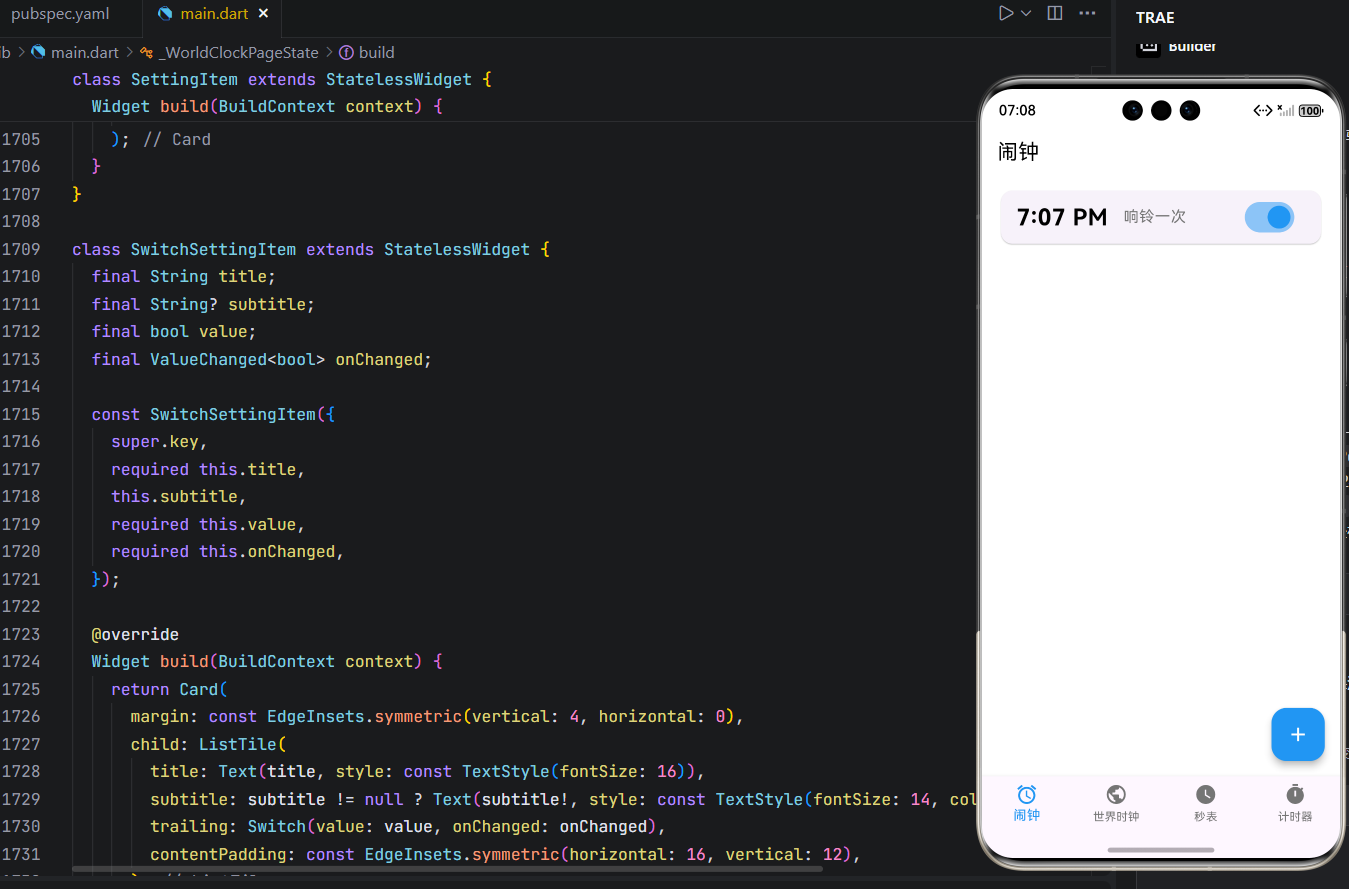
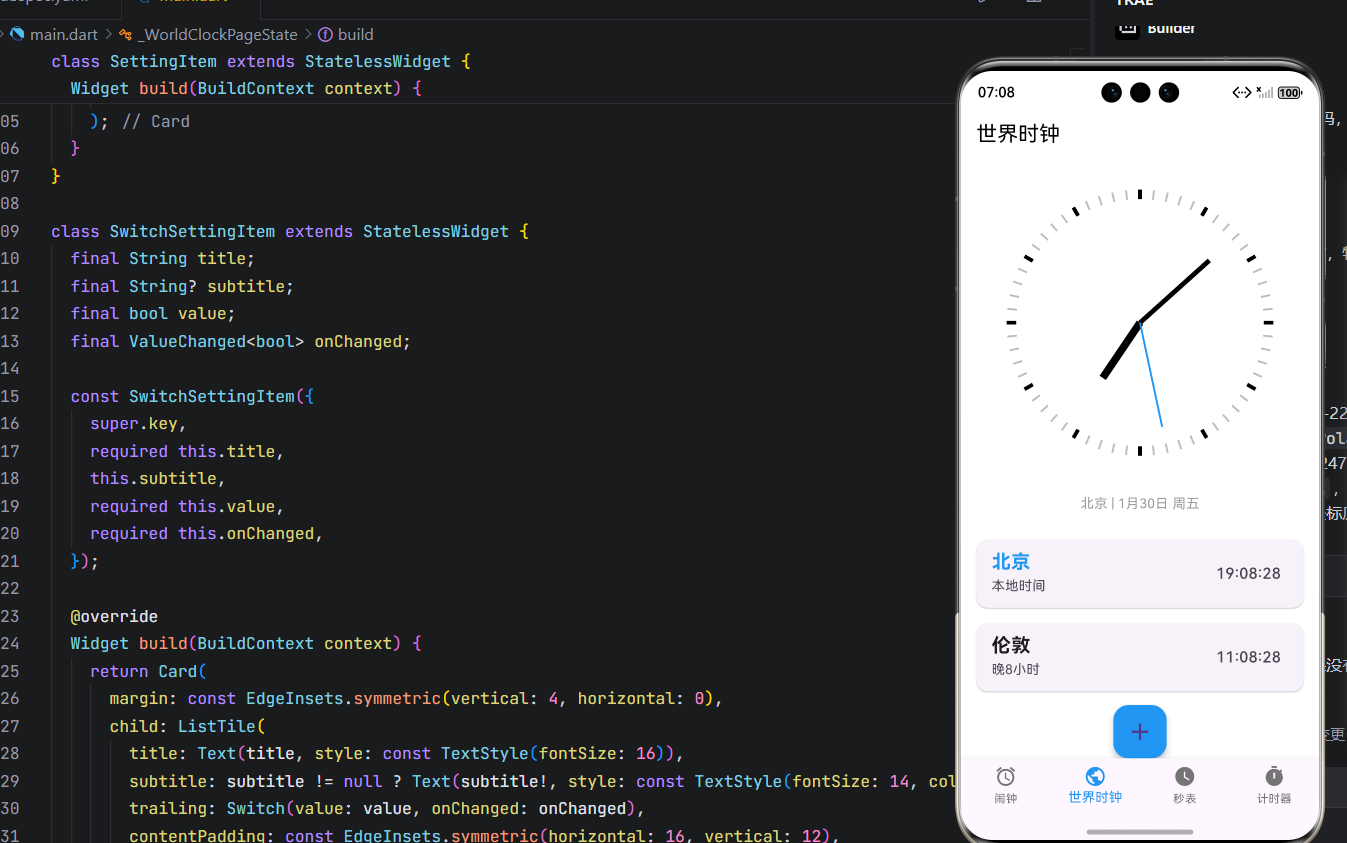
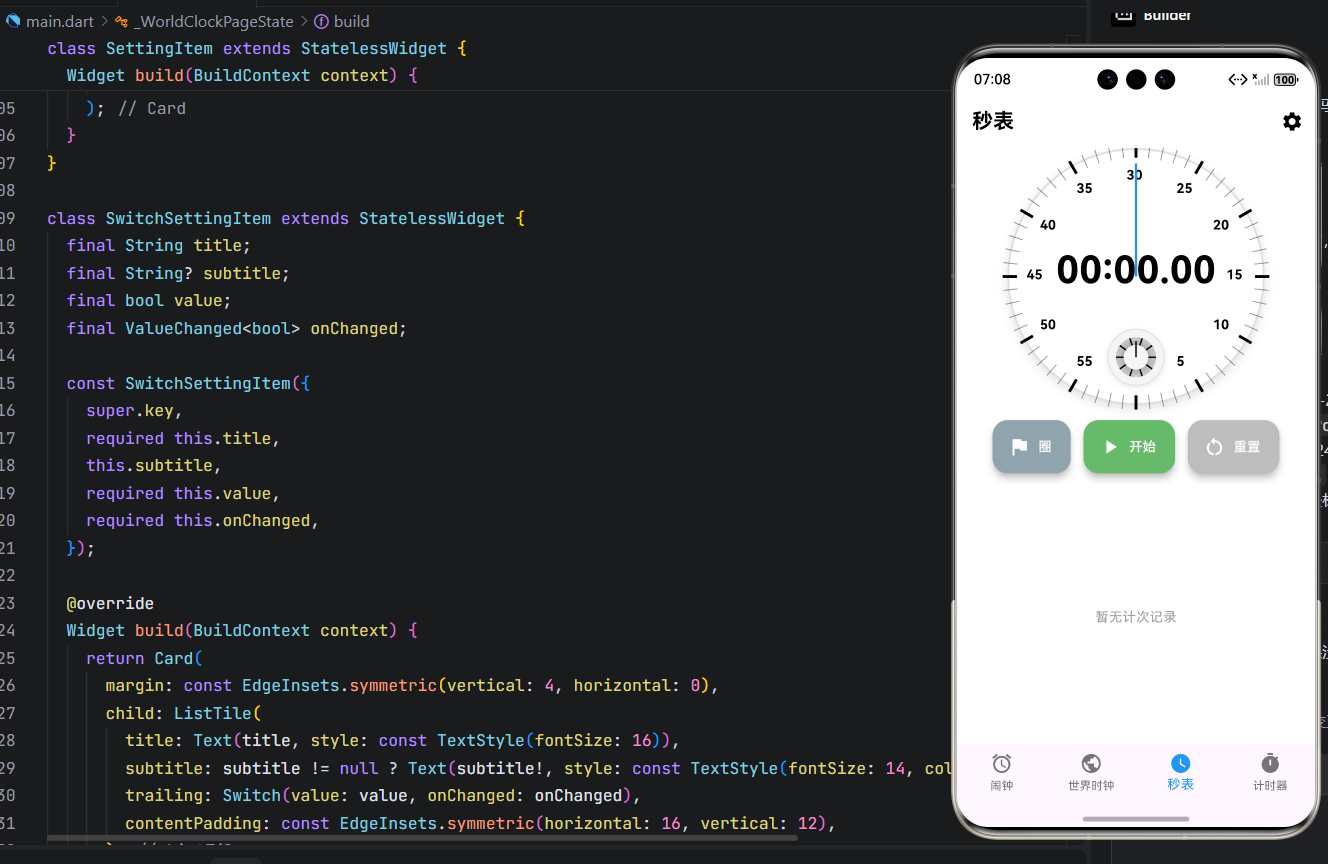
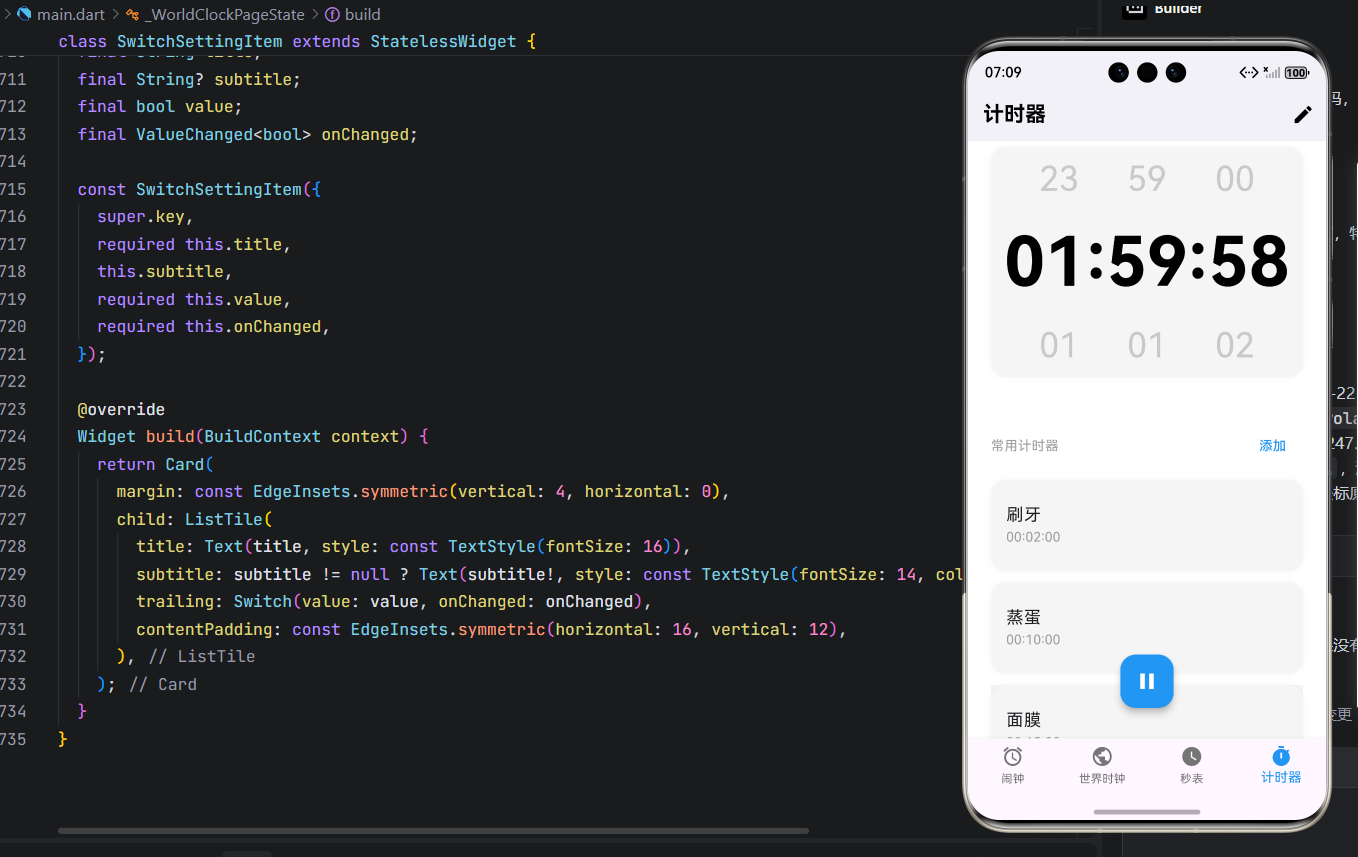
六、总结:Flutter 在 OpenHarmony 生态中的定位
通过本次实践,我们验证了 Flutter 完全有能力构建符合 OpenHarmony 体验标准的系统级应用。其优势在于:
- 开发效率高:一套代码覆盖多端,加速鸿蒙生态应用供给;
- UI 表现力强:自绘引擎突破原生组件限制,实现高保真设计;
- 社区生态成熟:大量插件可复用,降低开发成本。
当然,也需正视挑战:
- 后台能力依赖 Platform Channel;
- 部分鸿蒙特有 API(如分布式能力)需原生桥接;
- 包体积略大于纯 ArkTS 应用。
欢迎加入开源鸿蒙跨平台社区: https://openharmonycrossplatform.csdn.net