🚀运行效果展示
Flutter框架跨平台鸿蒙开发------学校校历APP的开发流程
前言
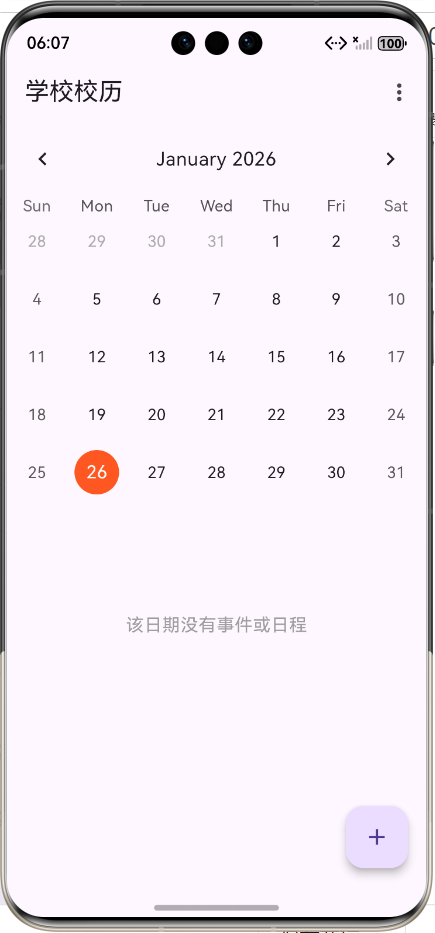
随着移动互联网的普及,学校校历作为学生和教师日常学习生活的重要参考工具,也需要适应数字化时代的发展。本项目基于Flutter框架开发了一款跨平台的学校校历APP,支持在鸿蒙系统等多个平台上运行,为用户提供便捷的校历查询、日程管理和课程表查看功能。
应用介绍
功能概述
学校校历APP是一款专为学生和教师设计的移动应用,主要提供以下功能:
- 校历查看:支持月视图和周视图切换,清晰展示学期内的重要日期和事件
- 事件管理:显示节假日、考试、活动等重要校历事件
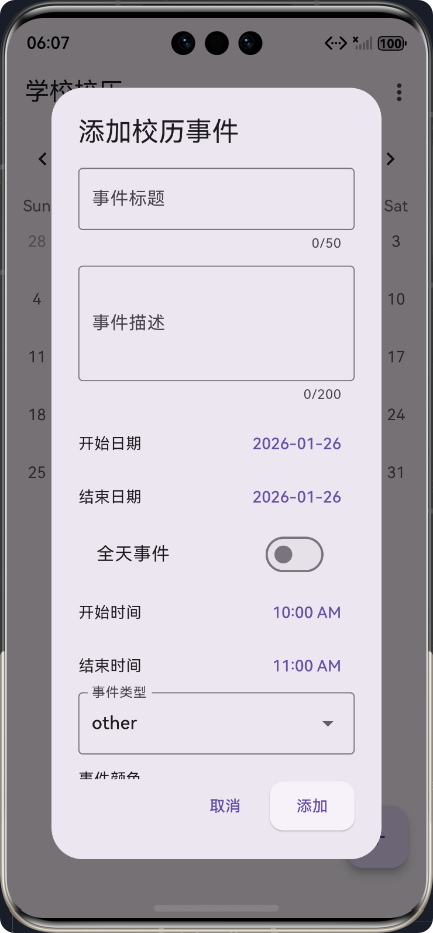
- 日程管理:支持添加、编辑和删除个人日程,设置提醒
- 课程表:展示每周课程安排,支持查看课程详情
- 响应式设计:适配不同屏幕尺寸,提供良好的用户体验
技术栈
- Flutter:跨平台UI框架,支持Android、iOS、鸿蒙等多个平台
- Dart:Flutter的开发语言
- table_calendar:日历组件库,用于实现校历视图
- provider:状态管理库,用于管理应用状态
核心功能实现
1. 数据模型设计
校历事件模型
dart
import 'package:flutter/material.dart';

/// 校历事件模型
class CalendarEvent {
  /// 事件ID
  final String id;
  /// 事件标题
  final String title;
  /// 事件描述
  final String? description;
  /// 事件开始时间
  final DateTime startDateTime;
  /// 事件结束时间
  final DateTime endDateTime;
  /// 事件类型(节假日、考试、活动等)
  final EventType type;
  /// 是否为全天事件
  final bool isAllDay;
  /// 事件颜色
  final Color color;

  /// 构造函数
  CalendarEvent({
    required this.id,
    required this.title,
    this.description,
    required this.startDateTime,
    required this.endDateTime,
    required this.type,
    this.isAllDay = false,
    this.color = Colors.blue,
  });
}

/// 事件类型枚举
enum EventType {
  /// 节假日
  holiday,
  /// 考试
  exam,
  /// 活动
  activity,
  /// 其他
  other,
}
课程和日程模型
dart
/// 课程模型
class Course {
  /// 课程ID
  final String id;
  /// 课程名称
  final String name;
  /// 教师姓名
  final String teacher;
  /// 上课地点
  final String location;
  /// 上课时间
  final List<CourseTime> times;
  /// 课程颜色
  final Color color;

  /// 构造函数
  Course({
    required this.id,
    required this.name,
    required this.teacher,
    required this.location,
    required this.times,
    this.color = Colors.green,
  });
}

/// 日程模型
class Schedule {
  /// 日程ID
  final String id;
  /// 日程标题
  final String title;
  /// 日程描述
  final String? description;
  /// 日程时间
  final DateTime dateTime;
  /// 是否完成
  final bool isCompleted;
  /// 是否有提醒
  final bool hasReminder;
  /// 提醒时间(提前几分钟)
  final int? reminderMinutes;

  /// 构造函数
  Schedule({
    required this.id,
    required this.title,
    this.description,
    required this.dateTime,
    this.isCompleted = false,
    this.hasReminder = false,
    this.reminderMinutes,
  });
}
2. 校历服务层
校历服务层负责提供数据支持,包括获取学期信息、课程表和日程数据:
dart
/// 校历服务类,提供校历相关的数据服务
class SchoolCalendarService {
  /// 获取当前学期信息
  SchoolTerm getCurrentTerm() {
    return SchoolTerm(
      id: '2024-2025-1',
      name: '2024-2025学年第一学期',
      startDate: DateTime(2024, 9, 2),
      endDate: DateTime(2025, 1, 18),
      weeks: 20,
      events: _getMockEvents(),
    );
  }

  /// 获取模拟课程数据
  List<Course> getMockCourses() {
    return [
      Course(
        id: '1',
        name: '高等数学',
        teacher: '张老师',
        location: '教学楼101',
        times: [
          CourseTime(
            dayOfWeek: 1,
            startSection: 1,
            endSection: 2,
            startTime: const TimeOfDay(hour: 8, minute: 0),
            endTime: const TimeOfDay(hour: 9, minute: 40),
          ),
        ],
        color: Colors.blue,
      ),
      // 更多课程...
    ];
  }

  /// 获取模拟日程数据
  List<Schedule> getMockSchedules() {
    return [
      Schedule(
        id: '1',
        title: '小组讨论',
        description: '讨论Flutter项目进度',
        dateTime: DateTime.now().add(const Duration(days: 1, hours: 14)),
        hasReminder: true,
        reminderMinutes: 30,
      ),
      // 更多日程...
    ];
  }

  /// 获取模拟校历事件
  List<CalendarEvent> _getMockEvents() {
    return [
      CalendarEvent(
        id: '1',
        title: '国庆节',
        description: '国庆节放假7天',
        startDateTime: DateTime(2024, 10, 1),
        endDateTime: DateTime(2024, 10, 7),
        type: EventType.holiday,
        isAllDay: true,
        color: Colors.red,
      ),
      // 更多事件...
    ];
  }
}
3. 校历主页面实现
校历主页面是应用的核心界面,实现了日历视图、事件和日程的展示:
dart
class SchoolCalendarMainPage extends StatefulWidget {
  const SchoolCalendarMainPage({Key? key}) : super(key: key);

  @override
  State<SchoolCalendarMainPage> createState() => _SchoolCalendarMainPageState();
}

class _SchoolCalendarMainPageState extends State<SchoolCalendarMainPage> {
  /// 校历服务
  final SchoolCalendarService _calendarService = SchoolCalendarService();
  /// 日历控制器
  late CalendarFormat _calendarFormat;
  /// 当前选中的日期
  late DateTime _focusedDay;
  /// 选中的日期
  late DateTime? _selectedDay;
  /// 校历事件列表
  List<CalendarEvent> _events = [];
  /// 日程列表
  List<Schedule> _schedules = [];

  @override
  void initState() {
    super.initState();
    _calendarFormat = CalendarFormat.month;
    _focusedDay = DateTime.now();
    _selectedDay = _focusedDay;
    _loadData();
  }

  /// 加载数据
  void _loadData() {
    final currentTerm = _calendarService.getCurrentTerm();
    setState(() {
      _events = currentTerm.events;
      _schedules = _calendarService.getMockSchedules();
    });
  }

  @override
  Widget build(BuildContext context) {
    return Scaffold(
      appBar: AppBar(
        title: const Text('学校校历'),
        actions: [
          // 视图切换菜单
          PopupMenuButton<CalendarFormat>(
            onSelected: (format) {
              setState(() {
                _calendarFormat = format;
              });
            },
            itemBuilder: (context) => [
              const PopupMenuItem(
                value: CalendarFormat.week,
                child: Text('周视图'),
              ),
              const PopupMenuItem(
                value: CalendarFormat.month,
                child: Text('月视图'),
              ),
            ],
          ),
        ],
      ),
      body: Column(
        children: [
          // 日历组件
          TableCalendar<CalendarEvent>(
            firstDay: DateTime.utc(2024, 1, 1),
            lastDay: DateTime.utc(2025, 12, 31),
            focusedDay: _focusedDay,
            calendarFormat: _calendarFormat,
            selectedDayPredicate: (day) => isSameDay(_selectedDay, day),
            onDaySelected: _onDaySelected,
            onFormatChanged: (format) {
              if (_calendarFormat != format) {
                setState(() {
                  _calendarFormat = format;
                });
              }
            },
            onPageChanged: (focusedDay) {
              _focusedDay = focusedDay;
            },
            eventLoader: _getEventsForDay,
            holidayPredicate: (day) {
              // 检查是否为节假日
              return _events.any((event) =>
                  event.type == EventType.holiday &&
                  event.startDateTime.isBefore(day.add(const Duration(days: 1))) &&
                  event.endDateTime.isAfter(day.subtract(const Duration(days: 1))));
            },
            calendarStyle: const CalendarStyle(
              todayDecoration: BoxDecoration(
                color: Colors.blue,
                shape: BoxShape.circle,
              ),
              selectedDecoration: BoxDecoration(
                color: Colors.deepOrange,
                shape: BoxShape.circle,
              ),
              holidayTextStyle: TextStyle(color: Colors.red),
            ),
          ),
          // 事件和日程列表
          Expanded(
            child: ListView(
              children: [
                // 事件列表
                if (selectedEvents.isNotEmpty) ...[
                  const Padding(
                    padding: EdgeInsets.all(8.0),
                    child: Text(
                      '校历事件',
                      style: TextStyle(
                        fontSize: 18,
                        fontWeight: FontWeight.bold,
                      ),
                    ),
                  ),
                  ...selectedEvents.map((event) => _buildEventCard(event)),
                ],
                // 日程列表
                if (selectedSchedules.isNotEmpty) ...[
                  const Padding(
                    padding: EdgeInsets.all(8.0),
                    child: Text(
                      '今日日程',
                      style: TextStyle(
                        fontSize: 18,
                        fontWeight: FontWeight.bold,
                      ),
                    ),
                  ),
                  ...selectedSchedules.map((schedule) => _buildScheduleCard(schedule)),
                ],
              ],
            ),
          ),
        ],
      ),
      floatingActionButton: FloatingActionButton(
        onPressed: () {
          // 添加新日程
          _showAddScheduleDialog();
        },
        child: const Icon(Icons.add),
        tooltip: '添加日程',
      ),
    );
  }

  // 其他方法...
}
4. 路由配置
在main.dart中配置应用路由:
dart
import 'package:flutter/material.dart';
import './pages/school_calendar_main_page.dart';

void main() {
  runApp(const MyApp());
}

class MyApp extends StatelessWidget {
  const MyApp({Key? key}) : super(key: key);

  @override
  Widget build(BuildContext context) {
    return MaterialApp(
      title: '学校校历',
      theme: ThemeData(
        primarySwatch: Colors.blue,
        textTheme: const TextTheme(
          headlineLarge: TextStyle(fontSize: 24, fontWeight: FontWeight.bold),
          headlineMedium: TextStyle(fontSize: 20, fontWeight: FontWeight.bold),
          bodyLarge: TextStyle(fontSize: 16),
          bodyMedium: TextStyle(fontSize: 14),
        ),
        cardTheme: CardTheme(
          elevation: 4,
          shape: RoundedRectangleBorder(borderRadius: BorderRadius.circular(12)),
        ),
        elevatedButtonTheme: ElevatedButtonThemeData(
          style: ElevatedButton.styleFrom(
            shape: RoundedRectangleBorder(borderRadius: BorderRadius.circular(12)),
            padding: const EdgeInsets.symmetric(horizontal: 24, vertical: 12),
          ),
        ),
      ),
      initialRoute: '/',
      routes: {
        '/': (context) => const SchoolCalendarMainPage(),
      },
      debugShowCheckedModeBanner: false,
    );
  }
}
应用架构设计
架构流程图
数据模型
服务层
状态管理
用户界面
用户界面
状态管理
服务层
数据模型
校历主页面
课程表页面
日程管理页面
设置页面
校历状态
课程表状态
日程状态
校历服务
课程服务
日程服务
校历事件模型
课程模型
日程模型
学期模型
开发流程总结
1. 需求分析与设计
- 确定应用核心功能:校历查看、事件管理、日程管理、课程表
- 设计数据模型:校历事件、课程、日程、学期
- 设计UI界面:日历视图、事件列表、日程列表、课程表
2. 项目初始化
- 创建Flutter项目
- 配置依赖:table_calendar、provider等
- 设置项目主题和样式
3. 核心功能实现
- 实现数据模型
- 实现服务层,提供数据支持
- 实现校历主页面,包括日历视图和事件列表
- 实现日程管理功能
- 实现课程表功能
4. 测试与优化
- 测试应用在不同平台上的运行情况
- 优化UI设计,提高用户体验
- 修复bug,提高应用稳定性
5. 跨平台适配
- 适配不同屏幕尺寸
- 测试鸿蒙系统等平台的兼容性
- 优化性能,提高运行流畅度
总结
本项目基于Flutter框架开发了一款跨平台的学校校历APP,实现了校历查看、事件管理、日程管理和课程表等核心功能。应用采用了清晰的架构设计,包括数据模型层、服务层、状态管理层和用户界面层,便于维护和扩展。
通过Flutter的跨平台特性,应用可以在鸿蒙系统等多个平台上运行,为用户提供一致的使用体验。同时,应用采用了响应式设计,适配不同屏幕尺寸,提高了用户体验。
未来可以进一步扩展应用功能,如添加云同步功能、推送提醒、课程表导入导出等,提高应用的实用性和便捷性。
运行效果
应用运行后,用户可以看到一个直观的日历界面,支持月视图和周视图切换。在日历上可以查看各种校历事件,如节假日、考试等。选中某一天后,可以查看当天的事件和日程。用户还可以添加、编辑和删除个人日程,设置提醒。
应用界面简洁美观,操作流畅,为用户提供了便捷的校历查询和日程管理功能。
附录
项目结构
lib/
├── models/
│   └── school_calendar_model.dart  # 数据模型
├── pages/
│   └── school_calendar_main_page.dart  # 校历主页面
├── services/
│   └── school_calendar_service.dart  # 校历服务
└── main.dart  # 应用入口
主要依赖
- flutter: 2.10.5
- table_calendar: ^3.1.1
- provider: ^6.1.1
运行命令
bash
# 获取依赖
flutter pub get

# 运行应用
flutter run

# 构建APK
flutter build apk

# 构建鸿蒙HAP包
flutter build ohos
通过本项目的开发,我们学习了如何使用Flutter框架开发跨平台应用,如何设计数据模型和服务层,如何实现日历视图和事件管理功能。希望本项目能够为其他开发者提供参考,共同推动跨平台应用开发的发展。
📚 参考资料
欢迎加入开源鸿蒙跨平台社区:https://openharmonycrossplatform.csdn.net