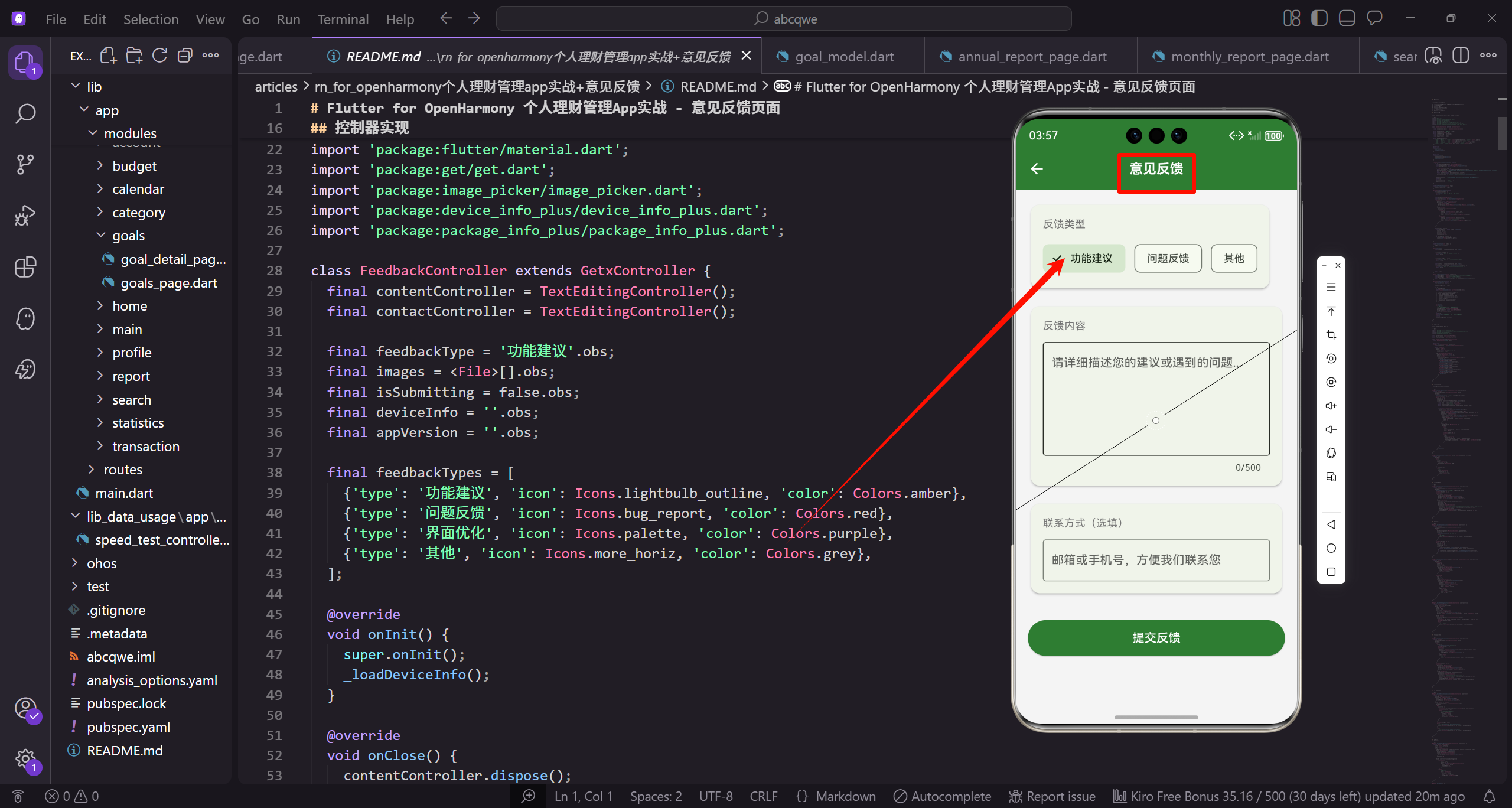
意见反馈是收集用户建议和问题的重要渠道。本篇将实现一个功能完善的反馈页面,支持选择反馈类型、填写内容、上传截图和联系方式。
功能设计
反馈页面包含以下功能:
- 反馈类型选择(功能建议、问题反馈、界面优化、其他)
- 反馈内容输入框
- 截图上传功能
- 联系方式输入框(选填)
- 设备信息自动收集
- 提交按钮和进度提示
控制器实现
创建 feedback_controller.dart 管理反馈状态:
dart
import 'dart:io';
import 'package:flutter/material.dart';
import 'package:get/get.dart';
import 'package:image_picker/image_picker.dart';
import 'package:device_info_plus/device_info_plus.dart';
import 'package:package_info_plus/package_info_plus.dart';

class FeedbackController extends GetxController {
  final contentController = TextEditingController();
  final contactController = TextEditingController();

  final feedbackType = '功能建议'.obs;
  final images = <File>[].obs;
  final isSubmitting = false.obs;
  final deviceInfo = ''.obs;
  final appVersion = ''.obs;

  final feedbackTypes = [
    {'type': '功能建议', 'icon': Icons.lightbulb_outline, 'color': Colors.amber},
    {'type': '问题反馈', 'icon': Icons.bug_report, 'color': Colors.red},
    {'type': '界面优化', 'icon': Icons.palette, 'color': Colors.purple},
    {'type': '其他', 'icon': Icons.more_horiz, 'color': Colors.grey},
  ];

  @override
  void onInit() {
    super.onInit();
    _loadDeviceInfo();
  }

  @override
  void onClose() {
    contentController.dispose();
    contactController.dispose();
    super.onClose();
  }

  Future<void> _loadDeviceInfo() async {
    try {
      final deviceInfoPlugin = DeviceInfoPlugin();
      final packageInfo = await PackageInfo.fromPlatform();

      if (Platform.isAndroid) {
        final androidInfo = await deviceInfoPlugin.androidInfo;
        deviceInfo.value = '${androidInfo.brand} ${androidInfo.model} (Android ${androidInfo.version.release})';
      } else if (Platform.isIOS) {
        final iosInfo = await deviceInfoPlugin.iosInfo;
        deviceInfo.value = '${iosInfo.name} (iOS ${iosInfo.systemVersion})';
      }

      appVersion.value = '${packageInfo.version} (${packageInfo.buildNumber})';
    } catch (e) {
      deviceInfo.value = '未知设备';
      appVersion.value = '1.0.0';
    }
  }

  void setFeedbackType(String type) {
    feedbackType.value = type;
  }

  Future<void> pickImage() async {
    if (images.length >= 3) {
      Get.snackbar('提示', '最多上传3张图片');
      return;
    }

    final picker = ImagePicker();
    final source = await Get.bottomSheet<ImageSource>(
      Container(
        padding: const EdgeInsets.all(16),
        decoration: const BoxDecoration(
          color: Colors.white,
          borderRadius: BorderRadius.vertical(top: Radius.circular(16)),
        ),
        child: Column(
          mainAxisSize: MainAxisSize.min,
          children: [
            ListTile(
              leading: const Icon(Icons.camera_alt),
              title: const Text('拍照'),
              onTap: () => Get.back(result: ImageSource.camera),
            ),
            ListTile(
              leading: const Icon(Icons.photo_library),
              title: const Text('从相册选择'),
              onTap: () => Get.back(result: ImageSource.gallery),
            ),
          ],
        ),
      ),
    );

    if (source != null) {
      final pickedFile = await picker.pickImage(
        source: source,
        maxWidth: 1080,
        maxHeight: 1920,
        imageQuality: 80,
      );
      if (pickedFile != null) {
        images.add(File(pickedFile.path));
      }
    }
  }

  void removeImage(int index) {
    images.removeAt(index);
  }

  bool validate() {
    final content = contentController.text.trim();

    if (content.isEmpty) {
      Get.snackbar('提示', '请输入反馈内容');
      return false;
    }

    if (content.length < 10) {
      Get.snackbar('提示', '反馈内容至少10个字符');
      return false;
    }

    final contact = contactController.text.trim();
    if (contact.isNotEmpty && !_isValidContact(contact)) {
      Get.snackbar('提示', '请输入有效的邮箱或手机号');
      return false;
    }

    return true;
  }

  bool _isValidContact(String contact) {
    final emailRegex = RegExp(r'^[\w-\.]+@([\w-]+\.)+[\w-]{2,4}$');
    final phoneRegex = RegExp(r'^1[3-9]\d{9}$');
    return emailRegex.hasMatch(contact) || phoneRegex.hasMatch(contact);
  }

  Future<void> submit() async {
    if (!validate()) return;

    isSubmitting.value = true;

    try {
      // 模拟提交延迟
      await Future.delayed(const Duration(seconds: 2));

      // 实际项目中,这里应该调用API提交反馈
      // await _feedbackService.submit(
      //   type: feedbackType.value,
      //   content: contentController.text,
      //   contact: contactController.text,
      //   images: images,
      //   deviceInfo: deviceInfo.value,
      //   appVersion: appVersion.value,
      // );

      Get.back();
      Get.snackbar(
        '感谢反馈',
        '我们已收到您的反馈,感谢您的支持!',
        snackPosition: SnackPosition.BOTTOM,
        backgroundColor: const Color(0xFF2E7D32),
        colorText: Colors.white,
      );
    } catch (e) {
      Get.snackbar('提交失败', '请检查网络后重试');
    } finally {
      isSubmitting.value = false;
    }
  }
}
页面实现
创建 feedback_page.dart:
dart
import 'package:flutter/material.dart';
import 'package:flutter_screenutil/flutter_screenutil.dart';
import 'package:get/get.dart';
import 'feedback_controller.dart';

const _primaryColor = Color(0xFF2E7D32);
const _textSecondary = Color(0xFF757575);

class FeedbackPage extends StatelessWidget {
  const FeedbackPage({super.key});

  @override
  Widget build(BuildContext context) {
    final controller = Get.put(FeedbackController());

    return Scaffold(
      appBar: AppBar(
        title: const Text('意见反馈'),
        centerTitle: true,
      ),
      body: SingleChildScrollView(
        padding: EdgeInsets.all(16.w),
        child: Column(
          crossAxisAlignment: CrossAxisAlignment.start,
          children: [
            _buildTypeSection(controller),
            SizedBox(height: 20.h),
            _buildContentSection(controller),
            SizedBox(height: 20.h),
            _buildImageSection(controller),
            SizedBox(height: 20.h),
            _buildContactSection(controller),
            SizedBox(height: 20.h),
            _buildDeviceInfoSection(controller),
            SizedBox(height: 32.h),
            _buildSubmitButton(controller),
            SizedBox(height: 16.h),
            _buildTips(),
          ],
        ),
      ),
    );
  }
}
反馈类型选择
使用卡片式设计展示反馈类型:
dart
Widget _buildTypeSection(FeedbackController controller) {
  return Column(
    crossAxisAlignment: CrossAxisAlignment.start,
    children: [
      _buildSectionTitle('反馈类型', isRequired: true),
      SizedBox(height: 12.h),
      Obx(() => Wrap(
        spacing: 12.w,
        runSpacing: 12.h,
        children: controller.feedbackTypes.map((item) {
          final type = item['type'] as String;
          final icon = item['icon'] as IconData;
          final color = item['color'] as Color;
          final isSelected = controller.feedbackType.value == type;

          return GestureDetector(
            onTap: () => controller.setFeedbackType(type),
            child: AnimatedContainer(
              duration: const Duration(milliseconds: 200),
              padding: EdgeInsets.symmetric(horizontal: 16.w, vertical: 12.h),
              decoration: BoxDecoration(
                color: isSelected ? color.withOpacity(0.1) : Colors.grey[100],
                borderRadius: BorderRadius.circular(12.r),
                border: Border.all(
                  color: isSelected ? color : Colors.transparent,
                  width: 2,
                ),
              ),
              child: Row(
                mainAxisSize: MainAxisSize.min,
                children: [
                  Icon(
                    icon,
                    color: isSelected ? color : _textSecondary,
                    size: 20.sp,
                  ),
                  SizedBox(width: 8.w),
                  Text(
                    type,
                    style: TextStyle(
                      fontSize: 14.sp,
                      color: isSelected ? color : _textSecondary,
                      fontWeight: isSelected ? FontWeight.w600 : FontWeight.normal,
                    ),
                  ),
                ],
              ),
            ),
          );
        }).toList(),
      )),
    ],
  );
}

Widget _buildSectionTitle(String title, {bool isRequired = false}) {
  return Row(
    children: [
      Text(
        title,
        style: TextStyle(
          fontSize: 15.sp,
          fontWeight: FontWeight.w600,
        ),
      ),
      if (isRequired)
        Text(
          ' *',
          style: TextStyle(
            fontSize: 15.sp,
            color: Colors.red,
          ),
        ),
    ],
  );
}
反馈内容输入
dart
Widget _buildContentSection(FeedbackController controller) {
  return Column(
    crossAxisAlignment: CrossAxisAlignment.start,
    children: [
      _buildSectionTitle('反馈内容', isRequired: true),
      SizedBox(height: 12.h),
      Container(
        decoration: BoxDecoration(
          color: Colors.grey[50],
          borderRadius: BorderRadius.circular(12.r),
          border: Border.all(color: Colors.grey[200]!),
        ),
        child: TextField(
          controller: controller.contentController,
          maxLines: 6,
          maxLength: 500,
          decoration: InputDecoration(
            hintText: '请详细描述您的建议或遇到的问题,我们会认真阅读每一条反馈...',
            hintStyle: TextStyle(color: _textSecondary, fontSize: 14.sp),
            border: InputBorder.none,
            contentPadding: EdgeInsets.all(16.w),
            counterStyle: TextStyle(color: _textSecondary, fontSize: 12.sp),
          ),
        ),
      ),
    ],
  );
}
截图上传
dart
Widget _buildImageSection(FeedbackController controller) {
  return Column(
    crossAxisAlignment: CrossAxisAlignment.start,
    children: [
      Row(
        mainAxisAlignment: MainAxisAlignment.spaceBetween,
        children: [
          _buildSectionTitle('上传截图'),
          Text(
            '最多3张',
            style: TextStyle(fontSize: 12.sp, color: _textSecondary),
          ),
        ],
      ),
      SizedBox(height: 12.h),
      Obx(() => Wrap(
        spacing: 12.w,
        runSpacing: 12.h,
        children: [
          ...controller.images.asMap().entries.map((entry) {
            return _buildImageItem(entry.key, entry.value, controller);
          }),
          if (controller.images.length < 3) _buildAddImageButton(controller),
        ],
      )),
    ],
  );
}

Widget _buildImageItem(int index, File file, FeedbackController controller) {
  return Stack(
    children: [
      Container(
        width: 80.w,
        height: 80.w,
        decoration: BoxDecoration(
          borderRadius: BorderRadius.circular(8.r),
          image: DecorationImage(
            image: FileImage(file),
            fit: BoxFit.cover,
          ),
        ),
      ),
      Positioned(
        top: -8,
        right: -8,
        child: GestureDetector(
          onTap: () => controller.removeImage(index),
          child: Container(
            padding: EdgeInsets.all(4.w),
            decoration: const BoxDecoration(
              color: Colors.red,
              shape: BoxShape.circle,
            ),
            child: Icon(
              Icons.close,
              color: Colors.white,
              size: 14.sp,
            ),
          ),
        ),
      ),
    ],
  );
}

Widget _buildAddImageButton(FeedbackController controller) {
  return GestureDetector(
    onTap: controller.pickImage,
    child: Container(
      width: 80.w,
      height: 80.w,
      decoration: BoxDecoration(
        color: Colors.grey[100],
        borderRadius: BorderRadius.circular(8.r),
        border: Border.all(color: Colors.grey[300]!, style: BorderStyle.solid),
      ),
      child: Column(
        mainAxisAlignment: MainAxisAlignment.center,
        children: [
          Icon(Icons.add_photo_alternate, color: _textSecondary, size: 28.sp),
          SizedBox(height: 4.h),
          Text(
            '添加图片',
            style: TextStyle(fontSize: 10.sp, color: _textSecondary),
          ),
        ],
      ),
    ),
  );
}
联系方式输入
dart
Widget _buildContactSection(FeedbackController controller) {
  return Column(
    crossAxisAlignment: CrossAxisAlignment.start,
    children: [
      Row(
        children: [
          _buildSectionTitle('联系方式'),
          SizedBox(width: 8.w),
          Container(
            padding: EdgeInsets.symmetric(horizontal: 8.w, vertical: 2.h),
            decoration: BoxDecoration(
              color: Colors.grey[200],
              borderRadius: BorderRadius.circular(4.r),
            ),
            child: Text(
              '选填',
              style: TextStyle(fontSize: 10.sp, color: _textSecondary),
            ),
          ),
        ],
      ),
      SizedBox(height: 12.h),
      Container(
        decoration: BoxDecoration(
          color: Colors.grey[50],
          borderRadius: BorderRadius.circular(12.r),
          border: Border.all(color: Colors.grey[200]!),
        ),
        child: TextField(
          controller: controller.contactController,
          decoration: InputDecoration(
            hintText: '邮箱或手机号,方便我们联系您',
            hintStyle: TextStyle(color: _textSecondary, fontSize: 14.sp),
            border: InputBorder.none,
            contentPadding: EdgeInsets.all(16.w),
            prefixIcon: Icon(Icons.contact_mail, color: _textSecondary),
          ),
        ),
      ),
    ],
  );
}
设备信息展示
dart
Widget _buildDeviceInfoSection(FeedbackController controller) {
  return Container(
    padding: EdgeInsets.all(12.w),
    decoration: BoxDecoration(
      color: Colors.blue.withOpacity(0.05),
      borderRadius: BorderRadius.circular(8.r),
    ),
    child: Obx(() => Column(
      crossAxisAlignment: CrossAxisAlignment.start,
      children: [
        Row(
          children: [
            Icon(Icons.info_outline, color: Colors.blue, size: 16.sp),
            SizedBox(width: 8.w),
            Text(
              '设备信息(自动收集)',
              style: TextStyle(
                fontSize: 12.sp,
                color: Colors.blue,
                fontWeight: FontWeight.w500,
              ),
            ),
          ],
        ),
        SizedBox(height: 8.h),
        Text(
          '设备: ${controller.deviceInfo.value}',
          style: TextStyle(fontSize: 11.sp, color: _textSecondary),
        ),
        Text(
          '版本: ${controller.appVersion.value}',
          style: TextStyle(fontSize: 11.sp, color: _textSecondary),
        ),
      ],
    )),
  );
}
提交按钮
dart
Widget _buildSubmitButton(FeedbackController controller) {
  return Obx(() => SizedBox(
    width: double.infinity,
    height: 50.h,
    child: ElevatedButton(
      onPressed: controller.isSubmitting.value ? null : controller.submit,
      style: ElevatedButton.styleFrom(
        backgroundColor: _primaryColor,
        shape: RoundedRectangleBorder(
          borderRadius: BorderRadius.circular(12.r),
        ),
        elevation: 0,
      ),
      child: controller.isSubmitting.value
          ? SizedBox(
              width: 24.w,
              height: 24.w,
              child: const CircularProgressIndicator(
                color: Colors.white,
                strokeWidth: 2,
              ),
            )
          : Text(
              '提交反馈',
              style: TextStyle(
                fontSize: 16.sp,
                color: Colors.white,
                fontWeight: FontWeight.w600,
              ),
            ),
    ),
  ));
}

Widget _buildTips() {
  return Container(
    padding: EdgeInsets.all(12.w),
    decoration: BoxDecoration(
      color: Colors.grey[50],
      borderRadius: BorderRadius.circular(8.r),
    ),
    child: Column(
      crossAxisAlignment: CrossAxisAlignment.start,
      children: [
        Text(
          '温馨提示',
          style: TextStyle(
            fontSize: 13.sp,
            fontWeight: FontWeight.w600,
            color: _textSecondary,
          ),
        ),
        SizedBox(height: 8.h),
        _buildTipItem('我们会认真阅读每一条反馈'),
        _buildTipItem('如需回复,请填写联系方式'),
        _buildTipItem('截图可以帮助我们更好地理解问题'),
      ],
    ),
  );
}

Widget _buildTipItem(String text) {
  return Padding(
    padding: EdgeInsets.only(bottom: 4.h),
    child: Row(
      crossAxisAlignment: CrossAxisAlignment.start,
      children: [
        Text('• ', style: TextStyle(color: _textSecondary, fontSize: 12.sp)),
        Expanded(
          child: Text(
            text,
            style: TextStyle(color: _textSecondary, fontSize: 12.sp),
          ),
        ),
      ],
    ),
  );
}
设计要点
意见反馈页面的设计考虑:
- 反馈类型使用图标和颜色区分,更直观
- 内容输入框足够大,方便用户详细描述
- 支持上传截图,帮助开发者理解问题
- 联系方式选填,降低用户填写门槛
- 自动收集设备信息,便于问题排查
- 提交时显示加载状态,防止重复提交
- 温馨提示引导用户填写完整信息
实际项目中的扩展
在实际项目中,反馈功能可以进一步完善:
- 将反馈数据发送到服务器
- 支持查看历史反馈记录
- 实现反馈状态跟踪(已提交、处理中、已解决)
- 添加常见问题FAQ入口
- 支持语音反馈
小结
意见反馈页面是与用户沟通的重要桥梁,好的反馈机制可以帮助开发者了解用户需求,持续改进产品。通过完善的表单设计和友好的交互体验,鼓励用户积极反馈。下一篇将实现数据导出页面。
欢迎加入 OpenHarmony 跨平台开发社区,获取更多技术资源和交流机会: