说明
1. 自动分类
-
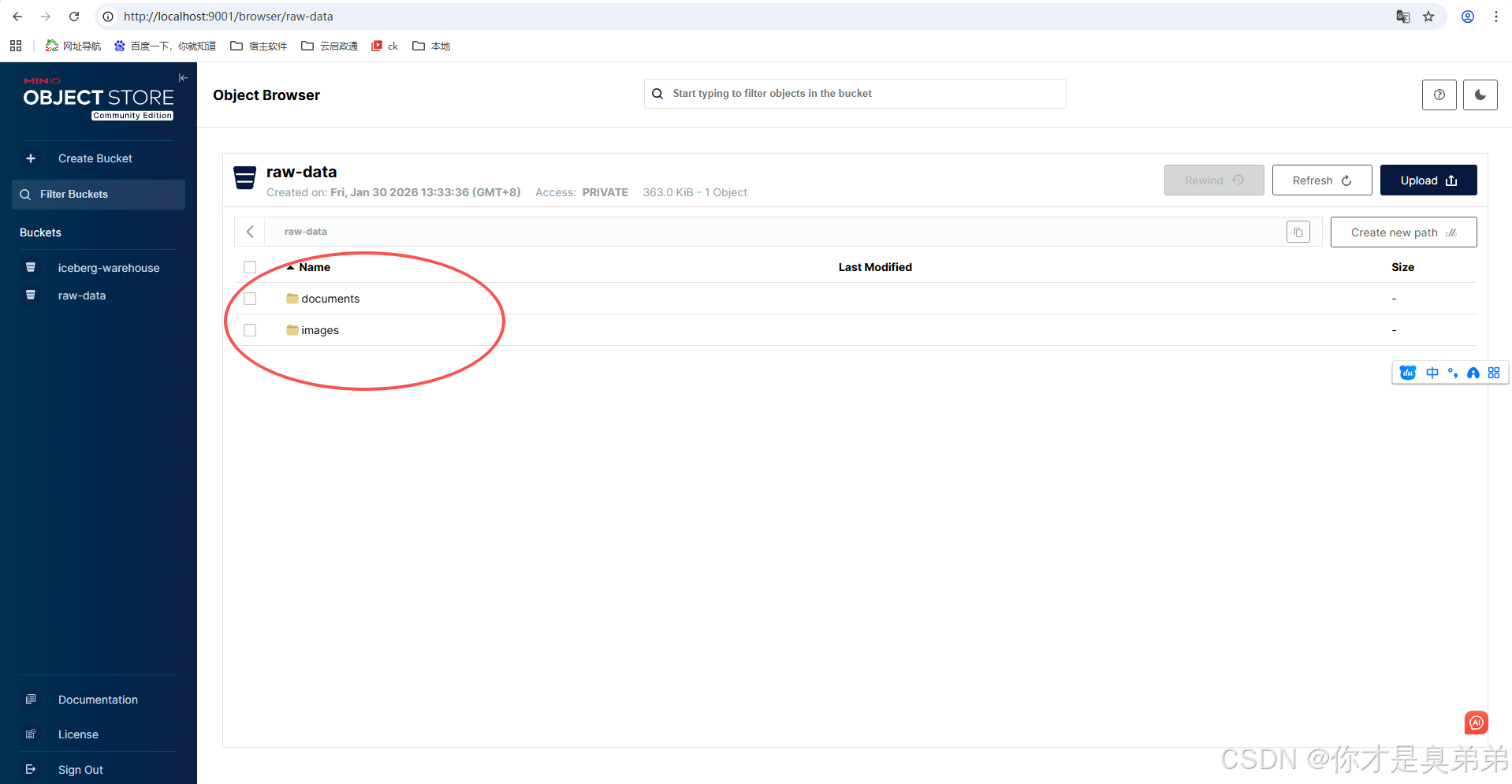
根据文件后缀名自动分类到对应文件夹
-
支持的主要分类:
images,videos,audios,documents,archives,others
2. 智能文件名生成
-
保留原始文件名中的中文字符
-
自动移除危险字符
-
添加时间戳防止重名
-
限制文件名长度
3. 路径结构示例
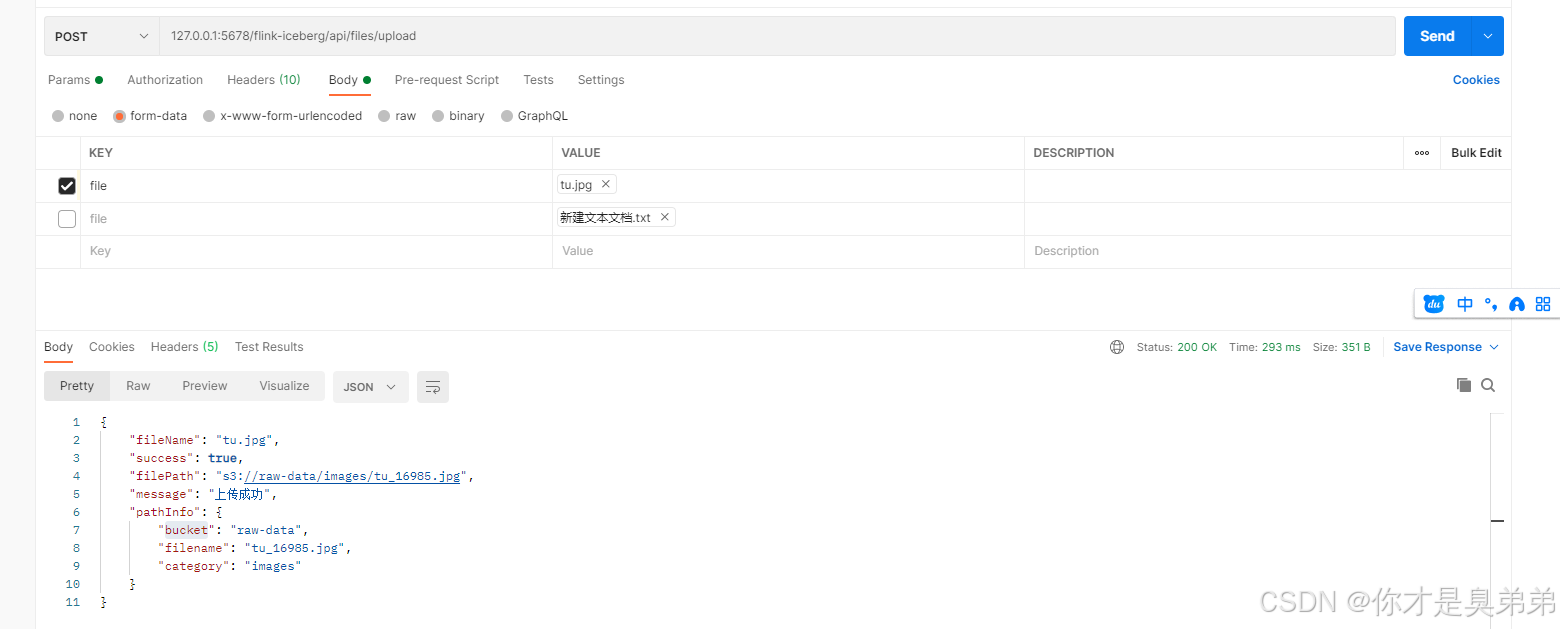
上传文件 tu.jpg 将生成路径:
XML
s3://raw-data/images/tu_84671.jpg- raw-data:MinIO桶名
- images:自动分类的文件夹
- tu_84671.jpg:处理后的安全文件名
4. API 接口
- POST /api/files/upload:上传单个文件(可选指定分类)
- POST /api/files/upload/batch:批量上传文件
- GET /api/files/url:获取文件临时访问链接
- DELETE /api/files/delete:删除文件
- GET /api/files/categories:查看支持的文件分类
Pom.xml
XML
     <!-- MinIO SDK -->
        <dependency>
            <groupId>io.minio</groupId>
            <artifactId>minio</artifactId>
            <version>8.5.0</version>
        </dependency>
.yml 文件
XML
server:
  port: 5678
  servlet:
    context-path: /flink-iceberg


# MinIO 配置
minio:
  endpoint: http://localhost:9000
  access-key: admin
  secret-key: admin123
  bucket-name: raw-data  # 原始数据桶
  region: us-east-1
  path-style-access: true


# 日志配置
logging:
  level:
    com.example: DEBUG
    org.apache.flink: INFO
    org.apache.iceberg: INFO
    org.apache.hadoop: WARN
  file:
    name: logs/flink-iceberg.log
  logback:
    rollingpolicy:
      max-file-size: 10MB
      max-history: 30
MinioConfig
java
import io.minio.MinioClient;
import lombok.Data;
import org.springframework.boot.context.properties.ConfigurationProperties;
import org.springframework.context.annotation.Bean;
import org.springframework.context.annotation.Configuration;

@Data
@Configuration
@ConfigurationProperties(prefix = "minio")
public class MinioConfig {
    private String endpoint;
    private String accessKey;
    private String secretKey;
    private String bucketName;
    private String region;
    private boolean pathStyleAccess = true;

    @Bean
    public MinioClient minioClient() {
        return MinioClient.builder()
                .endpoint(endpoint)
                .credentials(accessKey, secretKey)
                .region(region)
                .build();
    }
}
MinioService
java
import com.example.integration.config.MinioConfig;
import io.minio.*;
import io.minio.errors.*;
import io.minio.http.Method;
import lombok.RequiredArgsConstructor;
import lombok.extern.slf4j.Slf4j;
import org.springframework.stereotype.Service;
import org.springframework.web.multipart.MultipartFile;

import java.io.IOException;
import java.io.InputStream;
import java.security.InvalidKeyException;
import java.security.NoSuchAlgorithmException;
import java.time.LocalDate;
import java.time.format.DateTimeFormatter;
import java.util.*;
import java.util.concurrent.TimeUnit;

@Slf4j
@Service
@RequiredArgsConstructor
public class MinioService {

    private final MinioClient minioClient;
    private final MinioConfig minioConfig;

    private static final DateTimeFormatter DATE_FORMATTER =
            DateTimeFormatter.ofPattern("yyyyMMdd");

    // 文件类型分类映射
    private static final Map<String, String> FILE_TYPE_CATEGORIES = new HashMap<>();

    static {
        // 图片类型
        FILE_TYPE_CATEGORIES.put("jpg", "images");
        FILE_TYPE_CATEGORIES.put("jpeg", "images");
        FILE_TYPE_CATEGORIES.put("png", "images");
        FILE_TYPE_CATEGORIES.put("gif", "images");
        FILE_TYPE_CATEGORIES.put("bmp", "images");
        FILE_TYPE_CATEGORIES.put("webp", "images");
        FILE_TYPE_CATEGORIES.put("svg", "images");
        FILE_TYPE_CATEGORIES.put("ico", "images");

        // 视频类型
        FILE_TYPE_CATEGORIES.put("mp4", "videos");
        FILE_TYPE_CATEGORIES.put("avi", "videos");
        FILE_TYPE_CATEGORIES.put("mov", "videos");
        FILE_TYPE_CATEGORIES.put("wmv", "videos");
        FILE_TYPE_CATEGORIES.put("flv", "videos");
        FILE_TYPE_CATEGORIES.put("mkv", "videos");
        FILE_TYPE_CATEGORIES.put("webm", "videos");
        FILE_TYPE_CATEGORIES.put("mpeg", "videos");
        FILE_TYPE_CATEGORIES.put("mpg", "videos");
        FILE_TYPE_CATEGORIES.put("3gp", "videos");

        // 音频类型
        FILE_TYPE_CATEGORIES.put("mp3", "audios");
        FILE_TYPE_CATEGORIES.put("wav", "audios");
        FILE_TYPE_CATEGORIES.put("wma", "audios");
        FILE_TYPE_CATEGORIES.put("aac", "audios");
        FILE_TYPE_CATEGORIES.put("flac", "audios");
        FILE_TYPE_CATEGORIES.put("ogg", "audios");
        FILE_TYPE_CATEGORIES.put("m4a", "audios");

        // 文档类型
        FILE_TYPE_CATEGORIES.put("pdf", "documents");
        FILE_TYPE_CATEGORIES.put("doc", "documents");
        FILE_TYPE_CATEGORIES.put("docx", "documents");
        FILE_TYPE_CATEGORIES.put("xls", "documents");
        FILE_TYPE_CATEGORIES.put("xlsx", "documents");
        FILE_TYPE_CATEGORIES.put("ppt", "documents");
        FILE_TYPE_CATEGORIES.put("pptx", "documents");
        FILE_TYPE_CATEGORIES.put("txt", "documents");
        FILE_TYPE_CATEGORIES.put("rtf", "documents");
        FILE_TYPE_CATEGORIES.put("csv", "documents");
        FILE_TYPE_CATEGORIES.put("md", "documents");

        // 压缩文件
        FILE_TYPE_CATEGORIES.put("zip", "archives");
        FILE_TYPE_CATEGORIES.put("rar", "archives");
        FILE_TYPE_CATEGORIES.put("7z", "archives");
        FILE_TYPE_CATEGORIES.put("tar", "archives");
        FILE_TYPE_CATEGORIES.put("gz", "archives");

        // 其他类型
        FILE_TYPE_CATEGORIES.put("exe", "others");
        FILE_TYPE_CATEGORIES.put("apk", "others");
        FILE_TYPE_CATEGORIES.put("ipa", "others");
        FILE_TYPE_CATEGORIES.put("iso", "others");
        FILE_TYPE_CATEGORIES.put("dmg", "others");
    }

    /**
     * 安全上传文件(自动创建桶,根据文件类型自动分类)
     */
    public String uploadFile(MultipartFile file) {
        // 1. 基本校验
        if (file == null || file.isEmpty()) {
            throw new IllegalArgumentException("文件不能为空");
        }

        // 2. 确保桶存在
        ensureBucketExists();

        // 3. 生成安全的文件名和路径
        String originalFilename = file.getOriginalFilename();
        String fileExtension = getFileExtension(originalFilename);
        String category = getCategoryByExtension(fileExtension);
        String safeFilename = generateSafeFilename(originalFilename, fileExtension);

        // 不再包含年月日,直接使用 category/safeFilename 格式
        String objectPath = category + "/" + safeFilename;

        try (InputStream inputStream = file.getInputStream()) {
            // 4. 上传文件
            minioClient.putObject(
                    PutObjectArgs.builder()
                            .bucket(minioConfig.getBucketName())
                            .object(objectPath)
                            .stream(inputStream, file.getSize(), -1)
                            .contentType(getContentType(file, fileExtension))
                            .build()
            );

            log.info("文件上传成功: {} -> {} (分类: {})", originalFilename, objectPath, category);

            // 5. 返回存储路径
            return String.format("s3://%s/%s",
                    minioConfig.getBucketName(), objectPath);

        } catch (Exception e) {
            log.error("文件上传失败: {}", e.getMessage(), e);
            throw new RuntimeException("文件上传失败: " + e.getMessage(), e);
        }
    }

    /**
     * 上传文件(可指定分类)
     */
    public String uploadFile(MultipartFile file, String customCategory) {
        // 1. 基本校验
        if (file == null || file.isEmpty()) {
            throw new IllegalArgumentException("文件不能为空");
        }

        if (customCategory == null || customCategory.trim().isEmpty()) {
            return uploadFile(file); // 使用自动分类
        }

        // 2. 确保桶存在
        ensureBucketExists();

        // 3. 生成安全的文件名和路径
        String originalFilename = file.getOriginalFilename();
        String fileExtension = getFileExtension(originalFilename);
        String category = customCategory.trim().toLowerCase();
        String safeFilename = generateSafeFilename(originalFilename, fileExtension);

        // 不再包含年月日,直接使用 category/safeFilename 格式
        String objectPath = category + "/" + safeFilename;

        try (InputStream inputStream = file.getInputStream()) {
            // 4. 上传文件
            minioClient.putObject(
                    PutObjectArgs.builder()
                            .bucket(minioConfig.getBucketName())
                            .object(objectPath)
                            .stream(inputStream, file.getSize(), -1)
                            .contentType(getContentType(file, fileExtension))
                            .build()
            );

            log.info("文件上传成功: {} -> {} (指定分类: {})", originalFilename, objectPath, category);

            // 5. 返回存储路径
            return String.format("s3://%s/%s",
                    minioConfig.getBucketName(), objectPath);

        } catch (Exception e) {
            log.error("文件上传失败: {}", e.getMessage(), e);
            throw new RuntimeException("文件上传失败: " + e.getMessage(), e);
        }
    }

    /**
     * 批量上传(确保事务性)
     */
    public Map<String, String> uploadFiles(MultipartFile[] files) {
        Map<String, String> results = new HashMap<>();

        for (MultipartFile file : files) {
            try {
                String filePath = uploadFile(file);
                results.put(file.getOriginalFilename(), filePath);
            } catch (Exception e) {
                results.put(file.getOriginalFilename(), "失败: " + e.getMessage());
                log.error("批量上传中文件 {} 失败: {}",
                        file.getOriginalFilename(), e.getMessage());
            }
        }

        return results;
    }

    /**
     * 获取文件临时访问URL(安全,默认1小时过期)
     */
    public String getFileUrl(String objectPath, int expiryHours) {
        try {
            String cleanPath = extractObjectPath(objectPath);

            return minioClient.getPresignedObjectUrl(
                    GetPresignedObjectUrlArgs.builder()
                            .method(Method.GET)
                            .bucket(minioConfig.getBucketName())
                            .object(cleanPath)
                            .expiry(expiryHours, TimeUnit.HOURS)
                            .build()
            );
        } catch (Exception e) {
            log.error("生成文件访问URL失败: {}", e.getMessage());
            return null;
        }
    }

    /**
     * 安全删除文件
     */
    public boolean deleteFile(String objectPath) {
        try {
            String cleanPath = extractObjectPath(objectPath);

            // 先检查文件是否存在
            if (!fileExists(cleanPath)) {
                log.warn("文件不存在: {}", cleanPath);
                return false;
            }

            minioClient.removeObject(
                    RemoveObjectArgs.builder()
                            .bucket(minioConfig.getBucketName())
                            .object(cleanPath)
                            .build()
            );

            log.info("文件删除成功: {}", cleanPath);
            return true;

        } catch (Exception e) {
            log.error("文件删除失败: {}", e.getMessage(), e);
            return false;
        }
    }

    /**
     * 检查文件是否存在
     */
    public boolean fileExists(String objectPath) {
        try {
            String cleanPath = extractObjectPath(objectPath);

            minioClient.statObject(
                    StatObjectArgs.builder()
                            .bucket(minioConfig.getBucketName())
                            .object(cleanPath)
                            .build()
            );
            return true;
        } catch (Exception e) {
            return false;
        }
    }

    // ============== 私有方法 ==============

    /**
     * 确保桶存在,不存在则创建(私有桶,不设置公开策略)
     */
    private void ensureBucketExists() {
        try {
            boolean exists = minioClient.bucketExists(
                    BucketExistsArgs.builder()
                            .bucket(minioConfig.getBucketName())
                            .build()
            );

            if (!exists) {
                minioClient.makeBucket(
                        MakeBucketArgs.builder()
                                .bucket(minioConfig.getBucketName())
                                .build()
                );
                log.info("桶创建成功: {}", minioConfig.getBucketName());
            }
        } catch (Exception e) {
            log.error("检查/创建桶失败: {}", e.getMessage(), e);
            throw new RuntimeException("存储服务初始化失败", e);
        }
    }

    /**
     * 获取文件扩展名
     */
    private String getFileExtension(String filename) {
        if (filename == null || filename.isEmpty()) {
            return "unknown";
        }

        int lastDotIndex = filename.lastIndexOf(".");
        if (lastDotIndex > 0 && lastDotIndex < filename.length() - 1) {
            return filename.substring(lastDotIndex + 1).toLowerCase();
        }

        return "unknown";
    }

    /**
     * 根据文件扩展名获取分类
     */
    private String getCategoryByExtension(String extension) {
        return FILE_TYPE_CATEGORIES.getOrDefault(extension, "others");
    }

    /**
     * 生成安全的文件名(防止路径穿越攻击)
     */
    private String generateSafeFilename(String originalFilename, String extension) {
        if (originalFilename == null) {
            // 生成随机文件名
            return String.format("file_%s.%s",
                    UUID.randomUUID().toString().substring(0, 8),
                    extension);
        }

        // 获取文件名(不含扩展名)
        String nameWithoutExt = originalFilename;
        int lastDotIndex = originalFilename.lastIndexOf(".");
        if (lastDotIndex > 0) {
            nameWithoutExt = originalFilename.substring(0, lastDotIndex);
        }

        // 移除危险字符,只保留字母、数字、中文、下划线、短横线
        String safeName = nameWithoutExt.replaceAll("[^a-zA-Z0-9\\u4e00-\\u9fa5_\\-]", "_");

        // 防止隐藏文件和空文件名
        if (safeName.isEmpty() || safeName.startsWith(".")) {
            safeName = "file_" + safeName;
        }

        // 限制文件名长度
        if (safeName.length() > 100) {
            safeName = safeName.substring(0, 100);
        }

        // 添加时间戳防止重名
        String timestamp = String.valueOf(System.currentTimeMillis() % 100000);

        return String.format("%s_%s.%s", safeName, timestamp, extension);
    }

    /**
     * 获取文件Content-Type
     */
    private String getContentType(MultipartFile file, String extension) {
        String contentType = file.getContentType();
        if (contentType != null && !contentType.isEmpty()) {
            return contentType;
        }

        // 根据扩展名判断
        switch (extension.toLowerCase()) {
            case "jpg":
            case "jpeg":
                return "image/jpeg";
            case "png":
                return "image/png";
            case "gif":
                return "image/gif";
            case "bmp":
                return "image/bmp";
            case "pdf":
                return "application/pdf";
            case "txt":
                return "text/plain";
            case "doc":
                return "application/msword";
            case "docx":
                return "application/vnd.openxmlformats-officedocument.wordprocessingml.document";
            case "xls":
                return "application/vnd.ms-excel";
            case "xlsx":
                return "application/vnd.openxmlformats-officedocument.spreadsheetml.sheet";
            case "ppt":
                return "application/vnd.ms-powerpoint";
            case "pptx":
                return "application/vnd.openxmlformats-officedocument.presentationml.presentation";
            case "mp4":
                return "video/mp4";
            case "avi":
                return "video/x-msvideo";
            case "mov":
                return "video/quicktime";
            case "mp3":
                return "audio/mpeg";
            case "wav":
                return "audio/wav";
            case "zip":
                return "application/zip";
            case "rar":
                return "application/x-rar-compressed";
            default:
                return "application/octet-stream";
        }
    }

    /**
     * 提取对象路径(清理s3://前缀)
     */
    private String extractObjectPath(String fullPath) {
        if (fullPath == null) return "";

        // 移除 s3://bucket/ 前缀
        if (fullPath.startsWith("s3://")) {
            String withoutPrefix = fullPath.substring(5);
            int slashIndex = withoutPrefix.indexOf("/");
            if (slashIndex > 0) {
                return withoutPrefix.substring(slashIndex + 1);
            }
        }

        return fullPath;
    }
}
MinioController
java
import com.example.integration.service.MinioService;
import lombok.RequiredArgsConstructor;
import lombok.extern.slf4j.Slf4j;
import org.springframework.http.ResponseEntity;
import org.springframework.web.bind.annotation.*;
import org.springframework.web.multipart.MultipartFile;

import java.util.HashMap;
import java.util.Map;

@Slf4j
@RestController
@RequestMapping("/api/files")
@RequiredArgsConstructor
public class FileController {

    private final MinioService minioService;

    @PostMapping("/upload")
    public ResponseEntity<Map<String, Object>> uploadFile(
            @RequestParam("file") MultipartFile file,
            @RequestParam(value = "category", required = false) String category) {

        try {
            String filePath;
            if (category != null && !category.trim().isEmpty()) {
                filePath = minioService.uploadFile(file, category);
            } else {
                filePath = minioService.uploadFile(file);
            }

            Map<String, Object> response = new HashMap<>();
            response.put("success", true);
            response.put("filePath", filePath);
            response.put("fileName", file.getOriginalFilename());
            response.put("message", "上传成功");

            // 根据路径结构提取信息
            if (filePath != null && !filePath.isEmpty()) {
                try {
                    // 移除 "s3://" 前缀
                    String pathWithoutPrefix = filePath.replaceFirst("^s3://", "");
                    String[] pathParts = pathWithoutPrefix.split("/");

                    if (pathParts.length >= 2) {
                        Map<String, String> pathInfo = new HashMap<>();
                        pathInfo.put("bucket", pathParts[0]);
                        pathInfo.put("category", pathParts[1]);
                        pathInfo.put("filename", pathParts[pathParts.length - 1]);
                        response.put("pathInfo", pathInfo);
                    }
                } catch (Exception e) {
                    log.warn("解析文件路径信息失败: {}", e.getMessage());
                }
            }

            return ResponseEntity.ok(response);
        } catch (Exception e) {
            Map<String, Object> errorResponse = new HashMap<>();
            errorResponse.put("success", false);
            errorResponse.put("error", e.getMessage());

            return ResponseEntity.badRequest().body(errorResponse);
        }
    }

    @PostMapping("/upload/batch")
    public ResponseEntity<Map<String, Object>> uploadFiles(
            @RequestParam("files") MultipartFile[] files) {

        Map<String, String> results = minioService.uploadFiles(files);

        long successCount = results.values().stream()
                .filter(v -> !v.startsWith("失败:"))
                .count();

        Map<String, Object> response = new HashMap<>();
        response.put("total", files.length);
        response.put("success", successCount);
        response.put("failed", files.length - successCount);
        response.put("results", results);

        return ResponseEntity.ok(response);
    }

    @GetMapping("/url")
    public ResponseEntity<Map<String, Object>> getFileUrl(
            @RequestParam String filePath,
            @RequestParam(defaultValue = "1") int expiryHours) {

        String url = minioService.getFileUrl(filePath, expiryHours);

        if (url != null) {
            Map<String, Object> response = new HashMap<>();
            response.put("url", url);
            response.put("expiryHours", expiryHours);

            return ResponseEntity.ok(response);
        } else {
            Map<String, Object> errorResponse = new HashMap<>();
            errorResponse.put("error", "文件不存在或生成链接失败");

            return ResponseEntity.badRequest().body(errorResponse);
        }
    }

    @DeleteMapping("/delete")
    public ResponseEntity<Map<String, Object>> deleteFile(
            @RequestParam String filePath) {

        boolean success = minioService.deleteFile(filePath);

        Map<String, Object> response = new HashMap<>();

        if (success) {
            response.put("success", true);
            response.put("message", "文件删除成功");
            return ResponseEntity.ok(response);
        } else {
            response.put("success", false);
            response.put("error", "文件删除失败");
            return ResponseEntity.badRequest().body(response);
        }
    }

    @GetMapping("/categories")
    public ResponseEntity<Map<String, Object>> getSupportedCategories() {
        Map<String, Object> response = new HashMap<>();
        response.put("success", true);

        Map<String, String[]> categories = new HashMap<>();
        categories.put("images", new String[]{"jpg", "jpeg", "png", "gif", "bmp", "webp", "svg", "ico"});
        categories.put("videos", new String[]{"mp4", "avi", "mov", "wmv", "flv", "mkv", "webm", "mpeg", "mpg", "3gp"});
        categories.put("audios", new String[]{"mp3", "wav", "wma", "aac", "flac", "ogg", "m4a"});
        categories.put("documents", new String[]{"pdf", "doc", "docx", "xls", "xlsx", "ppt", "pptx", "txt", "rtf", "csv", "md"});
        categories.put("archives", new String[]{"zip", "rar", "7z", "tar", "gz"});
        categories.put("others", new String[]{"exe", "apk", "ipa", "iso", "dmg"});

        response.put("categories", categories);
        return ResponseEntity.ok(response);
    }
}
验证
PostMan:127.0.0.1:5678/flink-iceberg/api/files/upload