需求
有如下由word.shape拼接九宫格图表,通过模拟解析HTML文本可实现字体的设置,如图中所示匹配度为9的标识为颜色为白色、字体加粗显示,具体实现可参照我的文章《C# 操作Word模拟解析HTML标记输出带格式的文本》。新需求是需要改变文字Range对象所在的父对象的背景色,如下图中匹配度为9的表格。
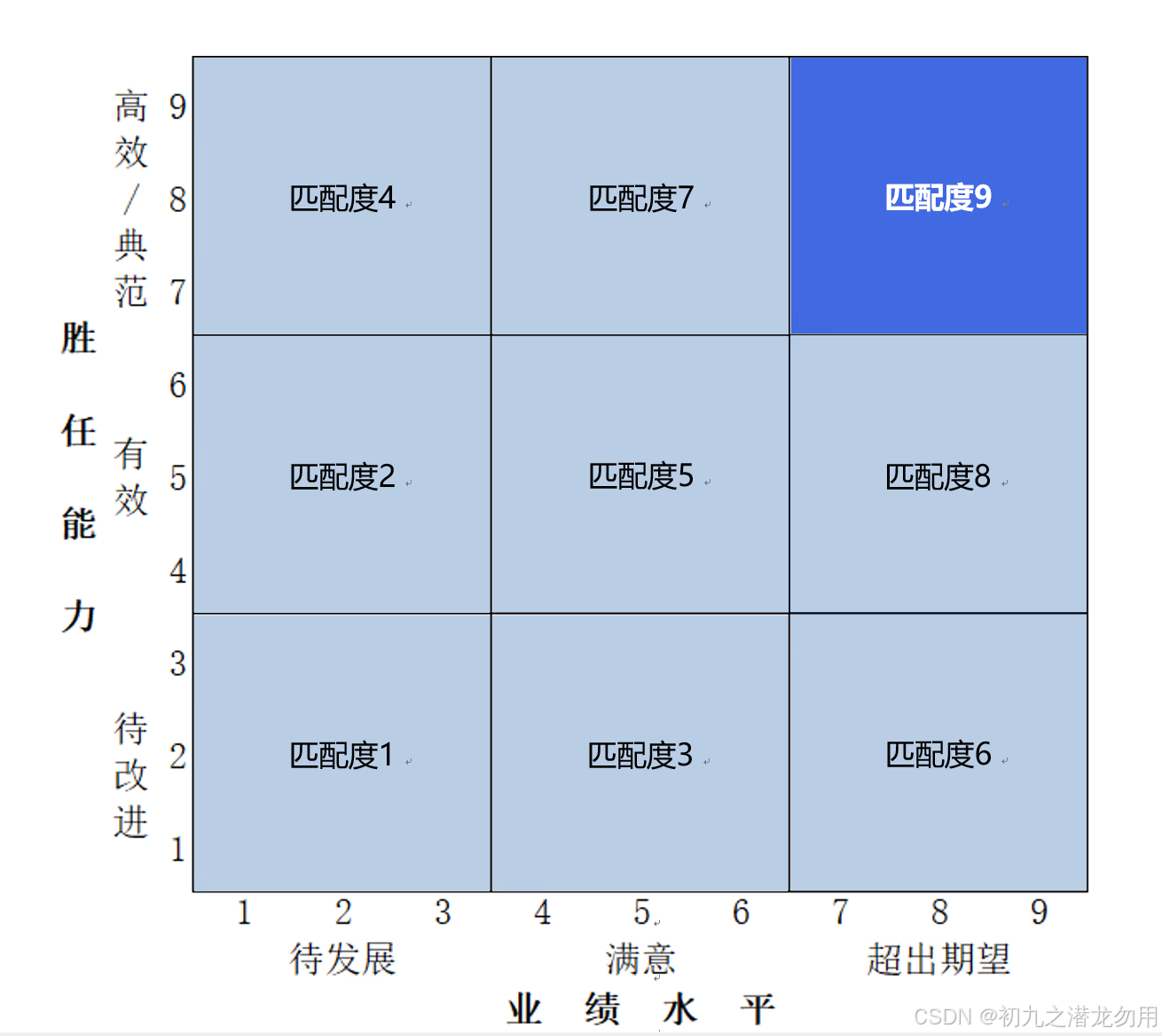
因此需要对HTML模拟解析进行进一步的改造设计,增加自定义属性。
解决方案
目前主要针对如下两个 Range 对象进行操作:
|----|------------|-------------|
| 序号 | 对象 | 说明 |
| 1 | Word.Shape | 形状对象,填充其背景色 |
基本的实现的思路如下:
一、将原始输出文本按照指定的定义进行 HTML 标记化,如将 "匹配度9" 文本更改为 "<span style='font-weight:bold;color:#ffffff;parent-background-color:#4169E1;'>匹配度9</span>" (html 部分使用标准的 span + style ),这样可以同时兼容标准的网页版输出。对 Range 的文本(Text)使用正则表达式提取 HTML 标记间的所有查找关键字。
二、对 Range 的字符集对象(Word.Characters)进行逐字操作,提取 HTML 标记的 style 属性部分,分隔各种 style 进行解析,增加 background-color 背景色设置,重刷每一个字符的格式。并新增 parent-background-color 属性,通过传递的参数对象,改变参数对象的背景填充色。
三、处理完格式设置,调用 Range.Find 对象替换掉 "多余" 的 HTML 标记文本,完成最终输出效果。
范例运行环境
操作系统: Windows Server 2019 DataCenter
操作系统上安装 Office Word 2016
数据库:Microsoft SQL Server 2016
.net版本: .netFramework4.7.1 或以上
开发工具:VS2019 C#
配置Office DCOM
配置方法可参照我的文章《C# 读取Word表格到DataSet》进行处理和配置。
设计实现
组件库引入

方法实现
processWordChars 方法基本说明如下表:
| 序号 | 参数名称 | 参数类型 | 说明 |
| 1 | chars | Word.Characters | Word.Range的字符集对象 |
| 2 | ws | Word.Shape | 传递需要填充背景的形状对象,默认值为 null |
|---|
方法示例代码如下:
cs
void processWordChars(Word.Characters chars,Word.Shape ws=null)
{

  string content = chars.Parent.Text;
  if (content == null || content == "") { return; }
  Word.Find fnd = chars.Parent.Find;

  ArrayList paras2 = new ArrayList();
  paras2.Add(new string[] { "<span style=", "</span>" });
  foreach (string[] p in paras2)
  {
      string pattern = string.Format(@"{0}(.*?){1}", p[0], p[1]);
      System.Text.RegularExpressions.MatchCollection matches = System.Text.RegularExpressions.Regex.Matches(content, pattern);
      foreach (System.Text.RegularExpressions.Match match in matches)
      {
         string key = match.Groups[1].Value;  //提取的内容
         string vkey = key.Substring(key.IndexOf('>') + 1); //最终有效内容

         string vstyle = key.Substring(1, key.Length - vkey.Length - 3); //截取 style 值
         string findkey = p[0] + key + "</span>";  //最终替换部分
         int fk = content.IndexOf(findkey);
         if (fk != -1)
         {
             for (int i = 1; i <= findkey.Length; i++)
             {
                 foreach (string kv in vstyle.Split(';'))
                 {
                     string[] style = kv.Split(':');
                     if (style[0] == "color")
                     {
                         chars[fk + i].Font.Color =(Word.WdColor)ColorTranslator.ToOle(ColorTranslator.FromHtml(style[1]));
                                        // 获取ARGB值
                     }
                     else if(style[0]== "font-weight")
                     {
                         if (style[1] == "bold") {
                             chars[fk + i].Font.Bold=1;
                         }
                     }
                     else if (style[0] == "font-family")
                     {
                         chars[fk + i].Font.Name=style[1];
                     }
                     else if (style[0] == "background-color")
                     {
                         chars[fk + i].Font.Shading.BackgroundPatternColor = (Word.WdColor)ColorTranslator.ToOle(ColorTranslator.FromHtml(style[1]));
                     }
                     else if (style[0] == "parent-background-color")
                     {
                         if (ws != null)
                         {
                             ws.Fill.ForeColor.RGB = ColorTranslator.ToOle(ColorTranslator.FromHtml(style[1]));
                         }
                     }

                 }
              }
          fnd.ClearFormatting();
          Object findText = findkey;
          Object matchCase = false; Object matchWholeWord = Type.Missing; Object matchWildcards = false; Object matchSoundsLike = false; Object matchAllWordForms = false;
          Object forward = true; Object wrap = Word.WdFindWrap.wdFindContinue; Object format = false;
          Object replaceWith = vkey;
          Object replace = Word.WdReplace.wdReplaceAll; Object matchKashida = Type.Missing; Object matchDiacritics = Type.Missing; Object matchAlefHamza = Type.Missing; Object matchControl = Type.Missing;
          fnd.Execute(ref findText, ref matchCase, ref matchWholeWord, ref matchWildcards, ref matchSoundsLike, ref matchAllWordForms,ref forward, ref wrap, ref format, ref replaceWith, ref replace, ref matchKashida, ref matchDiacritics, ref matchAlefHamza, ref matchControl);
          content = chars.Parent.Text;
         }
      }
   }
}
小结
1、parent-background-color为自定义特殊属性,不属于标准属性,代码增加了对该属性值的处理,并配合传递的 Word.Shape 对象。
2、背景颜色请参照十六进制表示输入(如 #00ff00)。
3、示例代码中 Word 表示 using Word=Microsoft.Office.Interop.Word; 的引用。
示例代码我们提供了操作的关键方法,这里仅作参考,欢迎大家评论指教提供更好的解决方案!