Flutter for OpenHarmony全面升级「今日运势」 应用的视觉与交互革新
在数字娱乐与心理慰藉需求日益增长的今天,一款优秀的运势类应用不仅要提供内容,更要营造沉浸式的体验。继上一版《今日运势与心理测试》应用发布后,开发者对
UI/UX、动画效果和内容维度进行了全方位升级 。本文将聚焦于新增与优化的核心功能 ,深入剖析这款 Flutter
应用如何通过精妙的设计与代码,将"看运势"这件事变成一场视觉与心灵的双重享受。
完整效果展示
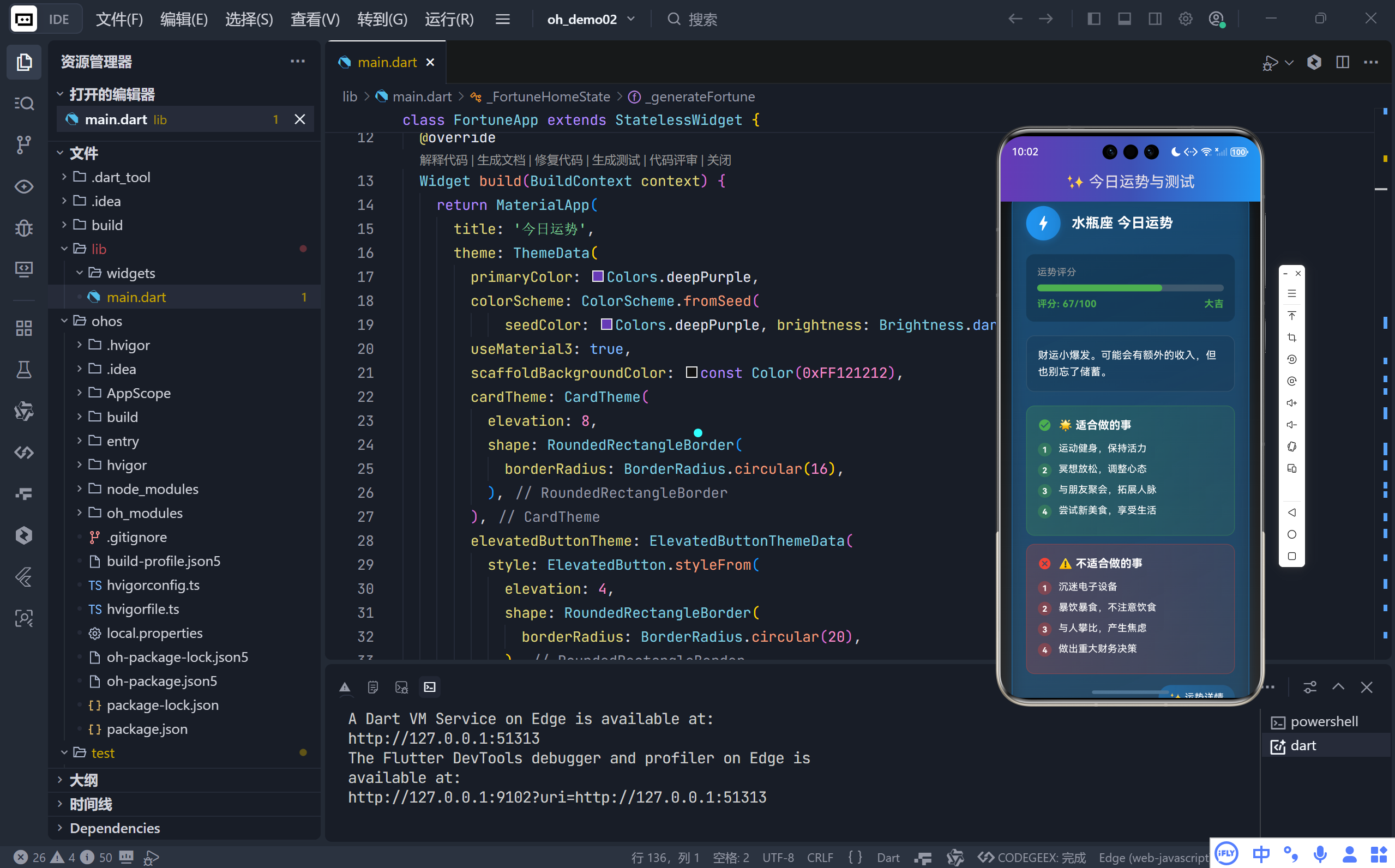
一、从"能用"到"惊艳":UI 视觉体系的全面重构
1. 全局深色渐变背景
新版彻底摒弃了单一的 #121212 背景色,转而采用垂直线性渐变:
dart
decoration: BoxDecoration(
  gradient: LinearGradient(
    colors: [Color(0xFF121212), Color(0xFF1E1E1E), Color(0xFF2A2A2A)],
  ),
)
- 从顶部的纯黑到底部的深灰,营造出空间纵深感;
- 避免了纯黑背景带来的压抑感,视觉更舒适、层次更丰富。
2. 星座按钮:质感飞跃
旧版使用简单的 ElevatedButton,新版则完全自定义:
dart
Container(
  decoration: BoxDecoration(
    gradient: LinearGradient(colors: [deepPurple, indigo].withOpacity(0.4)),
    border: Border.all(color: deepPurple.withOpacity(0.6)),
    boxShadow: [BoxShadow(blurRadius: 5, ...)],
  ),
  child: Text(zodiac),
)
- 双色渐变 + 半透边框 + 微阴影,让每个星座标签如同悬浮的宝石;
- 圆角更大(
25),触感更柔和,整体更具"命运之轮"的仪式感。
3. 主题色动态化:每份运势都有专属色彩
这是本次最大的亮点之一!运势卡片不再使用固定紫色,而是为每次生成的运势随机分配主题色:
dart
'color': _getRandomColor(), // 从8种高饱和色中随机选取并在 _buildFortuneCard 中贯穿使用:
- 图标容器背景色
- 卡片边框与阴影色
- "运势详情"标签底色
效果 :白羊座可能呈现活力橙,双鱼座则是宁静蓝------色彩成为星座性格的延伸,极大提升个性化体验。
二、内容维度爆炸式扩展:从一句话到完整指南
旧版运势仅包含一句泛化文案,新版则构建了一个结构化的运势报告系统:
1. 三大核心模块
每份运势卡片现在包含:
- 运势总评:保留原有的鼓励性文案;
- 适合做的事(✅):3--5 条具体行动建议;
- 不适合做的事(⚠️) :2--4 条风险提示。
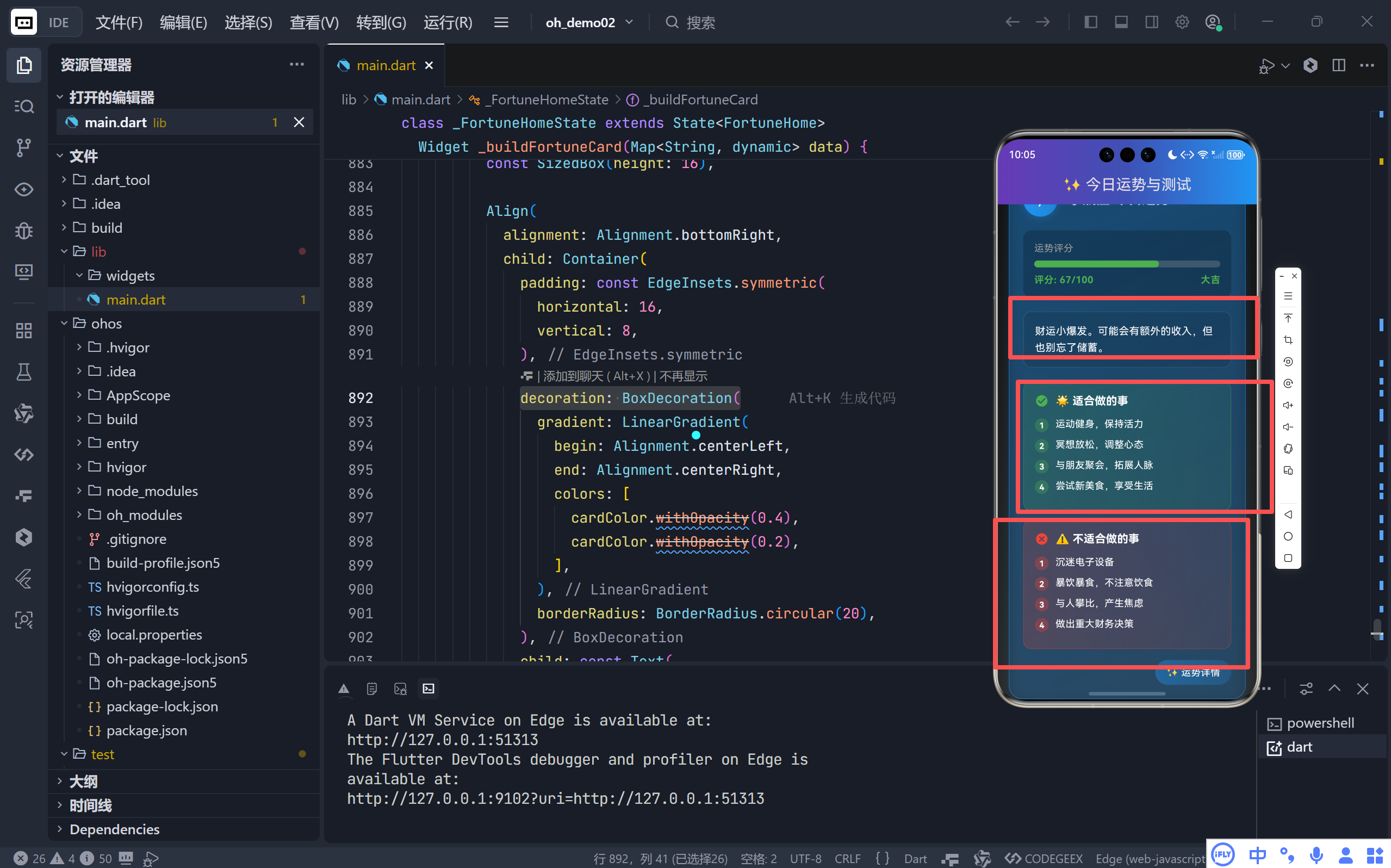
2. 精细化内容设计
- 行动建议库包含 10 条正向行为(如"制定新计划"、"帮助他人");
- 风险提示库包含 10 条负面行为(如"熬夜加班"、"冲动购物");
- 每次生成时随机抽取并去重,确保内容新鲜且不重复。
价值 :用户不再只是"看看运气",而是获得一份可执行的当日生活指南,实用性与粘性大幅提升。
3. 视觉分区清晰
- ✅ 区块使用绿色渐变底+绿色图标,传递积极信号;
- ⚠️ 区块使用红色渐变底+红色图标,形成强烈警示;
- 每条事项前增加带编号的彩色圆点,提升可读性与精致感。
三、交互动效升级:让每一次点击都充满期待
1. 引入专业动画控制器
通过 SingleTickerProviderStateMixin 和 AnimationController,实现了:
dart
_fadeAnimation = Tween<double>(begin: 0, end: 1).animate(CurvedAnimation(...));
_scaleAnimation = Tween<double>(begin: 0.9, end: 1).animate(CurvedAnimation(...));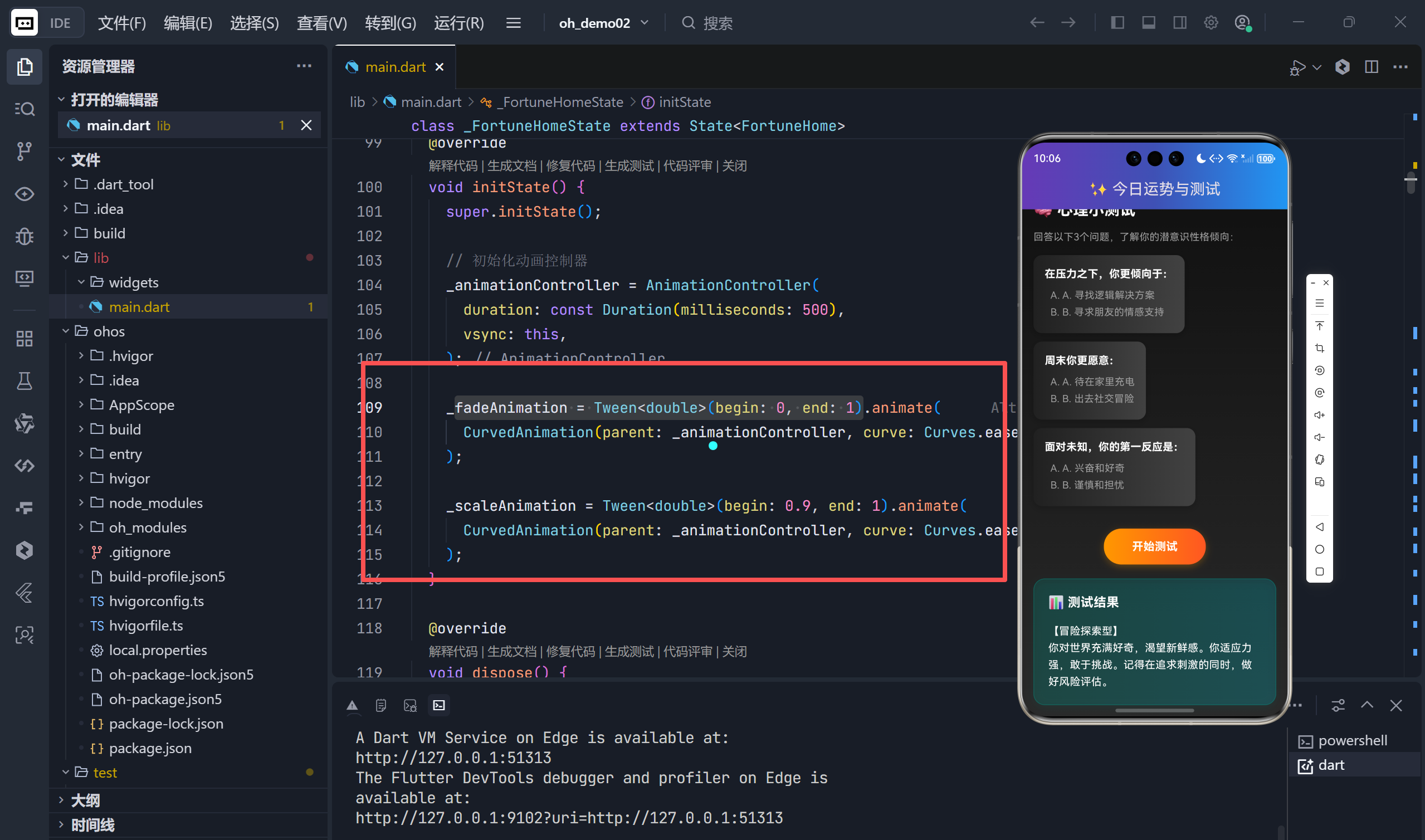
2. 卡片入场动画
运势结果和测试结果均包裹在 FadeTransition + ScaleTransition 中:
dart
FadeTransition(
  opacity: _fadeAnimation,
  child: ScaleTransition(
    scale: _scaleAnimation,
    child: _buildFortuneCard(...),
  ),
)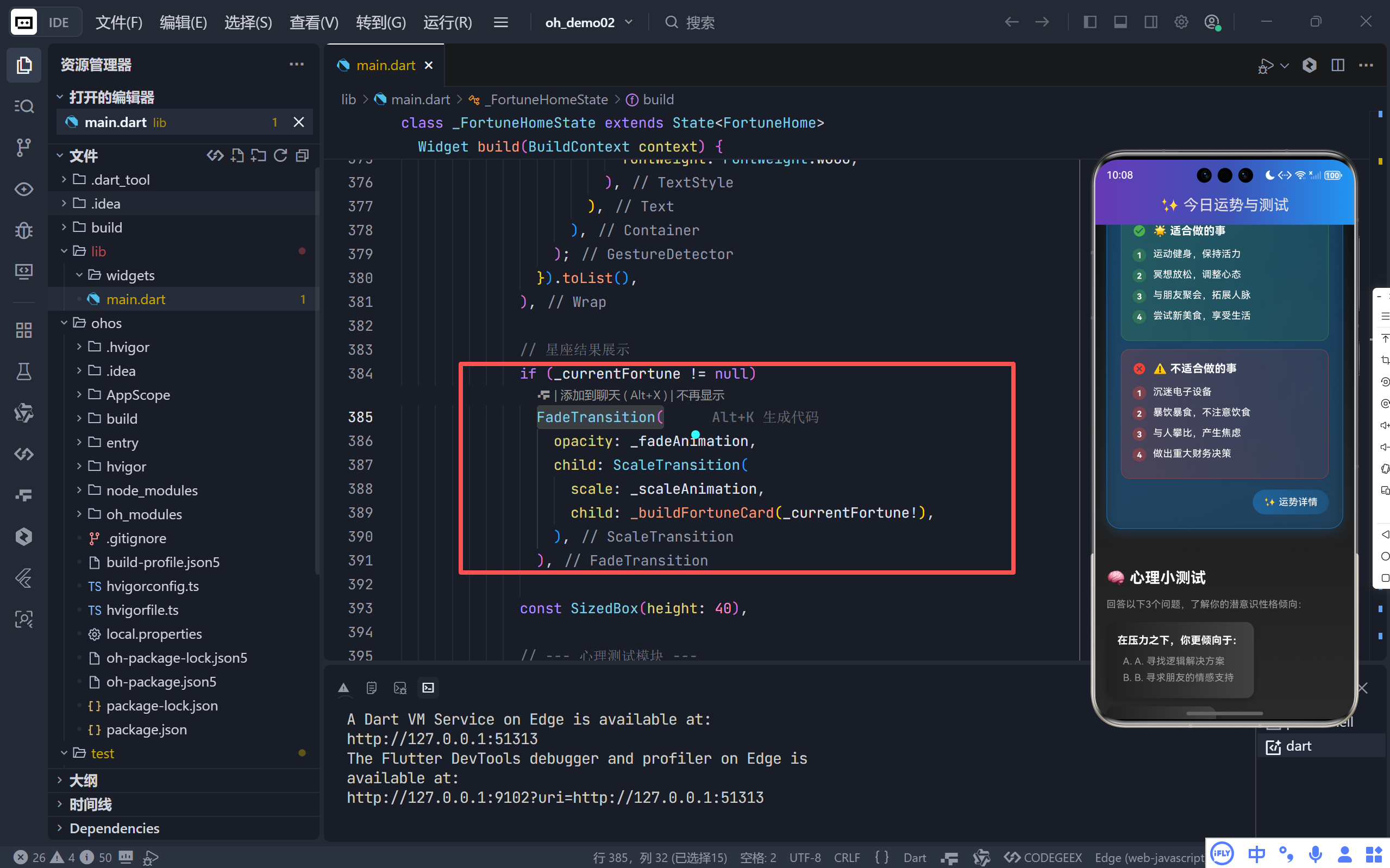
- 淡入 + 微缩放效果,模拟"魔法显现"的感觉;
- 动画时长 500ms,节奏舒缓不突兀。
3. 多次触发动画
无论是点击星座还是完成测试,都会重置并重新播放动画:
dart
_animationController.reset();
_animationController.forward();确保每次新内容出现都有流畅的过渡,杜绝生硬刷新。
四、细节打磨:专业级的 UI 组件设计
1. 评分区域全面升级
- 进度条增加圆角 (
borderRadius: 5)和深色背景; - 新增吉凶文字标签(大吉/中吉/凶),与评分数字形成双重反馈;
- 使用
AlwaysStoppedAnimation确保颜色稳定,避免闪烁。
2. 图标容器精致化
星座图标不再直接显示,而是嵌入一个50x50 的圆形渐变容器中:
- 容器自身带有同色系阴影,立体感极强;
- 图标变为白色,确保在任何背景下都清晰可见。
3. 全局主题统一
通过 ThemeData 预设了 cardTheme 和 elevatedButtonTheme:
dart
cardTheme: CardTheme(elevation: 8, shape: RoundedRectangleBorder(borderRadius: 16)),虽然新版大量使用自定义 Container,但这些预设保证了未来扩展组件的一致性。
五、总结:一次从功能到情感的跃迁
| 维度 | 旧版 | 新版 |
|---|---|---|
| 视觉 | 基础深色主题 | 多层渐变 + 动态主题色 |
| 内容 | 1 句泛化文案 | 结构化报告(总评+宜+忌) |
| 交互 | 静态展示 | 淡入缩放动画 |
| 细节 | 标准 Material 组件 | 高度定制化 UI 元素 |
这次升级不仅仅是代码的堆砌,更是产品思维的体现:
运势不是玄学,而是通过设计语言,给予用户一种被理解、被指引的温暖感。
🌐 加入社区
欢迎加入 开源鸿蒙跨平台开发者社区 ,获取最新资源与技术支持:
👉 开源鸿蒙跨平台开发者社区
完整代码展示
bash
import 'dart:math';
import 'package:flutter/material.dart';
import 'package:flutter/animation.dart';
void main() {
runApp(const FortuneApp());
}
class FortuneApp extends StatelessWidget {
const FortuneApp({super.key});
@override
Widget build(BuildContext context) {
return MaterialApp(
title: '今日运势',
theme: ThemeData(
primaryColor: Colors.deepPurple,
colorScheme: ColorScheme.fromSeed(
seedColor: Colors.deepPurple, brightness: Brightness.dark),
useMaterial3: true,
scaffoldBackgroundColor: const Color(0xFF121212),
cardTheme: CardTheme(
elevation: 8,
shape: RoundedRectangleBorder(
borderRadius: BorderRadius.circular(16),
),
),
elevatedButtonTheme: ElevatedButtonThemeData(
style: ElevatedButton.styleFrom(
elevation: 4,
shape: RoundedRectangleBorder(
borderRadius: BorderRadius.circular(20),
),
),
),
),
home: const FortuneHome(),
debugShowCheckedModeBanner: false,
);
}
}
class FortuneHome extends StatefulWidget {
const FortuneHome({super.key});
@override
State<FortuneHome> createState() => _FortuneHomeState();
}
class _FortuneHomeState extends State<FortuneHome>
with SingleTickerProviderStateMixin {
// 模拟的星座列表
final List<String> _zodiacs = [
'白羊座',
'金牛座',
'双子座',
'巨蟹座',
'狮子座',
'处女座',
'天秤座',
'天蝎座',
'射手座',
'摩羯座',
'水瓶座',
'双鱼座'
];
// 模拟的心理测试题目
final List<Map<String, dynamic>> _quizQuestions = [
{
'question': '在压力之下,你更倾向于:',
'choices': ['A. 寻找逻辑解决方案', 'B. 寻求朋友的情感支持']
},
{
'question': '周末你更愿意:',
'choices': ['A. 待在家里充电', 'B. 出去社交冒险']
},
{
'question': '面对未知,你的第一反应是:',
'choices': ['A. 兴奋和好奇', 'B. 谨慎和担忧']
},
];
// 测试结果
String _quizResult = '';
bool _isTestCompleted = false;
// 当前选中的星座运势
Map<String, dynamic>? _currentFortune;
// 动画控制器
late AnimationController _animationController;
late Animation<double> _fadeAnimation;
late Animation<double> _scaleAnimation;
// 随机数生成器
final Random _random = Random();
@override
void initState() {
super.initState();
// 初始化动画控制器
_animationController = AnimationController(
duration: const Duration(milliseconds: 500),
vsync: this,
);
_fadeAnimation = Tween<double>(begin: 0, end: 1).animate(
CurvedAnimation(parent: _animationController, curve: Curves.easeOut),
);
_scaleAnimation = Tween<double>(begin: 0.9, end: 1).animate(
CurvedAnimation(parent: _animationController, curve: Curves.easeOut),
);
}
@override
void dispose() {
_animationController.dispose();
super.dispose();
}
// 生成星座运势
void _generateFortune(String zodiac) {
setState(() {
_currentFortune = {
'name': zodiac,
'score': _random.nextInt(100),
'text': _getFortuneText(),
'icon': _getZodiacIcon(zodiac),
'color': _getRandomColor(),
'goodThings': _getGoodThings(),
'badThings': _getBadThings(),
};
// 触发动画
_animationController.reset();
_animationController.forward();
});
}
// 获取随机颜色
Color _getRandomColor() {
final List<Color> colors = [
Colors.purple,
Colors.blue,
Colors.green,
Colors.orange,
Colors.pink,
Colors.teal,
Colors.amber,
Colors.indigo,
];
return colors[_random.nextInt(colors.length)];
}
// 获取运势文案
String _getFortuneText() {
final List<String> texts = [
'今天是行动的一天!大胆尝试新事物,好运会眷顾勇敢者。',
'保持耐心。今天适合处理细节工作,不宜做重大决策。',
'社交运极佳。你会遇到有趣的人,或者收到意想不到的消息。',
'财运小爆发。可能会有额外的收入,但也别忘了储蓄。',
'注意休息。身体在向你发出信号,不要过度透支精力。',
'灵感迸发。你的创意想法今天会得到他人的高度认可。',
];
return texts[_random.nextInt(texts.length)];
}
// 获取适合做的事
List<String> _getGoodThings() {
final List<String> goodThings = [
'制定新计划,开启新项目',
'与朋友聚会,拓展人脉',
'运动健身,保持活力',
'学习新知识,提升技能',
'投资理财,规划财务',
'整理房间,创造整洁环境',
'尝试新美食,享受生活',
'冥想放松,调整心态',
'帮助他人,传递正能量',
'表达爱意,增进感情',
];
// 随机选择3-5件适合做的事
final int count = 3 + _random.nextInt(3);
final List<String> selected = [];
while (selected.length < count && goodThings.isNotEmpty) {
final int index = _random.nextInt(goodThings.length);
selected.add(goodThings[index]);
goodThings.removeAt(index);
}
return selected;
}
// 获取不适合做的事
List<String> _getBadThings() {
final List<String> badThings = [
'做出重大财务决策',
'与人发生争执',
'熬夜加班,过度劳累',
'暴饮暴食,不注意饮食',
'拖延重要任务',
'过度消费,冲动购物',
'忽视健康问题',
'沉迷电子设备',
'与人攀比,产生焦虑',
'忽视家人朋友的感受',
];
// 随机选择2-4件不适合做的事
final int count = 2 + _random.nextInt(3);
final List<String> selected = [];
while (selected.length < count && badThings.isNotEmpty) {
final int index = _random.nextInt(badThings.length);
selected.add(badThings[index]);
badThings.removeAt(index);
}
return selected;
}
// 获取星座图标 (使用Material Icon模拟)
IconData _getZodiacIcon(String zodiac) {
switch (zodiac) {
case '白羊座':
return Icons.whatshot;
case '金牛座':
return Icons.eco;
case '双子座':
return Icons.chat;
case '巨蟹座':
return Icons.heart_broken;
case '狮子座':
return Icons.star;
case '处女座':
return Icons.cleaning_services;
case '天秤座':
return Icons.scale;
case '天蝎座':
return Icons.visibility;
case '射手座':
return Icons.explore;
case '摩羯座':
return Icons.lunch_dining;
case '水瓶座':
return Icons.bolt;
case '双鱼座':
return Icons.opacity;
default:
return Icons.question_mark;
}
}
// 处理心理测试逻辑
void _startQuiz() {
setState(() {
_isTestCompleted = false;
_quizResult = '正在分析你的性格...';
// 触发动画
_animationController.reset();
_animationController.forward();
// 模拟异步处理
Future.delayed(const Duration(seconds: 2), () {
final int random = _random.nextInt(4);
setState(() {
_quizResult = _getPersonalityResult(random);
_isTestCompleted = true;
// 再次触发动画显示结果
_animationController.reset();
_animationController.forward();
});
});
});
}
String _getPersonalityResult(int index) {
switch (index) {
case 0:
return '【逻辑分析型】\n你是一个极度理性的人。在面对问题时,你习惯用逻辑和数据说话。你擅长规划,但也需要学会偶尔放松,感受生活的情感面。';
case 1:
return '【社交达人型】\n你充满活力,天生的社交家。你从与他人的互动中获取能量,善于沟通。注意在喧嚣中保持独立的思考。';
case 2:
return '【沉稳内敛型】\n你深思熟虑,是值得信赖的伙伴。你喜欢按部就班,厌恶风险。你的稳定是团队的基石,偶尔也可以尝试跳出舒适区。';
case 3:
return '【冒险探索型】\n你对世界充满好奇,渴望新鲜感。你适应力强,敢于挑战。记得在追求刺激的同时,做好风险评估。';
default:
return '【全能型】\n你拥有平衡的性格,能根据环境切换模式。这既是优点也是挑战,找到核心的自我会让你更强大。';
}
}
@override
Widget build(BuildContext context) {
return Scaffold(
appBar: AppBar(
title: const Text('✨ 今日运势与测试'),
centerTitle: true,
flexibleSpace: Container(
decoration: BoxDecoration(
gradient: LinearGradient(
begin: Alignment.centerLeft,
end: Alignment.centerRight,
colors: [
Colors.deepPurple,
Colors.indigo,
Colors.blue,
],
),
),
),
),
body: Container(
decoration: BoxDecoration(
gradient: LinearGradient(
begin: Alignment.topCenter,
end: Alignment.bottomCenter,
colors: [
const Color(0xFF121212),
const Color(0xFF1E1E1E),
const Color(0xFF2A2A2A),
],
),
),
child: SingleChildScrollView(
padding: const EdgeInsets.all(16),
child: Column(
crossAxisAlignment: CrossAxisAlignment.start,
children: [
// --- 星座运势模块 ---
const Text(
'🌟 点击查看星座运势',
style: TextStyle(
fontSize: 22,
fontWeight: FontWeight.bold,
color: Colors.white,
),
),
const SizedBox(height: 16),
Wrap(
spacing: 10,
runSpacing: 10,
children: _zodiacs.map((zodiac) {
return GestureDetector(
onTap: () => _generateFortune(zodiac),
child: Container(
padding: const EdgeInsets.symmetric(
horizontal: 18, vertical: 12),
decoration: BoxDecoration(
gradient: LinearGradient(
begin: Alignment.centerLeft,
end: Alignment.centerRight,
colors: [
Colors.deepPurple.withOpacity(0.4),
Colors.indigo.withOpacity(0.4),
],
),
borderRadius: BorderRadius.circular(25),
border: Border.all(
color: Colors.deepPurple.withOpacity(0.6),
width: 1,
),
boxShadow: [
BoxShadow(
color: Colors.deepPurple.withOpacity(0.2),
blurRadius: 5,
offset: const Offset(0, 2),
),
],
),
child: Text(
zodiac,
style: const TextStyle(
color: Colors.white,
fontWeight: FontWeight.w600,
),
),
),
);
}).toList(),
),
// 星座结果展示
if (_currentFortune != null)
FadeTransition(
opacity: _fadeAnimation,
child: ScaleTransition(
scale: _scaleAnimation,
child: _buildFortuneCard(_currentFortune!),
),
),
const SizedBox(height: 40),
// --- 心理测试模块 ---
const Text(
'🧠 心理小测试',
style: TextStyle(
fontSize: 22,
fontWeight: FontWeight.bold,
color: Colors.white,
),
),
const SizedBox(height: 12),
const Text(
'回答以下3个问题,了解你的潜意识性格倾向:',
style: TextStyle(color: Colors.grey, fontSize: 14),
),
const SizedBox(height: 16),
..._quizQuestions.map((q) {
return Container(
margin: const EdgeInsets.only(bottom: 12),
padding: const EdgeInsets.all(16),
decoration: BoxDecoration(
gradient: LinearGradient(
begin: Alignment.centerLeft,
end: Alignment.centerRight,
colors: [
Colors.grey[900]!,
Colors.grey[800]!,
],
),
borderRadius: BorderRadius.circular(12),
boxShadow: [
BoxShadow(
color: Colors.black.withOpacity(0.2),
blurRadius: 8,
offset: const Offset(0, 3),
),
],
),
child: Column(
crossAxisAlignment: CrossAxisAlignment.start,
children: [
Text(
q['question']!,
style: const TextStyle(
fontWeight: FontWeight.bold,
color: Colors.white,
fontSize: 15,
),
),
const SizedBox(height: 10),
...List.generate(q['choices']!.length, (index) {
return Padding(
padding: const EdgeInsets.only(left: 8, bottom: 4),
child: Text(
'${['A', 'B'][index]}. ${q['choices']![index]}',
style: const TextStyle(
color: Colors.grey, fontSize: 14),
),
);
}),
],
),
);
}).toList(),
const SizedBox(height: 20),
Center(
child: GestureDetector(
onTap: _startQuiz,
child: Container(
padding: const EdgeInsets.symmetric(
horizontal: 40, vertical: 14),
decoration: BoxDecoration(
gradient: LinearGradient(
begin: Alignment.centerLeft,
end: Alignment.centerRight,
colors: [
Colors.orange,
Colors.deepOrange,
],
),
borderRadius: BorderRadius.circular(25),
boxShadow: [
BoxShadow(
color: Colors.orange.withOpacity(0.3),
blurRadius: 8,
offset: const Offset(0, 3),
),
],
),
child: const Text(
'开始测试',
style: TextStyle(
color: Colors.white,
fontWeight: FontWeight.bold,
fontSize: 16,
),
),
),
),
),
// 测试结果展示
if (_quizResult.isNotEmpty)
FadeTransition(
opacity: _fadeAnimation,
child: ScaleTransition(
scale: _scaleAnimation,
child: Container(
margin: const EdgeInsets.only(top: 20),
padding: const EdgeInsets.all(20),
decoration: BoxDecoration(
gradient: LinearGradient(
begin: Alignment.centerLeft,
end: Alignment.centerRight,
colors: [
Colors.teal.withOpacity(0.2),
Colors.cyan.withOpacity(0.2),
],
),
borderRadius: BorderRadius.circular(16),
border: Border.all(
color: Colors.teal.withOpacity(0.4),
width: 1,
),
boxShadow: [
BoxShadow(
color: Colors.teal.withOpacity(0.1),
blurRadius: 10,
offset: const Offset(0, 4),
),
],
),
child: Column(
crossAxisAlignment: CrossAxisAlignment.start,
children: [
const Text(
'📊 测试结果',
style: TextStyle(
fontSize: 18,
fontWeight: FontWeight.bold,
color: Colors.white,
),
),
const SizedBox(height: 16),
Text(
_quizResult,
style: const TextStyle(
color: Colors.white,
height: 1.6,
fontSize: 15,
),
),
],
),
),
),
),
],
),
),
),
);
}
// 构建运势卡片组件
Widget _buildFortuneCard(Map<String, dynamic> data) {
Color cardColor = data['color'] ?? Colors.purple;
return Container(
margin: const EdgeInsets.symmetric(vertical: 16),
padding: const EdgeInsets.all(20),
decoration: BoxDecoration(
gradient: LinearGradient(
begin: Alignment.topLeft,
end: Alignment.bottomRight,
colors: [
cardColor.withOpacity(0.3),
cardColor.withOpacity(0.1),
],
),
borderRadius: BorderRadius.circular(20),
border: Border.all(
color: cardColor.withOpacity(0.5),
width: 1,
),
boxShadow: [
BoxShadow(
color: cardColor.withOpacity(0.2),
blurRadius: 15,
offset: const Offset(0, 5),
),
],
),
child: Column(
crossAxisAlignment: CrossAxisAlignment.start,
children: [
Row(
children: [
Container(
width: 50,
height: 50,
decoration: BoxDecoration(
gradient: LinearGradient(
begin: Alignment.centerLeft,
end: Alignment.centerRight,
colors: [
cardColor,
cardColor.withOpacity(0.7),
],
),
borderRadius: BorderRadius.circular(25),
boxShadow: [
BoxShadow(
color: cardColor.withOpacity(0.3),
blurRadius: 8,
offset: const Offset(0, 2),
),
],
),
child: Center(
child: Icon(
data['icon'],
color: Colors.white,
size: 28,
),
),
),
const SizedBox(width: 16),
Expanded(
child: Text(
'${data['name']} 今日运势',
style: const TextStyle(
fontSize: 20,
fontWeight: FontWeight.bold,
color: Colors.white,
),
),
),
],
),
const SizedBox(height: 20),
Container(
padding: const EdgeInsets.all(16),
decoration: BoxDecoration(
color: Colors.black.withOpacity(0.2),
borderRadius: BorderRadius.circular(12),
),
child: Column(
crossAxisAlignment: CrossAxisAlignment.start,
children: [
const Text(
'运势评分',
style: TextStyle(
color: Colors.grey,
fontSize: 14,
),
),
const SizedBox(height: 8),
LinearProgressIndicator(
value: data['score'] / 100,
backgroundColor: Colors.grey.withOpacity(0.3),
valueColor: AlwaysStoppedAnimation<Color>(
data['score'] > 60 ? Colors.green : Colors.red,
),
minHeight: 10,
borderRadius: BorderRadius.circular(5),
),
const SizedBox(height: 8),
Row(
mainAxisAlignment: MainAxisAlignment.spaceBetween,
children: [
Text(
'评分: ${data['score']}/100',
style: TextStyle(
color: data['score'] > 60 ? Colors.green : Colors.red,
fontWeight: FontWeight.bold,
),
),
Text(
data['score'] > 60
? '大吉'
: data['score'] > 30
? '中吉'
: '凶',
style: TextStyle(
color: data['score'] > 60 ? Colors.green : Colors.red,
fontWeight: FontWeight.bold,
),
),
],
),
],
),
),
const SizedBox(height: 20),
Container(
padding: const EdgeInsets.all(16),
decoration: BoxDecoration(
color: Colors.black.withOpacity(0.1),
borderRadius: BorderRadius.circular(12),
border: Border.all(
color: Colors.white.withOpacity(0.1),
width: 1,
),
),
child: Text(
data['text'],
style: const TextStyle(
color: Colors.white,
height: 1.6,
fontSize: 15,
),
),
),
const SizedBox(height: 20),
// 适合做的事
Container(
padding: const EdgeInsets.all(16),
decoration: BoxDecoration(
gradient: LinearGradient(
begin: Alignment.centerLeft,
end: Alignment.centerRight,
colors: [
Colors.green.withOpacity(0.2),
Colors.green.withOpacity(0.1),
],
),
borderRadius: BorderRadius.circular(12),
border: Border.all(
color: Colors.green.withOpacity(0.3),
width: 1,
),
),
child: Column(
crossAxisAlignment: CrossAxisAlignment.start,
children: [
Row(
children: [
const Icon(
Icons.check_circle,
color: Colors.green,
size: 20,
),
const SizedBox(width: 10),
const Text(
'🌟 适合做的事',
style: TextStyle(
color: Colors.white,
fontWeight: FontWeight.bold,
fontSize: 16,
),
),
],
),
const SizedBox(height: 12),
...(data['goodThings'] ?? []).asMap().entries.map((entry) {
int index = entry.key;
String thing = entry.value;
return Padding(
padding: const EdgeInsets.only(bottom: 8),
child: Row(
crossAxisAlignment: CrossAxisAlignment.start,
children: [
Container(
width: 20,
height: 20,
margin: const EdgeInsets.only(top: 2, right: 10),
decoration: BoxDecoration(
color: Colors.green.withOpacity(0.3),
borderRadius: BorderRadius.circular(10),
),
child: Center(
child: Text(
'${index + 1}',
style: const TextStyle(
color: Colors.white,
fontSize: 12,
fontWeight: FontWeight.bold,
),
),
),
),
Expanded(
child: Text(
thing,
style: const TextStyle(
color: Colors.white,
fontSize: 14,
height: 1.4,
),
),
),
],
),
);
}).toList(),
],
),
),
const SizedBox(height: 12),
// 不适合做的事
Container(
padding: const EdgeInsets.all(16),
decoration: BoxDecoration(
gradient: LinearGradient(
begin: Alignment.centerLeft,
end: Alignment.centerRight,
colors: [
Colors.red.withOpacity(0.2),
Colors.red.withOpacity(0.1),
],
),
borderRadius: BorderRadius.circular(12),
border: Border.all(
color: Colors.red.withOpacity(0.3),
width: 1,
),
),
child: Column(
crossAxisAlignment: CrossAxisAlignment.start,
children: [
Row(
children: [
const Icon(
Icons.cancel,
color: Colors.red,
size: 20,
),
const SizedBox(width: 10),
const Text(
'⚠️ 不适合做的事',
style: TextStyle(
color: Colors.white,
fontWeight: FontWeight.bold,
fontSize: 16,
),
),
],
),
const SizedBox(height: 12),
...(data['badThings'] ?? []).asMap().entries.map((entry) {
int index = entry.key;
String thing = entry.value;
return Padding(
padding: const EdgeInsets.only(bottom: 8),
child: Row(
crossAxisAlignment: CrossAxisAlignment.start,
children: [
Container(
width: 20,
height: 20,
margin: const EdgeInsets.only(top: 2, right: 10),
decoration: BoxDecoration(
color: Colors.red.withOpacity(0.3),
borderRadius: BorderRadius.circular(10),
),
child: Center(
child: Text(
'${index + 1}',
style: const TextStyle(
color: Colors.white,
fontSize: 12,
fontWeight: FontWeight.bold,
),
),
),
),
Expanded(
child: Text(
thing,
style: const TextStyle(
color: Colors.white,
fontSize: 14,
height: 1.4,
),