python
from string import Template

import jsonpath
import pandas as pd
import json
import os
import requests

def clean_text(text):
    """
    清理文本中的特殊字符,但保留JSON格式
    """
    if isinstance(text, str):
        # 先检查是否是JSON字符串
        try:
            # 如果是有效的JSON,直接返回原字符串
            json.loads(text)
            return text
        except json.JSONDecodeError:
            # 如果不是JSON字符串,再进行清理
            text = text.replace('\\\\', '\\')
            text = text.replace('\\n', ' ')
            text = text.replace('\\r', ' ')
            text = text.replace('\\t', ' ')
            text = text.replace('\\', '')
            text = ' '.join(text.split())
            return text.strip()
    return text


def excel_to_clean_json(excel_file='接口测试.xlsx', output_file='output.json'):
    """读取Excel并转换为清理后的JSON"""
    try:
        # 读取Excel
        df = pd.read_excel(excel_file, keep_default_na=False)

        # 清理数据
        for col in df.columns:
            df[col] = df[col].apply(clean_text)

        # 转换为JSON并保存
        data = df.to_dict('records')
        with open(output_file, 'w', encoding='utf-8') as f:
            json.dump(data, f, ensure_ascii=False, indent=2)
        return data
    except Exception as e:
        print(f"处理失败: {e}")
        return None


def execute_test_case(test_case):
    """执行单个测试用例"""
    try:
        # 1. 解析URL参数
        url_params_str = test_case.get('URL参数', '{}')
        url_params = json.loads(url_params_str) if url_params_str else {}

        # 2. 解析JSON参数
        json_params_str = test_case.get('JSON参数', '{}')
        json_params = json.loads(json_params_str) if json_params_str else {}

        # 3. 获取接口信息
        global dic
        url = test_case.get('接口URL', '')

        if "$" in url:
            url = Template(url).substitute(dic)
            print(url, 'iii')
        method = test_case.get('请求方式', 'get').lower()
        print(f"📋 测试用例: {test_case.get('描述', '未知用例')}")
        print(f"🌐 接口地址: {url}")
        print(f"📤 请求方式: {method}")
        print(f"🔗 URL参数: {url_params}")
        print(f"📦 JSON参数: {json_params}")

        # 4. 根据请求类型发送请求
        headers = {'Content-Type': 'application/json'}


        if method == 'post':
            # POST请求通常将参数放在body中
            response = requests.post(url, json=json_params, params=url_params, headers=headers)
            if test_case.get('提取参数', '{}'):
                lst = jsonpath.jsonpath(response.json(), "$.." + test_case.get('提取参数', '{}'))
                dic[test_case.get('提取参数', '{}')] = lst[0]
        elif method == 'get':
            response = requests.get(url, params=url_params, headers=headers)
            if test_case.get('提取参数', '{}'):
                lst = jsonpath.jsonpath(response.json(), "$.." + test_case.get('提取参数', '{}'))
                dic[test_case.get('提取参数', '{}')] = lst[0]
        else:
            # 其他请求方式
            response = requests.request(method=method, url=url, json=json_params, params=url_params, headers=headers)
            if test_case.get('提取参数', '{}'):
                lst = jsonpath.jsonpath(response.json(), "$.." + test_case.get('提取参数', '{}'))
                dic[test_case.get('提取参数', '{}')] = lst[0]

        print(f"📥 响应状态码: {response.status_code}")
        print(f"📥 响应内容: {response.text}")
        print("-" * 50)

        # 解析JSON响应
        try:
            result = response.json()
            return result
        except:
            return {'text': response.text, 'status_code': response.status_code}

    except Exception as e:
        print(f"❌ 执行测试用例时发生错误: {e}")
        return None


def main():
    """主函数"""

    # 1. 从Excel读取数据
    data = excel_to_clean_json('接口测试.xlsx')
    if not data:
        print("❌ 无法读取Excel数据")
        return

    print(f"✅ 成功读取 {len(data)} 条测试用例")
    print("=" * 50)

    # 2. 遍历并执行测试用例
    results = []
    for i, test_case in enumerate(data):
        print(f"🚀 执行第 {i + 1} 条测试用例")
        result = execute_test_case(test_case)
        results.append(result)

    # 3. 分析结果
    print("\n📊 测试结果分析:")
    for i, (test_case, result) in enumerate(zip(data, results)):
        print(f"{i + 1}. {test_case.get('描述', '未知用例')}: ", end='')
        if result and isinstance(result, dict):
            if result.get('code') == 0 or result.get('code') == 200:
                print("✅ 测试通过")
            elif result.get('code') == -1:
                print("❌ 测试失败 - 错误码: -1")
                print(f"   错误信息: {result.get('msg', '未知错误')}")
            else:
                print(f"⚠️  其他响应: {result}")
        else:
            print("❓ 未返回可解析的JSON响应")


if __name__ == "__main__":
    dic = {}
    main()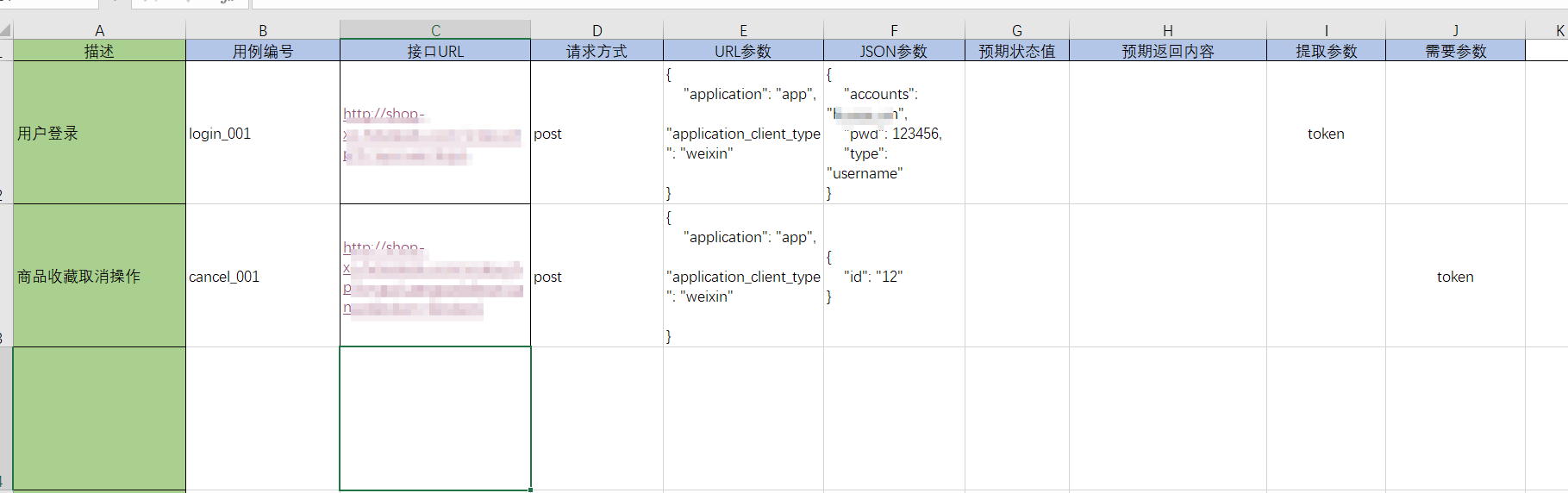
此方法可以遍历Excel表格里面的接口数据。