前言
为FTP局域网小网站增加密钥验证:从裸奔到安全可控
在之前的版本中,我们的FTP局域网小网站存在一个明显的安全隐患:任何连接到同一路由器的设备都可以直接访问所有文件。虽然这带来了极致的便利性(无需登录、无需配置),但也意味着:公共WiFi环境下,陌生人可能访问你的私人文件。
为了解决这个问题,我决定为工具增加API密钥验证机制,在保持便捷性的同时提升安全性。
具体大版本和这个保持一致: FTP局域网功能小网站V2
本文相当于2.1版本增加一个鉴权功能。
电脑端:

手机端:

输入的密钥在app.py中设置
python
# 定义访问密钥
ACCESS_KEY = "211985"  # 可以根据实际需求修改
代码
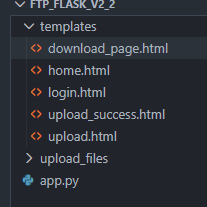
代码结构如下:
download_page.html
html
<!DOCTYPE html>
<html lang="zh-CN">
<head>
    <meta charset="UTF-8">
    <meta http-equiv="Content-Type" content="text/html; charset=UTF-8">
    <meta name="viewport" content="width=device-width, initial-scale=1.0">
    <title>下载文件 - FTP功能小网站</title>
    <!-- 引入Tailwind CSS -->
    <script src="https://cdn.tailwindcss.com"></script>
    <!-- 引入Font Awesome -->
    <link href="https://cdn.jsdelivr.net/npm/font-awesome@4.7.0/css/font-awesome.min.css" rel="stylesheet">

    <!-- 配置Tailwind自定义颜色 -->
    <script>
        tailwind.config = {
            theme: {
                extend: {
                    colors: {
                        primary: '#4F46E5',
                    }
                }
            }
        }
    </script>

    <style type="text/tailwindcss">
        @layer utilities {
            .file-item-hover {
                @apply bg-blue-50;
            }
        }
    </style>
</head>
<body class="bg-gradient-to-br from-blue-50 to-teal-50 min-h-screen font-sans text-gray-800">
    <div class="container mx-auto px-4 py-8 max-w-4xl relative">
        <!-- 登出按钮 -->
        <div class="absolute top-0 right-0 mt-2 mr-2">
            <a href="{{ url_for('logout') }}" class="inline-flex items-center text-gray-500 hover:text-primary transition-colors px-3 py-2 rounded-lg hover:bg-primary/5">
                <i class="fa fa-sign-out mr-1"></i>
                <span>登出</span>
            </a>
        </div>

        <!-- 页面标题 -->
        <header class="text-center mb-10 mt-6">
            <h1 class="text-[clamp(1.8rem,4vw,2.5rem)] font-bold text-primary mb-2">
                <i class="fa fa-cloud-download mr-3"></i>文件下载
            </h1>
            <p class="text-gray-500">选择您需要下载的文件</p>
        </header>

        <!-- 文件列表卡片 -->
        <div class="bg-white rounded-xl shadow-md overflow-hidden mb-8">
            <!-- 列表头部 -->
            <div class="bg-gray-50 px-6 py-4 border-b border-gray-100">
                <h2 class="font-semibold text-gray-700">可供下载的文件</h2>
            </div>

            <!-- 文件列表 -->
            <div class="divide-y divide-gray-100">
                {% if fl and fl|length > 0 %}
                    {% for file in fl %}
                    <div class="px-6 py-4 flex items-center justify-between transition-all duration-200 hover:file-item-hover">
                        <!-- 文件名 -->
                        <div class="flex items-center">
                            <div class="w-10 h-10 rounded bg-gray-100 flex items-center justify-center mr-4 text-gray-500">
                                <i class="fa fa-file-o"></i>
                            </div>
                            <span class="font-medium text-gray-800 truncate max-w-md">{{ file }}</span>
                        </div>

                        <!-- 下载按钮 -->
                        <a href="{{ url_for('download_file', filename=file) }}"
                           class="inline-flex items-center bg-primary/10 text-primary px-4 py-2 rounded-lg transition-all duration-200 hover:bg-primary hover:text-white">
                            <i class="fa fa-download mr-2"></i>
                            <span>下载</span>
                        </a>
                    </div>
                    {% endfor %}
                {% else %}
                    <!-- 空状态 -->
                    <div class="px-6 py-16 text-center">
                        <div class="inline-flex items-center justify-center w-16 h-16 rounded-full bg-gray-100 text-gray-400 mb-4">
                            <i class="fa fa-folder-open-o text-2xl"></i>
                        </div>
                        <p class="text-gray-500">暂无可供下载的文件</p>
                    </div>
                {% endif %}
            </div>
        </div>

        <!-- 返回按钮 -->
        <div class="text-center">
            <a href="{{ url_for('home') }}" class="inline-flex items-center text-primary hover:text-primary/80 transition-colors">
                <i class="fa fa-arrow-left mr-2"></i>返回首页
            </a>
        </div>

        <!-- 页脚 -->
        <footer class="mt-16 text-center text-gray-400 text-sm">
            <p>© 2025 FTP功能小网站 - 便捷快速的文件传输服务 - AndyDennis</p>
        </footer>
    </div>

    <!-- 简单的动画效果 -->
    <script>
        // 添加页面加载动画
        document.addEventListener('DOMContentLoaded', () => {
            const fileItems = document.querySelectorAll('.divide-y > div');
            fileItems.forEach((item, index) => {
                setTimeout(() => {
                    item.classList.add('animate-fade-in');
                }, 100 * index);
            });
        });

        // 添加动画样式
        const style = document.createElement('style');
        style.textContent = `
            @keyframes fadeIn {
                from { opacity: 0; transform: translateY(10px); }
                to { opacity: 1; transform: translateY(0); }
            }
            .animate-fade-in {
                animation: fadeIn 0.3s ease-out forwards;
            }
        `;
        document.head.appendChild(style);
    </script>
</body>
</html>
home.html
html
<!DOCTYPE html>
<html lang="zh-CN">
<head>
    <meta charset="UTF-8">
    <meta name="viewport" content="width=device-width, initial-scale=1.0">
    <title>FTP功能小网站</title>
    <!-- 引入Tailwind CSS -->
    <script src="https://cdn.tailwindcss.com"></script>
    <!-- 引入Font Awesome -->
    <link href="https://cdn.jsdelivr.net/npm/font-awesome@4.7.0/css/font-awesome.min.css" rel="stylesheet">

    <!-- 配置Tailwind自定义颜色和字体 -->
    <script>
        tailwind.config = {
            theme: {
                extend: {
                    colors: {
                        primary: '#4F46E5', // 主色调:靛蓝色,传达信任和专业感
                        secondary: '#8B5CF6', // 辅助色:紫色
                        neutral: '#F8FAFC', // 中性色:浅灰
                    },
                    fontFamily: {
                        sans: ['Inter', 'system-ui', 'sans-serif'],
                    },
                }
            }
        }
    </script>

    <style type="text/tailwindcss">
        @layer utilities {
            .content-auto {
                content-visibility: auto;
            }
            .btn-hover {
                @apply transform transition-all duration-300 hover:scale-105 hover:shadow-lg;
            }
            .card-effect {
                @apply bg-white rounded-xl shadow-md transition-all duration-300 hover:shadow-xl;
            }
        }
    </style>
</head>
<body class="bg-gradient-to-br from-neutral to-blue-50 min-h-screen flex flex-col items-center justify-center p-4 font-sans text-gray-800">
    <!-- 页面容器 -->
    <div class="max-w-md w-full mx-auto text-center relative">

        <!-- 标题区域 -->
        <div class="mb-12 animate-fade-in">
            <div class="inline-flex items-center justify-center w-16 h-16 rounded-full bg-primary/10 text-primary mb-4">
                <i class="fa fa-cloud-upload text-3xl"></i>
            </div>
            <h1 class="text-[clamp(2rem,5vw,3rem)] font-bold text-primary mb-2">FTP功能小网站</h1>
            <p class="text-gray-500">简单高效的文件上传与下载服务</p>
        </div>

        <!-- 操作按钮区域 -->
        <div class="grid gap-6">
            <!-- 上传按钮 -->
            <a href="{{ url_for('upload_file') }}" class="card-effect p-6 flex items-center justify-center space-x-3 btn-hover group">
                <div class="w-10 h-10 rounded-full bg-green-100 flex items-center justify-center text-green-600 group-hover:bg-green-600 group-hover:text-white transition-colors">
                    <i class="fa fa-upload"></i>
                </div>
                <span class="text-lg font-medium">上传文件</span>
            </a>

            <!-- 下载按钮 -->
            <a href="{{ url_for('download_page') }}" class="card-effect p-6 flex items-center justify-center space-x-3 btn-hover group">
                <div class="w-10 h-10 rounded-full bg-blue-100 flex items-center justify-center text-blue-600 group-hover:bg-blue-600 group-hover:text-white transition-colors">
                    <i class="fa fa-download"></i>
                </div>
                <span class="text-lg font-medium">下载文件</span>
            </a>
        </div>

        <!-- 页脚 -->
        <footer class="mt-16 text-gray-400 text-sm">
            <p>© 2025 FTP功能小网站 - 便捷快速的文件传输服务 - AndyDennis</p>
        </footer>
    </div>

    <!-- 简单的动画效果脚本 -->
    <script>
        // 添加页面加载动画类
        document.addEventListener('DOMContentLoaded', () => {
            const cards = document.querySelectorAll('.card-effect');
            cards.forEach((card, index) => {
                setTimeout(() => {
                    card.classList.add('animate-slide-up');
                }, 100 * index);
            });
        });

        // 定义简单的CSS动画
        const style = document.createElement('style');
        style.textContent = `
            @keyframes fadeIn {
                from { opacity: 0; transform: translateY(10px); }
                to { opacity: 1; transform: translateY(0); }
            }
            @keyframes slideUp {
                from { opacity: 0; transform: translateY(20px); }
                to { opacity: 1; transform: translateY(0); }
            }
            .animate-fade-in {
                animation: fadeIn 0.6s ease-out forwards;
            }
            .animate-slide-up {
                animation: slideUp 0.5s ease-out forwards;
            }
        `;
        document.head.appendChild(style);
    </script>
</body>
</html>
login.html (2.2新增)
html
<!DOCTYPE html>
<html lang="zh-CN">
<head>
    <meta charset="UTF-8">
    <meta name="viewport" content="width=device-width, initial-scale=1.0">
    <title>登录 - FTP功能小网站</title>
    <!-- 引入Tailwind CSS -->
    <script src="https://cdn.tailwindcss.com"></script>
    <!-- 引入Font Awesome -->
    <link href="https://cdn.jsdelivr.net/npm/font-awesome@4.7.0/css/font-awesome.min.css" rel="stylesheet">

    <!-- 配置Tailwind自定义颜色和字体 -->
    <script>
        tailwind.config = {
            theme: {
                extend: {
                    colors: {
                        primary: '#4F46E5', // 主色调:靛蓝色,传达信任和专业感
                        secondary: '#8B5CF6', // 辅助色:紫色
                        neutral: '#F8FAFC', // 中性色:浅灰
                    },
                    fontFamily: {
                        sans: ['Inter', 'system-ui', 'sans-serif'],
                    },
                }
            }
        }
    </script>

    <style type="text/tailwindcss">
        @layer utilities {
            .content-auto {
                content-visibility: auto;
            }
            .btn-hover {
                @apply transform transition-all duration-300 hover:scale-105 hover:shadow-lg;
            }
            .card-effect {
                @apply bg-white rounded-xl shadow-md transition-all duration-300 hover:shadow-xl;
            }
        }
    </style>
</head>
<body class="bg-gradient-to-br from-neutral to-blue-50 min-h-screen flex flex-col items-center justify-center p-4 font-sans text-gray-800">
    <!-- 页面容器 -->
    <div class="max-w-md w-full mx-auto text-center">
        <!-- 标题区域 -->
        <div class="mb-12 animate-fade-in">
            <div class="inline-flex items-center justify-center w-16 h-16 rounded-full bg-primary/10 text-primary mb-4">
                <i class="fa fa-lock text-3xl"></i>
            </div>
            <h1 class="text-[clamp(2rem,5vw,3rem)] font-bold text-primary mb-2">请输入密钥</h1>
            <p class="text-gray-500">需要验证身份才能访问FTP功能</p>
        </div>

        <!-- 登录表单 -->
        <div class="card-effect p-8 animate-slide-up">
            {% if error %}
            <div class="mb-4 p-3 bg-red-100 text-red-700 rounded-lg">
                {{ error }}
            </div>
            {% endif %}
            <form method="POST" action="{{ url_for('login') }}">
                <div class="mb-6">
                    <label for="key" class="block text-left text-gray-700 mb-2">密钥</label>
                    <div class="relative">
                        <span class="absolute inset-y-0 left-0 flex items-center pl-3 text-gray-400">
                            <i class="fa fa-key"></i>
                        </span>
                        <input type="password" id="key" name="key"
                               class="w-full pl-10 pr-4 py-3 border border-gray-300 rounded-lg focus:outline-none focus:ring-2 focus:ring-primary/50 focus:border-primary transition-colors"
                               placeholder="请输入访问密钥" required>
                    </div>
                </div>
                <button type="submit"
                        class="w-full bg-primary text-white py-3 px-6 rounded-lg font-medium btn-hover flex items-center justify-center space-x-2">
                    <i class="fa fa-sign-in"></i>
                    <span>验证密钥</span>
                </button>
            </form>
        </div>

        <!-- 页脚 -->
        <footer class="mt-16 text-gray-400 text-sm">
            <p>© 2025 FTP功能小网站 - 便捷快速的文件传输服务 - AndyDennis</p>
        </footer>
    </div>

    <!-- 简单的动画效果脚本 -->
    <script>
        // 添加页面加载动画类
        document.addEventListener('DOMContentLoaded', () => {
            const cards = document.querySelectorAll('.card-effect');
            cards.forEach((card, index) => {
                setTimeout(() => {
                    card.classList.add('animate-slide-up');
                }, 100 * index);
            });
        });

        // 定义简单的CSS动画
        const style = document.createElement('style');
        style.textContent = `
            @keyframes fadeIn {
                from { opacity: 0; transform: translateY(10px); }
                to { opacity: 1; transform: translateY(0); }
            }
            @keyframes slideUp {
                from { opacity: 0; transform: translateY(20px); }
                to { opacity: 1; transform: translateY(0); }
            }
            .animate-fade-in {
                animation: fadeIn 0.6s ease-out forwards;
            }
            .animate-slide-up {
                animation: slideUp 0.5s ease-out forwards;
            }
        `;
        document.head.appendChild(style);
    </script>
</body>
</html>
upload_success.html
html
<!DOCTYPE html>
<html lang="zh-CN">
<head>
    <meta charset="UTF-8">
    <meta name="viewport" content="width=device-width, initial-scale=1.0">
    <title>上传成功 - FTP功能小网站</title>
    <!-- 引入Tailwind CSS -->
    <script src="https://cdn.tailwindcss.com"></script>
    <!-- 引入Font Awesome -->
    <link href="https://cdn.jsdelivr.net/npm/font-awesome@4.7.0/css/font-awesome.min.css" rel="stylesheet">

    <!-- 配置Tailwind自定义颜色 -->
    <script>
        tailwind.config = {
            theme: {
                extend: {
                    colors: {
                        primary: '#4F46E5',
                        success: '#10B981', // 成功状态颜色
                    }
                }
            }
        }
    </script>

    <style type="text/tailwindcss">
        @layer utilities {
            .btn-action {
                @apply px-6 py-3 rounded-lg font-medium transition-all duration-300 hover:shadow-lg transform hover:-translate-y-0.5;
            }
            .btn-primary {
                @apply bg-primary text-white hover:bg-primary/90;
            }
            .btn-secondary {
                @apply bg-gray-100 text-gray-700 hover:bg-gray-200;
            }
        }
    </style>
</head>
<body class="bg-gradient-to-br from-blue-50 to-teal-50 min-h-screen font-sans flex items-center justify-center p-4">
    <div class="max-w-md w-full text-center relative">
        <!-- 登出按钮 -->
        <div class="absolute top-0 right-0 mt-2 mr-2">
            <a href="{{ url_for('logout') }}" class="inline-flex items-center text-gray-500 hover:text-primary transition-colors px-3 py-2 rounded-lg hover:bg-primary/5">
                <i class="fa fa-sign-out mr-1"></i>
                <span>登出</span>
            </a>
        </div>

        <!-- 成功状态卡片 -->
        <div class="bg-white rounded-2xl shadow-lg p-8 md:p-10 transform transition-all duration-500 animate-float">
            <!-- 成功图标 -->
            <div class="w-20 h-20 mx-auto bg-success/10 rounded-full flex items-center justify-center mb-6 animate-pulse-slow">
                <i class="fa fa-check text-4xl text-success"></i>
            </div>

            <!-- 成功信息 -->
            <h1 class="text-[clamp(1.5rem,3vw,2rem)] font-bold text-gray-800 mb-3">上传成功!</h1>
            <p class="text-gray-600 mb-8">
                文件 <span class="font-medium text-primary">{{ filename }}</span> 已成功上传
            </p>

            <!-- 文件信息 -->
            <div class="bg-gray-50 rounded-lg p-4 mb-8 text-left">
                <div class="flex items-center text-sm text-gray-500">
                    <i class="fa fa-file-text-o w-5 text-gray-400"></i>
                    <span class="ml-2 truncate">{{ filename }}</span>
                </div>
            </div>

            <!-- 操作按钮 -->
            <div class="flex flex-col sm:flex-row gap-4 justify-center">
                <a href="{{ url_for('upload_file') }}" class="btn-action btn-primary flex items-center justify-center">
                    <i class="fa fa-upload mr-2"></i>上传另一个文件
                </a>
                <a href="{{ url_for('home') }}" class="btn-action btn-secondary flex items-center justify-center">
                    <i class="fa fa-home mr-2"></i>返回首页
                </a>
            </div>
        </div>

        <!-- 页脚 -->
        <footer class="mt-10 text-gray-400 text-sm">
            <p>© 2025 FTP功能小网站 - 便捷快速的文件传输服务 - AndyDennis</p>
        </footer>
    </div>

    <!-- 动画样式 -->
    <style>
        @keyframes float {
            0%, 100% { transform: translateY(0); }
            50% { transform: translateY(-10px); }
        }
        @keyframes pulseSlow {
            0%, 100% { transform: scale(1); }
            50% { transform: scale(1.05); }
        }
        .animate-float {
            animation: float 3s ease-in-out infinite;
        }
        .animate-pulse-slow {
            animation: pulseSlow 2s ease-in-out infinite;
        }
    </style>
</body>
</html>
upload.html
html
<!DOCTYPE html>
<html lang="zh-CN">
<head>
    <meta charset="UTF-8">
    <meta name="viewport" content="width=device-width, initial-scale=1.0">
    <title>上传文件 - FTP功能小网站</title>
    <!-- 引入Tailwind CSS -->
    <script src="https://cdn.tailwindcss.com"></script>
    <!-- 引入Font Awesome -->
    <link href="https://cdn.jsdelivr.net/npm/font-awesome@4.7.0/css/font-awesome.min.css" rel="stylesheet">

    <!-- 配置Tailwind自定义颜色 -->
    <script>
        tailwind.config = {
            theme: {
                extend: {
                    colors: {
                        primary: '#4F46E5',
                        secondary: '#8B5CF6',
                        accent: '#10B981', // 上传相关的强调色(绿色)
                    }
                }
            }
        }
    </script>

    <style type="text/tailwindcss">
        @layer utilities {
            .file-upload-hover {
                @apply border-accent bg-accent/5;
            }
            .btn-primary {
                @apply bg-primary text-white px-6 py-3 rounded-lg font-medium transition-all duration-300 hover:bg-primary/90 hover:shadow-lg transform hover:-translate-y-0.5;
            }
            .card {
                @apply bg-white rounded-xl shadow-md p-6 md:p-8 transition-all duration-300 hover:shadow-xl;
            }
        }
    </style>
</head>
<body class="bg-gradient-to-br from-blue-50 to-teal-50 min-h-screen font-sans">
    <div class="container mx-auto px-4 py-8 max-w-3xl relative">
        <!-- 登出按钮 -->
        <div class="absolute top-0 right-0 mt-2 mr-2">
            <a href="{{ url_for('logout') }}" class="inline-flex items-center text-gray-500 hover:text-primary transition-colors px-3 py-2 rounded-lg hover:bg-primary/5">
                <i class="fa fa-sign-out mr-1"></i>
                <span>登出</span>
            </a>
        </div>

        <!-- 页面标题 -->
        <header class="text-center mb-10 mt-6">
            <h1 class="text-[clamp(1.8rem,4vw,2.5rem)] font-bold text-primary mb-2">
                <i class="fa fa-cloud-upload mr-3"></i>上传文件
            </h1>
            <p class="text-gray-500">选择并上传您需要存储的文件</p>
        </header>

        <!-- 上传卡片 -->
        <div class="card mb-8">
            <!-- 拖放区域 -->
            <div id="drop-area" class="border-2 border-dashed border-gray-300 rounded-lg p-8 text-center mb-6 transition-all duration-300">
                <i class="fa fa-file-o text-5xl text-gray-400 mb-4"></i>
                <p class="text-gray-600 mb-4">拖放文件到此处,或</p>

                <!-- 文件选择表单 -->
                <form action="{{ url_for('upload_success')}}" method="POST" enctype="multipart/form-data" id="upload-form">
                    <label for="file-upload" class="btn-primary inline-flex items-center">
                        <i class="fa fa-folder-open mr-2"></i>选择文件
                        <input id="file-upload" type="file" name="file" class="hidden" accept="*/*"/>
                    </label>

                    <div id="file-info" class="mt-4 hidden">
                        <p class="text-gray-700"><span id="file-name"></span></p>
                        <p class="text-sm text-gray-500 mt-1" id="file-size"></p>
                    </div>

                    <div class="mt-6">
                        <button type="submit" class="btn-primary">
                            <i class="fa fa-upload mr-2"></i>开始上传
                        </button>
                    </div>
                </form>
            </div>

            <!-- 上传说明 -->
            <div class="text-sm text-gray-500 bg-gray-50 p-4 rounded-lg">
                <p><i class="fa fa-info-circle text-primary mr-2"></i>上传说明:</p>
                <ul class="list-disc list-inside mt-2 space-y-1">
                    <li>请确保文件符合上传规范</li>
                    <li>支持多种文件格式上传</li>
                    <li>上传完成后将自动跳转至成功页面</li>
                </ul>
            </div>
        </div>

        <!-- 返回按钮 -->
        <div class="text-center">
            <a href="{{ url_for('home') }}" class="inline-flex items-center text-primary hover:text-primary/80 transition-colors">
                <i class="fa fa-arrow-left mr-2"></i>返回首页
            </a>
        </div>

        <!-- 页脚 -->
        <footer class="mt-16 text-center text-gray-400 text-sm">
            <p>© 2025 FTP功能小网站 - 便捷快速的文件传输服务 - AndyDennis</p>
        </footer>
    </div>

    <!-- 交互脚本 -->
    <script>
        // 获取DOM元素
        const dropArea = document.getElementById('drop-area');
        const fileInput = document.getElementById('file-upload');
        const fileInfo = document.getElementById('file-info');
        const fileName = document.getElementById('file-name');
        const fileSize = document.getElementById('file-size');
        const uploadForm = document.getElementById('upload-form');

        // 处理文件选择
        fileInput.addEventListener('change', (e) => {
            if (e.target.files.length > 0) {
                showFileInfo(e.target.files[0]);
            }
        });

        // 拖放功能
        ['dragenter', 'dragover', 'dragleave', 'drop'].forEach(eventName => {
            dropArea.addEventListener(eventName, preventDefaults, false);
        });

        function preventDefaults(e) {
            e.preventDefault();
            e.stopPropagation();
        }

        ['dragenter', 'dragover'].forEach(eventName => {
            dropArea.addEventListener(eventName, highlight, false);
        });

        ['dragleave', 'drop'].forEach(eventName => {
            dropArea.addEventListener(eventName, unhighlight, false);
        });

        function highlight() {
            dropArea.classList.add('file-upload-hover');
        }

        function unhighlight() {
            dropArea.classList.remove('file-upload-hover');
        }

        dropArea.addEventListener('drop', handleDrop, false);

        function handleDrop(e) {
            const dt = e.dataTransfer;
            const file = dt.files[0];

            if (file) {
                // 将拖放的文件设置到文件输入中
                fileInput.files = dt.files;
                showFileInfo(file);
            }
        }

        // 显示文件信息
        function showFileInfo(file) {
            fileName.textContent = `文件名: ${file.name}`;
            fileSize.textContent = `文件大小: ${formatFileSize(file.size)}`;
            fileInfo.classList.remove('hidden');

            // 添加显示动画
            fileInfo.classList.add('animate-fade-in');
        }

        // 格式化文件大小
        function formatFileSize(bytes, decimals = 2) {
            if (bytes === 0) return '0 Bytes';

            const k = 1024;
            const dm = decimals < 0 ? 0 : decimals;
            const sizes = ['Bytes', 'KB', 'MB', 'GB', 'TB'];

            const i = Math.floor(Math.log(bytes) / Math.log(k));

            return parseFloat((bytes / Math.pow(k, i)).toFixed(dm)) + ' ' + sizes[i];
        }

        // 添加动画样式
        const style = document.createElement('style');
        style.textContent = `
            @keyframes fadeIn {
                from { opacity: 0; transform: translateY(10px); }
                to { opacity: 1; transform: translateY(0); }
            }
            .animate-fade-in {
                animation: fadeIn 0.3s ease-out forwards;
            }
        `;
        document.head.appendChild(style);
    </script>
</body>
</html>
app.py
python
from flask import Flask, render_template, request, send_from_directory, abort, redirect, url_for, session
import os
import secrets
import time
import functools

app = Flask(__name__)
app.secret_key = secrets.token_hex(16)  # 用于加密session

# 定义访问密钥
ACCESS_KEY = "211985"  # 可以根据实际需求修改

# token有效期(秒)
TOKEN_EXPIRY = 3600  # 1小时


def getfile():
    print(os.getcwd())
    path1 = os.getcwd() + '/upload_files'
    path2 = os.getcwd()
    # 跳转目录 跳转到下载文件的目录,获得下载文件目录里面的list之后,然后再跳转出来.
   #这个跳转的步骤是为了获取到upload_files目录下的文件的名字,然后把它放进f_list中
    os.chdir(path1)
    f_list = os.listdir()
    os.chdir(path2)
    print(os.getcwd())
    return f_list


def is_Have_file(filename):
    print(os.getcwd())
    path1 = os.getcwd() + '/upload_files'
    path2 = os.getcwd()
    os.chdir(path1)
    flag = os.path.isfile(filename)
    os.chdir(path2)
    print(os.getcwd())
    return flag


# 登录装饰器,用于检查用户是否已登录
def login_required(f):
    @functools.wraps(f)
    def decorated_function(*args, **kwargs):
        # 检查session中是否有token和token过期时间
        if 'token' not in session or 'token_expiry' not in session:
            return redirect(url_for('login'))

        # 检查token是否过期
        if time.time() > session['token_expiry']:
            # token过期,清除session并跳转到登录页
            session.pop('token', None)
            session.pop('token_expiry', None)
            return redirect(url_for('login'))

        return f(*args, **kwargs)
    return decorated_function


# 登录路由
@app.route('/login', methods=['GET', 'POST'])
def login():
    if request.method == 'POST':
        # 获取用户输入的密钥
        key = request.form.get('key')

        # 验证密钥
        if key == ACCESS_KEY:
            # 生成token并保存到session
            session['token'] = secrets.token_hex(32)
            session['token_expiry'] = time.time() + TOKEN_EXPIRY

            # 重定向到首页
            return redirect(url_for('home'))
        else:
            # 密钥错误,显示错误信息
            return render_template('login.html', error='密钥错误,请重新输入')

    # GET请求,显示登录页
    return render_template('login.html')


# 登出路由
@app.route('/logout')
def logout():
    # 清除session中的token信息
    session.pop('token', None)
    session.pop('token_expiry', None)
    return redirect(url_for('login'))


@app.route('/')
@login_required
def home():
    return render_template('home.html')


@app.route('/upload')
@login_required
def upload_file():
    return render_template('upload.html')


@app.route('/uploader', methods=['GET', 'POST'])
@login_required
def upload_success():
    if request.method == 'POST':
        f = request.files['file']
        f.save('upload_files/' + f.filename)
        return render_template('upload_success.html', filename=f.filename)


# 显示下载文件的界面
@app.route('/down', methods=['GET'])
@login_required
def download_page():
    f_list = getfile()
    return render_template('download_page.html', fl=f_list)


# 下载要下载的文件,要下载的文件是通过get方法来传递的
@app.route('/download_file', methods=['GET'])
@login_required
def download_file():
    if request.method == 'GET':
        download_filename = request.args.get('filename')
        f_list = getfile()
        print()
        if is_Have_file(download_filename):
            return send_from_directory('upload_files', download_filename, as_attachment=True)
        else:
            abort(404)


if __name__ == '__main__':
    app.run(host='0.0.0.0', port=5000)