依赖
XML
    <dependencies>
        <dependency>
            <groupId>org.springframework.boot</groupId>
            <artifactId>spring-boot-starter-web</artifactId>
            <version>2.7.13</version>
        </dependency>
        <!-- Word文档处理 开始-->
        <dependency>
            <groupId>org.apache.poi</groupId>
            <artifactId>poi</artifactId>
            <version>5.2.3</version>
        </dependency>
        <dependency>
            <groupId>org.apache.poi</groupId>
            <artifactId>poi-ooxml</artifactId>
            <version>5.2.3</version>
        </dependency>
        <!-- Word文档处理 结束-->
        <!--二维码生  开始-->
        <dependency>
            <groupId>com.google.zxing</groupId>
            <artifactId>core</artifactId>
            <version>3.3.0</version>
        </dependency>
        <dependency>
            <groupId>com.google.zxing</groupId>
            <artifactId>javase</artifactId>
            <version>3.3.0</version>
        </dependency>
        <!--二维码生  结束-->
        <dependency>
            <groupId>org.projectlombok</groupId>
            <artifactId>lombok</artifactId>
            <version>1.18.30</version>
        </dependency>
    </dependencies>
二维码生成
java
package org.example.wordGenerate;

import com.google.zxing.BarcodeFormat;
import com.google.zxing.EncodeHintType;
import com.google.zxing.MultiFormatWriter;
import com.google.zxing.WriterException;
import com.google.zxing.client.j2se.MatrixToImageWriter;
import com.google.zxing.common.BitMatrix;
import com.google.zxing.qrcode.QRCodeWriter;
import com.google.zxing.qrcode.decoder.ErrorCorrectionLevel;

import java.io.ByteArrayOutputStream;
import java.io.File;
import java.io.IOException;
import java.nio.file.FileSystems;
import java.nio.file.Path;
import java.util.Date;
import java.util.HashMap;
import java.util.Map;

public class QRCodeServiceUtils {

    /**
     * 生成二维码字节数组
     *
     * @param content 二维码内容
     * @param width   宽度
     * @param height  高度
     * @return 二维码图片字节数组
     */
    public static byte[] generateQRCode(String content, int width, int height) {
        try {
            Map<EncodeHintType, Object> hints = new HashMap<>();
            hints.put(EncodeHintType.ERROR_CORRECTION, ErrorCorrectionLevel.H);
            hints.put(EncodeHintType.MARGIN, 1);
            hints.put(EncodeHintType.CHARACTER_SET, "UTF-8");
            QRCodeWriter qrCodeWriter = new QRCodeWriter();
            BitMatrix bitMatrix = qrCodeWriter.encode(content, BarcodeFormat.QR_CODE, width, height, hints);
            ByteArrayOutputStream outputStream = new ByteArrayOutputStream();
            MatrixToImageWriter.writeToStream(bitMatrix, "PNG", outputStream);
            return outputStream.toByteArray();
        } catch (Exception e) {
            System.out.println("生成二维码失败");
            throw new RuntimeException("生成二维码失败", e);
        }
    }

    /**
     * 生成二维码
     *
     * @param content
     * @return
     * @throws WriterException
     * @throws IOException
     */
    public static File enQrcode(String content, int width, int height) throws WriterException, IOException {
        String filePath = "resources";
        String fileName = "rpot_" + new Date().getTime() + ".png";
//        int width = 200; // 图像宽度
//        int height = 200; // 图像高度
        String format = "png";// 图像类型
        Map<EncodeHintType, Object> hints = new HashMap<>();
        hints.put(EncodeHintType.CHARACTER_SET, "UTF-8");
        BitMatrix bitMatrix = new MultiFormatWriter().encode(content,
                BarcodeFormat.QR_CODE, width, height, hints);// 生成矩阵
        Path path = FileSystems.getDefault().getPath(filePath, fileName);
        MatrixToImageWriter.writeToPath(bitMatrix, format, path);// 输出图像
        System.out.println("qrcode输出成功.");
        return new File(filePath + fileName);
    }
}
生成word&加入二维码
word模板
注意圈起来的全部是变量,可以替换的值
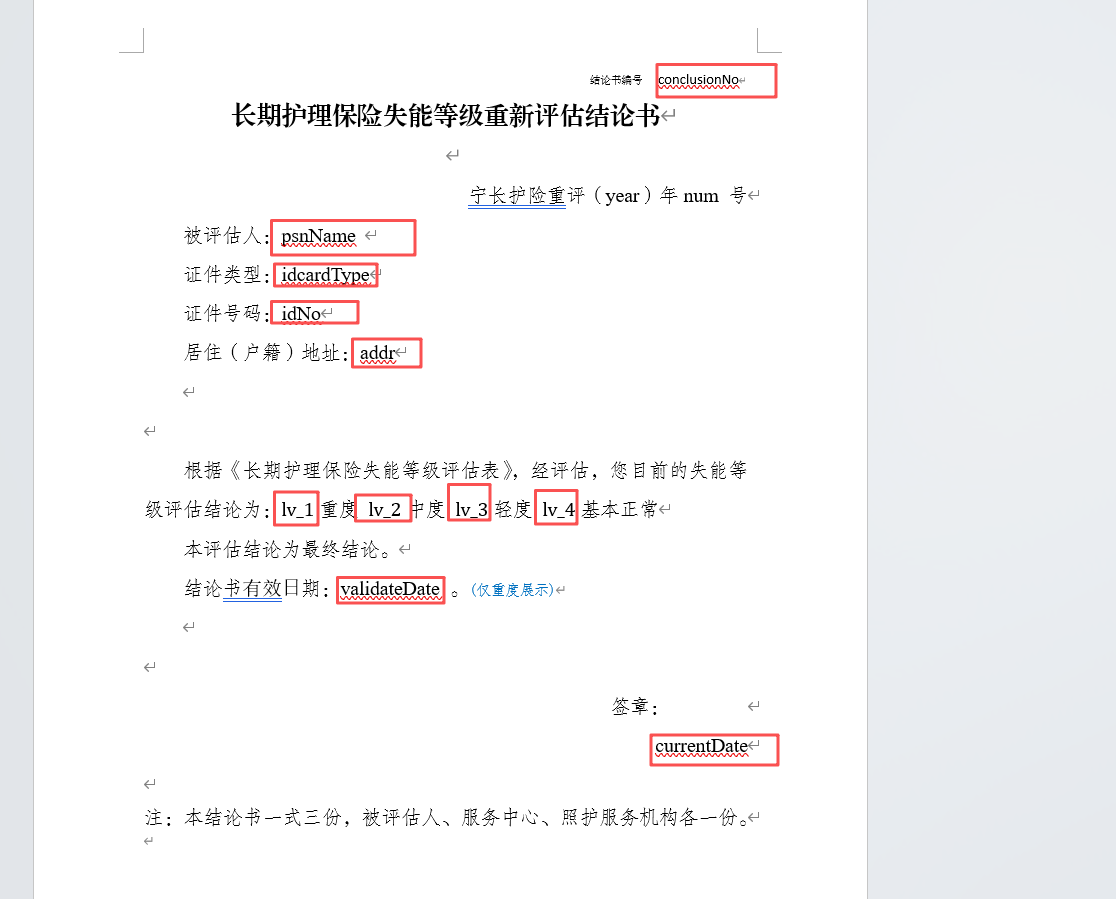
代码如下
java
package org.example.wordGenerate;

import org.apache.poi.util.Units;
import org.apache.poi.xwpf.usermodel.*;
import org.openxmlformats.schemas.wordprocessingml.x2006.main.CTP;
import org.openxmlformats.schemas.wordprocessingml.x2006.main.CTPPr;
import org.springframework.util.StringUtils;

import java.io.ByteArrayInputStream;
import java.io.FileInputStream;
import java.io.FileOutputStream;
import java.util.List;
import java.util.Map;

public class WordDocumentUtils {
    /**
     * 替换Word文档中的文本内容
     *
     * @param templatePath 模板路径
     * @param outputPath   输出路径
     * @param replacements 替换内容映射
     */
    public void replaceTextInDocument(String templatePath, String outputPath,
                                      Map<String, String> replacements) throws Exception {
        try (FileInputStream fis = new FileInputStream(templatePath);
             XWPFDocument document = new XWPFDocument(fis)) {

            // 替换段落中的文本
            replaceInParagraphs(document.getParagraphs(), replacements);

            // 替换表格中的文本
            replaceInTables(document.getTables(), replacements);

            // 替换页眉页脚
            replaceInHeaderFooter(document, replacements);

            // 保存文档
            try (FileOutputStream fos = new FileOutputStream(outputPath)) {
                document.write(fos);
            }

            System.out.println("文档生成成功: " + outputPath);
        }
    }

    /**
     * 替换段落中的文本
     */
    private void replaceInParagraphs(List<XWPFParagraph> paragraphs,
                                     Map<String, String> replacements) {
        for (XWPFParagraph paragraph : paragraphs) {
            List<XWPFRun> runs = paragraph.getRuns();
            if (runs.isEmpty()) {
                continue;
            }

            // 收集完整文本
            StringBuilder fullTextBuilder = new StringBuilder();
            for (XWPFRun run : runs) {
                String text = run.getText(0);
                if (text != null) {
                    fullTextBuilder.append(text);
                }
            }

            String fullText = fullTextBuilder.toString();
            if (!StringUtils.hasText(fullText)) {
                continue;
            }

            // 执行替换
            String replacedText = replacePlaceholders(fullText, replacements);
            if (fullText.equals(replacedText)) {
                continue;
            }

            // 保留第一个 run 的格式,清空其他 runs
            XWPFRun firstRun = runs.get(0);
            firstRun.setText(replacedText, 0);

            // 清空其他 runs
            for (int i = 1; i < runs.size(); i++) {
                runs.get(i).setText("", 0);
            }
        }
    }

    /**
     * 替换表格中的文本
     */
    private void replaceInTables(List<XWPFTable> tables, Map<String, String> replacements) {
        for (XWPFTable table : tables) {
            for (XWPFTableRow row : table.getRows()) {
                for (XWPFTableCell cell : row.getTableCells()) {
                    replaceInParagraphs(cell.getParagraphs(), replacements);
                }
            }
        }
    }

    /**
     * 替换页眉页脚中的文本
     */
    private void replaceInHeaderFooter(XWPFDocument document, Map<String, String> replacements) {
        // 替换页眉
        List<XWPFHeader> headers = document.getHeaderList();
        for (XWPFHeader header : headers) {
            replaceInParagraphs(header.getParagraphs(), replacements);
        }

        // 替换页脚
        List<XWPFFooter> footers = document.getFooterList();
        for (XWPFFooter footer : footers) {
            replaceInParagraphs(footer.getParagraphs(), replacements);
        }
    }

    /**
     * 替换占位符
     */
    private String replacePlaceholders(String text, Map<String, String> replacements) {
        if (!StringUtils.hasText(text) || replacements == null || replacements.isEmpty()) {
            return text;
        }

        String result = text;
        for (Map.Entry<String, String> entry : replacements.entrySet()) {
            String placeholder = entry.getKey();
            String replacement = entry.getValue() != null ? entry.getValue() : "";
            result = result.replace(placeholder, replacement);
        }

        return result;
    }

    /****************************   添加二维码到右上方    ****************************/
    /**
     * 添加二维码到文档
     */
    public void addQRCodeToDocument(String filePath, String content) throws Exception {
        //生成二维码
        byte[] qrCodeBytes = QRCodeServiceUtils.generateQRCode(content, 120, 120);
        try (FileInputStream fis = new FileInputStream(filePath);
             XWPFDocument doc = new XWPFDocument(fis);
             FileOutputStream fos = new FileOutputStream(filePath)) {
            boolean qrCodeAdded = false;
            // 查找并替换二维码占位符
            for (XWPFParagraph paragraph : doc.getParagraphs()) {
                String text = paragraph.getText();
                if (text != null && (text.contains("##QRCODE##") || text.contains("二维码") || text.contains("QR"))) {
                    replaceQRCodePlaceholder(paragraph, qrCodeBytes);
                    qrCodeAdded = true;
                    break;
                }
            }
            // 如果没找到占位符,在文档开头添加二维码(右对齐)
            if (!qrCodeAdded) {
                System.out.println("未找到二维码占位符,二维码放右上角");
                addQRCodeToDocumentStart(doc, qrCodeBytes);
            } else {
                System.out.println("找到二维码占位符");
            }
            doc.write(fos);
        }
    }

    /**
     * 替换二维码占位符
     */
    private void replaceQRCodePlaceholder(XWPFParagraph paragraph, byte[] qrCodeBytes) throws Exception {
        List<XWPFRun> runs = paragraph.getRuns();

        for (int i = 0; i < runs.size(); i++) {
            XWPFRun run = runs.get(i);
            String text = run.getText(0);

            if (text != null && text.contains("##QRCODE##")) {
                // 清空占位符文本
                run.setText(text.replace("##QRCODE##", ""), 0);

                // 在当前位置插入二维码
                XWPFRun qrRun = paragraph.insertNewRun(i);
                qrRun.addPicture(new ByteArrayInputStream(qrCodeBytes),
                        XWPFDocument.PICTURE_TYPE_PNG,
                        "qrcode.png",
                        Units.toEMU(80),  // 宽度
                        Units.toEMU(80)); // 高度
                // 设置右对齐
                paragraph.setAlignment(ParagraphAlignment.RIGHT);
                break;
            }
        }
    }

    /**
     * 在文档第一页右上角添加二维码
     */
    private void addQRCodeToDocumentStart(XWPFDocument doc, byte[] qrCodeBytes) throws Exception {
        // 检查文档是否已有内容
        List<XWPFParagraph> paragraphs = doc.getParagraphs();

        XWPFParagraph qrParagraph;
        if (paragraphs.isEmpty()) {
            // 如果文档为空,创建新段落
            qrParagraph = doc.createParagraph();
        } else {
            // 在第一个段落之前插入二维码段落
            XWPFParagraph firstParagraph = paragraphs.get(0);
            qrParagraph = doc.insertNewParagraph(firstParagraph.getCTP().newCursor());
        }

        // 设置段落右对齐
        qrParagraph.setAlignment(ParagraphAlignment.RIGHT);

        // 设置段落间距
        qrParagraph.setSpacingBefore(0);
        qrParagraph.setSpacingAfter(50);

        // 设置段落缩进
        qrParagraph.setIndentFromLeft(0);
        qrParagraph.setIndentFromRight(0);

        // 获取段落属性并移除任何分页符设置
        CTP ctp = qrParagraph.getCTP();
        CTPPr ppr = ctp.getPPr() != null ? ctp.getPPr() : ctp.addNewPPr();

        // 移除分页符设置以防止强制分页
        if (ppr.isSetPageBreakBefore()) {
            ppr.unsetPageBreakBefore();
        }

        // 添加二维码图片
        XWPFRun qrRun = qrParagraph.createRun();
        qrRun.addPicture(
                new ByteArrayInputStream(qrCodeBytes),
                XWPFDocument.PICTURE_TYPE_PNG,
                "qrcode.png",
                Units.toEMU(40),  // 宽度40磅
                Units.toEMU(40)   // 高度40磅
        );
    }

}
测试类
java
package org.example.wordGenerate;

import org.springframework.util.ResourceUtils;

import java.io.File;
import java.util.HashMap;
import java.util.Map;
import java.util.Objects;

public class DocxUtils {
    private static final WordDocumentUtils wordDocumentUtils = new WordDocumentUtils();

    /**
     * 生成结论书
     */
    public static File generateConclusionDocument(Map<String, Object> data, String qrContent, String docxTemplatePath, String outputDir) throws Exception {
        File outputDirFile = new File(outputDir);
        if (!outputDirFile.exists()) {
            outputDirFile.mkdirs();
        }
//        String outputPath = outputDir + "/conclusion_" + System.currentTimeMillis() + ".docx";
        String outputPath = outputDir + "/output.docx";
        Map<String, String> replacements = new HashMap<>();
        replacements.put("conclusionNo", (String) data.getOrDefault("conclusionNo", ""));
        replacements.put("year", (String) data.getOrDefault("year", ""));
        replacements.put("num", (String) data.getOrDefault("num", ""));
        replacements.put("psnName", (String) data.getOrDefault("psnName", ""));
        replacements.put("idcardType", (String) data.getOrDefault("idcardType", ""));
        replacements.put("idNo", (String) data.getOrDefault("idNo", ""));
        replacements.put("addr", (String) data.getOrDefault("addr", ""));
        replacements.put("validateDate", (String) data.getOrDefault("validateDate", ""));
        replacements.put("currentDate", (String) data.getOrDefault("currentDate", ""));
        String checkedBox = "☑"; // Unicode 检查标记,较细
        String uncheckedBox = "❏"; // Unicode 方形,与检查标记大小更匹配
        replacements.put("lv_1", Objects.equals(data.getOrDefault("lv_1", ""), "true") ? checkedBox : uncheckedBox);
        replacements.put("lv_2", Objects.equals(data.getOrDefault("lv_2", ""), "true") ? checkedBox : uncheckedBox);
        replacements.put("lv_3", Objects.equals(data.getOrDefault("lv_3", ""), "true") ? checkedBox : uncheckedBox);
        replacements.put("lv_4", Objects.equals(data.getOrDefault("lv_4", ""), "true") ? checkedBox : uncheckedBox);
        // 执行文本替换
        wordDocumentUtils.replaceTextInDocument(docxTemplatePath, outputPath, replacements);
        wordDocumentUtils.addQRCodeToDocument(outputPath, qrContent);
        return new File(outputPath);
    }


    public static void main(String[] args) throws Exception {
        Map<String, Object> data = new HashMap<>();
        data.put("conclusionNo", "112345647897");
        data.put("year", "2026");
        data.put("num", "0001");
        data.put("psnName", "张三");
        data.put("idcardType", "身份证");
        data.put("idNo", "321323339707113065");
        data.put("addr", "江苏省宿迁市宿城区技术开发区");
        data.put("validateDate", "2026年01月01日至2028年01月01日");
        data.put("currentDate", "2026年01月01日");
        data.put("lv_1", "true");
        // 模板文件路径
        String templatePath = ResourceUtils.getFile("classpath:templates/template.docx").getPath();
        String outPath = "src/main/resources/output";
        File document = DocxUtils.generateConclusionDocument(data, "https://www.baidu.com/", templatePath, outPath);
        System.out.println(document.getAbsolutePath());
    }
}
测试结果
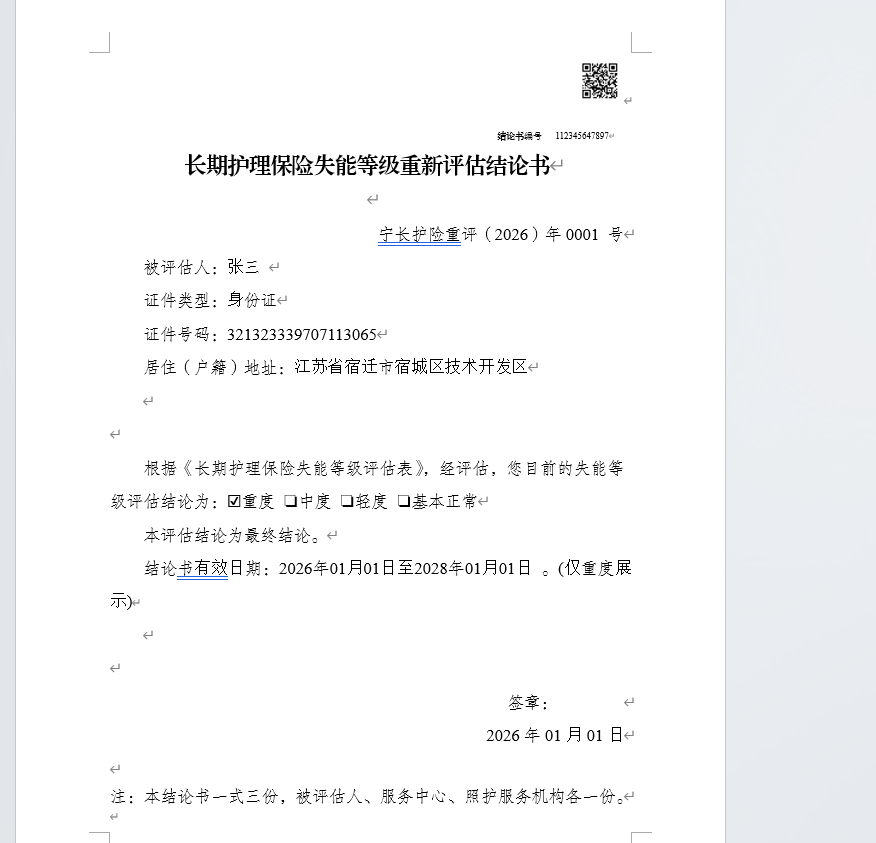
word转pdf
依赖
<dependency>
            <groupId>org.docx4j</groupId>
            <artifactId>docx4j-core</artifactId>
            <version>8.3.9</version>
        </dependency>
        <dependency>
            <groupId>org.docx4j</groupId>
            <artifactId>docx4j-export-fo</artifactId>
            <version>8.3.9</version>
        </dependency>
        <dependency>
            <groupId>org.docx4j</groupId>
            <artifactId>docx4j-JAXB-Internal</artifactId>
            <version>8.3.9</version>
        </dependency>
代码
java
package org.example;

import org.docx4j.Docx4J;
import org.docx4j.fonts.IdentityPlusMapper;
import org.docx4j.fonts.Mapper;
import org.docx4j.fonts.PhysicalFont;
import org.docx4j.fonts.PhysicalFonts;
import org.docx4j.openpackaging.packages.WordprocessingMLPackage;

import java.io.File;
import java.io.FileOutputStream;
import java.util.Map;

public class PdfUtils {
    /**
     * 使用 docx4j 将 .docx 文件转换为 .pdf
     *
     * @param inputDocxPath 输入 .docx 文件路径
     * @param outputPdfPath 输出 .pdf 文件路径
     */
    public static void convert(String inputDocxPath, String outputPdfPath) throws Exception {
        WordprocessingMLPackage wordMLPackage = WordprocessingMLPackage.load(new File(inputDocxPath));
        try (FileOutputStream outputStream = new FileOutputStream(outputPdfPath)) {
            // 4. 转换为 PDF
            Docx4J.toPDF(wordMLPackage, outputStream);
        }
        System.out.println("✅ Word 转 PDF 成功: " + outputPdfPath);
    }
}
测试
使用springboot启动类测试
java
package org.example;

import org.springframework.boot.SpringApplication;
import org.springframework.boot.autoconfigure.SpringBootApplication;

@SpringBootApplication
public class Application {
    public static void main(String[] args) {
        SpringApplication.run(Application.class, args);
        try {
            String wordFilePath = "D:\\develop\\codes\\javacode\\testboot\\src\\main\\resources\\output\\output.docx";
            String pdfFilePath = "D:\\develop\\codes\\javacode\\testboot\\src\\main\\resources\\output\\output1.pdf";
            System.out.println("开始转换 Word 到 PDF...");
            PdfUtils.convert(wordFilePath, pdfFilePath);
            System.out.println("转换完成!");
        } catch (Exception e) {
            e.printStackTrace();
        }
    }
}
启动报错
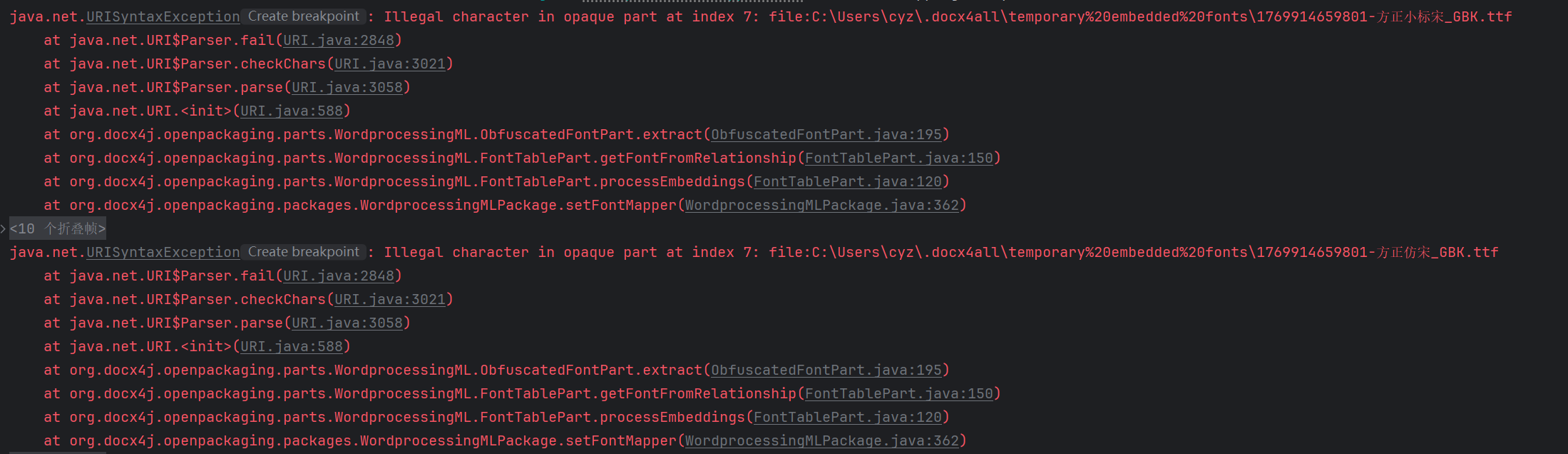
并且结果乱码
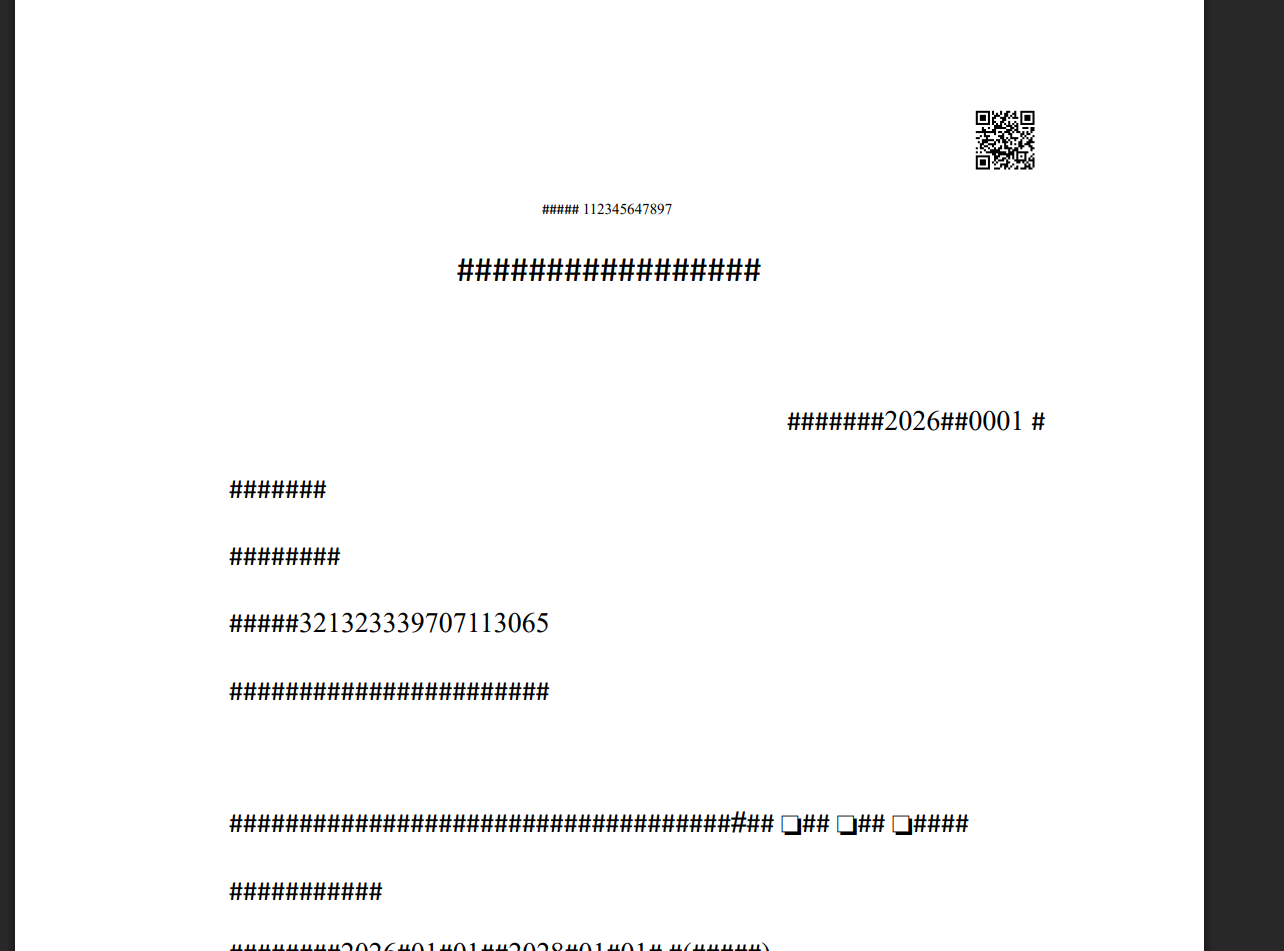
发现缺少方正仿宋_GBK和方正小标宋_GBK字体
查询系统自带字体,修改convert方法
java
public static void convert(String inputDocxPath, String outputPdfPath) throws Exception {
        // 1. 使用新的 API 加载文档
        WordprocessingMLPackage wordMLPackage = WordprocessingMLPackage.load(new File(inputDocxPath));

        // 注册系统字体
        Map<String, PhysicalFont> physicalFonts = PhysicalFonts.getPhysicalFonts();
        System.out.println("物理字体->" + physicalFonts.keySet());
        for (Map.Entry<String, PhysicalFont> entry : physicalFonts.entrySet()) {
            System.out.println(entry.getKey());
        }
        // 3. 使用 try-with-resources 自动关闭流
        try (FileOutputStream outputStream = new FileOutputStream(outputPdfPath)) {
            // 4. 转换为 PDF
            Docx4J.toPDF(wordMLPackage, outputStream);
        }
        System.out.println("✅ Word 转 PDF 成功: " + outputPdfPath);
    }
java
物理字体->[constantia, source sans pro black, bahnschrift, microsoft phagspa bold, fzyaoti, garamond, consolas italic, youyuan, bodoni mt condensed, javanese text, nirmala text semilight, microsoft yi baiti, nirmala text bold, old english text mt, microsoft jhenghei ui, open sans, candara bold, verdana bold italic, sans serif collection, stsong, raleway, cooper black, simsun, palace script mt, papyrus, microsoft yahei ui light, bodoni mt condensed bold italic, stliti, arvo bold italic, lucida handwriting italic, magneto bold, gadugi, vivaldi italic, felix titling, franklin gothic heavy, trebuchet ms, fredericka the great, matura mt script capitals, bookshelf symbol 7, dubai medium, lucida bright demibold, bodoni mt italic, nirmala ui semilight, dosis regular, malgun gothic semilight, tw cen mt bold italic, shadows into light, calisto mt, script mt bold, fzcuheisongs-b-gb, bookman old style bold italic, bodoni mt bold, open sans italic, franklin gothic demi cond, lucida bright italic, dejavu sans mono, century schoolbook italic, perpetua bold, yu gothic bold, franklin gothic book italic, julius sans one, constantia bold, parchment, ms ui gothic, gill sans mt bold italic, roboto italic, yu gothic medium, perpetua titling mt light, mingliu-extb, microsoft tai le, consolas bold italic, dengxian regular, fzshuti, stxihei, barrio regular, eras demi itc, perpetua titling mt bold, eras light itc, rockwell, comfortaa regular, dubai light, franklin gothic medium italic, iqyht regular, bubblegum sans regular, goudy stout, simsun-extg, stfangsong, noto serif sc, pmingliu-extb, times new roman, informal roman, simsun-extb, kunstler script, lisu, tw cen mt italic, franklin gothic demi italic, roboto bold, brush script mt italic, ink free, calibri bold, comic sans ms bold, lucida fax italic, elephant, perpetua bold italic, bodoni mt poster compressed, gill sans mt ext condensed bold, lucida sans demibold roman, maiandra gd, imprint mt shadow, candara light italic, ubuntu mono, dubai bold, lucida sans typewriter bold oblique, simhei, source sans pro black italic, franklin gothic heavy italic, microsoft yahei ui bold, calibri bold italic, showcard gothic, book antiqua bold italic, century gothic italic, zilla slab, droid serif, footlight mt light, century gothic bold, segoe ui black, stxinwei, bell mt italic, rockwell extra bold, roboto bold italic, cambria, onyx, arvo-italic, arial, webdings, tw cen mt bold, segoe ui bold, ms gothic, bodoni mt bold italic, baskerville old face, century gothic bold italic, roboto slab regular, nsimsun, droid serif bold, comic sans ms bold italic, forte, candara light, consolas bold, gill sans mt condensed, leelawadee ui bold, verdana bold, eras medium itc, palatino linotype, eras bold itc, franklin gothic book, dejavu sans mono bold, bodoni mt condensed italic, calisto mt italic, book antiqua bold, microsoft new tai lue, vast shadow regular, rockwell italic, pristina, french script mt, trebuchet ms italic, century schoolbook bold, microsoft himalaya, microsoft jhenghei ui light, segoe script, bell mt bold, arial narrow bold italic, gill sans mt, kristen itc, bradley hand itc, calibri, calibri light, century, segoe ui emoji, yu gothic ui bold, wingdings, nirmala ui, source sans pro light, century schoolbook bold italic, cabin sketch bold, segoe ui historic, kaiti, garamond bold, copperplate gothic light, dengxian bold, high tower text, courier new bold, lucida sans typewriter bold, verdana italic, courier new bold italic, yu gothic ui regular, stxingkai, lucida fax demibold italic, viner hand itc, mistral, tahoma bold, sitka text, mingliu_hkscs-extb, mingliu_mscs-extb, cambria math, arial italic, berlin sans fb demi bold, cambria bold italic, ebrima, colonna mt, segoe ui black italic, lucida fax regular, constantia italic, microsoft jhenghei bold, microsoft yahei ui, berlin sans fb bold, rage italic, georgia italic, ravie, bodoni mt, yu gothic ui semibold, berlin sans fb, franklin gothic medium, verdana, corbel light italic, ms reference sans serif, corbel, georgia bold, numberonly bold, times new roman bold italic, freestyle script, marlett, segoe ui semibold, lucida sans italic, myanmar text, roboto condensed, tw cen mt, monoton, gloucester mt extra condensed, niagara solid, microsoft yahei, franklin gothic demi, leelawadee ui, nanum pen, palatino linotype italic, din next lt pro bold, palatino linotype bold, iqyht medium, stcaiyun, open sans bold italic, calisto mt bold italic, tw cen mt condensed bold, sitka text italic, nirmala text, fangsong, ms outlook, segoe ui semibold italic, rockwell bold, yu gothic ui light, nirmala ui bold, source sans pro italic, roboto slab bold, microsoft jhenghei, palatino linotype bold italic, garamond italic, book antiqua italic, castellar, myanmar text bold, sylfaen, californian fb, malgun gothic bold, georgia bold italic, comic sans ms italic, droid serif bold italic, times new roman italic, bookman old style, corbel light, symbol, century gothic, arvo, corbel italic, segoe print, britannic bold, segoe ui light, cambria italic, segoe ui semilight italic, trebuchet ms bold, lucida sans regular, rockwell condensed bold, lucida bright, roboto condensed bold italic, agency fb bold, poiret one, lobster, malgun gothic, niagara engraved, segoe ui semilight, edwardian script itc, book antiqua, candara italic, open sans bold, cambria bold, segoe ui light italic, californian fb italic, stkaiti, mongolian baiti, segoe mdl2 assets, bodoni mt black, curlz mt, source sans pro regular, stzhongsong, ms reference specialty, engravers mt, wide latin, dejavu sans mono bold oblique, perpetua, ebrima bold, gill sans ultra bold, modern no. 20, bookman old style italic, yu gothic ui semilight, segoe ui, candara bold italic, barlow condensed regular, source sans pro semibold, copperplate gothic bold, lucida calligraphy italic, tw cen mt condensed extra bold, trebuchet ms bold italic, goudy old style, arial rounded mt bold, courier new italic, agency fb, source sans pro semibold italic, leelawadee ui semilight, calibri italic, delius-regular, noto sans sc, segoe ui symbol, segoe ui italic, arial bold, microsoft phagspa, yu gothic regular, megrim, lucida sans typewriter regular, arial black, century schoolbook, lucida sans typewriter oblique, segoe ui variable, source sans pro bold, ocr a extended, yu gothic light, segoe ui bold italic, gill sans mt italic, pangolin regular, din next lt pro medium, corbel bold, poor richard, goudy old style italic, wingdings 3, indie flower, wingdings 2, comfortaa bold, microsoft jhenghei light, rockwell condensed, corbel bold italic, microsoft sans serif, lucida sans unicode, bell mt, sthupo, arial narrow italic, goudy old style bold, gadugi bold, roboto condensed bold, franklin gothic medium cond, comic sans ms, lucida bright demibold italic, perpetua italic, arial narrow bold, segoe fluent icons, georgia, microsoft yahei light, roboto condensed italic, bodoni mt black italic, ms pgothic, arvo bold, gill sans ultra bold condensed, roboto, calibri light italic, fredoka one, arial bold italic, bookman old style bold, microsoft tai le bold, microsoft yahei bold, arial narrow, consolas, monotype corsiva, centaur, microsoft new tai lue bold, tahoma, bodoni mt condensed bold, droid serif italic, rockwell bold italic, lucida sans demibold italic, mt extra, cabin sketch regular, dejavu sans mono oblique, lucida console, segoe script bold, gill sans mt bold, high tower text italic, vladimir script, din next lt pro regular, courier new, din next lt pro light, zilla slab bold, lucida fax demibold, dengxian light, source sans pro bold italic, raleway bold, dubai regular, microsoft jhenghei ui bold, candara, mv boli, calisto mt bold, tw cen mt condensed, hyzhonghei 197, constantia bold italic, segoe print bold, times new roman bold, californian fb bold]常用字体映射
java
fontMapper.put("隶书", PhysicalFonts.get("LiSu"));
        fontMapper.put("宋体", PhysicalFonts.get("SimSun"));
        fontMapper.put("微软雅黑", PhysicalFonts.get("Microsoft YaHei"));
        fontMapper.put("黑体", PhysicalFonts.get("SimHei"));
        fontMapper.put("楷体", PhysicalFonts.get("KaiTi"));
        fontMapper.put("新宋体", PhysicalFonts.get("NSimSun"));
        fontMapper.put("华文行楷", PhysicalFonts.get("STXingkai"));
        fontMapper.put("华文仿宋", PhysicalFonts.get("STFangsong"));
        fontMapper.put("仿宋", PhysicalFonts.get("FangSong"));
        fontMapper.put("幼圆", PhysicalFonts.get("YouYuan"));
        fontMapper.put("华文宋体", PhysicalFonts.get("STSong"));
        fontMapper.put("华文中宋", PhysicalFonts.get("STZhongsong"));
        fontMapper.put("等线", PhysicalFonts.get("SimSun")); // 注意:这里用了 SimSun,可能不是最佳选择
        fontMapper.put("等线 Light", PhysicalFonts.get("SimSun"));
        fontMapper.put("华文琥珀", PhysicalFonts.get("STHupo"));
        fontMapper.put("华文隶书", PhysicalFonts.get("STLiti"));
        fontMapper.put("华文新魏", PhysicalFonts.get("STXinwei"));
        fontMapper.put("华文彩云", PhysicalFonts.get("STCaiyun"));
        fontMapper.put("方正姚体", PhysicalFonts.get("FZYaoti"));
        fontMapper.put("方正舒体", PhysicalFonts.get("FZShuTi"));
        fontMapper.put("华文细黑", PhysicalFonts.get("STXihei"));
        fontMapper.put("宋体扩展", PhysicalFonts.get("simsun-extB"));
        fontMapper.put("仿宋_GB2312", PhysicalFonts.get("FangSong_GB2312"));
        fontMapper.put("新細明體", PhysicalFonts.get("SimSun"));
        PhysicalFonts.put("PMingLiU", PhysicalFonts.get("SimSun"));
        PhysicalFonts.put("新細明體", PhysicalFonts.get("SimSun"));
配置映射
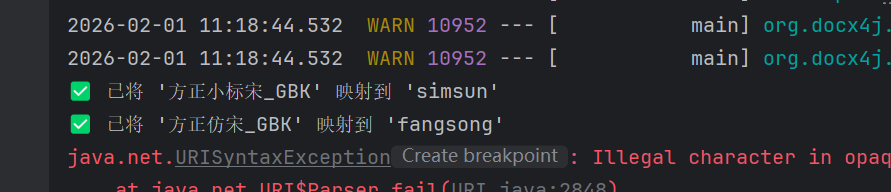
先将系统的字体加载到环境,因为缺少 方正仿宋_GBK和方正小标宋_GBK字体,配置对应的映射为
方正小标宋_GBK->fangsong 方正仿宋_GBK -> simsun完整代码如下
java
package org.example;

import org.docx4j.Docx4J;
import org.docx4j.fonts.IdentityPlusMapper;
import org.docx4j.fonts.Mapper;
import org.docx4j.fonts.PhysicalFont;
import org.docx4j.fonts.PhysicalFonts;
import org.docx4j.openpackaging.packages.WordprocessingMLPackage;

import java.io.File;
import java.io.FileOutputStream;
import java.util.Map;

public class PdfUtils {
    /**
     * 使用 docx4j 将 .docx 文件转换为 .pdf
     *
     * @param inputDocxPath 输入 .docx 文件路径
     * @param outputPdfPath 输出 .pdf 文件路径
     */
    public static void convert(String inputDocxPath, String outputPdfPath) throws Exception {
        // 1. 使用新的 API 加载文档
        WordprocessingMLPackage wordMLPackage = WordprocessingMLPackage.load(new File(inputDocxPath));
        // 2. 配置字体映射,解决中文乱码问题
        Mapper fontMapper = new IdentityPlusMapper();
        // 注册系统字体
        Map<String, PhysicalFont> physicalFonts = PhysicalFonts.getPhysicalFonts();
        for (Map.Entry<String, PhysicalFont> entry : physicalFonts.entrySet()) {
            fontMapper.put(entry.getKey(), entry.getValue());
        }
        // 常用中文字体映射表  //这边如果查询不大就查询小写,下面的也可以参考这样写
        fontMapper.put("隶书", PhysicalFonts.get("LiSu")==null?PhysicalFonts.get("lisu"):PhysicalFonts.get("LiSu"));
        fontMapper.put("宋体", PhysicalFonts.get("SimSun"));
        fontMapper.put("微软雅黑", PhysicalFonts.get("Microsoft YaHei"));
        fontMapper.put("黑体", PhysicalFonts.get("SimHei"));
        fontMapper.put("楷体", PhysicalFonts.get("KaiTi"));
        fontMapper.put("新宋体", PhysicalFonts.get("NSimSun"));
        fontMapper.put("华文行楷", PhysicalFonts.get("STXingkai"));
        fontMapper.put("华文仿宋", PhysicalFonts.get("STFangsong"));
        fontMapper.put("仿宋", PhysicalFonts.get("FangSong"));
        fontMapper.put("幼圆", PhysicalFonts.get("YouYuan"));
        fontMapper.put("华文宋体", PhysicalFonts.get("STSong"));
        fontMapper.put("华文中宋", PhysicalFonts.get("STZhongsong"));
        fontMapper.put("等线", PhysicalFonts.get("SimSun")); // 注意:这里用了 SimSun,可能不是最佳选择
        fontMapper.put("等线 Light", PhysicalFonts.get("SimSun"));
        fontMapper.put("华文琥珀", PhysicalFonts.get("STHupo"));
        fontMapper.put("华文隶书", PhysicalFonts.get("STLiti"));
        fontMapper.put("华文新魏", PhysicalFonts.get("STXinwei"));
        fontMapper.put("华文彩云", PhysicalFonts.get("STCaiyun"));
        fontMapper.put("方正姚体", PhysicalFonts.get("FZYaoti"));
        fontMapper.put("方正舒体", PhysicalFonts.get("FZShuTi"));
        fontMapper.put("华文细黑", PhysicalFonts.get("STXihei"));
        fontMapper.put("宋体扩展", PhysicalFonts.get("simsun-extB"));
        fontMapper.put("仿宋_GB2312", PhysicalFonts.get("FangSong_GB2312"));
        fontMapper.put("新細明體", PhysicalFonts.get("SimSun"));
        PhysicalFonts.put("PMingLiU", PhysicalFonts.get("SimSun"));
        PhysicalFonts.put("新細明體", PhysicalFonts.get("SimSun"));
        wordMLPackage.setFontMapper(fontMapper);
        String targetSongtiFontName = "simsun"; // 或者 "NSimSun", "STSong"
        String targetFangsongFontName = "fangsong"; // 或者 "STFangsong"
        PhysicalFont songtiFont = physicalFonts.get(targetSongtiFontName);
        PhysicalFont fangsongFont = physicalFonts.get(targetFangsongFontName);
        if (songtiFont != null) {
            fontMapper.put("方正小标宋_GBK", songtiFont);
            System.out.println("✅ 已将 '方正小标宋_GBK' 映射到 '" + targetSongtiFontName + "'");
        } else {
            System.err.println("❌ 警告: 系统未找到名为 '" + targetSongtiFontName + "' 的字体,无法映射 '方正小标宋_GBK'。");
        }
        if (fangsongFont != null) {
            fontMapper.put("方正仿宋_GBK", fangsongFont);
            System.out.println("✅ 已将 '方正仿宋_GBK' 映射到 '" + targetFangsongFontName + "'");
        } else {
            System.err.println("❌ 警告: 系统未找到名为 '" + targetFangsongFontName + "' 的字体,无法映射 '方正仿宋_GBK'。");
        }
        // 3. 使用 try-with-resources 自动关闭流
        try (FileOutputStream outputStream = new FileOutputStream(outputPdfPath)) {
            // 4. 转换为 PDF
            Docx4J.toPDF(wordMLPackage, outputStream);
        }
        System.out.println("✅ Word 转 PDF 成功: " + outputPdfPath);
    }
}
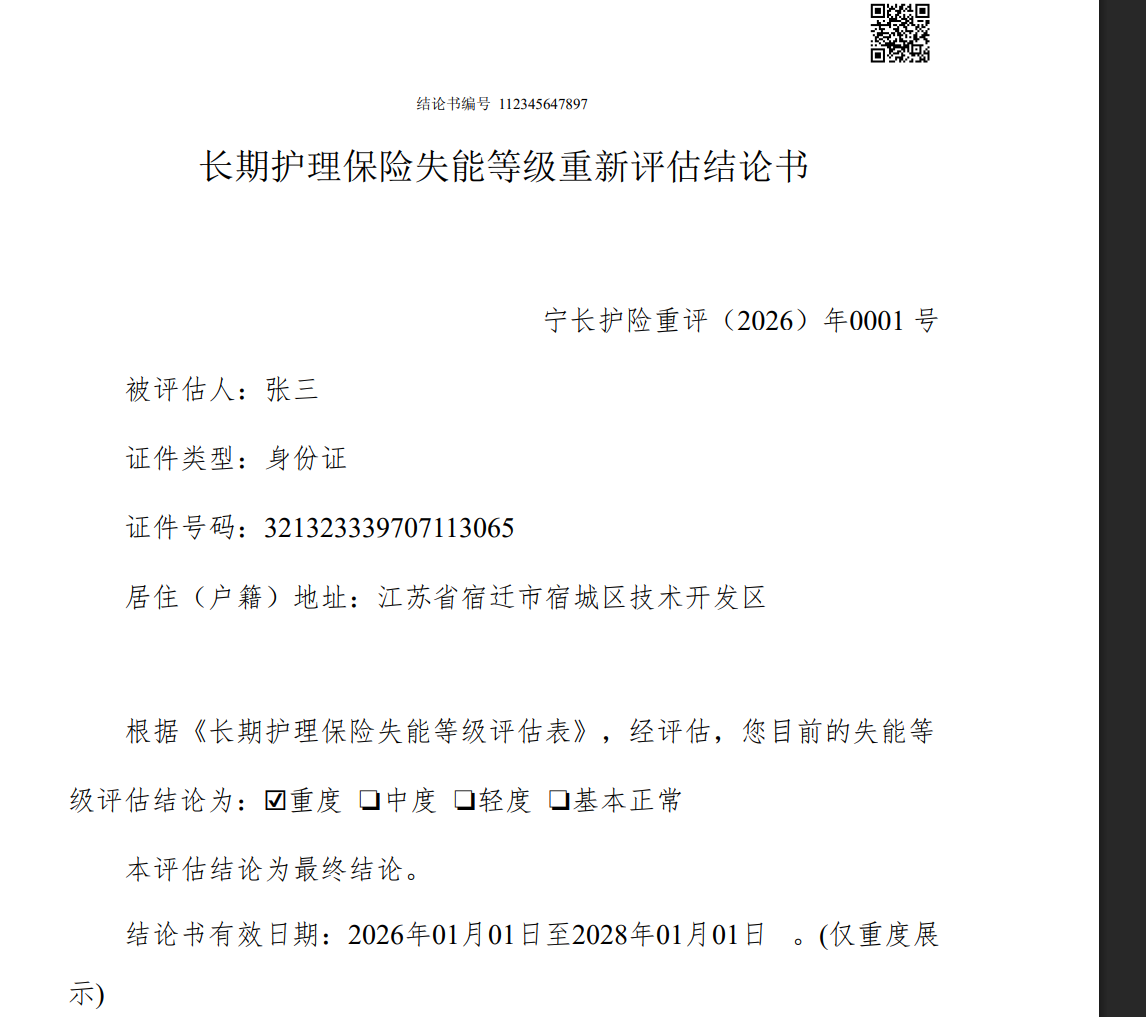
查看日志,虽然有报错,但是字体映射正确了
查看pdf,没有乱码,只是格式有点问题
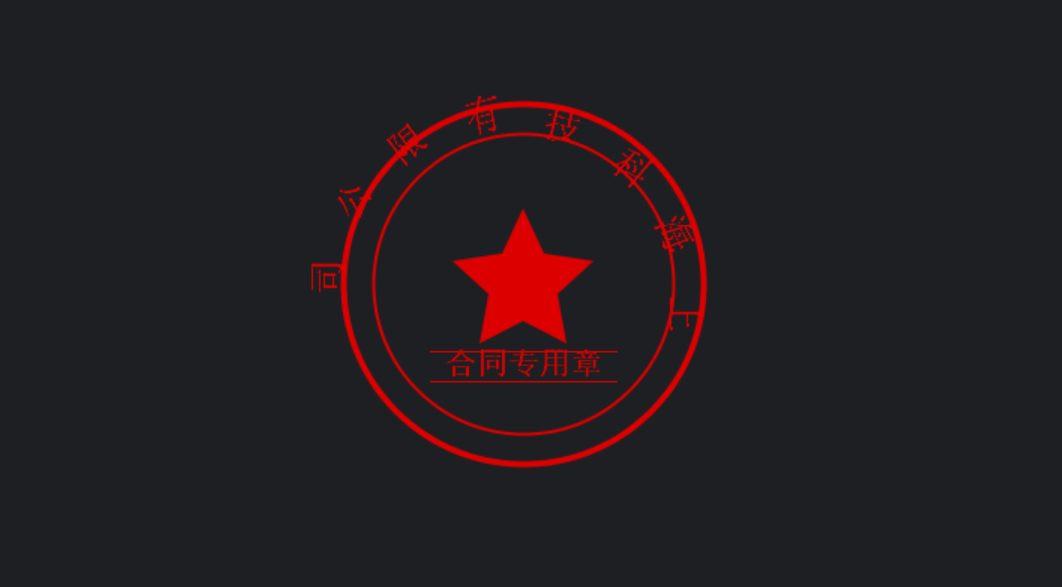
生成印章
也可以使用在线 https://sign.v2gx.com/
代码
java
package org.example.wordGenerate;

import javax.imageio.ImageIO;
import java.awt.*;
import java.awt.font.FontRenderContext;
import java.awt.geom.AffineTransform;
import java.awt.image.BufferedImage;
import java.io.ByteArrayOutputStream;
import java.io.File;
import java.io.FileOutputStream;

public class SealImageGenerate {
    /**
     * 创建真实感的印章图片
     */
    public byte[] createRealisticSeal() throws Exception {
        int width = 300;  // 增大尺寸以便显示文字
        int height = 300;

        BufferedImage image = new BufferedImage(width, height, BufferedImage.TYPE_INT_ARGB);
        Graphics2D g2d = image.createGraphics();

        // 设置高质量渲染
        g2d.setRenderingHint(RenderingHints.KEY_ANTIALIASING, RenderingHints.VALUE_ANTIALIAS_ON);
        g2d.setRenderingHint(RenderingHints.KEY_TEXT_ANTIALIASING, RenderingHints.VALUE_TEXT_ANTIALIAS_ON);

        // 透明背景
        g2d.setColor(new Color(0, 0, 0, 0));
        g2d.fillRect(0, 0, width, height);

        // 红色印章
        g2d.setColor(new Color(220, 0, 0));

        int centerX = width / 2;
        int centerY = height / 2;
        int radius = 120;

        // 绘制外圆
        g2d.setStroke(new BasicStroke(4f));
        g2d.drawOval(centerX - radius, centerY - radius, radius * 2, radius * 2);

        // 绘制内圆
        int innerRadius = radius - 20;
        g2d.setStroke(new BasicStroke(2f));
        g2d.drawOval(centerX - innerRadius, centerY - innerRadius, innerRadius * 2, innerRadius * 2);

        // 绘制五角星
        g2d.fillPolygon(createStar(centerX, centerY, 25, 50));

        // 添加公司名称(弧形文字)
        addArcText(g2d, "上海科技有限公司", centerX, centerY, radius - 10, true);

        // 添加底部文字
        addBottomText(g2d, "合同专用章", centerX, centerY, innerRadius - 10);

        g2d.dispose();

        ByteArrayOutputStream baos = new ByteArrayOutputStream();
        ImageIO.write(image, "PNG", baos);
        return baos.toByteArray();
    }

    /**
     * 添加弧形文字
     */
    private void addArcText(Graphics2D g2d, String text, int centerX, int centerY, int radius, boolean top) {
        try {
            Font font = new Font("宋体", Font.BOLD, 24);
            g2d.setFont(font);

            // 创建弧形文字
            FontRenderContext frc = g2d.getFontRenderContext();
            int textWidth = (int) font.getStringBounds(text, frc).getWidth();

            // 计算每个字符的角度
            double arcAngle = Math.toRadians(180); // 180度弧形
            double anglePerChar = arcAngle / (text.length() - 1);
            double startAngle = Math.toRadians(top ? 180 : 0);

            for (int i = 0; i < text.length(); i++) {
                char c = text.charAt(i);
                String charStr = String.valueOf(c);
                int charWidth = (int) font.getStringBounds(charStr, frc).getWidth();

                double angle = startAngle + (anglePerChar * i);
                if (top) {
                    angle = Math.toRadians(180) - angle;
                }

                double x = centerX + Math.cos(angle) * radius - charWidth / 2;
                double y = centerY + Math.sin(angle) * radius + 8; // 调整文字垂直位置

                // 旋转文字以适应弧形
                AffineTransform originalTransform = g2d.getTransform();
                AffineTransform transform = new AffineTransform();
                transform.translate(x, y);
                transform.rotate(angle + Math.toRadians(90));
                g2d.setTransform(transform);

                g2d.drawString(charStr, 0, 0);
                g2d.setTransform(originalTransform);
            }
        } catch (Exception e) {
            e.printStackTrace();
        }
    }

    /**
     * 添加底部水平文字
     */
    private void addBottomText(Graphics2D g2d, String text, int centerX, int centerY, int radius) {
        try {
            Font font = new Font("宋体", Font.BOLD, 20);
            g2d.setFont(font);

            FontRenderContext frc = g2d.getFontRenderContext();
            int textWidth = (int) font.getStringBounds(text, frc).getWidth();

            int x = centerX - textWidth / 2;
            int y = centerY + radius / 2 + 15;

            // 添加水平文字
            g2d.drawString(text, x, y);

            // 在文字上下添加横线
            g2d.setStroke(new BasicStroke(1f));
            int lineY1 = y - 15;
            int lineY2 = y + 5;
            int lineX1 = centerX - textWidth / 2 - 10;
            int lineX2 = centerX + textWidth / 2 + 10;

            g2d.drawLine(lineX1, lineY1, lineX2, lineY1);
            g2d.drawLine(lineX1, lineY2, lineX2, lineY2);

        } catch (Exception e) {
            e.printStackTrace();
        }
    }

    /**
     * 创建五角星
     */
    private Polygon createStar(int centerX, int centerY, int innerRadius, int outerRadius) {
        Polygon star = new Polygon();
        for (int i = 0; i < 10; i++) {
            double angle = Math.PI / 5 * i - Math.PI / 2; // 调整角度使一个角朝上
            int radius = (i % 2 == 0) ? outerRadius : innerRadius;
            int x = centerX + (int) (Math.cos(angle) * radius);
            int y = centerY + (int) (Math.sin(angle) * radius);
            star.addPoint(x, y);
        }
        return star;
    }

    /**
     * 创建简化版印章(如果上面的太复杂)
     */
    public byte[] createSimpleSeal() throws Exception {
        int width = 250;
        int height = 250;

        BufferedImage image = new BufferedImage(width, height, BufferedImage.TYPE_INT_ARGB);
        Graphics2D g2d = image.createGraphics();

        // 设置高质量渲染
        g2d.setRenderingHint(RenderingHints.KEY_ANTIALIASING, RenderingHints.VALUE_ANTIALIAS_ON);
        g2d.setRenderingHint(RenderingHints.KEY_TEXT_ANTIALIASING, RenderingHints.VALUE_TEXT_ANTIALIAS_ON);

        // 透明背景
        g2d.setColor(new Color(0, 0, 0, 0));
        g2d.fillRect(0, 0, width, height);

        int centerX = width / 2;
        int centerY = height / 2;
        int radius = 100;

        // 红色印章
        g2d.setColor(new Color(220, 0, 0));

        // 绘制外圆
        g2d.setStroke(new BasicStroke(3f));
        g2d.drawOval(centerX - radius, centerY - radius, radius * 2, radius * 2);

        // 绘制五角星
        g2d.fillPolygon(createStar(centerX, centerY, 20, 40));

        // 添加简单文字
        Font font = new Font("宋体", Font.BOLD, 18);
        g2d.setFont(font);

        String companyName = "上海科技有限公司";
        FontRenderContext frc = g2d.getFontRenderContext();
        int textWidth = (int) font.getStringBounds(companyName, frc).getWidth();

        int textX = centerX - textWidth / 2;
        int textY = centerY + radius + 25;

        g2d.drawString(companyName, textX, textY);

        g2d.dispose();

        ByteArrayOutputStream baos = new ByteArrayOutputStream();
        ImageIO.write(image, "PNG", baos);
        return baos.toByteArray();
    }

    public static void main(String[] args) {
        SealImageGenerate sealImageGenerate = new SealImageGenerate();
        try {
            // 生成真实感印章
            byte[] sealBytes = sealImageGenerate.createRealisticSeal();
            File outputFile = new File("src/main/resources/sealpng/seal.png");
            try (FileOutputStream fos = new FileOutputStream(outputFile)) {
                fos.write(sealBytes);
            }
            System.out.println("真实印章保存至: " + outputFile.getAbsolutePath());

            // 生成简化版印章
//            byte[] simpleSealBytes = sealImageGenerate.createSimpleSeal();
//            File simpleOutputFile = new File("company_seal_simple.png");
//            try (FileOutputStream fos = new FileOutputStream(simpleOutputFile)) {
//                fos.write(simpleSealBytes);
//            }
//            System.out.println("简化印章保存至: " + simpleOutputFile.getAbsolutePath());

        } catch (Exception e) {
            e.printStackTrace();
        }
    }
}
测试结果