1. 场景分析与缓存策略选择
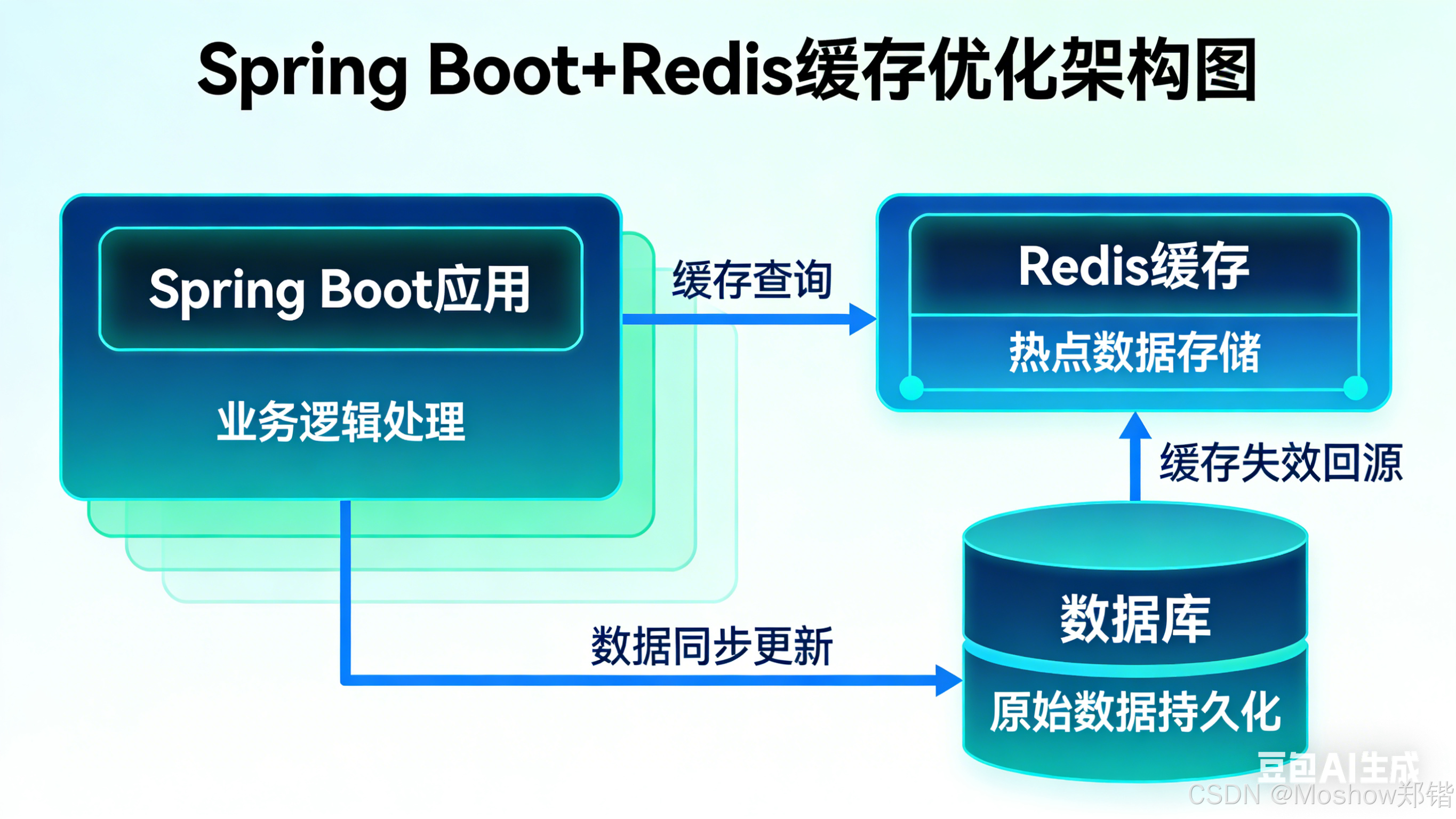
1.1 典型数据查询场景特性
-
KPI指标查询:实时性要求高,计算复杂,但数据更新频率中等
-
图表数据查询:聚合运算多,响应时间敏感,数据维度固定
-
表格数据查询:分页、排序、过滤复杂,数据量大但可缓存部分结果
1.2 缓存策略决策矩阵
| 场景类型 | 缓存时间 | 更新策略 | 缓存粒度 |
|---|---|---|---|
| KPI实时指标 | 30秒-5分钟 | 主动更新 + 失效 | 按指标+时间维度 |
| 历史图表 | 1-24小时 | 定时刷新 + 版本控制 | 按图表类型+参数 |
| 表格数据 | 5-30分钟 | 按需更新 + 条件失效 | 分页缓存 + 主键缓存 |
2. Spring Boot 集成 Redis 配置
2.1 依赖配置
XML
<dependencies>
    <!-- Spring Boot Data Redis -->
    <dependency>
        <groupId>org.springframework.boot</groupId>
        <artifactId>spring-boot-starter-data-redis</artifactId>
    </dependency>

    <!-- Redis连接池 -->
    <dependency>
        <groupId>org.apache.commons</groupId>
        <artifactId>commons-pool2</artifactId>
    </dependency>

    <!-- 缓存支持 -->
    <dependency>
        <groupId>org.springframework.boot</groupId>
        <artifactId>spring-boot-starter-cache</artifactId>
    </dependency>

    <!-- 序列化支持 -->
    <dependency>
        <groupId>com.fasterxml.jackson.datatype</groupId>
        <artifactId>jackson-datatype-jsr310</artifactId>
    </dependency>
</dependencies>
2.2 Redis 配置类
java
@Configuration
@EnableCaching
public class RedisConfig {

    @Bean
    public RedisConnectionFactory redisConnectionFactory(
            @Value("${spring.redis.host}") String host,
            @Value("${spring.redis.port}") int port,
            @Value("${spring.redis.password}") String password,
            @Value("${spring.redis.database}") int database) {

        RedisStandaloneConfiguration config = new RedisStandaloneConfiguration();
        config.setHostName(host);
        config.setPort(port);
        config.setPassword(RedisPassword.of(password));
        config.setDatabase(database);

        LettuceClientConfiguration clientConfig = LettuceClientConfiguration.builder()
                .commandTimeout(Duration.ofSeconds(2))
                .build();

        return new LettuceConnectionFactory(config, clientConfig);
    }

    @Bean
    public RedisTemplate<String, Object> redisTemplate(
            RedisConnectionFactory connectionFactory) {

        RedisTemplate<String, Object> template = new RedisTemplate<>();
        template.setConnectionFactory(connectionFactory);

        // 使用Jackson序列化
        Jackson2JsonRedisSerializer<Object> serializer =
            new Jackson2JsonRedisSerializer<>(Object.class);
        ObjectMapper mapper = new ObjectMapper();
        mapper.registerModule(new JavaTimeModule());
        mapper.disable(SerializationFeature.WRITE_DATES_AS_TIMESTAMPS);
        mapper.setVisibility(PropertyAccessor.ALL, JsonAutoDetect.Visibility.ANY);
        serializer.setObjectMapper(mapper);

        template.setKeySerializer(new StringRedisSerializer());
        template.setValueSerializer(serializer);
        template.setHashKeySerializer(new StringRedisSerializer());
        template.setHashValueSerializer(serializer);

        return template;
    }

    @Bean
    public CacheManager cacheManager(RedisConnectionFactory factory) {
        return RedisCacheManager.builder(factory)
            .cacheDefaults(getDefaultCacheConfig())
            .withInitialCacheConfigurations(getCacheConfigurations())
            .transactionAware()
            .build();
    }

    private RedisCacheConfiguration getDefaultCacheConfig() {
        return RedisCacheConfiguration.defaultCacheConfig()
            .entryTtl(Duration.ofMinutes(30))
            .serializeKeysWith(RedisSerializationContext.SerializationPair
                .fromSerializer(new StringRedisSerializer()))
            .serializeValuesWith(RedisSerializationContext.SerializationPair
                .fromSerializer(new GenericJackson2JsonRedisSerializer()))
            .disableCachingNullValues();
    }

    private Map<String, RedisCacheConfiguration> getCacheConfigurations() {
        Map<String, RedisCacheConfiguration> configs = new HashMap<>();

        // KPI缓存配置:短时间,高频率
        configs.put("kpi", getDefaultCacheConfig()
            .entryTtl(Duration.ofMinutes(5))
            .computePrefixWith(cacheName -> "cache:kpi:" + cacheName + ":"));

        // 图表缓存配置:中等时间
        configs.put("chart", getDefaultCacheConfig()
            .entryTtl(Duration.ofHours(1))
            .computePrefixWith(cacheName -> "cache:chart:" + cacheName + ":"));

        // 表格缓存配置:按查询条件缓存
        configs.put("table", getDefaultCacheConfig()
            .entryTtl(Duration.ofMinutes(15))
            .computePrefixWith(cacheName -> "cache:table:" + cacheName + ":"));

        return configs;
    }
}
3. 数据层缓存实现策略
3.1 KPI指标查询缓存
java
@Service
@Slf4j
public class KPIService {

    @Autowired
    private RedisTemplate<String, Object> redisTemplate;

    private static final String KPI_CACHE_PREFIX = "kpi:indicators:";

    /**
     * 获取实时KPI指标 - 带缓存
     */
    @Cacheable(value = "kpi", key = "#indicatorType + ':' + #timeRange + ':' + #dimension")
    public KPIResult getKPIWithCache(String indicatorType, TimeRange timeRange, String dimension) {
        log.info("查询数据库获取KPI数据: {}-{}-{}", indicatorType, timeRange, dimension);
        return calculateKPI(indicatorType, timeRange, dimension);
    }

    /**
     * 批量获取KPI - 使用Pipeline优化
     */
    public Map<String, KPIResult> batchGetKPI(List<KPIQuery> queries) {
        Map<String, KPIResult> results = new HashMap<>();
        List<Object> cacheResults = redisTemplate.executePipelined(
            (RedisCallback<Object>) connection -> {
                StringRedisConnection stringRedisConn = (StringRedisConnection) connection;
                for (KPIQuery query : queries) {
                    String key = buildKPIKey(query);
                    stringRedisConn.get(key);
                }
                return null;
            });

        // 处理缓存命中与未命中
        for (int i = 0; i < queries.size(); i++) {
            KPIQuery query = queries.get(i);
            String cached = (String) cacheResults.get(i);

            if (cached != null) {
                results.put(query.getId(), deserializeKPI(cached));
            } else {
                KPIResult result = calculateKPI(query);
                redisTemplate.opsForValue().set(
                    buildKPIKey(query),
                    serializeKPI(result),
                    Duration.ofMinutes(5)
                );
                results.put(query.getId(), result);
            }
        }

        return results;
    }

    /**
     * 主动更新KPI缓存
     */
    @Scheduled(fixedRate = 300000) // 每5分钟更新一次
    @CacheEvict(value = "kpi", allEntries = true)
    public void refreshKPICache() {
        log.info("刷新KPI缓存");
    }

    private String buildKPIKey(KPIQuery query) {
        return KPI_CACHE_PREFIX + query.getType() + ":" +
               query.getTimeRange() + ":" + query.getDimension();
    }
}
3.2 图表数据缓存策略
java
@Service
public class ChartDataService {

    @Autowired
    private StringRedisTemplate stringRedisTemplate;

    /**
     * 获取图表数据 - 带多级缓存
     */
    public ChartData getChartData(ChartRequest request) {
        String cacheKey = buildChartCacheKey(request);

        // 1. 尝试从Redis获取
        String cachedData = stringRedisTemplate.opsForValue().get(cacheKey);
        if (cachedData != null) {
            return parseChartData(cachedData);
        }

        // 2. 尝试从本地缓存获取(Guava Cache作为二级缓存)
        ChartData localCached = localChartCache.getIfPresent(cacheKey);
        if (localCached != null) {
            // 异步刷新Redis缓存
            refreshRedisCacheAsync(cacheKey, localCached);
            return localCached;
        }

        // 3. 查询数据库
        ChartData data = fetchFromDatabase(request);

        // 4. 更新缓存
        updateChartCache(cacheKey, data, getChartTTL(request.getChartType()));

        return data;
    }

    /**
     * 图表缓存键生成策略
     */
    private String buildChartCacheKey(ChartRequest request) {
        // 包含图表类型、时间范围、过滤条件等维度
        return String.format("chart:%s:%s:%s:%s",
            request.getChartType(),
            request.getTimeRange().getCode(),
            request.getFilters().hashCode(),
            request.getAggregationLevel());
    }

    /**
     * 按图表类型设置不同的TTL
     */
    private Duration getChartTTL(ChartType type) {
        switch (type) {
            case REAL_TIME:
                return Duration.ofMinutes(5);
            case DAILY_REPORT:
                return Duration.ofHours(1);
            case HISTORICAL_TREND:
                return Duration.ofDays(1);
            default:
                return Duration.ofHours(6);
        }
    }

    /**
     * 使用Bloom Filter防止缓存穿透
     */
    public ChartData getChartDataWithBloomFilter(ChartRequest request) {
        String cacheKey = buildChartCacheKey(request);

        // 检查Bloom Filter
        if (!bloomFilter.mightContain(cacheKey)) {
            return null; // 或返回默认空数据
        }

        return getChartData(request);
    }
}
3.3 表格数据查询优化
java
@Repository
public class TableDataRepository {

    @Autowired
    private RedisTemplate<String, Object> redisTemplate;
    @Autowired
    private JdbcTemplate jdbcTemplate;

    /**
     * 分页查询表格数据 - 缓存优化
     */
    public PageResult<TableRow> getTableData(TableQuery query, Pageable pageable) {
        String cacheKey = buildTableCacheKey(query, pageable);

        // 尝试获取缓存
        PageResult<TableRow> cached = (PageResult<TableRow>)
            redisTemplate.opsForValue().get(cacheKey);

        if (cached != null) {
            return cached;
        }

        // 查询数据库
        List<TableRow> data = queryDatabase(query, pageable);
        int total = getTotalCount(query);

        PageResult<TableRow> result = new PageResult<>(data, pageable, total);

        // 缓存结果
        redisTemplate.opsForValue().set(
            cacheKey,
            result,
            getTableCacheTTL(query),
            TimeUnit.MINUTES
        );

        // 缓存记录ID列表,用于数据更新时失效缓存
        cacheRecordIds(query, data);

        return result;
    }

    /**
     * 智能缓存键生成:只缓存热点查询
     */
    private String buildTableCacheKey(TableQuery query, Pageable pageable) {
        // 只缓存前5页数据,后面的查询不缓存
        if (pageable.getPageNumber() > 5) {
            return null;
        }

        return String.format("table:data:%s:page%d:size%d:%s",
            query.getTableName(),
            pageable.getPageNumber(),
            pageable.getPageSize(),
            query.getConditionHash());
    }

    /**
     * 数据更新时失效相关缓存
     */
    @Transactional
    public void updateTableData(TableRow row) {
        // 更新数据库
        updateDatabase(row);

        // 失效相关缓存
        String pattern = String.format("table:*%s*", row.getTableName());
        Set<String> keys = redisTemplate.keys(pattern);
        if (keys != null && !keys.isEmpty()) {
            redisTemplate.delete(keys);
        }

        // 更新Bloom Filter
        updateBloomFilter(row);
    }
}
4. 高级缓存模式
4.1 缓存预热与预加载
java
@Component
public class CacheWarmUpService {

    @Autowired
    private RedisTemplate<String, Object> redisTemplate;
    @Autowired
    private KPIService kpiService;
    @Autowired
    private ChartDataService chartDataService;

    @PostConstruct
    @EventListener(ContextRefreshedEvent.class)
    public void warmUpCache() {
        CompletableFuture.runAsync(() -> {
            log.info("开始缓存预热...");

            // 预热高频KPI查询
            warmUpKPICache();

            // 预热常用图表
            warmUpChartCache();

            // 预热热点表格数据
            warmUpTableCache();

            log.info("缓存预热完成");
        });
    }

    private void warmUpKPICache() {
        List<KPIQuery> hotQueries = getHotKPIQueries();
        for (KPIQuery query : hotQueries) {
            try {
                kpiService.getKPIWithCache(query.getType(),
                    query.getTimeRange(), query.getDimension());
            } catch (Exception e) {
                log.warn("预热KPI缓存失败: {}", query, e);
            }
        }
    }
}
4.2 分布式锁避免缓存击穿
java
@Service
public class CacheBreakdownPreventionService {

    @Autowired
    private RedisTemplate<String, Object> redisTemplate;

    /**
     * 使用Redis分布式锁防止缓存击穿
     */
    public Object getDataWithLock(String key, Supplier<Object> dataLoader,
                                  Duration lockTimeout, Duration cacheTTL) {

        // 1. 尝试从缓存获取
        Object cached = redisTemplate.opsForValue().get(key);
        if (cached != null) {
            return cached;
        }

        // 2. 尝试获取分布式锁
        String lockKey = "lock:" + key;
        Boolean locked = redisTemplate.opsForValue().setIfAbsent(
            lockKey, "locked", lockTimeout);

        if (Boolean.TRUE.equals(locked)) {
            try {
                // 3. 再次检查缓存(双检锁)
                cached = redisTemplate.opsForValue().get(key);
                if (cached != null) {
                    return cached;
                }

                // 4. 加载数据
                Object data = dataLoader.get();

                // 5. 写入缓存
                if (data != null) {
                    redisTemplate.opsForValue().set(key, data, cacheTTL);
                }

                return data;
            } finally {
                // 释放锁
                redisTemplate.delete(lockKey);
            }
        } else {
            // 等待并重试
            try {
                Thread.sleep(100);
                return getDataWithLock(key, dataLoader, lockTimeout, cacheTTL);
            } catch (InterruptedException e) {
                Thread.currentThread().interrupt();
                return dataLoader.get();
            }
        }
    }
}
5. 监控与优化
5.1 缓存监控配置
java
@Configuration
public class CacheMetricsConfig {

    @Bean
    public MeterRegistryCustomizer<MeterRegistry> cacheMetrics() {
        return registry -> {
            // 监控缓存命中率
            registry.gauge("cache.hit.rate",
                Tags.of("type", "kpi"),
                this,
                ctx -> calculateHitRate("kpi"));

            // 监控缓存大小
            registry.gauge("cache.size",
                Tags.of("type", "chart"),
                this,
                ctx -> estimateCacheSize("chart"));
        };
    }

    /**
     * 缓存健康检查
     */
    @Component
    public class CacheHealthIndicator implements HealthIndicator {

        @Autowired
        private RedisConnectionFactory connectionFactory;

        @Override
        public Health health() {
            try {
                RedisConnection connection = connectionFactory.getConnection();
                String result = connection.ping();
                connection.close();

                if ("PONG".equals(result)) {
                    return Health.up()
                        .withDetail("message", "Redis缓存服务正常")
                        .build();
                } else {
                    return Health.down()
                        .withDetail("message", "Redis响应异常")
                        .build();
                }
            } catch (Exception e) {
                return Health.down()
                    .withDetail("message", "Redis连接失败")
                    .withException(e)
                    .build();
            }
        }
    }
}
5.2 性能优化建议
-
序列化优化:使用Protobuf或Msgpack替代JSON
-
内存优化:配置Redis最大内存和淘汰策略
-
连接优化:使用连接池,合理配置连接参数
-
数据压缩:对大value进行压缩存储
-
批量操作:使用Pipeline减少网络往返
6. 最佳实践总结
6.1 缓存设计原则
-
按需缓存:只缓存热点数据
-
合理过期:根据业务场景设置TTL
-
及时失效:数据更新时清除相关缓存
-
分级缓存:本地缓存+Redis多级缓存
-
监控告警:实时监控缓存命中率和性能
6.2 业务场景适配表
| 场景 | 推荐策略 | 注意事项 |
|---|---|---|
| 实时KPI | 短时间缓存 + 主动刷新 | 注意数据一致性 |
| 历史报表 | 长时间缓存 + 版本控制 | 注意内存占用 |
| 复杂查询 | 结果集缓存 + 条件索引 | 注意缓存键设计 |
| 频繁更新 | 只缓存只读数据 | 及时失效缓存 |
6.3 故障处理预案
-
缓存雪崩:设置随机过期时间,使用熔断降级
-
缓存穿透:使用Bloom Filter,缓存空值
-
缓存击穿:使用分布式锁,热点数据永不过期
-
缓存一致:采用双删策略,消息队列同步