一、Location字符匹配详解
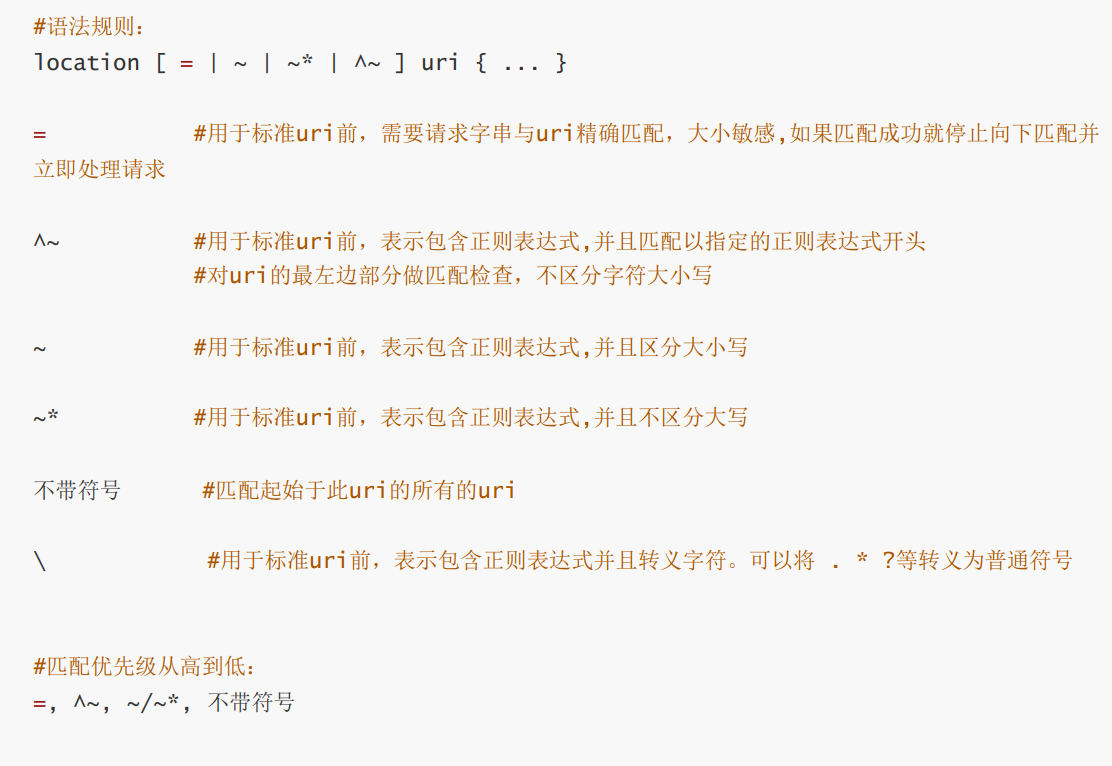
1.Location后什么都不带直接指定目录
[root@Nginx ~]# cd /usr/local/nginx/conf/
[root@Nginx conf]# cd conf.d/
[root@Nginx conf.d]# vim vhosts.conf
server {
    listen 80;
    server_name lee.timinglee.org;
    location /null {
        return 200 "/null-1";
    }
}


[root@Nginx conf.d]# nginx -s reload
[root@Nginx conf.d]# curl lee.timinglee.org/null/
/null-1

[root@Nginx conf.d]# curl lee.timinglee.org/NULL/
<html>
<head><title>404 Not Found</title></head>
<body>
<center><h1>404 Not Found</h1></center>
<hr><center>nginx/1.28.1</center>
</body>
</html>
[root@Nginx conf.d]# curl lee.timinglee.org/test/null
<html>
<head><title>404 Not Found</title></head>
<body>
<center><h1>404 Not Found</h1></center>
<hr><center>nginx/1.28.1</center>
</body>
</html>
2.location 后用 =
[root@Nginx conf.d]# vim vhosts.conf
server {
    listen 80;
    server_name lee.timinglee.org;
    location /null {
        return 200 "null-1";
    }

    location = /null {				#精确匹配到此结束
        return 200 "null-2";
    }

    location ~ /null {
        return 200 "null-3";
    }

}

[root@Nginx conf.d]# nginx -s reload
[root@Nginx conf.d]# curl lee.timinglee.org/null
null-2
3.location 后用"^~"
[root@Nginx conf.d]# vim vhosts.conf
server {
    listen 80;
    server_name lee.timinglee.org;
    location /null {
        return 200 "null-1";
    }

    location = /null {
        return 200 "null-2";
    }

    location ~ /null {
        return 200 "null-3";
    }

    location ^~ /lee {
        return 200 "lee";
    }

}
[root@Nginx conf.d]# nginx -s reload
lee
[root@Nginx conf.d]# curl  lee.timinglee.org/lee
lee
[root@Nginx conf.d]# curl  lee.timinglee.org/test/lee
<html>
<head><title>404 Not Found</title></head>
<body>
<center><h1>404 Not Found</h1></center>
<hr><center>nginx/1.28.1</center>
</body>
</html>
[root@Nginx conf.d]# curl  lee.timinglee.org/lee/test
lee
[root@Nginx conf.d]# curl  lee.timinglee.org/aleea/test
<html>
<head><title>404 Not Found</title></head>
<body>
<center><h1>404 Not Found</h1></center>
<hr><center>nginx/1.28.1</center>
</body>
</html>
[root@Nginx conf.d]# curl  lee.timinglee.org/leeab/test
lee
4.location 后用"~"
bash
[root@Nginx conf.d]# vim vhosts.conf
server {
    listen 80;
    server_name lee.timinglee.org;
    location /null {
        return 200 "null-1";
    }

    location = /null {
        return 200 "null-2";
    }

    location ~ /null {
        return 200 "null-3";
    }

    location ^~ /lee {
        return 200 "lee";
    }

    location ~ /timing/ {
        return 200 "timing";
    }
}

[root@Nginx conf.d]# nginx -s reload

[root@Nginx conf.d]# curl  lee.timinglee.org/timinga/
timing
[root@Nginx conf.d]# curl  lee.timinglee.org/timing/
timing
[root@Nginx conf.d]# curl  lee.timinglee.org/a/timing/
timing
[root@Nginx conf.d]# curl  lee.timinglee.org/a/timinga/
timing
[root@Nginx conf.d]# curl  lee.timinglee.org/a/atiming/
<html>
<head><title>404 Not Found</title></head>
<body>
<center><h1>404 Not Found</h1></center>
<hr><center>nginx/1.28.1</center>
</body>
</html>
[root@Nginx conf.d]# curl  lee.timinglee.org/aTiminga/a/
<html>
<head><title>404 Not Found</title></head>
<body>
<center><h1>404 Not Found</h1></center>
<hr><center>nginx/1.28.1</center>
</body>
</html>
[root@Nginx conf.d]# curl  lee.timinglee.org/Timinga/a/
<html>
<head><title>404 Not Found</title></head>
<body>
<center><h1>404 Not Found</h1></center>
<hr><center>nginx/1.28.1</center>
</body>
</html>
5.location 后用"~*"
bash
[root@Nginx conf.d]# vim vhosts.conf
server {
    listen 80;
    server_name lee.timinglee.org;
    location /null {
        return 200 "null-1";
    }

    location = /null {
        return 200 "null-2";
    }

    location ~ /null {
        return 200 "null-3";
    }

    location ^~ /lee {
        return 200 "lee";
    }

    location ~ /timing/ {
        return 200 "timing";
    }

    location ~* /timinglee {
        return 200 "timinglee";
    }

}

[root@Nginx conf.d]# nginx -s reload

[root@Nginx conf.d]# curl  lee.timinglee.org/Timinglee/
timinglee
[root@Nginx conf.d]# curl  lee.timinglee.org/timinglee/
timinglee
[root@Nginx conf.d]# curl  lee.timinglee.org/timinglee/a
timinglee
[root@Nginx conf.d]# curl  lee.timinglee.org/a/timinglee/a
timinglee
[root@Nginx conf.d]# curl  lee.timinglee.org/a/atiminglee/a
<html>
<head><title>404 Not Found</title></head>
<body>
<center><h1>404 Not Found</h1></center>
<hr><center>nginx/1.28.1</center>
</body>
</html>
[root@Nginx conf.d]# curl  lee.timinglee.org/a/timingleea/a
timinglee
[root@Nginx conf.d]# curl  lee.timinglee.org/a/Timinglee/a
timinglee
6.location 后用"\"
bash
[root@Nginx conf.d]# vim vhosts.conf
server {
    listen 80;
    server_name lee.timinglee.org;
    location /null {
        return 200 "null-1";
    }

    location = /null {
        return 200 "null-2";
    }

    location ~ /null {
        return 200 "null-3";
    }

    location ^~ /lee {
        return 200 "lee";
    }

    location ~ /timing/ {
        return 200 "timing";
    }

    location ~* /timinglee {
        return 200 "timinglee";
    }

    location ~* \.(img|php|jsp)$ {
        return 200 "app";
    }

}

[root@Nginx conf.d]# nginx -s reload
[root@Nginx conf.d]# curl  lee.timinglee.org/test.php
app
[root@Nginx conf.d]# curl  lee.timinglee.org/test.jsp
app
二、服务访问的用户认证
bash
[root@Nginx ~]# htpasswd  -cmb /usr/local/nginx/conf/.htpasswd admin  lee
Adding password for user admin

[root@Nginx conf.d]# mkdir -p /usr/local/nginx/html/admin
[root@Nginx conf.d]# echo "Admin " > /usr/local/nginx/html/admin/index.html

[root@Nginx ~]# vim /usr/local/nginx/conf/conf.d/vhosts.conf
server {
    listen 80;
    server_name lee.timinglee.org;
    location /admin {
        root /usr/local/nginx/html;
        auth_basic "login passwd";
        auth_basic_user_file "/usr/local/nginx/conf/.htpasswd";
    }
}

[root@Nginx ~]# systemctl restart nginx.service

#测试:
root@Nginx ~]# curl  lee.timinglee.org/admin/
<html>
<head><title>401 Authorization Required</title></head>
<body>
<center><h1>401 Authorization Required</h1></center>
<hr><center>nginx/1.28.1</center>
</body>
</html>


[root@Nginx ~]# curl  -uadmin:lee http://lee.timinglee.org/admin/
admin
三、自定义错误页面
bash
[root@Nginx ~]# mkdir  /usr/local/nginx/errorpage
[root@Nginx ~]# echo "太不巧了,你要访问的页面辞职了!!" > /usr/local/nginx/errorpage/errormessage
[root@Nginx ~]# cat /usr/local/nginx/errorpage/errormessage
太不巧了,你要访问的页面辞职了!!


[root@Nginx ~]# vim /usr/local/nginx/conf/conf.d/vhosts.conf
server {
    listen 80;
    server_name lee.timinglee.org;
    error_page 404 405 503 502 /error;
    location /lee {
        root /usr/local/nginx/html;
    }

    location /error {
        alias /usr/local/nginx/errorpage/errormessage;
    }
}


[root@Nginx conf.d]# nginx -s reload

[root@Nginx ~]# curl  lee.timinglee.org/lee/
太不巧了,你要访问的页面辞职了!!
四、自定义错误日志
bash
[root@Nginx ~]# mkdir  -p /usr/local/nginx/logs/timinglee.org/
	[root@Nginx ~]# vim /usr/local/nginx/conf/conf.d/vhosts.conf
	server {
    listen 80;
    server_name lee.timinglee.org;
    error_page 404 405 503 502 /error;
    error_log logs/timinglee.org/lee.error error;
    location /lee {
        root /usr/local/nginx/html;
    }

    location /error {
        alias /usr/local/nginx/errorpage/errormessage;
    }
}

[root@Nginx ~]# systemctl restart nginx.service
[root@Nginx conf.d]# nginx -s reload

#测试
[root@Nginx ~]# cd  /usr/local/nginx/logs/timinglee.org/
[root@Nginx timinglee.org]# ls
lee.error
[root@Nginx timinglee.org]# cat lee.error
[root@Nginx timinglee.org]# curl  lee.timinglee.org/lee/
太不巧了,你要访问的页面辞职了!!
[root@Nginx timinglee.org]# cat lee.error
2026/02/01 11:10:57 [error] 2467#0: *1 "/usr/local/nginx/html/lee/index.html" is not found (2: No such file or directory), client: 172.25.254.100, server: lee.timinglee.org, request: "GET /lee/ HTTP/1.1", host: "lee.timinglee.org"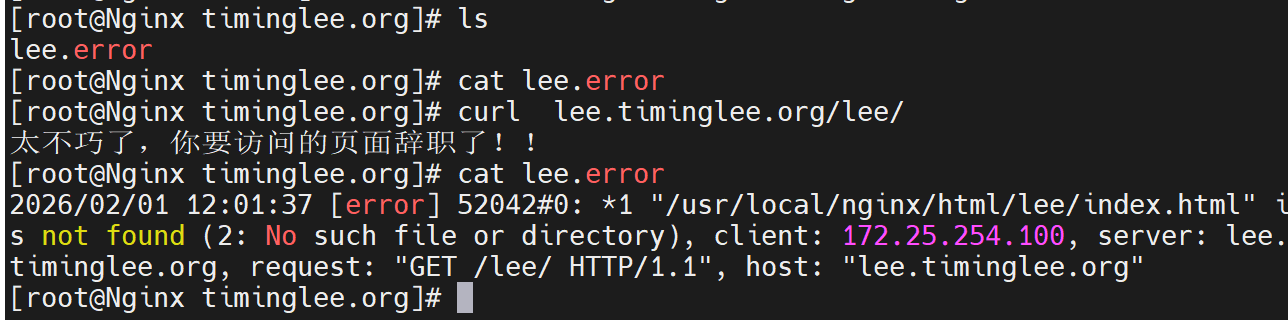
五、Nginx中建立下载服务器
[root@Nginx ~]# mkdir  -p /usr/local/nginx/download
[root@Nginx ~]# cp /etc/passwd  /usr/local/nginx/download/
[root@Nginx ~]# dd if=/dev/zero of=/usr/local/nginx/download/bigfile bs=1M count=100
记录了100+0 的读入
记录了100+0 的写出
104857600字节(105 MB,100 MiB)已复制,0.152409 s,688 MB/s

[root@Nginx ~]# vim /usr/local/nginx/conf/conf.d/vhosts.conf
server {
    listen 80;
    server_name lee.timinglee.org;
    error_page 404 405 503 502 /error;
    error_log logs/timinglee.org/lee.error error;
    location /lee {
        root /usr/local/nginx/html;
    }

    location /error {
        alias /usr/local/nginx/errorpage/errormessage;
    }


    location /download {
        root /usr/local/nginx;
    }
}
[root@Nginx ~]# nginx -s reload
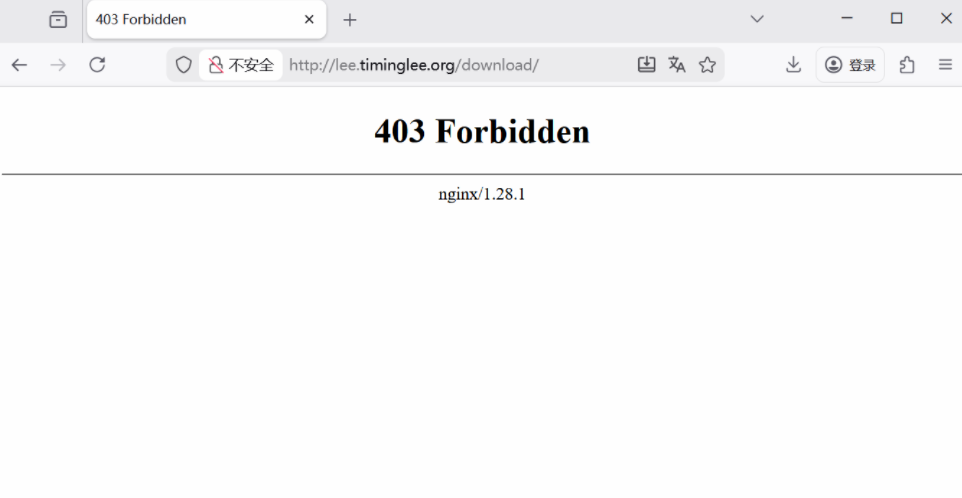
访问
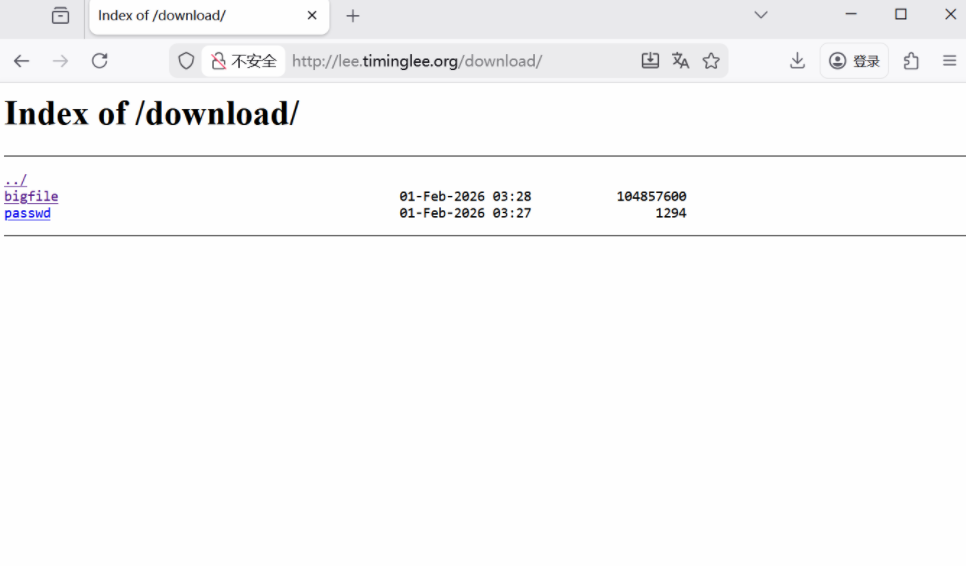
1.启用列表功能
[root@Nginx ~]# vim /usr/local/nginx/conf/conf.d/vhosts.conf
server {
    listen 80;
    server_name lee.timinglee.org;
    error_page 404 405 503 502 /error;
    error_log logs/timinglee.org/lee.error error;
    location /lee {
        root /usr/local/nginx/html;
    }

    location /error {
        alias /usr/local/nginx/errorpage/errormessage;
    }


    location /download {
        root /usr/local/nginx;
        autoindex on;
    }
}
[root@Nginx ~]# nginx -s reload
访问效果
2.下载控速
[root@Nginx ~]# wget http://lee.timinglee.org/download/bigfile
--2026-02-01 11:37:52--  http://lee.timinglee.org/download/bigfile
正在解析主机 lee.timinglee.org (lee.timinglee.org)... 172.25.254.100
正在连接 lee.timinglee.org (lee.timinglee.org)|172.25.254.100|:80... 已连接。
已发出 HTTP 请求,正在等待回应... 200 OK
长度:104857600 (100M) [application/octet-stream]
正在保存至: "bigfile"

bigfile                  100%[=================================>] 100.00M   232MB/s  用时 0.4s

2026-02-01 11:37:52 (232 MB/s) - 已保存 "bigfile" [104857600/104857600])

[root@Nginx ~]# rm -fr bigfile

[root@Nginx ~]# vim /usr/local/nginx/conf/conf.d/vhosts.conf
server {
    listen 80;
    server_name lee.timinglee.org;
    error_page 404 405 503 502 /error;
    error_log logs/timinglee.org/lee.error error;
    location /lee {
        root /usr/local/nginx/html;
    }

    location /error {
        alias /usr/local/nginx/errorpage/errormessage;
    }


    location /download {
        root /usr/local/nginx;
        autoindex on;
        limit_rate 1024k;
    }
}
[root@Nginx ~]# nginx -s reload

[root@Nginx ~]# wget http://lee.timinglee.org/download/bigfile
--2026-02-01 11:39:09--  http://lee.timinglee.org/download/bigfile
正在解析主机 lee.timinglee.org (lee.timinglee.org)... 172.25.254.100
正在连接 lee.timinglee.org (lee.timinglee.org)|172.25.254.100|:80... 已连接。
已发出 HTTP 请求,正在等待回应... 200 OK
长度:104857600 (100M) [application/octet-stream]
正在保存至: "bigfile"

bigfile                   12%[===>                              ]  12.00M  1.00MB/s  剩余 88s
3.显示文件大小优化
[root@Nginx ~]# vim /usr/local/nginx/conf/conf.d/vhosts.conf
server {
    listen 80;
    server_name lee.timinglee.org;
    error_page 404 405 503 502 /error;
    error_log logs/timinglee.org/lee.error error;
    location /lee {
        root /usr/local/nginx/html;
    }

    location /error {
        alias /usr/local/nginx/errorpage/errormessage;
    }


    location /download {
        root /usr/local/nginx;
        autoindex on;
        limit_rate 1024k;
        autoindex_exact_size off;
    }
}
[root@Nginx ~]# nginx -s reload
效果
root@Nginx ~]# curl lee.timinglee.org/download
<html>
<head><title>301 Moved Permanently</title></head>
<body>
<center><h1>301 Moved Permanently</h1></center>
<hr><center>nginx/1.28.1</center>
</body>
</html>
root@Nginx \~# curl lee.timinglee.org/download/
<html>
<head><title>Index of /download/</title></head>
<body>
<h1>Index of /download/</h1><hr><pre><a href="../">../</a>
<a href="bigfile">bigfile</a> 01-Feb-2026 03:28 100M
<a href="passwd">passwd</a> 01-Feb-2026 03:27 1294
</pre><hr></body>
</html>
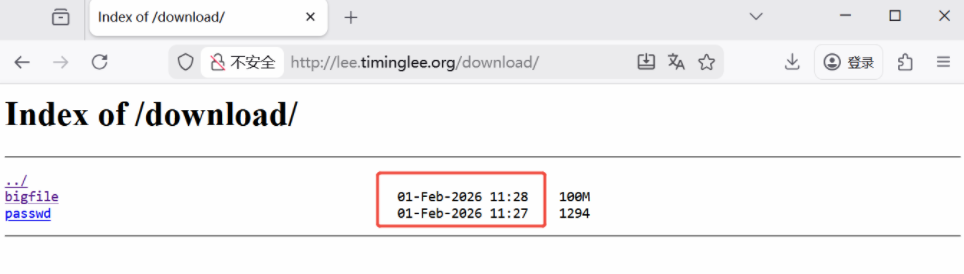
4.时间显示调整
[root@Nginx ~]# vim /usr/local/nginx/conf/conf.d/vhosts.conf
server {
    listen 80;
    server_name lee.timinglee.org;
    error_page 404 405 503 502 /error;
    error_log logs/timinglee.org/lee.error error;
    location /lee {
        root /usr/local/nginx/html;
    }

    location /error {
        alias /usr/local/nginx/errorpage/errormessage;
    }


    location /download {
        root /usr/local/nginx;
        autoindex on;
        limit_rate 1024k;
        autoindex_exact_size off;
        autoindex_localtime on;
    }
}
[root@Nginx ~]# nginx -s reload
效果:
5.设定页面风格
[root@Nginx ~]# vim /usr/local/nginx/conf/conf.d/vhosts.conf
server {
    listen 80;
    server_name lee.timinglee.org;
    error_page 404 405 503 502 /error;
    error_log logs/timinglee.org/lee.error error;
    location /lee {
        root /usr/local/nginx/html;
    }

    location /error {
        alias /usr/local/nginx/errorpage/errormessage;
    }


    location /download {
        root /usr/local/nginx;
        autoindex on;
        limit_rate 1024k;
        autoindex_exact_size off;
        autoindex_localtime on;
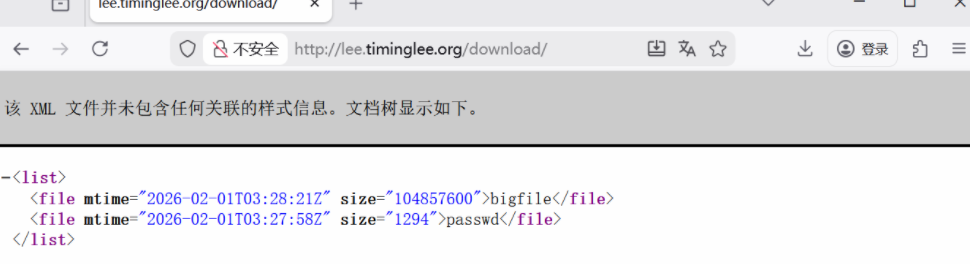
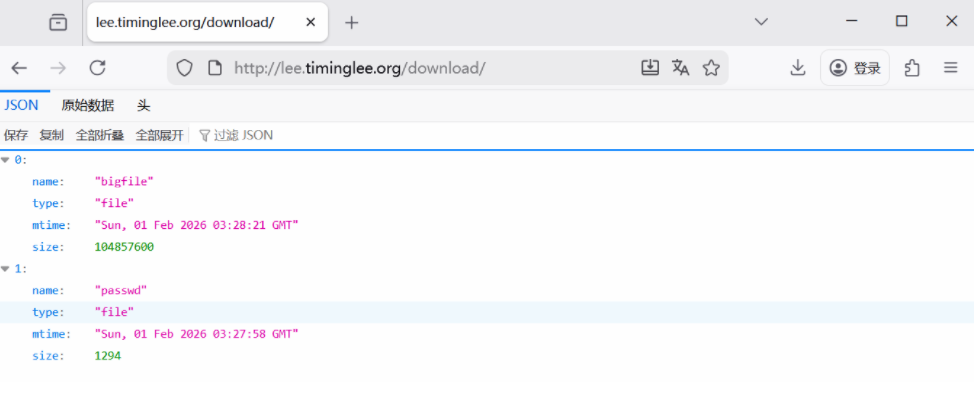
        autoindex_format html | xml | json | jsonp;
    }
}
[root@Nginx ~]# nginx -s reload
xml风格
json风格
六、Nginx的文件检测
bash
[root@Nginx ~]# echo default > /usr/local/nginx/errorpage/default.html
[root@Nginx ~]# cat /usr/local/nginx/errorpage/default.html
default


[root@Nginx ~]# vim /usr/local/nginx/conf/conf.d/vhosts.conf
server {
    listen 80;
    server_name lee.timinglee.org;
    error_page 404 405 503 502 /error;
    error_log logs/timinglee.org/lee.error error;
    root /usr/local/nginx/errorpage;
    try_files $uri $uri.html $uri/index.html /default.html;
}

[root@Nginx ~]# nginx -s reload

#测试:
[root@Nginx ~]# curl -v  lee.timinglee.org/aaaaaaaaaa/
*   Trying 172.25.254.100:80...
* Connected to lee.timinglee.org (172.25.254.100) port 80 (#0)
> GET /aaaaaaaaaa/ HTTP/1.1
> Host: lee.timinglee.org
> User-Agent: curl/7.76.1
> Accept: */*
>
* Mark bundle as not supporting multiuse
< HTTP/1.1 200 OK
< Server: nginx/1.28.1
< Date: Sun, 01 Feb 2026 06:25:45 GMT
< Content-Type: text/html
< Content-Length: 8
< Last-Modified: Sun, 01 Feb 2026 06:17:57 GMT
< Connection: keep-alive
< Keep-Alive: timeout=100
< ETag: "697ef015-8"
< Accept-Ranges: bytes
<
default
* Connection #0 to host lee.timinglee.org left intact
七、Nginx的状态页
bash
[root@Nginx ~]# vim /usr/local/nginx/conf/conf.d/vhosts.conf
server {
    listen 80;
    server_name lee.timinglee.org;

    location /nginx_status{
        stub_status;
        auth_basic "auth login";
        auth_basic_user_file /usr/local/nginx/conf/.htpasswd;
        allow 172.25.254.0/24;
        deny all;
    }
}

[root@Nginx ~]# nginx -s reload
访问效果
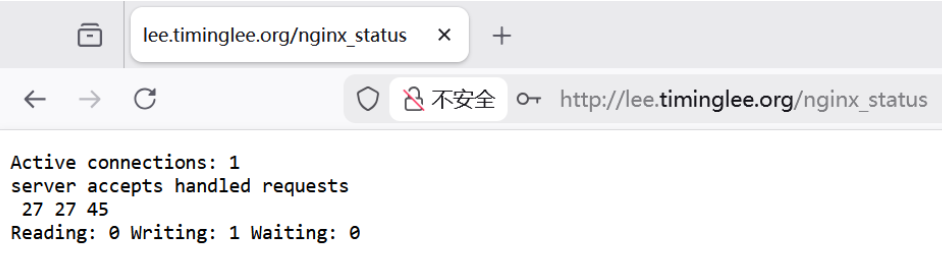

八、Nginx的压缩功能
bash
[root@Nginx ~]# mkdir  /usr/local/nginx/timinglee.org/lee/html -p
[root@Nginx ~]# echo  hello lee > /usr/local/nginx/timinglee.org/lee/html/index.html
[root@Nginx html]# cp /usr/local/nginx/logs/access.log /usr/local/nginx/timinglee.org/lee/html/bigfile.txt


[root@Nginx ~]# vim /usr/local/nginx/conf/nginx.conf
    gzip  on;
    gzip_comp_level 4;
    gzip_disable "MSIE [1-6]\.";
    gzip_min_length 1024k;
    gzip_buffers 32 1024k;
    gzip_types text/plain application/javascript application/x-javascript text/css  application/xml text/javascript application/x-httpd-php image/gif image/png;
    gzip_vary on;
    gzip_static on;


[root@Nginx ~]# vim /usr/local/nginx/conf/conf.d/vhosts.conf
server {
    listen 80;
    server_name lee.timinglee.org;
    root /usr/local/nginx/timinglee.org/lee/html;
    location /nginx_status{
        stub_status;
        auth_basic "auth login";
        auth_basic_user_file /usr/local/nginx/conf/.htpasswd;
        allow 172.25.254.0/24;
        deny all;
    }
}

[root@Nginx ~]# nginx -s reload


#测试
[root@Nginx html]# curl  --head --compressed  lee.timinglee.org/bigfile.txt
HTTP/1.1 200 OK
Server: nginx/1.28.1
Date: Sun, 01 Feb 2026 07:32:10 GMT
Content-Type: text/plain
Last-Modified: Sun, 01 Feb 2026 07:29:53 GMT
Connection: keep-alive
Keep-Alive: timeout=100
Vary: Accept-Encoding
ETag: W/"697f00f1-2ca84bd"
Content-Encoding: gzip

[root@Nginx html]# curl  --head --compressed  lee.timinglee.org/index.html
HTTP/1.1 200 OK
Server: nginx/1.28.1
Date: Sun, 01 Feb 2026 07:32:19 GMT
Content-Type: text/html
Content-Length: 10
Last-Modified: Sun, 01 Feb 2026 07:19:59 GMT
Connection: keep-alive
Keep-Alive: timeout=100
ETag: "697efe9f-a"
Accept-Ranges: bytes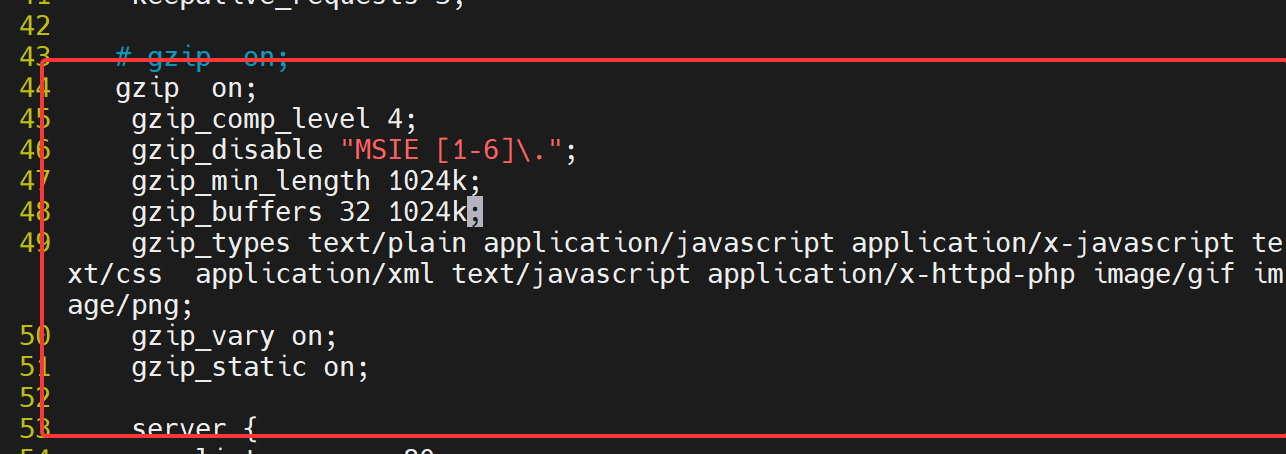
九、Nginx 变量
1.升级Nginx支持echo
bash
[root@Nginx ~]# systemctl stop nginx.service
[root@Nginx ~]# ps aux | grep nginx
root        5193  0.0  0.1   6636  2176 pts/1    S+   16:08   0:00 grep --color=auto nginx


[root@Nginx ~]# tar zxf echo-nginx-module-0.64.tar.gz
[root@Nginx ~]# cd nginx-1.28.1/

[root@Nginx nginx-1.28.1]# make clean

[root@Nginx nginx-1.28.1]# ./configure  --prefix=/usr/local/nginx --user=nginx --group=nginx --with-http_ssl_module --with-http_v2_module --with-http_realip_module --with-http_stub_status_module --with-http_gzip_static_module --with-pcre --with-stream --with-stream_ssl_module --with-stream_realip_module  --add-module=/root/echo-nginx-module-0.64

[root@Nginx nginx-1.28.1]# make
[root@Nginx nginx-1.28.1]# rm -rf /usr/local/nginx/sbin/nginx
[root@Nginx nginx-1.28.1]# cp objs/nginx /usr/local/nginx/sbin/ -p

#测试
[root@Nginx nginx-1.28.1]# vim /usr/local/nginx/conf/conf.d/vhosts.conf
server {
    listen 80;
    server_name lee.timinglee.org;
    root /usr/local/nginx/timinglee.org/lee/html;
    location /vars {
        default_type text/html;
        echo $remote_addr;
    }
}

[root@Nginx nginx-1.28.1]# nginx -t
nginx: the configuration file /usr/local/nginx/conf/nginx.conf syntax is ok
nginx: configuration file /usr/local/nginx/conf/nginx.conf test is successful


[root@Nginx nginx-1.28.1]# systemctl start nginx.service
2.理解内建变量
root@Nginx nginx-1.28.1# vim /usr/local/nginx/conf/conf.d/vhosts.conf
server {
listen 80;
server_name lee.timinglee.org;
root /usr/local/nginx/timinglee.org/lee/html;
location /vars {
default_type text/html;
echo $remote_addr;
}
}
root@Nginx nginx-1.28.1# nginx -s reload
root@Nginx nginx-1.28.1# curl lee.timinglee.org/vars/
172.25.254.100
root@Nginx nginx-1.28.1# vim /usr/local/nginx/conf/conf.d/vhosts.confserver {
listen 80;
server_name lee.timinglee.org;
root /usr/local/nginx/timinglee.org/lee/html;
location /vars {
default_type text/html;
echo $args;
}
}
root@Nginx nginx-1.28.1# nginx -s reload
root@Nginx nginx-1.28.1# curl "http://lee.timinglee.org/vars?key=lee\&id=11"
key=lee&id=11
root@Nginx nginx-1.28.1# vim /usr/local/nginx/conf/conf.d/vhosts.confserver {
listen 80;
server_name lee.timinglee.org;
root /usr/local/nginx/timinglee.org/lee/html;
location /vars {
default_type text/html;
echo $args;
echo $is_args;
}
}
root@Nginx nginx-1.28.1# nginx -s reload
root@Nginx nginx-1.28.1# curl "http://lee.timinglee.org/vars?key=lee\&id=11"
172.25.254.100
key=lee&id=11
?
root@Nginx nginx-1.28.1# curl "http://lee.timinglee.org/vars"
172.25.254.100
root@Nginx nginx-1.28.1# vim /usr/local/nginx/conf/conf.d/vhosts.confserver {
listen 80;
server_name lee.timinglee.org;
root /usr/local/nginx/timinglee.org/lee/html;
location /vars {
default_type text/html;
echo $document_root;
}
}
root@Nginx nginx-1.28.1# nginx -s reload
root@Nginx nginx-1.28.1# curl "http://lee.timinglee.org/vars?key=lee\&id=11"
/usr/local/nginx/timinglee.org/lee/html
root@Nginx nginx-1.28.1# vim /usr/local/nginx/conf/conf.d/vhosts.conf
server {
listen 80;
server_name lee.timinglee.org;
root /usr/local/nginx/timinglee.org/lee/html;
location /vars {
default_type text/html;
echo $remote_addr;
echo $args;
echo $is_args;
echo $document_root;
echo $document_uri;
echo $host;
echo $remote_port;
echo $remote_user;
echo $request_method;
echo $request_filename;
echo $request_uri;
echo $scheme;
echo $server_protocol;
echo $server_addr;
echo $server_name;
echo $server_port;
echo $http_user_agent;
echo $cookie_key2;
echo $http_user_agent;
}
}
root@Nginx nginx-1.28.1# nginx -s reload
root@Nginx nginx-1.28.1# curl -b "key1=hello,key2=timinglee" -A "haha" -ulee:lee "http://lee.timinglee.org/vars?key=lee\&id=11"
172.25.254.100
key=lee&id=11
?
/usr/local/nginx/timinglee.org/lee/html
/vars
45156
lee
GET
/usr/local/nginx/timinglee.org/lee/html/vars
/vars?key=lee&id=11
http
HTTP/1.1
172.25.254.100
80
haha
timinglee
haha