14.6 创建容器
容器是指用于包裹和组织其他HTML元素的元素。容器本身不直接显示内容,而是作为其他元素的父元素存在,帮助控制布局和样式。
14.6.1 <div>标签
<div> 是块级容器标签,用于划分网页区域,包裹其他标签。
容器内的所有标签会继承该容器的 style 样式。
不在容器内的标签不受其样式影响。
语法结构
python
<div>其他标签</div>示例代码
python
<body>
  <h1>我是标题1</h1>
  <div style="background: antiquewhite">
    <h2>我是标题2</h2>
    <p>我这里可以输入一个段落</p>
  </div>
</body>
<h1>不在<div>中,因此不受背景色样式影响。
<h2>和<p>在<div>中,会显示容器设置的antiquewhite背景色。
14.6.2 布局设置
width:设置容器宽度,单位为像素(px)。
height:设置容器高度,单位为像素(px)。
float:设置容器的浮动位置,可选值有left(靠左)、right(靠右)、top(靠顶部)、bottom(靠底部)。
语法结构
python
<div style="width:容器宽度; height:容器高度; float:容器位置"></div>.嵌套容器示例
python
<body>
  <h1>我是标题1</h1>
  <div style="background: antiquewhite; width: 500px;height: 400px">
    <h2>我是标题2</h2>
    <div style="background: brown; width: 200px; height:300px;float: left">
      <p>我这里可以输入一个段落</p>
      <p>python <span style="color:blue">办公</span> 自动化</p>
    </div>
    <div style="background:darkcyan; width:300px;height:300px;float:right">
      <h3>我是标题3</h3>
    </div>
    <p>最后一段内容</p>
  </div>
</body>
布局说明:
- 外层容器:
• 宽度:500px
• 高度:400px
• 背景色:antiquewhite(古董白)
- 内层左侧容器:
• 宽度:200px
• 高度:300px
• 背景色:brown(棕色)
• 浮动:向左(float: left)
- 内层右侧容器:
• 宽度:300px
• 高度:300px
• 背景色:darkcyan(深青色)
• 浮动:向右(float: right)
- 内容结构:
• 标题层级:h1 > h2 > h3
• 段落文本包含Python办公自动化相关内容
• 使用了span标签设置蓝色文字
这个布局展示了基本的CSS浮动布局,左右两个子容器并排显示,总宽度为500px(200px + 300px),高度都为300px,外层容器高度为400px,底部还有一段文本内容。
14.7 创建表格
14.7.1 表格标签
<table>:定义表格,border 属性设置边框粗细。
<tr>:定义表格的一行。
<td>:定义表格的单元格。
行数由 <tr> 数量决定,列数由每行的 <td> 数量决定
示例代码:
python
<body>
  <h1>创建表格</h1>
  <table border="2">
    <tr>
      <td>第1行中的第1格</td>
      <td>第1行中的第2格</td>
    </tr>
    <tr>
      <td>第2行中的第1格</td>
      <td>第2行中的第2格</td>
    </tr>
  </table>
</body>
14.7.2 添加表格表头
<th>:定义表头单元格,默认加粗居中。
colspan:设置表头跨列数,rowspan:设置表头跨行数。
示例代码:
python
<body>
  <h1>我是标题1</h1>
  <table border="2">
    <th colspan="2">我是表格表头内容</th>
    <tr>
      <td>第1行中的第1格</td>
      <td>第1行中的第2格</td>
    </tr>
    <tr>
      <td>第2行中的第1格</td>
      <td>第2行中的第2格</td>
    </tr>
  </table>
</body>
14.7.3 添加表格标题
<caption>:定义表格标题,默认位于表格上方居中。
必须放在 <table> 标签内,一个表格只能有一个标题。
python
<body>
  <h1>添加表格标题</h1>
  <table border="2">
    <caption>我是表格标题</caption>
    <tr>
      <td>第1行中的第1格</td>
      <td>第1行中的第2格</td>
    </tr>
    <tr>
      <td>第2行中的第1格</td>
      <td>第2行中的第2格</td>
    </tr>
  </table>
</body>
项目案例:好书推荐网站
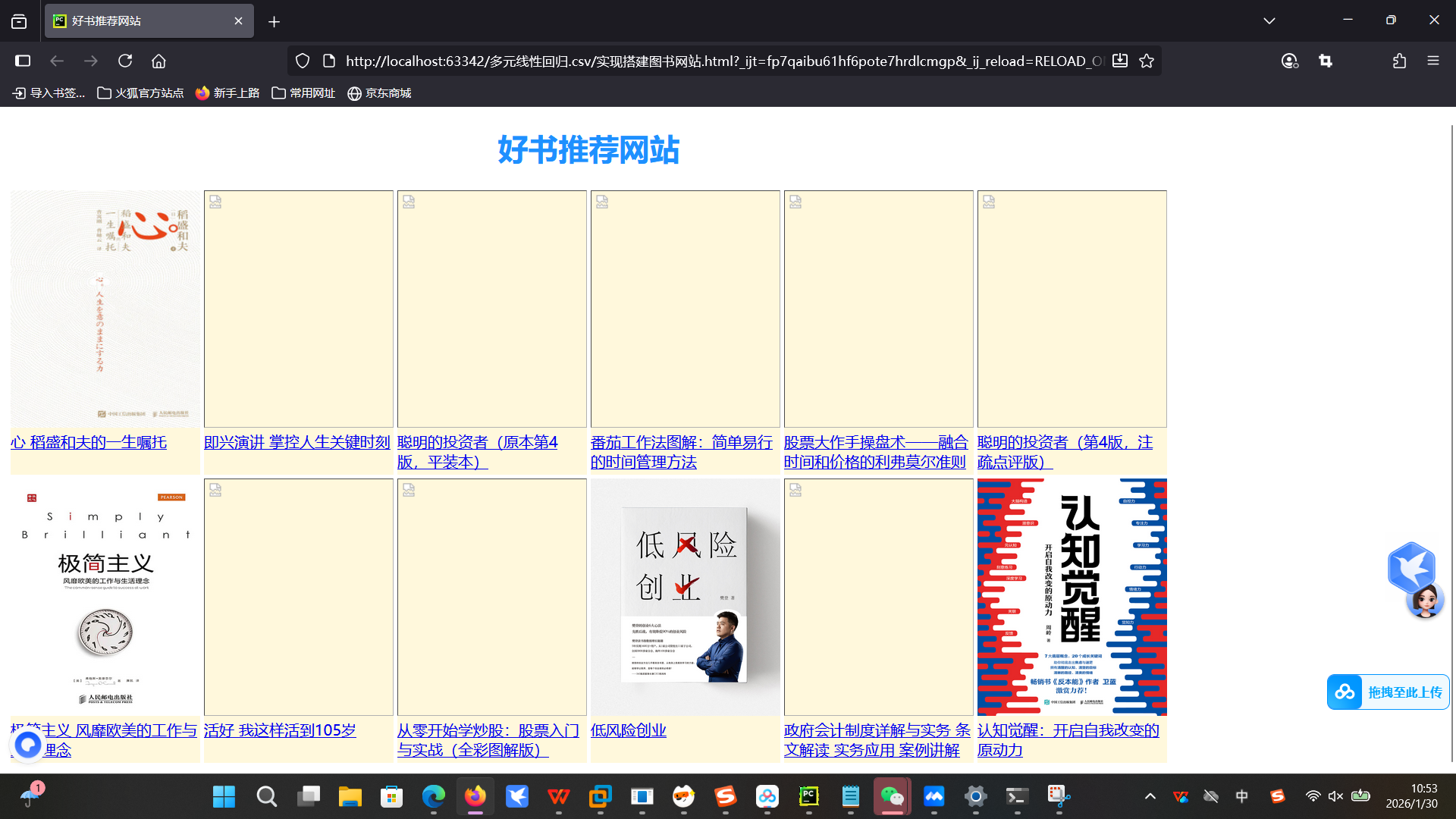
用 <table> 实现 2 行 6 列的网格布局,每个单元格用 <div> 包裹图书信息。每个图书容器设置统一的宽高、背景色和浮动方式,保证视觉对齐。通过 <a> 标签实现书名到购买页面的跳转。
完整项目代码
python
<!DOCTYPE html>
<html lang="zh-cn">
<head>
    <meta charset="UTF-8">
    <title>好书推荐网站</title>
</head>
<body>
    <table>
        <caption><h1 style="color: dodgerblue ;size: 38px">好书推荐网站</h1></caption>
        <tr>
            <td>
                <div style="background: cornsilk ;width: 200px;height: 300px;float: left">
                    <img src="https://cdn.ptpress.cn/uploadimg/Material/978-7-115-53619-8/72jpg/53619.jpg" width="200" height="250">
                    <a href="https://www.ptpress.com.cn/shopping/buy?bookId=5e6fe0f3-6ee7-9b0c87e6">心 稻盛和夫的一生嘱托</a>
                </div>
            </td>
            <td>
                <div style="background: cornsilk ;width: 200px;height: 300px;float: left">
                    <img src="https://cdn.ptpress.cn/uploadimg/Material/978-7-115-48382-/72jpg/48382.jpg" width="200" height="250">
                    <a href="https://www.ptpress.com.cn/shopping/buy?bookId=ebb3164d-06af-41f5-85bd-60f95a5e09cb">即兴演讲 掌控人生关键时刻</a>
                </div>
            </td>
            <td>
                <div style="background: cornsilk ;width: 200px;height: 300px;float: left">
                    <img src="https://cdn.ptpress.cn/uploadimg/Material/978-7-115-41359-/72jpg/41359.jpg" width="200" height="250">
                    <a href="https://www.ptpress.com.cn/shopping/buy?bookId=25c373dc-e599-4036-8534-a102aad0a776">聪明的投资者(原本第4版,平装本)</a>
                </div>
            </td>
            <td>
                <div style="background: cornsilk ;width: 200px;height: 300px;float: left">
                    <img src="https://cdn.ptpress.cn/uploadimg/Material/978-7-115-24669-/72jpg/24669.jpg" width="200" height="250">
                    <a href="https://www.ptpress.com.cn/shopping/buy?bookId=c44b8d45-6a91-4800-b91c-c3392379b208">番茄工作法图解:简单易行的时间管理方法</a>
                </div>
            </td>
            <td>
                <div style="background: cornsilk ;width: 200px;height: 300px;float: left">
                    <img src="https://cdn.ptpress.cn/uploadimg/Material/978-7-115-29236-/72jpg/29236.jpg" width="200" height="250">
                    <a href="https://www.ptpress.com.cn/shopping/buy?bookId=f642f34c-9f46-4a6f-ad15-c9b9b2875004">股票大作手操盘术------融合时间和价格的利弗莫尔准则</a>
                </div>
            </td>
            <td>
                <div style="background: cornsilk ;width: 200px;height: 300px;float: left">
                    <img src="https://cdn.ptpress.cn/uploadimg/Material/978-7-115-41358-/72jpg/41358.jpg" width="200" height="250">
                    <a href="https://www.ptpress.com.cn/shopping/buy?bookId=67e260c3-b0cb-41bb-b698-6f9dbd54a610">聪明的投资者(第4版,注疏点评版)</a>
                </div>
            </td>
        </tr>
        <tr>
            <td>
                <div style="background: cornsilk ;width: 200px;height: 300px;float: left">
                    <img src="https://cdn.ptpress.cn/uploadimg/Material/978-7-115-37407-3/72jpg/37407.jpg" width="200" height="250">
                    <a href="https://www.ptpress.com.cn/shopping/buy?bookId=4d1c7610-10d7-4d4b-a2f2-dd702983f8d">极简主义 风靡欧美的工作与生活理念</a>
                </div>
            </td>
            <td>
                <div style="background: cornsilk ;width: 200px;height: 300px;float: left">
                    <img src="https://cdn.ptpress.cn/uploadimg/Material/978-7-115-48908-/72jpg/48908.jpg" width="200" height="250">
                    <a href="https://www.ptpress.com.cn/shopping/buy?bookId=3eee0747-bfd049b1-86b4-18d838480264">活好 我这样活到105岁</a>
                </div>
            </td>
            <td>
                <div style="background: cornsilk ;width: 200px;height: 300px;float: left">
                    <img src="https://cdn.ptpress.cn/uploadimg/Material/978-7-115-38808-/72jpg/38808.jpg" width="200" height="250">
                    <a href="https://www.ptpress.com.cn/shopping/buy?bookId=ca2de4df-b928-47a8-b8ce-5a725106df07">从零开始学炒股:股票入门与实战(全彩图解版)</a>
                </div>
            </td>
            <td>
                <div style="background: cornsilk ;width: 200px;height: 300px;float: left">
                    <img src="https://cdn.ptpress.cn/uploadimg/Material/978-7-115-51023-5/72jpg/51023.jpg" width="200" height="250">
                    <a href="https://www.ptpress.com.cn/shopping/buy?bookId=c7309aeb-a7bc-45e4-9818-47bc4b5579f4">低风险创业</a>
                </div>
            </td>
            <td>
                <div style="background: cornsilk ;width: 200px;height: 300px;float: left">
                    <img src="https://cdn.ptpress.cn/uploadimg/Material/978-7-115-48388-/72jpg/48388.jpg" width="200" height="250">
                    <a href="https://www.ptpress.com.cn/shopping/buy?bookId=6498a974-0db5-4379-bb77-eaf098e57a28">政府会计制度详解与实务 条文解读 实务应用 案例讲解</a>
                </div>
            </td>
            <td>
                <div style="background: cornsilk ;width: 200px;height: 300px;float: left">
                    <img src="https://cdn.ptpress.cn/uploadimg/Material/978-7-115-54342-4/72jpg/54342.jpg" width="200" height="250">
                    <a href="https://www.ptpress.com.cn/shopping/buy?bookId=7a745ee7-4a02-412f-942a-bf0131743346">认知觉醒:开启自我改变的原动力</a>
                </div>
            </td>
        </tr>
    </table>
</body>
</html>
运行结果:
15.1 网络爬虫的介绍
15.1.1 网络爬虫库
网络爬虫库介绍:
• 网络爬虫是通过代码将HTML网页内容下载到本地的过程,主要用于获取网页中的关键信息(数据、图片、视频等)
Python网络爬虫库:
• urllib库:Python自带的标准库,无需下载安装,但代码编写较复杂
• requests库:Python第三方库,需下载安装,基于urllib库构建,使用更简洁方便
• scrapy库:Python第三方库,需下载安装,适用于专业应用开发,集成了爬虫框架
• selenium库:Python第三方库,需下载安装,可用于驱动浏览器执行命令,实现办公自动化和Web应用测试
15.1.2 robots.txt规则
robots.txt文件:
• 存在于网站根目录,声明网站中禁止访问和允许访问的URL
• 访问方式:在域名后加上/robots.txt
robots.txt规则内容:
• User-agent:表示访问网站的搜索引擎
*:表示所有类型的搜索引擎
Wandoujia Spider:表示该搜索引擎需要遵守的规则
Mediapartners-Google:表示该搜索引擎需要遵守的规则
Disallow:表明该搜索引擎不允许访问的URL
Allow:表明允许该搜索引擎访问的URL
Sitemap:网站地图,提供所有可爬取的URL
Crawl-delay:5,提醒用户使用爬虫工具时每次访问需延迟5秒,避免服务器拥堵
#:注释,与Python注释概念相同
注意事项:访问网站前需阅读robots.txt规则并严格遵守
有些网站可能没有robots.txt规则,但仍需遵守《中华人民共和国网络安全法》等法律法规
当网站没有robots.txt规则时,一般默认允许用户使用爬虫工具访问
15.2requests库和网页源代码
15.2.1requests库的安装
执行下面命令:
python
pip install requests -i https://pypi.tuna.tsinghua.edu.cn/simple15.3获取网页资源
15.3.1requests.get() 是 requests 库中最基础也是最常用的方法,主要用于向服务器发起 HTTP GET 请求,从而获取网页内容(HTML)、图片、JSON 数据等
get()搜索信息
python
import requests
r = requests.get('https://www.ryjiaoyu.com//search?keyword=python')
print(r.text)
get()添加信息
python
import requests
info ={'keyword':'excel' }
r = requests.get('https://www.bilibili.com/search',params=info)
print(r.url)
print(r.text)
15.3.2返回Response对象
Response属性:status_code (状态码)、headers(响应头)、url响应的最终url位置、 encoding访问r.text时使用的编码、cookies服务器返回的文件