1.概述
PostgreSQL是一种功能强大的对象关系型数据库管理系统(ORDBMS),它起源于加州大学伯克利分校的POSTGRES项目。PostgreSQL和MySQL都是流行的开源关系型数据库管理系统(RDBMS),从功能性的角度来说,PostgreSQL相对更为完善。本文主要讲解利用springboot整合mybatis和postgresql,进行数据存储。
2.springboot集成postgresql
2.1 CentOS7安装postgresql
2.1.1 下载安装包
bash
wget https://ftp.postgresql.org/pub/source/v17.4/postgresql-17.4.tar.gz2.1.2 解压安装包
bash
tar -zxvf postgresql-17.4.tar.gz2.1.3 安装依赖
bash
yum install gcc gcc-c++ make libicu-devel bison flex readline-devel zlib-devel2.1.4 编译安装
bash
#进入安装路径 以/usr/local/pgsql/postgresql-17.4为例
cd /usr/local/pgsql/postgresql-17.4

#执行编译指令
./configure

make

make install
2.1.5 创建数据存储目录
bash
#添加postgres角色
useradd postgres

#创建目录
mkdir -p /usr/local/pgsql/data

#赋权
chown postgres:postgres /usr/local/pgsql/data
2.1.6 配置环境变量
bash
vim /etc/profile.d/pgsql.sh
export PGHOME=/usr/local/pgsql
export PGDATA=/usr/local/pgsql/data
export PATH=$PGHOME/bin:$PATH

#使用环境变量生效
source /etc/profile.d/pgsql.sh
2.1.7 进行数据库初始化
bash
#切换用户
su postgres

#执行数据初始化
/usr/local/pgsql/bin/initdb -D /usr/local/pgsql/data

#退出角色
exit
2.1.8 启动服务
bash
#复制源码包里的脚本至etc/init.d目录下,并加执行权限
cp ./contrib/start-scripts/linux /etc/init.d/postgresql
chmod +x /etc/init.d/postgresql

#启动服务
service postgresql start
2.1.9 配置远程访问
bash
vim /usr/local/pgsql/data/pg_hba.conf
#添加以下内容,允许远程访问
host    all             all             0.0.0.0/0               password

#然后重启数据库
service postgresql restart
2.1.10 运行成功界面

2.2 postgresql基本操作语句
bash
#切换角色
su postgres

#进入命令执行窗口
psql

#查看当前数据库所有角色
\l

#创建数据库
create database db_name;

#切换数据库
\c db_name;

#查看表结构
\d table_name;

#创建用户并赋权
CREATE USER user_name with password '123456';

#修改表
ALTER TABLE table_name ADD COLUMN new_column VARCHAR(50);
ALTER TABLE table_name DROP COLUMN column_name;
ALTER TABLE table_name RENAME TO new_table_name;
ALTER TABLE table_name ALTER COLUMN column_name TYPE new_type;

#删除表
DROP TABLE IF EXISTS table_name;

#清空表数据(保留结构)
TRUNCATE TABLE table_name;

#重命名列
ALTER TABLE table_name RENAME COLUMN old_name TO new_name;

#添加约束
ALTER TABLE table_name ADD CONSTRAINT constraint_name UNIQUE(column_name);
ALTER TABLE table_name ADD PRIMARY KEY (column_name);
2.3 springboot集成mybatis和postgresql
2.3.1 创建数据库
java
CREATE TABLE IF NOT EXISTS users (
    id SERIAL PRIMARY KEY,
    username VARCHAR(50) UNIQUE NOT NULL,
    email VARCHAR(100) UNIQUE NOT NULL,
    password_hash VARCHAR(255) NOT NULL,
    full_name VARCHAR(100),
    age INTEGER CHECK (age >= 0),
    is_active BOOLEAN DEFAULT true,
    created_at TIMESTAMP DEFAULT CURRENT_TIMESTAMP,
    updated_at TIMESTAMP DEFAULT CURRENT_TIMESTAMP
);
2.3.2 新增配置文件
bash
spring.application.name=postgresql-example
server.port=8081
spring.datasource.url=jdbc:postgresql://localhost:5432/test
spring.datasource.username=postgres
spring.datasource.password=postgres
spring.datasource.driver-class-name=org.postgresql.Driver

mybatis-plus.mapper-locations=classpath:mybatis/*.xml
mybatis-plus.type-aliases-package=com.eckey.lab.postgresql.entity
logging.level.root=info
2.3.3 引入pom
java
<dependencies>
		<dependency>
			<groupId>org.springframework.boot</groupId>
			<artifactId>spring-boot-starter</artifactId>
		</dependency>
		<dependency>
			<groupId>org.springframework.boot</groupId>
			<artifactId>spring-boot-starter-web</artifactId>
		</dependency>
		<dependency>
			<groupId>org.projectlombok</groupId>
			<artifactId>lombok</artifactId>
			<optional>true</optional>
		</dependency>
		<dependency>
			<groupId>org.springframework.boot</groupId>
			<artifactId>spring-boot-starter-test</artifactId>
			<scope>test</scope>
		</dependency>
		<dependency>
			<groupId>com.alibaba</groupId>
			<artifactId>fastjson</artifactId>
		</dependency>
		<dependency>
			<groupId>org.apache.commons</groupId>
			<artifactId>commons-lang3</artifactId>
		</dependency>
		<dependency>
			<groupId>org.projectlombok</groupId>
			<artifactId>lombok</artifactId>
		</dependency>
		<dependency>
			<groupId>org.postgresql</groupId>
			<artifactId>postgresql</artifactId>
		</dependency>
		<dependency>
			<groupId>com.baomidou</groupId>
			<artifactId>mybatis-plus-spring-boot3-starter</artifactId>
		</dependency>
	</dependencies>
2.3.4 编写mapper文件
java
<?xml version="1.0" encoding="UTF-8"?>
<!DOCTYPE mapper PUBLIC "-//mybatis.org//DTD Mapper 3.0//EN" "http://mybatis.org/dtd/mybatis-3-mapper.dtd">
<mapper namespace="com.eckey.lab.postgresql.mapper.UsersMapper">

    <resultMap id="dataMap" type="com.eckey.lab.postgresql.entity.Users">
        <id column="id" property="id"/>
        <result column="username" property="username"/>
        <result column="email" property="email"/>
        <result column="password_hash" property="passwordHash"/>
        <result column="full_name" property="fullName"/>
        <result column="age" property="age"/>
        <result column="is_active" property="isActive"/>
        <result column="created_at" property="createAt"/>
        <result column="updated_at" property="updateAt"/>
    </resultMap>

    <insert id="insert" parameterType="com.eckey.lab.postgresql.entity.Users">
        insert into users(id, username, email, password_hash, full_name,
                          age, is_active, created_at, updated_at)
        values (#{id}, #{username}, #{email}, #{passwordHash}, #{fullName},
                #{age}, #{isActive}, now(), now())
    </insert>

    <select id="selectAll" resultMap="dataMap">
        select *
        from users
    </select>

    <select id="findById" resultMap="dataMap">
        SELECT *
        FROM users
        WHERE id = #{id}
    </select>

    <update id="update" parameterType="com.eckey.lab.postgresql.entity.Users">
        UPDATE users
        SET username   = #{username},
            email      = #{email},
            age        = #{age},
            full_name  = #{fullName},
            updated_at = now()
        WHERE id = #{id}
    </update>

    <delete id="delete">
        DELETE
        FROM users
        WHERE id = #{id}
    </delete>
</mapper>
2.3.5 编写service文件
java
package com.eckey.lab.postgresql.service.impl;

import com.alibaba.fastjson.JSON;
import com.eckey.lab.postgresql.entity.Users;
import com.eckey.lab.postgresql.mapper.UsersMapper;
import com.eckey.lab.postgresql.service.UserService;
import com.eckey.lab.postgresql.utils.Result;
import jakarta.annotation.Resource;
import lombok.extern.slf4j.Slf4j;
import org.springframework.stereotype.Service;

@Slf4j
@Service
public class UserServiceImpl implements UserService {

    @Resource
    private UsersMapper usersMapper;

    public Result findAll() {
        return Result.success(usersMapper.selectAll());
    }

    public Result add(Users user) {
        usersMapper.insert(user);
        return Result.success();
    }

    public Integer delete(Integer id) {
        return usersMapper.delete(id);
    }

    public Integer update(Users users) {
        return usersMapper.update(users);
    }

    @Override
    public Users findById(Integer id) {
        Users byId = usersMapper.findById(id);
        log.info("findById:{}", JSON.toJSONString(byId));
        return byId;
    }

}
2.3.6 编写controller文件
java
package com.eckey.lab.postgresql.controller;

import com.eckey.lab.postgresql.entity.Users;
import com.eckey.lab.postgresql.service.UserService;
import com.eckey.lab.postgresql.utils.Result;
import lombok.extern.slf4j.Slf4j;
import org.springframework.beans.factory.annotation.Autowired;
import org.springframework.web.bind.annotation.RequestBody;
import org.springframework.web.bind.annotation.RequestMapping;
import org.springframework.web.bind.annotation.RequestParam;
import org.springframework.web.bind.annotation.RestController;

@Slf4j
@RestController
@RequestMapping("/user")
public class UserController {

    @Autowired
    private UserService userService;

    @RequestMapping("/list")
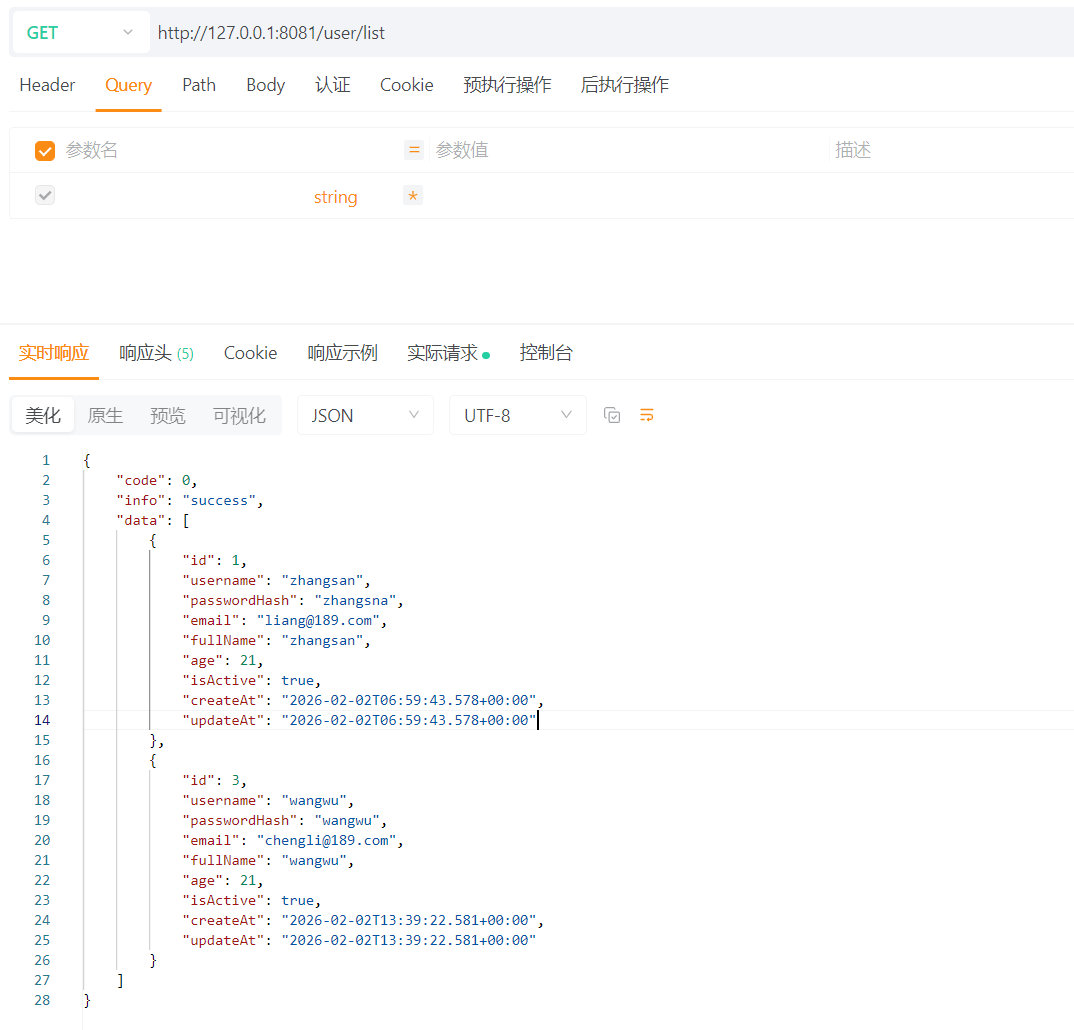
    public Result list() {
        return userService.findAll();
    }

    @RequestMapping("/add")
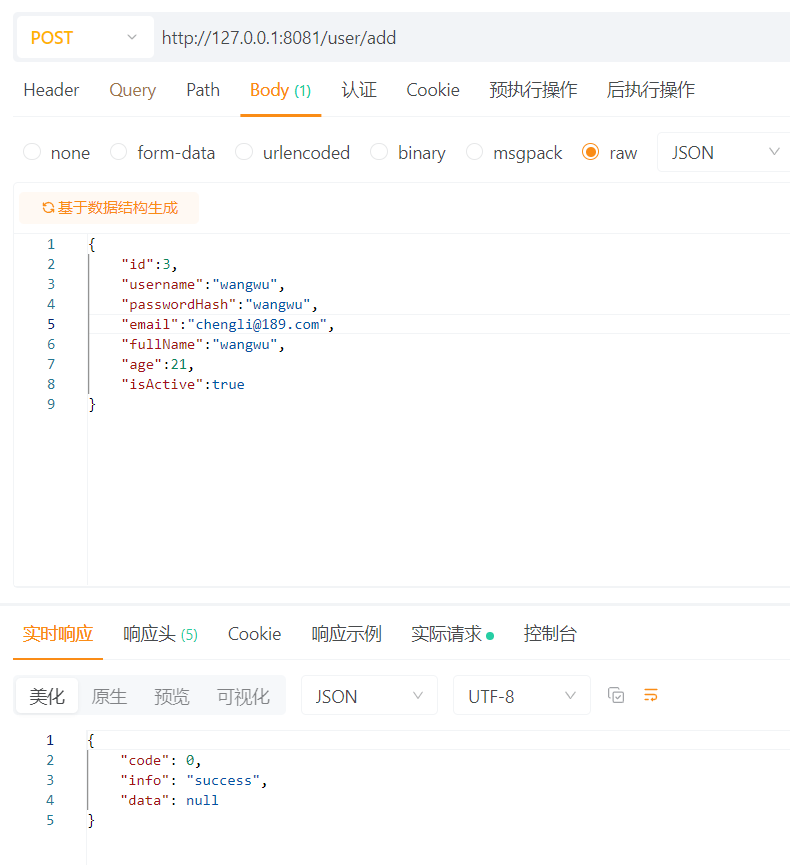
    public Result add(@RequestBody Users user) {
        log.info("add user: {}", user);
        return userService.add(user);
    }

    @RequestMapping("/update")
    public Result update(@RequestBody Users user) {
        log.info("update user: {}", user);
        userService.update(user);
        return Result.success();
    }

    @RequestMapping("/delete")
    public Result delete(@RequestParam("id") Integer id) {
        log.info("delete user: {}", id);
        userService.delete(id);
        return Result.success();
    }

    @RequestMapping("/findById")
    public Result findById(@RequestParam("id") Integer id) {
        log.info("findById,id {}", id);
        Users byId = userService.findById(id);
        return Result.success(byId);
    }
}
上面展示了一些核心部分代码,具体代码可查看附录。
2.3.7 测试如下
1.发送请求
2.查看列表
3.小结
1.PostgreSQL和MySQL都是非常流行的开源关系型数据库管理系统(RDBMS),相比于MySQL,PostgreSQL更严格地遵循SQL标准,支持更复杂的SQL查询和标准特性;
2.PostgreSQL支持外键、检查约束、唯一约束、非空约束等,且对事务和复杂查询的支持更全面;
3.PostgreSQL拥有更丰富的数据类型,包括数组、hstore(键值对)、JSON、JSONB、XML、范围类型、几何类型、网络地址类型等;
4.PostgreSQL支持B-tree、哈希、GiST、SP-GiST、GIN和BRIN索引,以及表达式索引和部分索引,相比于MySQL,索引类型更丰富;
5.MySQL在简单查询和读操作上通常表现更快,PostgreSQL在复杂查询、并发写操作和大型数据量下通常表现更优。
4.参考文献
1.https://www.cnblogs.com/hovin/p/18797847
2.https://www.runoob.com/postgresql/postgresql-tutorial.html