一、动画相关属性
1. 动画通用属性
plus.animate = {
    duration = 300,          // 动画持续时间(毫秒)
    delay = 0,               // 动画延迟时间
    easing = "linear",       // 缓动函数
    loop = false,            // 是否循环
    autoPlay = true          // 是否自动播放
}
2. 控件动画属性
控件对象.animate = {
    opacity = {              // 透明度动画
        from = 0,            // 起始值
        to = 1,              // 结束值
        duration = 500
    },
    translate = {            // 位移动画
        x = 100,             // X轴位移
        y = 50,              // Y轴位移
        duration = 300
    },
    scale = {                // 缩放动画
        x = 1.5,             // X轴缩放
        y = 1.5,             // Y轴缩放
        duration = 400
    },
    rotate = {               // 旋转动画
        angle = 360,         // 旋转角度
        duration = 1000
    }
}
二、动画方法
1. 基础动画方法
// 创建动画对象
var anim = plus.animate(目标控件, 动画配置);

// 播放动画
anim.play();

// 暂停动画
anim.pause();

// 停止动画
anim.stop();

// 重置动画
anim.reset();

// 设置动画进度(0-1之间)
anim.seek(0.5);
2. 控件动画方法
// 淡入效果
控件.fadeIn(持续时间, 回调函数);

// 淡出效果
控件.fadeOut(持续时间, 回调函数);

// 滑动显示
控件.slideIn(方向, 持续时间, 回调函数);
// 方向可选:"top", "bottom", "left", "right"

// 滑动隐藏
控件.slideOut(方向, 持续时间, 回调函数);

// 缩放显示
控件.zoomIn(持续时间, 回调函数);

// 缩放隐藏
控件.zoomOut(持续时间, 回调函数);

// 弹跳效果
控件.bounce(幅度, 持续时间, 回调函数);

// 抖动效果
控件.shake(幅度, 持续时间, 回调函数);
3. 动画链式调用
控件.animate({
    translate = { x = 100, duration = 300 }
}).then({
    rotate = { angle = 180, duration = 200 }
}).then({
    scale = { x = 1.5, y = 1.5, duration = 250 }
}).start();
三、动画事件
1. 动画生命周期事件
anim.onPlay = function() {
    // 动画开始播放时触发
};

anim.onPause = function() {
    // 动画暂停时触发
};

anim.onStop = function() {
    // 动画停止时触发
};

anim.onComplete = function() {
    // 动画完成时触发
};

anim.onUpdate = function(progress) {
    // 动画更新时触发,progress为进度值(0-1)
};
2. 控件动画事件
控件.onAnimateStart = function(animType) {
    // 控件动画开始时触发
    // animType: 动画类型,如"fadeIn", "slideOut"等
};

控件.onAnimateEnd = function(animType) {
    // 控件动画结束时触发
};
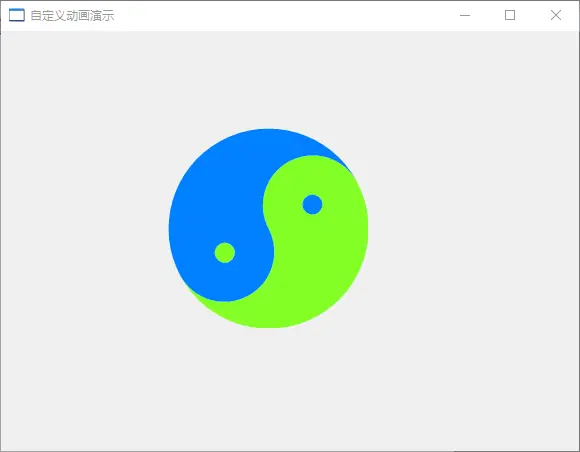
四、程序
//自绘动画
import win.ui;
/*DSG{{*/
var winform = win.form(text="自定义动画演示";right=577;bottom=419)
winform.add(
plus={cls="plus";left=167;top=97;right=367;bottom=297;z=1}
)
/*}}*/

//在前景里绘制动画:旋转的太极图
winform.plus.onDrawContent = function(graphics,rc,txtColor,rcContent,foreColor,font){
    if(owner.animationState===null ) return;

    //旋转画板
    graphics.rotateRect(rc,owner.animationState);

    //创建画刷
    var brush = gdip.solidBrush(0xFF84FF26);
    var brush2 = gdip.solidBrush(0xFF0080FF);

    //画左右半圆
    var w,h = rc.width(),rc.height();
    graphics.fillPie(brush, 0, 0, w, h, 90, 180);
    graphics.fillPie(brush2, 0, 0, w, h, 90, -180);

    //画鱼头
    graphics.fillPie(brush, w/4-1, h/2, w/2, h/2, 90, -180);
        graphics.fillPie(brush2, w/4+1, 0, w/2, h/2, 90, 180);

    //画鱼眼
    graphics.fillEllipse(brush, w/2-10, h/4-10, 20, 20);
    graphics.fillEllipse(brush2, w/2-10, h/4*3-10, 20, 20);

    brush.delete();
    brush2.delete();
}

//动画状态控制函数
winform.plus.onAnimation = function(state,beginning,change,timestamp,duration){
    //if(state>change-1) return; //返回 null 值停止

    var x = timestamp/duration;
    return beginning+change*(-x*x + 2*x);
}

//开始动画,参数:interval,beginning,change,duration
winform.plus.startAnimation(12,0,360,2000);

//悬浮控件窗口
winform.plus.orphanWindow(true);

winform.show();
win.loopMessage();
五、运行界面