Flutter for OpenHarmony 实战:华容道游戏完整开发指南
文章目录
- [Flutter for OpenHarmony 实战:华容道游戏完整开发指南](#Flutter for OpenHarmony 实战:华容道游戏完整开发指南)
-
- 摘要
- 一、项目背景与功能概述
-
- [1.1 华容道游戏历史](#1.1 华容道游戏历史)
- [1.2 应用功能规划](#1.2 应用功能规划)
- [1.3 棋子类型与尺寸](#1.3 棋子类型与尺寸)
- 二、华容道游戏规则
-
- [2.1 棋盘布局](#2.1 棋盘布局)
- [2.2 移动规则](#2.2 移动规则)
- [2.3 胜利条件](#2.3 胜利条件)
- [2.4 经典布局:横刀立马](#2.4 经典布局:横刀立马)
- 三、技术选型与架构设计
-
- [3.1 核心技术栈](#3.1 核心技术栈)
- [3.2 应用架构](#3.2 应用架构)
- [3.3 数据流设计](#3.3 数据流设计)
- 四、棋盘与棋子设计
-
- [4.1 棋子类型枚举](#4.1 棋子类型枚举)
- [4.2 棋子数据类](#4.2 棋子数据类)
- [4.3 棋子颜色设计](#4.3 棋子颜色设计)
- 五、UI界面实现
-
- [5.1 棋盘尺寸计算](#5.1 棋盘尺寸计算)
- [5.2 Stack布局实现棋盘](#5.2 Stack布局实现棋盘)
- [5.3 棋子组件实现](#5.3 棋子组件实现)
- 六、焦点管理机制
-
- [6.1 FocusNode基础](#6.1 FocusNode基础)
- [6.2 焦点状态管理](#6.2 焦点状态管理)
- [6.3 焦点颜色变化](#6.3 焦点颜色变化)
- [6.4 键盘事件处理](#6.4 键盘事件处理)
- 七、完整代码实现
-
- [7.1 游戏初始化](#7.1 游戏初始化)
- [7.2 碰撞检测](#7.2 碰撞检测)
- [7.3 移动棋子](#7.3 移动棋子)
- [7.4 键盘控制](#7.4 键盘控制)
- [7.5 胜利检测](#7.5 胜利检测)
- 八、运行效果与测试
-
- [8.1 项目运行命令](#8.1 项目运行命令)
- [8.2 功能测试清单](#8.2 功能测试清单)
- 九、总结
摘要
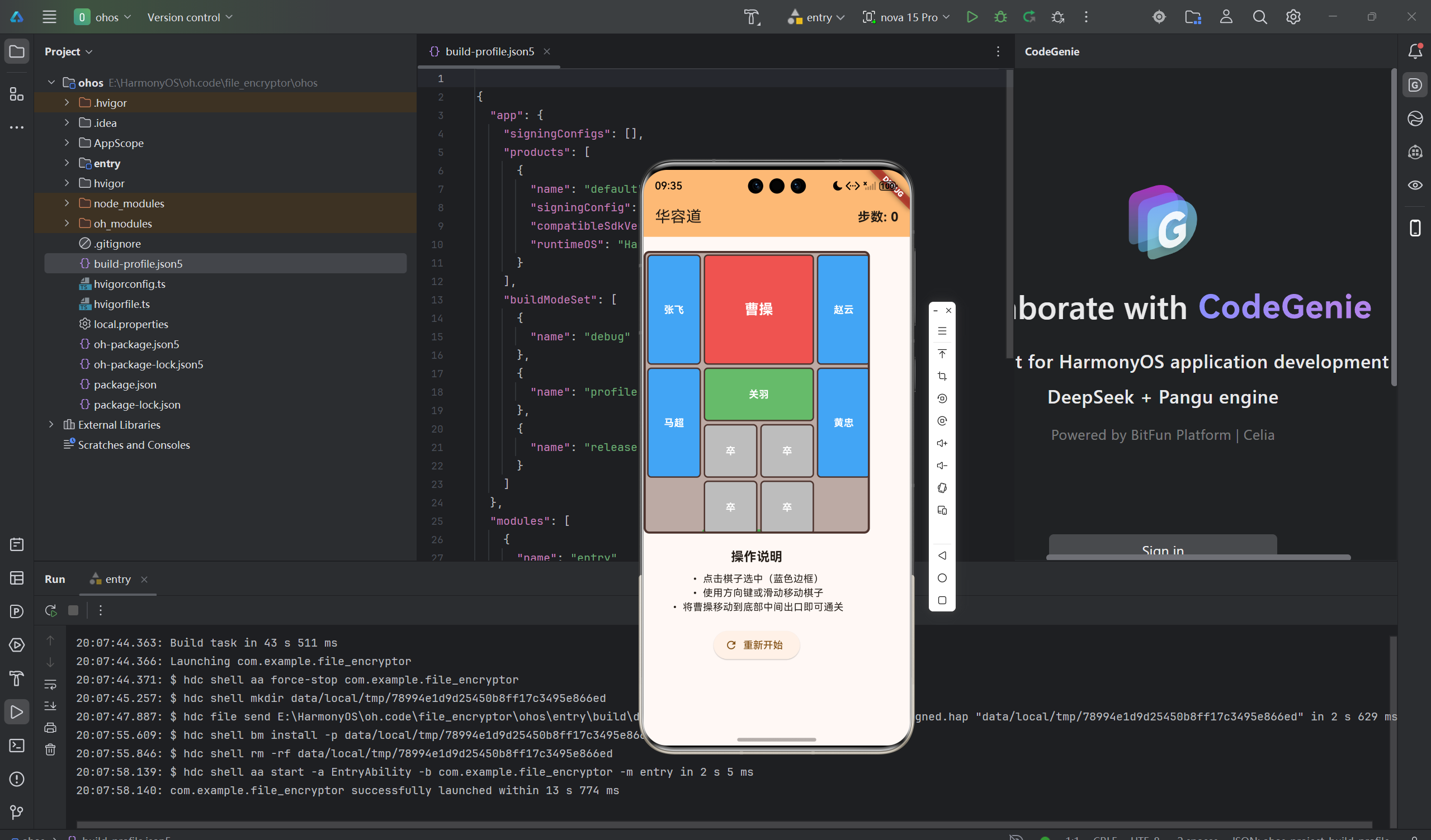
华容道是中国传统的智力游戏,通过移动不同大小的方块,让"曹操"从顶部移动到底部出口。本文将详细介绍如何使用Flutter for OpenHarmony框架开发一款功能完整的华容道游戏。文章涵盖了棋盘布局设计、棋子数据模型、焦点管理、手势识别、碰撞检测等核心技术点。通过本文学习,读者将掌握Flutter在鸿蒙平台上开发益智游戏的完整流程,了解滑块拼图游戏的实现方法。
一、项目背景与功能概述
1.1 华容道游戏历史
华容道源自三国故事,是中国最经典的智力游戏之一。游戏的目标是通过移动不同大小的棋子,让最大的"曹操"棋子从初始位置移动到棋盘底部中央的出口。
1.2 应用功能规划
| 功能模块 | 具体功能 |
|---|---|
| 棋盘显示 | 4x5网格布局,底部中央出口 |
| 棋子显示 | 曹操(2x2)、关羽(2x1横)、五虎将(1x2竖)、小兵(1x1) |
| 棋子选择 | 点击选中,蓝色边框高亮 |
| 移动控制 | 方向键和触摸滑动 |
| 碰撞检测 | 防止棋子重叠 |
| 胜利检测 | 曹操到达出口即通关 |
| 步数统计 | 记录移动次数 |
1.3 棋子类型与尺寸
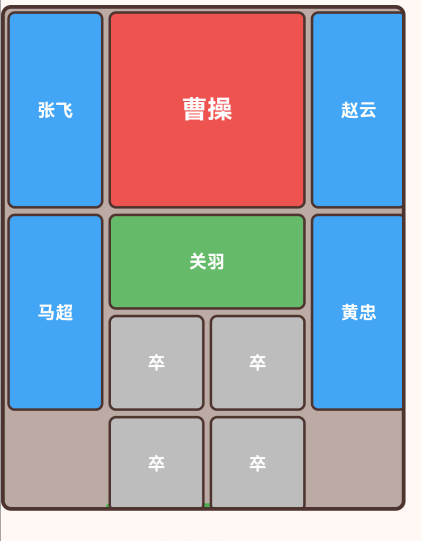
| 棋子 | 类型 | 尺寸 | 数量 |
|---|---|---|---|
| 曹操 | 2x2 | 占2列2行 | 1个 |
| 关羽 | 2x1横 | 占2列1行 | 1个 |
| 五虎将 | 1x2竖 | 占1列2行 | 4个 |
| 小兵 | 1x1 | 占1列1行 | 4个 |
二、华容道游戏规则
2.1 棋盘布局
棋盘是一个4列×5行的网格:
- 底部中央为出口
- 曹操初始位于顶部中央
- 目标是将曹操移动到出口位置
2.2 移动规则
- 棋子只能水平或垂直移动
- 不能斜向移动
- 移动后不能超出棋盘边界
- 移动后不能与其他棋子重叠
2.3 胜利条件
当曹操棋子到达底部中央位置(第3行第1-2列)时,游戏通关。
2.4 经典布局:横刀立马
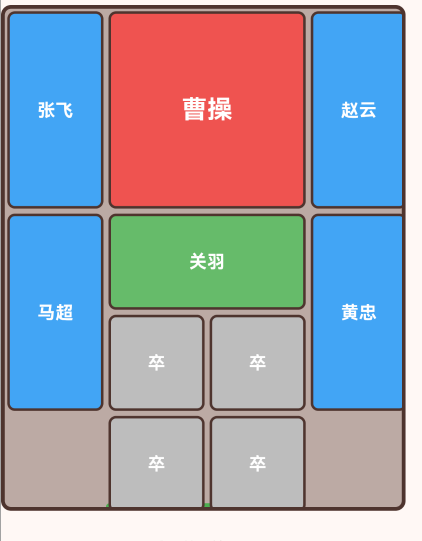
┌───┬───┬───┬───┐
│张│曹│曹│赵│
│飞│操│操│云│
├───┼───┼───┼───┤
│马│关│关│黄│
│超│羽│羽│忠│
├───┼───┼───┼───┤
│马│关│关│黄│
│超│羽│羽│忠│
├───┼───┼───┼───┤
│卒│卒│卒│卒│
├───┴───┴───┴───┤
│   出口   │
└───────────┘
三、技术选型与架构设计
3.1 核心技术栈
UI组件
- Stack:实现棋盘和棋子叠加
- Positioned:绝对定位棋子
- GestureDetector:手势识别
- KeyboardListener:键盘事件监听
状态管理
- StatefulWidget管理游戏状态
- setState更新UI
交互方式
- 点击:选择棋子
- 滑动:移动棋子
- 键盘:方向键控制
3.2 应用架构
KlotskiGameApp (应用根组件)
    └── KlotskiGamePage (游戏页面)
        ├── AppBar (导航栏 + 步数显示)
        ├── 棋盘区域
        │   └── Stack
        │       ├── 出口标记
        │       └── 棋子列表 (Positioned)
        │           ├── 曹操
        │           ├── 关羽
        │           ├── 五虎将 (4个)
        │           └── 小兵 (4个)
        ├── 操作说明
        └── 重置按钮
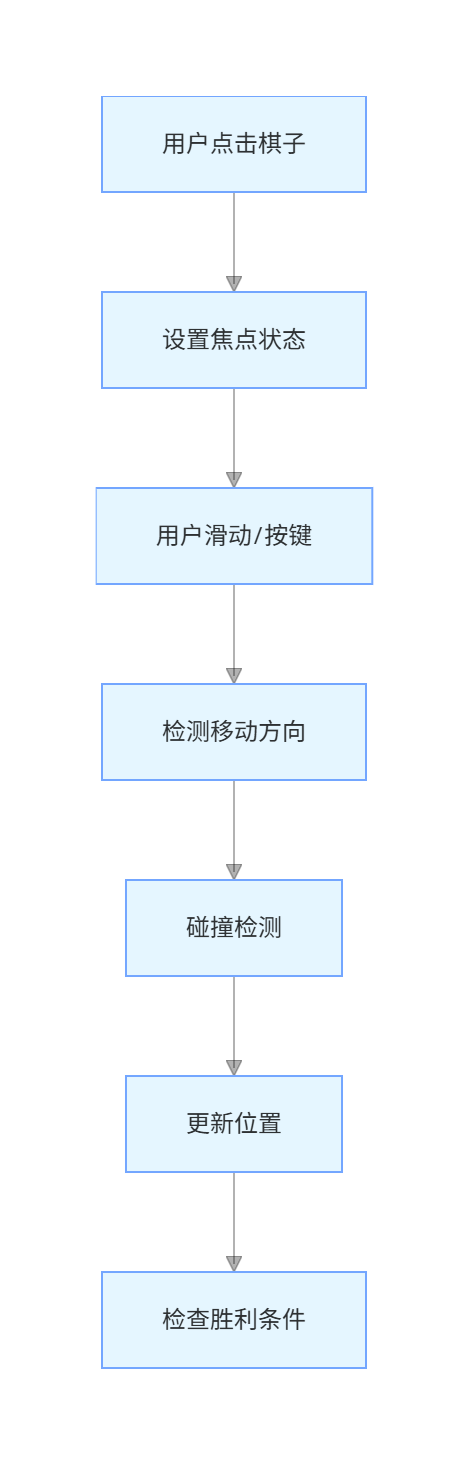
3.3 数据流设计
四、棋盘与棋子设计
4.1 棋子类型枚举
dart
enum PieceType {
  caocao,      // 曹操 (2x2)
  guanyu,      // 关羽 (2x1横)
  general,     // 五虎将 (1x2竖)
  soldier,     // 小兵 (1x1)
}
4.2 棋子数据类
dart
class Piece {
  final String name;      // 棋子名称
  final PieceType type;   // 棋子类型
  int x;                  // 列位置 (0-3)
  int y;                  // 行位置 (0-4)
  final int width;        // 宽度(占几列)
  final int height;       // 高度(占几行)
  bool hasFocus;          // 是否获得焦点

  Piece({
    required this.name,
    required this.type,
    required this.x,
    required this.y,
    required this.width,
    required this.height,
    this.hasFocus = false,
  });
}
4.3 棋子颜色设计
dart
Color get color {
  switch (type) {
    case PieceType.caocao:
      return Colors.red.shade400;    // 曹操:红色
    case PieceType.guanyu:
      return Colors.green.shade400;  // 关羽:绿色
    case PieceType.general:
      return Colors.blue.shade400;   // 五虎将:蓝色
    case PieceType.soldier:
      return Colors.grey.shade400;   // 小兵:灰色
  }
}
五、UI界面实现
5.1 棋盘尺寸计算
dart
Widget _buildBoard() {
  final screenSize = MediaQuery.of(context).size;
  final boardSize = screenSize.width * 0.85;
  final cellSize = boardSize / boardColumns;

  return Container(
    width: boardSize,
    height: boardSize / boardColumns * boardRows,
    decoration: BoxDecoration(
      color: Colors.brown.shade200,
      border: Border.all(color: Colors.brown.shade800, width: 3),
      borderRadius: BorderRadius.circular(8),
    ),
    // ...
  );
}
计算逻辑
- boardSize:屏幕宽度的85%
- cellSize:每个格子的大小 = boardSize / 4
- 棋盘高度:cellSize × 5
5.2 Stack布局实现棋盘
dart
Stack(
  children: [
    // 出口标记(底部中间)
    Positioned(
      left: cellSize,
      right: cellSize,
      bottom: -3,
      child: Container(
        height: 6,
        decoration: BoxDecoration(
          color: Colors.green,
          borderRadius: BorderRadius.only(
            topLeft: Radius.circular(3),
            topRight: Radius.circular(3),
          ),
        ),
      ),
    ),
    // 棋子
    ..._pieces.map((piece) {
      return Positioned(
        left: piece.x * cellSize,
        top: piece.y * cellSize,
        child: _buildPiece(piece, cellSize),
      );
    }),
  ],
)
布局要点
- 使用Positioned绝对定位棋子
- left和top根据棋子的x、y计算
- 出口使用绿色标记
5.3 棋子组件实现
dart
Widget _buildPiece(Piece piece, double cellSize) {
  return GestureDetector(
    onTap: () {
      setState(() {
        for (var p in _pieces) {
          p.hasFocus = false;
        }
        piece.hasFocus = true;
      });
    },
    onPanEnd: (details) {
      // 滑动处理
      final dx = details.localPosition.dx;
      final dy = details.localPosition.dy;

      if (dx.abs() > dy.abs()) {
        if (dx > 10) {
          _movePiece(piece, 1, 0);
        } else if (dx < -10) {
          _movePiece(piece, -1, 0);
        }
      } else {
        if (dy > 10) {
          _movePiece(piece, 0, 1);
        } else if (dy < -10) {
          _movePiece(piece, 0, -1);
        }
      }
    },
    child: Container(
      width: piece.width * cellSize - 4,
      height: piece.height * cellSize - 4,
      decoration: BoxDecoration(
        color: piece.focusColor,
        borderRadius: BorderRadius.circular(6),
        border: Border.all(
          color: piece.hasFocus ? Colors.blue.shade700 : Colors.brown.shade800,
          width: piece.hasFocus ? 3 : 2,
        ),
      ),
      child: Center(
        child: Text(
          piece.name,
          style: TextStyle(
            fontSize: piece.type == PieceType.caocao ? 20 : 14,
            fontWeight: FontWeight.bold,
            color: Colors.white,
          ),
        ),
      ),
    ),
  );
}
六、焦点管理机制
6.1 FocusNode基础
dart
class _KlotskiGamePageState extends State<KlotskiGamePage> {
  final FocusNode _focusNode = FocusNode();

  @override
  void initState() {
    super.initState();
    _focusNode.requestFocus();  // 自动获取焦点
  }

  @override
  void dispose() {
    _focusNode.dispose();  // 释放焦点
    super.dispose();
  }
}
6.2 焦点状态管理
dart
// 点击棋子时设置焦点
onTap: () {
  setState(() {
    // 清除其他棋子的焦点
    for (var p in _pieces) {
      p.hasFocus = false;
    }
    // 设置当前棋子焦点
    piece.hasFocus = true;
  });
}
6.3 焦点颜色变化
dart
Color get focusColor {
  return hasFocus ? Colors.blue : color;
}

// 使用
decoration: BoxDecoration(
  color: piece.focusColor,
  border: Border.all(
    color: piece.hasFocus ? Colors.blue.shade700 : Colors.brown.shade800,
    width: piece.hasFocus ? 3 : 2,
  ),
)
6.4 键盘事件处理
dart
KeyboardListener(
  focusNode: _focusNode,
  onKeyEvent: (event) => _handleKeyEvent(_focusNode, event),
  child: Scaffold(
    // ...
  ),
)
七、完整代码实现
7.1 游戏初始化
dart
void _initializeGame() {
  _pieces.clear();
  _moveCount = 0;

  // 曹操 (2x2) - 顶部中间
  _pieces.add(Piece(
    name: '曹操',
    type: PieceType.caocao,
    x: 1,
    y: 0,
    width: 2,
    height: 2,
  ));

  // 五虎将 (1x2竖)
  _pieces.add(Piece(name: '张飞', type: PieceType.general, x: 0, y: 0, width: 1, height: 2));
  _pieces.add(Piece(name: '赵云', type: PieceType.general, x: 3, y: 0, width: 1, height: 2));
  _pieces.add(Piece(name: '马超', type: PieceType.general, x: 0, y: 2, width: 1, height: 2));
  _pieces.add(Piece(name: '黄忠', type: PieceType.general, x: 3, y: 2, width: 1, height: 2));

  // 关羽 (2x1横)
  _pieces.add(Piece(name: '关羽', type: PieceType.guanyu, x: 1, y: 2, width: 2, height: 1));

  // 小兵 (1x1)
  _pieces.add(Piece(name: '卒', type: PieceType.soldier, x: 1, y: 3, width: 1, height: 1));
  _pieces.add(Piece(name: '卒', type: PieceType.soldier, x: 2, y: 3, width: 1, height: 1));
  _pieces.add(Piece(name: '卒', type: PieceType.soldier, x: 1, y: 4, width: 1, height: 1));
  _pieces.add(Piece(name: '卒', type: PieceType.soldier, x: 2, y: 4, width: 1, height: 1));

  setState(() {});
}
7.2 碰撞检测
dart
// 检查位置是否被占用
bool _isPositionOccupied(int x, int y, Piece? excludePiece) {
  for (var piece in _pieces) {
    if (piece == excludePiece) continue;

    if (x >= piece.x && x < piece.x + piece.width &&
        y >= piece.y && y < piece.y + piece.height) {
      return true;
    }
  }
  return false;
}

// 检查棋子是否可以移动到目标位置
bool _canMoveTo(Piece piece, int newX, int newY) {
  // 检查边界
  if (newX < 0 || newX + piece.width > boardColumns) return false;
  if (newY < 0 || newY + piece.height > boardRows) return false;

  // 检查碰撞
  for (int dx = 0; dx < piece.width; dx++) {
    for (int dy = 0; dy < piece.height; dy++) {
      if (_isPositionOccupied(newX + dx, newY + dy, piece)) {
        return false;
      }
    }
  }

  return true;
}
7.3 移动棋子
dart
void _movePiece(Piece piece, int dx, int dy) {
  int newX = piece.x + dx;
  int newY = piece.y + dy;

  if (_canMoveTo(piece, newX, newY)) {
    setState(() {
      piece.x = newX;
      piece.y = newY;
      _moveCount++;
    });

    _checkWin();
  }
}
7.4 键盘控制
dart
KeyEventResult _handleKeyEvent(FocusNode node, KeyEvent event) {
  if (event is! KeyDownEvent) return KeyEventResult.ignored;

  final focusedPiece = _pieces.cast<Piece?>().firstWhere(
    (p) => p?.hasFocus == true,
    orElse: () => null,
  );

  if (focusedPiece == null) return KeyEventResult.ignored;

  switch (event.logicalKey) {
    case LogicalKeyboardKey.arrowUp:
      _movePiece(focusedPiece, 0, -1);
      return KeyEventResult.handled;
    case LogicalKeyboardKey.arrowDown:
      _movePiece(focusedPiece, 0, 1);
      return KeyEventResult.handled;
    case LogicalKeyboardKey.arrowLeft:
      _movePiece(focusedPiece, -1, 0);
      return KeyEventResult.handled;
    case LogicalKeyboardKey.arrowRight:
      _movePiece(focusedPiece, 1, 0);
      return KeyEventResult.handled;
    default:
      return KeyEventResult.ignored;
  }
}
7.5 胜利检测
dart
void _checkWin() {
  final caocao = _pieces.firstWhere((p) => p.type == PieceType.caocao);
  if (caocao.x == 1 && caocao.y == 3) {
    WidgetsBinding.instance.addPostFrameCallback((_) {
      showDialog(
        context: context,
        barrierDismissible: false,
        builder: (context) => AlertDialog(
          title: const Text('恭喜通关!'),
          content: Text('总共移动了 $_moveCount 步'),
          actions: [
            TextButton(
              onPressed: () {
                Navigator.pop(context);
                _initializeGame();
              },
              child: const Text('重新开始'),
            ),
          ],
        ),
      );
    });
  }
}
八、运行效果与测试
8.1 项目运行命令
bash
cd E:\HarmonyOS\oh.code\klotski_game
flutter run -d ohos
8.2 功能测试清单
棋子选择测试
- 点击棋子能否正确设置焦点
- 蓝色边框是否正确显示
- 切换焦点是否正常
移动控制测试
- 方向键控制移动
- 触摸滑动控制移动
- 边界检测是否正确
- 碰撞检测是否正确
胜利条件测试
- 曹操到达出口时是否触发胜利
- 胜利弹窗是否正确显示
- 步数统计是否准确
重置功能测试
- 重置按钮是否恢复正常布局
- 步数是否归零
- 焦点是否清除
九、总结
本文详细介绍了使用Flutter for OpenHarmony开发华容道游戏的完整过程,涵盖了以下核心技术点:
- 棋盘布局设计:Stack + Positioned实现绝对定位
- 棋子数据模型:枚举类型、位置信息、尺寸属性
- 焦点管理:FocusNode、焦点状态、颜色变化
- 手势识别:GestureDetector、滑动检测
- 键盘控制:KeyboardListener、方向键处理
- 碰撞检测:边界检查、重叠检测
- 胜利检测:位置判断、弹窗提示
这个项目展示了Flutter在益智游戏开发中的完整流程,代码结构清晰,交互流畅。读者可以基于此项目添加更多功能,如:
- 多种布局选择
- 撤销/重做功能
- 关卡系统
- 计时功能
- 自动求解算法
通过本文的学习,读者应该能够独立开发类似的滑块拼图游戏,掌握Flutter在鸿蒙平台上的游戏开发技巧。
欢迎加入开源鸿蒙跨平台社区 : 开源鸿蒙跨平台开发者社区