Flutter for OpenHarmony 进阶:手势识别与碰撞检测算法深度解析
文章目录
- [Flutter for OpenHarmony 进阶:手势识别与碰撞检测算法深度解析](#Flutter for OpenHarmony 进阶:手势识别与碰撞检测算法深度解析)
-
- 摘要
- 一、手势识别系统概述
-
- [1.1 Flutter手势体系](#1.1 Flutter手势体系)
- [1.2 常用手势类型](#1.2 常用手势类型)
- 二、GestureDetector详解
-
- [2.1 GestureDetector基础](#2.1 GestureDetector基础)
- [2.2 垂直拖动手势](#2.2 垂直拖动手势)
- [2.3 Pan手势处理](#2.3 Pan手势处理)
- [2.4 华容道中的手势实现](#2.4 华容道中的手势实现)
- 三、键盘事件处理
-
- [3.1 KeyboardListener基础](#3.1 KeyboardListener基础)
- [3.2 KeyEvent类型](#3.2 KeyEvent类型)
- [3.3 方向键处理](#3.3 方向键处理)
- [3.4 KeyEventResult](#3.4 KeyEventResult)
- 四、焦点事件机制
-
- [4.1 FocusNode基础](#4.1 FocusNode基础)
- [4.2 焦点状态监听](#4.2 焦点状态监听)
- [4.3 华容道中的焦点管理](#4.3 华容道中的焦点管理)
- [4.4 焦点视觉反馈](#4.4 焦点视觉反馈)
- 五、碰撞检测算法
-
- [5.1 矩形碰撞检测](#5.1 矩形碰撞检测)
- [5.2 多格子碰撞检测](#5.2 多格子碰撞检测)
- [5.3 矩形相交检测](#5.3 矩形相交检测)
- 六、移动验证逻辑
-
- [6.1 移动验证流程](#6.1 移动验证流程)
- [6.2 边界检测](#6.2 边界检测)
- [6.3 完整移动验证](#6.3 完整移动验证)
- [6.4 移动动画](#6.4 移动动画)
- 七、高级功能扩展
-
- [7.1 撤销功能](#7.1 撤销功能)
- [7.2 关卡系统](#7.2 关卡系统)
- [7.3 计时功能](#7.3 计时功能)
- [7.4 自动求解提示](#7.4 自动求解提示)
- 八、性能优化策略
-
- [8.1 减少不必要的setState](#8.1 减少不必要的setState)
- [8.2 优化碰撞检测](#8.2 优化碰撞检测)
- [8.3 使用const构造函数](#8.3 使用const构造函数)
- 九、总结
摘要
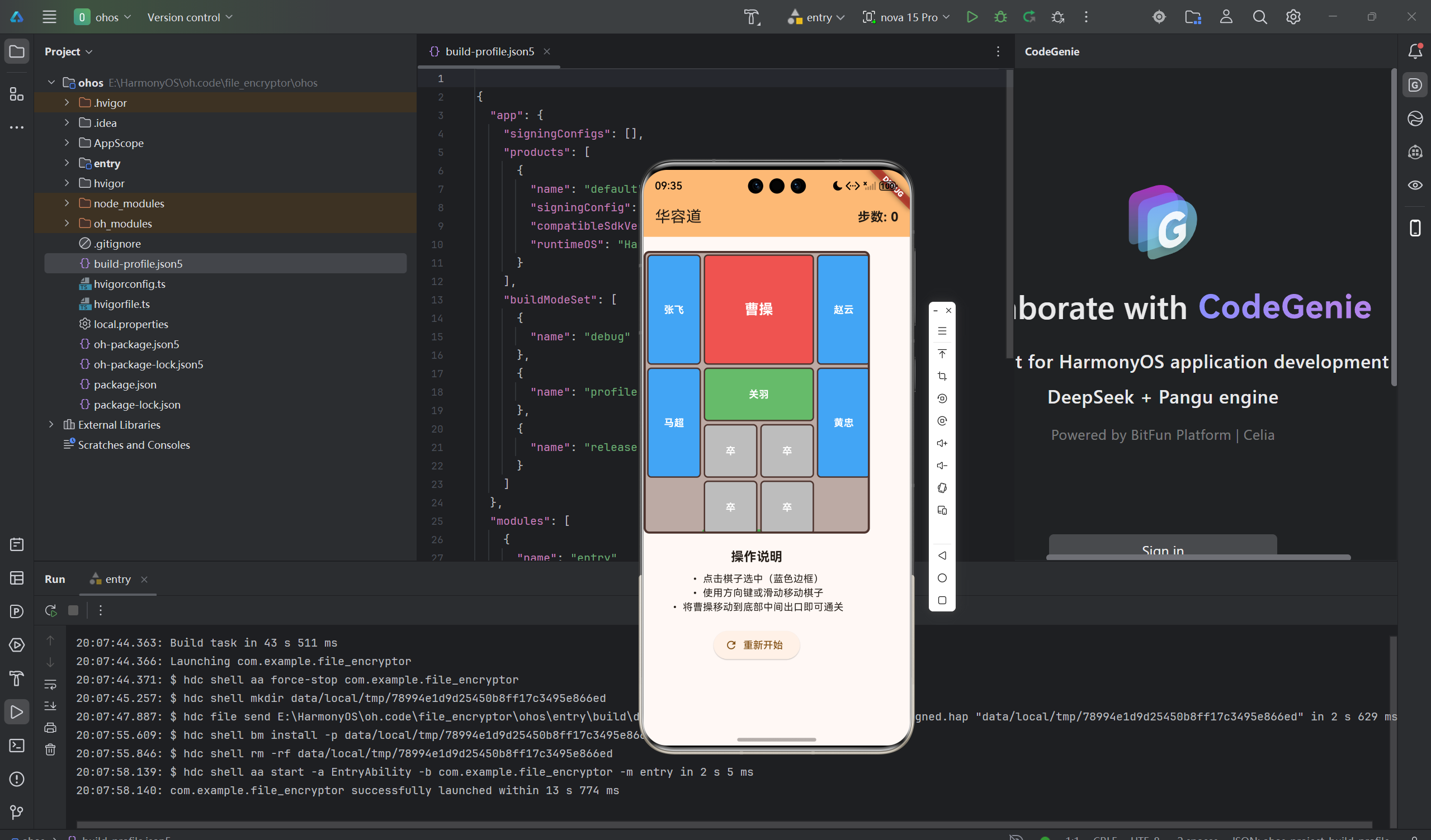
手势识别和碰撞检测是华容道游戏的核心交互技术。本文深入讲解Flutter中的手势识别系统,详细分析GestureDetector、KeyboardListener、焦点事件机制、碰撞检测算法等高级技术点。通过本文学习,读者将掌握Flutter在鸿蒙平台上的交互处理技巧,了解如何构建流畅、准确的游戏控制系统。
一、手势识别系统概述
1.1 Flutter手势体系
Flutter的手势系统是一个竞技场(Arena)模型:
- 多个手势识别器可以同时监听
- 通过竞技机制决定谁获胜
- 支持手势冲突解决
1.2 常用手势类型
| 手势 | 描述 | 应用场景 |
|---|---|---|
| 点击 | Tap | 按钮点击、选择 |
| 双击 | DoubleTap | 快速操作 |
| 长按 | LongPress | 上下文菜单 |
| 滑动 | Pan/Drag | 拖拽、移动 |
| 缩放 | Scale | 图片缩放 |
| 旋转 | Rotation | 旋转操作 |
二、GestureDetector详解
2.1 GestureDetector基础
GestureDetector是Flutter中最常用的手势识别组件:
dart
GestureDetector(
  onTap: () {
    print('点击');
  },
  onDoubleTap: () {
    print('双击');
  },
  onLongPress: () {
    print('长按');
  },
  child: Container(
    width: 100,
    height: 100,
    color: Colors.blue,
  ),
)
2.2 垂直拖动手势
dart
GestureDetector(
  onVerticalDragStart: (details) {
    print('开始拖动: ${details.globalPosition}');
  },
  onVerticalDragUpdate: (details) {
    print('拖动中: ${details.delta.dy}');
  },
  onVerticalDragEnd: (details) {
    print('拖动结束: ${details.velocity.pixelsPerSecond}');
  },
  child: Container(
    width: 100,
    height: 100,
    color: Colors.green,
  ),
)
2.3 Pan手势处理
dart
GestureDetector(
  onPanStart: (details) {
    // 开始拖动
    _startPosition = details.globalPosition;
  },
  onPanUpdate: (details) {
    // 拖动中
    final delta = details.delta;
    // 根据delta更新位置
  },
  onPanEnd: (details) {
    // 拖动结束
    final velocity = details.velocity.pixelsPerSecond;
  },
  child: Widget,
)
2.4 华容道中的手势实现
使用onPanEnd检测滑动方向:
dart
onPanEnd: (details) {
  final dx = details.localPosition.dx;
  final dy = details.localPosition.dy;

  if (dx.abs() > dy.abs()) {
    // 水平移动
    if (dx > 10) {
      _movePiece(piece, 1, 0);  // 向右
    } else if (dx < -10) {
      _movePiece(piece, -1, 0); // 向左
    }
  } else {
    // 垂直移动
    if (dy > 10) {
      _movePiece(piece, 0, 1);  // 向下
    } else if (dy < -10) {
      _movePiece(piece, 0, -1); // 向上
    }
  }
}
算法要点
- 比较dx和dy的绝对值判断主方向
- 使用阈值(10像素)避免误触
- 根据正负方向确定移动方向
三、键盘事件处理
3.1 KeyboardListener基础
KeyboardListener用于监听键盘事件:
dart
KeyboardListener(
  focusNode: _focusNode,
  onKeyEvent: (KeyEvent event) {
    if (event is KeyDownEvent) {
      print('按键按下: ${event.logicalKey}');
    } else if (event is KeyUpEvent) {
      print('按键释放: ${event.logicalKey}');
    }
    return KeyEventResult.handled;
  },
  child: Widget,
)
3.2 KeyEvent类型
dart
// KeyDownEvent:按键按下
// KeyUpEvent:按键释放
// KeyRepeatEvent:按键重复

KeyEventResult _handleKeyEvent(KeyEvent event) {
  if (event is KeyDownEvent) {
    // 处理按键按下
    return KeyEventResult.handled;
  }
  return KeyEventResult.ignored;
}
3.3 方向键处理
dart
KeyEventResult _handleKeyEvent(FocusNode node, KeyEvent event) {
  if (event is! KeyDownEvent) return KeyEventResult.ignored;

  switch (event.logicalKey) {
    case LogicalKeyboardKey.arrowUp:
      _movePiece(focusedPiece, 0, -1);
      return KeyEventResult.handled;
    case LogicalKeyboardKey.arrowDown:
      _movePiece(focusedPiece, 0, 1);
      return KeyEventResult.handled;
    case LogicalKeyboardKey.arrowLeft:
      _movePiece(focusedPiece, -1, 0);
      return KeyEventResult.handled;
    case LogicalKeyboardKey.arrowRight:
      _movePiece(focusedPiece, 1, 0);
      return KeyEventResult.handled;
    default:
      return KeyEventResult.ignored;
  }
}
3.4 KeyEventResult
dart
enum KeyEventResult {
  handled,   // 已处理,停止传播
  ignored,   // 忽略,继续传播
  skipRemaining siblings,  // 跳过兄弟节点
}
四、焦点事件机制
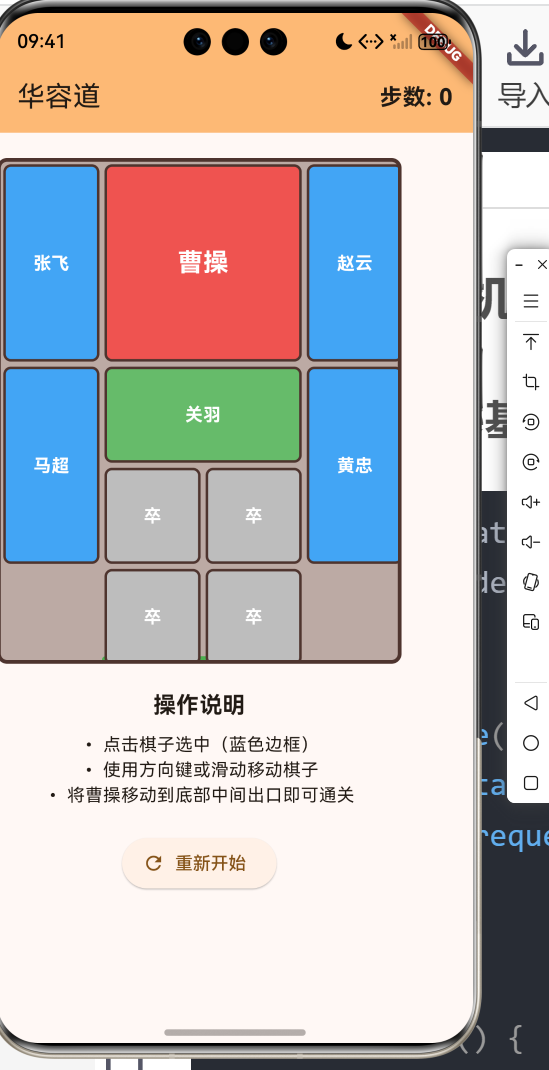
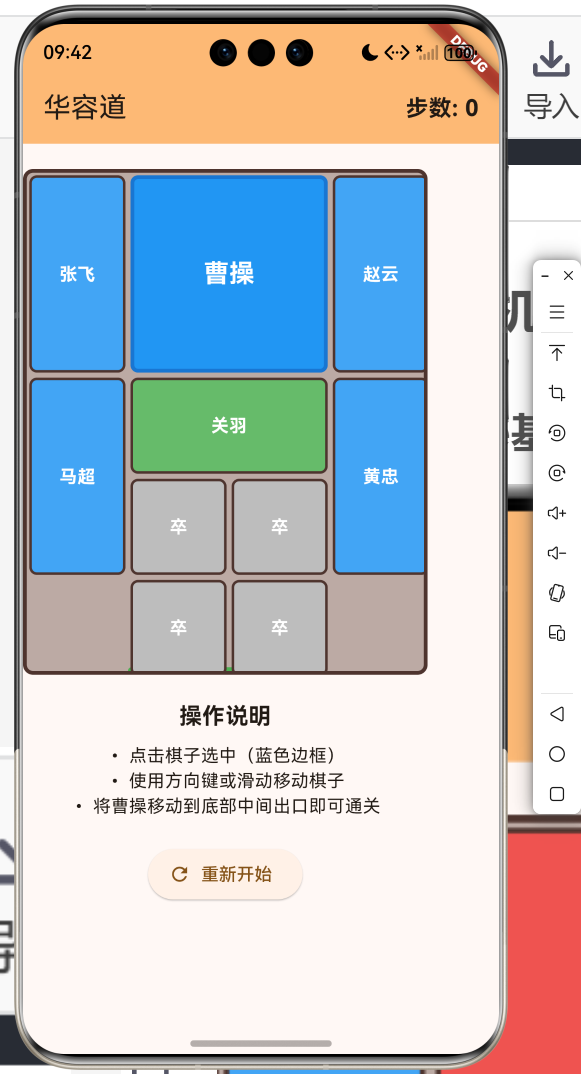
4.1 FocusNode基础
dart
class _WidgetState extends State<Widget> {
  final FocusNode _focusNode = FocusNode();

  @override
  void initState() {
    super.initState();
    _focusNode.requestFocus();  // 请求焦点
  }

  @override
  void dispose() {
    _focusNode.dispose();  // 释放资源
    super.dispose();
  }
}
4.2 焦点状态监听
dart
_focusNode.addListener(() {
  if (_focusNode.hasFocus) {
    print('获得焦点');
  } else {
    print('失去焦点');
  }
});
4.3 华容道中的焦点管理
dart
// 点击棋子设置焦点
onTap: () {
  setState(() {
    // 清除其他棋子的焦点
    for (var p in _pieces) {
      p.hasFocus = false;
    }
    // 设置当前棋子焦点
    piece.hasFocus = true;
  });
}

// 获取当前焦点棋子
Piece? getFocusedPiece() {
  try {
    return _pieces.firstWhere((p) => p.hasFocus);
  } catch (e) {
    return null;
  }
}
4.4 焦点视觉反馈
dart
Container(
  decoration: BoxDecoration(
    color: piece.hasFocus ? Colors.blue : piece.color,
    border: Border.all(
      color: piece.hasFocus ? Colors.blue.shade700 : Colors.grey,
      width: piece.hasFocus ? 3 : 1,
    ),
  ),
)
五、碰撞检测算法
5.1 矩形碰撞检测
华容道使用矩形碰撞检测(AABB算法):
dart
bool _isPositionOccupied(int x, int y, Piece? excludePiece) {
  for (var piece in _pieces) {
    if (piece == excludePiece) continue;

    // 检查点(x, y)是否在piece内
    if (x >= piece.x && x < piece.x + piece.width &&
        y >= piece.y && y < piece.y + piece.height) {
      return true;
    }
  }
  return false;
}
算法原理
- 检查点是否在矩形内
- 使用>=和<实现边界判断
- excludePiece参数排除自身
5.2 多格子碰撞检测
对于大尺寸棋子(如曹操2x2),需要检查所有占用的格子:
dart
bool _canMoveTo(Piece piece, int newX, int newY) {
  // 检查边界
  if (newX < 0 || newX + piece.width > boardColumns) return false;
  if (newY < 0 || newY + piece.height > boardRows) return false;

  // 检查所有占用格子的碰撞
  for (int dx = 0; dx < piece.width; dx++) {
    for (int dy = 0; dy < piece.height; dy++) {
      if (_isPositionOccupied(newX + dx, newY + dy, piece)) {
        return false;
      }
    }
  }

  return true;
}
算法流程
- 遍历棋子占用的所有格子
- 对每个格子检查碰撞
- 任何一个格子碰撞则返回false
- 全部通过才返回true
5.3 矩形相交检测
检测两个矩形是否相交:
dart
bool _rectsIntersect(
  int x1, int y1, int w1, int h1,
  int x2, int y2, int w2, int h2,
) {
  return x1 < x2 + w2 && x1 + w1 > x2 &&
         y1 < y2 + h2 && y1 + h1 > y2;
}

// 使用
if (_rectsIntersect(
  piece.x, piece.y, piece.width, piece.height,
  other.x, other.y, other.width, other.height,
)) {
  // 发生碰撞
}
六、移动验证逻辑
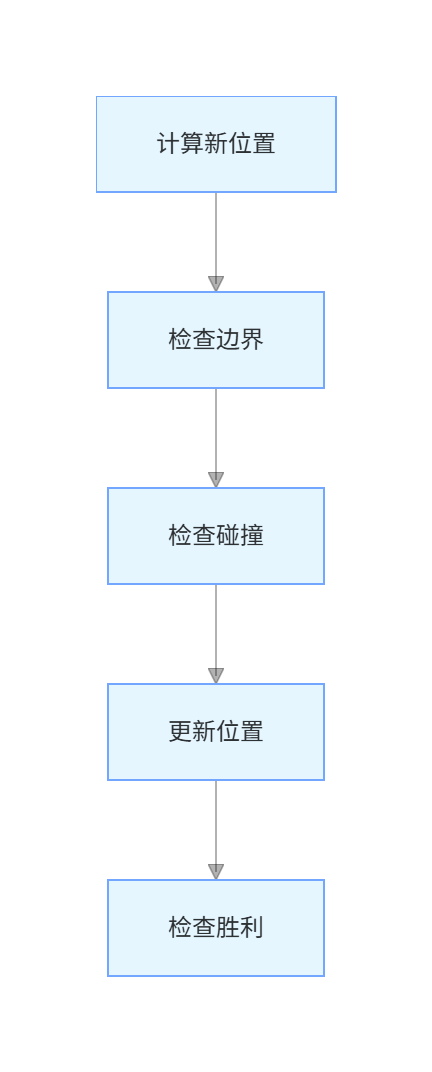
6.1 移动验证流程
6.2 边界检测
dart
bool _isWithinBounds(int x, int y, int width, int height) {
  // 左边界
  if (x < 0) return false;
  // 右边界
  if (x + width > boardColumns) return false;
  // 上边界
  if (y < 0) return false;
  // 下边界
  if (y + height > boardRows) return false;

  return true;
}
6.3 完整移动验证
dart
void _movePiece(Piece piece, int dx, int dy) {
  int newX = piece.x + dx;
  int newY = piece.y + dy;

  // 验证移动
  if (_canMoveTo(piece, newX, newY)) {
    setState(() {
      piece.x = newX;
      piece.y = newY;
      _moveCount++;
    });

    _checkWin();
  } else {
    // 移动失败反馈
    ScaffoldMessenger.of(context).showSnackBar(
      const SnackBar(content: Text('无法移动到该位置')),
    );
  }
}
6.4 移动动画
添加平滑的移动动画:
dart
void _movePieceWithAnimation(Piece piece, int targetX, int targetY) {
  final tween = Tween<double>(begin: 0, end: 1);
  final animationController = AnimationController(
    duration: const Duration(milliseconds: 200),
    vsync: this,
  );

  animationController.addListener(() {
    setState(() {
      double progress = animationController.value;
      piece.x = (piece.x + (targetX - piece.x) * progress).round();
      piece.y = (piece.y + (targetY - piece.y) * progress).round();
    });
  });

  animationController.addListener(() {
    if (animationController.isCompleted) {
      piece.x = targetX;
      piece.y = targetY;
      _checkWin();
      animationController.dispose();
    }
  });

  animationController.forward();
}
七、高级功能扩展
7.1 撤销功能
dart
class _KlotskiGamePageState extends State<KlotskiGamePage> {
  final List<List<Piece>> _history = [];

  void _saveState() {
    _history.add(_pieces.map((p) => Piece(
      name: p.name,
      type: p.type,
      x: p.x,
      y: p.y,
      width: p.width,
      height: p.height,
      hasFocus: p.hasFocus,
    )).toList());

    // 限制历史记录数量
    if (_history.length > 100) {
      _history.removeAt(0);
    }
  }

  void _undo() {
    if (_history.isEmpty) {
      ScaffoldMessenger.of(context).showSnackBar(
        const SnackBar(content: Text('没有可撤销的步骤')),
      );
      return;
    }

    setState(() {
      _pieces.clear();
      _pieces.addAll(_history.removeLast());
      _moveCount--;
    });
  }

  void _movePiece(Piece piece, int dx, int dy) {
    if (_canMoveTo(piece, piece.x + dx, piece.y + dy)) {
      _saveState();  // 保存状态
      // ... 执行移动
    }
  }
}
7.2 关卡系统
dart
class Level {
  final String name;
  final String description;
  final List<Piece> pieces;

  Level({
    required this.name,
    required this.description,
    required this.pieces,
  });
}

class _KlotskiGamePageState extends State<KlotskiGamePage> {
  int _currentLevel = 0;
  late List<Level> _levels;

  @override
  void initState() {
    super.initState();
    _levels = _loadLevels();
    _loadLevel(_currentLevel);
  }

  List<Level> _loadLevels() {
    return [
      Level(
        name: '横刀立马',
        description: '经典布局',
        pieces: [
          Piece(name: '曹操', type: PieceType.caocao, x: 1, y: 0, width: 2, height: 2),
          // ... 其他棋子
        ],
      ),
      Level(
        name: '指挥若定',
        description: '第二关',
        pieces: [...],
      ),
      // ... 更多关卡
    ];
  }

  void _loadLevel(int index) {
    final level = _levels[index];
    setState(() {
      _pieces.clear();
      _pieces.addAll(level.pieces);
      _moveCount = 0;
    });
  }

  void _nextLevel() {
    if (_currentLevel < _levels.length - 1) {
      _loadLevel(++_currentLevel);
    }
  }
}
7.3 计时功能
dart
class _KlotskiGamePageState extends State<KlotskiGamePage> {
  Timer? _timer;
  int _elapsedSeconds = 0;

  void _startTimer() {
    _stopTimer();
    _timer = Timer.periodic(const Duration(seconds: 1), (timer) {
      setState(() {
        _elapsedSeconds++;
      });
    });
  }

  void _stopTimer() {
    _timer?.cancel();
    _timer = null;
  }

  String _formatTime(int seconds) {
    final minutes = seconds ~/ 60;
    final secs = seconds % 60;
    return '${minutes.toString().padLeft(2, '0')}:${secs.toString().padLeft(2, '0')}';
  }
}
7.4 自动求解提示
dart
class _KlotskiGamePageState extends State<KlotskiGamePage> {
  void _showHint() {
    // 简单的提示:找出可以移动的棋子
    List<Map<String, dynamic>> movablePieces = [];

    for (var piece in _pieces) {
      List<String> directions = [];

      if (_canMoveTo(piece, piece.x, piece.y - 1)) directions.add('上');
      if (_canMoveTo(piece, piece.x, piece.y + 1)) directions.add('下');
      if (_canMoveTo(piece, piece.x - 1, piece.y)) directions.add('左');
      if (_canMoveTo(piece, piece.x + 1, piece.y)) directions.add('右');

      if (directions.isNotEmpty) {
        movablePieces.add({
          'piece': piece.name,
          'directions': directions,
        });
      }
    }

    if (movablePieces.isEmpty) {
      ScaffoldMessenger.of(context).showSnackBar(
        const SnackBar(content: Text('没有可移动的棋子')),
      );
    } else {
      showDialog(
        context: context,
        builder: (context) => AlertDialog(
          title: const Text('可移动的棋子'),
          content: Column(
            mainAxisSize: MainAxisSize.min,
            children: movablePieces.map((item) {
              return ListTile(
                title: Text(item['piece']),
                subtitle: Text(item['directions'].join('、')),
              );
            }).toList(),
          ),
        ),
      );
    }
  }
}
八、性能优化策略
8.1 减少不必要的setState
dart
// 不推荐:每次移动都触发重绘
void _movePiece(Piece piece, int dx, int dy) {
  setState(() {
    piece.x += dx;
    piece.y += dy;
  });
}

// 推荐:只在位置实际改变时更新
void _movePiece(Piece piece, int dx, int dy) {
  int newX = piece.x + dx;
  int newY = piece.y + dy;

  if (newX != piece.x || newY != piece.y) {
    if (_canMoveTo(piece, newX, newY)) {
      setState(() {
        piece.x = newX;
        piece.y = newY;
      });
    }
  }
}
8.2 优化碰撞检测
dart
// 不推荐:每次都检查所有棋子
bool _canMoveTo(Piece piece, int newX, int newY) {
  for (var p in _pieces) {
    if (_isColliding(piece, p)) return false;
  }
  return true;
}

// 推荐:只检查附近的棋子
bool _canMoveTo(Piece piece, int newX, int newY) {
  // 只检查附近的棋子(+1范围)
  for (var p in _pieces) {
    if (p == piece) continue;
    if ((p.x - newX).abs() <= piece.width + 1 &&
        (p.y - newY).abs() <= piece.height + 1) {
      if (_isColliding(piece, p)) return false;
    }
  }
  return true;
}
8.3 使用const构造函数
dart
// 推荐:使用const减少重建
const Positioned(
  left: 0,
  top: 0,
  child: Text('曹操'),
)
九、总结
本文深入讲解了华容道游戏中的手势识别和碰撞检测技术,主要内容包括:
- 手势识别:GestureDetector、Pan手势、方向检测
- 键盘事件:KeyboardListener、KeyEvent处理
- 焦点管理:FocusNode、焦点状态、视觉反馈
- 碰撞检测:AABB算法、矩形相交检测、多格子检测
- 移动验证:边界检查、碰撞检查、位置更新
- 功能扩展:撤销、关卡、计时、提示
- 性能优化:减少setState、优化碰撞检测
掌握这些技术可以让你开发出交互流畅、逻辑严谨的游戏应用。在实际项目中,还需要考虑用户体验、性能优化、错误处理等方面,确保应用的稳定性和可玩性。
欢迎加入开源鸿蒙跨平台社区 : 开源鸿蒙跨平台开发者社区