前提:云服务器、docker 账号、GitHub 账号
CI/CD 主要有三种实现方式:
- 直接命令行部署:通过脚本直接部署到服务器
- 服务器工具部署:使用阿里云等服务器提供的部署工具
- GitHub Actions 自动化部署:基于代码提交自动触发部署
1. 命令行直接部署
项目结构
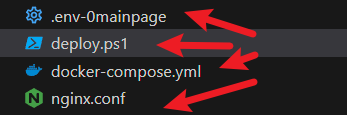
- env 文件: 存放服务器端口、账号等配置信息
- deploy 脚本: 编写主要部署逻辑
- docker 文件: Docker 容器配置
- nginx 配置: Web 服务器配置文件
部署脚本示例
Docker Compose 配置文件
docker-compose.yml
yaml
version: "3"
services:
  mainpage:
    image: nginx:stable-alpine
    container_name: mainpage-nginx
    restart: always
    ports:
      - "80:80"
    volumes:
      # Nginx 配置
      - ./nginx.conf:/etc/nginx/conf.d/default.conf:ro
      # 0MainPage 构建产物
      - /root/project/0MainPage/dist:/usr/share/nginx/html:ro
Nginx 配置文件
nginx.conf
nginx
server {
    listen       80;
    server_name  localhost;

    # MIME 类型配置
    include       /etc/nginx/mime.types;
    default_type  application/octet-stream;

    # 安全头配置
    add_header X-Frame-Options "SAMEORIGIN" always;
    add_header X-Content-Type-Options "nosniff" always;
    add_header X-XSS-Protection "1; mode=block" always;
    add_header Referrer-Policy "strict-origin-when-cross-origin" always;

    # 开启 gzip 压缩
    gzip on;
    gzip_min_length 1k;
    gzip_comp_level 6;
    gzip_types text/plain application/javascript application/x-javascript text/css application/xml text/javascript application/x-httpd-php image/jpeg image/gif image/png application/json;
    gzip_vary on;
    gzip_disable "MSIE [1-6]\.";

    # 静态资源缓存配置 - JS文件
    location ~* \.js$ {
        root /usr/share/nginx/html;
        add_header Content-Type "application/javascript; charset=utf-8";
        expires 1y;
        add_header Cache-Control "public, immutable";
        access_log off;
    }

    # 静态资源缓存配置 - CSS文件
    location ~* \.css$ {
        root /usr/share/nginx/html;
        add_header Content-Type "text/css; charset=utf-8";
        expires 1y;
        add_header Cache-Control "public, immutable";
        access_log off;
    }

    # 静态资源缓存配置 - 图片和字体文件
    location ~* \.(png|jpg|jpeg|gif|ico|svg|woff|woff2|ttf|eot)$ {
        root /usr/share/nginx/html;
        expires 1y;
        add_header Cache-Control "public, immutable";
        access_log off;
    }

    # HTML文件不缓存
    location ~* \.html$ {
        root /usr/share/nginx/html;
        add_header Cache-Control "no-cache, no-store, must-revalidate";
        add_header Pragma "no-cache";
        add_header Expires "0";
    }

    # 0MainPage - 主页项目(根路径)
    location / {
        root   /usr/share/nginx/html;
        index  index.html index.htm;
        try_files $uri $uri/ /index.html;
    }

    error_page   500 502 503 504  /50x.html;
    location = /50x.html {
        root   /usr/share/nginx/html;
    }
}
PowerShell 部署脚本
deploy.ps1
powershell
# Deploy script for 0MainPage project
Write-Host "[Deploy] Starting 0MainPage deployment process..." -ForegroundColor Green

# Load environment variables from .env file

$envFile = Join-Path $PSScriptRoot ".env-0mainpage"
if (Test-Path $envFile) {
    Write-Host "[Config] Loading environment variables from .env file..." -ForegroundColor Yellow
    Get-Content $envFile | ForEach-Object {
        if ($_.Trim() -match "^([^#][^=]+)=(.*)$") {
            $name = $matches[1].Trim()
            $value = $matches[2].Trim()
            [Environment]::SetEnvironmentVariable($name, $value, "Process")
        }
    }
} else {
    Write-Host "[Warning] .env file not found, using default values" -ForegroundColor Yellow
}

# Server configuration from environment variables

$serverHost = if ($env:SERVER_HOST) { $env:SERVER_HOST } else { "" }
$serverUser = if ($env:SERVER_USER) { $env:SERVER_USER } else { "" }
$serverPassword = $env:SERVER_PASSWORD
$serverPath = if ($env:SERVER_0MAINPAGE_PATH) { $env:SERVER_0MAINPAGE_PATH } else { "/root/project/0MainPage/dist" }
$serverConfigPath = if ($env:SERVER_CONFIG_PATH) { $env:SERVER_CONFIG_PATH } else { "/root/project/CD/0MainPage" }
$projectPath = if ($env:LOCAL_0MAINPAGE_PATH) { $env:LOCAL_0MAINPAGE_PATH } else { "C:\Users\what\Desktop\my-project\0MainPage" }

if (-not $serverPassword) {
    Write-Host "[Error] SERVER_PASSWORD not found in environment variables" -ForegroundColor Red
    exit 1
}

Write-Host "[Config] Server: $serverHost" -ForegroundColor Yellow
Write-Host "[Config] Target: 0MainPage (Port 80)" -ForegroundColor Yellow
Write-Host "[Config] Project Path: $projectPath" -ForegroundColor Yellow

# Check and navigate to 0MainPage

if (!(Test-Path $projectPath)) {
    Write-Host "[Error] 0MainPage directory not found at: $projectPath" -ForegroundColor Red
    exit 1
}

$currentPath = Get-Location
Set-Location $projectPath
Write-Host "[Info] Changed to project directory: $projectPath" -ForegroundColor Yellow

try { # 1. Install dependencies if needed
    if (!(Test-Path "node_modules")) {
        Write-Host "[Step1] Installing dependencies..." -ForegroundColor Cyan
        npm install
        if ($LASTEXITCODE -ne 0) {
            throw "Dependencies installation failed with exit code $LASTEXITCODE"
        }
    }

    # 2. Build project
    Write-Host "[Step2] Building 0MainPage project..." -ForegroundColor Cyan
    npm run build
    if ($LASTEXITCODE -ne 0) {
        throw "Build command failed with exit code $LASTEXITCODE"
    }

    if (!(Test-Path "dist")) {
        Write-Host "[Error] Build failed, dist directory not found" -ForegroundColor Red
        exit 1
    }

    # 3. Create server directory if not exists
    Write-Host "[Step3] Preparing server directory..." -ForegroundColor Cyan
    $plinkExists = Get-Command plink -ErrorAction SilentlyContinue
    if ($plinkExists) {
        try {
            $plinkCommand = "echo y | plink -pw '$serverPassword' ${serverUser}@${serverHost} 'mkdir -p ${serverPath} && mkdir -p ${serverConfigPath}'"
            Write-Host "[Execute] Creating directories on server..." -ForegroundColor Gray
            Invoke-Expression $plinkCommand
        } catch {
            Write-Host "[Warning] Directory creation failed: $_" -ForegroundColor Yellow
        }
    }

    # 4. Upload dist to server
    Write-Host "[Step4] Uploading 0MainPage dist to server..." -ForegroundColor Cyan
    $pscpExists = Get-Command pscp -ErrorAction SilentlyContinue
    if ($pscpExists) {
        try {
            $pscpCommand = "echo y | pscp -pw '$serverPassword' -r dist/* ${serverUser}@${serverHost}:${serverPath}/"
            Write-Host "[Execute] Uploading files..." -ForegroundColor Gray
            Invoke-Expression $pscpCommand
        } catch {
            throw "File transfer failed: $_"
        }
    }

    # 5. Upload config files
    Write-Host "[Step5] Uploading 0MainPage config files..." -ForegroundColor Cyan
    $configPath = $PSScriptRoot
    if (Test-Path $configPath) {
        if ($pscpExists) {
            $pscpConfigCommand = "pscp -pw '$serverPassword' ${configPath}/docker-compose.yml ${configPath}/nginx.conf ${serverUser}@${serverHost}:${serverConfigPath}/"
            Write-Host "[Execute] Uploading config files..." -ForegroundColor Gray
            Invoke-Expression $pscpConfigCommand
        }
    }

    # 6. Stop existing container
    Write-Host "[Step6] Stopping existing 0MainPage container..." -ForegroundColor Cyan
    try {
        if ($plinkExists) {
            $plinkCommand = "plink -batch -pw '$serverPassword' ${serverUser}@${serverHost} 'cd ${serverConfigPath} && docker stop mainpage-nginx || true && docker rm mainpage-nginx || true'"
            Write-Host "[Execute] Stopping existing container..." -ForegroundColor Gray
            Invoke-Expression $plinkCommand
        }
    } catch {
        Write-Host "[Info] No existing container to stop" -ForegroundColor Yellow
    }

    # 7. Start 0MainPage container
    Write-Host "[Step7] Starting 0MainPage container..." -ForegroundColor Cyan
    try {
        if ($plinkExists) {
            $plinkCommand = "plink -batch -pw '$serverPassword' ${serverUser}@${serverHost} 'cd ${serverConfigPath} && docker compose up -d'"
            Write-Host "[Execute] Starting container..." -ForegroundColor Gray
            Invoke-Expression $plinkCommand
        }
    } catch {
        Write-Host "[Error] Container start failed: $_" -ForegroundColor Red
        throw
    }

    # 8. Verify deployment
    Write-Host "[Step8] Verifying 0MainPage deployment..." -ForegroundColor Cyan
    try {
        if ($plinkExists) {
            $plinkVerifyCommand = "plink -batch -pw '$serverPassword' ${serverUser}@${serverHost} 'docker ps | grep mainpage-nginx'"
            Write-Host "[Execute] Verifying container..." -ForegroundColor Gray
            Invoke-Expression $plinkVerifyCommand
        }
    } catch {
        Write-Host "[Warning] Verification failed: $_" -ForegroundColor Yellow
    }

    Write-Host "[Done] 0MainPage deployment successful!" -ForegroundColor Green
    Write-Host "[Access] http://$serverHost" -ForegroundColor Yellow

} catch {
    Write-Host "[Error] Deployment failed: $\_" -ForegroundColor Red
    exit 1
} finally {
    Set-Location $currentPath
}
2. 服务器工具部署
使用阿里云、腾讯云等云服务商提供的部署工具,具体配置根据服务商文档进行设置。
3. GitHub Actions 自动化部署(推荐)
提供两种部署模式:
- 主分支自动部署:提交代码到主分支时自动触发部署
- 标签部署:根据 Git Tag 来触发部署
Dockerfile 配置
dockerfile
# 构建阶段
FROM node:20-alpine as build-stage

WORKDIR /app

# 复制 package 文件
COPY package*.json ./
COPY pnpm-lock.yaml ./

# 安装 pnpm 并安装依赖
RUN npm install -g pnpm
RUN pnpm install

# 复制源代码(排除 node_modules)
COPY src ./src
COPY public ./public
COPY index.html ./
COPY vite.config.ts ./
COPY tsconfig.json ./
COPY tsconfig.app.json ./
COPY tsconfig.node.json ./

# 构建应用
RUN pnpm run build

# 生产阶段
FROM nginx:stable-alpine as production-stage

# 复制自定义 nginx 配置
COPY nginx.conf /etc/nginx/conf.d/default.conf

# 复制构建产物
COPY --from=build-stage /app/dist /usr/share/nginx/html

# 暴露端口
EXPOSE 80

CMD ["nginx", "-g", "daemon off;"]
GitHub Actions 配置文件
yaml
name: Publish Image

on:
  push:
    branches: ["master"]
    paths-ignore:
      - ".gitignore"
      - "README.md"
      - ".vscode/**"
  pull_request:
    branches: ["master"]

jobs:
  build:
    runs-on: ubuntu-latest
    steps:
      - uses: actions/checkout@v4

      - uses: docker/login-action@v3
        with:
          registry: ghcr.io
          username: ${{ github.actor }}
          password: ${{ secrets.GITHUB_TOKEN }}

      - uses: actions/setup-node@v4
        with:
          node-version: "20"

      - uses: actions/cache@v4
        id: cache
        with:
          path: node_modules
          key: ${{ runner.os }}-node-${{ hashFiles('package-lock.json') }}
          restore-keys: |
            ${{ runner.os }}-node-

      - name: Install dependencies
        if: steps.cache.outputs.cache-hit != 'true'
        run: npm install

      - name: Build
        run: npm run build

      - name: Build and push Docker image
        run: |
          docker build . --file Dockerfile --tag ghcr.io/${{ github.repository_owner }}/0mainpage:latest
          docker push ghcr.io/${{ github.repository_owner }}/0mainpage:latest

      - name: Deploy to server
        uses: appleboy/ssh-action@v1.0.0
        with:
          host: ${{ secrets.SERVER_HOST }}
          username: ${{ secrets.SERVER_USER }}
          password: ${{ secrets.SERVER_PASSWORD }}
          port: ${{ secrets.SERVER_PORT || '22' }}
          timeout: 30s
          command_timeout: 10m
          debug: true
          script: |
            docker stop mainpage-nginx || true
            docker rm mainpage-nginx || true
            docker login -u ${{ github.actor }} -p ${{ secrets.GITHUB_TOKEN }} https://ghcr.io
            docker pull ghcr.io/${{ github.repository_owner }}/0mainpage:latest
            docker run -dp 80:80 --restart=always --name mainpage-nginx ghcr.io/${{ github.repository_owner }}/0mainpage:latest
GitHub 仓库配置
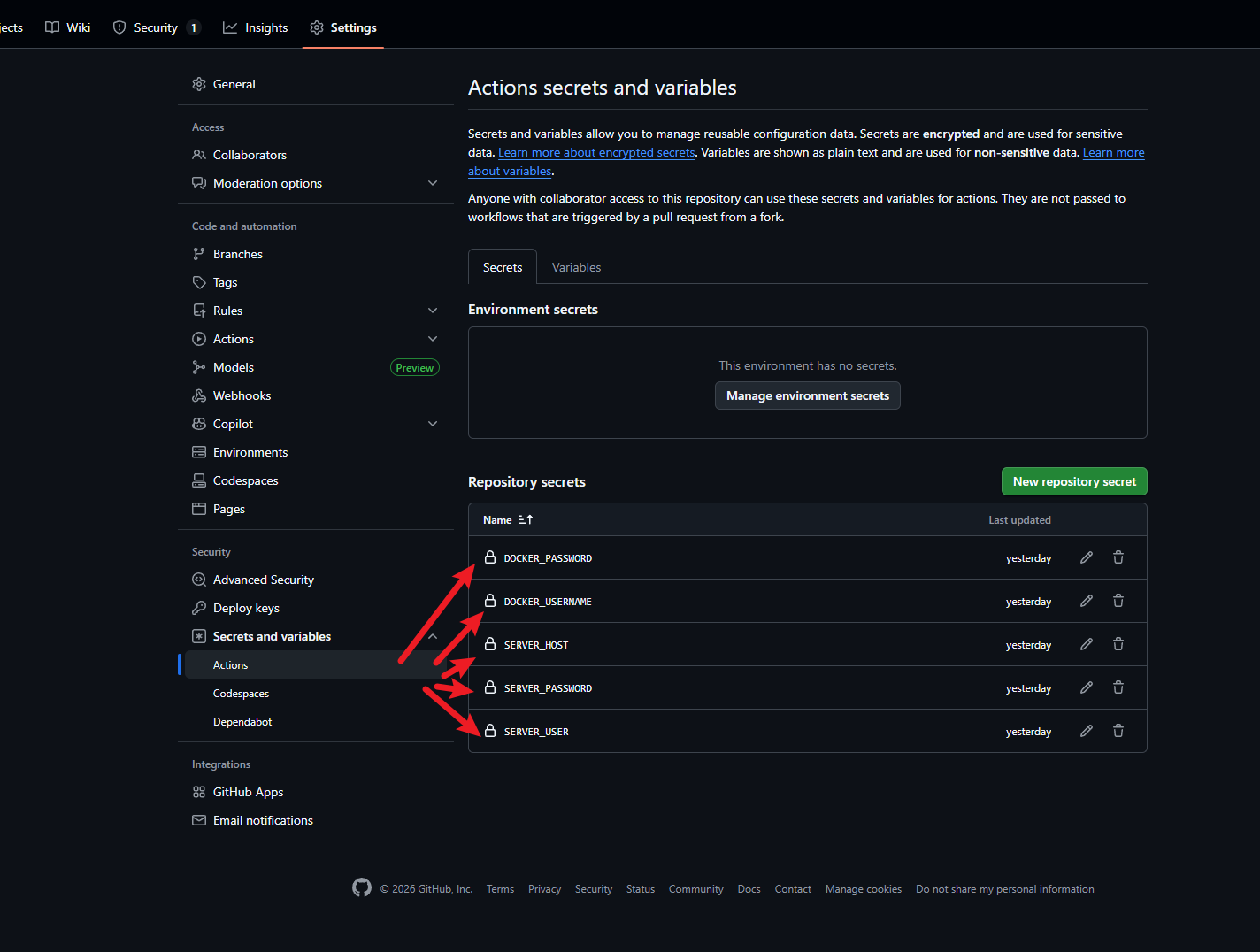
需要在 GitHub 仓库的 Settings > Secrets and variables > Actions 中配置以下环境变量:
SERVER_HOST: 服务器地址SERVER_USER: 服务器用户名SERVER_PASSWORD: 服务器密码SERVER_PORT: SSH 端口(默认 22)