前言
前阵子入手了大疆Pocket3,这款小巧的云台相机让我能够随时随地记录生活中的美好瞬间。每次出游归来,存储卡里都塞满了北京各个角落的影像------从什刹海的波光粼粼到故宫角楼的落日余晖,从胡同里飘出的炊烟到国贸璀璨的夜景。
从存储卡到云端浏览的烦恼
起初,每次想回顾这些视频,我都得将Pocket3连接到电脑,把文件导入硬盘,再打开播放器软件。当我想在沙发上用平板或手机轻松浏览时,这种传统方式就显得不太"现代"了。
为什么不让自己拍摄的视频像在线流媒体一样随时可看呢?这个念头在我脑中闪过,我便决定动手打造一个属于自己的流媒体平台。
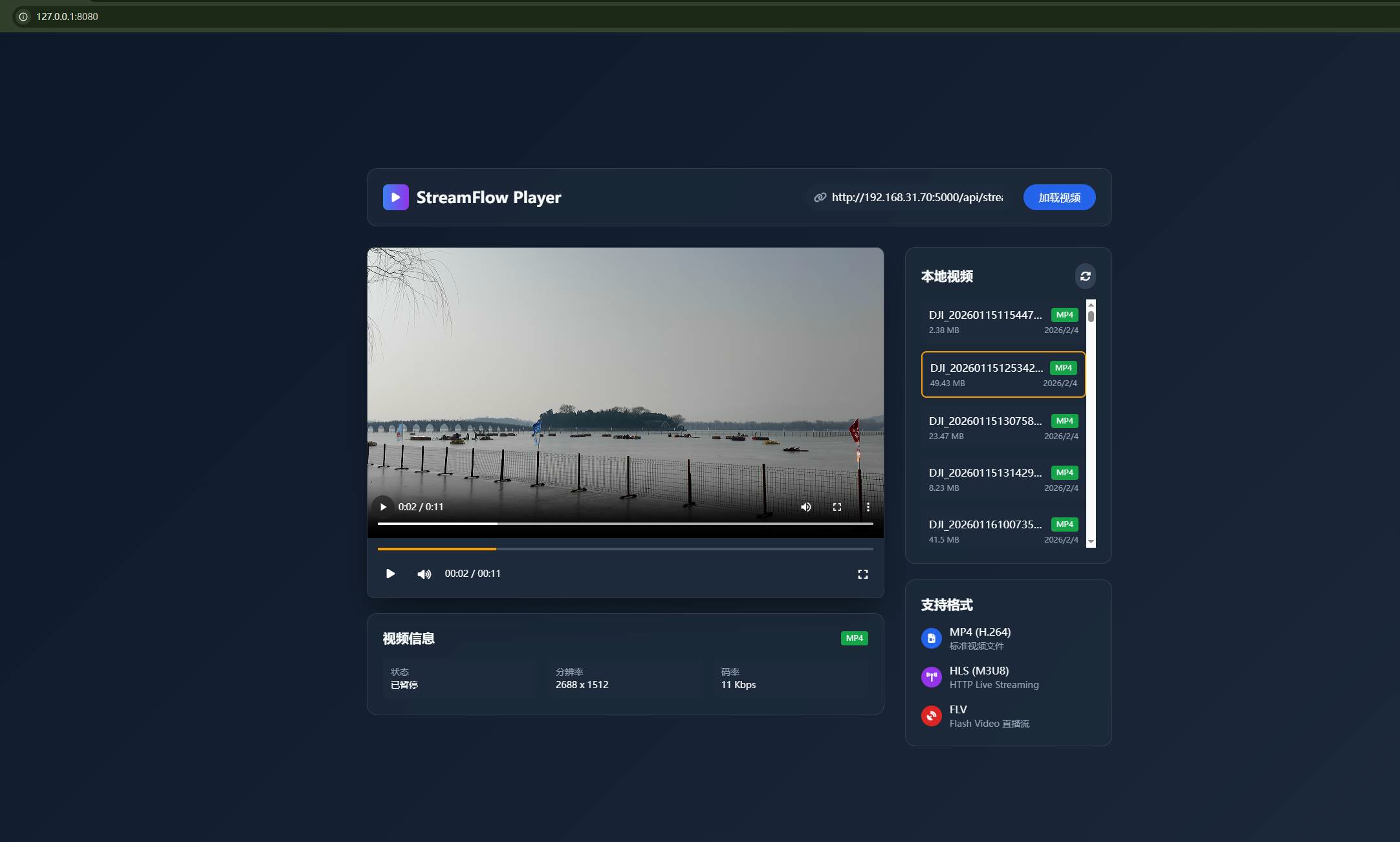
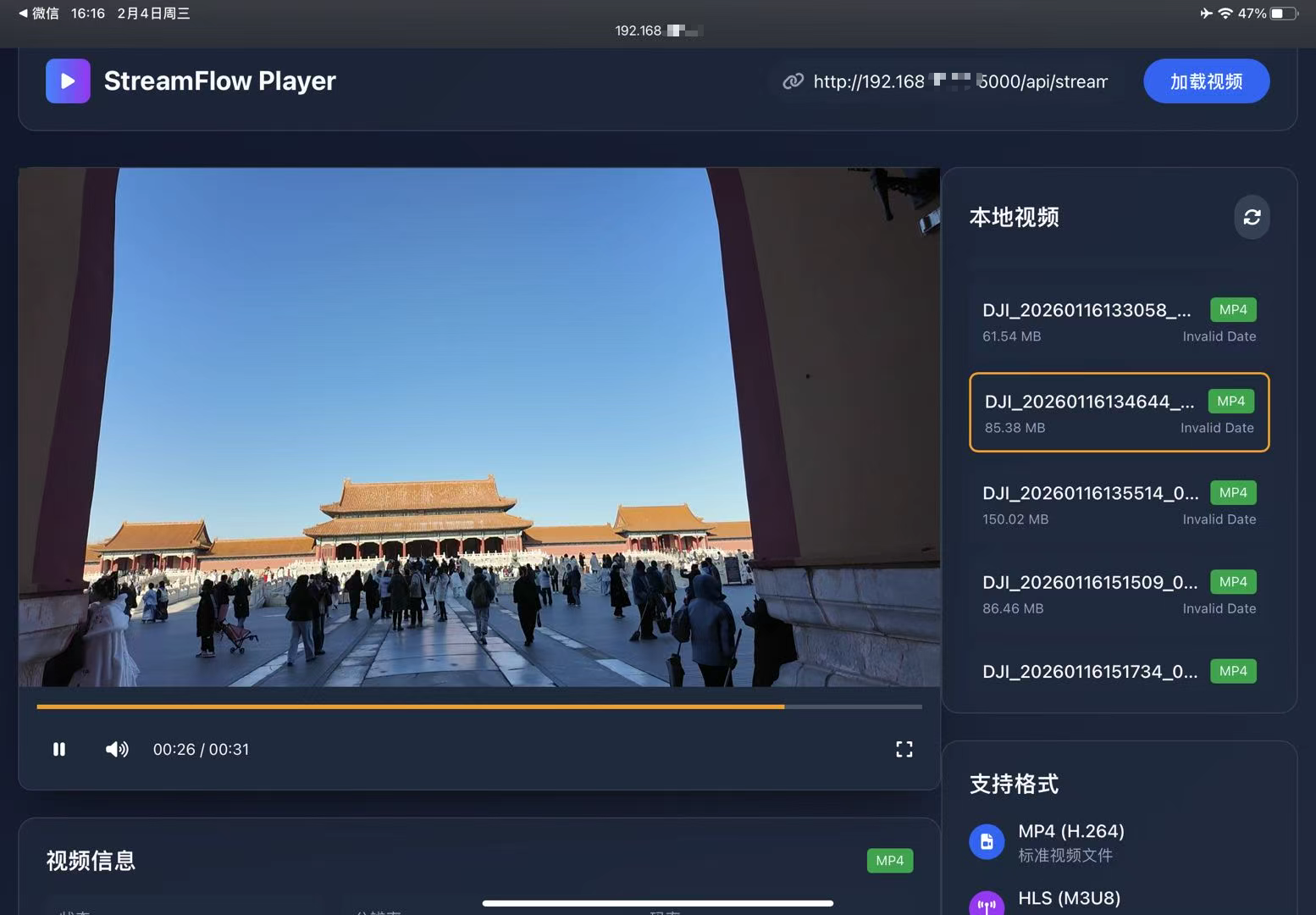
经过2个小时的开发,我创建了StreamFlow Player------一个简洁而实用的网页应用。它的界面设计以深色为主,突出重点内容,整体风格干净利落。
核心功能亮点:
• 便捷的本地视频列表:右侧区域直接展示了我从Pocket3导入的所有视频文件,清晰标注了每个视频的大小和创建日期
• 实时视频信息:底部区域实时显示播放状态、分辨率、码率等关键信息,让我随时了解视频的技术参数
• 跨设备访问:通过简单的局域网地址(如http://192.168.xx.xx:8000),我可以在任何连接到同一网络的设备上访问这个平台
使用体验:自由与便捷
现在,当我坐在阳台的摇椅上,想回顾昨天在颐和园拍摄的湖景时,只需打开手机浏览器,输入地址,就能立即观看。视频加载迅速,播放流畅,就像使用任何主流流媒体服务一样自然。
最让我满意的是,这个解决方案完全由我掌控:
• 没有上传等待时间,视频直接从本地存储读取
• 没有隐私担忧,所有内容都在我的局域网内流通
• 没有订阅费用,一次开发,长期受益
有了这个流媒体平台,我发现自己更频繁地回顾拍摄的视频素材,有时甚至会连续播放多个视频,寻找剪辑灵感。当朋友来访时,我也可以轻松地与他们分享我的北京影像日记,而不必担心设备兼容性问题。
效果展示
可以拖动进度条,查看所有视频。我给DJ配的内存卡只有128G,于是拍完我一般拿个读卡器,把里面的图片视频拷贝到我一个2T的移动机械硬盘上。
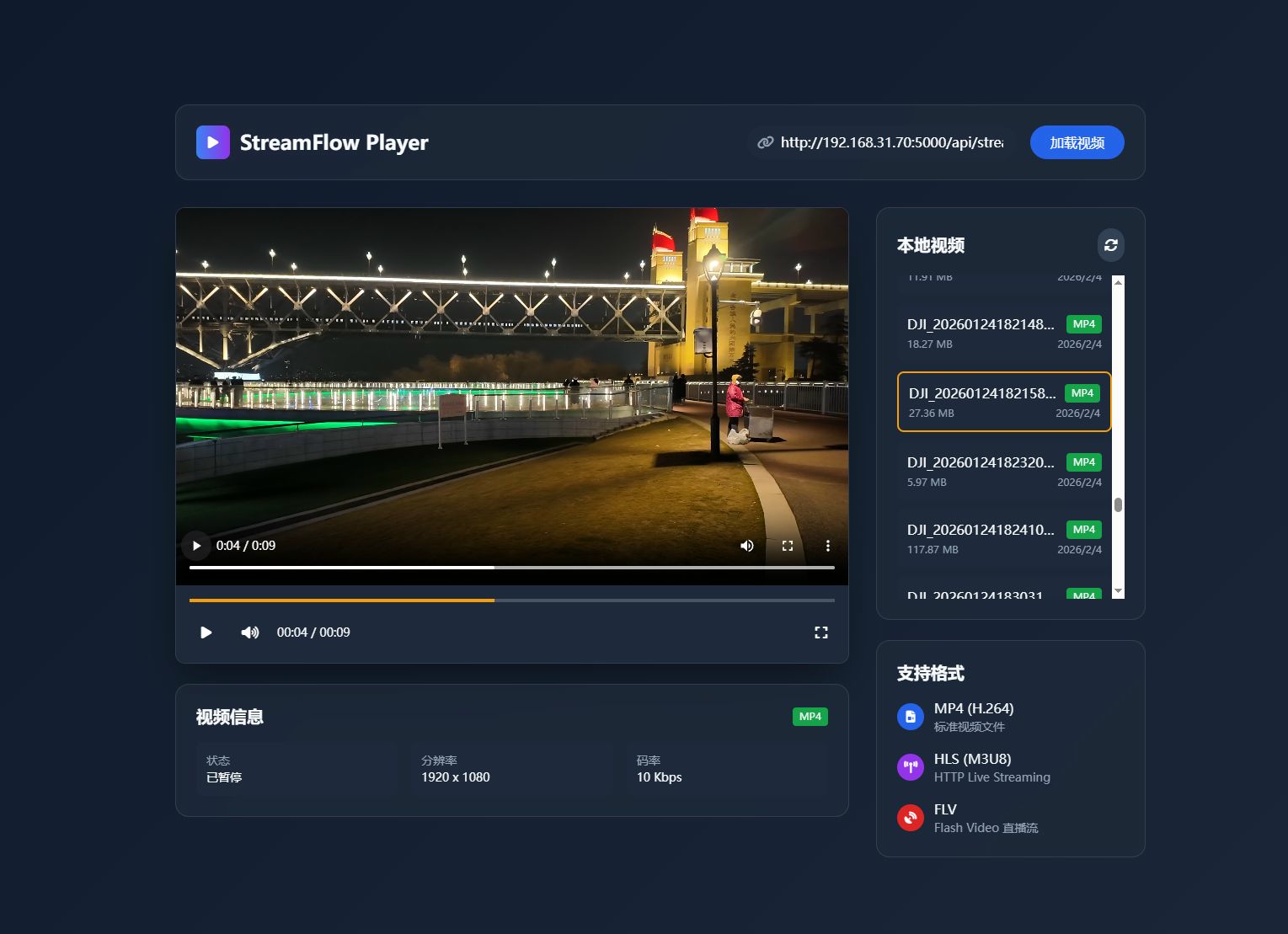
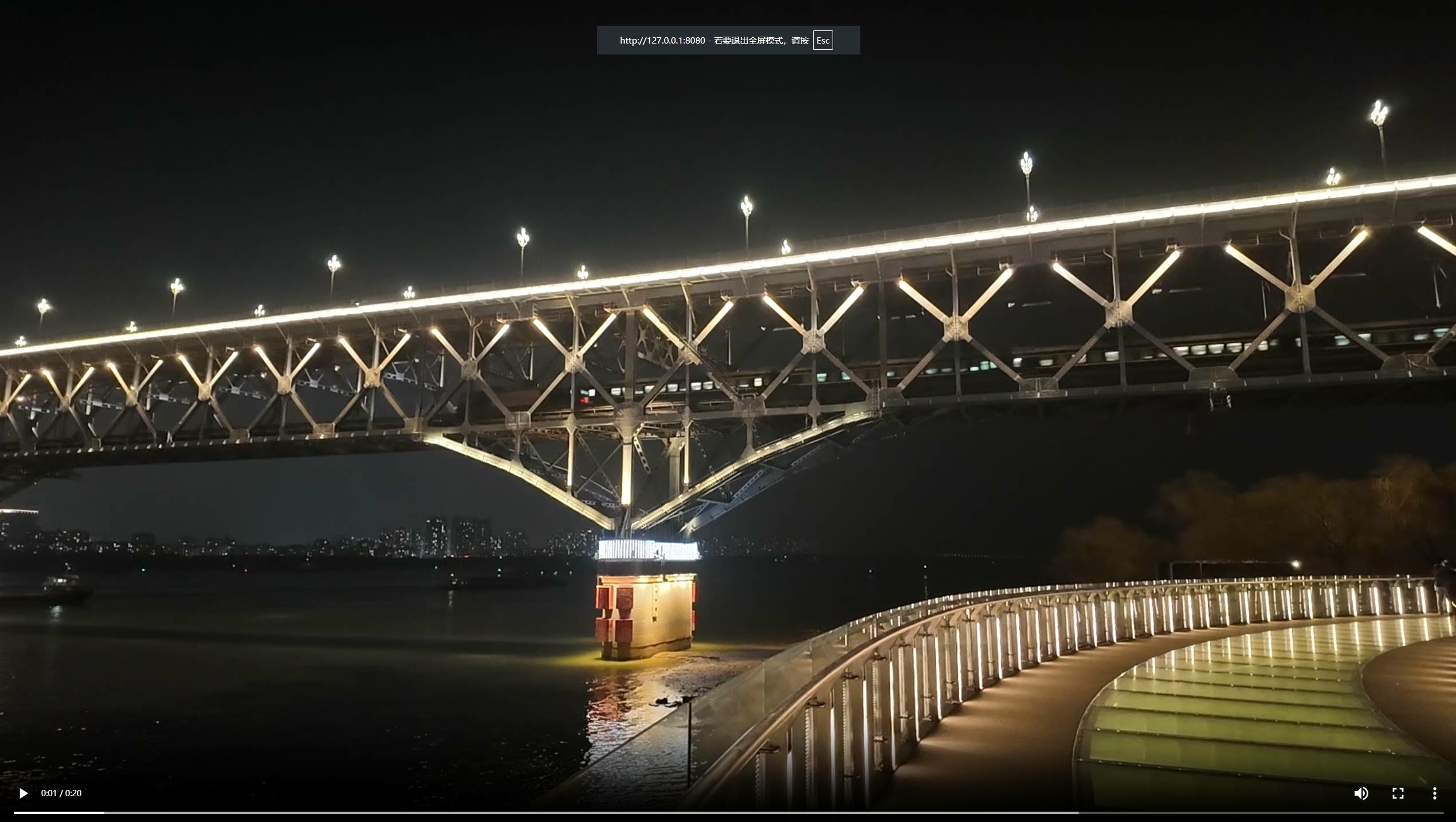
页面可全屏播放。
同个设备只需访问127.0.0.1:【前端启动端口】即可, 局域网下需替换为启动的设备.
ipad端:
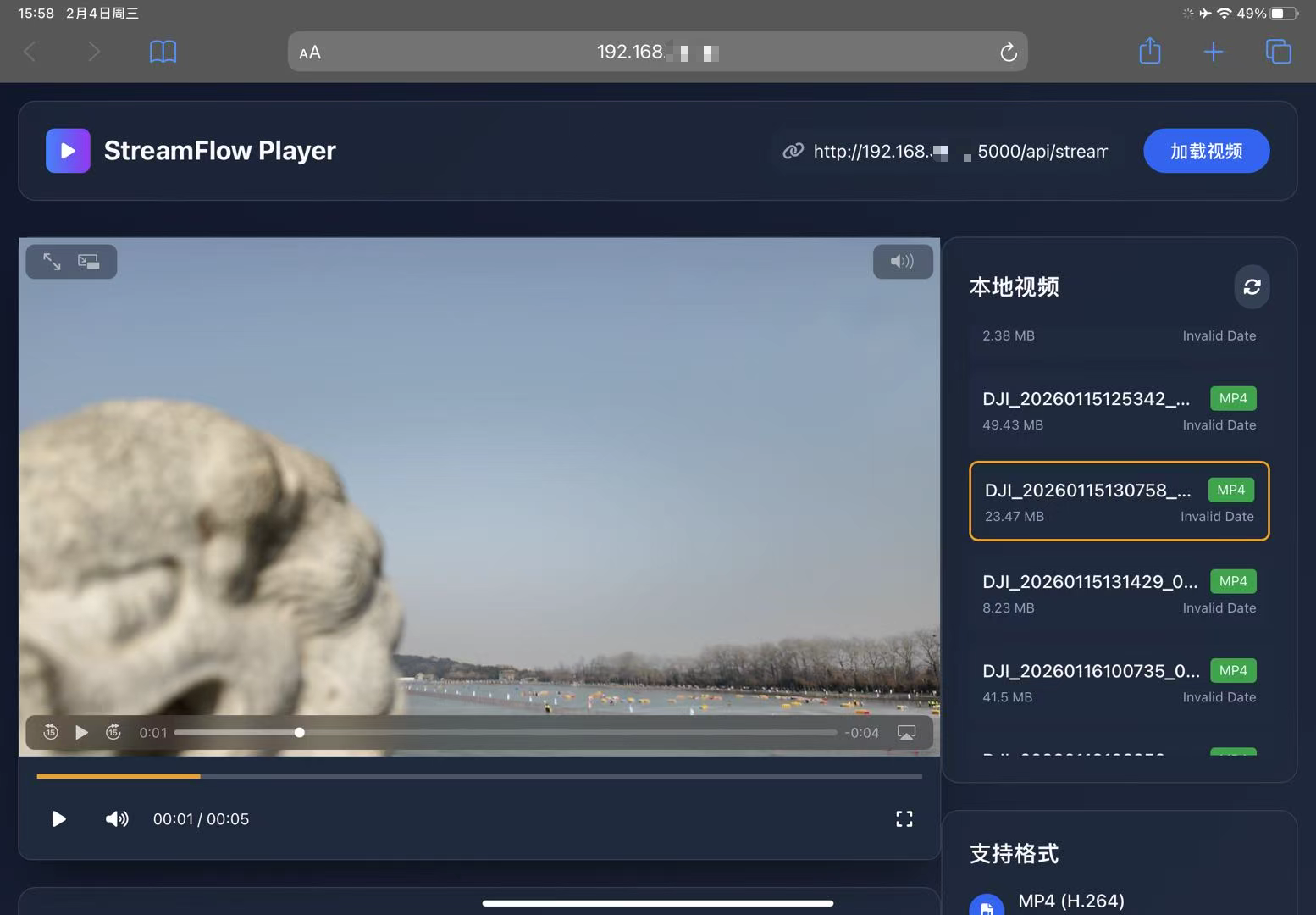
列表设置了监听事件,点哪个就会播放哪个视频
代码
代码结构如下,我们比较关心app.py和index.html.
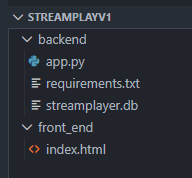
app.py的VIDEO_DIR 指定要访问的视频目录。
app.py
当前暂不支持流式传输,下个版本可能会优化。
python
from flask import Flask, jsonify, send_file, request
from flask_cors import CORS
import os
import sqlite3
import mimetypes
from datetime import datetime

app = Flask(__name__)
CORS(app)  # 允许跨域请求

# 配置视频文件目录
# VIDEO_DIR = os.path.join(os.path.dirname(__file__), 'videos')
VIDEO_DIR = 'H:/DJ/DJI_001'
if not os.path.exists(VIDEO_DIR):
    os.makedirs(VIDEO_DIR)

# 数据库配置
DB_NAME = 'streamplayer.db'

# 初始化数据库
def init_db():
    conn = sqlite3.connect(DB_NAME)
    cursor = conn.cursor()
    # 创建视频文件表
    cursor.execute('''
    CREATE TABLE IF NOT EXISTS videos (
        id INTEGER PRIMARY KEY AUTOINCREMENT,
        filename TEXT NOT NULL,
        filepath TEXT NOT NULL,
        filesize INTEGER,
        duration INTEGER,
        format TEXT,
        created_at TIMESTAMP DEFAULT CURRENT_TIMESTAMP
    )
    ''')
    conn.commit()
    conn.close()

# 扫描视频目录并更新数据库
def scan_videos():
    conn = sqlite3.connect(DB_NAME)
    cursor = conn.cursor()

    # 支持的视频格式
    video_extensions = {'.mp4', '.mkv', '.avi', '.mov', '.wmv', '.flv', '.webm'}

    # 清空现有数据
    cursor.execute('DELETE FROM videos')

    # 扫描目录
    for filename in os.listdir(VIDEO_DIR):
        filepath = os.path.join(VIDEO_DIR, filename)
        if os.path.isfile(filepath):
            ext = os.path.splitext(filename)[1].lower()
            if ext in video_extensions:
                filesize = os.path.getsize(filepath)
                cursor.execute('''
                INSERT INTO videos (filename, filepath, filesize, format)
                VALUES (?, ?, ?, ?)
                ''', (filename, filepath, filesize, ext[1:]))

    conn.commit()
    conn.close()


# API路由
@app.route('/api/videos', methods=['GET'])
def get_videos():
    """获取视频文件列表"""
    conn = sqlite3.connect(DB_NAME)
    conn.row_factory = sqlite3.Row
    cursor = conn.cursor()

    # 重新扫描视频目录
    scan_videos()

    cursor.execute('SELECT id, filename, filesize, format, created_at FROM videos')
    videos = [dict(row) for row in cursor.fetchall()]

    conn.close()
    return jsonify(videos)

@app.route('/api/video/<int:video_id>', methods=['GET'])
def get_video(video_id):
    """获取单个视频文件信息"""
    conn = sqlite3.connect(DB_NAME)
    conn.row_factory = sqlite3.Row
    cursor = conn.cursor()

    cursor.execute('SELECT * FROM videos WHERE id = ?', (video_id,))
    video = cursor.fetchone()

    conn.close()

    if video:
        return jsonify(dict(video))
    else:
        return jsonify({'error': '视频文件不存在'}), 404

@app.route('/api/stream/<int:video_id>', methods=['GET'])
def stream_video(video_id):
    """流式传输视频文件"""
    conn = sqlite3.connect(DB_NAME)
    cursor = conn.cursor()

    cursor.execute('SELECT filepath, filename FROM videos WHERE id = ?', (video_id,))
    video = cursor.fetchone()

    conn.close()

    if not video:
        return jsonify({'error': '视频文件不存在'}), 404

    filepath, filename = video

    # 获取文件的MIME类型
    mime_type, _ = mimetypes.guess_type(filepath)
    if mime_type is None:
        mime_type = 'video/mp4'  # 默认类型

    # 发送文件(todo: 支持断点续传, 流式传输)
    return send_file(
        filepath,
        mimetype=mime_type,
        as_attachment=False,
        conditional=True
    )

@app.route('/api/upload', methods=['POST'])
def upload_video():
    """上传视频文件"""
    if 'file' not in request.files:
        return jsonify({'error': '没有选择文件'}), 400

    file = request.files['file']
    if file.filename == '':
        return jsonify({'error': '文件名不能为空'}), 400

    # 检查文件格式
    ext = os.path.splitext(file.filename)[1].lower()
    video_extensions = {'.mp4', '.mkv', '.avi', '.mov', '.wmv', '.flv', '.webm'}
    if ext not in video_extensions:
        return jsonify({'error': '不支持的文件格式'}), 400

    # 保存文件
    filepath = os.path.join(VIDEO_DIR, file.filename)
    file.save(filepath)

    # 更新数据库
    scan_videos()

    return jsonify({'message': '文件上传成功', 'filename': file.filename})

@app.route('/api/refresh', methods=['POST'])
def refresh_videos():
    """刷新视频列表"""
    scan_videos()
    return jsonify({'message': '视频列表已刷新'})

# 健康检查路由
@app.route('/api/health', methods=['GET'])
def health_check():
    return jsonify({'status': 'ok', 'timestamp': datetime.now().isoformat()})

if __name__ == '__main__':
    # 初始化数据库
    init_db()
    scan_videos()
    app.run(host='0.0.0.0', port=5000, debug=True)
requirements.txt中是一些依赖
txt
Flask==2.0.1
Flask-CORS==3.0.10
SQLAlchemy==1.4.27
Werkzeug==2.0.1
python-dotenv==0.19.0
index.html
html
<!DOCTYPE html>
<html lang="zh-CN">
<head>
<meta charset="UTF-8">
<meta name="viewport" content="width=device-width, initial-scale=1.0">
<title>StreamFlow Player-Andy Dennis</title>
<script src="https://cdn.tailwindcss.com"></script>
<link href="https://cdn.bootcdn.net/ajax/libs/font-awesome/6.4.0/css/all.min.css" rel="stylesheet">
<style>
/* 自定义样式 - 基于设计系统 */
:root {
--primary: #3b82f6;
--primary-dark: #1d4ed8;
--secondary: #64748b;
--accent: #f59e0b;
--dark: #1e293b;
--light: #f8fafc;
}
body {
font-family: 'Inter', system-ui, -apple-system, sans-serif;
background: linear-gradient(135deg, #0f172a 0%, #1e293b 100%);
min-height: 100vh;
color: var(--light);
}
.glass-effect {
background: rgba(30, 41, 59, 0.7);
backdrop-filter: blur(10px);
border: 1px solid rgba(255, 255, 255, 0.1);
}
.player-container {
box-shadow: 0 25px 50px -12px rgba(0, 0, 0, 0.5);
border-radius: 12px;
overflow: hidden;
}
.progress-bar {
height: 4px;
background: rgba(255, 255, 255, 0.2);
position: relative;
cursor: pointer;
}
.progress-filled {
height: 100%;
background: var(--accent);
width: 0%;
transition: width 0.1s ease;
}
.control-btn {
transition: all 0.2s ease;
border-radius: 50%;
}
.control-btn:hover {
background: rgba(255, 255, 255, 0.1);
transform: scale(1.05);
}
.format-badge {
background: var(--primary);
padding: 2px 8px;
border-radius: 4px;
font-size: 0.75rem;
margin-left: 8px;
}
.video-item {
transition: all 0.2s ease;
}
.video-item:hover {
transform: translateY(-2px);
}
.video-item.active {
border: 2px solid var(--accent);
}
.reload-btn {
transition: all 0.2s ease;
}
.reload-btn:hover {
transform: rotate(180deg);
}
</style>
</head>
<body class="min-h-screen flex items-center justify-center p-4">
<div class="w-full max-w-6xl mx-auto">
<!-- 头部 -->
<header class="glass-effect rounded-2xl p-6 mb-8">
<div class="flex flex-col md:flex-row justify-between items-center">
<div class="flex items-center mb-4 md:mb-0">
<div class="w-10 h-10 bg-gradient-to-r from-blue-500 to-purple-600 rounded-lg flex items-center justify-center mr-3">
<i class="fas fa-play text-white"></i>
</div>
<h1 class="text-2xl font-bold">StreamFlow Player</h1>
</div>
<div class="flex items-center space-x-4">
<div class="relative">
<input type="text" id="videoUrl" placeholder="粘贴视频链接 (MP4, M3U8, FLV)"
class="bg-slate-800 text-white rounded-full py-2 px-4 pl-10 w-80 focus:outline-none focus:ring-2 focus:ring-blue-500">
<i class="fas fa-link absolute left-3 top-3 text-slate-400"></i>
</div>
<button id="loadVideo" class="bg-blue-600 hover:bg-blue-700 text-white rounded-full py-2 px-6 font-medium transition-colors">
加载视频
</button>
</div>
</div>
</header>
<!-- 主内容区域 -->
<div class="flex flex-col lg:flex-row gap-8">
<!-- 播放器区域 -->
<main class="flex-1">
<div class="player-container glass-effect">
<!-- 视频播放器 -->
<div id="player" class="w-full aspect-video bg-black rounded-t-lg overflow-hidden flex items-center justify-center"></div>
<!-- 自定义控制条 -->
<div class="p-4 bg-slate-800">
<!-- 进度条 -->
<div class="progress-bar mb-4">
<div class="progress-filled"></div>
</div>
<!-- 控制按钮 -->
<div class="flex justify-between items-center">
<div class="flex items-center space-x-4">
<button id="playPause" class="control-btn w-10 h-10 flex items-center justify-center">
<i class="fas fa-play text-white"></i>
</button>
<button id="mute" class="control-btn w-8 h-8 flex items-center justify-center">
<i class="fas fa-volume-up text-white"></i>
</button>
<div class="text-sm">
<span id="currentTime">00:00</span> / <span id="duration">00:00</span>
</div>
</div>
<div class="flex items-center space-x-4">
<button id="fullscreen" class="control-btn w-8 h-8 flex items-center justify-center">
<i class="fas fa-expand text-white"></i>
</button>
</div>
</div>
</div>
</div>
<!-- 视频信息 -->
<div class="glass-effect rounded-2xl p-6 mt-6">
<div class="flex justify-between items-center mb-4">
<h2 class="text-xl font-bold">视频信息</h2>
<div id="formatIndicator" class="format-badge">未加载</div>
</div>
<div class="grid grid-cols-1 md:grid-cols-3 gap-4 text-sm">
<div class="bg-slate-800 p-3 rounded-lg">
<div class="text-slate-400">状态</div>
<div id="statusInfo">等待输入视频链接</div>
</div>
<div class="bg-slate-800 p-3 rounded-lg">
<div class="text-slate-400">分辨率</div>
<div id="resolutionInfo">-</div>
</div>
<div class="bg-slate-800 p-3 rounded-lg">
<div class="text-slate-400">码率</div>
<div id="bitrateInfo">-</div>
</div>
</div>
</div>
</main>
<!-- 侧边栏 -->
<aside class="w-full lg:w-80">
<!-- 本地视频列表 -->
<div class="glass-effect rounded-2xl p-6 mb-6">
<div class="flex justify-between items-center mb-4">
<h2 class="text-xl font-bold">本地视频</h2>
<button id="refreshVideos" class="reload-btn bg-slate-700 hover:bg-slate-600 p-2 rounded-full">
<i class="fas fa-sync-alt text-white"></i>
</button>
</div>
<div id="videoList" class="space-y-3 max-h-96 overflow-y-auto">
<!-- 视频列表将通过JavaScript动态加载 -->
<div class="text-center text-slate-400 py-8">
<i class="fas fa-spinner fa-spin text-2xl mb-2"></i>
<p>加载视频列表中...</p>
</div>
</div>
</div>
<!-- 格式支持 -->
<div class="glass-effect rounded-2xl p-6">
<h2 class="text-xl font-bold mb-4">支持格式</h2>
<div class="space-y-4">
<div class="flex items-center">
<div class="w-8 h-8 bg-blue-600 rounded-full flex items-center justify-center mr-3">
<i class="fas fa-file-video text-white text-sm"></i>
</div>
<div>
<div class="font-medium">MP4 (H.264)</div>
<div class="text-sm text-slate-400">标准视频文件</div>
</div>
</div>
<div class="flex items-center">
<div class="w-8 h-8 bg-purple-600 rounded-full flex items-center justify-center mr-3">
<i class="fas fa-broadcast-tower text-white text-sm"></i>
</div>
<div>
<div class="font-medium">HLS (M3U8)</div>
<div class="text-sm text-slate-400">HTTP Live Streaming</div>
</div>
</div>
<div class="flex items-center">
<div class="w-8 h-8 bg-red-600 rounded-full flex items-center justify-center mr-3">
<i class="fas fa-satellite-dish text-white text-sm"></i>
</div>
<div>
<div class="font-medium">FLV</div>
<div class="text-sm text-slate-400">Flash Video 直播流</div>
</div>
</div>
</div>
</div>
</aside>
</div>
</div>
<!-- 引入Flowplayer库 -->
<link rel="stylesheet" href="https://cdnjs.cloudflare.com/ajax/libs/flowplayer/7.2.7/flowplayer.min.css">
<script src="https://cdnjs.cloudflare.com/ajax/libs/flowplayer/7.2.7/flowplayer.min.js"></script>
<script>
// 初始化Flowplayer [2,3](@ref)
document.addEventListener('DOMContentLoaded', function() {
// 获取DOM元素
const videoUrlInput = document.getElementById('videoUrl');
const loadVideoBtn = document.getElementById('loadVideo');
const playPauseBtn = document.getElementById('playPause');
const muteBtn = document.getElementById('mute');
const fullscreenBtn = document.getElementById('fullscreen');
const currentTimeEl = document.getElementById('currentTime');
const durationEl = document.getElementById('duration');
const progressBar = document.querySelector('.progress-bar');
const progressFilled = document.querySelector('.progress-filled');
const formatIndicator = document.getElementById('formatIndicator');
const statusInfo = document.getElementById('statusInfo');
const resolutionInfo = document.getElementById('resolutionInfo');
const bitrateInfo = document.getElementById('bitrateInfo');
const videoListEl = document.getElementById('videoList');
const refreshVideosBtn = document.getElementById('refreshVideos');
let player = null;
let currentVideoId = null;
// 后端API地址
const API_BASE_URL = 'http://192.168.31.70:5000/api';
// 加载视频列表
function loadVideoList() {
videoListEl.innerHTML = `
<div class="text-center text-slate-400 py-8">
<i class="fas fa-spinner fa-spin text-2xl mb-2"></i>
<p>加载视频列表中...</p>
</div>
`;
fetch(`${API_BASE_URL}/videos`)
.then(response => response.json())
.then(videos => {
if (videos.length === 0) {
videoListEl.innerHTML = `
<div class="text-center text-slate-400 py-8">
<i class="fas fa-video text-2xl mb-2"></i>
<p>没有找到视频文件</p>
<p class="text-sm mt-2">请将视频文件放入 backend/videos 目录</p>
</div>
`;
} else {
videoListEl.innerHTML = '';
videos.forEach(video => {
const videoItem = document.createElement('div');
videoItem.className = `video-item bg-slate-800 p-3 rounded-lg cursor-pointer hover:bg-slate-700 transition-colors ${currentVideoId === video.id ? 'active' : ''}`;
videoItem.dataset.videoId = video.id;
videoItem.dataset.videoFormat = video.format;
// 格式化文件大小
const formattedSize = formatFileSize(video.filesize);
videoItem.innerHTML = `
<div class="flex justify-between items-center">
<div class="font-medium truncate">${video.filename}</div>
<span class="format-badge bg-green-600">${video.format.toUpperCase()}</span>
</div>
<div class="flex justify-between items-center text-xs text-slate-400 mt-1">
<span>${formattedSize}</span>
<span>${new Date(video.created_at).toLocaleDateString()}</span>
</div>
`;
videoItem.addEventListener('click', () => {
playLocalVideo(video.id, video.filename, video.format);
});
videoListEl.appendChild(videoItem);
});
}
})
.catch(error => {
console.error('加载视频列表失败:', error);
videoListEl.innerHTML = `
<div class="text-center text-red-400 py-8">
<i class="fas fa-exclamation-triangle text-2xl mb-2"></i>
<p>加载视频列表失败</p>
<p class="text-sm mt-2">请检查后端服务是否运行</p>
</div>
`;
});
}
// 播放本地视频
function playLocalVideo(videoId, filename, format) {
currentVideoId = videoId;
// 更新视频项的激活状态
document.querySelectorAll('.video-item').forEach(item => {
if (parseInt(item.dataset.videoId) === videoId) {
item.classList.add('active');
} else {
item.classList.remove('active');
}
});
const videoUrl = `${API_BASE_URL}/stream/${videoId}`;
videoUrlInput.value = videoUrl;
statusInfo.textContent = `加载视频: ${filename}`;
initPlayer(videoUrl, format);
}
// 初始化播放器
function initPlayer(videoUrl, format = 'mp4') {
// 清理现有播放器
if (player && typeof player.destroy === 'function') {
player.destroy();
} else {
// 如果destroy方法不存在,重新创建播放器容器
const playerContainer = document.getElementById('player');
if (playerContainer) {
playerContainer.innerHTML = '';
}
}
// 设置格式指示器
let type = 'mp4';
if (format === 'm3u8' || videoUrl.match(/\.m3u8(?:\?|$)/i)) {
type = 'm3u8';
formatIndicator.textContent = 'HLS';
formatIndicator.className = 'format-badge bg-purple-600';
} else if (format === 'flv' || videoUrl.match(/\.flv(?:\?|$)/i)) {
type = 'flv';
formatIndicator.textContent = 'FLV';
formatIndicator.className = 'format-badge bg-red-600';
} else {
formatIndicator.textContent = 'MP4';
formatIndicator.className = 'format-badge bg-green-600';
}
// 初始化播放器
try {
// 清空播放器容器
const playerContainer = document.getElementById('player');
if (playerContainer) {
playerContainer.innerHTML = '';
}
// 使用原生HTML5 video标签
const videoElement = document.createElement('video');
videoElement.id = 'videoPlayer';
videoElement.className = 'w-full h-full';
videoElement.controls = true;
videoElement.autoplay = true;
videoElement.muted = false;
videoElement.style.objectFit = 'fill';
videoElement.style.width = '100%';
videoElement.style.height = '100%';
const sourceElement = document.createElement('source');
sourceElement.src = videoUrl;
sourceElement.type = type === 'flv' ? 'video/flv' : 'video/mp4';
videoElement.appendChild(sourceElement);
playerContainer.appendChild(videoElement);
// 保存播放器实例
player = videoElement;
// 添加事件监听器
videoElement.addEventListener('loadedmetadata', function() {
statusInfo.textContent = '播放器准备就绪';
console.log('Video metadata loaded');
// 更新视频分辨率信息
if (videoElement.videoWidth && videoElement.videoHeight) {
resolutionInfo.textContent = `${videoElement.videoWidth} x ${videoElement.videoHeight}`;
} else {
resolutionInfo.textContent = '未知';
}
// 更新视频码率信息
// 尝试通过视频文件大小和时长估算码率
// 注意:这种方法只是估算,实际码率可能不同
if (videoElement.duration > 0) {
// 尝试获取视频文件大小(需要后端支持)
// 这里使用一个简单的估算方法
const estimatedBitrate = Math.round((videoElement.duration * 1000) / 1024); // 估算值
bitrateInfo.textContent = `${estimatedBitrate} Kbps`;
} else {
bitrateInfo.textContent = '未知';
}
});
videoElement.addEventListener('play', function() {
statusInfo.textContent = '播放中';
playPauseBtn.innerHTML = '<i class="fas fa-pause text-white"></i>';
});
videoElement.addEventListener('pause', function() {
statusInfo.textContent = '已暂停';
playPauseBtn.innerHTML = '<i class="fas fa-play text-white"></i>';
});
videoElement.addEventListener('error', function(error) {
statusInfo.textContent = '播放错误';
console.error('Video error:', error);
});
// 更新时间显示
setInterval(function() {
if (player && !isNaN(player.duration)) {
const currentTime = player.currentTime;
const duration = player.duration;
currentTimeEl.textContent = formatTime(currentTime);
durationEl.textContent = formatTime(duration);
// 更新进度条
if (duration > 0) {
const percent = (currentTime / duration) * 100;
progressFilled.style.width = percent + '%';
}
}
}, 500);
} catch (error) {
console.error('初始化播放器失败:', error);
statusInfo.textContent = '播放器初始化失败,请检查视频链接';
player = null;
return;
}
// 播放器事件监听器已在创建video元素时添加
}
// 格式化时间
function formatTime(seconds) {
const mins = Math.floor(seconds / 60);
const secs = Math.floor(seconds % 60);
return `${mins.toString().padStart(2, '0')}:${secs.toString().padStart(2, '0')}`;
}
// 格式化文件大小
function formatFileSize(bytes) {
if (bytes === 0) return '0 B';
const k = 1024;
const sizes = ['B', 'KB', 'MB', 'GB'];
const i = Math.floor(Math.log(bytes) / Math.log(k));
return parseFloat((bytes / Math.pow(k, i)).toFixed(2)) + ' ' + sizes[i];
}
// 加载视频按钮事件
loadVideoBtn.addEventListener('click', function() {
const videoUrl = videoUrlInput.value.trim();
if (!videoUrl) {
alert('请输入视频链接');
return;
}
statusInfo.textContent = '加载中...';
initPlayer(videoUrl);
});
// 播放/暂停按钮事件
playPauseBtn.addEventListener('click', function() {
if (player) {
if (player.paused) {
player.play();
} else {
player.pause();
}
} else {
// 如果播放器未初始化,尝试加载输入框中的视频链接
const videoUrl = videoUrlInput.value.trim();
if (videoUrl) {
statusInfo.textContent = '加载中...';
initPlayer(videoUrl);
} else {
statusInfo.textContent = '请先输入视频链接或选择本地视频';
}
}
});
// 静音按钮事件
muteBtn.addEventListener('click', function() {
if (player) {
player.muted = !player.muted;
muteBtn.innerHTML = player.muted ?
'<i class="fas fa-volume-mute text-white"></i>' :
'<i class="fas fa-volume-up text-white"></i>';
}
});
// 全屏按钮事件
fullscreenBtn.addEventListener('click', function() {
if (player) {
const playerContainer = document.getElementById('player');
if (playerContainer.requestFullscreen) {
playerContainer.requestFullscreen();
} else if (playerContainer.mozRequestFullScreen) {
playerContainer.mozRequestFullScreen();
} else if (playerContainer.webkitRequestFullscreen) {
playerContainer.webkitRequestFullscreen();
} else if (playerContainer.msRequestFullscreen) {
playerContainer.msRequestFullscreen();
}
}
});
// 进度条点击事件
progressBar.addEventListener('click', function(e) {
if (player && !isNaN(player.duration)) {
const rect = progressBar.getBoundingClientRect();
const percent = (e.clientX - rect.left) / rect.width;
const time = percent * player.duration;
player.currentTime = time;
}
});
// 刷新视频列表按钮事件
refreshVideosBtn.addEventListener('click', function() {
loadVideoList();
});
// 回车键支持
videoUrlInput.addEventListener('keypress', function(e) {
if (e.key === 'Enter') {
loadVideoBtn.click();
}
});
// 初始化加载视频列表
loadVideoList();
});
</script>
</body>
</html>启动
先在backend框架, 启动后端
python
python app.py在前端, 我比较喜欢用live-server, 这是个npm的工具
没有的话,
bash
npm install -g live-server然后再front_end
bash
live-server