欢迎加入开源鸿蒙跨平台社区:开源鸿蒙跨平台开发者社区
Flutter for OpenHarmony 实战:2048游戏完整开发指南
文章目录
- [Flutter for OpenHarmony 实战:2048游戏完整开发指南](#Flutter for OpenHarmony 实战:2048游戏完整开发指南)
-
- 摘要
- 一、项目背景与功能概述
-
- [1.1 2048游戏介绍](#1.1 2048游戏介绍)
- [1.2 应用功能规划](#1.2 应用功能规划)
- [1.3 方块颜色设计](#1.3 方块颜色设计)
- 二、数据模型设计
-
- [2.1 游戏数据结构](#2.1 游戏数据结构)
- [2.2 游戏初始化](#2.2 游戏初始化)
- 三、随机方块生成
-
- [3.1 添加随机方块](#3.1 添加随机方块)
- 四、移动与合并算法
-
- [4.1 向左移动](#4.1 向左移动)
- [4.2 向右移动](#4.2 向右移动)
- [4.3 向上移动](#4.3 向上移动)
- [4.4 向下移动](#4.4 向下移动)
- 五、游戏状态管理
-
- [5.1 移动处理](#5.1 移动处理)
- [5.2 检查游戏状态](#5.2 检查游戏状态)
- [5.3 检查是否还能移动](#5.3 检查是否还能移动)
- 六、UI界面实现
-
- [6.1 网格构建](#6.1 网格构建)
- [6.2 方块UI](#6.2 方块UI)
- [6.3 颜色映射](#6.3 颜色映射)
- [6.4 控制按钮](#6.4 控制按钮)
- 七、总结
摘要
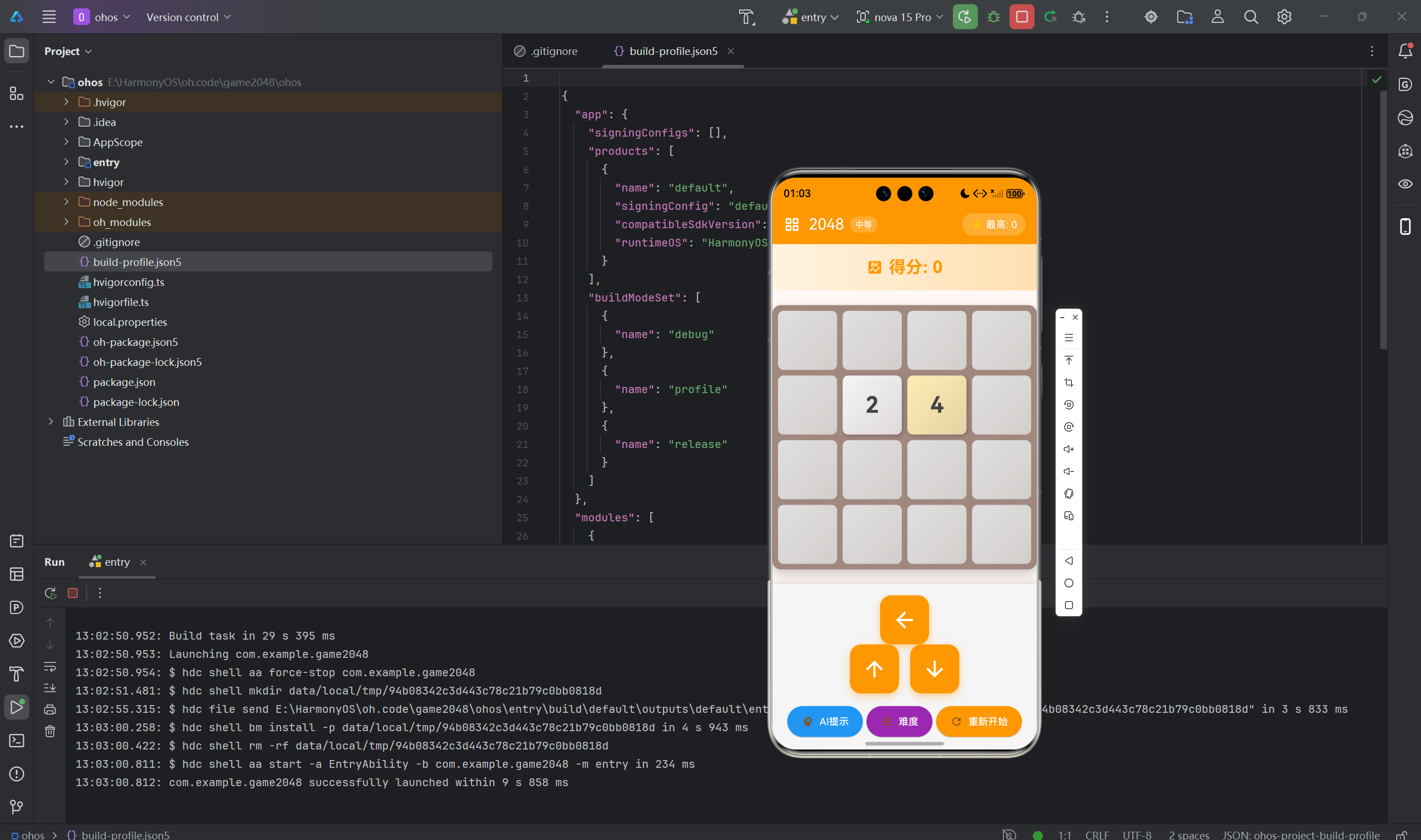
2048是由Gabriel Cirulla在2014年创造的经典益智游戏,通过滑动屏幕合并相同数字的方块,目标是合成2048这个数字。本文将详细介绍如何使用Flutter for OpenHarmony框架开发一款功能完整的2048游戏。文章涵盖了方块合并算法、随机生成策略、分数计算、游戏状态管理等核心技术点。通过本文学习,读者将掌握Flutter在滑动类游戏开发中的完整流程,了解数组操作和游戏逻辑的实现。
一、项目背景与功能概述
1.1 2048游戏介绍
2048是一款简单但极具挑战性的益智游戏:
- 目标:合成数字为2048的方块
- 规则 :
- 滑动时所有方块向该方向移动
- 相同数字的方块碰撞时合并
- 每次移动后在空位生成2或4
- 无法移动时游戏结束
1.2 应用功能规划
| 功能模块 | 具体功能 |
|---|---|
| 方向控制 | 上下左右四个方向移动 |
| 方块合并 | 相同数字合并为2倍值 |
| 随机生成 | 90%概率生成2,10%生成4 |
| 分数计算 | 每次合并累加分数 |
| 最高分记录 | 保存历史最高分 |
| 胜利判断 | 合成2048时获胜 |
| 失败判断 | 无法移动时游戏结束 |
| 颜色映射 | 不同数字不同颜色 |
1.3 方块颜色设计
| 数字 | 背景色 | 文字色 |
|---|---|---|
| 0 | 灰色300 | - |
| 2 | 灰色100 | 深灰 |
| 4 | 琥珀100 | 深灰 |
| 8 | 琥珀200 | 白色 |
| 16 | 橙色200 | 白色 |
| 32 | 橙色300 | 白色 |
| 64 | 橙色400 | 白色 |
| 128 | 深橙300 | 白色 |
| 256 | 深橙400 | 白色 |
| 512 | 红色300 | 白色 |
| 1024 | 红色400 | 白色 |
| 2048 | 红色500 | 白色 |
二、数据模型设计
2.1 游戏数据结构
dart
class _GamePageState extends State<GamePage> {
  // 4×4游戏板
  late List<List<int>> _board;

  // 游戏状态
  int _score = 0;
  int _bestScore = 0;
  bool _gameOver = false;
  bool _gameWon = false;
  final Random _random = Random();
}
2.2 游戏初始化
dart
void _initGame() {
  _board = List.generate(4, (_) => List.filled(4, 0));
  _score = 0;
  _gameOver = false;
  _gameWon = false;

  _addRandomTile();
  _addRandomTile();

  setState(() {});
}
三、随机方块生成
3.1 添加随机方块
dart
void _addRandomTile() {
  final emptyCells = <Point>[];

  // 收集所有空位
  for (int r = 0; r < 4; r++) {
    for (int c = 0; c < 4; c++) {
      if (_board[r][c] == 0) {
        emptyCells.add(Point(r, c));
      }
    }
  }

  // 随机选择一个空位
  if (emptyCells.isNotEmpty) {
    final randomCell = emptyCells[_random.nextInt(emptyCells.length)];
    _board[randomCell.x.toInt()][randomCell.y.toInt()] =
      _random.nextDouble() < 0.9 ? 2 : 4;
  }
}关键设计:
- 90%概率生成2,10%概率生成4
- 只在空位生成
- 每次移动后生成一个新方块
四、移动与合并算法
4.1 向左移动
dart
bool _moveLeft() {
  bool moved = false;

  for (int r = 0; r < 4; r++) {
    // 1. 过滤掉0,收集非零元素
    final row = _board[r].where((n) => n != 0).toList();
    final newRow = <int>[];

    // 2. 合并相同数字
    for (int i = 0; i < row.length; i++) {
      if (i + 1 < row.length && row[i] == row[i + 1]) {
        final merged = row[i] * 2;
        newRow.add(merged);
        _score += merged;
        if (merged == 2048 && !_gameWon) {
          _gameWon = true;
        }
        i++; // 跳过下一个
      } else {
        newRow.add(row[i]);
      }
    }

    // 3. 补齐0
    while (newRow.length < 4) {
      newRow.add(0);
    }

    // 4. 更新棋盘并检测是否有移动
    for (int c = 0; c < 4; c++) {
      if (_board[r][c] != newRow[c]) {
        moved = true;
      }
      _board[r][c] = newRow[c];
    }
  }

  return moved;
}算法步骤:
- 过滤掉空白格(0)
- 合并相邻的相同数字
- 在末尾补齐0
- 检测是否有变化
4.2 向右移动
dart
bool _moveRight() {
  bool moved = false;

  for (int r = 0; r < 4; r++) {
    final row = _board[r].where((n) => n != 0).toList();
    final newRow = <int>[];

    // 从右向左合并
    for (int i = row.length - 1; i >= 0; i--) {
      if (i - 1 >= 0 && row[i] == row[i - 1]) {
        final merged = row[i] * 2;
        newRow.insert(0, merged);
        _score += merged;
        if (merged == 2048 && !_gameWon) {
          _gameWon = true;
        }
        i--; // 跳过前一个
      } else {
        newRow.insert(0, row[i]);
      }
    }

    // 在前面补齐0
    while (newRow.length < 4) {
      newRow.insert(0, 0);
    }

    for (int c = 0; c < 4; c++) {
      if (_board[r][c] != newRow[c]) {
        moved = true;
      }
      _board[r][c] = newRow[c];
    }
  }

  return moved;
}
4.3 向上移动
dart
bool _moveUp() {
  bool moved = false;

  for (int c = 0; c < 4; c++) {
    // 收集列的非零元素
    final col = <int>[];
    for (int r = 0; r < 4; r++) {
      if (_board[r][c] != 0) {
        col.add(_board[r][c]);
      }
    }

    final newCol = <int>[];

    // 从上向下合并
    for (int i = 0; i < col.length; i++) {
      if (i + 1 < col.length && col[i] == col[i + 1]) {
        final merged = col[i] * 2;
        newCol.add(merged);
        _score += merged;
        if (merged == 2048 && !_gameWon) {
          _gameWon = true;
        }
        i++; // 跳过下一个
      } else {
        newCol.add(col[i]);
      }
    }

    while (newCol.length < 4) {
      newCol.add(0);
    }

    for (int r = 0; r < 4; r++) {
      if (_board[r][c] != newCol[r]) {
        moved = true;
      }
      _board[r][c] = newCol[r];
    }
  }

  return moved;
}
4.4 向下移动
dart
bool _moveDown() {
  bool moved = false;

  for (int c = 0; c < 4; c++) {
    final col = <int>[];
    for (int r = 0; r < 4; r++) {
      if (_board[r][c] != 0) {
        col.add(_board[r][c]);
      }
    }

    final newCol = <int>[];

    // 从下向上合并
    for (int i = col.length - 1; i >= 0; i--) {
      if (i - 1 >= 0 && col[i] == col[i - 1]) {
        final merged = col[i] * 2;
        newCol.insert(0, merged);
        _score += merged;
        if (merged == 2048 && !_gameWon) {
          _gameWon = true;
        }
        i--; // 跳过前一个
      } else {
        newCol.insert(0, col[i]);
      }
    }

    while (newCol.length < 4) {
      newCol.insert(0, 0);
    }

    for (int r = 0; r < 4; r++) {
      if (_board[r][c] != newCol[r]) {
        moved = true;
      }
      _board[r][c] = newCol[r];
    }
  }

  return moved;
}
五、游戏状态管理
5.1 移动处理
dart
void _handleMove(String direction) {
  if (_gameOver) return;

  bool moved = false;

  switch (direction) {
    case 'left':
      moved = _moveLeft();
      break;
    case 'right':
      moved = _moveRight();
      break;
    case 'up':
      moved = _moveUp();
      break;
    case 'down':
      moved = _moveDown();
      break;
  }

  if (moved) {
    _addRandomTile();

    if (_score > _bestScore) {
      _bestScore = _score;
    }

    _checkGameState();

    setState(() {});
  }
}
5.2 检查游戏状态
dart
void _checkGameState() {
  // 检查是否胜利
  if (_gameWon) {
    _showWinDialog();
    return;
  }

  // 检查是否游戏结束
  if (!_canMove()) {
    _gameOver = true;
    _showGameOverDialog();
  }
}
5.3 检查是否还能移动
dart
bool _canMove() {
  // 检查是否有空格
  for (int r = 0; r < 4; r++) {
    for (int c = 0; c < 4; c++) {
      if (_board[r][c] == 0) return true;
    }
  }

  // 检查是否有相邻相同的数字
  for (int r = 0; r < 4; r++) {
    for (int c = 0; c < 4; c++) {
      final current = _board[r][c];
      if (c + 1 < 4 && _board[r][c + 1] == current) return true;
      if (r + 1 < 4 && _board[r + 1][c] == current) return true;
    }
  }

  return false;
}检测条件:
- 有空格:可以移动
- 有相邻相同的数字:可以合并
- 都不满足:游戏结束
六、UI界面实现
6.1 网格构建
dart
Widget _buildBoard() {
  return Container(
    padding: const EdgeInsets.all(8),
    decoration: BoxDecoration(
      color: Colors.brown.shade300,
      borderRadius: BorderRadius.circular(8),
    ),
    child: GridView.builder(
      primary: true,
      padding: EdgeInsets.zero,
      gridDelegate: const SliverGridDelegateWithFixedCrossAxisCount(
        crossAxisCount: 4,
        crossAxisSpacing: 8,
        mainAxisSpacing: 8,
        childAspectRatio: 1.0,
      ),
      itemCount: 16,
      itemBuilder: (context, index) {
        final row = index ~/ 4;
        final col = index % 4;
        return _buildTile(row, col);
      },
    ),
  );
}
6.2 方块UI
在这里插入图片描述
dart
Widget _buildTile(int row, int col) {
  final value = _board[row][col];

  return Container(
    decoration: BoxDecoration(
      color: _getTileColor(value),
      borderRadius: BorderRadius.circular(8),
    ),
    child: Center(
      child: value == 0
        ? null
        : Text(
            '$value',
            style: TextStyle(
              fontSize: value >= 1000 ? 24 : 32,
              fontWeight: FontWeight.bold,
              color: _getTextColor(value),
            ),
          ),
    ),
  );
}
6.3 颜色映射
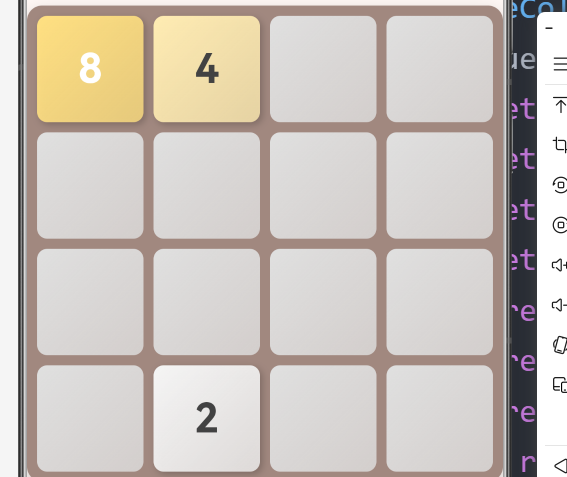
dart
Color _getTileColor(int value) {
  switch (value) {
    case 0: return Colors.grey.shade300;
    case 2: return Colors.grey.shade100;
    case 4: return Colors.amber.shade100;
    case 8: return Colors.amber.shade200;
    case 16: return Colors.orange.shade200;
    case 32: return Colors.orange.shade300;
    case 64: return Colors.orange.shade400;
    case 128: return Colors.deepOrange.shade300;
    case 256: return Colors.deepOrange.shade400;
    case 512: return Colors.red.shade300;
    case 1024: return Colors.red.shade400;
    case 2048: return Colors.red.shade500;
    default: return Colors.purple;
  }
}

Color _getTextColor(int value) {
  if (value <= 4) return Colors.grey.shade800;
  return Colors.white;
}
6.4 控制按钮
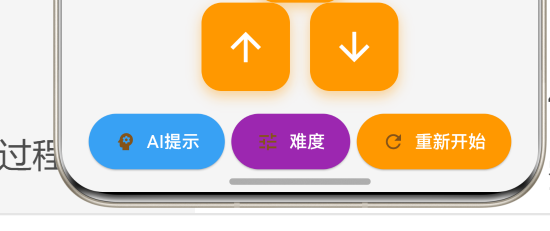
dart
Container(
  padding: const EdgeInsets.all(16),
  color: Colors.grey.shade200,
  child: Column(
    children: [
      Row(
        mainAxisAlignment: MainAxisAlignment.center,
        children: [
          ElevatedButton(
            onPressed: () => _handleMove('left'),
            style: ElevatedButton.styleFrom(
              minimumSize: const Size(60, 60),
            ),
            child: const Icon(Icons.arrow_back, size: 30),
          ),
        ],
      ),
      Row(
        mainAxisAlignment: MainAxisAlignment.center,
        children: [
          ElevatedButton(
            onPressed: () => _handleMove('up'),
            style: ElevatedButton.styleFrom(
              minimumSize: const Size(60, 60),
            ),
            child: const Icon(Icons.arrow_upward, size: 30),
          ),
          const SizedBox(width: 16),
          ElevatedButton(
            onPressed: () => _handleMove('down'),
            style: ElevatedButton.styleFrom(
              minimumSize: const Size(60, 60),
            ),
            child: const Icon(Icons.arrow_downward, size: 30),
          ),
        ],
      ),
      const SizedBox(height: 8),
      ElevatedButton.icon(
        onPressed: () => _initGame(),
        icon: const Icon(Icons.refresh),
        label: const Text('重新开始'),
        style: ElevatedButton.styleFrom(
          backgroundColor: Colors.blue,
          foregroundColor: Colors.white,
        ),
      ),
    ],
  ),
)
七、总结
本文详细介绍了使用Flutter for OpenHarmony开发2048游戏的完整过程,涵盖了以下核心技术点:
- 数据模型:4×4游戏板、分数、游戏状态
- 随机生成:空位收集、概率控制
- 移动算法:四方向移动、数字合并、零填充
- 状态检测:胜利判断、失败检测、可移动检测
- UI实现:网格构建、方块渲染、颜色映射
- 交互设计:方向按钮、重新开始
这个项目展示了Flutter在滑动类游戏开发中的完整流程,特别是数组操作和合并逻辑的实现。
欢迎加入开源鸿蒙跨平台社区 : 开源鸿蒙跨平台开发者社区