python
# encoding: utf-8
# 版权所有 2024 ©涂聚文有限公司
# 许可信息查看:言語成了邀功盡責的功臣,還需要行爲每日來值班嗎
# 描述:
# Author    : geovindu,Geovin Du 涂聚文.
# IDE       : PyCharm 2023.1 python 3.11
# OS        : windows 10
# database  : mysql 9.0 sql server 2019, poostgreSQL 17.0  oracle 11g
# Datetime  : 2026/02/05 22:16
# User      : geovindu
# Product   : PyCharm
# Project   : pyOracleDemo
# File      : Main.py
# explain   : 学习
'''
https://github.com/gradio-app/gradio
https://modelscope.cn/models/ZhipuAI/GLM-OCR
https://www.gradio.app/custom-components/gallery
pip install gradio -i https://pypi.tuna.tsinghua.edu.cn/simple
pip install streamlit -i https://pypi.tuna.tsinghua.edu.cn/simple
pip install pypdf2 -i https://pypi.tuna.tsinghua.edu.cn/simple
pip install PyCryptodome -i https://pypi.tuna.tsinghua.edu.cn/simple
pip install pdfplumber -i https://pypi.tuna.tsinghua.edu.cn/simple


'''
import gradio as gr
import os
import tempfile
import streamlit as st
#from PyPDF2 import PdfReader, errors as PyPDF2Errors
from typing import Optional
from typing import List
import pdfplumber  # 替换PyPDF2
import traceback


class DocumentQASystem:
    """私有化PDF文档问答系统(修复is_encrypted属性错误)"""

    def __init__(self):
        st.set_page_config(
            page_title="私有化文档问答系统",
            layout="wide",
            initial_sidebar_state="collapsed"
        )
        if "doc_text" not in st.session_state:
            st.session_state.doc_text = ""
        self._set_custom_style()

    def _set_custom_style(self):
        st.markdown("""
            <style>
            .stButton>button {width: 100%; margin-top: 10px;}
            .stTextInput>div>div>input {padding: 8px;}
            .doc-preview {max-height: 400px; overflow-y: auto; border: 1px solid #eee; padding: 10px; border-radius: 5px;}
            </style>
        """, unsafe_allow_html=True)

    def _extract_pdf_text(self, pdf_path: str) -> str:
        """
        修复:移除错误的is_encrypted判断,适配pdfplumber加密PDF处理逻辑
        核心:pdfplumber打开加密PDF会抛异常,捕获后引导输入密码
        """
        full_text = ""
        try:
            # 第一步:尝试直接打开PDF(非加密PDF直接处理)
            try:
                with pdfplumber.open(pdf_path) as pdf:
                    # 逐页提取文本(中文友好)
                    for page_num, page in enumerate(pdf.pages, 1):
                        text = page.extract_text()
                        if text:
                            full_text += f"\n=== 第 {page_num} 页 ===\n{text}\n"

            # 第二步:捕获加密PDF异常,引导输入密码
            except pdfplumber.utils.PDFEncryptionError:
                st.warning("检测到该PDF文件已加密,请输入解密密码")
                pdf_password = st.text_input(
                    "PDF解密密码",
                    type="password",
                    key="pdf_pwd",
                    help="输入密码后会自动重新解析"
                )
                # 有密码时尝试解密打开
                if pdf_password:
                    try:
                        with pdfplumber.open(pdf_path, password=pdf_password) as pdf:
                            for page_num, page in enumerate(pdf.pages, 1):
                                text = page.extract_text()
                                if text:
                                    full_text += f"\n=== 第 {page_num} 页 ===\n{text}\n"
                    except Exception:
                        st.error("密码错误!请输入正确的PDF解密密码")
                        return ""
                else:
                    st.info("请输入密码后重试解析")
                    return ""

            return full_text.strip()

        except ImportError:
            st.error("依赖缺失:请执行 `pip install pdfplumber` 安装解析库")
            return ""
        except Exception as e:
            # 打印详细错误(仅调试用,可注释)
            st.error(f"PDF解析失败:{str(e)}")
            st.debug(f"详细错误信息:{traceback.format_exc()}")
            return ""

    def _mock_llm_answer(self, question: str, context: str) -> str:
        return f"【回答】:针对问题"{question}",上下文中检索到相关内容:{context[:100]}..."

    def render_ui(self):
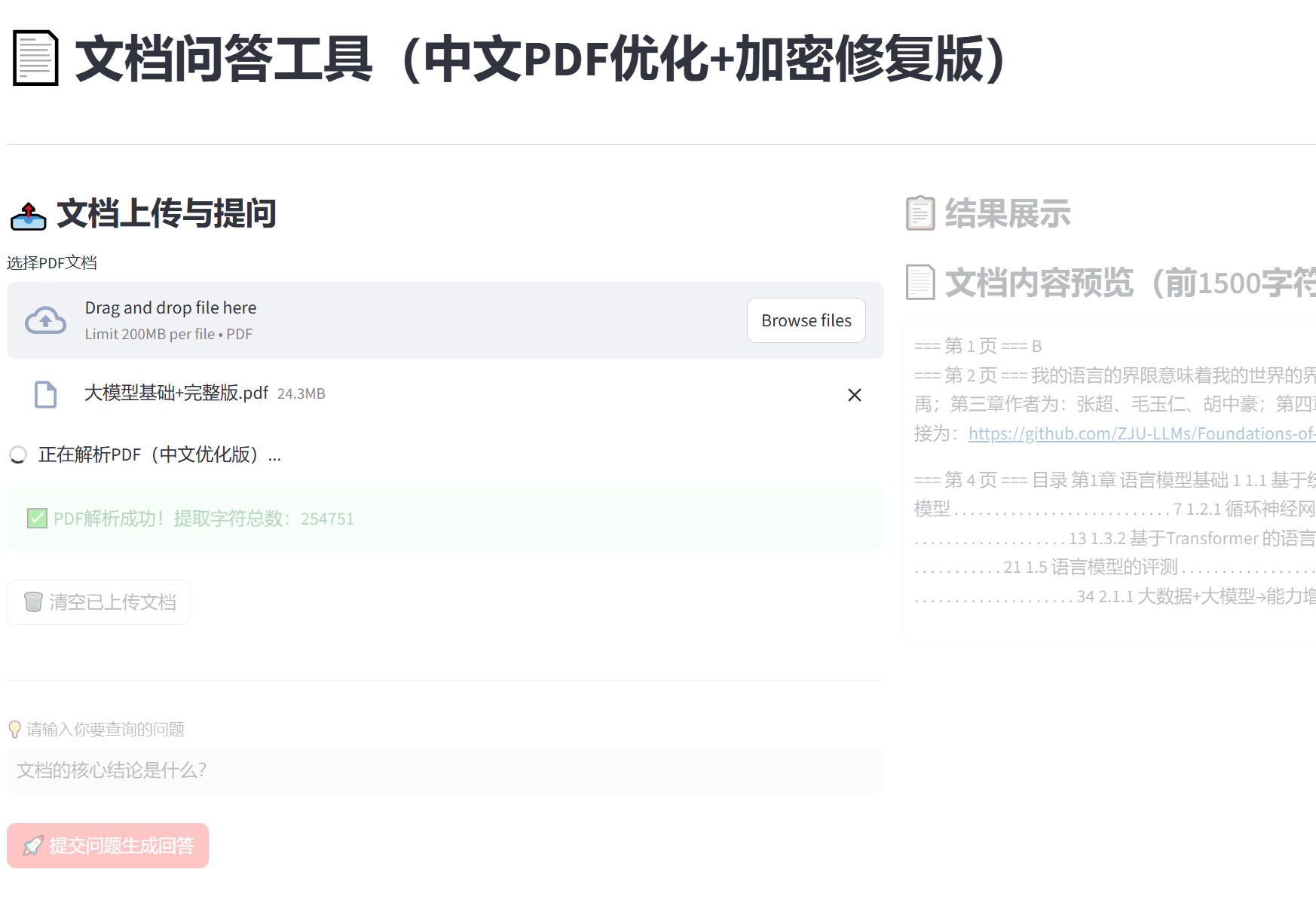
        st.title("📄 文档问答工具(中文PDF优化+加密修复版)")
        st.divider()

        col1, col2 = st.columns([1, 2])
        with col1:
            st.subheader("📤 文档上传与提问")
            uploaded_file = st.file_uploader("选择PDF文档", type=["pdf"])

            if uploaded_file is not None:
                with st.spinner("正在解析PDF(中文优化版)..."):
                    # 临时文件处理
                    with tempfile.NamedTemporaryFile(delete=False, suffix=".pdf") as tmp_file:
                        tmp_file.write(uploaded_file.read())
                        tmp_path = tmp_file.name

                    # 提取文本(核心修复后的方法)
                    st.session_state.doc_text = self._extract_pdf_text(tmp_path)

                    # 清理临时文件(增加异常捕获)
                    try:
                        os.unlink(tmp_path)
                    except Exception as e:
                        st.warning(f"临时文件清理失败:{str(e)}(不影响功能)")

                    if st.session_state.doc_text:
                        st.success(f"✅ PDF解析成功!提取字符总数:{len(st.session_state.doc_text)}")

            # 清空文档按钮
            if st.button("🗑️ 清空已上传文档", type="secondary"):
                st.session_state.doc_text = ""
                st.rerun()

            st.divider()
            # 用户提问
            question = st.text_input(
                "💡 请输入你要查询的问题",
                placeholder="例如:文档中提到的核心结论是什么?",
                disabled=not st.session_state.doc_text
            )
            # 提交按钮(仅当有文档和问题时可用)
            submit_btn = st.button(
                "🚀 提交问题生成回答",
                type="primary",
                disabled=not (question and st.session_state.doc_text)
            )

        with col2:
            st.subheader("📋 结果展示")
            # 显示回答
            if submit_btn:
                with st.spinner("正在基于文档内容生成回答..."):
                    answer = self._mock_llm_answer(question, st.session_state.doc_text)
                    st.markdown("### 🎯 回答结果")
                    st.write(answer)
                    st.divider()

            # 文档内容预览
            if st.session_state.doc_text:
                st.markdown("### 📄 文档内容预览(前1500字符)")
                st.markdown(
                    f'<div class="doc-preview">{st.session_state.doc_text[:1500]}...</div>',
                    unsafe_allow_html=True
                )
            else:
                st.info("📌 请先上传PDF文档,支持中文文本型PDF、加密PDF(需输入密码)")

        # 底部提示
        st.divider()
        st.caption("💡 注意:扫描件PDF(纯图片)无法提取文本,需先进行OCR识别;文本型PDF均可正常解析")


def main():
    """程序主入口函数"""
    # 实例化问答系统并渲染界面
    qa_system = DocumentQASystem()
    qa_system.render_ui()
# Press the green button in the gutter to run the script.
if __name__ == '__main__':
    print('hello world')
    main()
在终端运行:
python
# 2. 用Streamlit专用命令启动(关键!)
streamlit run Main.py