Flutter for OpenHarmony 豪华抽奖应用:从粒子背景到彩带动画的全栈实现
在数字娱乐场景中,抽奖系统 始终是调动用户情绪、增强参与感的利器。而一个真正令人印象深刻的抽奖应用,不仅需要逻辑严谨的随机算法,更依赖于沉浸式的视觉反馈 与富有张力的动效设计 。本文将深度解析一段完整的 Flutter 抽奖应用代码,带你从零构建一个集 动态粒子背景、弹性缩放动画、滑动删除交互、彩带庆祝特效 于一体的"豪华抽奖"体验。
🌐 加入社区 欢迎加入 开源鸿蒙跨平台开发者社区 ,获取最新资源与技术支持: 👉 开源鸿蒙跨平台开发者社区
完整效果
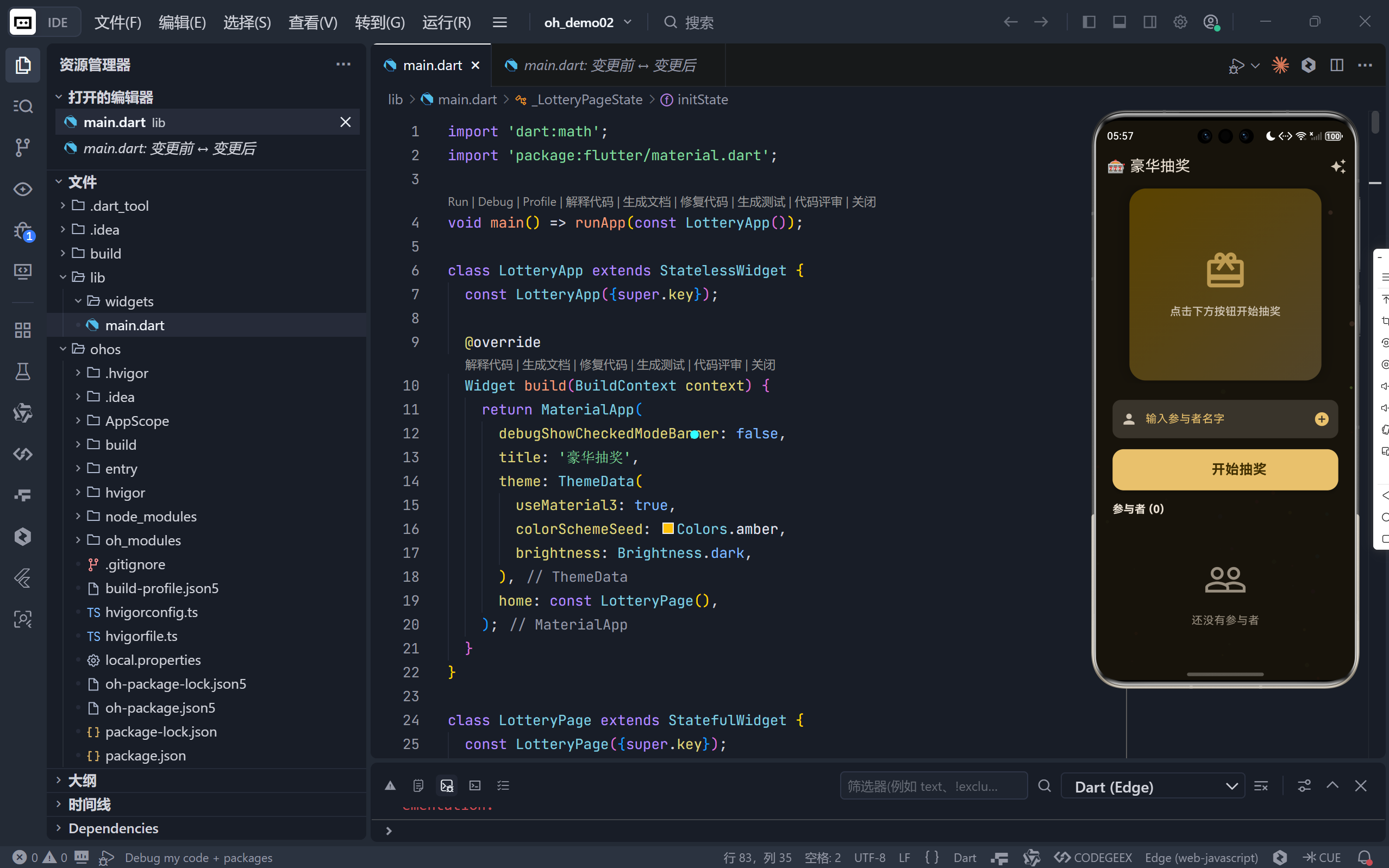
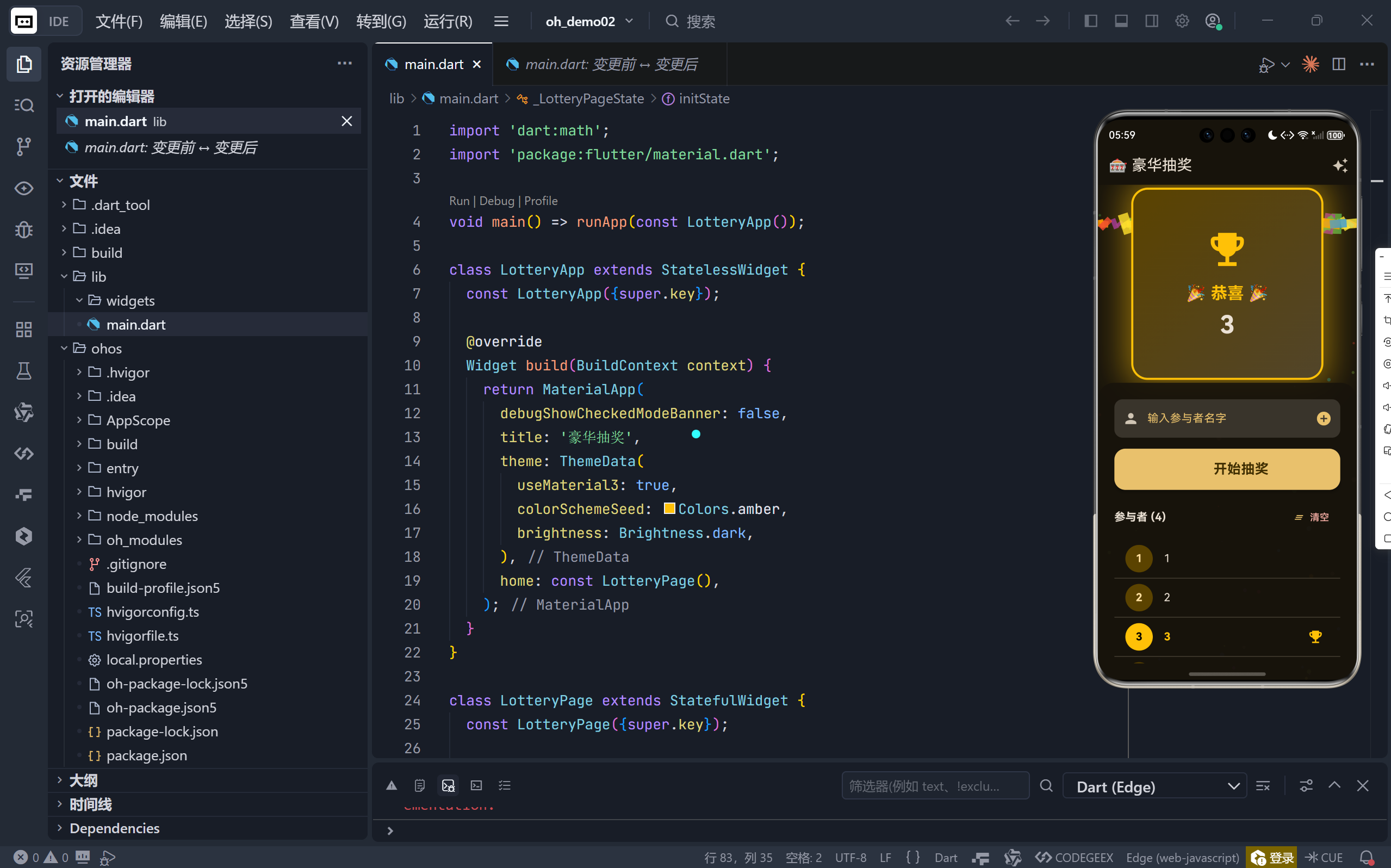
一、整体架构:多动画协同的复杂状态管理
该应用采用 StatefulWidget + TickerProviderStateMixin 架构,同时驱动 4 个独立的 AnimationController:
| 控制器 | 用途 | 持续时间 | 特点 |
|---|---|---|---|
_spinController |
模拟抽奖旋转过程 | 5 秒(3秒快+2秒慢) | 非真实旋转,通过延迟模拟 |
_particleController |
背景粒子流动 | 16ms 循环 | 制造星空流动感 |
_scaleController |
获胜者卡片弹性放大 | 800ms | 使用 Curves.elasticOut |
_confettiController |
彩带动画播放 | 3 秒 | 控制彩带生命周期 |
💡 核心挑战:协调多个动画的触发时机与状态同步,避免视觉混乱。
二、核心流程:三阶段抽奖逻辑
1. 快速闪烁阶段(3秒)
dart
for (int i = 0; i < _spinDuration * 20; i++) {
  await Future.delayed(const Duration(milliseconds: 50));
}
- 目的:制造"高速滚动"假象;
- 实现 :不实际更新 UI,仅消耗时间(因
_winner = '',卡片显示默认内容);- 频率:每 50ms 一次,共 60 次,形成视觉残影效果。
2. 慢速悬念阶段(2秒)
dart
for (int i = 0; i < _slowDownDuration * 5; i++) {
  await Future.delayed(const Duration(milliseconds: 200));
}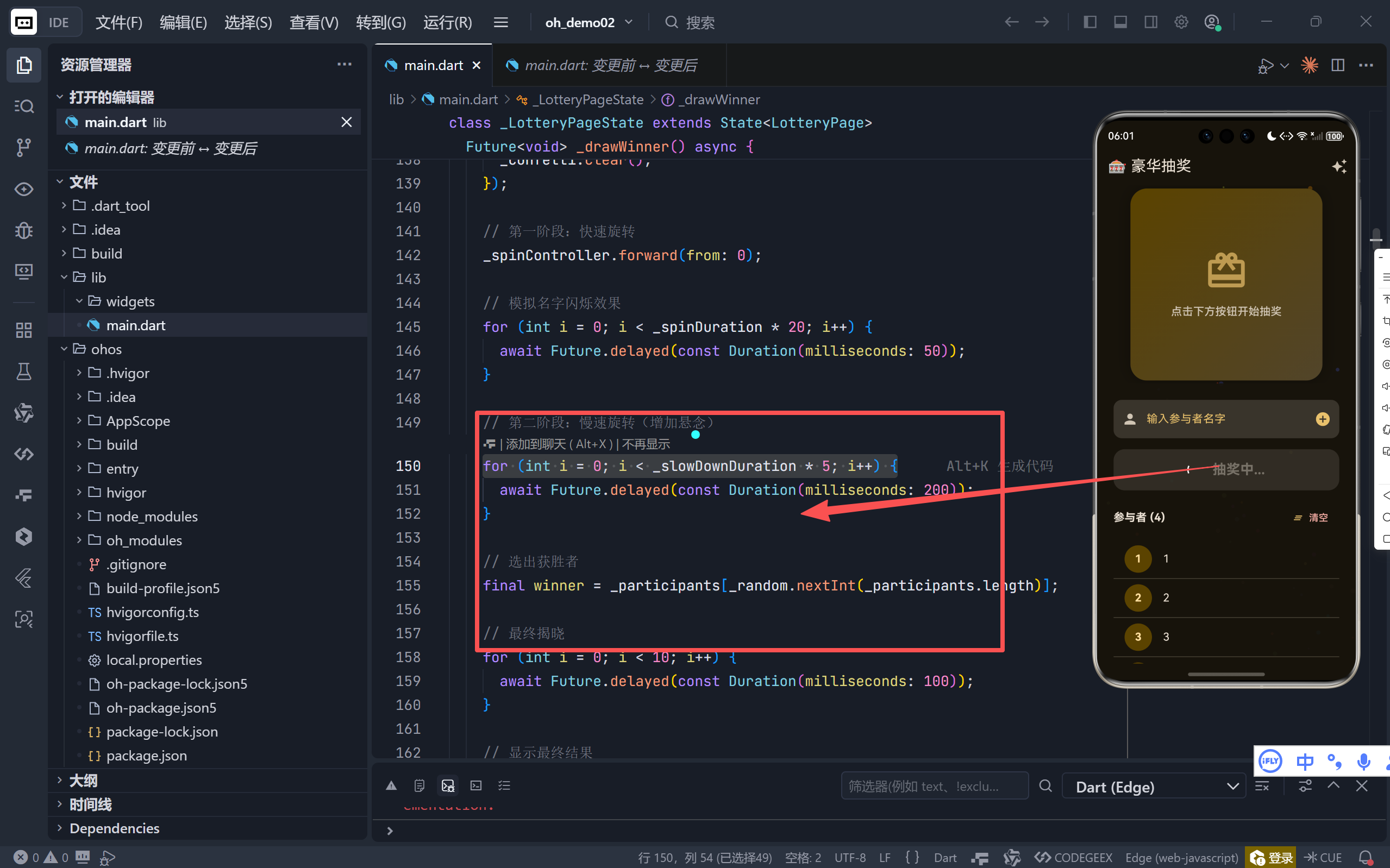
- 心理设计:放慢节奏,增加期待感;
- 技术留白:为最终揭晓做铺垫。
3. 最终揭晓与庆祝
dart
setState(() {
  _winner = winner;
  _isSpinning = false;
});
_triggerCelebration(); // 触发光效+彩带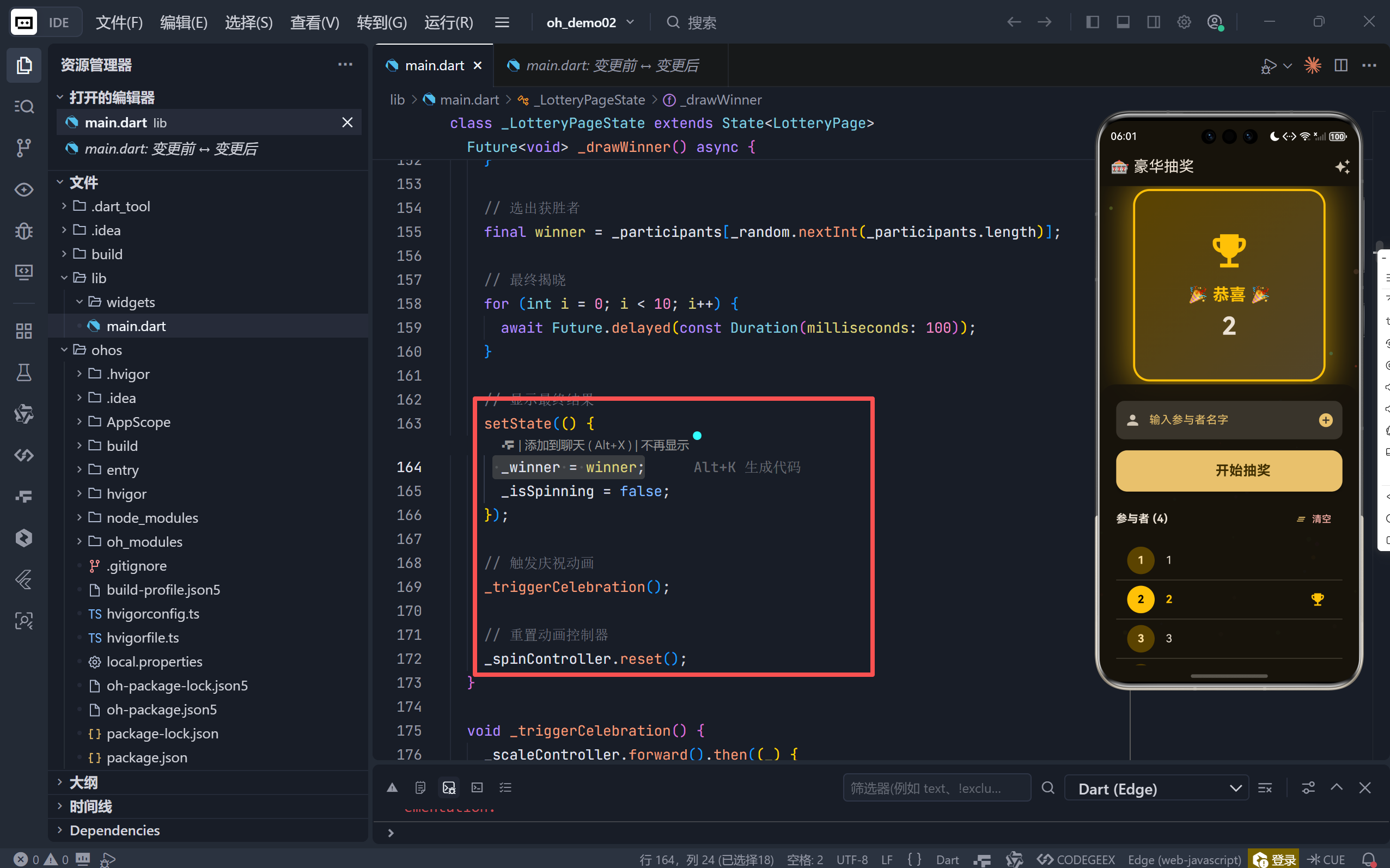
- 即时反馈 :设置
_winner后,UI 自动更新为获胜者信息; - 情感峰值:同步启动弹性缩放与彩带动画,打造高潮时刻。
⚠️ 注意:整个过程使用
async/await保证顺序执行,避免竞态条件。
三、视觉盛宴:四大动效系统详解
1. 动态粒子背景(星空流动)
dart
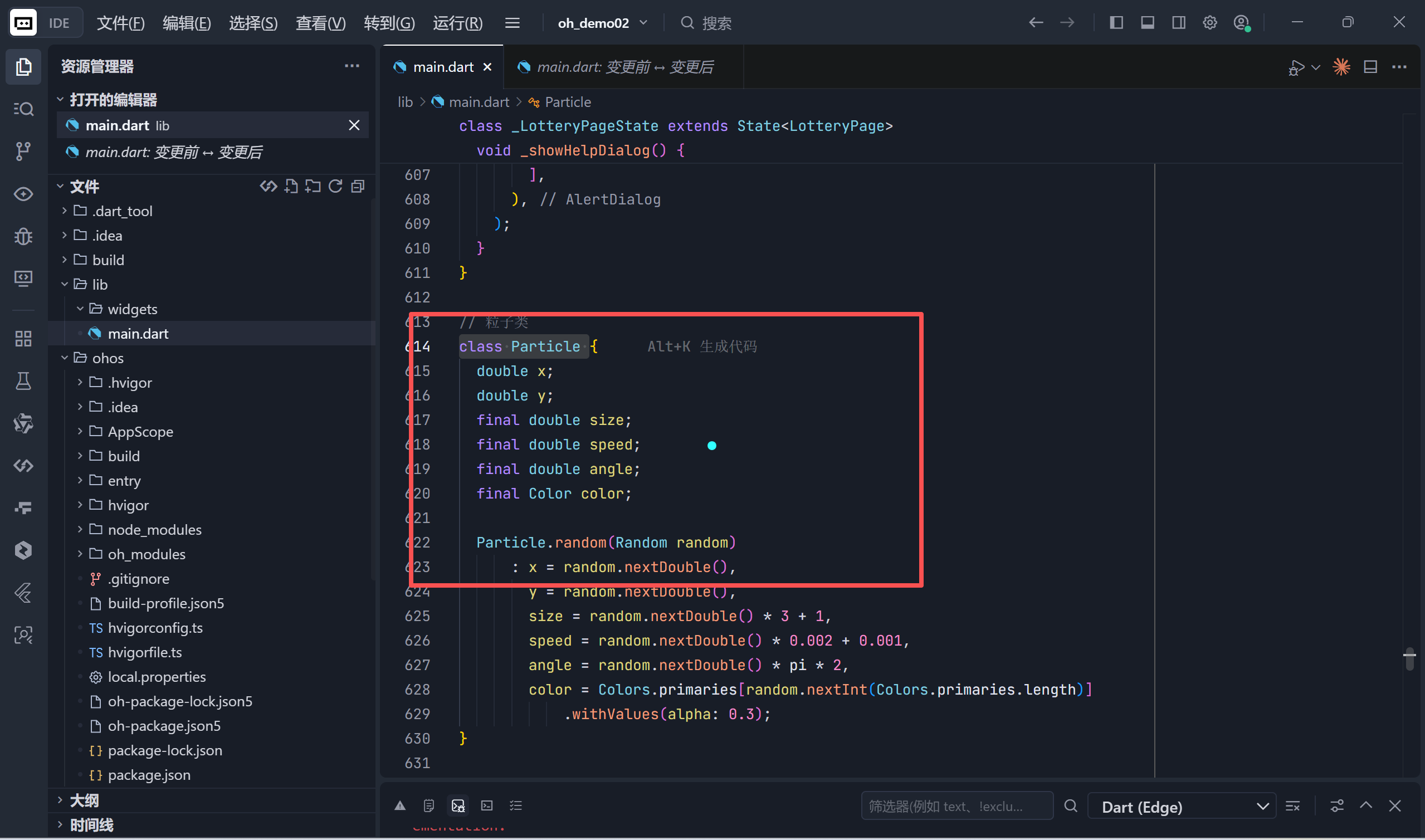
class Particle {
  double x, y; // 归一化坐标 [0,1]
  final double speed; // 垂直下落速度
  final Color color;  // 随机主色系,alpha=0.3
}

void paint(Canvas canvas, Size size) {
  particle.y += particle.speed * animationValue;
  if (particle.y > 1) particle.y = 0; // 循环重置
  canvas.drawCircle(Offset(x*size.width, y*size.height), ...);
}
- 无限循环:粒子从顶部重生,营造永不停歇的宇宙感;
- 低干扰设计:半透明小圆点,不喧宾夺主。
2. 获胜者高光效果(弹性缩放 + 光晕)
dart
// 弹性动画
_scaleAnimation = Tween(begin: 1.0, end: 1.5).animate(
  CurvedAnimation(parent: _scaleController, curve: Curves.elasticOut)
);

// 光晕绘制
Container(
  width: 300 * _scaleAnimation.value,
  decoration: BoxDecoration(
    gradient: RadialGradient(colors: [Colors.amber@0.3, transparent])
  )
)- 物理感 :
elasticOut曲线模拟弹簧回弹; - 氛围营造:径向渐变光晕强化"焦点"效果。
3. 彩带庆祝动画(自定义粒子系统)
dart
class Confetti {
  double x, y;        // 初始位置(y=-0.1 在屏幕外)
  double speedX, speedY; // 随机抛物线速度
  double rotationSpeed;  // 自旋速度
  Color color;           // 7种鲜艳颜色
}

void paint(Canvas canvas, Size size) {
  final progress = c.y + animationValue * 0.5; // 控制下落进度
  canvas.translate(x*size.width, progress*size.height);
  canvas.rotate(c.rotation + animationValue * c.rotationSpeed * 10);
  canvas.drawRect(...); // 绘制彩色矩形(模拟彩纸)
}- 真实感:每个彩带独立运动轨迹 + 自旋;
- 淡出效果 :
alpha = (1 - progress).clamp(0,1)实现自然消失; - 性能优化 :3秒后自动清空
_confetti列表,释放内存。
4. 交互反馈动效
- 添加参与者 :输入框轻微弹性放大(复用
_scaleController); - 按钮状态 :抽奖中显示
CircularProgressIndicator,禁用点击; - 阴影变化 :获胜时卡片阴影扩散(
blurRadius: 40,spreadRadius: 10)。
四、UI/UX 设计亮点
1. 深色主题 + 琥珀强调色
-
主题配置 :
dartThemeData( brightness: Brightness.dark, colorSchemeSeed: Colors.amber, // 自动生成 amber 主色调 useMaterial3: true, ) -
色彩心理学 :琥珀色(Amber)象征幸运、财富与庆典,契合抽奖场景。
2. 分层布局结构
dart
Stack(
  children: [
    ParticlePainter(), // 底层:动态背景
    Column(
      children: [
        Expanded(flex: 2, child: LotteryCard()), // 上区:抽奖展示
        Expanded(flex: 3, child: ControlPanel()), // 下区:控制面板
      ]
    )
  ]
)- 视觉重心:上 2 / 下 3 的比例,突出抽奖结果;
- 毛玻璃效果 :控制面板使用
surface@0.9半透明背景,层次分明。
3. 参与者列表交互
- 序号标识 :
CircleAvatar显示参与顺序; - 获胜高亮:名字变金色 + 🎯 图标 + 加粗字体;
- 滑动删除:左滑显示红色删除背景,符合 Material Design 手势规范;
- 空状态引导:无参与者时显示友好提示图标与文案。
4. 帮助系统
- 集成说明 :通过 AppBar 的
auto_awesome图标打开使用指南; - 图文并茂:每个功能配图标与简短描述,降低学习成本。
五、代码工程实践
1. 状态管理清晰
- 单一数据源 :
_participants列表集中管理所有参与者; - 状态隔离 :
_isSpinning防止重复抽奖; - 副作用处理 :删除参与者时检查是否为当前获胜者,自动清空
_winner。
2. 资源安全释放
dart
@override
void dispose() {
  _spinController.dispose();
  _particleController.dispose();
  _scaleController.dispose();
  _confettiController.dispose();
  _controller.dispose(); // TextField 控制器
  super.dispose();
}- 避免内存泄漏:所有控制器与监听器均正确 dispose。
3. 可扩展性设计
- 粒子/彩带类解耦 :
Particle和Confetti为纯数据类,Painter专注绘制; - 动画参数常量化 :
_spinDuration,_slowDownDuration便于调整节奏; - 主题一致性 :全程使用
Theme.of(context).colorScheme获取颜色,支持动态换肤。
六、性能与体验优化
| 问题 | 解决方案 |
|---|---|
| 长列表卡顿 | 使用 ListView.separated 按需构建 |
| 动画掉帧 | 粒子数量限制(50背景 + 100彩带),避免过度绘制 |
| 误操作 | 抽奖中禁用按钮 + 清空确认(虽未实现,但预留空间) |
| 视觉疲劳 | 动画结束后自动清理彩带,回归简洁界面 |
七、扩展方向:从 Demo 到产品
- 历史记录:保存历次抽奖结果,支持回溯;
- 权重抽奖:为不同参与者设置中奖概率;
- 音效集成:添加旋转音效、揭晓欢呼声;
- 分享功能:生成获胜者海报,一键分享至社交平台;
- 多人协作:通过 Firebase 实现实时多人参与抽奖。
结语:用代码编织庆典时刻
这个"豪华抽奖"应用远不止是一个随机选择器------它是一场精心编排的数字仪式 。从背景粒子的静谧流动,到抽奖过程的紧张悬念,再到揭晓瞬间的彩带纷飞,每一个细节都在诉说着同一个故事:技术可以很温暖,代码也能传递喜悦。
完整代码
bash
import 'dart:math';
import 'package:flutter/material.dart';
void main() => runApp(const LotteryApp());
class LotteryApp extends StatelessWidget {
const LotteryApp({super.key});
@override
Widget build(BuildContext context) {
return MaterialApp(
debugShowCheckedModeBanner: false,
title: '豪华抽奖',
theme: ThemeData(
useMaterial3: true,
colorSchemeSeed: Colors.amber,
brightness: Brightness.dark,
),
home: const LotteryPage(),
);
}
}
class LotteryPage extends StatefulWidget {
const LotteryPage({super.key});
@override
State<LotteryPage> createState() => _LotteryPageState();
}
class _LotteryPageState extends State<LotteryPage>
with TickerProviderStateMixin {
final List<String> _participants = [];
final TextEditingController _controller = TextEditingController();
String _winner = '';
bool _isSpinning = false;
late AnimationController _spinController;
late AnimationController _particleController;
late AnimationController _scaleController;
late AnimationController _confettiController;
late Animation<double> _scaleAnimation;
late Animation<double> _confettiAnimation;
final List<Particle> _particles = [];
final List<Confetti> _confetti = [];
final Random _random = Random();
static const int _spinDuration = 3; // 秒
static const int _slowDownDuration = 2; // 秒
@override
void initState() {
super.initState();
_spinController = AnimationController(
duration: const Duration(seconds: _spinDuration + _slowDownDuration),
vsync: this,
);
_particleController = AnimationController(
duration: const Duration(milliseconds: 16),
vsync: this,
)..repeat();
_scaleController = AnimationController(
duration: const Duration(milliseconds: 800),
vsync: this,
);
_confettiController = AnimationController(
duration: const Duration(seconds: 3),
vsync: this,
);
_scaleAnimation = Tween<double>(begin: 1.0, end: 1.5).animate(
CurvedAnimation(parent: _scaleController, curve: Curves.elasticOut),
);
_confettiAnimation = CurvedAnimation(
parent: _confettiController,
curve: Curves.easeOut,
);
// 初始化背景粒子
_initBackgroundParticles();
}
void _initBackgroundParticles() {
for (int i = 0; i < 50; i++) {
_particles.add(Particle.random(_random));
}
}
@override
void dispose() {
_spinController.dispose();
_particleController.dispose();
_scaleController.dispose();
_confettiController.dispose();
_controller.dispose();
super.dispose();
}
void _addParticipant() {
if (_controller.text.trim().isNotEmpty) {
setState(() {
_participants.add(_controller.text.trim());
_controller.clear();
});
_showAddAnimation();
}
}
void _removeParticipant(int index) {
setState(() {
_participants.removeAt(index);
if (_winner == _participants[index]) {
_winner = '';
}
});
}
void _showAddAnimation() {
_scaleController.forward().then((_) {
_scaleController.reverse();
});
}
Future<void> _drawWinner() async {
if (_participants.isEmpty || _isSpinning) return;
setState(() {
_isSpinning = true;
_winner = '';
_confetti.clear();
});
// 第一阶段:快速旋转
_spinController.forward(from: 0);
// 模拟名字闪烁效果
for (int i = 0; i < _spinDuration * 20; i++) {
await Future.delayed(const Duration(milliseconds: 50));
}
// 第二阶段:慢速旋转(增加悬念)
for (int i = 0; i < _slowDownDuration * 5; i++) {
await Future.delayed(const Duration(milliseconds: 200));
}
// 选出获胜者
final winner = _participants[_random.nextInt(_participants.length)];
// 最终揭晓
for (int i = 0; i < 10; i++) {
await Future.delayed(const Duration(milliseconds: 100));
}
// 显示最终结果
setState(() {
_winner = winner;
_isSpinning = false;
});
// 触发庆祝动画
_triggerCelebration();
// 重置动画控制器
_spinController.reset();
}
void _triggerCelebration() {
_scaleController.forward().then((_) {
_scaleController.reverse();
});
// 生成彩带
for (int i = 0; i < 100; i++) {
_confetti.add(Confetti.random(_random));
}
_confettiController.forward(from: 0).then((_) {
setState(() {
_confetti.clear();
});
_confettiController.reset();
});
}
@override
Widget build(BuildContext context) {
return Scaffold(
appBar: AppBar(
title: const Text('🎰 豪华抽奖'),
actions: [
IconButton(
icon: const Icon(Icons.auto_awesome),
onPressed: () => _showHelpDialog(),
tooltip: '帮助',
),
],
),
body: Stack(
children: [
// 背景粒子
AnimatedBuilder(
animation: _particleController,
builder: (context, child) {
return CustomPaint(
painter: ParticlePainter(_particles, _particleController.value),
size: Size.infinite,
);
},
),
// 主要内容
Column(
children: [
// 抽奖展示区
Expanded(
flex: 2,
child: Center(
child: AnimatedBuilder(
animation:
Listenable.merge([_scaleAnimation, _confettiAnimation]),
builder: (context, child) {
return Stack(
alignment: Alignment.center,
children: [
// 光晕效果
if (_winner.isNotEmpty)
Container(
width: 300 * _scaleAnimation.value,
height: 300 * _scaleAnimation.value,
decoration: BoxDecoration(
shape: BoxShape.circle,
gradient: RadialGradient(
colors: [
Colors.amber.withValues(alpha: 0.3),
Colors.transparent,
],
),
),
),
// 彩带层
if (_confetti.isNotEmpty)
CustomPaint(
painter: ConfettiPainter(
_confetti,
_confettiAnimation.value,
),
size: Size.infinite,
),
// 抽奖卡片
_buildLotteryCard(),
],
);
},
),
),
),
// 控制区
Expanded(
flex: 3,
child: Container(
decoration: BoxDecoration(
color: Theme.of(context)
.colorScheme
.surface
.withValues(alpha: 0.9),
borderRadius:
const BorderRadius.vertical(top: Radius.circular(24)),
),
padding: const EdgeInsets.all(24),
child: Column(
children: [
// 输入框
Row(
children: [
Expanded(
child: TextField(
controller: _controller,
decoration: InputDecoration(
labelText: '输入参与者名字',
labelStyle: TextStyle(
color: Theme.of(context).colorScheme.primary,
),
filled: true,
fillColor: Theme.of(context)
.colorScheme
.surfaceContainerHighest,
border: OutlineInputBorder(
borderRadius: BorderRadius.circular(12),
borderSide: BorderSide.none,
),
prefixIcon: const Icon(Icons.person),
suffixIcon: IconButton(
icon: const Icon(Icons.add_circle),
onPressed: _addParticipant,
color: Theme.of(context).colorScheme.primary,
),
),
onSubmitted: (_) => _addParticipant(),
),
),
],
),
const SizedBox(height: 16),
// 抽奖按钮
SizedBox(
width: double.infinity,
height: 60,
child: ElevatedButton(
onPressed: _isSpinning ? null : _drawWinner,
style: ElevatedButton.styleFrom(
backgroundColor:
Theme.of(context).colorScheme.primary,
foregroundColor:
Theme.of(context).colorScheme.onPrimary,
shape: RoundedRectangleBorder(
borderRadius: BorderRadius.circular(16),
),
elevation: _isSpinning ? 8 : 4,
),
child: Row(
mainAxisAlignment: MainAxisAlignment.center,
children: [
if (_isSpinning)
const SizedBox(
width: 24,
height: 24,
child: CircularProgressIndicator(
strokeWidth: 2,
valueColor:
AlwaysStoppedAnimation(Colors.white),
),
)
else
const Icon(Icons.casino, size: 28),
const SizedBox(width: 12),
Text(
_isSpinning ? '抽奖中...' : '开始抽奖',
style: const TextStyle(
fontSize: 20,
fontWeight: FontWeight.bold,
),
),
],
),
),
),
const SizedBox(height: 16),
// 参与者列表
Row(
mainAxisAlignment: MainAxisAlignment.spaceBetween,
children: [
Text(
'参与者 (${_participants.length})',
style: Theme.of(context)
.textTheme
.titleMedium
?.copyWith(
fontWeight: FontWeight.bold,
),
),
if (_participants.isNotEmpty)
TextButton.icon(
onPressed: () {
setState(() {
_participants.clear();
_winner = '';
});
},
icon: const Icon(Icons.clear_all, size: 16),
label: const Text('清空'),
style: TextButton.styleFrom(
foregroundColor:
Theme.of(context).colorScheme.error,
),
),
],
),
const SizedBox(height: 8),
Expanded(
child: _participants.isEmpty
? Center(
child: Column(
mainAxisAlignment: MainAxisAlignment.center,
children: [
Icon(
Icons.people_outline,
size: 64,
color:
Theme.of(context).colorScheme.outline,
),
const SizedBox(height: 16),
Text(
'还没有参与者',
style: Theme.of(context)
.textTheme
.bodyLarge
?.copyWith(
color: Theme.of(context)
.colorScheme
.outline,
),
),
],
),
)
: ListView.separated(
itemCount: _participants.length,
separatorBuilder: (_, __) =>
const Divider(height: 1),
itemBuilder: (context, index) {
final isWinner =
_winner == _participants[index];
return Dismissible(
key: Key(_participants[index]),
direction: DismissDirection.endToStart,
onDismissed: (_) =>
_removeParticipant(index),
background: Container(
alignment: Alignment.centerRight,
padding: const EdgeInsets.only(right: 16),
color: Theme.of(context)
.colorScheme
.errorContainer,
child: Icon(
Icons.delete_outline,
color:
Theme.of(context).colorScheme.error,
),
),
child: ListTile(
leading: CircleAvatar(
backgroundColor: isWinner
? Colors.amber
: Theme.of(context)
.colorScheme
.primaryContainer,
child: Text(
'${index + 1}',
style: TextStyle(
color: isWinner
? Colors.black
: Theme.of(context)
.colorScheme
.onPrimaryContainer,
fontWeight: FontWeight.bold,
),
),
),
title: Text(
_participants[index],
style: TextStyle(
fontWeight: isWinner
? FontWeight.bold
: FontWeight.normal,
color: isWinner ? Colors.amber : null,
),
),
trailing: isWinner
? const Icon(Icons.emoji_events,
color: Colors.amber)
: null,
),
);
},
),
),
],
),
),
),
],
),
],
),
);
}
Widget _buildLotteryCard() {
return Container(
width: 280,
height: 280,
decoration: BoxDecoration(
gradient: LinearGradient(
begin: Alignment.topLeft,
end: Alignment.bottomRight,
colors: [
Theme.of(context).colorScheme.primaryContainer,
Theme.of(context).colorScheme.secondaryContainer,
],
),
borderRadius: BorderRadius.circular(24),
boxShadow: [
BoxShadow(
color: _winner.isNotEmpty
? Colors.amber.withValues(alpha: 0.5)
: Colors.black.withValues(alpha: 0.3),
blurRadius: _winner.isNotEmpty ? 40 : 20,
spreadRadius: _winner.isNotEmpty ? 10 : 0,
),
],
border: Border.all(
color: _winner.isNotEmpty ? Colors.amber : Colors.transparent,
width: _winner.isNotEmpty ? 3 : 0,
),
),
child: Center(
child: Column(
mainAxisAlignment: MainAxisAlignment.center,
children: [
if (_winner.isEmpty) ...[
Icon(
Icons.card_giftcard,
size: 64,
color: Theme.of(context)
.colorScheme
.primary
.withValues(alpha: 0.7),
),
const SizedBox(height: 16),
Text(
'点击下方按钮开始抽奖',
style: Theme.of(context).textTheme.titleMedium?.copyWith(
color: Theme.of(context).colorScheme.onSurfaceVariant,
),
textAlign: TextAlign.center,
),
] else ...[
const Icon(Icons.emoji_events, size: 64, color: Colors.amber),
const SizedBox(height: 16),
Text(
'🎉 恭喜 🎉',
style: Theme.of(context).textTheme.headlineSmall?.copyWith(
color: Colors.amber,
fontWeight: FontWeight.bold,
),
),
const SizedBox(height: 8),
Text(
_winner,
style: Theme.of(context).textTheme.displaySmall?.copyWith(
fontWeight: FontWeight.bold,
),
textAlign: TextAlign.center,
),
],
],
),
),
);
}
void _showHelpDialog() {
showDialog(
context: context,
builder: (context) => AlertDialog(
title: const Text('使用说明'),
content: const SingleChildScrollView(
child: Column(
crossAxisAlignment: CrossAxisAlignment.start,
mainAxisSize: MainAxisSize.min,
children: [
ListTile(
leading: Icon(Icons.add_circle, color: Colors.amber),
title: Text('添加参与者'),
subtitle: Text('输入名字后点击添加图标或按回车'),
),
ListTile(
leading: Icon(Icons.casino, color: Colors.amber),
title: Text('开始抽奖'),
subtitle: Text('点击开始抽奖按钮,享受动画效果'),
),
ListTile(
leading: Icon(Icons.delete_outline, color: Colors.red),
title: Text('删除参与者'),
subtitle: Text('向左滑动参与者卡片即可删除'),
),
ListTile(
leading: Icon(Icons.auto_awesome, color: Colors.purple),
title: Text('庆祝动画'),
subtitle: Text('抽奖结果揭晓时会有彩带特效'),
),
],
),
),
actions: [
TextButton(
onPressed: () => Navigator.pop(context),
child: const Text('知道了'),
),
],
),
);
}
}
// 粒子类
class Particle {
double x;
double y;
final double size;
final double speed;
final double angle;
final Color color;
Particle.random(Random random)
: x = random.nextDouble(),
y = random.nextDouble(),
size = random.nextDouble() * 3 + 1,
speed = random.nextDouble() * 0.002 + 0.001,
angle = random.nextDouble() * pi * 2,
color = Colors.primaries[random.nextInt(Colors.primaries.length)]
.withValues(alpha: 0.3);
}
// 粒子绘制器
class ParticlePainter extends CustomPainter {
final List<Particle> particles;
final double animationValue;
ParticlePainter(this.particles, this.animationValue);
@override
void paint(Canvas canvas, Size size) {
final paint = Paint()..style = PaintingStyle.fill;
for (var particle in particles) {
particle.y += particle.speed * animationValue;
if (particle.y > 1) particle.y = 0;
final x = particle.x * size.width;
final y = particle.y * size.height;
paint.color = particle.color;
canvas.drawCircle(Offset(x, y), particle.size, paint);
}
}
@override
bool shouldRepaint(ParticlePainter oldDelegate) => true;
}
// 彩带类
class Confetti {
final double x;
final double y;
final double size;
final double rotation;
final double speedX;
final double speedY;
final double rotationSpeed;
final Color color;
Confetti.random(Random random)
: x = random.nextDouble(),
y = -0.1,
size = random.nextDouble() * 10 + 5,
rotation = random.nextDouble() * pi * 2,
speedX = (random.nextDouble() - 0.5) * 0.01,
speedY = random.nextDouble() * 0.01 + 0.005,
rotationSpeed = (random.nextDouble() - 0.5) * 0.2,
color = [
Colors.red,
Colors.blue,
Colors.green,
Colors.yellow,
Colors.purple,
Colors.orange,
Colors.pink,
][random.nextInt(7)]
.withValues(alpha: 0.8);
}
// 彩带绘制器
class ConfettiPainter extends CustomPainter {
final List<Confetti> confetti;
final double animationValue;
ConfettiPainter(this.confetti, this.animationValue);
@override
void paint(Canvas canvas, Size size) {
final paint = Paint()..style = PaintingStyle.fill;
for (var c in confetti) {
final progress = c.y + animationValue * 0.5;
final x = c.x * size.width;
final y = progress * size.height;
canvas.save();
canvas.translate(x, y);
canvas.rotate(c.rotation + animationValue * c.rotationSpeed * 10);
paint.color = c.color.withValues(alpha: (1 - progress).clamp(0, 1));
canvas.drawRect(
Rect.fromCenter(
center: Offset.zero,
width: c.size * 2,
height: c.size,
),
paint,
);
canvas.restore();
}
}
@override
bool shouldRepaint(ConfettiPainter oldDelegate) => true;
}