仅做一次记录,可能会有不理解和错误的地方
背景
刷过不死Uboot + ImmortalWrt, 想刷回原厂固件,试图刷原厂分区因操作分区表不当成普砖.
砖度判断:引用恩山
一台刷砖的AX6,先判定是普通砖还是深度砖,普通砖TTL可救,深度砖编程器才能救:
1、普通砖:上电SYS黄灯常亮,过会儿双黄灯闪一下又开始SYS黄灯常亮,然后重复。
------这种UBOOT未损坏(一般是sysupgrade、ubiformat指令或web里写入固件失败导致)。
2、深度砖:接上电源,双黄灯闪一下,过几秒双黄灯又闪一下,然后重复。
------这种UBOOT已损坏(一般刷入新分区表文件后漏拔电重启步骤),请走售后或拆ROM芯片上编程器。
试图小米路由器修复工具救砖,但是不识别,无反应
在后续的串口信息发现分区表变成这样:
IPQ807x#   mtdparts
device nand0 <nand0>, # parts = 1
 #: name                size            offset          mask_flags
 0: fs                  0x023c0000      0x02dc0000      0

active partition: nand0,0 - (fs) 0x023c0000 @ 0x02dc0000

defaults:
mtdids  : none
mtdparts: none
经判断这次是普通砖,使用TTL救砖.
大致思路
重刷分区表和openwrt固件再用小米路由器修复工具刷回原厂固件
准备工作
- USB转TTL工具 + 杜邦线 这里使用CH340G (记得装驱动)
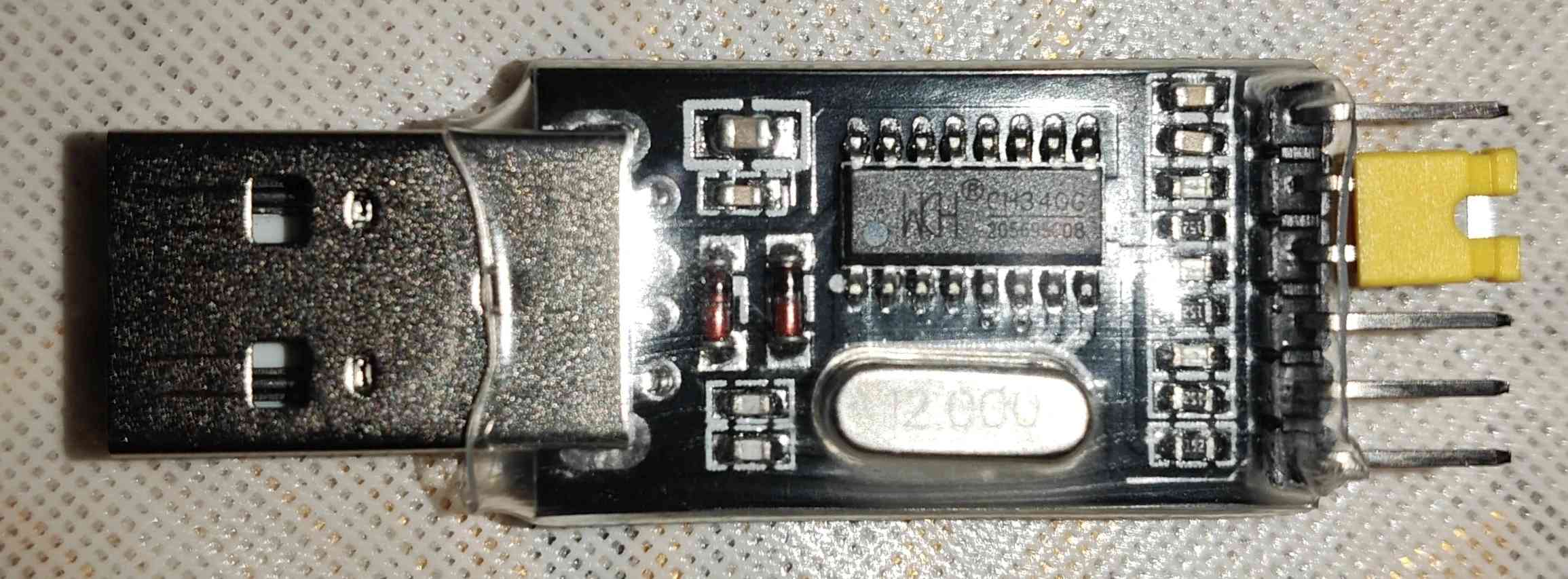
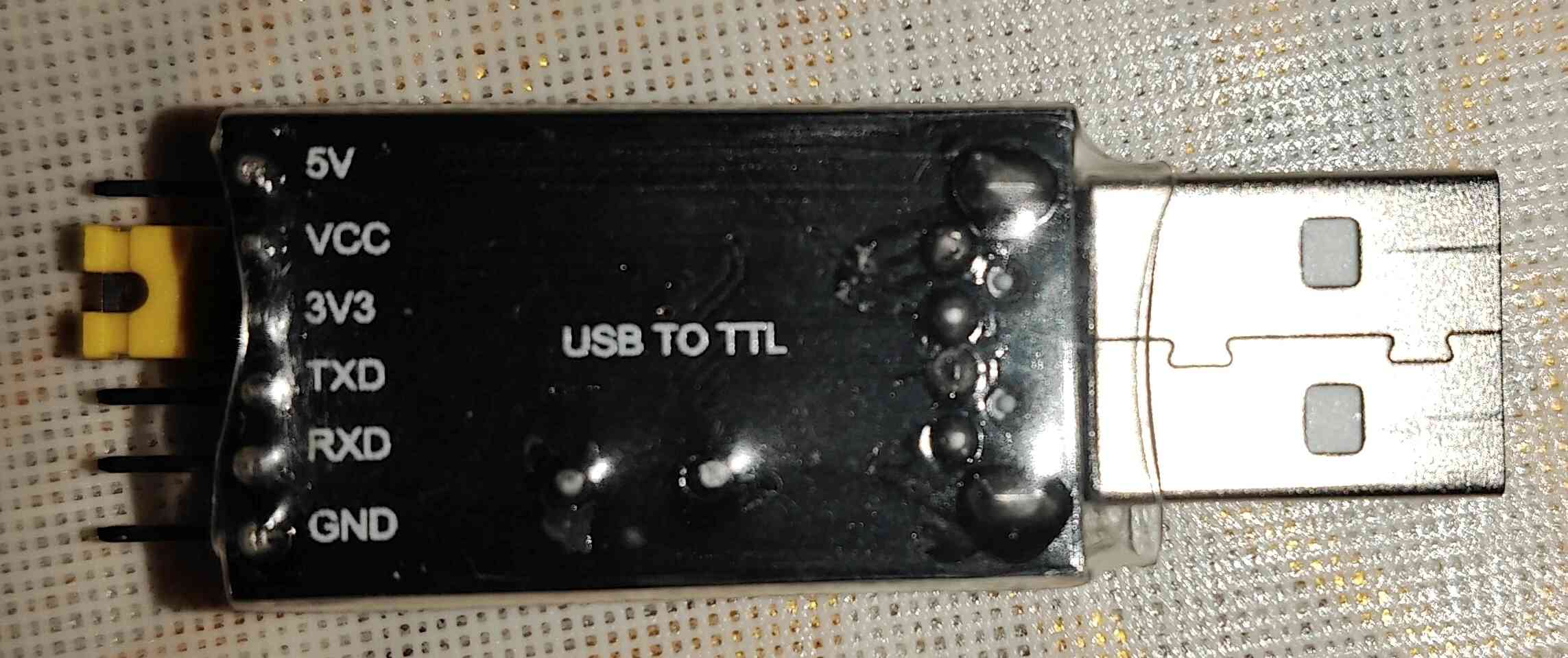
- Putty 进行串口通信
- tftpd64 用于搭建本地 TFTP 服务器,传输文件
- ImmortalWrt原厂分区固件 这里使用immortalwrt-qualcommax-ipq807x-redmi_ax6-stock-squashfs-factory.ubi
- 原厂分区表文件mibib.bin
- 小米路由器修复工具
将分区表文件mibib.bin和固件immortalwrt-qualcommax-ipq807x-redmi_ax6-stock-squashfs-factory.ubi放入tftpd64目录
immortalwrt-qualcommax-ipq807x-redmi_ax6-stock-squashfs-factory.ubi在本文中被改名成test.bin
章节1 拆机找TTL触点 连线进行Putty串口通信
大概在这个位置:
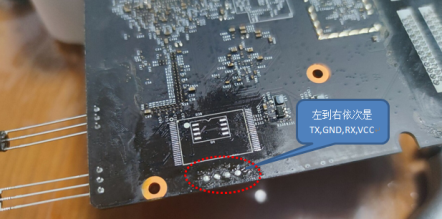
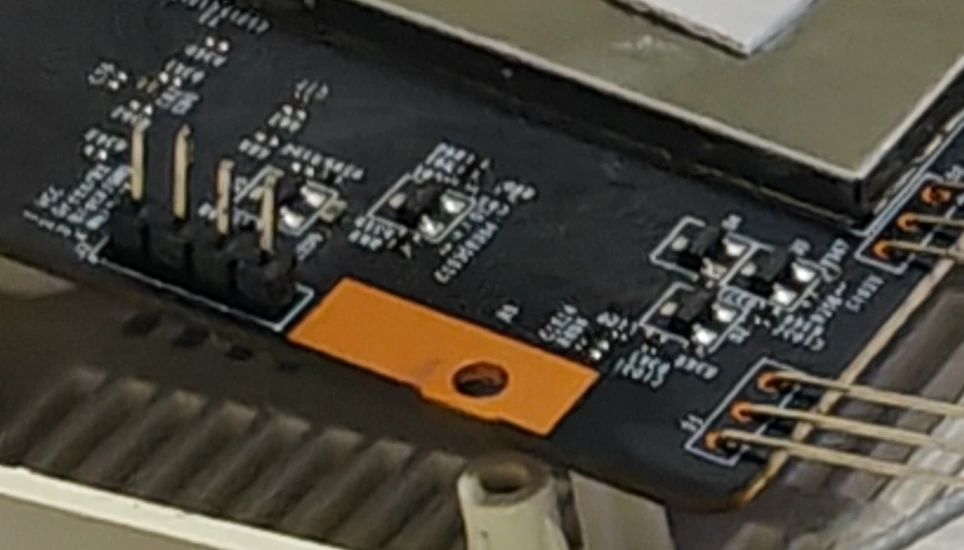
可以焊个4pin针方便连接
*CH340G跳线帽需短接在 3.3V 模式 *
PC插上CH340G 在设备管理器查看它的端口号
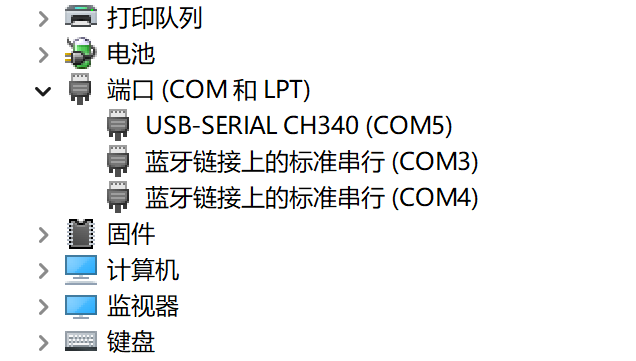
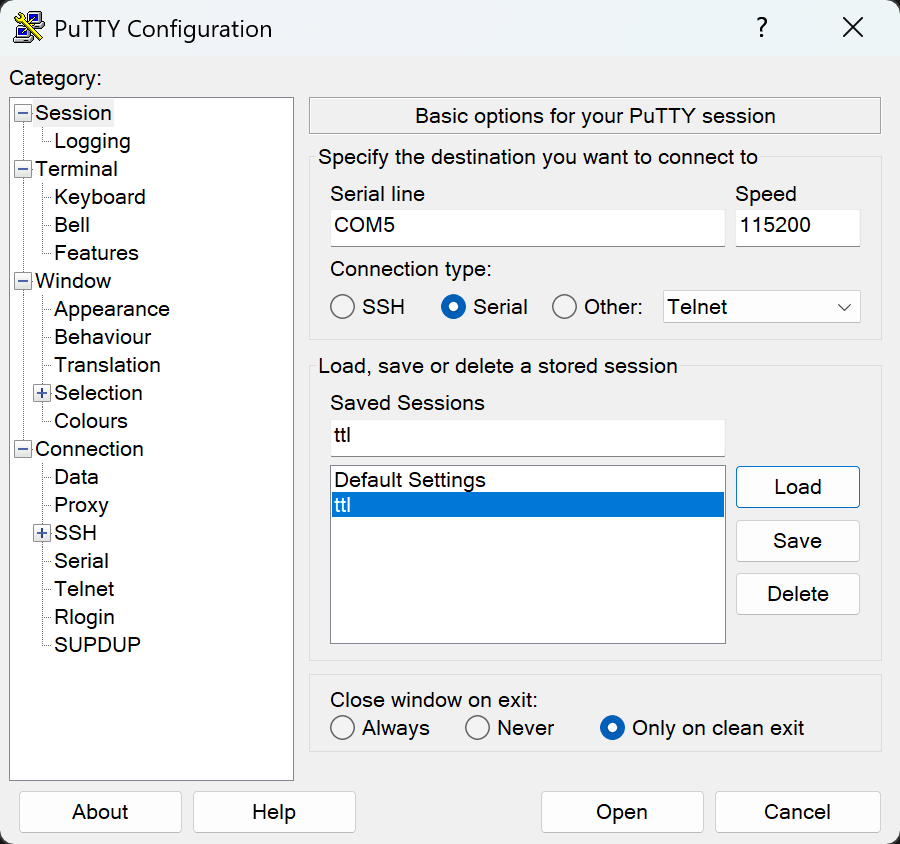
在putty设置:
Connection type: Serial
Serial line: COM5 <--用实际CH340G的端口号
Speed (Baud rate): 115200
然后按照以下逻辑相联
CH340G GND       <--> 路由器 GND
CH340G TX (发送) <--> 路由器 RX (接收)
CH340G RX (接收) <--> 路由器 TX (发送)
VCC不连
路由器通电之后再接TTL,不然路由器无法启动
正常情况应该是路由器开始闪黄灯,putty开始输出:
...
U-Boot 2016.01 (Jul 08 2021 - 07:16:48 +0000), Build: jenkins-common_router_openwrt_ota_publish-1455

DRAM:  smem ram ptable found: ver: 1 len: 4
512 MiB
NAND:  ONFI device found
ID = 158061c8
Vendor = c8
Device = 61
SF: Unsupported flash IDs: manuf ff, jedec ffff, ext_jedec ffff
ipq_spi: SPI Flash not found (bus/cs/speed/mode) = (0/0/48000000/0)
128 MiB
MMC:   sdhci: Node Not found, skipping initialization

PCI1 is not defined in the device tree
In:    serial@78B3000
Out:   serial@78B3000
Err:   serial@78B3000
machid: 8010010
MMC Device 0 not found
eth5 MAC Address from ART is not valid
write phy_id=1, reg(0x8074):0x0670
write phy_id=2, reg(0x8074):0x0670
write phy_id=3, reg(0x8074):0x0670
write phy_id=4, reg(0x8074):0x0670
bootwait is on, bootdelay=2
Hit any key to stop autoboot:  0
 trigger button release!
boot from rootfs 0
  miwifi: check crash in rmem !
ubi0: attaching mtd1
ubi0: scanning is finished
UBI init error 22
Erasing NAND...
Erasing at 0x6e0000 -- 100% complete.
Writing to NAND... OK
resetting ...
我们需要在
bash
Hit any key to stop autoboot: 0倒计时结束前按任意键如 Ctrl+C 或者 Enter
呼出UBOOT命令行 IPQ807x#
如果倒计时过短或者压根没有bootwait,可以试着按住reset再通电再接TTL再试图中断呼出UBOOT命令行
Hit any key to stop autoboot:  0
 detect button press, continue check 5 secs
 detect button pressed 5 secs !
 confirm to launch xq_upgrade ! <--检测到reset,进入原厂救援模式
章节2 修复分区表
查询当前分区表,发现已经变成以下这种情况了
IPQ807x#   mtdparts
device nand0 <nand0>, # parts = 1
 #: name                size            offset          mask_flags
 0: fs                  0x023c0000      0x02dc0000      0
active partition: nand0,0 - (fs) 0x023c0000 @ 0x02dc0000
defaults:
mtdids  : none
mtdparts: none
Gemini:
parts = 1:你的闪存里现在只认出了1个分区。
Name: fs:这就是为什么启动会失败,它找不到 rootfs,只找到了个叫 fs 的残余分区。
Offset: 0x02dc0000:好消息是,这个地址正好是 AX6 原厂固件 rootfs (系统分区) 的起始物理地址。
重刷分区表 mibib.bin 到物理地址 0x40000
电脑网卡设置
先设置连接路由器的网卡:
IP: 192.168.31.100
掩码: 255.255.255.0
网关: 192.168.31.1
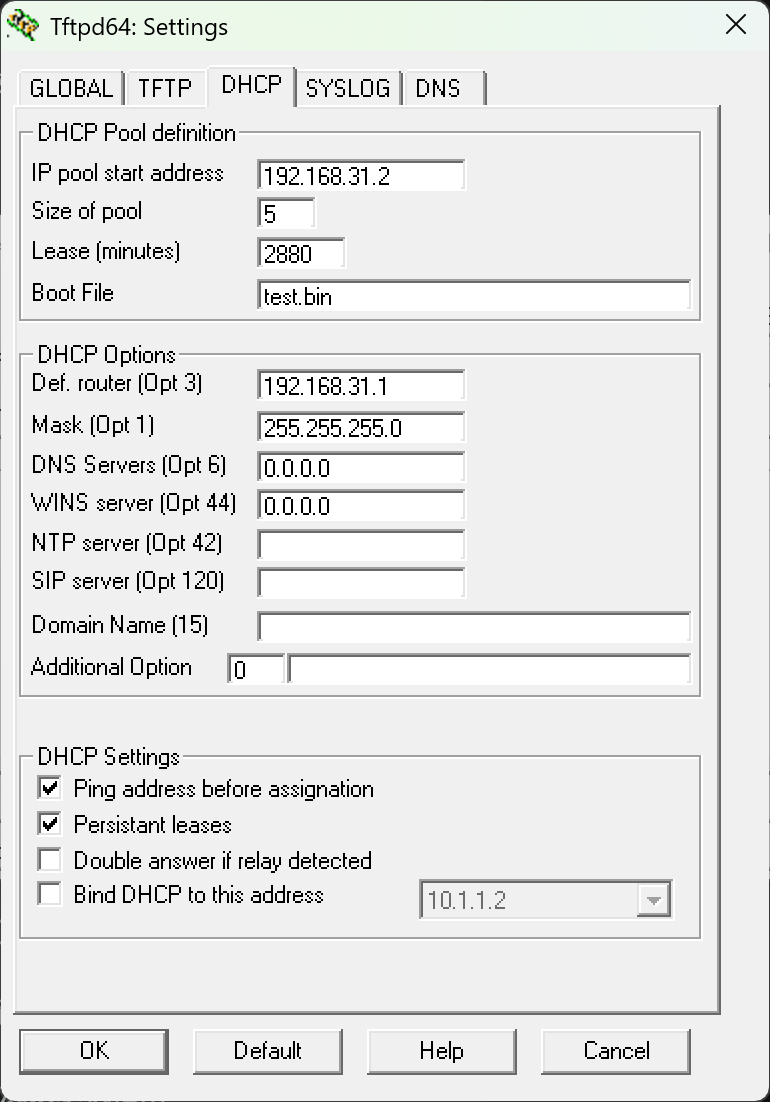
配置Tftpd
打开Tftpd64-设置-DHCP
IP pool start address: 192.168.31.2
Size of pool: 5
Router (Opt 3): 填入 192.168.31.1
Mask: 255.255.255.0
WINS/DNS: 填 0.0.0.0 或者留空即可。
Tftpd64主界面
Server interfaces 选择相应网卡
重刷分区表
将分区表文件mibib.bin 下载到内存
在UBOOT命令行输入:
设置TFTP服务器
IPQ807x# setenv serverip 192.168.31.100
IPQ807x# setenv ipaddr 192.168.31.2


IPQ807x# tftpboot 0x44000000 mibib.bin
擦除 MIBIB 所在的区块
IPQ807x# nand erase 0x40000 0x40000写入 MIBIB
IPQ807x# nand write 0x44000000 0x40000 0x40000设置启动标志并重置环境变量
IPQ807x# env default -a
IPQ807x# saveenv
IPQ807x# reset
env default -a
gemini:
这步操作相当于给 U-Boot 进行了一次"格式化大脑"。它忘掉了所有错误的旧设置,重启后重新从闪存里读取了你之前刷进去的那个正确的 mibib.bin。
章节3 刷入Openwrt底包
通过tftp下载固件到路由器内存
重新设置TFTP服务器
IPQ807x# setenv serverip 192.168.31.100
IPQ807x# setenv ipaddr 192.168.31.2
下载固件到内存
IPQ807x# tftpboot 0x44000000 test.bin擦除rootfs分区
IPQ807x# nand erase 0x2dc0000 0x23c0000将固件写入分区
IPQ807x# nand write 0x44000000 0x2dc0000 0x1c50000使用nand write 0x44000000 0x2dc0000 $filesize
会报错
IPQ807x# nand write 0x44000000 0x2dc0000 $filesize
NAND write: device 0 offset 0x2dc0000, size 0x1c403bc
NAND write to offset 2dc0000 failed -22
Gemini:
NAND write ... failed -22 是完全预料之中的,也是个"好"错误。
原因:-22 代表 "Invalid Argument" (参数无效)。
详解:NAND Flash 的写入必须严格按照页大小 (Page Size) 对齐(通常是 2048 字节或 4096 字节)。你的固件大小是 0x1c403bc,末尾的 3bc 说明它没有对齐,所以 U-Boot 拒绝写入。
保存环境变量
IPQ807x# saveenv
IPQ807x# reset
出现resetting...后重新接TTL线,不出意外的话加载一会后串口应该会显示:
## Loading kernel from FIT Image at 44000000 ...
   Using 'config@ac04' configuration
   Trying 'kernel-1' kernel subimage
     Description:  ARM64 OpenWrt Linux-6.12.60
     Type:         Kernel Image
     Compression:  gzip compressed
     Data Start:   0x440000e8
     Data Size:    5599108 Bytes = 5.3 MiB
     Architecture: AArch64
     OS:           Linux
     Load Address: 0x41000000
     Entry Point:  0x41000000
     Hash algo:    crc32
     Hash value:   498fead8
     Hash algo:    sha1
     Hash value:   77fc2d898d54e6241736c2f5ad567dcf550ed6dd
   Verifying Hash Integrity ... crc32+ sha1+ OK
## Loading fdt from FIT Image at 44000000 ...
   Using 'config@ac04' configuration
   Trying 'fdt-1' fdt subimage
     Description:  ARM64 OpenWrt redmi_ax6-stock device tree blob
     Type:         Flat Device Tree
     Compression:  uncompressed
     Data Start:   0x445571ac
     Data Size:    49003 Bytes = 47.9 KiB
     Architecture: AArch64
     Hash algo:    crc32
     Hash value:   7aca8bd9
     Hash algo:    sha1
     Hash value:   f9759b7825963dbbd670ab22d1b7be2e8c778124
   Verifying Hash Integrity ... crc32+ sha1+ OK
   Booting using the fdt blob at 0x445571ac
   Uncompressing Kernel Image ... OK
   Loading Device Tree to 4a3f1000, end 4a3fff6a ... OK
Using machid 0x8010010 from environment

Starting kernel ...

Jumping to AARCH64 kernel via monitor
章节3 小米路由器修复工具刷回原厂官方固件
进入immortalwrt bash 查看当前分区信息,可以看见已经还原分区表了
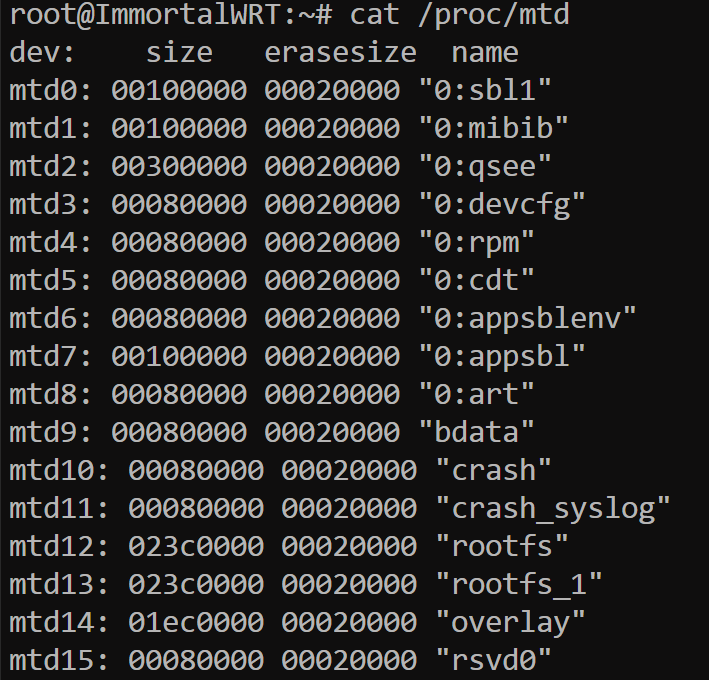
接下来就可以捅reset然后用小米路由器修复工具刷原厂官方固件了
这部分就省略了
结尾
感谢网上各路大神的教程和Gemini的帮助,但是貌似bdata丢了,没SN码和MAC地址了
累了,先不折腾了,下次一定
Uboot 日志记录:
U-Boot 2016.01 (Jul 08 2021 - 07:16:48 +0000), Build: jenkins-common_router_open

DRAM:  smem ram ptable found: ver: 1 len: 4
512 MiB
NAND:  ONFI device found
ID = 158061c8
Vendor = c8
Device = 61
SF: Unsupported flash IDs: manuf ff, jedec ffff, ext_jedec ffff
ipq_spi: SPI Flash not found (bus/cs/speed/mode) = (0/0/48000000/0)
128 MiB
MMC:   sdhci: Node Not found, skipping initialization

PCI1 is not defined in the device tree
In:    serial@78B3000
Out:   serial@78B3000
Err:   serial@78B3000
machid: 8010010
MMC Device 0 not found
eth5 MAC Address from ART is not valid
write phy_id=1, reg(0x8074):0x0670
write phy_id=2, reg(0x8074):0x0670
write phy_id=3, reg(0x8074):0x0670
write phy_id=4, reg(0x8074):0x0670
bootwait is on, bootdelay=2
Hit any key to stop autoboot:  0

Net:   MAC0 addr:9c:9d:7e:5c:d2:31
PHY ID1: 0x4d
PHY ID2: 0xd0b1
EDMA ver 1 hw init
Num rings - TxDesc:1 (0-0) TxCmpl:1 (7-7)
RxDesc:1 (15-15) RxFill:1 (7-7)
ipq807x_edma_alloc_rings: successfull
ipq807x_edma_setup_ring_resources: successfull
ipq807x_edma_configure_rings: successfull
ipq807x_edma_hw_init: successfull
board_eth_init: ipq807x_edma_init successed
eth0
IPQ807x#   mtdparts

device nand0 <nand0>, # parts = 1
 #: name                size            offset          mask_flags
 0: fs                  0x023c0000      0x02dc0000      0

active partition: nand0,0 - (fs) 0x023c0000 @ 0x02dc0000

defaults:
mtdids  : none
mtdparts: none
IPQ807x# <INTERRUPT>
IPQ807x# setenv serverip 192.168.31.100
IPQ807x# setenv ipaddr 192.168.31.2
IPQ807x# tftpboot 0x44000000 mibib.bin
ipq807x_eth_halt: done
eth0 PHY0 Down Speed :10 Half duplex
eth0 PHY1 up Speed :10 Full duplex
eth0 PHY2 Down Speed :10 Half duplex
eth0 PHY3 up Speed :1000 Full duplex
eth0 PHY4 Down Speed :10 Half duplex
eth0 PHY5 Down Speed :10 Half duplex
ipq807x_eth_init: done
Using eth0 device
TFTP from server 192.168.31.100; our IP address is 192.168.31.2
Filename 'mibib.bin'.
Load address: 0x44000000
Loading: *
Got TFTP_OACK: TFTP remote port: changes from 69 to 51212
#################################################################
         #######
         2.1 MiB/s
done
Bytes transferred = 1048576 (100000 hex)
ipq807x_eth_halt: done
IPQ807x# nand erase 0x40000 0x40000

NAND erase: device 0 offset 0x40000, size 0x40000
Erasing at 0x60000 -- 100% complete.
OK
IPQ807x# nand write 0x44000000 0x40000 0x40000

NAND write: device 0 offset 0x40000, size 0x40000
 262144 bytes written: OK
IPQ807x# tftpboot 0x44000000 test.bin
ipq807x_eth_halt: done
eth0 PHY0 Down Speed :10 Half duplex
eth0 PHY1 up Speed :10 Full duplex
eth0 PHY2 Down Speed :10 Half duplex
eth0 PHY3 up Speed :1000 Full duplex
eth0 PHY4 Down Speed :10 Half duplex
eth0 PHY5 Down Speed :10 Half duplex
ipq807x_eth_init: done
Using eth0 device
TFTP from server 192.168.31.100; our IP address is 192.168.31.2
Filename 'test.bin'.
Load address: 0x44000000
Loading: *
Got TFTP_OACK: TFTP remote port: changes from 69 to 51542
#################################################################
         #################################################################
         #################################################################
         #################################################################
         #################################################################
         #################################################################
         #################################################################
         #################################################################
         #################################################################
         #################################################################
         #################################################################
         #################################################################
         #################################################################
         #################################################################
         #################################################################
         #################################################################
         #################################################################
         #################################################################
         #################################################################
         #################################################################
         #################################################################
         #################################################################
         #################################################################
         #################################################################
         #################################################################
         #################################################################
         #################################################################
         #################################################################
         #################################################################
         #################################################################
         #################################################################
         ###
         2.1 MiB/s
done
Bytes transferred = 29623228 (1c403bc hex)
ipq807x_eth_halt: done
IPQ807x# nand erase 0x2dc0000 0x23c0000

NAND erase: device 0 offset 0x2dc0000, size 0x23c0000
Erasing at 0x5160000 -- 100% complete.
OK
IPQ807x# nand write 0x44000000 0x2dc0000 $filesize

NAND write: device 0 offset 0x2dc0000, size 0x1c403bc
NAND write to offset 2dc0000 failed -22
 0 bytes written: ERROR
IPQ807x# <INTERRUPT>
IPQ807x# reset
resetting ...
PCI1 is not defined in the device tree
In:    serial@78B3000
Out:   serial@78B3000
Err:   serial@78B3000
machid: 8010010
MMC Device 0 not found
eth5 MAC Address from ART is not valid
write phy_id=1, reg(0x8074):0x0670
write phy_id=2, reg(0x8074):0x0670
write phy_id=3, reg(0x8074):0x0670
write phy_id=4, reg(0x8074):0x0670
bootwait is on, bootdelay=2
Hit any key to stop autoboot:  0

Net:   MAC0 addr:9c:9d:7e:5c:d2:31
PHY ID1: 0x4d
PHY ID2: 0xd0b1
EDMA ver 1 hw init
Num rings - TxDesc:1 (0-0) TxCmpl:1 (7-7)
RxDesc:1 (15-15) RxFill:1 (7-7)
ipq807x_edma_alloc_rings: successfull
ipq807x_edma_setup_ring_resources: successfull
ipq807x_edma_configure_rings: successfull
ipq807x_edma_hw_init: successfull
board_eth_init: ipq807x_edma_init successed
eth0
IPQ807x# <INTERRUPT>
IPQ807x# mtdparts

device nand0 <nand0>, # parts = 1
 #: name                size            offset          mask_flags
 0: fs                  0x023c0000      0x02dc0000      0

active partition: nand0,0 - (fs) 0x023c0000 @ 0x02dc0000

defaults:
mtdids  : none
mtdparts: none
IPQ807x# <INTERRUPT>
IPQ807x# setenv serverip 192.168.31.100
IPQ807x# setenv ipaddr 192.168.31.2
IPQ807x# tftpboot 0x44000000 test.bin
ipq807x_eth_halt: done
eth0 PHY0 Down Speed :10 Half duplex
eth0 PHY1 up Speed :10 Full duplex
eth0 PHY2 Down Speed :10 Half duplex
eth0 PHY3 up Speed :1000 Full duplex
eth0 PHY4 Down Speed :10 Half duplex
eth0 PHY5 Down Speed :10 Half duplex
ipq807x_eth_init: done
Using eth0 device
TFTP from server 192.168.31.100; our IP address is 192.168.31.2
Filename 'test.bin'.
Load address: 0x44000000
Loading: *
Got TFTP_OACK: TFTP remote port: changes from 69 to 57976
#################################################################
         #################################################################
         #################################################################
         #################################################################
         #################################################################
         #################################################################
         #################################################################
         #################################################################
         #################################################################
         #################################################################
         #################################################################
         #################################################################
         #################################################################
         #################################################################
         #################################################################
         #################################################################
         #################################################################
         #################################################################
         #################################################################
         #################################################################
         #################################################################
         ############################
         2.1 MiB/s
done
Bytes transferred = 20447232 (1380000 hex)
ipq807x_eth_halt: done
IPQ807x# <INTERRUPT>
IPQ807x# nand write 0x44000000 0x2dc0000 0x1380000

NAND write: device 0 offset 0x2dc0000, size 0x1380000
 20447232 bytes written: OK
IPQ807x# setenv flag_boot_rootfs 0
IPQ807x# setenv flag_last_success 0
IPQ807x# setenv flag_try_sys1_failed 8
IPQ807x# setenv flag_try_sys2_failed 8
IPQ807x# saveenv
Saving Environment to NAND...
Erasing NAND...
Erasing at 0x6e0000 -- 100% complete.
Writing to NAND... OK
IPQ807x# reset
resetting ...


U-Boot 2016.01 (Jul 08 2021 - 07:16:48 +0000), Build: jenkins-common_router_openwrt_ota_publish-1455

DRAM:  smem ram ptable found: ver: 1 len: 4
512 MiB
NAND:  ONFI device found
ID = 158061c8
Vendor = c8
Device = 61
SF: Unsupported flash IDs: manuf ff, jedec ffff, ext_jedec ffff
ipq_spi: SPI Flash not found (bus/cs/speed/mode) = (0/0/48000000/0)
128 MiB
MMC:   sdhci: Node Not found, skipping initialization

PCI1 is not defined in the device tree
In:    serial@78B3000
Out:   serial@78B3000
Err:   serial@78B3000
machid: 8010010
MMC Device 0 not found
eth5 MAC Address from ART is not valid
write phy_id=1, reg(0x8074):0x0670
write phy_id=2, reg(0x8074):0x0670
write phy_id=3, reg(0x8074):0x0670
write phy_id=4, reg(0x8074):0x0670
bootwait is on, bootdelay=2
Hit any key to stop autoboot:  0
 trigger button release!
boot from rootfs 0
  miwifi: check crash in rmem !
ubi0: attaching mtd1
ubi0: scanning is finished
UBI init error 22
Erasing NAND...
Erasing at 0x6e0000 -- 100% complete.
Writing to NAND... OK
resetting ...


U-Boot 2016.01 (Jul 08 2021 - 07:16:48 +0000), Build: jenkins-common_router_openwrt_ota_publish-1455

DRAM:  smem ram ptable found: ver: 1 len: 4
512 MiB
NAND:  ONFI device found
ID = 158061c8
Vendor = c8
Device = 61
SF: Unsupported flash IDs: manuf ff, jedec ffff, ext_jedec ffff
ipq_spi: SPI Flash not found (bus/cs/speed/mode) = (0/0/48000000/0)
128 MiB
MMC:   sdhci: Node Not found, skipping initialization

PCI1 is not defined in the device tree
In:    serial@78B3000
Out:   serial@78B3000
Err:   serial@78B3000
machid: 8010010
MMC Device 0 not found
eth5 MAC Address from ART is not valid
write phy_id=1, reg(0x8074):0x0670
write phy_id=2, reg(0x8074):0x0670
write phy_id=3, reg(0x8074):0x0670
write phy_id=4, reg(0x8074):0x0670
bootwait is on, bootdelay=2
Hit any key to stop autoboot:  0

Net:   MAC0 addr:9c:9d:7e:5c:d2:31
PHY ID1: 0x4d
PHY ID2: 0xd0b1
EDMA ver 1 hw init
Num rings - TxDesc:1 (0-0) TxCmpl:1 (7-7)
RxDesc:1 (15-15) RxFill:1 (7-7)
ipq807x_edma_alloc_rings: successfull
ipq807x_edma_setup_ring_resources: successfull
ipq807x_edma_configure_rings: successfull
ipq807x_edma_hw_init: successfull
board_eth_init: ipq807x_edma_init successed
eth0
IPQ807x# env default -a
## Resetting to default environment
IPQ807x# saveenv
Saving Environment to NAND...
Erasing NAND...
Erasing at 0x6e0000 -- 100% complete.
Writing to NAND... OK
IPQ807x# reset
resetting ...


U-Boot 2016.01 (Jul 08 2021 - 07:16:48 +0000), Build: jenkins-common_router_openwrt_ota_publish-1455

DRAM:  smem ram ptable found: ver: 1 len: 4
512 MiB
NAND:  ONFI device found
ID = 158061c8
Vendor = c8
Device = 61
SF: Unsupported flash IDs: manuf ff, jedec ffff, ext_jedec ffff
ipq_spi: SPI Flash not found (bus/cs/speed/mode) = (0/0/48000000/0)
128 MiB
MMC:   sdhci: Node Not found, skipping initialization

PCI1 is not defined in the device tree
In:    serial@78B3000
Out:   serial@78B3000
Err:   serial@78B3000
machid: 8010010
MMC Device 0 not found
eth5 MAC Address from ART is not valid
write phy_id=1, reg(0x8074):0x0670
write phy_id=2, reg(0x8074):0x0670
write phy_id=3, reg(0x8074):0x0670
write phy_id=4, reg(0x8074):0x0670
Hit any key to stop autoboot:  0
 trigger button release!
boot from rootfs 1
  miwifi: check crash in rmem !
ubi0: attaching mtd1
ubi0: scanning is finished
ubi0: volume 2 ("rootfs_data") re-sized from 9 to 108 LEBs
ubi0: attached mtd1 (name "mtd=0", size 35 MiB)
ubi0: PEB size: 131072 bytes (128 KiB), LEB size: 126976 bytes
ubi0: min./max. I/O unit sizes: 2048/2048, sub-page size 2048
ubi0: VID header offset: 2048 (aligned 2048), data offset: 4096
ubi0: good PEBs: 286, bad PEBs: 0, corrupted PEBs: 0
ubi0: user volume: 3, internal volumes: 1, max. volumes count: 128
ubi0: max/mean erase counter: 1/0, WL threshold: 4096, image sequence number: 1764934210
ubi0: available PEBs: 0, total reserved PEBs: 286, PEBs reserved for bad PEB handling: 20
Read 0 bytes from volume kernel to 44000000
No size specified -> Using max size (5713920)
Could not find PCI in device tree
Erasing NAND...
Erasing at 0x6e0000 -- 100% complete.
Writing to NAND... OK
## Loading kernel from FIT Image at 44000000 ...
   Using 'config@ac04' configuration
   Trying 'kernel-1' kernel subimage
     Description:  ARM64 OpenWrt Linux-6.12.60
     Type:         Kernel Image
     Compression:  gzip compressed
     Data Start:   0x440000e8
     Data Size:    5599108 Bytes = 5.3 MiB
     Architecture: AArch64
     OS:           Linux
     Load Address: 0x41000000
     Entry Point:  0x41000000
     Hash algo:    crc32
     Hash value:   498fead8
     Hash algo:    sha1
     Hash value:   77fc2d898d54e6241736c2f5ad567dcf550ed6dd
   Verifying Hash Integrity ... crc32+ sha1+ OK
## Loading fdt from FIT Image at 44000000 ...
   Using 'config@ac04' configuration
   Trying 'fdt-1' fdt subimage
     Description:  ARM64 OpenWrt redmi_ax6-stock device tree blob
     Type:         Flat Device Tree
     Compression:  uncompressed
     Data Start:   0x445571ac
     Data Size:    49003 Bytes = 47.9 KiB
     Architecture: AArch64
     Hash algo:    crc32
     Hash value:   7aca8bd9
     Hash algo:    sha1
     Hash value:   f9759b7825963dbbd670ab22d1b7be2e8c778124
   Verifying Hash Integrity ... crc32+ sha1+ OK
   Booting using the fdt blob at 0x445571ac
   Uncompressing Kernel Image ... OK
   Loading Device Tree to 4a3f1000, end 4a3fff6a ... OK
Using machid 0x8010010 from environment

Starting kernel ...

Jumping to AARCH64 kernel via monitor