在这里Flutter开发鸿蒙年味 + 实用实战应用|搭建【多 Tab 应用】基础工程 + 实现【弧形底部导航】构建了多个底部选项卡,在这里Flutter开发鸿蒙年味 + 实用实战应用|春节祝福:列表选卡 + 贴纸拖动 + 截图分享完成了春节祝福选项卡功能。接下来基于 lottie (电子烟花 JSON 动画)与 flutter_animator(手持烟花粒子效果),在「绿色烟花」选项卡中实现两种风格:电子烟花(Lottie 本地资源)、手持烟花(点击位置棍子 + 锥形火花)。
一、📦 库选型与适用场景
1.1 本实战用到的库
| 库名 | 核心价值 | 适用场景 |
|---|---|---|
| lottie | 解析并渲染 After Effects 导出的 JSON 动画,纯 Dart、多端通用 | 电子烟花:加载本地 lottie_firework.json,无音效循环播放 |
| flutter_animator | Animate.css 风格预置动画,FadeOut 等、少样板代码 | 手持烟花:棍子 + 锥形火花流,点击任意位置在该处显示,金/黄/白/橙配色 |
为什么选这两种:Lottie 负责「现成 JSON 电子烟花」、flutter_animator 负责「点击即现的手持烟花」粒子效果,两种风格用 Tab 切换展示。
1.2 整体流程概览
📦 库选型
🔧 环境与依赖
📥 集成与资源
🎆 两种风格实现
📤 鸿蒙打包与优化
二、🔧 环境适配
2.1 支持的 Flutter 版本
| 库 | 最低 Flutter / Dart | 本教程验证 |
|---|---|---|
| lottie ^3.3.0 | Dart 2.12+ | Flutter 3.x + Dart 3.x ✅ |
| flutter_animator ^3.2.2 | Flutter >=3 | Flutter 3.x ✅ |
2.2 多端适配
- lottie :纯 Dart 解析与渲染,Android / iOS / 鸿蒙 / Web / 桌面均可。
- flutter_animator:纯 Flutter 组件,多端一致。
三、📥 集成步骤
3.1 pubspec.yaml 配置
在项目根目录的 pubspec.yaml 的 dependencies: 下增加:
yaml
dependencies:
  flutter:
    sdk: flutter
  lottie: ^3.3.0
  flutter_animator: ^3.2.2
在 flutter: 下声明资源目录:
yaml
flutter:
  uses-material-design: true
  assets:
    - assets/
为什么配置 assets :电子烟花使用本地 assets/lottie_firework.json,需在此声明。
3.2 依赖安装
bash
flutter pub get3.3 页面顶部导入
绿色烟花页(lib/pages/firework_page.dart)顶部:
dart
import 'dart:math';

import 'package:flutter/material.dart';
import 'package:font_awesome_flutter/font_awesome_flutter.dart';
import 'package:lottie/lottie.dart';
import 'package:flutter_animator/flutter_animator.dart';
四、🎆 两种风格实现与完整代码
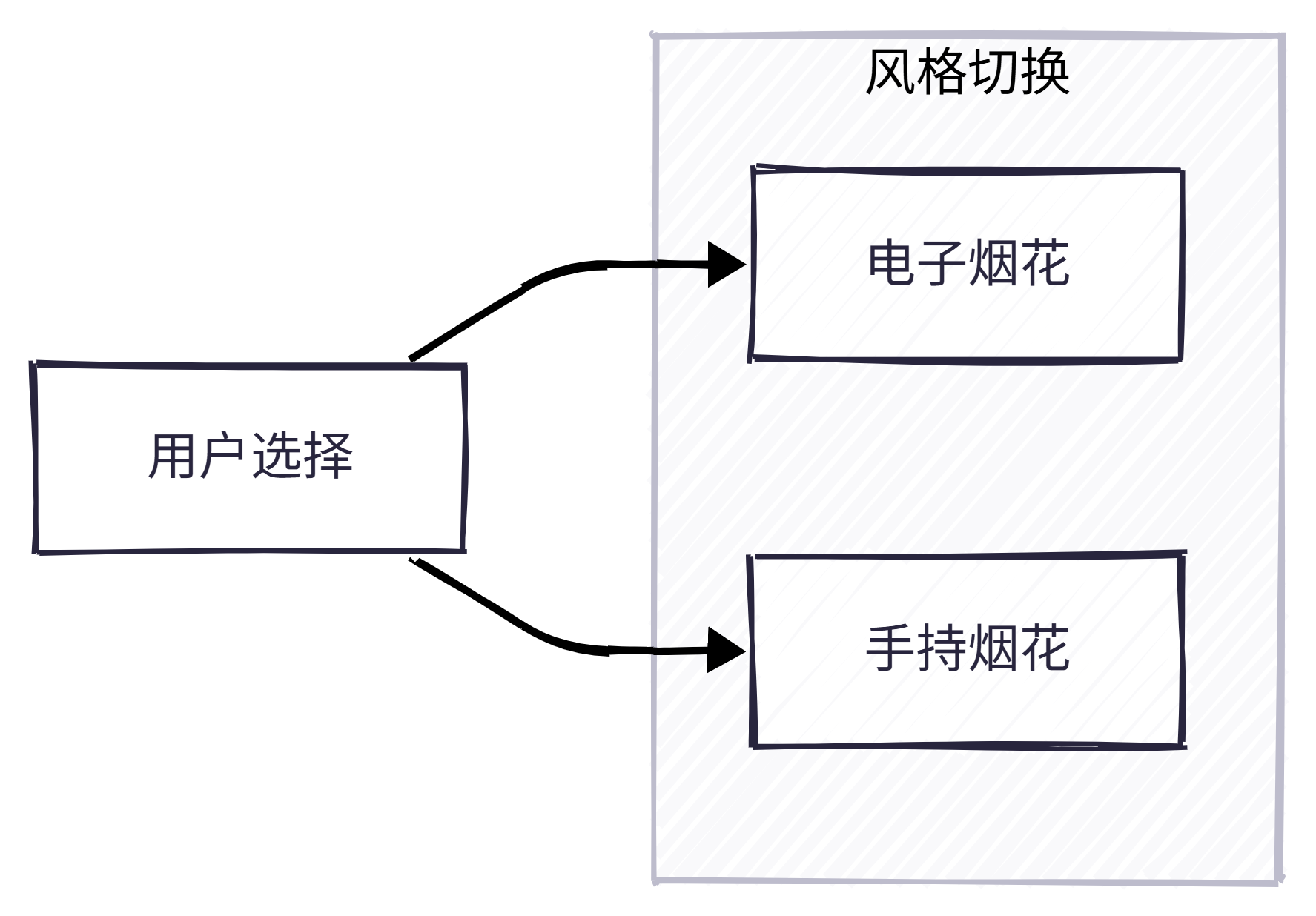
整体设计:绿色烟花页 提供两个 Tab------电子烟花 (Lottie)、手持烟花 (点击位置棍子+火花);根据 _styleIndex 切换子视图。
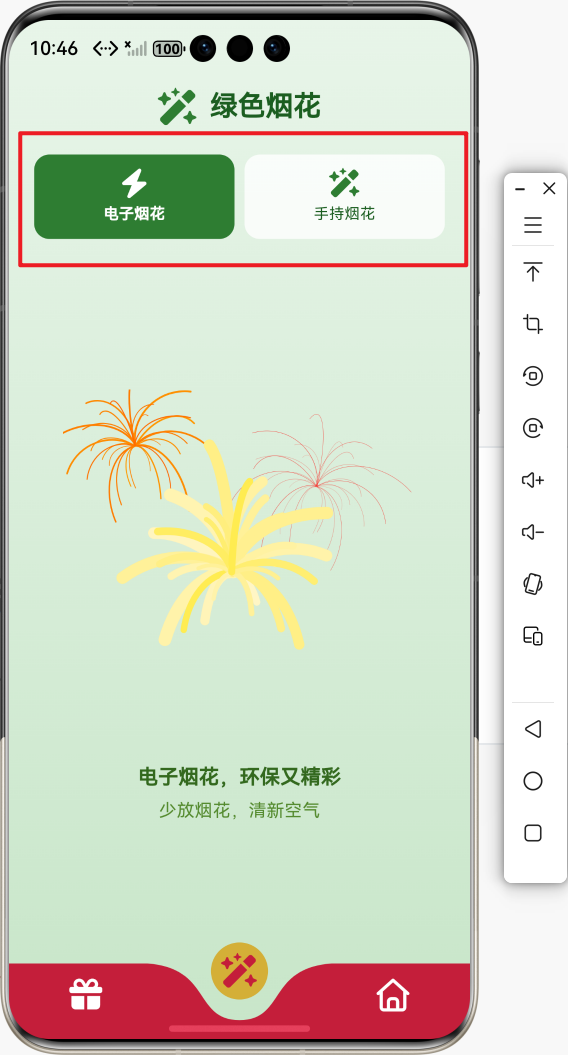
4.1 页面骨架与 Tab 切换(完整代码)
为什么用 StatefulWidget :需要维护当前选中的 Tab 索引 _styleIndex,以及手持烟花侧的点击位置与重播 key。
dart
/// 绿色烟花页:电子烟花(Lottie)、手持烟花(粒子)
class FireworkPage extends StatefulWidget {
  const FireworkPage({super.key});

  @override
  State<FireworkPage> createState() => _FireworkPageState();
}

class _FireworkPageState extends State<FireworkPage> {
  /// 当前风格:0 电子烟花(Lottie),1 手持烟花(粒子)
  int _styleIndex = 0;

  @override
  Widget build(BuildContext context) {
    return Container(
      decoration: const BoxDecoration(
        gradient: LinearGradient(
          begin: Alignment.topCenter,
          end: Alignment.bottomCenter,
          colors: [Color(0xFFE8F5E9), Color(0xFFC8E6C9)],
        ),
      ),
      child: SafeArea(
        child: Column(
          children: [
            _buildHeader(),
            _buildStyleTabs(),
            Expanded(child: _buildContent()),
          ],
        ),
      ),
    );
  }

  Widget _buildHeader() {
    return Padding(
      padding: const EdgeInsets.symmetric(vertical: 16),
      child: Row(
        mainAxisAlignment: MainAxisAlignment.center,
        children: [
          FaIcon(
            FontAwesomeIcons.wandMagicSparkles,
            size: 28,
            color: const Color(0xFF2E7D32),
          ),
          const SizedBox(width: 10),
          Text(
            '绿色烟花',
            style: Theme.of(context).textTheme.titleLarge?.copyWith(
                  fontWeight: FontWeight.bold,
                  color: const Color(0xFF1B5E20),
                ),
          ),
        ],
      ),
    );
  }

  Widget _buildStyleTabs() {
    const styles = ['电子烟花', '手持烟花'];
    const icons = [
      FontAwesomeIcons.bolt,
      FontAwesomeIcons.wandMagicSparkles,
    ];
    return Padding(
      padding: const EdgeInsets.symmetric(horizontal: 16, vertical: 8),
      child: Row(
        children: List.generate(2, (i) {
          final selected = _styleIndex == i;
          return Expanded(
            child: Padding(
              padding: const EdgeInsets.symmetric(horizontal: 4),
              child: Material(
                color: selected
                    ? const Color(0xFF2E7D32)
                    : Colors.white.withValues(alpha: 0.8),
                borderRadius: BorderRadius.circular(12),
                child: InkWell(
                  onTap: () => setState(() => _styleIndex = i),
                  borderRadius: BorderRadius.circular(12),
                  child: Padding(
                    padding: const EdgeInsets.symmetric(vertical: 12),
                    child: Column(
                      children: [
                        FaIcon(
                          icons[i],
                          size: 22,
                          color: selected
                              ? Colors.white
                              : const Color(0xFF2E7D32),
                        ),
                        const SizedBox(height: 4),
                        Text(
                          styles[i],
                          style: TextStyle(
                            fontSize: 12,
                            fontWeight:
                                selected ? FontWeight.bold : FontWeight.w500,
                            color: selected
                                ? Colors.white
                                : const Color(0xFF1B5E20),
                          ),
                          textAlign: TextAlign.center,
                        ),
                      ],
                    ),
                  ),
                ),
              ),
            ),
          );
        }),
      ),
    );
  }

  Widget _buildContent() {
    switch (_styleIndex) {
      case 0:
        return const _LottieStyleView();
      case 1:
        return const _SparklerStyleView();
      default:
        return const _LottieStyleView();
    }
  }
}
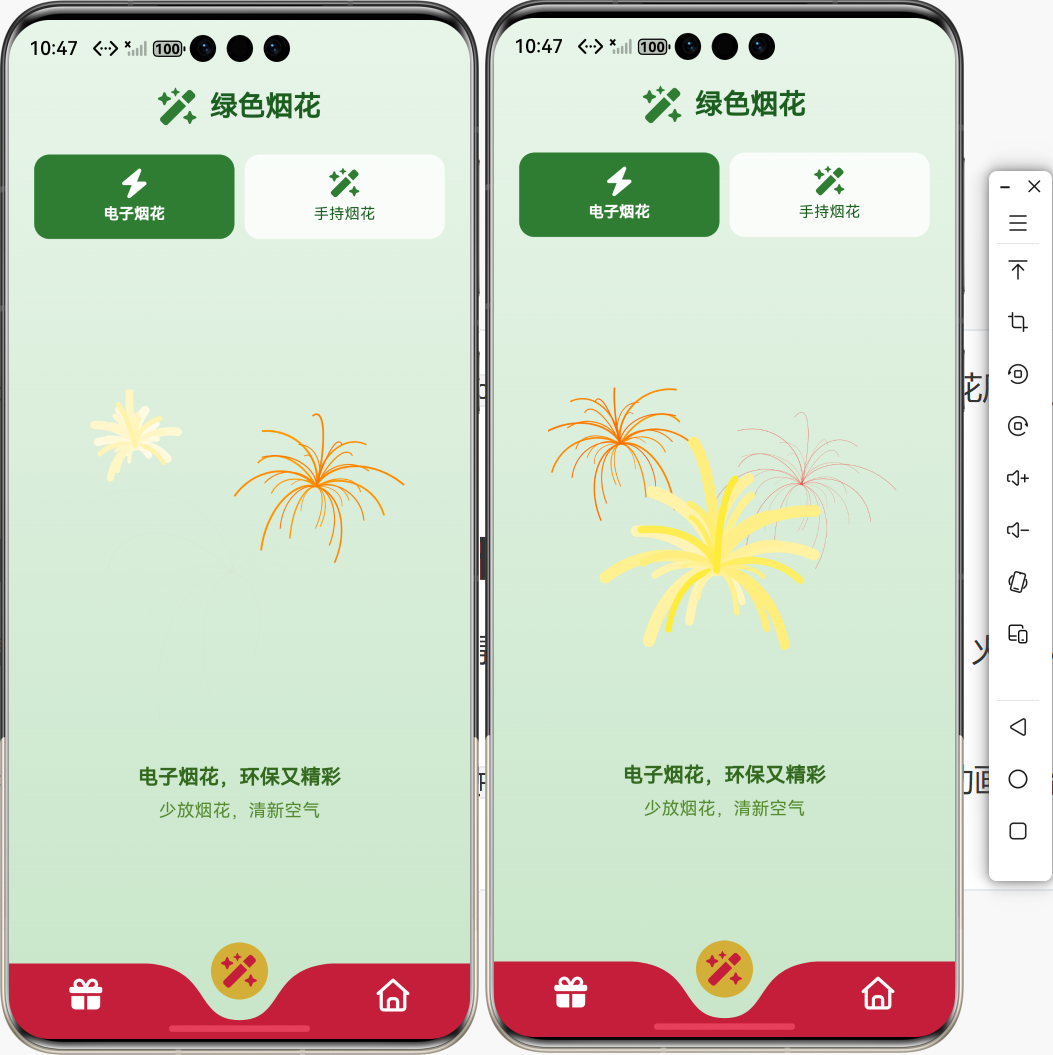
4.2 风格一:电子烟花(Lottie 本地资源)完整代码
为什么用 Lottie.asset:电子烟花使用本地 JSON,无需网络,首帧快、离线可用。
dart
/// 电子烟花:Lottie 动画
class _LottieStyleView extends StatelessWidget {
  const _LottieStyleView();

  static const String _lottieAsset = 'assets/lottie_firework.json';

  @override
  Widget build(BuildContext context) {
    return Center(
      child: Column(
        mainAxisAlignment: MainAxisAlignment.center,
        children: [
          SizedBox(
            width: 280,
            height: 280,
            child: Lottie.asset(
              _lottieAsset,
              fit: BoxFit.contain,
              errorBuilder: (_, __, ___) => const Column(
                mainAxisAlignment: MainAxisAlignment.center,
                children: [
                  Icon(Icons.broken_image, size: 48, color: Color(0xFF2E7D32)),
                  SizedBox(height: 8),
                  Text(
                    '未找到 assets/lottie_firework.json',
                    textAlign: TextAlign.center,
                    style: TextStyle(color: Color(0xFF33691E)),
                  ),
                ],
              ),
            ),
          ),
          const SizedBox(height: 16),
          Text(
            '电子烟花,环保又精彩',
            style: Theme.of(context).textTheme.titleMedium?.copyWith(
                  color: const Color(0xFF33691E),
                  fontWeight: FontWeight.w600,
                ),
          ),
          const SizedBox(height: 4),
          Text(
            '少放烟花,清新空气',
            style: Theme.of(context).textTheme.bodyMedium?.copyWith(
                  color: const Color(0xFF558B2F),
                ),
          ),
        ],
      ),
    );
  }
}
资源说明 :将电子烟花 Lottie JSON 放入 assets/lottie_firework.json;可替换为其他电子/烟花风格 JSON。
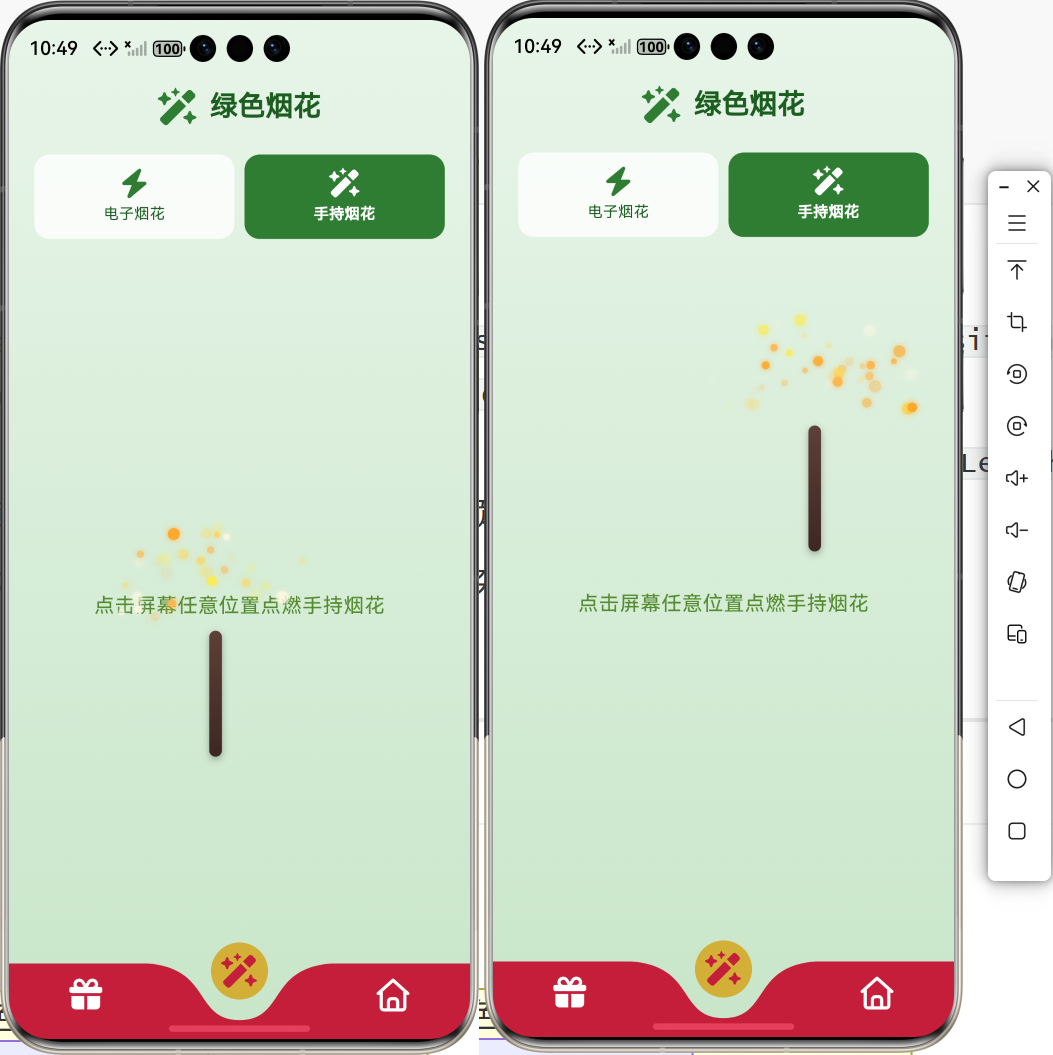
4.3 风格二:手持烟花(点击位置棍子 + 锥形火花)完整代码
为什么在点击位置显示 :用 TapDownDetails.localPosition 得到点击坐标,棍子顶端放在该点,火花从该点向上锥形扩散,符合「手持烟花」在手中位置燃烧的直觉。
为什么用 offset 而不是 delay :flutter_animator 的 AnimationPreferences 使用 offset 表示动画开始延迟(错峰淡出),duration 表示动画时长。
dart
/// 手持烟花:点击位置棍子 + 向上锥形火花流
class _SparklerStyleView extends StatefulWidget {
  const _SparklerStyleView();

  @override
  State<_SparklerStyleView> createState() => _SparklerStyleViewState();
}

class _SparklerStyleViewState extends State<_SparklerStyleView> {
  int _relightKey = 0;
  /// 点击位置,null 时只显示提示
  Offset? _tapPosition;

  static const List<Color> _sparkColors = [
    Color(0xFFFFD54F),
    Color(0xFFFFEB3B),
    Color(0xFFFFF8E1),
    Color(0xFFFFB74D),
    Color(0xFFFFA726),
  ];

  static const int _particleCount = 36;
  static const double _stickWidth = 10;
  static const double _stickHeight = 100;
  static const double _coneLength = 90;
  static const double _particleRadius = 3.5;

  void _onTapDown(TapDownDetails details) {
    setState(() {
      _tapPosition = details.localPosition;
      _relightKey++;
    });
  }

  @override
  Widget build(BuildContext context) {
    return Stack(
      children: [
        GestureDetector(
          behavior: HitTestBehavior.opaque,
          onTapDown: _onTapDown,
          child: Container(
            color: Colors.transparent,
            child: Center(
              child: Text(
                '点击屏幕任意位置点燃手持烟花',
                style: Theme.of(context).textTheme.bodyLarge?.copyWith(
                      color: const Color(0xFF558B2F),
                    ),
              ),
            ),
          ),
        ),
        if (_tapPosition != null) ...[
          Positioned(
            left: _tapPosition!.dx - _stickWidth / 2,
            top: _tapPosition!.dy,
            child: _buildStick(),
          ),
          Positioned(
            left: _tapPosition!.dx - _coneLength,
            top: _tapPosition!.dy - _coneLength,
            width: _coneLength * 2,
            height: _coneLength * 2,
            child: _buildSparks(),
          ),
        ],
      ],
    );
  }

  Widget _buildStick() {
    return Container(
      width: _stickWidth,
      height: _stickHeight,
      decoration: BoxDecoration(
        borderRadius: BorderRadius.circular(_stickWidth / 2),
        gradient: const LinearGradient(
          begin: Alignment.topCenter,
          end: Alignment.bottomCenter,
          colors: [
            Color(0xFF5D4037),
            Color(0xFF3E2723),
          ],
        ),
        boxShadow: [
          BoxShadow(
            color: Colors.black.withValues(alpha: 0.3),
            blurRadius: 4,
            offset: const Offset(0, 2),
          ),
        ],
      ),
    );
  }

  Widget _buildSparks() {
    final random = Random(_relightKey);
    return IgnorePointer(
      child: Stack(
        clipBehavior: Clip.none,
        children: List.generate(_particleCount, (i) {
          final angle = (random.nextDouble() - 0.5) * 0.9 * pi;
          final len = _coneLength * (0.4 + random.nextDouble() * 0.6);
          final dx = sin(angle) * len;
          final dy = -cos(angle) * len;
          final color = _sparkColors[random.nextInt(_sparkColors.length)];
          final radius = _particleRadius * (0.6 + random.nextDouble() * 0.8);
          return Positioned(
            left: _coneLength + dx - radius,
            top: _coneLength + dy - radius,
            child: FadeOut(
              key: ValueKey('$_relightKey-$i'),
              preferences: AnimationPreferences(
                duration: Duration(milliseconds: 500 + random.nextInt(300)),
                offset: Duration(milliseconds: i * 12 + random.nextInt(25)),
              ),
              child: Container(
                width: radius * 2,
                height: radius * 2,
                decoration: BoxDecoration(
                  shape: BoxShape.circle,
                  color: color,
                  boxShadow: [
                    BoxShadow(
                      color: color.withValues(alpha: 0.7),
                      blurRadius: 3,
                      spreadRadius: 0.5,
                    ),
                  ],
                ),
              ),
            ),
          );
        }),
      ),
    );
  }
}要点简述:
- 棍子 :
_buildStick()为细长圆角矩形,深棕渐变,长度_stickHeight,顶端对齐_tapPosition(top: _tapPosition!.dy),水平居中(left: _tapPosition!.dx - _stickWidth / 2)。 - 火花 :在以点击为原点的锥形内随机分布,
angle约 ±0.45π 向上,len在 0.4~1.0 倍_coneLength;每个粒子用FadeOut+AnimationPreferences(duration, offset)错峰淡出;颜色从_sparkColors随机取。 - 再次点击 :更新
_tapPosition并_relightKey++,烟花移到新位置并重新播放火花动画。
五、🧩 封装与文件清单
5.1 封装结构
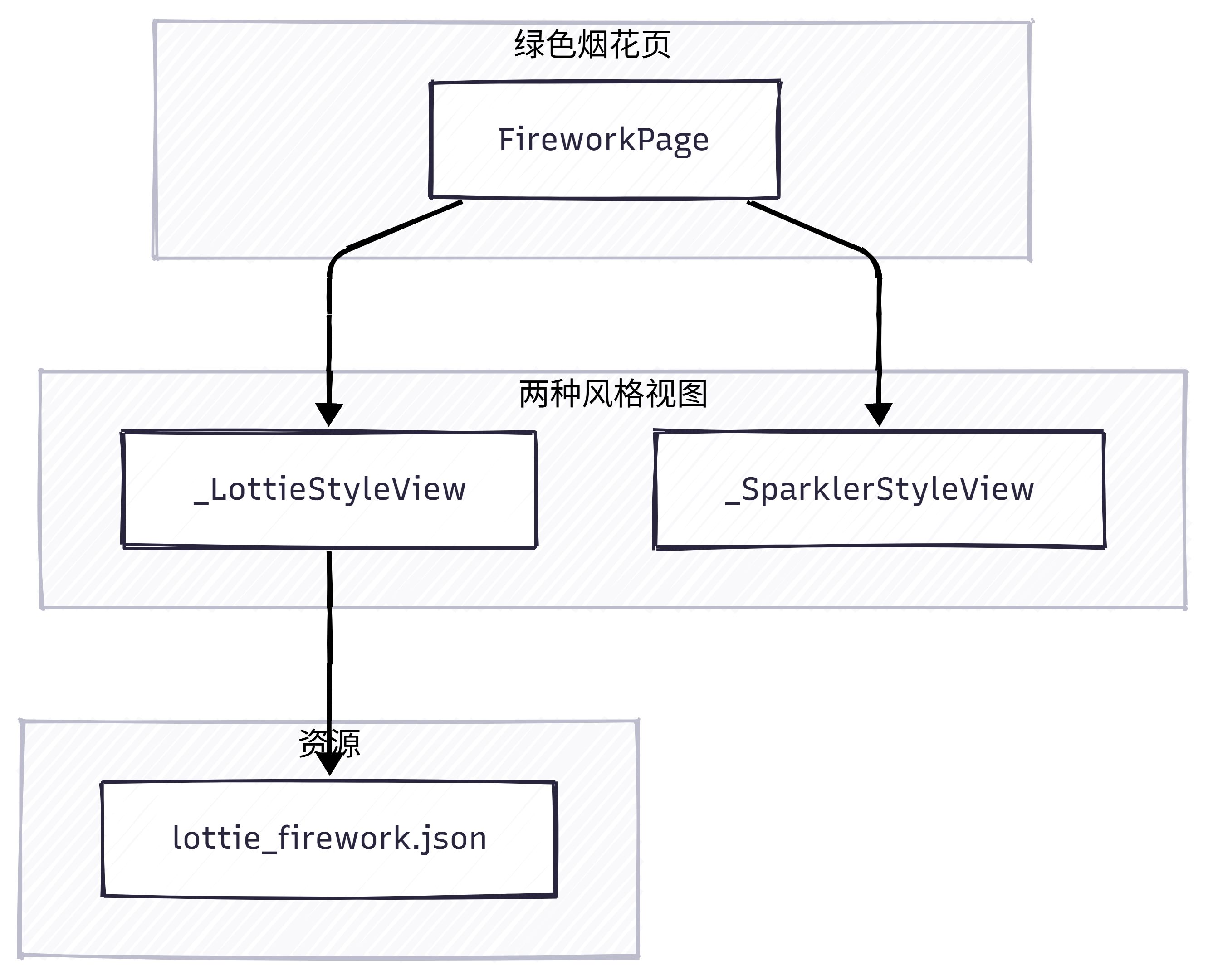
- FireworkPage :维护
_styleIndex(0/1),build 时切换电子烟花 / 手持烟花。 - _LottieStyleView:无状态,仅展示 Lottie + 文案。
- _SparklerStyleView :有状态,维护
_tapPosition、_relightKey,点击时在点击处绘制棍子与火花。
5.2 文件清单
| 文件 | 说明 |
|---|---|
lib/pages/firework_page.dart |
绿色烟花页完整实现(含上述全部代码) |
pubspec.yaml |
依赖 lottie、flutter_animator;flutter.assets: assets/ |
assets/lottie_firework.json |
电子烟花 Lottie 动画(需放入 assets/) |
手持烟花无需额外资源,纯代码实现。
六、⚡ 工程优化与高频问题
6.1 显示与性能
- Lottie :使用
Lottie.asset避免网络延迟,首帧更快。 - 手持烟花:单次仅一处烟花(棍子 + 一批粒子),粒子数约 36,重绘压力小;每次点击仅更新位置与 key,逻辑简单。
6.2 体积与资源
- lottie:仅依赖一个 JSON 文件,可按需替换为更小的电子烟花 JSON。
- flutter_animator:无额外资源。
6.3 高频问题
| 现象 | 原因 | 解决 |
|---|---|---|
| Target of URI doesn't exist: lottie / flutter_animator | 依赖未解析 | 执行 flutter pub get,必要时重启 IDE |
| 未找到 assets/lottie_firework.json | 未添加文件或路径错误 | 将 JSON 放入项目 assets/ 且 pubspec 已声明 assets: |
| FadeOut 报错 delay 不存在 | API 为 offset | 使用 AnimationPreferences(offset: Duration(...), ...) |