背景
项目使用 OceanBase 数据库,并通过 ShardingSphere JDBC 实现分表。由于 ShardingSphere 当前不支持 jdbc:oceanbase: 协议,我们在代码中将连接串替换为 jdbc:mysql 并引入 MySQL 驱动
xml
<dependency>
    <groupId>com.oceanbase</groupId>
    <artifactId>oceanbase-client</artifactId>
    <version>2.4.8</version>
</dependency>

<dependency>
    <groupId>org.apache.shardingsphere</groupId>
    <artifactId>shardingsphere-jdbc</artifactId>
    <version>5.5.2</version>
</dependency>

<dependency>
    <groupId>com.mysql</groupId>
    <artifactId>mysql-connector-j</artifactId>
    <!-- 问题根源 -->
    <version>8.4.0</version>
</dependency>
数据源配置如下(关键部分)
yaml
spring:
  datasource:
    driver-class-name: com.oceanbase.jdbc.Driver
    url: jdbc:oceanbase:loadbalance://IP:PORT/test?...
    druid:
      initial-size: 8
      max-active: 30
      min-idle: 8
typescript
@Configuration
public class ShardingDataSourceConfiguration {

    @Value("${spring.datasource.url}")
    private String url;

    @Value("${spring.datasource.username}")
    private String username;

    @Value("${spring.datasource.password}")
    private String password;

    private Map<String, DataSource> createDataSourceMap() {
        Map<String, DataSource> dataSourceMap = new HashMap<>();
        DruidDataSource dataSource1 = new DruidDataSource();
        dataSource1.setDriverClassName("com.mysql.cj.jdbc.Driver");
        url = url.replace("jdbc:oceanbase", "jdbc:mysql");
        dataSource1.setUrl(url);
        dataSource1.setUsername(username);
        dataSource1.setPassword(password);
        dataSource1.setInitialSize(8);
        dataSource1.setMaxActive(30);
        dataSource1.setMinIdle(8);
        dataSourceMap.put("ds_0", dataSource1);
        return dataSourceMap;
    }

    @Bean("shardingDataSource")
    public DataSource dataSource() throws SQLException {
        Properties props = new Properties();
        props.put("sql-show", false);
        return ShardingSphereDataSourceFactory.createDataSource(
            createDataSourceMap(),
            Collections.singletonList(createShardingRuleConfiguration()),
            props
        );
    }
}
同时,项目中还有一个未经过 ShardingSphere 的原生 OceanBase 数据源
kotlin
@Configuration
public class DataSourceConfiguration {

    @Bean(name = "logAnalysisDataSource")
    public DataSource logAnalysisDataSource() {
        // com.alibaba.druid.spring.boot.autoconfigure.DruidDataSourceBuilder
        // 使用 spring.datasource 配置来创建数据库连接池
        DruidDataSource druidDataSource = DruidDataSourceBuilder.create().build();
        druidDataSource.setSocketTimeout(180000);
        druidDataSource.setConnectTimeout(180000);
        return druidDataSource;
    }
}
问题现象
启动项目时,发现 @Bean("shardingDataSource") 所对应的 DruidDataSource 初始化时间特别长,但 @Bean(name = "logAnalysisDataSource") 所对应的 DruidDataSource 初始化却很快
css
[2026-02-07 17:47:32.417] [INFO ] [com.zaxxer.hikari.HikariDataSource] [80] - [HikariPool-1 - Starting...]
[2026-02-07 17:47:32.739] [INFO ] [com.zaxxer.hikari.HikariDataSource] [82] - [HikariPool-1 - Start completed.]

[2026-02-07 17:50:22.107] [INFO ] [com.alibaba.druid.pool.DruidDataSource] [1007] - [{dataSource-1} inited]

[2026-02-07 17:50:34.454] [INFO ] [com.alibaba.druid.pool.DruidDataSource] [1007] - [{dataSource-2} inited]

[2026-02-07 17:50:35.840] [INFO ] [com.xxx.WebApplication] [61] - [Started WebApplication in 188.327 seconds (JVM running for 189.054)]
日志中的 HikariDataSource 是 ShardingSphere JDBC 用于操作元数据的内部连接池,其初始化完成至 DruidDataSource#init 执行前的耗时可忽略不计
启动日志中,{dataSource-1} 对应 @Bean("shardingDataSource"),{dataSource-2} 对应 @Bean(name = "logAnalysisDataSource")
从日志可以看出,@Bean("shardingDataSource") 这个 DruidDataSource 对象的初始化时间为 2 分 50 秒,而 @Bean(name = "logAnalysisDataSource") 这个 DruidDataSource 对象的初始化时间为 12 秒,而两者唯一的区别在于底层 JDBC 驱动
备注:因项目开发环境位于内网,且数据库部署于不同地域,网络延迟较高,数据库连接池初始化耗时 12 秒属正常范围
跟踪 Druid 源码发现,耗时主要集中在 createPhysicalConnection() 方法执行过程中,该方法负责建立底层物理数据库连接
kotlin
public class DruidDataSource extends DruidAbstractDataSource implements DruidDataSourceMBean, ManagedDataSource, Referenceable, Closeable, Cloneable, ConnectionPoolDataSource, MBeanRegistration {

    public void init() throws SQLException {
        try {
            if (createScheduler != null && asyncInit) {
                for (int i = 0; i < initialSize; ++i) {
                    submitCreateTask(true);
                }
            } else if (!asyncInit) {
                // init connections
                while (poolingCount < initialSize) {
                    try {
                        // 慢在这里
                        PhysicalConnectionInfo pyConnectInfo = createPhysicalConnection();
                        DruidConnectionHolder holder = new DruidConnectionHolder(this, pyConnectInfo);
                        connections[poolingCount++] = holder;
                    } catch (SQLException ex) {

                    }
                }
            }
        } finally {
            inited = true;
            lock.unlock();
            if (init && LOG.isInfoEnabled()) {
                String msg = "{dataSource-" + this.getID();
                if (this.name != null && !this.name.isEmpty()) {
                    msg += ",";
                    msg += this.name;
                }
                msg += "} inited";
                // 打印日志
                LOG.info(msg);
            }
        }
    }
}
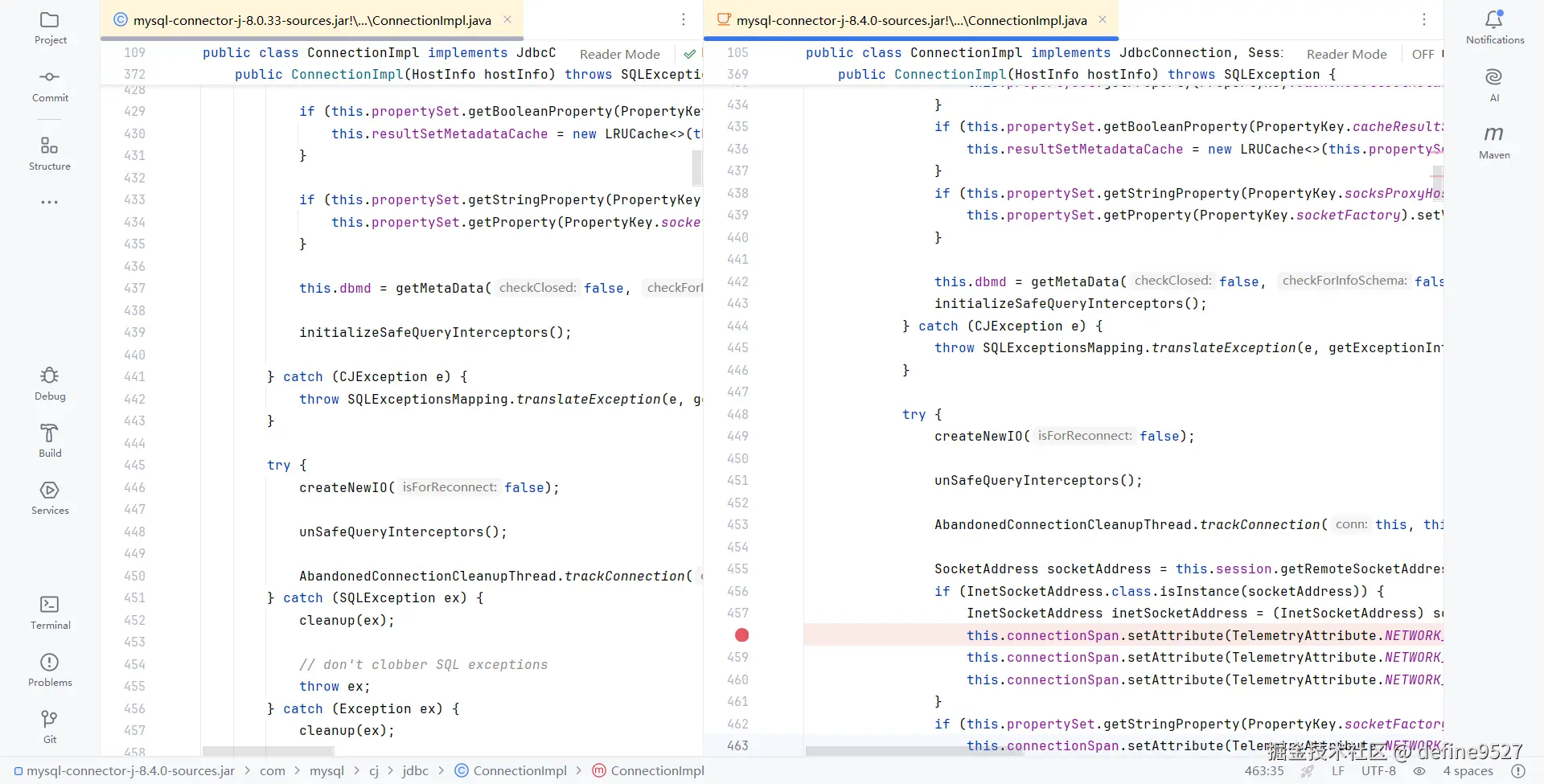
继续跟踪源码,最终定位到问题源于 MySQL 驱动在创建连接时调用 InetSocketAddress.getHostName() 进行反向 DNS 解析,耗时显著,导致连接初始化缓慢
完整的链路:DruidAbstractDataSource#createPhysicalConnection => ... => com.mysql.cj.jdbc.ConnectionImpl#getInstance(HostInfo hostInfo) => ConnectionImpl 构造方法
kotlin
package com.mysql.cj.jdbc;

public class ConnectionImpl implements JdbcConnection, SessionEventListener, Serializable {
    public ConnectionImpl(HostInfo hostInfo) throws SQLException {
        try {
            SocketAddress socketAddress = this.session.getRemoteSocketAddress();
            if (InetSocketAddress.class.isInstance(socketAddress)) {
                InetSocketAddress inetSocketAddress = (InetSocketAddress) socketAddress;
                // 关键
                this.connectionSpan.setAttribute(
                    TelemetryAttribute.NETWORK_PEER_ADDRESS,
                    // 获取 hostname 字段值
                    inetSocketAddress.getHostName()
                );
            }
        }
    }
}
java
package java.net;

public class InetSocketAddress extends SocketAddress {

    private final transient InetSocketAddressHolder holder;

    // Private implementation class pointed to by all public methods.
    private static class InetSocketAddressHolder {
        // The hostname of the Socket Address
        private String hostname;
        // The IP address of the Socket Address
        private InetAddress addr;
        // The port number of the Socket Address
        private int port;

        private InetSocketAddressHolder(String hostname, InetAddress addr, int port) {
            this.hostname = hostname;
            this.addr = addr;
            this.port = port;
        }

        private int getPort() {
            return port;
        }

        private InetAddress getAddress() {
            return addr;
        }

        private String getHostName() {
            if (hostname != null)
                return hostname;
            if (addr != null)
                // ⚠️ 触发反向 DNS 解析!内网无 DNS 服务 → 阻塞超时
                return addr.getHostName();
            return null;
        }
    }

    /**
     * Gets the {@code hostname}.
     * Note: This method may trigger a name service reverse lookup if the
     * address was created with a literal IP address.
     *
     * @return  the hostname part of the address.
     */
    public final String getHostName() {
        return holder.getHostName();
    }
}
在网上搜了下,有如下的文章片段
markdown
# 解决 Linux 上 Java 获取 hostname 很慢的问题

在 Linux 环境中运行 Java 应用时,有时会遇到 `InetAddress.getLocalHost().getHostName()` 方法执行缓慢的问题,严重影响应用启动速度

## 问题原因
Java 在调用 `getHostName()` 时,会尝试对本机 IP 地址进行**反向 DNS 解析(PTR 查询)**,以获取主机名,若 DNS 服务器不可达、无 PTR 记录或网络延迟高,该操作将长时间阻塞

## 常见场景
- Docker / K8S 容器中未配置 DNS
- 内部网络无反向解析支持
- 使用纯 IP 地址连接数据库(如 MySQL)
真相大白!我的项目开发环境位于公司内网,完全无法访问外网,更无外部 DNS 服务支持,以下为尝试 ping 外网的输出结果
ruby
$ ping www.baidu.com
Ping 请求找不到主机 www.baidu.com。请检查该名称,然后重试。
那怎么解释 @Bean(name = "logAnalysisDataSource") 这个 DruidDataSource 对象的初始化时间仅 12 秒呢?这是因为它使用的是 jdbc:oceanbase 协议与 oceanbase-client 驱动,这个驱动在连接建立过程中不会调用 InetSocketAddress.getHostName() 方法(没看源码,仅为猜测,但八九不离十)
如何解决这个问题呢?有如下两种方法(网上说添加几个 JVM 参数就能解决,实测无效)
上述问题在 SpringBoot 3 Druid 启动慢排查,SpringBoot 启动慢、服务偶发接口慢查询,MySQL Connector-j 9.0.0 版本问题,getHostName() 请求慢 这篇文章中也提到了
解决办法一:修改 hosts 文件
- 修改 hosts 文件,添加域名映射
makefile
10.xxx.xxx.146 www.define.com- 从启动日志可以看出,问题完美解决
css
[2026-02-07 18:44:04.258] [INFO ] [com.zaxxer.hikari.HikariDataSource] [80] - [HikariPool-1 - Starting...]
[2026-02-07 18:44:04.582] [INFO ] [com.zaxxer.hikari.HikariDataSource] [82] - [HikariPool-1 - Start completed.]

[2026-02-07 18:44:09.426] [INFO ] [com.alibaba.druid.pool.DruidDataSource] [1007] - [{dataSource-1} inited]

[2026-02-07 18:44:22.180] [INFO ] [com.alibaba.druid.pool.DruidDataSource] [1007] - [{dataSource-2} inited]

[2026-02-07 18:44:23.552] [INFO ] [com.xxx.WebApplication] [61] - [Started WebApplication in 24.191 seconds (JVM running for 24.92)]- 原理:因
InetAddress.getHostName()在本地 hosts 有映射时会跳过网络 DNS 查询,从而避免阻塞
解决办法二:降低 MySQL 驱动版本
- 降低至 8.0.33 版本,实测有效
xml
<dependency>
    <groupId>com.mysql</groupId>
    <artifactId>mysql-connector-j</artifactId>
    <version>8.0.33</version>
</dependency>- 从启动日志可以看出,问题完美解决
css
[2026-02-07 18:51:19.582] [INFO ] [com.zaxxer.hikari.HikariDataSource] [80] - [HikariPool-1 - Starting...]
[2026-02-07 18:51:19.899] [INFO ] [com.zaxxer.hikari.HikariDataSource] [82] - [HikariPool-1 - Start completed.]

[2026-02-07 18:51:24.718] [INFO ] [com.alibaba.druid.pool.DruidDataSource] [1007] - [{dataSource-1} inited]

[2026-02-07 18:51:37.035] [INFO ] [com.alibaba.druid.pool.DruidDataSource] [1007] - [{dataSource-2} inited]

[2026-02-07 18:51:38.433] [INFO ] [com.xxx.WebApplication] [61] - [Started WebApplication in 23.6 seconds (JVM running for 24.33)]- 翻看 8.0.33 中 ConnectionImpl 的源码,不会调用
InetSocketAddress.getHostName()方法