1、目的
实现简易的Excel表格,包含复制粘贴、撤销重做、拖拉填充、删除等功能
2、效果
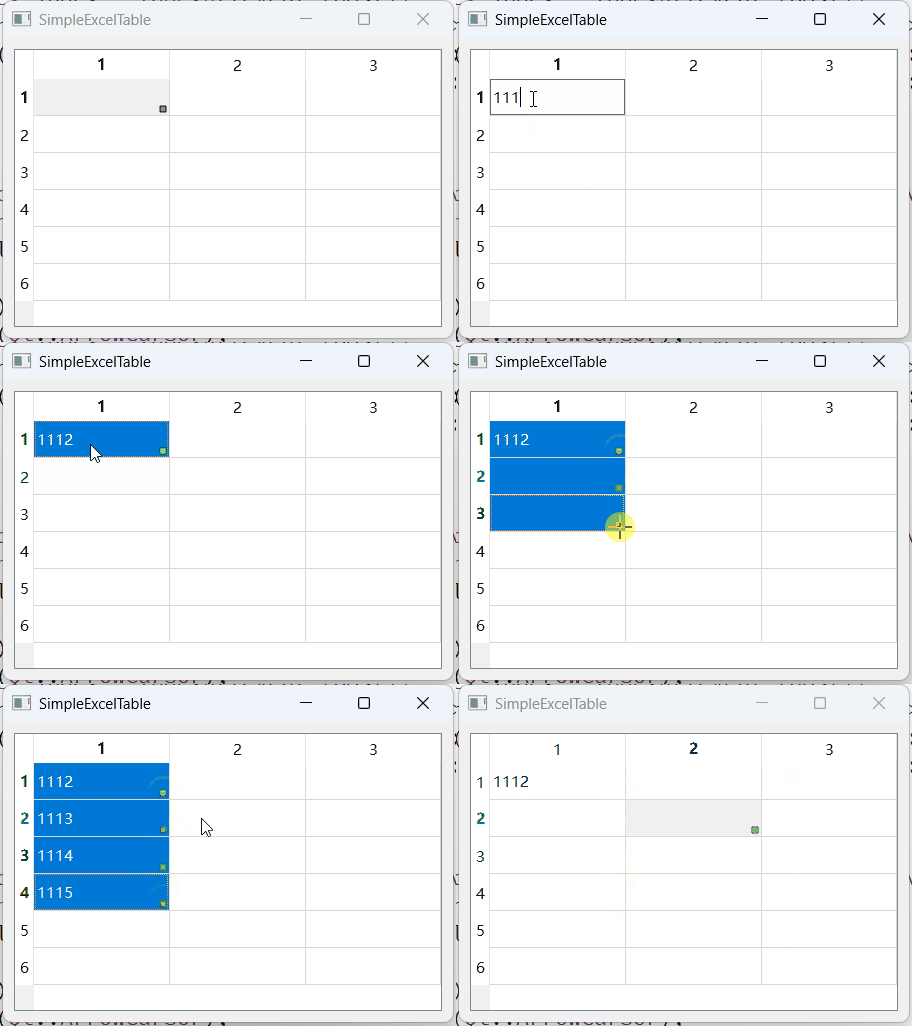
3、方法
使用QTreeWidget,QUndoStack、QUndoCommand进行实现
4、源码
a、头文件
cpp
#ifndef SIMPLEEXCELTABLE_H
#define SIMPLEEXCELTABLE_H

#include <QTableWidget>
#include <QUndoStack>

class SimpleExcelTable : public QTableWidget {
  Q_OBJECT
 public:
  explicit SimpleExcelTable(QWidget *parent = 0);
  ~SimpleExcelTable();

 public slots:
  void undo();   // 撤销
  void redo();   // 重组
  void copy();   // 复制
  void paste();  // 粘贴
  void del();    // 删除

 protected:
  void mousePressEvent(QMouseEvent *event) override;
  void mouseMoveEvent(QMouseEvent *event) override;
  void mouseReleaseEvent(QMouseEvent *event) override;
  void paintEvent(QPaintEvent *event) override;
  void keyPressEvent(QKeyEvent *event) override;
  void keyReleaseEvent(QKeyEvent *event) override;

 private:
  void pasteData(int startRow, int startCol, const QString &clipboardText);
  // 判断当前鼠标位置是否在拖拉范围内
  bool isInHandleArea(const QModelIndex &index, const QPoint &pos) const;
  void updateFillPreview(const QModelIndex &endIndex);
  void performFill();
  QVector<QString> generateFillSeries(const QString &base, int count) const;

 private:
  QUndoStack *m_undoStack = nullptr;

  /// 拖动填充
  bool m_draging = false;  // 是否正在拖动
  QModelIndex m_startIndex;
  bool m_isCopyMode = false;  // 按ctrl键为复制模式
  bool m_isProcessingUndoRedo = false;
  enum DragDirection {
    NoDirection,
    RightHorizontal,
    LeftHorizontal,
    UpVertical,
    DownVertical
  };
  DragDirection m_dragDirection = NoDirection;

 public slots:
};

#endif  // SIMPLEEXCELTABLE_H
b、源文件
cpp
#include "simpleexceltable.h"

#include <QApplication>
#include <QClipboard>
#include <QDebug>
#include <QMouseEvent>
#include <QPainter>
#include <QShortcut>

class CellEditCommand : public QUndoCommand {
 public:
  explicit CellEditCommand(QTableWidget *table, int row, int col,
                           const QString &oldVal, const QString &newVal,
                           QUndoCommand *parent = nullptr);
  void undo() override;
  void redo() override;

 private:
  QTableWidget *m_table;
  int m_row, m_col;
  QString m_oldVal, m_newVal;
};

CellEditCommand::CellEditCommand(QTableWidget *table, int row, int col,
                                 const QString &oldVal, const QString &newVal,
                                 QUndoCommand *parent)
    : QUndoCommand(parent),
      m_table(table),
      m_row(row),
      m_col(col),
      m_oldVal(oldVal),
      m_newVal(newVal) {}

void CellEditCommand::undo() {
  if (auto item = m_table->item(m_row, m_col)) {
    item->setText(m_oldVal);
  }
}

void CellEditCommand::redo() {
  if (auto item = m_table->item(m_row, m_col)) {
    item->setText(m_newVal);
  }
}

SimpleExcelTable::SimpleExcelTable(QWidget *parent)
    : QTableWidget(parent), m_undoStack(new QUndoStack(this)) {
  QShortcut *undoShortcut = new QShortcut(QKeySequence::Undo, this);
  connect(undoShortcut, &QShortcut::activated, this, &SimpleExcelTable::undo);

  QShortcut *redoShortcut = new QShortcut(QKeySequence::Redo, this);
  connect(redoShortcut, &QShortcut::activated, this, &SimpleExcelTable::redo);

  QShortcut *copyShortcut = new QShortcut(QKeySequence::Copy, this);
  connect(copyShortcut, &QShortcut::activated, this, &SimpleExcelTable::copy);

  QShortcut *pasteShortcut = new QShortcut(QKeySequence::Paste, this);
  connect(pasteShortcut, &QShortcut::activated, this, &SimpleExcelTable::paste);

  QShortcut *delShortcut = new QShortcut(QKeySequence::Delete, this);
  connect(delShortcut, &QShortcut::activated, this, &SimpleExcelTable::del);
}

SimpleExcelTable::~SimpleExcelTable() {}

void SimpleExcelTable::undo() {
  m_isProcessingUndoRedo = true;
  m_undoStack->undo();
  m_isProcessingUndoRedo = false;
}

void SimpleExcelTable::redo() {
  m_isProcessingUndoRedo = true;
  m_undoStack->redo();
  m_isProcessingUndoRedo = false;
}

void SimpleExcelTable::copy() {
  QItemSelectionModel *select = selectionModel();
  if (!select->hasSelection()) return;

  QString copiedText;
  QModelIndexList indexes = select->selectedIndexes();

  std::sort(indexes.begin(), indexes.end(),
            [](const QModelIndex &a, const QModelIndex &b) {
              return a.row() < b.row() ||
                     (a.row() == b.row() && a.column() < b.column());
            });

  int currentRow = -1;
  for (const QModelIndex &index : indexes) {
    if (index.row() != currentRow) {
      if (currentRow != -1) copiedText += "\n";
      currentRow = index.row();
    } else {
      copiedText += "\t";
    }
    copiedText += index.data().toString();
  }

  QApplication::clipboard()->setText(copiedText);
}

void SimpleExcelTable::paste() {
  QModelIndex startIndex = currentIndex();
  if (!startIndex.isValid()) return;

  const QString clipboardText = QApplication::clipboard()->text();
  if (clipboardText.isEmpty()) return;

  pasteData(startIndex.row(), startIndex.column(), clipboardText);
}

void SimpleExcelTable::del() {
  QItemSelectionModel *select = selectionModel();
  if (!select->hasSelection()) return;

  QMap<QModelIndex, QString> changes;
  QModelIndexList indexes = select->selectedIndexes();
  for (const QModelIndex &index : indexes) {
    int row = index.row();
    int col = index.column();
    QTableWidgetItem *item = this->item(index.row(), index.column());

    // 记录原始值
    if (item) {
      changes[index] = item->text();
    } else {
      changes[index] = "";
    }

    // 设置新值
    if (!item) {
      item = new QTableWidgetItem();
      setItem(row, col, item);
    }
    item->setText("");
  }

  if (!changes.isEmpty()) {
    QUndoCommand *cmd = new QUndoCommand("del");
    for (auto it = changes.constBegin(); it != changes.constEnd(); ++it) {
      QModelIndex idx = it.key();
      new CellEditCommand(this, idx.row(), idx.column(), it.value(),
                          item(idx.row(), idx.column())->text(), cmd);
    }
    m_undoStack->push(cmd);
  }
}

void SimpleExcelTable::mousePressEvent(QMouseEvent *event) {
  QModelIndex index = indexAt(event->pos());
  if (event->button() == Qt::LeftButton && index.isValid() &&
      isInHandleArea(index, event->pos())) {
    m_draging = true;
    m_startIndex = currentIndex();
    m_isCopyMode = QApplication::keyboardModifiers() & Qt::ControlModifier;
    setCursor(Qt::CrossCursor);
    return;
  }
  QTableWidget::mousePressEvent(event);
}

void SimpleExcelTable::mouseMoveEvent(QMouseEvent *event) {
  QTableWidget::mouseMoveEvent(event);
  if (m_draging && m_startIndex.isValid()) {
    QModelIndex endIndex = indexAt(event->pos());
    if (endIndex.isValid()) {
      updateFillPreview(endIndex);
      viewport()->update();
    }
  } else {
    QModelIndex index = indexAt(event->pos());
    bool inHandle = isInHandleArea(index, event->pos());
    setCursor((index.isValid() && inHandle) ? Qt::CrossCursor
                                            : Qt::ArrowCursor);
  }
}

void SimpleExcelTable::mouseReleaseEvent(QMouseEvent *event) {
  if (m_draging) {
    performFill();
    m_draging = false;
    viewport()->update();
    setCursor(Qt::ArrowCursor);
  }
  QTableWidget::mouseReleaseEvent(event);
}

void SimpleExcelTable::paintEvent(QPaintEvent *event) {
  QTableWidget::paintEvent(event);

  QPainter painter(viewport());
  painter.setRenderHint(QPainter::Antialiasing);

  foreach (const QModelIndex &index, selectionModel()->selectedIndexes()) {
    QRect rect = visualRect(index);
    if (rect.intersects(event->rect())) {
      // 绘制绿色填充手柄
      QPoint handleCenter = rect.bottomRight() - QPoint(5, 5);
      painter.setPen(QColor(0, 128, 0));
      painter.setBrush(QColor(144, 238, 144));
      painter.drawRect(handleCenter.x() - 3, handleCenter.y() - 3, 6, 6);
    }
  }
}

void SimpleExcelTable::keyPressEvent(QKeyEvent *event) {
  if (event->key() == Qt::Key_Control && m_draging) {
    m_isCopyMode = true;
    setCursor(Qt::DragCopyCursor);
  }
  QTableWidget::keyPressEvent(event);
}

void SimpleExcelTable::keyReleaseEvent(QKeyEvent *event) {
  if (event->key() == Qt::Key_Control && m_draging) {
    m_isCopyMode = false;
    setCursor(Qt::CrossCursor);
  }
  QTableWidget::keyReleaseEvent(event);
}

void SimpleExcelTable::pasteData(int startRow, int startCol,
                                 const QString &clipboardText) {
  QMap<QModelIndex, QString> changes;
  int rowOffset = 0;

  foreach (const QString &line, clipboardText.split('\n')) {
    int colOffset = 0;
    foreach (const QString &value, line.split('\t')) {
      const int targetRow = startRow + rowOffset;
      const int targetCol = startCol + colOffset;
      if (targetRow >= rowCount() || targetCol >= columnCount()) continue;

      QTableWidgetItem *item = this->item(targetRow, targetCol);
      // 记录原始值
      if (item) {
        changes[model()->index(targetRow, targetCol)] = item->text();
      } else {
        changes[model()->index(targetRow, targetCol)] = "";
      }
      // 设置新值
      if (!item) {
        item = new QTableWidgetItem();
        setItem(targetRow, targetCol, item);
      }
      item->setText(value);

      colOffset++;
    }
    rowOffset++;
  }
  if (!changes.isEmpty()) {
    QUndoCommand *cmd = new QUndoCommand("Paste");
    for (auto it = changes.constBegin(); it != changes.constEnd(); ++it) {
      QModelIndex idx = it.key();
      new CellEditCommand(this, idx.row(), idx.column(), it.value(),
                          item(idx.row(), idx.column())->text(), cmd);
    }
    m_undoStack->push(cmd);
  }
}

bool SimpleExcelTable::isInHandleArea(const QModelIndex &index,
                                      const QPoint &pos) const {
  if (!selectionModel()->isSelected(index)) return false;

  QRect rect = visualRect(index);
  QRect handleArea(rect.bottomRight() - QPoint(8, 8), QSize(10, 10));
  return handleArea.contains(pos);
}

void SimpleExcelTable::updateFillPreview(const QModelIndex &endIndex) {
  QItemSelection selection;
  int endIndexRow = m_startIndex.row();
  int endIndexColumn = m_startIndex.column();
  endIndexRow = endIndex.row();
  endIndexColumn = m_startIndex.column();
  if (endIndexRow >= m_startIndex.row()) {
    m_dragDirection = DownVertical;
  } else {
    m_dragDirection = UpVertical;
  }

  selectionModel()->clearSelection();
  QModelIndex topLeft =
      model()->index(qMin(m_startIndex.row(), endIndexRow),
                     qMin(m_startIndex.column(), endIndexColumn));
  QModelIndex bottomRight =
      model()->index(qMax(m_startIndex.row(), endIndexRow),
                     qMax(m_startIndex.column(), endIndexColumn));
  selection.select(topLeft, bottomRight);
  selectionModel()->select(selection, QItemSelectionModel::ClearAndSelect);
}

void SimpleExcelTable::performFill() {
  if (!m_startIndex.isValid()) return;

  QItemSelectionModel *select = selectionModel();
  if (!select->hasSelection()) return;
  QModelIndexList indexes = select->selectedIndexes();
  std::sort(indexes.begin(), indexes.end(),
            [](const QModelIndex &a, const QModelIndex &b) {
              return a.row() < b.row() ||
                     (a.row() == b.row() && a.column() < b.column());
            });

  int startRow = m_startIndex.row(), endRow = 0;
  int startCol = m_startIndex.column(), endCol = 0;
  int rowDir = 1;
  int colDir = 1;
  switch (m_dragDirection) {
    case RightHorizontal:
      endRow = m_startIndex.row();
      endCol = indexes.back().column();
      rowDir = 1;
      colDir = 1;
      break;
    case LeftHorizontal:
      endRow = m_startIndex.row();
      endCol = indexes.front().column();
      rowDir = 1;
      colDir = -1;
      break;
    case UpVertical:
      endRow = indexes.front().row();
      endCol = m_startIndex.column();
      rowDir = -1;
      colDir = 1;
      break;
    case DownVertical:
      endRow = indexes.back().row();
      endCol = m_startIndex.column();
      rowDir = 1;
      colDir = 1;
      break;
    default:
      break;
  }

  QMap<QModelIndex, QString> changes;
  for (int r = 0; r <= qAbs(endRow - startRow); ++r) {
    for (int c = 0; c <= qAbs(endCol - startCol); ++c) {
      int targetRow = startRow + r * rowDir;
      int targetCol = startCol + c * colDir;

      QTableWidgetItem *srcItem =
          item(m_startIndex.row(), m_startIndex.column());
      QTableWidgetItem *dstItem = item(targetRow, targetCol);
      if (!srcItem) continue;

      QString newValue = srcItem->text();
      // 字符中存在数字,非复制模式就进行递增
      if (!m_isCopyMode) {
        int distance = qMax(r, c);
        auto series = generateFillSeries(srcItem->text(), distance + 1);
        newValue = series.value(distance, srcItem->text());
      }

      if (!dstItem) {
        dstItem = new QTableWidgetItem();
        setItem(targetRow, targetCol, dstItem);
      }
      // 记录原始值
      changes[model()->index(targetRow, targetCol)] = dstItem->text();

      // 设置新值
      dstItem->setText(newValue);
    }
  }

  if (changes.isEmpty()) return;
  QUndoCommand *cmd = new QUndoCommand("Auto Fill");
  for (auto it = changes.constBegin(); it != changes.constEnd(); ++it) {
    QModelIndex idx = it.key();
    new CellEditCommand(this, idx.row(), idx.column(), it.value(),
                        item(idx.row(), idx.column())->text(), cmd);
  }
  m_undoStack->push(cmd);
}

QVector<QString> SimpleExcelTable::generateFillSeries(const QString &base,
                                                      int count) const {
  QVector<QString> series;
  bool isNumber;
  double num = base.toDouble(&isNumber);
  if (isNumber) {
    for (int i = 0; i < count; ++i) series << QString::number(num + i);
    return series;
  }

  QRegularExpression re("^(.*?)(\\d+)$");
  auto match = re.match(base);
  if (match.hasMatch()) {
    QString prefix = match.captured(1);
    int number = match.captured(2).toInt();
    for (int i = 0; i < count; ++i)
      series << QString("%1%2").arg(prefix).arg(number + i);
    return series;
  }

  series.fill(base, count);
  return series;
}对你有用就点个赞👍,以后需要用到就收藏⭐