一:效果展示
本项目是基于
Python和Tkinter的图形界面应用程序,用于将文本文件转换为MP3语音文件
二:功能描述
(1)文本转语音转换
- 使用
pyttsx3引擎将文本转换为语音并保存为MP3文件 - 支持中文语音合成(默认使用"
Microsoft Huihui"语音)
(2)文件处理
- 单文件转换:选择单个文本文件进行转换
- 批量转换:支持同时选择多个文本文件进行批量转换
- 自动保存:在预览窗口中修改文本内容会自动保存到源文件
(3)语音参数调节
- 语速调节(1-100范围)
- 音量调节(1-100范围)
1. 用户界面功能
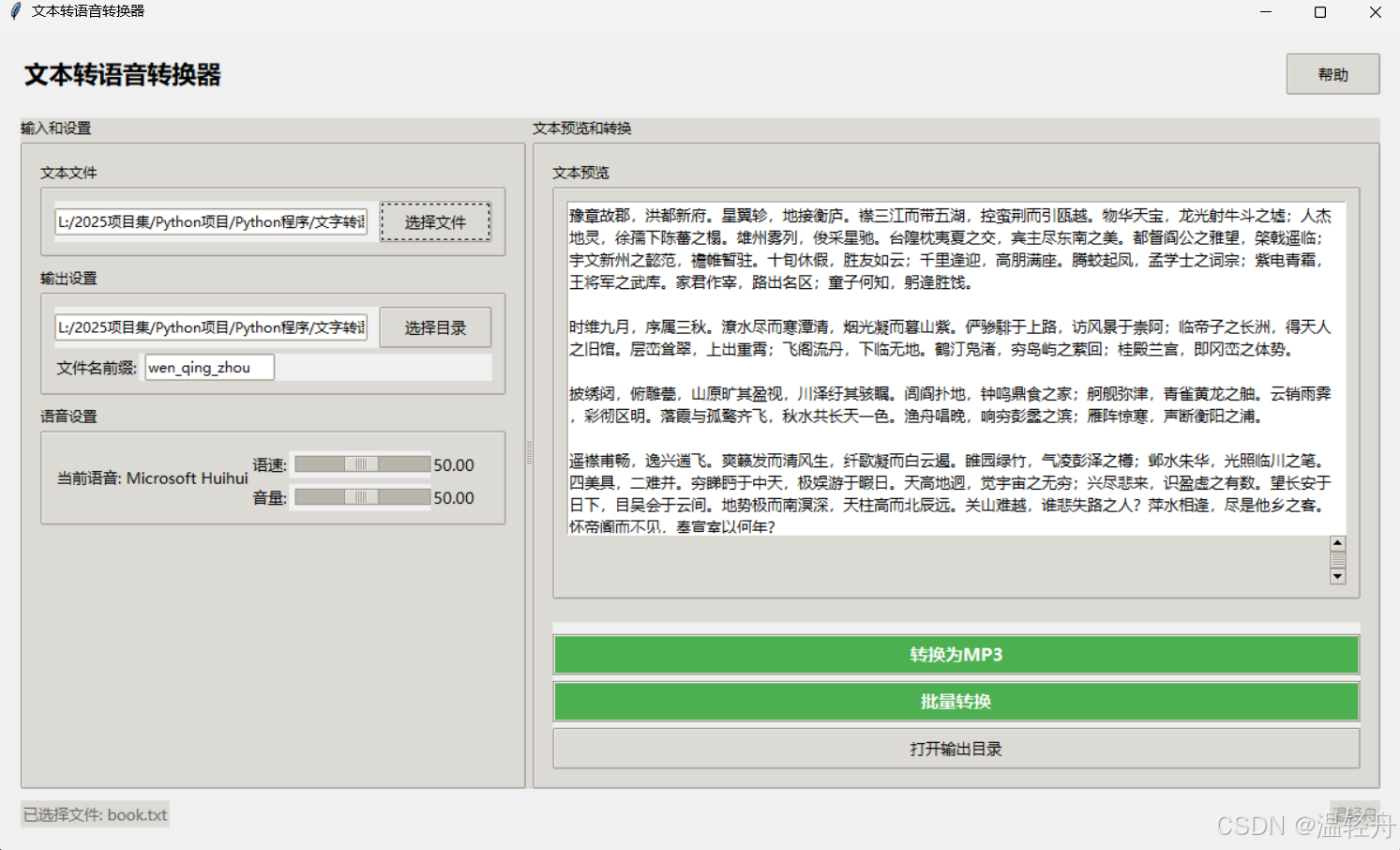
(1)主界面布局
- 标题栏:显示应用名称"文本转语音转换器"和帮助按钮
- 左右分栏:左侧为输入和设置面板,右侧为文本预览和转换面板
- 状态栏:显示当前状态信息和版本信息
(2)左侧面板功能
- 文本文件选择
- 通过文件对话框选择要转换的文本文件
- 自动填充输出目录为文本文件所在目录
- 自动加载并显示文本内容到预览区域
- 输出设置
- 可自定义输出目录
- 可设置输出文件名前缀(默认"wen_qing_zhou")
- 语音设置
- 显示当前使用的语音名称
- 语速调节滑块和实时显示
- 音量调节滑块和实时显示
(3)右侧面板功能
- 文本预览
- 显示选定文本文件的内容
- 支持直接编辑文本内容(自动保存到源文件)
- 带滚动条的可编辑文本框
- 转换控制
- "转换为MP3"按钮:执行单文件转换
- "批量转换"按钮:执行多文件批量转换
- "打开输出目录"按钮:快速访问保存的MP3文件
- 进度指示
- 转换过程中显示进度条
- 状态栏显示转换进度信息
2. 技术特点
- 多线程处理
- 使用单独的线程执行转换任务,避免界面冻结
- 转换过程中禁用按钮防止重复操作
- 错误处理
- 对文件操作、语音引擎配置等关键操作进行异常捕获
- 通过消息框向用户显示错误信息
- 自适应参数映射
- 将用户友好的1-100范围参数映射到语音引擎实际需要的参数范围
- 语速映射采用非线性调整,提供更精细的慢速控制
- 跨平台支持
- 使用pathlib处理路径,确保跨平台兼容性
- 根据不同操作系统使用适当的方法打开目录
- UI美化
- 使用ttk的clam主题
- 自定义按钮样式(如绿色强调按钮)
- 一致的字体设置(微软雅黑)
3. 使用流程
- 单文件转换
- 点击"选择文件"选择文本文件
- (可选)调整语音参数或修改文本内容
- 点击"转换为MP3"开始转换
- 转换完成后在输出目录查找MP3文件
- 批量转换
- 点击"批量转换"选择多个文本文件
- 设置统一的输出参数
- 程序会自动为每个文件生成带序号的输出文件名
- 查看结果
- 使用"打开输出目录"快速访问输出文件
- 状态栏和消息框显示转换结果
4. 辅助功能
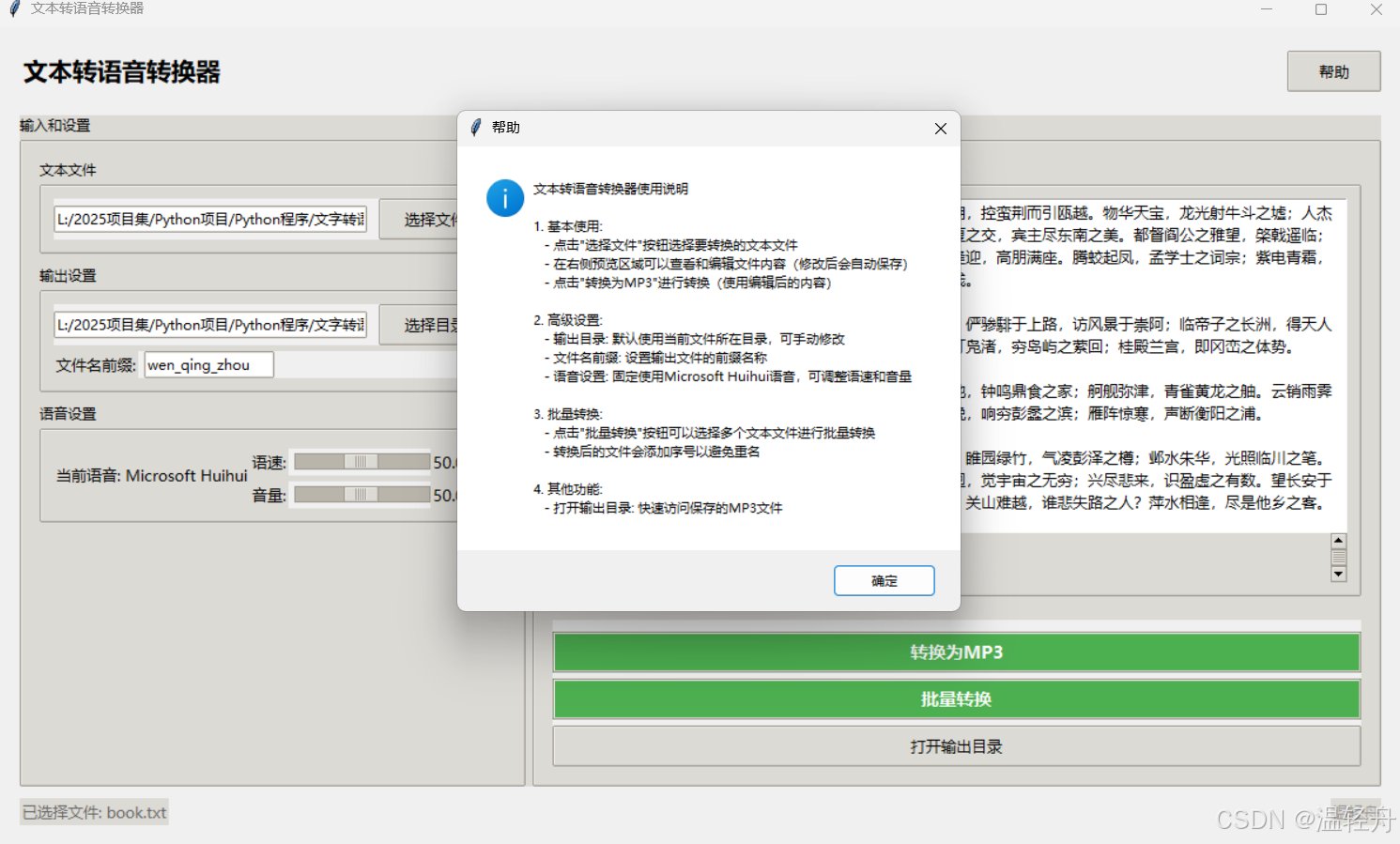
- 帮助文档: 通过"帮助"按钮查看详细的使用说明
- 自动保存: 预览区域的修改会自动保存到源文件
- 状态反馈: 状态栏实时显示当前操作状态
三:完整代码
python
import pathlib
import tkinter as tk
from tkinter import ttk
from tkinter import filedialog, messagebox
import pyttsx3
from PIL import Image, ImageTk
import threading
import os
import platform
import webbrowser
from datetime import datetime

class Application(tk.Tk):
    def __init__(self):
        super().__init__()
        self.title("文本转语音转换器")
        self.geometry("1200x700")
        self.minsize(700, 400)
        self.resizable(True, True)

        self.minsize(700, 400)

        self.engine = pyttsx3.init()
        self.file_path = tk.StringVar()
        self.output_dir = tk.StringVar()

        self.rate_var = tk.DoubleVar(value=50.00)
        self.volume_var = tk.DoubleVar(value=50.00)

        self.display_rate_var = tk.StringVar()
        self.display_volume_var = tk.StringVar()
        self.update_display_vars()

        self.rate_var.trace_add('write', self.update_display_vars)
        self.volume_var.trace_add('write', self.update_display_vars)

        self.target_voice = "Microsoft Huihui"
        self.voice_id = None

        self.style = ttk.Style()
        self.style.theme_use('clam')

        self.style.configure('TButton', font=('微软雅黑', 10), padding=5)
        self.style.configure('TEntry', font=('微软雅黑', 10))
        self.style.configure('TLabel', font=('微软雅黑', 10))
        self.style.configure('TFrame', background='#f0f0f0')
        self.style.configure('TLabelframe', font=('微软雅黑', 10, 'bold'))
        self.style.configure('Accent.TButton', foreground='white', background='#4CAF50', font=('微软雅黑', 11, 'bold'))
        self.style.map('Accent.TButton', background=[('active', '#45a049'), ('!active', '#4CAF50')])

        self.init_ui()
        self.load_voices()

    def init_ui(self):
        main_frame = ttk.Frame(self, padding=20)
        main_frame.pack(fill=tk.BOTH, expand=True)

        title_frame = tk.Frame(main_frame, bd=0, highlightthickness=0, bg=self.cget('bg'))
        title_frame.pack(fill=tk.X, pady=(0, 20))

        title_label = tk.Label(
            title_frame,
            text="文本转语音转换器",
            font=('微软雅黑', 16, 'bold'),
            bg=self.cget('bg')
        )
        title_label.pack(side=tk.LEFT)

        help_btn = ttk.Button(title_frame, text="帮助", command=self.show_help, width=8)
        help_btn.pack(side=tk.RIGHT, padx=(10, 0))

        pw = ttk.PanedWindow(main_frame, orient=tk.HORIZONTAL)
        pw.pack(fill=tk.BOTH, expand=True)

        left_panel = ttk.Labelframe(pw, text="输入和设置", padding=15)
        pw.add(left_panel, weight=2)

        right_panel = ttk.Labelframe(pw, text="文本预览和转换", padding=15)
        pw.add(right_panel, weight=3)

        self.create_left_panel(left_panel)

        self.create_right_panel(right_panel)

        self.status_var = tk.StringVar()

        self.status_var.set("准备就绪")
        status_frame = ttk.Frame(main_frame)
        status_frame.pack(fill=tk.X, pady=(10, 0))

        status_label = ttk.Label(status_frame, textvariable=self.status_var, foreground='#666')
        status_label.pack(side=tk.LEFT)

        version_label = ttk.Label(status_frame, text="温轻舟", foreground='#999')
        version_label.pack(side=tk.RIGHT)

    def update_display_vars(self, *args):
        self.display_rate_var.set(f"{self.rate_var.get():.2f}")
        self.display_volume_var.set(f"{self.volume_var.get():.2f}")

    def create_left_panel(self, parent):
        file_frame = ttk.LabelFrame(parent, text="文本文件", padding=10)
        file_frame.pack(fill=tk.X, pady=(0, 10))

        entry_frame = ttk.Frame(file_frame)
        entry_frame.pack(fill=tk.X, expand=True)

        self.txt_path = ttk.Entry(entry_frame, textvariable=self.file_path, width=30)
        self.txt_path.pack(side=tk.LEFT, fill=tk.X, expand=True, padx=(0, 10))

        btn_sel = ttk.Button(entry_frame, text="选择文件", command=self.select_file, width=10)
        btn_sel.pack(side=tk.RIGHT)

        output_frame = ttk.LabelFrame(parent, text="输出设置", padding=10)
        output_frame.pack(fill=tk.X, pady=(0, 10))

        dir_frame = ttk.Frame(output_frame)
        dir_frame.pack(fill=tk.X, expand=True)

        self.txt_output_dir = ttk.Entry(dir_frame, textvariable=self.output_dir, width=30)
        self.txt_output_dir.pack(side=tk.LEFT, fill=tk.X, expand=True, padx=(0, 10))

        btn_dir = ttk.Button(dir_frame, text="选择目录", command=self.select_output_dir, width=10)
        btn_dir.pack(side=tk.RIGHT)

        prefix_frame = ttk.Frame(output_frame)
        prefix_frame.pack(fill=tk.X, pady=(5, 0))

        ttk.Label(prefix_frame, text="文件名前缀:").pack(side=tk.LEFT)
        self.prefix_entry = ttk.Entry(prefix_frame, width=15)
        self.prefix_entry.pack(side=tk.LEFT, padx=(5, 0))
        self.prefix_entry.insert(0, "wen_qing_zhou")

        voice_frame = ttk.LabelFrame(parent, text="语音设置", padding=10)
        voice_frame.pack(fill=tk.X, pady=(0, 10))

        ttk.Label(voice_frame, text=f"当前语音: {self.target_voice}").pack(side=tk.LEFT)

        rate_frame = ttk.Frame(voice_frame)
        rate_frame.pack(fill=tk.X, pady=(5, 0))

        ttk.Label(rate_frame, text="语速:").pack(side=tk.LEFT)
        self.rate_scale = ttk.Scale(rate_frame, from_=1, to=100, variable=self.rate_var, orient=tk.HORIZONTAL)
        self.rate_scale.pack(side=tk.LEFT, fill=tk.X, expand=True, padx=(5, 0))
        self.rate_label = ttk.Label(rate_frame, textvariable=self.display_rate_var, width=6)
        self.rate_label.pack(side=tk.LEFT)

        volume_frame = ttk.Frame(voice_frame)
        volume_frame.pack(fill=tk.X, pady=(5, 0))

        ttk.Label(volume_frame, text="音量:").pack(side=tk.LEFT)
        self.volume_scale = ttk.Scale(volume_frame, from_=1, to=100, variable=self.volume_var, orient=tk.HORIZONTAL)
        self.volume_scale.pack(side=tk.LEFT, fill=tk.X, expand=True, padx=(5, 0))
        self.volume_label = ttk.Label(volume_frame, textvariable=self.display_volume_var, width=6)
        self.volume_label.pack(side=tk.LEFT)

    def create_right_panel(self, parent):
        preview_frame = ttk.LabelFrame(parent, text="文本预览", padding=10)
        preview_frame.pack(fill=tk.BOTH, expand=True, pady=(0, 10))

        self.text_preview = tk.Text(preview_frame, height=8, font=('微软雅黑', 10), wrap=tk.WORD)
        self.text_preview.pack(fill=tk.BOTH, expand=True)

        self.text_preview.bind('<<Modified>>', self.on_text_modified)

        scrollbar = ttk.Scrollbar(preview_frame, orient=tk.VERTICAL, command=self.text_preview.yview)
        scrollbar.pack(side=tk.RIGHT, fill=tk.Y)
        self.text_preview.configure(yscrollcommand=scrollbar.set)

        convert_frame = ttk.Frame(parent)
        convert_frame.pack(fill=tk.X, pady=(10, 0))

        self.btn_convert = ttk.Button(
            convert_frame,
            text="转换为MP3",
            command=self.convert_to_mp3,
            style='Accent.TButton'
        )
        self.btn_convert.pack(fill=tk.X, pady=(10, 0))

        btn_batch = ttk.Button(
            convert_frame,
            text="批量转换",
            command=self.batch_convert,
            style='Accent.TButton'
        )
        btn_batch.pack(fill=tk.X, pady=(5, 0))

        btn_open_dir = ttk.Button(
            convert_frame,
            text="打开输出目录",
            command=self.open_output_dir
        )
        btn_open_dir.pack(fill=tk.X, pady=(5, 0))

        self.progress = ttk.Progressbar(convert_frame, mode='indeterminate', length=200)

    def load_voices(self):
        try:
            voices = self.engine.getProperty('voices')
            for voice in voices:
                if self.target_voice in voice.name:
                    self.voice_id = voice.id
                    break

            if not self.voice_id:
                if voices:
                    self.voice_id = voices[0].id
                    self.status_var.set(f"未找到 {self.target_voice} 语音,将使用 {voices[0].name}")
                else:
                    raise Exception("未找到任何可用语音")
        except Exception as e:
            self.status_var.set(f"加载语音列表失败: {str(e)}")

    def select_file(self):
        current_file = self.file_path.get()
        if current_file and os.path.exists(current_file):
            initial_dir = os.path.dirname(current_file)
        else:
            initial_dir = str(pathlib.Path.home())

        txt_file = filedialog.askopenfilename(
            initialdir=initial_dir,
            title="选择文本文件",
            filetypes=(('文本文件', '*.txt'), ('所有文件', '*.*'))
        )
        if txt_file:
            self.file_path.set(txt_file)
            file_dir = os.path.dirname(txt_file)
            self.output_dir.set(file_dir)

            self.status_var.set(f"已选择文件: {pathlib.Path(txt_file).name}")
            try:
                with open(txt_file, 'r', encoding='utf8') as f:
                    content = f.read()
                    self.text_preview.delete(1.0, tk.END)
                    self.text_preview.insert(tk.END, content)
                    self.text_preview.edit_modified(False)
            except Exception as e:
                messagebox.showwarning("警告", f"无法读取文件内容: {str(e)}")

    def select_output_dir(self):
        current_file = self.file_path.get()
        if current_file and os.path.exists(current_file):
            initial_dir = os.path.dirname(current_file)
        elif self.output_dir.get():
            initial_dir = self.output_dir.get()
        else:
            initial_dir = str(pathlib.Path.home())

        directory = filedialog.askdirectory(
            initialdir=initial_dir,
            title="选择输出目录"
        )
        if directory:
            self.output_dir.set(directory)
            self.status_var.set(f"输出目录设置为: {directory}")

    def on_text_modified(self, event):
        if self.text_preview.edit_modified():
            current_file = self.file_path.get()
            if current_file and os.path.exists(current_file):
                try:
                    content = self.text_preview.get(1.0, tk.END)
                    with open(current_file, 'w', encoding='utf8') as f:
                        f.write(content)
                    self.status_var.set(f"已自动保存修改到文件: {os.path.basename(current_file)}")
                except Exception as e:
                    self.status_var.set(f"自动保存失败: {str(e)}")
            self.text_preview.edit_modified(False)

    def configure_engine(self):
        try:
            if self.voice_id:
                self.engine.setProperty('voice', self.voice_id)

            rate = self.rate_var.get()
            volume = self.volume_var.get()

            if rate <= 50:
                progress = rate / 50.0
                mapped_rate = 20 + (150 - 20) * (progress ** 1.5)
            else:
                progress = (rate - 50) / 50.0
                mapped_rate = 150 + (300 - 150) * progress

            mapped_volume = volume / 100.0

            mapped_rate = max(20, min(300, mapped_rate))
            mapped_volume = max(0.0, min(1.0, mapped_volume))

            self.engine.setProperty('rate', int(mapped_rate))
            self.engine.setProperty('volume', mapped_volume)

        except Exception as e:
            messagebox.showwarning("警告", f"配置语音引擎失败: {str(e)}")

    def convert_to_mp3(self):
        if not self.file_path.get():
            messagebox.showwarning("警告", "请先选择文本文件!")
            return

        def convert_thread():
            try:
                self.btn_convert.state(['disabled'])
                self.progress.pack(fill=tk.X, pady=(10, 0))
                self.progress.start()
                self.status_var.set("正在转换...")
                self.update()

                text = self.text_preview.get(1.0, tk.END)
                if not text.strip():
                    raise ValueError("文本内容为空!")

                self.configure_engine()

                prefix = self.prefix_entry.get() or "TTS_Output"
                timestamp = datetime.now().strftime("%Y%m%d_%H%M%S")
                output_name = f"{prefix}_{timestamp}.mp3"

                output_dir = self.output_dir.get() or os.path.dirname(self.file_path.get()) or str(pathlib.Path.home())
                output_path = pathlib.Path(output_dir) / output_name

                self.engine.save_to_file(text, str(output_path))
                self.engine.runAndWait()

                self.progress.stop()
                self.progress.pack_forget()
                self.status_var.set(f"转换成功! 文件已保存为: {output_path.name}")
                messagebox.showinfo("成功", f"文件转换成功!\n已保存为: {output_path.name}")

            except Exception as e:
                self.progress.stop()
                self.progress.pack_forget()
                self.status_var.set("转换失败")
                messagebox.showerror("错误", f"转换过程中出错:\n{str(e)}")
            finally:
                self.btn_convert.state(['!disabled'])

        threading.Thread(target=convert_thread, daemon=True).start()

    def batch_convert(self):
        files = filedialog.askopenfilenames(
            initialdir=os.path.dirname(self.file_path.get()) if self.file_path.get() else str(pathlib.Path.home()),
            title="选择多个文本文件",
            filetypes=(('文本文件', '*.txt'), ('所有文件', '*.*'))
        )

        if not files:
            return

        def batch_thread():
            try:
                self.btn_convert.state(['disabled'])
                self.progress.pack(fill=tk.X, pady=(10, 0))
                self.progress.start()
                self.status_var.set("正在批量转换...")
                self.update()

                success_count = 0
                prefix = self.prefix_entry.get() or "TTS_Output"
                timestamp = datetime.now().strftime("%Y%m%d_%H%M%S")

                self.configure_engine()

                for i, file_path in enumerate(files, 1):
                    if not file_path:
                        continue

                    try:
                        with open(file_path, 'r', encoding='utf8') as f:
                            text = f.read()
                            if not text.strip():
                                continue

                            file_prefix = f"{prefix}_batch_{timestamp}_{i}"
                            output_name = f"{file_prefix}.mp3"

                            output_dir = self.output_dir.get() or os.path.dirname(file_path) or str(pathlib.Path.home())
                            output_path = pathlib.Path(output_dir) / output_name

                            self.engine.save_to_file(text, str(output_path))
                            self.engine.runAndWait()
                            success_count += 1
                            self.status_var.set(f"正在批量转换... 已完成 {i}/{len(files)}")
                            self.update()

                    except Exception as e:
                        self.status_var.set(f"转换 {os.path.basename(file_path)} 失败: {str(e)}")
                        continue

                self.progress.stop()
                self.progress.pack_forget()
                self.status_var.set(f"批量转换完成! 成功转换 {success_count}/{len(files)} 个文件")
                messagebox.showinfo("完成", f"批量转换完成!\n成功转换 {success_count}/{len(files)} 个文件")

            except Exception as e:
                self.progress.stop()
                self.progress.pack_forget()
                self.status_var.set("批量转换失败")
                messagebox.showerror("错误", f"批量转换过程中出错:\n{str(e)}")
            finally:
                self.btn_convert.state(['!disabled'])

    def open_output_dir(self):
        dir_path = self.output_dir.get()
        if not dir_path and self.file_path.get():
            dir_path = os.path.dirname(self.file_path.get())

        if not dir_path or not os.path.isdir(dir_path):
            messagebox.showwarning("警告", "无效的输出目录!")
            return

        try:
            if platform.system() == "Windows":
                os.startfile(dir_path)
            elif platform.system() == "Darwin":
                webbrowser.open(f"file://{dir_path}")
            else:
                webbrowser.open(dir_path)
        except Exception as e:
            messagebox.showerror("错误", f"无法打开目录:\n{str(e)}")

    def show_help(self):
        help_text = """文本转语音转换器使用说明

1. 基本使用:
   - 点击"选择文件"按钮选择要转换的文本文件
   - 在右侧预览区域可以查看和编辑文件内容(修改后会自动保存)
   - 点击"转换为MP3"进行转换(使用编辑后的内容)

2. 高级设置:
   - 输出目录: 默认使用当前文件所在目录,可手动修改
   - 文件名前缀: 设置输出文件的前缀名称
   - 语音设置: 固定使用Microsoft Huihui语音,可调整语速和音量

3. 批量转换:
   - 点击"批量转换"按钮可以选择多个文本文件进行批量转换
   - 转换后的文件会添加序号以避免重名

4. 其他功能:
   - 打开输出目录: 快速访问保存的MP3文件
"""

        messagebox.showinfo("帮助", help_text)

if __name__ == "__main__":
    app = Application()
    app.mainloop()