Flutter for OpenHarmony 习惯养成 App:用打卡机制打造自律生活的可视化引擎
在信息过载与注意力稀缺的时代,"坚持"成为最稀缺的能力。而一个优秀的习惯追踪工具 ,不应只是记录打卡的冰冷表格,而应是激发行动、反馈成就、陪伴成长的数字伙伴。
🌐 加入社区 欢迎加入 开源鸿蒙跨平台开发者社区 ,获取最新资源与技术支持: 👉 开源鸿蒙跨平台开发者社区
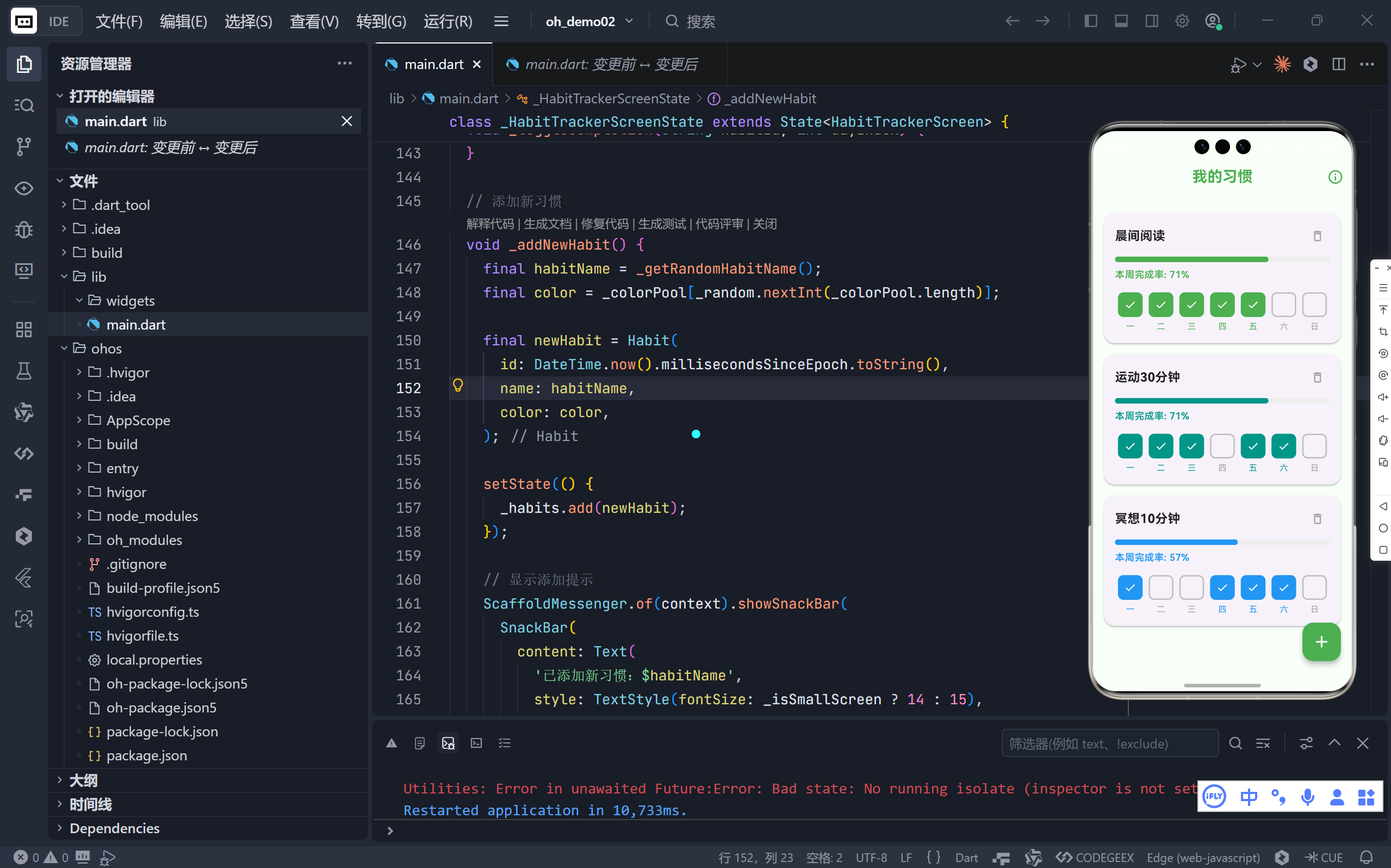
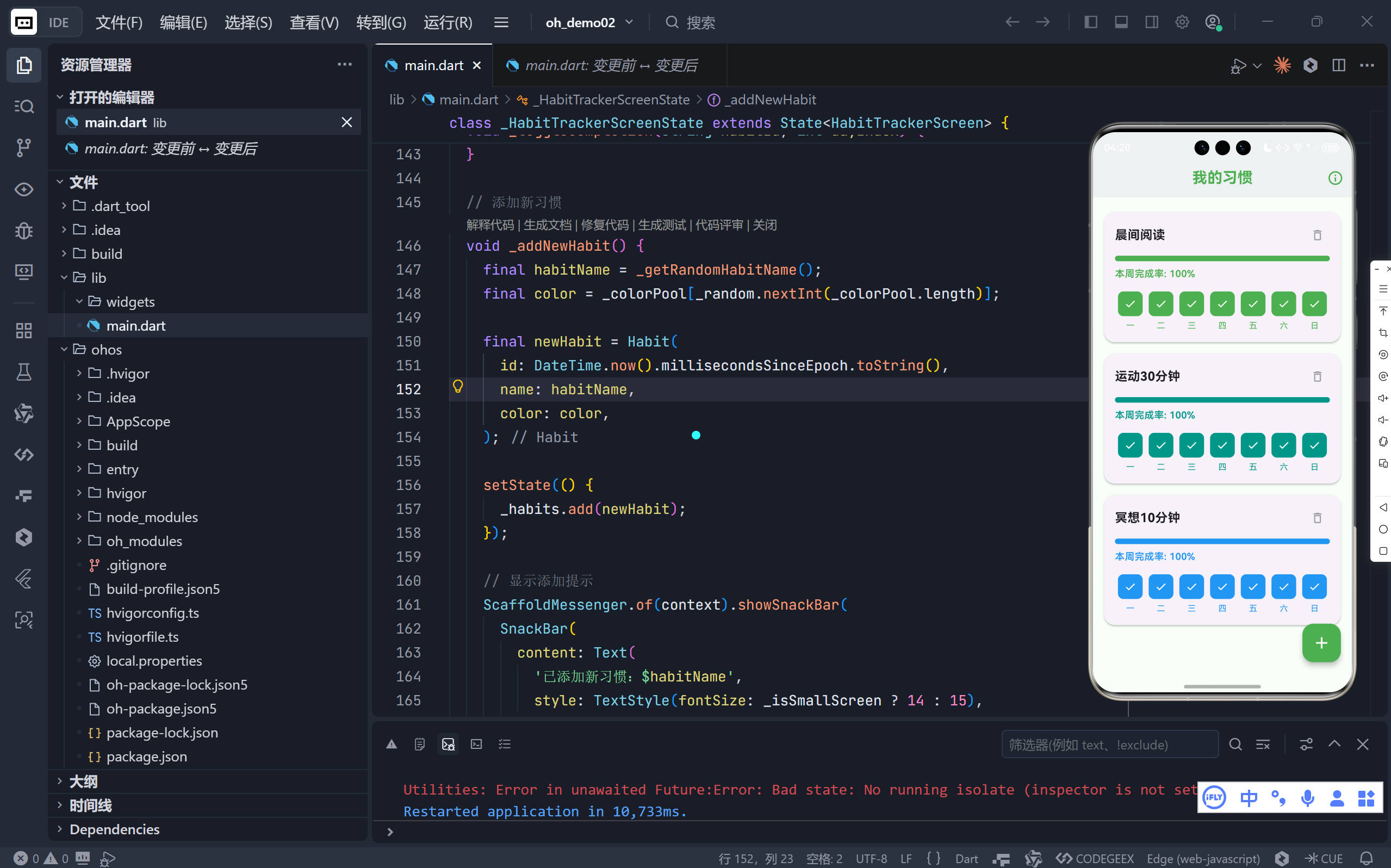
完整效果
一、核心理念:让"坚持"看得见、摸得着
该应用围绕三个关键体验展开:
- 可视化打卡:7天网格 + 复选框,每日状态一目了然;
- 即时反馈:完成率进度条 + 百分比数字,量化你的努力;
- 正向激励:统计面板 + 成就提示("连续7天可获徽章"),强化行为动机。
💡 心理学研究显示:可视化进展能显著提升目标达成率。这个 App 正是这一原理的完美实践。
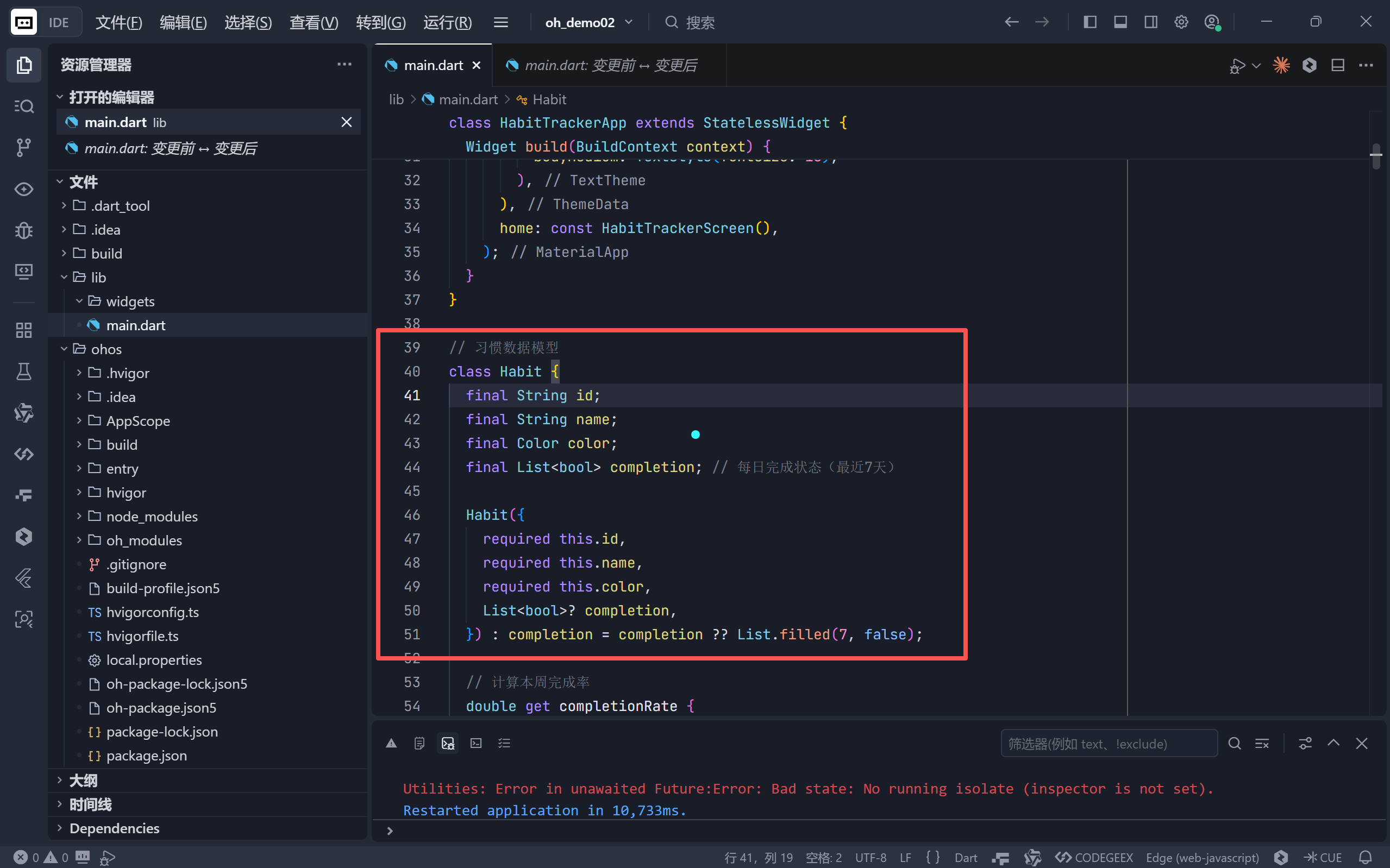
二、数据模型:简洁而强大的 Habit 类
dart
class Habit {
  final String id;
  final String name;
  final Color color;
  final List<bool> completion; // 最近7天完成状态

  double get completionRate => completed / 7;

  Habit copyWith({List<bool>? completion}) { ... }
}
- 不可变设计 :通过
copyWith创建新实例,确保状态更新安全; - 内聚计算 :
completionRate作为 getter,自动随数据变化; - 色彩编码:每个习惯拥有专属颜色,增强识别度与情感连接。
🎨 颜色不仅是装饰,更是认知锚点------绿色代表"晨间阅读",蓝色代表"冥想",形成条件反射。
三、交互设计亮点
1. 直观的 7 日打卡网格
dart
// 每日格子:边框 + 勾选图标 + 星期标签
Container(
  decoration: BoxDecoration(
    color: isCompleted ? habit.color : Colors.transparent,
    border: Border.all(color: isCompleted ? habit.color : Colors.grey),
  ),
  child: isCompleted ? Icon(Icons.check, color: Colors.white) : null,
)- 点击即切换:轻触任意日期格子,立即标记/取消完成;
- 视觉反馈:完成时填充主色 + 白色对勾,未完成为灰色边框;
- 星期标注:中文"一至日",符合本地用户认知习惯。
2. 完成率进度条 + 文字
- 使用
LinearProgressIndicator展示本周完成比例; - 数字百分比以习惯主色高亮,强化成就感;
- 进度条圆角设计(
borderRadius),更柔和现代。
3. 撤销删除(Undo Pattern)
dart
ScaffoldMessenger.of(context).showSnackBar(
  SnackBar(
    content: Text('已删除:...'),
    action: SnackBarAction(label: '撤销', onPressed: () { ... }),
  ),
);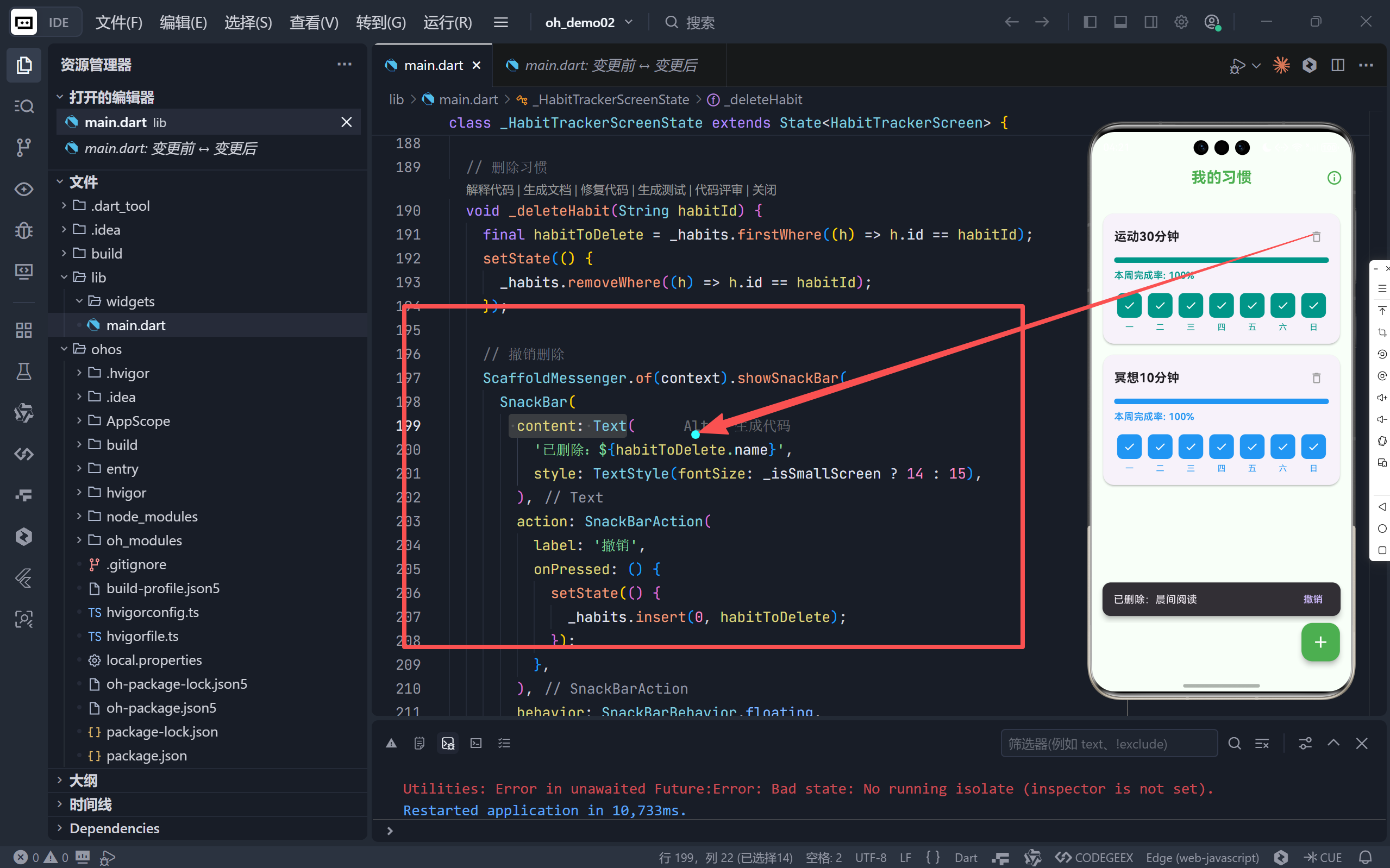
- 删除后弹出 Snackbar,提供 5 秒内撤销机会;
- 符合 Material Design 的"临时性操作"最佳实践;
- 极大降低误操作成本,提升用户安全感。
四、智能细节:超越基础功能的巧思
✅ 随机生成习惯名称(避免空输入)
dart
String _getRandomHabitName() {
  final prefixes = ['每日', '坚持', '养成'];
  final actions = ['喝水', '拉伸', '写日记'];
  return '$prefix$action';
}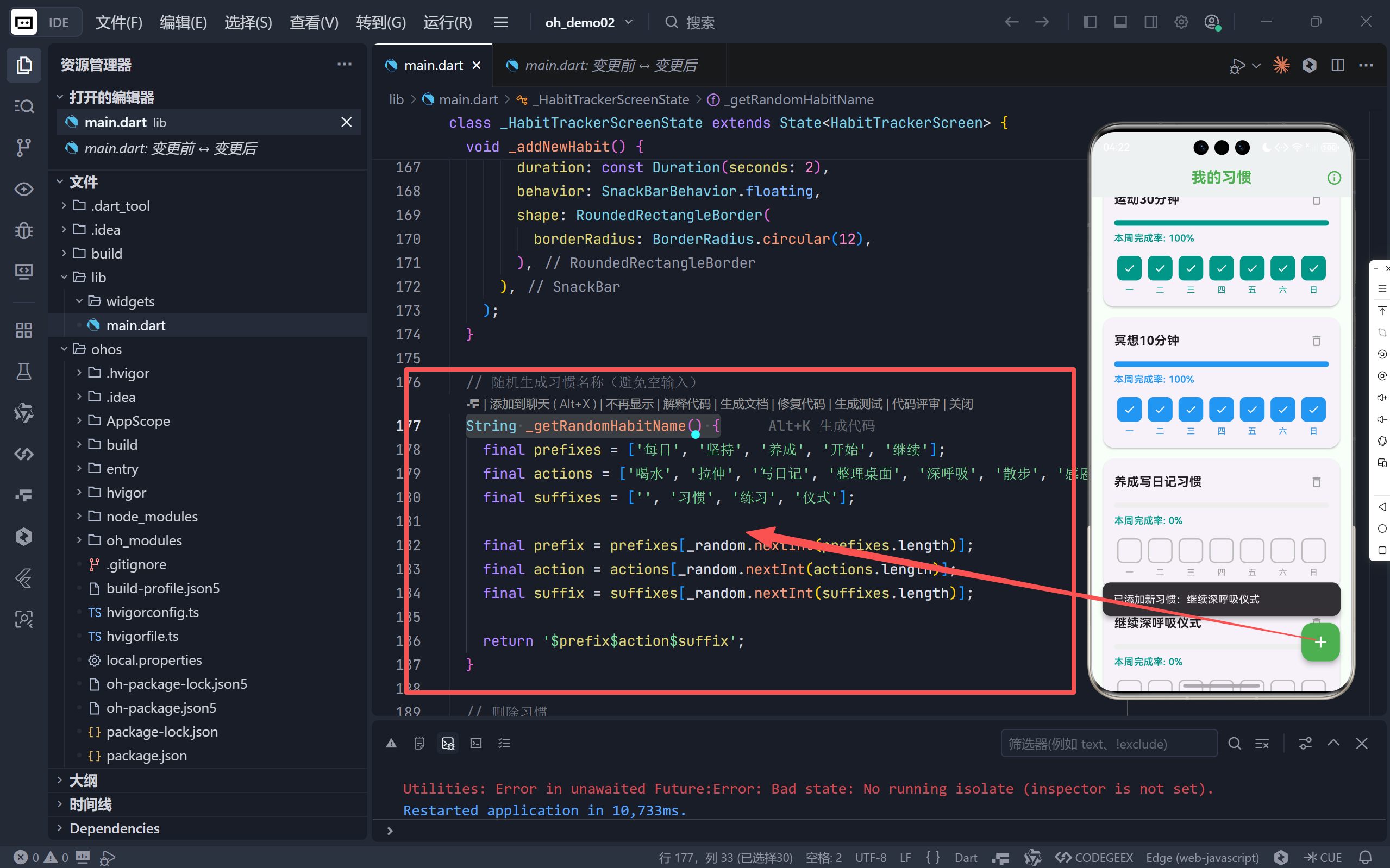
- 点击"+"按钮时,自动生成如"每日深呼吸"、"养成感恩习惯"等名称;
- 降低启动门槛:用户无需思考"该填什么",立刻开始使用;
- 后续可编辑,兼顾便捷性与灵活性。
✅ 统计概览(Stats Dashboard)
- 通过 AppBar 右上角
info_outline图标进入; - 展示:
- 总习惯数
- 本周总完成次数
- 平均完成率
- 底部提示:"连续完成7天可获得成就徽章!"------埋下长期激励钩子。
✅ 响应式布局适配小屏设备
dart
final _isSmallScreen = _screenWidth < 360;
// 动态调整:字体、间距、FAB 大小、图标尺寸- 在 iPhone SE 等小屏设备上自动压缩 padding 和字号;
- 确保内容不溢出、点击区域足够大;
- 体现 "移动优先" 的设计哲学。
五、UI/UX 设计语言:清新治愈的绿色主题
| 元素 | 设计说明 |
|---|---|
| 主色调 | Colors.green ------ 象征成长、健康、希望 |
| 背景色 | #F8FFF8 ------ 极浅绿,减少视觉疲劳 |
| 卡片 | 圆角 16 + 轻微阴影,层次分明不突兀 |
| 空状态 | 绿色描边圆形图标 + 引导文案,鼓励行动 |
| FAB 按钮 | 绿底白加号,符合 Material 规范 |
🌱 整体风格清新、宁静、无压迫感,契合"习惯养成"所需的平和心态。
六、技术实现亮点
| 技术点 | 应用说明 |
|---|---|
ListView.builder |
高效渲染习惯列表,支持动态增删 |
GestureDetector |
为打卡格子添加点击区域,比 InkWell 更精准 |
MediaQuery.of(context).size |
实时获取屏幕尺寸,驱动响应式逻辑 |
DateTime.now().millisecondsSinceEpoch |
生成唯一 ID,避免冲突 |
List.filled(7, false) |
初始化7天未完成状态,语义清晰 |
七、未来扩展方向
当前版本虽已完整,但潜力巨大:
- 持久化存储 :接入
hive或shared_preferences保存习惯数据; - 通知提醒 :使用
flutter_local_notifications设置每日打卡提醒; - 成就系统:实现"7天连胜"、"30天坚持"等徽章;
- 数据图表 :用
fl_chart展示月度/年度趋势; - 习惯分类:按"健康"、"学习"、"工作"分组管理;
- 云同步:通过 Firebase 实现多设备同步。
八、结语:微小习惯,复利人生
这个习惯追踪器的魅力,在于它不追求宏大目标,而专注微小行动的累积。
每天打一个勾,看似微不足道,但当7个勾连成一线,当进度条从0%走向100%,当统计面板显示"本周完成21次"------你看到的不是数据,而是自己的改变。
完整代码
bash
import 'package:flutter/material.dart';
import 'dart:math';
void main() {
runApp(const HabitTrackerApp());
}
class HabitTrackerApp extends StatelessWidget {
const HabitTrackerApp({super.key});
@override
Widget build(BuildContext context) {
return MaterialApp(
debugShowCheckedModeBanner: false,
title: '🌱 习惯养成',
theme: ThemeData(
brightness: Brightness.light,
primarySwatch: Colors.green,
scaffoldBackgroundColor: const Color(0xFFF8FFF8),
appBarTheme: const AppBarTheme(
backgroundColor: Colors.transparent,
foregroundColor: Colors.green,
elevation: 0,
),
floatingActionButtonTheme: const FloatingActionButtonThemeData(
backgroundColor: Colors.green,
foregroundColor: Colors.white,
),
textTheme: const TextTheme(
headlineSmall: TextStyle(fontSize: 20, fontWeight: FontWeight.bold),
bodyMedium: TextStyle(fontSize: 16),
),
),
home: const HabitTrackerScreen(),
);
}
}
// 习惯数据模型
class Habit {
final String id;
final String name;
final Color color;
final List<bool> completion; // 每日完成状态(最近7天)
Habit({
required this.id,
required this.name,
required this.color,
List<bool>? completion,
}) : completion = completion ?? List.filled(7, false);
// 计算本周完成率
double get completionRate {
if (completion.isEmpty) return 0.0;
final completed = completion.where((day) => day).length;
return completed / completion.length;
}
// 创建新实例(用于状态更新)
Habit copyWith({List<bool>? completion}) {
return Habit(
id: id,
name: name,
color: color,
completion: completion ?? this.completion,
);
}
}
class HabitTrackerScreen extends StatefulWidget {
const HabitTrackerScreen({super.key});
@override
State<HabitTrackerScreen> createState() => _HabitTrackerScreenState();
}
class _HabitTrackerScreenState extends State<HabitTrackerScreen> {
// 预设习惯颜色池
static final List<Color> _colorPool = [
Colors.green,
Colors.teal,
Colors.blue,
Colors.purple,
Colors.orange,
Colors.red,
Colors.pink,
Colors.brown,
];
// 屏幕尺寸分类
late double _screenWidth;
late bool _isSmallScreen;
// 初始习惯数据(模拟本地存储)
List<Habit> _habits = [
Habit(
id: '1',
name: '晨间阅读',
color: Colors.green,
completion: [true, true, false, true, true, false, true],
),
Habit(
id: '2',
name: '运动30分钟',
color: Colors.teal,
completion: [false, true, true, false, true, true, true],
),
Habit(
id: '3',
name: '冥想10分钟',
color: Colors.blue,
completion: [true, false, false, true, true, true, false],
),
];
final Random _random = Random();
@override
void didChangeDependencies() {
super.didChangeDependencies();
_updateScreenSize();
}
void _updateScreenSize() {
final size = MediaQuery.of(context).size;
_screenWidth = size.width;
_isSmallScreen = _screenWidth < 360;
}
// 切换某天的完成状态
void _toggleCompletion(String habitId, int dayIndex) {
setState(() {
_habits = _habits.map((habit) {
if (habit.id == habitId) {
final newCompletion = List<bool>.from(habit.completion);
newCompletion[dayIndex] = !newCompletion[dayIndex];
return habit.copyWith(completion: newCompletion);
}
return habit;
}).toList();
});
}
// 添加新习惯
void _addNewHabit() {
final habitName = _getRandomHabitName();
final color = _colorPool[_random.nextInt(_colorPool.length)];
final newHabit = Habit(
id: DateTime.now().millisecondsSinceEpoch.toString(),
name: habitName,
color: color,
);
setState(() {
_habits.add(newHabit);
});
// 显示添加提示
ScaffoldMessenger.of(context).showSnackBar(
SnackBar(
content: Text(
'已添加新习惯:$habitName',
style: TextStyle(fontSize: _isSmallScreen ? 14 : 15),
),
duration: const Duration(seconds: 2),
behavior: SnackBarBehavior.floating,
shape: RoundedRectangleBorder(
borderRadius: BorderRadius.circular(12),
),
),
);
}
// 随机生成习惯名称(避免空输入)
String _getRandomHabitName() {
final prefixes = ['每日', '坚持', '养成', '开始', '继续'];
final actions = ['喝水', '拉伸', '写日记', '整理桌面', '深呼吸', '散步', '感恩', '计划'];
final suffixes = ['', '习惯', '练习', '仪式'];
final prefix = prefixes[_random.nextInt(prefixes.length)];
final action = actions[_random.nextInt(actions.length)];
final suffix = suffixes[_random.nextInt(suffixes.length)];
return '$prefix$action$suffix';
}
// 删除习惯
void _deleteHabit(String habitId) {
final habitToDelete = _habits.firstWhere((h) => h.id == habitId);
setState(() {
_habits.removeWhere((h) => h.id == habitId);
});
// 撤销删除
ScaffoldMessenger.of(context).showSnackBar(
SnackBar(
content: Text(
'已删除:${habitToDelete.name}',
style: TextStyle(fontSize: _isSmallScreen ? 14 : 15),
),
action: SnackBarAction(
label: '撤销',
onPressed: () {
setState(() {
_habits.insert(0, habitToDelete);
});
},
),
behavior: SnackBarBehavior.floating,
shape: RoundedRectangleBorder(
borderRadius: BorderRadius.circular(12),
),
),
);
}
@override
Widget build(BuildContext context) {
_updateScreenSize();
final fabSize = _isSmallScreen ? 48.0 : 56.0;
final iconSize = _isSmallScreen ? 24.0 : 28.0;
return Scaffold(
appBar: AppBar(
title: Text(
'我的习惯',
style: TextStyle(
fontSize: _isSmallScreen ? 20 : 22,
fontWeight: FontWeight.bold,
),
),
centerTitle: true,
toolbarHeight: _isSmallScreen ? 52 : 56,
actions: [
IconButton(
icon: Icon(Icons.info_outline, size: _isSmallScreen ? 22 : 24),
onPressed: () {
_showStatsDialog();
},
padding: EdgeInsets.all(_isSmallScreen ? 8 : 12),
constraints: BoxConstraints(
minWidth: _isSmallScreen ? 40 : 48,
minHeight: _isSmallScreen ? 40 : 48,
),
),
],
),
body: _habits.isEmpty
? _buildEmptyState()
: ListView.builder(
padding: EdgeInsets.only(
top: 16,
bottom: _isSmallScreen ? 80 : 90,
),
itemCount: _habits.length,
itemBuilder: (context, index) {
final habit = _habits[index];
return _buildHabitCard(habit, index);
},
),
floatingActionButton: SizedBox(
width: fabSize,
height: fabSize,
child: FloatingActionButton(
heroTag: 'add_habit',
onPressed: _addNewHabit,
tooltip: '添加新习惯',
child: Icon(Icons.add, size: iconSize),
),
),
floatingActionButtonLocation: FloatingActionButtonLocation.endFloat,
);
}
Widget _buildEmptyState() {
final iconSize = _isSmallScreen ? 56.0 : 64.0;
final titleSize = _isSmallScreen ? 18.0 : 20.0;
final padding = _isSmallScreen ? 24.0 : 32.0;
return Center(
child: Padding(
padding: EdgeInsets.all(padding),
child: Column(
mainAxisAlignment: MainAxisAlignment.center,
children: [
Container(
padding: const EdgeInsets.all(24),
decoration: BoxDecoration(
color: Colors.green.withValues(alpha: 0.1),
shape: BoxShape.circle,
),
child: Icon(
Icons.checklist,
size: iconSize,
color: Colors.green,
),
),
SizedBox(height: _isSmallScreen ? 20 : 24),
Text(
'还没有习惯记录',
style: TextStyle(
fontSize: titleSize,
fontWeight: FontWeight.bold,
),
),
const SizedBox(height: 8),
Text(
'点击下方按钮添加你的第一个习惯',
textAlign: TextAlign.center,
style: const TextStyle(
color: Colors.grey,
height: 1.5,
fontSize: 14,
),
),
],
),
),
);
}
Widget _buildHabitCard(Habit habit, int index) {
final horizontalPadding = _isSmallScreen ? 12.0 : 16.0;
final verticalPadding = _isSmallScreen ? 12.0 : 16.0;
final cardMargin = _isSmallScreen
? const EdgeInsets.symmetric(horizontal: 12, vertical: 6)
: const EdgeInsets.symmetric(horizontal: 16, vertical: 8);
final fontSize = _isSmallScreen ? 16.0 : 18.0;
final iconSize = _isSmallScreen ? 18.0 : 20.0;
return Card(
margin: cardMargin,
elevation: 2,
shape: RoundedRectangleBorder(borderRadius: BorderRadius.circular(16)),
child: Padding(
padding: EdgeInsets.symmetric(
horizontal: horizontalPadding, vertical: verticalPadding),
child: Column(
crossAxisAlignment: CrossAxisAlignment.start,
children: [
// 习惯名称 + 删除按钮
Row(
children: [
Expanded(
child: Text(
habit.name,
style: TextStyle(
fontSize: fontSize, fontWeight: FontWeight.bold),
maxLines: 1,
overflow: TextOverflow.ellipsis,
),
),
SizedBox(
width: 36,
height: 36,
child: IconButton(
icon: Icon(Icons.delete_outline, size: iconSize),
onPressed: () => _deleteHabit(habit.id),
color: Colors.grey,
splashRadius: 18,
padding: EdgeInsets.zero,
constraints: const BoxConstraints(),
),
),
],
),
SizedBox(height: _isSmallScreen ? 8 : 12),
// 完成率进度条
LinearProgressIndicator(
value: habit.completionRate,
backgroundColor: Colors.grey.shade200,
color: habit.color,
minHeight: _isSmallScreen ? 6 : 8,
borderRadius: BorderRadius.circular(4),
),
SizedBox(height: _isSmallScreen ? 6 : 8),
// 完成率文本
Text(
'本周完成率: ${(habit.completionRate * 100).round()}%',
style: TextStyle(
color: habit.color,
fontWeight: FontWeight.w600,
fontSize: _isSmallScreen ? 13 : 14,
),
),
SizedBox(height: _isSmallScreen ? 12 : 16),
// 7天打卡网格
SizedBox(
height: _isSmallScreen ? 52 : 58,
child: Row(
children: List.generate(7, (dayIndex) {
final isCompleted = habit.completion[dayIndex];
final dayLabel =
['一', '二', '三', '四', '五', '六', '日'][dayIndex];
final boxSize = _isSmallScreen ? 32.0 : 36.0;
final fontSize = _isSmallScreen ? 11.0 : 12.0;
final iconSize = _isSmallScreen ? 16.0 : 18.0;
return Expanded(
child: GestureDetector(
onTap: () => _toggleCompletion(habit.id, dayIndex),
child: Column(
mainAxisAlignment: MainAxisAlignment.spaceBetween,
children: [
// 复选框
Container(
width: boxSize,
height: boxSize,
decoration: BoxDecoration(
color: isCompleted
? habit.color
: Colors.transparent,
border: Border.all(
color: isCompleted
? habit.color
: Colors.grey.shade400,
width: 2,
),
borderRadius: BorderRadius.circular(8),
),
child: isCompleted
? Icon(
Icons.check,
size: iconSize,
color: Colors.white,
)
: null,
),
// 星期标签
Text(
dayLabel,
style: TextStyle(
fontSize: fontSize,
color: isCompleted ? habit.color : Colors.grey,
),
),
],
),
),
);
}),
),
),
],
),
),
);
}
void _showStatsDialog() {
final totalHabits = _habits.length;
final totalCompleted = _habits.fold(0, (sum, habit) {
return sum + habit.completion.where((day) => day).length;
});
final avgCompletionRate = totalHabits > 0
? (_habits.fold(0.0, (sum, habit) => sum + habit.completionRate) /
totalHabits *
100)
.round()
: 0;
showDialog(
context: context,
builder: (context) => AlertDialog(
title: Text(
'📊 习惯统计',
style: TextStyle(fontSize: _isSmallScreen ? 18 : 20),
),
content: Column(
mainAxisSize: MainAxisSize.min,
children: [
_buildStatRow('总习惯数', '$totalHabits 个'),
_buildStatRow('本周完成', '$totalCompleted 次'),
_buildStatRow('平均完成率', '$avgCompletionRate%'),
SizedBox(height: _isSmallScreen ? 12 : 16),
Container(
padding: EdgeInsets.all(_isSmallScreen ? 10 : 12),
decoration: BoxDecoration(
color: Colors.green.withValues(alpha: 0.1),
borderRadius: BorderRadius.circular(8),
),
child: Text(
'小提示:连续完成7天可获得成就徽章!',
style: TextStyle(
color: Colors.green,
fontSize: _isSmallScreen ? 13 : 14,
),
),
),
],
),
actions: [
TextButton(
onPressed: Navigator.of(context).pop,
child: const Text('关闭'),
),
],
),
);
}
Widget _buildStatRow(String label, String value) {
return Padding(
padding: EdgeInsets.symmetric(vertical: _isSmallScreen ? 3 : 4),
child: Row(
mainAxisAlignment: MainAxisAlignment.spaceBetween,
children: [
Text(
label,
style: TextStyle(
fontWeight: FontWeight.bold,
fontSize: _isSmallScreen ? 14 : 15,
),
),
Text(
value,
style: TextStyle(
color: Colors.green,
fontSize: _isSmallScreen ? 14 : 15,
),
),
],
),
);
}
}