Flutter for OpenHarmony 实战:geolocator 高精度定位与位置隐私治理

前言
地理位置是连接数字世界与物理世界的纽带。在打车、运动、社交等业务中,位置的精准度 与获取速度直接决定了用户留存。
但在 HarmonyOS NEXT 这个强调"极致隐私"的系统中,获取位置不再是简单的 API 调用。你需要处理 精确位置与模糊位置的博弈、室内外无缝切换的挑战,以及北斗卫星芯片的深度调优 。geolocator 插件不仅是 FFI 胶水层,更是你驾驭鸿蒙位置服务 (Location Kit) 的指挥官。本文将带你从 0 到 1 构建一个稳健的鸿蒙 LBS 应用。
一、 深度解析:鸿蒙 LBS 混合定位原理
1.1 什么是"五位一体"定位?
鸿蒙系统的定位能力基于 NLP (Network Location Provider) 与 GNSS (Global Navigation Satellite System) 的深度融合:
- 卫星定位:支持北斗 (BDS)、GPS、GLONASS。
- Wi-Fi 定位:通过扫描邻近热点指纹。
- 基站定位:利用移动蜂窝塔。
- 蓝牙定位:适用于商场室内定位。
- 传感器辅助:利用气压计、陀螺仪优化高度和惯性。
💡 深度提示 :在鸿蒙上,geolocator 的 LocationAccuracy.high 并不代表只用 GPS。它会先通过 Wi-Fi 快速给出一个初略位置,同时异步冷启动北斗芯片以获取后续的高精度更新。
1.2 位置隐私的"阶梯授权"
鸿蒙 API 12+ 引入了更严苛的权限划分:
| 权限名 | 描述 | 业务场景建议 |
|---|---|---|
APPROXIMATELY_LOCATION |
模糊位置 (5km 误差) | 天气、本地新闻 |
LOCATION |
精确位置 (米级) | 导航、打车、跑腿 |
LOCATION_IN_BACKGROUND |
后台持续定位 | 运动轨迹记录、电子围栏 |
二、 集成指南
2.1 添加依赖 (鸿蒙适配版)
由于官方库暂未直接支持鸿蒙原生端,在鸿蒙 NEXT 平台上,你必须引用 OpenHarmony SIG 提供的适配版本。
🚨 注意: 适配库的 APL(API 接口层)可能与官方最新版存在参数命名差异。
yaml
dependencies:
  geolocator:
    git:
      url: https://atomgit.com/openharmony-sig/fluttertpc_geolocator.git
      path: geolocator
三、 工程实战:从权限博弈到高精度追踪
2.1 鸿蒙原生权限的"骚操作"
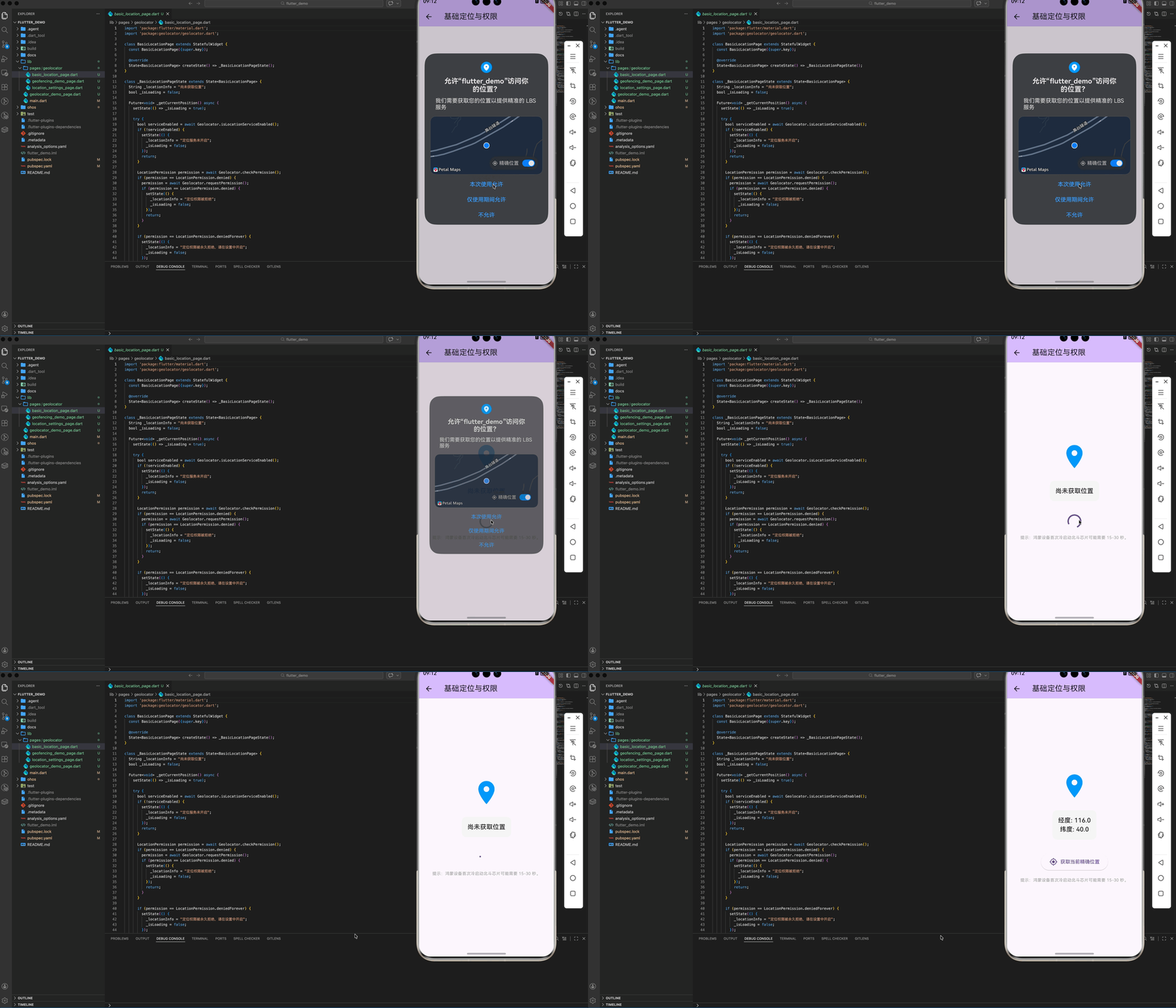
在 module.json5 中,你必须同时申请模糊和精确权限,否则系统会直接拒绝弹出授权框。
json5
"requestPermissions": [
  {
    "name": "ohos.permission.APPROXIMATELY_LOCATION",
    "reason": "$string:location_reason",
    "usedScene": { "abilities": ["EntryAbility"], "when": "inuse" }
  },
  {
    "name": "ohos.permission.LOCATION",
    "reason": "$string:location_reason",
    "usedScene": { "abilities": ["EntryAbility"], "when": "inuse" }
  }
]
2.2 亚米级定位配置 (北斗优化)
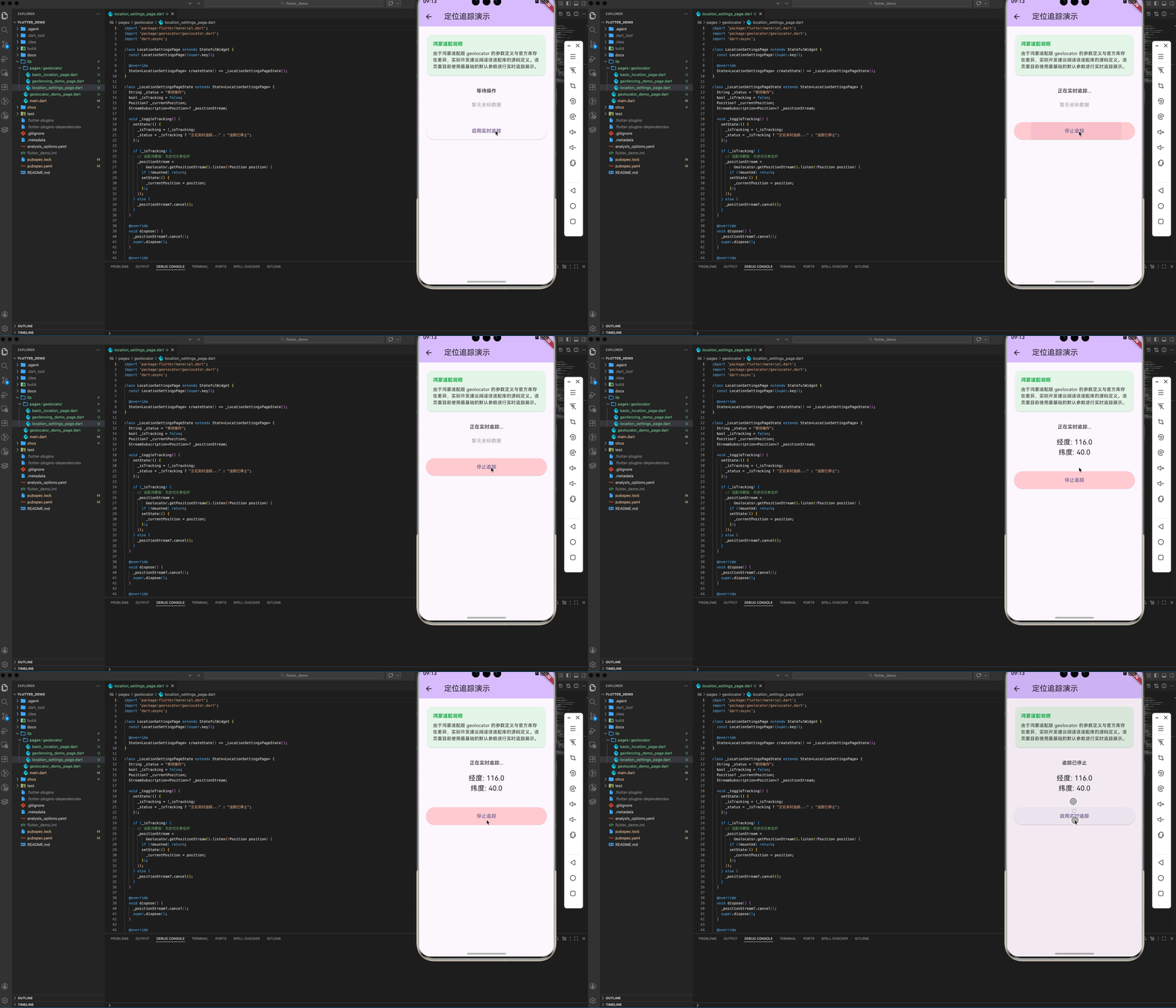
鸿蒙设备(如 Mate 60 系列)搭载了先进的双频北斗。要启用它,我们需要通过 LocationSettings 进行频率定制:
dart
late LocationSettings locationSettings;

if (defaultTargetPlatform == TargetPlatform.android || defaultTargetPlatform == TargetPlatform.ohos) {
  locationSettings = AndroidSettings( // 💡 鸿蒙目前复用 AndroidSettings 接口进行深度设置
    accuracy: LocationAccuracy.bestForNavigation, // 开启最高精度
    distanceFilter: 5, // 仅在移动 5 米以上时上报,节省系统中断资源
    forceLocationManager: true, // 强制调用底层 LocationManager,绕过缓存逻辑
    intervalDuration: const Duration(seconds: 1), // 1秒一次的高频采样
  );
}
三、 高级场景:运动轨迹追踪与功耗平衡
高频定位是"耗电大户"。在鸿蒙设备上,如果你的 App 处于后台且没有正确配置,系统会为了省电而杀掉你的定位流。
3.1 监听状态变化与保活
dart
StreamSubscription<ServiceStatus> serviceStatusStream = Geolocator.getServiceStatusStream().listen(
    (ServiceStatus status) {
        if (status == ServiceStatus.disabled) {
          // ⚠️ 提醒用户:您关闭了系统 GPS 开关!
        }
    });
3.2 自定义地理围栏 (Geofencing) 逻辑案例
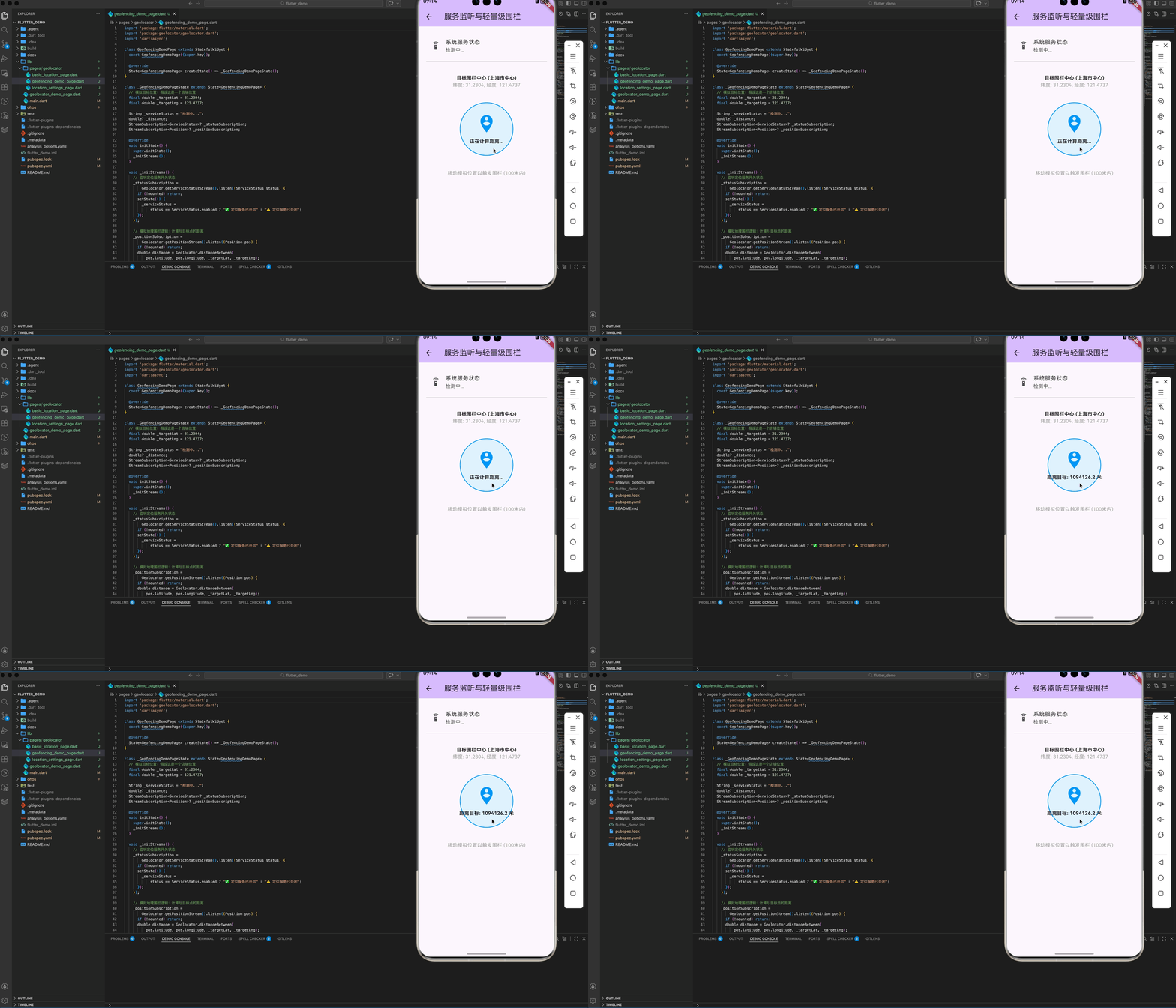
鸿蒙原生 Location Kit 支持硬件级地理围栏,但在 Flutter 侧,我们可以通过 distanceBetween 实现轻量级围栏:
dart
double distance = Geolocator.distanceBetween(
    currentPos.latitude, currentPos.longitude,
    targetLat, targetLng
);

if (distance < 100) {
  // 🔔 触发:您已进入店铺范围内!
}
四、 鸿蒙环境下的避坑指南 (FAQ)
4.1 模拟器永远返回 (0.0, 0.0)
原因 :鸿蒙模拟器默认不提供虚拟位置信息。
方案:在 DevEco Studio 的模拟器控制面板中,手动点击"Location"标签页并输入经纬度。
4.2 权限声明的 Schema 校验失败 (hvigor ERROR)
挑战 :在 module.json5 中直接写 reason: "原因" 会导致编译报错 00303038 Configuration Error。
优化 :鸿蒙 NEXT 强制要求权限原因必须国际化引用。你必须在 resources/base/element/string.json 中定义资源,然后在配置文件中通过 "$string:location_reason" 引用,否则无法通过安全校验。
4.3 MissingPluginException 异常
挑战 :在鸿蒙 NEXT 上直接运行官方 geolocator 会提示找不到插件实现。
方案 :必须替换为鸿蒙专版的适配库(如 openharmony-sig 版本),并确保 getCurrentPosition() 采用无参调用或匹配该适配库的 API 签名。同时,修改原生配置后必须完全卸载 App 再重新安装。
五、 完整示例代码
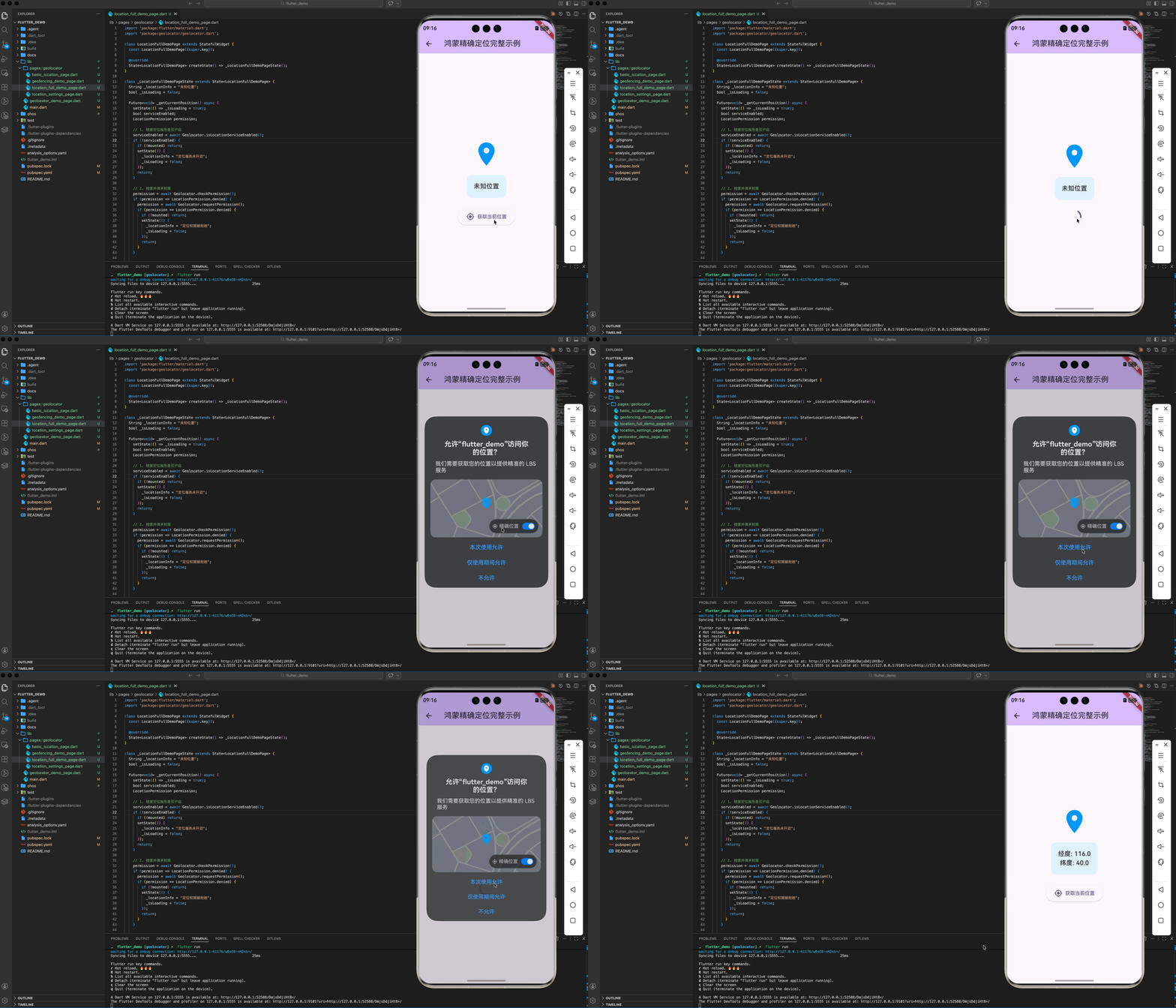
以下代码实现了在鸿蒙系统上动态请求定位权限并获取当前地理位置信息:
dart
import 'package:flutter/material.dart';
import 'package:geolocator/geolocator.dart';

class LocationDemo extends StatefulWidget {
  const LocationDemo({super.key});

  @override
  State<LocationDemo> createState() => _LocationDemoState();
}

class _LocationDemoState extends State<LocationDemo> {
  String _locationInfo = "未知位置";

  Future<void> _getCurrentPosition() async {
    bool serviceEnabled;
    LocationPermission permission;

    serviceEnabled = await Geolocator.isLocationServiceEnabled();
    if (!serviceEnabled) {
      setState(() => _locationInfo = "定位服务未开启");
      return;
    }

    permission = await Geolocator.checkPermission();
    if (permission == LocationPermission.denied) {
      permission = await Geolocator.requestPermission();
      if (permission == LocationPermission.denied) {
        setState(() => _locationInfo = "定位权限被拒绝");
        return;
      }
    }

    Position position = await Geolocator.getCurrentPosition();
    setState(() {
      _locationInfo = "经度: ${position.longitude}, 纬度: ${position.latitude}";
    });
  }

  @override
  Widget build(BuildContext context) {
    return Scaffold(
      appBar: AppBar(title: const Text('鸿蒙精确定位演示')),
      body: Center(
        child: Column(
          mainAxisAlignment: MainAxisAlignment.center,
          children: [
            const Icon(Icons.location_on, size: 80, color: Colors.blue),
            const SizedBox(height: 20),
            Text(_locationInfo, style: const TextStyle(fontSize: 18)),
            const SizedBox(height: 20),
            ElevatedButton(
              onPressed: _getCurrentPosition,
              child: const Text('获取当前位置'),
            ),
          ],
        ),
      ),
    );
  }
}
六、 总结
在鸿蒙生态中,geolocator 不仅是一个插件,更是你对设备硬件能力的掌控力。通过对 精确度分级、背景模式保活、以及北斗芯片特性的深度理解,你的 Flutter 应用将能在各种极端地理环境下展现出从容不迫的稳定性。
欢迎加入开源鸿蒙跨平台社区 :开源鸿蒙跨平台开发者社区