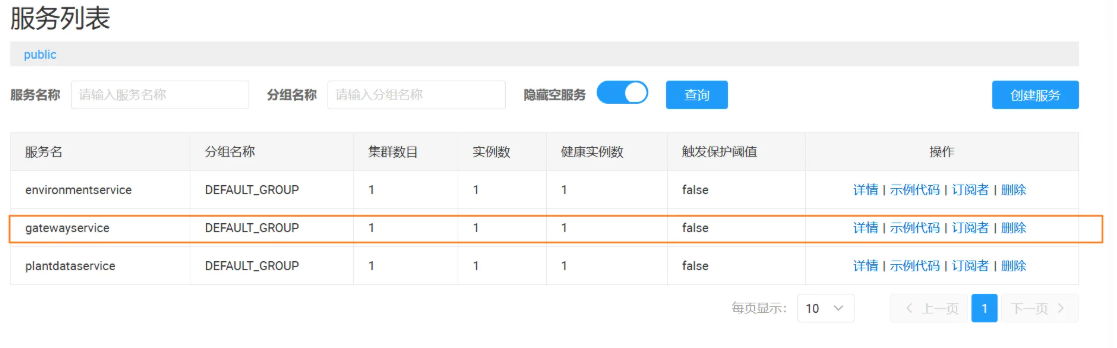
服务注册nacos后;通过网关转发的服务都需要使用服务名称进行服务转发与请求;
1、引入的包
cs
<PackageReference Include="MMLib.SwaggerForOcelot" Version="8.3.2" />
<PackageReference Include="nacos-sdk-csharp" Version="1.3.10" />
<PackageReference Include="nacos-sdk-csharp.AspNetCore" Version="1.3.10" />
<PackageReference Include="nacos-sdk-csharp.Extensions.Configuration" Version="1.3.10" />
<PackageReference Include="Ocelot" Version="22.0.1" />
<PackageReference Include="Ocelot.Provider.Nacos" Version="1.3.5" />
2、网关appsetting添加nacos的配置
服务名称ServiceName与DataId 必须小写
cs
{
    "Nacos": {
        // 【配置中心监听配置】- 监听Nacos配置中心的指定配置集,项目启动后自动拉取该配置
        "Listeners": [
            {
                // 是否为可选监听:false=强制监听,配置拉取失败会影响项目启动;true=可选监听,拉取失败不影响
                "Optional": false,
                // 要监听的配置集DataId(唯一标识,和Nacos控制台配置一致)
                "DataId": "spc.gateway.ocelot",
                // 要监听的配置集分组(默认DEFAULT_GROUP,和Nacos控制台配置一致)
                "Group": "DEFAULT_GROUP"
            },
            {
                // 是否为可选监听:false=强制监听,配置拉取失败会影响项目启动;true=可选监听,拉取失败不影响
                "Optional": false,
                // 要监听的配置集DataId(唯一标识,和Nacos控制台配置一致)
                "DataId": "spc.gateway.common",
                // 要监听的配置集分组(默认DEFAULT_GROUP,和Nacos控制台配置一致)
                "Group": "DEFAULT_GROUP"
            }
        ],
        // 【Nacos服务端地址】- 配置中心+注册中心的服务端地址,多个地址用数组形式["ip1:port1", "ip2:port2"]
        "ServerAddresses": [ "http://172.16.34.40:8848/" ],
        // 【Nacos登录账号】- Nacos控制台配置的用户名(若未开启鉴权可留空,开启后必须填)
        "UserName": "nacos",
        // 【Nacos登录密码】- Nacos控制台配置的密码(若未开启鉴权可留空,开启后必须填)
        "Password": "nacos",
        // 【Nacos命名空间ID】- 隔离不同环境的配置/服务,留空=默认命名空间(public),填控制台的命名空间ID(非名称)
        "Namespace": "",
        // 【服务注册分组】- 当前服务注册到Nacos的分组,默认DEFAULT_GROUP,可用于环境隔离(如DEV/PROD)
        "GroupName": "DEFAULT_GROUP",
        // 【服务集群名称】- 当前服务所属集群,默认DEFAULT,多集群部署时填写(如SH/BEIJING)
        "ClusterName": "DEFAULT",
        // 【服务名称】- 注册到Nacos的服务唯一标识,网关/其他服务通过该名称发现当前服务,不可重复
        "ServiceName": "gatewayservice",
        // 【Nacos请求默认超时时间】- 调用Nacos服务端接口(注册/拉取配置)的默认超时时间,单位毫秒
        "DefaultTimeOut": 15000,
        // 【Nacos心跳监听间隔】- 服务注册后,Nacos客户端监听服务端心跳的间隔时间,单位毫秒
        "ListenInterval": 1000,
        // 【配置中心是否使用RPC协议】- 1.3.10版本建议false,使用HTTP协议,兼容Nacos2.x服务端
        "ConfigUseRpc": false,
        // 【注册中心是否使用RPC协议】- 1.3.10版本建议false,使用HTTP协议,兼容Nacos2.x服务端
        "NamingUseRpc": false,
        // 【是否启用配置中心缓存】- 开启后拉取的配置会缓存到本地,避免Nacos服务端不可用时项目启动失败
        "EnableRemoteConfigCache": true,
        // 【配置中心自动刷新间隔】- 客户端主动拉取Nacos配置中心最新配置的间隔时间,单位毫秒
        "RefreshInterval": 5000,
        // 【服务注册IP】- 1.3.10版本核心配置,直接根节点(源码可读取),填宿主机IP(供其他服务调用)
        "Ip": "172.16.34.40",
        // 【服务注册端口】- 1.3.10版本核心配置,直接根节点(源码可读取),填宿主机映射端口,和docker-compose的端口映射一致
        "Port": 55000,
        // 【是否启用服务注册】- true=启动时自动注册到Nacos,false=仅订阅服务,不注册自身
        "RegisterEnabled": true,
        // 【实例是否启用】- true=实例可用,接受网关/其他服务的调用;false=实例不可用,会被Nacos剔除
        "InstanceEnabled": true,
        // 【服务实例权重】- 负载均衡时的权重,值越大被调用概率越高,默认100.0,范围0-1000
        "Weight": 100.0,
        // 【是否为临时实例】- true=临时实例,服务下线后Nacos会自动剔除;false=持久化实例,需手动注销
        "Ephemeral": true,
        // 【是否为HTTPS服务】- true=当前服务是HTTPS协议,false=HTTP协议,影响其他服务调用的协议
        "Secure": false,
        // 【首选网卡IP匹配前缀】- 1.3.10版本留空即可,避免UriTool自动探测网卡IP覆盖配置的Ip,多个前缀用逗号分隔(如192.168.,172.16.)
        "PreferredNetworks": "",
        // 【服务实例元数据】- 自定义键值对,可传递服务额外信息(如健康检查地址、版本号),Nacos控制台可查看
        "Metadata": {
            // 健康检查地址 - Nacos服务端根据该地址检测实例是否健康,需和项目健康检查接口一致
            "health-check-url": "/Health",
            // 实例状态 - 自定义状态标识,供其他服务做业务判断(可删,不影响核心功能)
            "status": "UP"
        }
    }
}
3、spc.gateway.ocelot模板格式如下:
服务名称必须使用小写
{
    "Routes": [
        // plantdataservice
        {
            "DownstreamPathTemplate": "/api/app/{everything}",
            "DownstreamScheme": "http",
            "ServiceName": "plantdataservice",
            "LoadBalancerOptions": {
                "Type": "RoundRobin"
            },
            "UseServiceDiscovery": true,
            "UpstreamPathTemplate": "/api/plantData/{everything}",
            "UpstreamHttpMethod": [],
            "SwaggerKey": "plantdataservice"
        }
    ],
    "SwaggerEndPoints": [
        {
            "Key": "plantdataservice",
            "Config": [
                {
                    "Name": "plantdataservice API",
                    "Version": "v1",
                    "Service": {
                        "Name": "plantdataservice",
                        "Path": "swagger/v1/swagger.json"
                    }
                }
            ]
        }
    ],
    "GlobalConfiguration": {
        "BaseUrl": "http://172.16.34.40:55000",
        "ServiceDiscoveryProvider": {
            "Type": "Nacos",
            "Host": "172.16.34.40",
            "Port": 8848,
            "Namespace": "",
            "UserName": "nacos",
            "Password": "nacos",
            "PollingInterval": 10000
        }
    }
}
4、spc.gateway.common配置如下:
{
    "App": {
        "CorsOrigins": "https://*.PlanManagementService.com,http://localhost:4200,http://localhost:44307,https://localhost:44307,http://*:8181"
    },
    "Logging": {
        "LogLevel": {
            "Default": "Information",
            "Microsoft.AspNetCore": "Warning"
        }
    },
    "AllowedHosts": "*",
    "SwaggerAuth": {
        "isenable": true,
        "authurl": "http://172.16.34.22:55001/connect/token",
        "client_id": "PlantDataService_App",
        "grant_type": "password",
        "scope": "offline_access",
        "response_type": "refresh_token"
    },
    "License": {
        "Path": "licenses/dev.license",
        "PublicKeyPath": "licenses/public.xml"
    }
}
5、program.cs代码如下:
using Nacos.AspNetCore.V2;
using Newtonsoft.Json;
using Ocelot.DependencyInjection;
using Ocelot.Middleware;
using Ocelot.Provider.Nacos;
using SPC.Gateway.License.Core;
using SPC.WebGateway.Until;

#region 全局配置
var AllowSpecificOrigins = "_allowSpecificOrigins";
var builder = WebApplication.CreateBuilder(args);
#endregion

#region 【新增全局变量】用于存储已校验的证书实例
RuntimeLicenseGuard? GlobalLicenseGuard = null;
LicenseValidator? GlobalLicenseValidator = null;
#endregion

#region 加载Nacos配置
builder.Configuration.AddNacosV2Configuration(builder.Configuration.GetSection("Nacos"));
#endregion

#region CORS
builder.Services.AddCors(options =>
{
    options.AddPolicy(name: AllowSpecificOrigins,
        policy =>
        {
            policy.AllowAnyOrigin()
             .SetIsOriginAllowedToAllowWildcardSubdomains()
             .AllowAnyHeader()
             .AllowAnyMethod();
        });
});
#endregion

builder.Services.AddHttpClient();
builder.Services.AddMemoryCache();

#region Ocelot + Nacos整合
builder.Services.AddOcelot().AddNacosDiscovery();
builder.Services.AddNacosAspNet(builder.Configuration, "Nacos");
#endregion

builder.Services.AddControllers();
builder.Services.AddEndpointsApiExplorer();

builder.Services.AddSwaggerForOcelot(builder.Configuration, opt =>
{
    opt.GenerateDocsForGatewayItSelf = true;
});
builder.Services.AddSwaggerGen();

#region 构建应用实例
var app = builder.Build();
#endregion

#region
var licensePath =
    Environment.GetEnvironmentVariable("LICENSE_PATH") ??
    app.Configuration["License:Path"] ??
    "/app/license/dev.license";

var publicKeyPath =
    Environment.GetEnvironmentVariable("LICENSE_PUBLIC_KEY_PATH") ??
    app.Configuration["License:PublicKeyPath"] ??
    "/app/license/public.xml";

if (!File.Exists(publicKeyPath))
    throw new Exception("Public key file not found: " + publicKeyPath);

Console.WriteLine($"✅ 最终使用的证书路径:{licensePath}");
Console.WriteLine($"✅ 最终使用的公钥路径:{publicKeyPath}");

var publicKeyXml = File.ReadAllText(publicKeyPath);
if (string.IsNullOrWhiteSpace(publicKeyXml))
    throw new Exception("Public key content is empty.");

GlobalLicenseGuard = new RuntimeLicenseGuard(licensePath, publicKeyXml);
GlobalLicenseValidator = new LicenseValidator(licensePath, publicKeyXml);
GlobalLicenseGuard.StartupCheck(out var licenseData, out var error);
#endregion

if (app.Environment.IsDevelopment())
{
    app.UseDeveloperExceptionPage();
}

app.UseRouting();
app.UseCors(AllowSpecificOrigins);
app.UseSwaggerAuthorized();
app.UseSwagger();

#region
app.Use(async (context, next) =>
{
    var guard = GlobalLicenseGuard!;
    if (!guard.RequestCheck(out var err))
    {
        if (context.Request.Path.Value!.ToLowerInvariant()
                      .Contains("auth".ToLowerInvariant()))
        {
            await HandleExceptionAsync(context, "非法请求,未通过校验");
            return;
        }
    }
    await next(context);
});
#endregion

app.Use(async (context, next) =>
{
    if (context.Request.Path.HasValue
                && (context.Request.Path.Value.IndexOf("SignalR", StringComparison.InvariantCultureIgnoreCase) > -1
                || context.Request.Path.Value.IndexOf("Swagger", StringComparison.InvariantCultureIgnoreCase) > -1))
    {
        await next(context);
        return;
    }
    #region Real-IP
    string? ipAddress = context?.Connection?.RemoteIpAddress?.ToString();
    if (context.Request.Headers.ContainsKey("X-Forwarded-For"))
    {
        ipAddress = context.Request.Headers["X-Forwarded-For"].ToString().Split(',')[0].Trim();
    }
    if (!string.IsNullOrEmpty(ipAddress))
    {
        context.Request.Headers["X-Real-IP"] = ipAddress;
    }
    else
    {
        context.Request.Headers.Add("X-Real-IP", "Unknown");
    }
    #endregion
    await next(context);
});

app.UseEndpoints(endpoints =>
{
    endpoints.MapControllerRoute(
        name: "default",
        pattern: "{controller=Home}/{action=Index}/{id?}");
});
app.UseSwaggerForOcelotUI();
app.UseOcelot().Wait();
app.Run();


#region 工具方法
static async Task HandleExceptionAsync(HttpContext context, string errorText)
{
    var response = context.Response;
    response.ContentType = "application/json";
    response.StatusCode = 403;
    await response.WriteAsync(JsonConvert.SerializeObject(errorText));
}
#endregion
6、服务必须添加一个控制器代码如下:
[ApiController]
public class DefaultController : Controller
{
    [HttpGet("Health")]
    public IActionResult Health()
    {
        return Ok();
    }
}
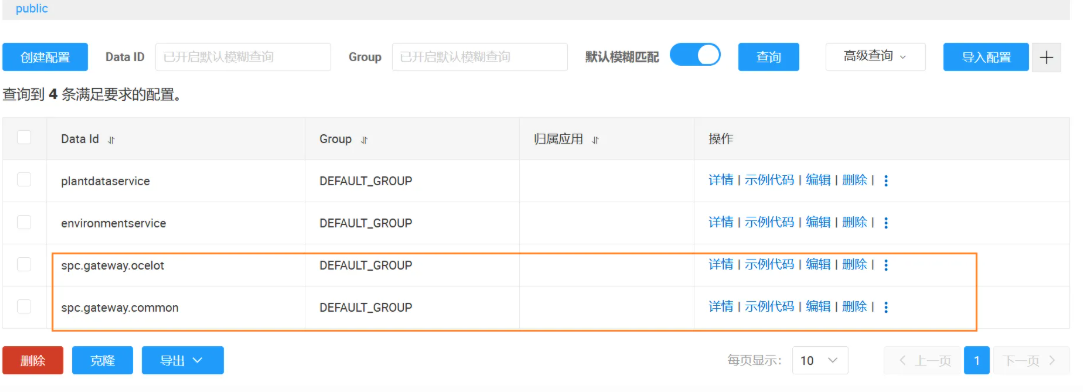
7、网关的nacos配置文件有两个
3、spc.gateway.ocelot模板格式如下:
服务名称必须使用小写
{
    "Routes": [
        // plantdataservice
        {
            "DownstreamPathTemplate": "/api/app/{everything}",
            "DownstreamScheme": "http",
            "ServiceName": "plantdataservice",
            "LoadBalancerOptions": {
                "Type": "RoundRobin"
            },
            "UseServiceDiscovery": true,
            "UpstreamPathTemplate": "/api/plantData/{everything}",
            "UpstreamHttpMethod": [],
            "SwaggerKey": "plantdataservice"
        }
    ],
    "SwaggerEndPoints": [
        {
            "Key": "plantdataservice",
            "Config": [
                {
                    "Name": "plantdataservice API",
                    "Version": "v1",
                    "Service": {
                        "Name": "plantdataservice",
                        "Path": "swagger/v1/swagger.json"
                    }
                }
            ]
        }
    ],
    "GlobalConfiguration": {
        "BaseUrl": "http://172.16.34.40:55000",
        "ServiceDiscoveryProvider": {
            "Type": "Nacos",
            "Host": "172.16.34.40",
            "Port": 8848,
            "Namespace": "",
            "UserName": "nacos",
            "Password": "nacos",
            "PollingInterval": 10000
        }
    }
}
4、spc.gateway.common配置如下:
{
    "App": {
        "CorsOrigins": "https://*.PlanManagementService.com,http://localhost:4200,http://localhost:44307,https://localhost:44307,http://*:8181"
    },
    "Logging": {
        "LogLevel": {
            "Default": "Information",
            "Microsoft.AspNetCore": "Warning"
        }
    },
    "AllowedHosts": "*",
    "SwaggerAuth": {
        "isenable": true,
        "authurl": "http://172.16.34.22:55001/connect/token",
        "client_id": "PlantDataService_App",
        "grant_type": "password",
        "scope": "offline_access",
        "response_type": "refresh_token"
    },
    "License": {
        "Path": "licenses/dev.license",
        "PublicKeyPath": "licenses/public.xml"
    }
}
5、program.cs代码如下:
using Nacos.AspNetCore.V2;
using Newtonsoft.Json;
using Ocelot.DependencyInjection;
using Ocelot.Middleware;
using Ocelot.Provider.Nacos;
using SPC.Gateway.License.Core;
using SPC.WebGateway.Until;

#region 全局配置
var AllowSpecificOrigins = "_allowSpecificOrigins";
var builder = WebApplication.CreateBuilder(args);
#endregion

#region 【新增全局变量】用于存储已校验的证书实例
RuntimeLicenseGuard? GlobalLicenseGuard = null;
LicenseValidator? GlobalLicenseValidator = null;
#endregion

#region 加载Nacos配置
builder.Configuration.AddNacosV2Configuration(builder.Configuration.GetSection("Nacos"));
#endregion

#region CORS
builder.Services.AddCors(options =>
{
    options.AddPolicy(name: AllowSpecificOrigins,
        policy =>
        {
            policy.AllowAnyOrigin()
             .SetIsOriginAllowedToAllowWildcardSubdomains()
             .AllowAnyHeader()
             .AllowAnyMethod();
        });
});
#endregion

builder.Services.AddHttpClient();
builder.Services.AddMemoryCache();

#region Ocelot + Nacos整合
builder.Services.AddOcelot().AddNacosDiscovery();
builder.Services.AddNacosAspNet(builder.Configuration, "Nacos");
#endregion

builder.Services.AddControllers();
builder.Services.AddEndpointsApiExplorer();

builder.Services.AddSwaggerForOcelot(builder.Configuration, opt =>
{
    opt.GenerateDocsForGatewayItSelf = true;
});
builder.Services.AddSwaggerGen();

#region 构建应用实例
var app = builder.Build();
#endregion

#region
var licensePath =
    Environment.GetEnvironmentVariable("LICENSE_PATH") ??
    app.Configuration["License:Path"] ??
    "/app/license/dev.license";

var publicKeyPath =
    Environment.GetEnvironmentVariable("LICENSE_PUBLIC_KEY_PATH") ??
    app.Configuration["License:PublicKeyPath"] ??
    "/app/license/public.xml";

if (!File.Exists(publicKeyPath))
    throw new Exception("Public key file not found: " + publicKeyPath);

Console.WriteLine($"✅ 最终使用的证书路径:{licensePath}");
Console.WriteLine($"✅ 最终使用的公钥路径:{publicKeyPath}");

var publicKeyXml = File.ReadAllText(publicKeyPath);
if (string.IsNullOrWhiteSpace(publicKeyXml))
    throw new Exception("Public key content is empty.");

GlobalLicenseGuard = new RuntimeLicenseGuard(licensePath, publicKeyXml);
GlobalLicenseValidator = new LicenseValidator(licensePath, publicKeyXml);
GlobalLicenseGuard.StartupCheck(out var licenseData, out var error);
#endregion

if (app.Environment.IsDevelopment())
{
    app.UseDeveloperExceptionPage();
}

app.UseRouting();
app.UseCors(AllowSpecificOrigins);
app.UseSwaggerAuthorized();
app.UseSwagger();

#region
app.Use(async (context, next) =>
{
    var guard = GlobalLicenseGuard!;
    if (!guard.RequestCheck(out var err))
    {
        if (context.Request.Path.Value!.ToLowerInvariant()
                      .Contains("auth".ToLowerInvariant()))
        {
            await HandleExceptionAsync(context, "非法请求,未通过校验");
            return;
        }
    }
    await next(context);
});
#endregion

app.Use(async (context, next) =>
{
    if (context.Request.Path.HasValue
                && (context.Request.Path.Value.IndexOf("SignalR", StringComparison.InvariantCultureIgnoreCase) > -1
                || context.Request.Path.Value.IndexOf("Swagger", StringComparison.InvariantCultureIgnoreCase) > -1))
    {
        await next(context);
        return;
    }
    #region Real-IP
    string? ipAddress = context?.Connection?.RemoteIpAddress?.ToString();
    if (context.Request.Headers.ContainsKey("X-Forwarded-For"))
    {
        ipAddress = context.Request.Headers["X-Forwarded-For"].ToString().Split(',')[0].Trim();
    }
    if (!string.IsNullOrEmpty(ipAddress))
    {
        context.Request.Headers["X-Real-IP"] = ipAddress;
    }
    else
    {
        context.Request.Headers.Add("X-Real-IP", "Unknown");
    }
    #endregion
    await next(context);
});

app.UseEndpoints(endpoints =>
{
    endpoints.MapControllerRoute(
        name: "default",
        pattern: "{controller=Home}/{action=Index}/{id?}");
});
app.UseSwaggerForOcelotUI();
app.UseOcelot().Wait();
app.Run();


#region 工具方法
static async Task HandleExceptionAsync(HttpContext context, string errorText)
{
    var response = context.Response;
    response.ContentType = "application/json";
    response.StatusCode = 403;
    await response.WriteAsync(JsonConvert.SerializeObject(errorText));
}
#endregion
6、服务必须添加一个控制器代码如下:
[ApiController]
public class DefaultController : Controller
{
    [HttpGet("Health")]
    public IActionResult Health()
    {
        return Ok();
    }
}
7、网关的nacos配置文件有两个
8、注入的服务截图