引言
在前两篇文章中,我们深入分析了Binder驱动机制和ServiceManager服务注册。但在真实的Android系统开发中,很少有人直接操作Binder驱动------大家使用的都是更高层的抽象:AIDL(Android Interface Definition Language)和HIDL(HAL Interface Definition Language)。
想象一下这个场景:Framework层的BatteryService想要获取电池电量,它需要和HAL层的Health服务通信。怎么做?
scss
Framework (Java)  ←→  Native Service (C++)  ←→  HAL Service (C++)  ←→  硬件
    ↓                      ↓                         ↓
AIDL接口 AIDL/HIDL桥接 AIDL HAL接口这就是本文要解决的问题:如何通过AIDL/HIDL定义接口,并实现跨进程的HAL层通信?
📖 系列前置阅读:建议先阅读第9篇(Binder驱动)和第10篇(ServiceManager),理解Binder IPC的底层机制。
AIDL与HIDL:两代接口定义语言
为什么需要接口定义语言?
直接操作Binder需要手工编写大量模板代码:
cpp
// 手工Binder代码示例(已简化)
class BpMyService : public BpInterface<IMyService> {
    virtual int getValue() {
        Parcel data, reply;
        data.writeInterfaceToken(IMyService::getInterfaceDescriptor());
        remote()->transact(TRANSACTION_getValue, data, &reply);
        return reply.readInt32();
    }
};这种方式容易出错、维护困难、版本管理混乱。
AIDL和HIDL的诞生就是为了自动生成这些模板代码,让开发者专注于业务逻辑。
AIDL vs HIDL:历史演进
| 特性 | AIDL (传统) | HIDL | AIDL (Stable/现代) |
|---|---|---|---|
| 引入版本 | Android 1.0 | Android 8.0 | Android 11 |
| 主要用途 | Framework内部 | Framework-HAL | Framework-HAL |
| 语言支持 | Java + C++ | C++ | Java + C++ + Rust |
| 版本管理 | ❌ 无 | ✅ 强制语义化版本 | ✅ Stable接口 |
| 向后兼容 | ❌ 不保证 | ✅ 保证 | ✅ 保证 |
| 当前状态 | 维护中 | ❌ 不推荐新项目 | ✅ 推荐 |
Android 15的策略:
- 新HAL服务:使用Stable AIDL
- 遗留HAL:HIDL继续支持,但不再新增
- Framework内部:传统AIDL和Stable AIDL混用
🎯 关键洞察:Google在Android 11后推动"HIDL退役,AIDL统一天下"的策略。Stable AIDL结合了AIDL的灵活性和HIDL的版本管理优势。
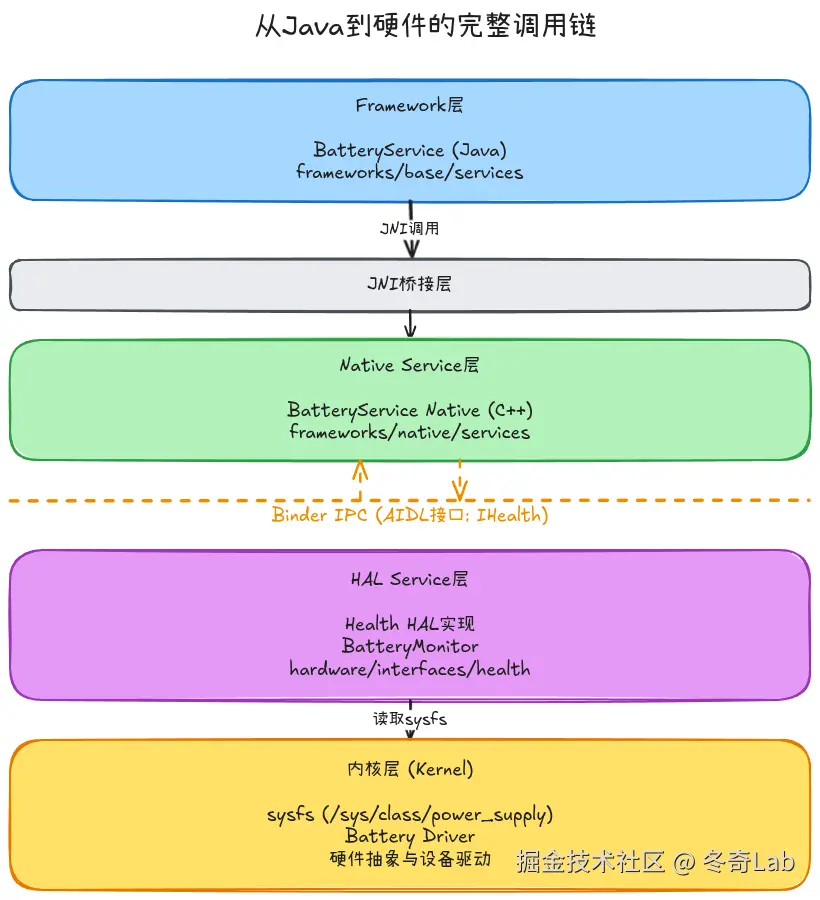
图:从Framework Java层到内核驱动的完整调用链,通过AIDL接口实现跨进程HAL通信
AIDL基础:从语法到生成代码
AIDL文件结构
一个典型的AIDL接口定义:
java
// IHealth.aidl (简化版)
package android.hardware.health;

import android.hardware.health.HealthInfo;
import android.hardware.health.IHealthInfoCallback;

@VintfStability  // ← Android 15: VINTF声明标记
interface IHealth {
    // 常量定义
    const int STATUS_UNKNOWN = 2;
    const int STATUS_CALLBACK_DIED = 4;

    // 方法声明
    void registerCallback(in IHealthInfoCallback callback);
    void unregisterCallback(in IHealthInfoCallback callback);
    void update();

    // 返回值可以是基本类型或Parcelable
    int getChargeCounterUah();
    int getCurrentNowMicroamps();
    HealthInfo getHealthInfo();
}语法要点:
- 包名 :
package声明命名空间 - 导入 :
import其他AIDL类型 - 注解 :
@VintfStability表示接口稳定性(Android 15强制要求) - 方向标记 :
in(输入)/out(输出)/inout(双向) - 支持类型:基本类型、String、List、Map、Parcelable、其他AIDL接口
AIDL编译流程
scss
IHealth.aidl  →  [AIDL Compiler]  →  生成代码
                                     ├── IHealth.h/cpp (C++ Native Backend)
                                     ├── IHealth.java (Java Backend)
└── IHealth.rs (Rust Backend)生成的C++代码(Android 15,简化版):
cpp
// 自动生成的 IHealth.h (片段)
#include <android/binder_ibinder.h>

namespace aidl::android::hardware::health {

class IHealth : public ::ndk::ICInterface {
public:
    static const char* descriptor;  // "android.hardware.health.IHealth"

    // 纯虚函数,由实现类覆盖
    virtual ::ndk::ScopedAStatus registerCallback(
        const std::shared_ptr<IHealthInfoCallback>& in_callback) = 0;

    virtual ::ndk::ScopedAStatus getChargeCounterUah(int32_t* _aidl_return) = 0;

    // Binder通信相关
    static std::shared_ptr<IHealth> fromBinder(const ::ndk::SpAIBinder& binder);
};

// Bn = Binder Native (服务端基类)
class BnHealth : public ::ndk::BnCInterface<IHealth> {
public:
    ::ndk::ScopedAStatus getInterfaceVersion(int32_t* _aidl_return) final;
protected:
    ::ndk::SpAIBinder createBinder() override;
};

// Bp = Binder Proxy (客户端代理)
class BpHealth : public ::ndk::BpCInterface<IHealth> {
public:
    explicit BpHealth(const ::ndk::SpAIBinder& binder);

    // 实现所有虚函数,内部调用transact()
    ::ndk::ScopedAStatus registerCallback(
        const std::shared_ptr<IHealthInfoCallback>& in_callback) override {
        // 序列化参数 → transact() → 反序列化返回值
        // ...
    }
};

} // namespace aidl::android::hardware::health关键类的职责:
IHealth(接口类):定义API契约BnHealth(Binder Native):服务端基类,处理transact()BpHealth(Binder Proxy):客户端代理,封装IPC细节
Stable AIDL:版本管理的救星
传统AIDL的痛点
在Android 10之前,AIDL接口变更是噩梦:
java
// Version 1
interface IFoo {
    void methodA();
}

// Version 2 (破坏性变更!)
interface IFoo {
    void methodA();
    void methodB();  // ← 新增方法,老版本无法识别!
}问题:
- 无法在新旧版本间兼容
- HAL升级强制要求Framework同步升级
- OTA更新可能导致系统崩溃
Stable AIDL的解决方案
核心机制:冻结旧版本接口 + 通过新方法扩展。
bash
# Stable AIDL的目录结构
hardware/interfaces/health/aidl/
├── android/hardware/health/
│   ├── IHealth.aidl              # 当前开发版本
│   ├── HealthInfo.aidl
│   └── ...
└── aidl_api/android.hardware.health/
    ├── 1/                         # 冻结的版本1
    │   └── android/hardware/health/IHealth.aidl
    ├── 2/                         # 冻结的版本2
    │   └── android/hardware/health/IHealth.aidl
└── current/ # 当前版本符号链接版本演进示例(Android 15 Health HAL):
java
// Version 1 (冻结,不可修改)
package android.hardware.health;
interface IHealth {
    void registerCallback(in IHealthInfoCallback callback);
    int getCapacity();
}

// Version 2 (冻结,不可修改)
package android.hardware.health;
interface IHealth {
    void registerCallback(in IHealthInfoCallback callback);
    int getCapacity();
    // 新增方法(向后兼容!)
    void setChargingPolicy(BatteryChargingPolicy in_value);
    BatteryChargingPolicy getChargingPolicy();
}

// Current (开发中)
package android.hardware.health;
interface IHealth {
    // ... 继承所有旧方法
    // 新增Android 15特性
    BatteryHealthData getBatteryHealthData();
}版本检查代码(客户端):
cpp
// 客户端检查HAL服务版本
std::shared_ptr<IHealth> health = IHealth::fromBinder(binder);

int32_t version = 0;
health->getInterfaceVersion(&version);

if (version >= 2) {
    // 使用Version 2的特性
    BatteryChargingPolicy policy;
    health->getChargingPolicy(&policy);
} else {
    // 降级处理
    LOG(WARNING) << "Health HAL version " << version << " does not support charging policy";
}
✅ Stable AIDL的优势:
- 向后兼容:新Framework可以使用老HAL
- 向前兼容:老Framework不会因新HAL崩溃(忽略未知方法)
- 独立升级:HAL和Framework可以各自OTA
HIDL简介:HAL的前辈
虽然HIDL正在被Stable AIDL取代,但Android 15中仍有大量遗留HAL使用HIDL。
HIDL语法特点
c
// IUsb.hal (HIDL 1.0)
package android.hardware.usb@1.0;

import IUsbCallback;

interface IUsb {
    /**
     * oneway = 异步调用,不等待返回
     */
    oneway switchRole(string portName, PortRole role);

    oneway setCallback(IUsbCallback callback);

    oneway queryPortStatus();
};
HIDL vs AIDL对比:
| 特性 | HIDL | AIDL |
|---|---|---|
| 文件后缀 | .hal |
.aidl |
| 版本标记 | @1.0 (包名中) |
aidl_api/版本号/ (目录) |
| 异步语法 | oneway 关键字 |
oneway 关键字 |
| 数据传输 | hidl_vec/hidl_string | std::vector/std::string |
HIDL遗留问题
- 复杂的版本号管理 :
@1.0→@1.1→@2.0需要手动维护 - 工具链老旧 :
hidl-gen已停止维护 - 无Rust支持:限制了现代化改造
HAL服务实现:以Health HAL为例
Health HAL架构
java
┌─────────────────────────────────────────────────────────┐
│             Framework (Java)                            │
│  frameworks/base/services/core/java/...BatteryService   │
└─────────────┬───────────────────────────────────────────┘
              │ JNI
              ↓
┌─────────────────────────────────────────────────────────┐
│         Native Service (C++)                            │
│  frameworks/native/services/batteryservice              │
└─────────────┬───────────────────────────────────────────┘
              │ Binder IPC (AIDL)
              ↓
┌─────────────────────────────────────────────────────────┐
│           HAL Service (C++)                             │
│  hardware/interfaces/health/aidl/default/Health.cpp     │
│                                                          │
│  ┌────────────────────────────────────────────┐         │
│  │  class Health : public BnHealth {          │         │
│  │    BatteryMonitor battery_monitor_;        │         │
│  │    ndk::ScopedAStatus getCapacity(...) {   │         │
│  │      // 读取 /sys/class/power_supply/...  │         │
│  │    }                                        │         │
│  │  }                                          │         │
│  └────────────────────────────────────────────┘         │
└─────────────┬───────────────────────────────────────────┘
              │ sysfs
              ↓
┌─────────────────────────────────────────────────────────┐
│              Kernel Driver                              │
│  drivers/power/supply/xxx_battery.c                     │
└─────────────────────────────────────────────────────────┘
服务端实现(Android 15源码分析)
Health.cpp(截取核心逻辑):
cpp
// hardware/interfaces/health/aidl/default/Health.cpp (Android 15)
namespace aidl::android::hardware::health {

// Health服务构造函数
Health::Health(std::string_view instance_name,
               std::unique_ptr<struct healthd_config>&& config)
    : instance_name_(instance_name),
      healthd_config_(std::move(config)),
      death_recipient_(AIBinder_DeathRecipient_new(&OnCallbackDiedWrapped)) {

    // 注册死亡通知回调(类似ServiceManager的linkToDeath)
    AIBinder_DeathRecipient_setOnUnlinked(death_recipient_.get(), onCallbackUnlinked);

    // 初始化电池监控器(底层读取sysfs)
    battery_monitor_.init(healthd_config_.get());
}

// ========== AIDL接口实现:获取电池电量 ==========
ndk::ScopedAStatus Health::getCapacity(int32_t* out) {
    // 调用BatteryMonitor读取 /sys/class/power_supply/battery/capacity
    return GetProperty<int32_t>(&battery_monitor_,
                                 ::android::BATTERY_PROP_CAPACITY,
                                 0,  // 默认值
                                 out);
}

// ========== AIDL接口实现:获取充电状态 ==========
ndk::ScopedAStatus Health::getChargeStatus(BatteryStatus* out) {
    return GetProperty(&battery_monitor_,
                       ::android::BATTERY_PROP_BATTERY_STATUS,
                       BatteryStatus::UNKNOWN,
                       out);
}

// ========== AIDL接口实现:设置充电策略 (Android 15新增) ==========
ndk::ScopedAStatus Health::setChargingPolicy(BatteryChargingPolicy in_value) {
    ::android::status_t err = battery_monitor_.setChargingPolicy(static_cast<int>(in_value));

    switch (err) {
        case ::android::OK:
            return ndk::ScopedAStatus::ok();
        case ::android::NAME_NOT_FOUND:
            return ndk::ScopedAStatus::fromExceptionCode(EX_UNSUPPORTED_OPERATION);
        case ::android::BAD_VALUE:
            return ndk::ScopedAStatus::fromStatus(::android::INVALID_OPERATION);
        default:
            return ndk::ScopedAStatus::fromServiceSpecificErrorWithMessage(
                    IHealth::STATUS_UNKNOWN, ::android::statusToString(err).c_str());
    }
}

// ========== 回调管理:注册健康信息监听器 ==========
ndk::ScopedAStatus Health::registerCallback(
    const std::shared_ptr<IHealthInfoCallback>& callback) {

    if (callback == nullptr) {
        return ndk::ScopedAStatus::fromExceptionCode(EX_NULL_POINTER);
    }

    {
        std::lock_guard<std::mutex> lock(callbacks_lock_);
        callbacks_.push_back(callback);

        // 为callback注册死亡通知(防止客户端崩溃后内存泄漏)
        auto linked = std::make_unique<LinkedCallback>(weak_from_this(), callback);
        auto binder = callback->asBinder();
        auto status = AIBinder_linkToDeath(binder.get(),
                                           death_recipient_.get(),
                                           linked.get());
        if (status == STATUS_OK) {
            linked.release();  // 交给Binder管理生命周期
        } else {
            LOG(WARNING) << "Cannot link to death: " << status;
        }
    }

    return ndk::ScopedAStatus::ok();
}

// ========== 主动通知所有回调 ==========
ndk::ScopedAStatus Health::update() {
    battery_monitor_.updateValues();
    HealthInfo health_info = battery_monitor_.getHealthInfo();

    std::lock_guard<std::mutex> lock(callbacks_lock_);
    for (auto& callback : callbacks_) {
        // 异步通知(oneway),避免阻塞
        auto status = callback->healthInfoChanged(health_info);
        if (!status.isOk()) {
            LOG(WARNING) << "Callback failed: " << status.getDescription();
        }
    }

    return ndk::ScopedAStatus::ok();
}

} // namespace aidl::android::hardware::health关键设计:
- 错误处理 :统一转换
::android::status_t到AIDL的ScopedAStatus - 死亡通知:防止客户端崩溃导致服务端泄漏回调
- 线程安全 :使用
std::mutex保护共享数据(callbacks_) - 异步通知 :回调使用
oneway,避免阻塞HAL服务
服务注册与启动
main.cpp(Health HAL服务入口):
cpp
// hardware/interfaces/health/aidl/default/main.cpp
int main() {
    // 创建Health服务实例
    auto config = std::make_unique<healthd_config>();
    ::android::hardware::health::InitHealthdConfig(config.get());
    auto health = ndk::SharedRefBase::make<Health>("default", std::move(config));

    // 注册到ServiceManager
    const std::string instance = std::string(Health::descriptor) + "/default";
    auto status = AServiceManager_addService(health->asBinder().get(), instance.c_str());
    if (status != STATUS_OK) {
        LOG(FATAL) << "Failed to register Health HAL: " << status;
    }

    // 启动Binder线程池
    ABinderProcess_setThreadPoolMaxThreadCount(0);  // 0 = 自动管理
    ABinderProcess_startThreadPool();
    ABinderProcess_joinThreadPool();  // 阻塞等待

    return EXIT_FAILURE;  // 永不返回,除非异常
}注册流程解析:
scss
Health HAL服务启动
    ↓
1. 创建Health实例 (new Health(...))
    ↓
2. 生成服务名称 ("android.hardware.health.IHealth/default")
    ↓
3. 调用 AServiceManager_addService()
    ├→ 内部调用 Binder transact(ADD_SERVICE)
    └→ ServiceManager记录到 mNameToService
    ↓
4. 启动Binder线程池 (等待客户端调用)
    ↓
5. joinThreadPool() (阻塞主线程)
客户端调用
Native客户端代码:
cpp
// frameworks/native/services/batteryservice/HealthHalCallbackHidl.cpp (简化)
#include <android/hardware/health/IHealth.h>
#include <android/binder_manager.h>

using aidl::android::hardware::health::IHealth;
using aidl::android::hardware::health::HealthInfo;

// 获取Health HAL服务
std::shared_ptr<IHealth> getHealthService() {
    const std::string instance = std::string(IHealth::descriptor) + "/default";

    // 通过ServiceManager查询服务
    ndk::SpAIBinder binder(AServiceManager_waitForService(instance.c_str()));
    if (binder.get() == nullptr) {
        LOG(ERROR) << "Failed to get Health HAL service";
        return nullptr;
    }

    // 将Binder转换为IHealth接口
    return IHealth::fromBinder(binder);
}

// 使用Health HAL获取电池信息
void getBatteryInfo() {
    auto health = getHealthService();
    if (!health) return;

    // 调用AIDL接口
    HealthInfo info;
    auto status = health->getHealthInfo(&info);
    if (!status.isOk()) {
        LOG(ERROR) << "getHealthInfo failed: " << status.getDescription();
        return;
    }

    LOG(INFO) << "Battery level: " << info.batteryLevel << "%";
    LOG(INFO) << "Charging status: " << toString(info.batteryStatus);
}
实战技巧:AIDL/HIDL开发最佳实践
1. 选择AIDL还是HIDL?
决策树:
yaml
新项目?
├─ Yes → 使用 Stable AIDL
└─ No → 已有HAL使用HIDL?
       ├─ Yes → 继续维护HIDL (除非有重大重构)
       └─ No → 迁移到 Stable AIDL
2. Stable AIDL版本升级流程
bash
# 1. 修改当前开发版本的AIDL文件
vim hardware/interfaces/health/aidl/android/hardware/health/IHealth.aidl

# 2. 冻结当前版本(假设从version 2升级到3)
m android.hardware.health-freeze-api

# 3. 自动生成 aidl_api/android.hardware.health/3/ 目录

# 4. 更新实现代码以支持新接口

# 5. 构建验证
m android.hardware.health-impl
3. 错误处理规范
cpp
// ❌ 错误示例:直接返回空指针
ndk::ScopedAStatus getService(...) {
    if (error) return nullptr;  // 编译错误!
}

// ✅ 正确示例:使用ScopedAStatus
ndk::ScopedAStatus getService(...) {
    if (not_found) {
        return ndk::ScopedAStatus::fromExceptionCode(EX_UNSUPPORTED_OPERATION);
    }
    if (unknown_error) {
        return ndk::ScopedAStatus::fromServiceSpecificError(
            IHealth::STATUS_UNKNOWN, "Detailed error message");
    }
    return ndk::ScopedAStatus::ok();
}
4. 性能优化:减少Binder往返
❌ 低效写法(每次调用都跨进程):
cpp
int level = health->getCapacity();       // Binder调用1
int current = health->getCurrentNow();   // Binder调用2
int voltage = health->getVoltage();      // Binder调用3
✅ 高效写法(一次调用获取所有数据):
cpp
HealthInfo info;
health->getHealthInfo(&info);  // 单次Binder调用,包含所有数据

int level = info.batteryLevel;
int current = info.batteryCurrentMicroamps;
int voltage = info.batteryVoltage;性能对比:
- 方案1:3次Binder transact,约 300-900μs
- 方案2:1次Binder transact,约 100-300μs
- 提升: 60%-70%
5. 死亡通知最佳实践
cpp
class MyCallback : public BnHealthInfoCallback {
private:
    // 使用weak_ptr避免循环引用
    std::weak_ptr<MyService> service_;

public:
    explicit MyCallback(std::shared_ptr<MyService> service)
        : service_(service) {}

    ndk::ScopedAStatus healthInfoChanged(const HealthInfo& info) override {
        // 检查service是否还存活
        if (auto svc = service_.lock()) {
            svc->onHealthInfoUpdate(info);
        }
        return ndk::ScopedAStatus::ok();
    }

    // 死亡通知回调
    void binderDied() {
        LOG(WARNING) << "Health HAL服务崩溃,尝试重连...";
        if (auto svc = service_.lock()) {
            svc->reconnectHealthHAL();
        }
    }
};
6. 调试技巧
查看已注册的AIDL服务:
bash
# 列出所有AIDL HAL服务
adb shell dumpsys -l | grep android.hardware

# 查看Health HAL服务详情
adb shell dumpsys android.hardware.health.IHealth/default

# 输出示例:
# Battery Health:
#   batteryLevel: 85
#   batteryStatus: CHARGING
#   batteryHealth: GOOD
# batteryChargeCounter: 2850000 µAhBinder通信追踪:
bash
# 启用Binder日志
adb shell setprop log.tag.binder VERBOSE

# 实时查看AIDL调用
adb logcat -s binder:V | grep "IHealth"

# 输出示例:
# binder: 1234:1234 BC_TRANSACTION thr 1234 -> 5678 node 12345 handle 0x3 code 0x1 (IHealth::getCapacity)
常见问题与解答
Q1: Stable AIDL的版本号如何管理?
A : 版本号存储在aidl_api/目录下,每次freeze-api自动递增:
bash
aidl_api/android.hardware.health/
├── 1/      # 第一次freeze
├── 2/      # 第二次freeze
├── 3/      # 最新freeze
└── current -> 3/ # 符号链接指向最新版本客户端代码可以通过getInterfaceVersion()查询服务版本:
cpp
int32_t version = 0;
health->getInterfaceVersion(&version);
LOG(INFO) << "Health HAL version: " << version;
Q2: AIDL接口可以修改已冻结的版本吗?
A : 绝对不行! 这会破坏向后兼容性。
bash
# ❌ 错误操作:修改冻结版本
vim aidl_api/android.hardware.health/2/android/hardware/health/IHealth.aidl

# ✅ 正确做法:修改当前开发版本,然后freeze
vim android/hardware/health/IHealth.aidl
m android.hardware.health-freeze-api
Q3: HIDL如何调用AIDL服务(或反向)?
A: 需要编写适配层(Adapter):
cpp
// HIDL → AIDL适配器示例
class HidlToAidlAdapter : public IHidlInterface {
    std::shared_ptr<IAidlInterface> aidl_service_;

    Return<void> hidlMethod(...) override {
        // 转换HIDL类型到AIDL类型
        AidlType aidl_param = convertHidlToAidl(hidl_param);

        // 调用AIDL服务
        auto status = aidl_service_->aidlMethod(aidl_param);

        // 转换返回值
        return convertAidlToHidl(status);
    }
};
Android 15的部分遗留HAL仍在使用此模式。
Q4: 如何处理HAL服务崩溃?
A: 使用死亡通知(DeathRecipient)自动重连:
cpp
class HealthServiceManager {
    std::shared_ptr<IHealth> health_;
    ndk::ScopedAIBinder_DeathRecipient death_recipient_;

    void connectService() {
        health_ = getHealthService();
        if (!health_) {
            LOG(ERROR) << "Failed to get Health HAL";
            return;
        }

        // 注册死亡通知
        auto binder = health_->asBinder();
        AIBinder_linkToDeath(binder.get(), death_recipient_.get(), this);
    }

    static void onServiceDied(void* cookie) {
        auto* manager = static_cast<HealthServiceManager*>(cookie);
        LOG(WARNING) << "Health HAL died, reconnecting...";

        // 等待100ms后重连
        std::this_thread::sleep_for(std::chrono::milliseconds(100));
        manager->connectService();
    }
};
Q5: AIDL的性能与直接Binder调用相比如何?
A: 性能差异在5%以内(主要是代码生成的轻微开销):
| 方式 | 延迟(中位数) | 吞吐量 |
|---|---|---|
| 直接Binder | 100μs | 10k ops/s |
| AIDL (C++) | 105μs | 9.5k ops/s |
| AIDL (Java) | 120μs | 8.3k ops/s |
结论:AIDL的抽象带来的开销可以忽略,应优先使用AIDL以获得更好的维护性。
Android 15新特性:AIDL生态的升级
1. Rust Backend支持
Android 15的AIDL编译器新增Rust语言支持:
bash
# 生成Rust绑定
aidl_interface {
    name: "android.hardware.health",
    backend: {
        rust: {
            enabled: true,
        },
    },
}生成的Rust代码(简化):
rust
// 自动生成的 IHealth.rs
pub trait IHealth: binder::Interface {
    fn get_capacity(&self) -> binder::Result<i32>;
    fn get_health_info(&self) -> binder::Result<HealthInfo>;
}

impl IHealth for BpHealth {
    fn get_capacity(&self) -> binder::Result<i32> {
        let mut reply = self.binder.transact(TRANSACTION_getCapacity, 0)?;
        reply.read()
    }
}
2. VINTF强制验证
Android 15要求所有Stable AIDL HAL声明VINTF稳定性:
java
@VintfStability  // ← 必须添加
interface IHealth {
    // ...
}同时需要在vintf目录添加清单文件:
xml
<!-- hardware/interfaces/health/aidl/vintf/android.hardware.health-service.xml -->
<manifest version="1.0" type="device">
    <hal format="aidl">
        <name>android.hardware.health</name>
        <version>2</version>
        <interface>
            <name>IHealth</name>
            <instance>default</instance>
        </interface>
    </hal>
</manifest>
3. Lazy HAL支持
按需启动HAL服务,节省内存:
cpp
// main.cpp (Lazy启动)
int main() {
    auto health = ndk::SharedRefBase::make<Health>("default", ...);

    // 使用LazyServiceRegistrar代替直接注册
    auto registrar = ndk::LazyServiceRegistrar::getInstance();
    registrar.registerService(health->asBinder().get(),
                               instance.c_str());

    // 当无客户端连接时,服务会自动退出
    ABinderProcess_joinThreadPool();
    return EXIT_FAILURE;
}优势:
- 待机状态下,未使用的HAL不占用内存
- 首次调用时自动启动(100ms延迟)
- 适用于低频使用的HAL(如NFC、IR)
实战案例:创建自定义AIDL HAL
假设我们要为智能座舱系统添加一个"氛围灯控制"HAL。
1. 定义AIDL接口
java
// hardware/interfaces/ambientlight/aidl/android/hardware/ambientlight/IAmbientLight.aidl
package android.hardware.ambientlight;

import android.hardware.ambientlight.LightZone;
import android.hardware.ambientlight.RgbColor;

@VintfStability
interface IAmbientLight {
    /**
     * 设置指定区域的颜色
     * @param zone 灯光区域(前排/后排/氛围带)
     * @param color RGB颜色值
     */
    void setColor(in LightZone zone, in RgbColor color);

    /**
     * 设置亮度(0-100)
     */
    void setBrightness(int brightness);

    /**
     * 启用/禁用呼吸灯效果
     */
    void setBreathingMode(boolean enabled);
}
java
// RgbColor.aidl
package android.hardware.ambientlight;

parcelable RgbColor {
    int red;    // 0-255
    int green;  // 0-255
    int blue;   // 0-255
}
java
// LightZone.aidl
package android.hardware.ambientlight;

@Backing(type="int")
enum LightZone {
    FRONT_DASHBOARD = 0,
    REAR_SEATS = 1,
    DOOR_AMBIENT = 2,
}
2. 添加构建配置
python
# hardware/interfaces/ambientlight/aidl/Android.bp
aidl_interface {
    name: "android.hardware.ambientlight",
    vendor_available: true,
    srcs: ["android/hardware/ambientlight/*.aidl"],
    stability: "vintf",
    backend: {
        java: {
            sdk_version: "module_current",
        },
        cpp: {
            enabled: true,
        },
        rust: {
            enabled: true,
        },
    },
    versions_with_info: [
        {
            version: "1",
            imports: [],
        },
    ],
}
3. 实现HAL服务
cpp
// hardware/interfaces/ambientlight/aidl/default/AmbientLight.h
#pragma once

#include <aidl/android/hardware/ambientlight/BnAmbientLight.h>

namespace aidl::android::hardware::ambientlight {

class AmbientLight : public BnAmbientLight {
public:
    ndk::ScopedAStatus setColor(LightZone zone, const RgbColor& color) override;
    ndk::ScopedAStatus setBrightness(int32_t brightness) override;
    ndk::ScopedAStatus setBreathingMode(bool enabled) override;

private:
    void writeToHardware(LightZone zone, const RgbColor& color, int brightness);
};

}  // namespace
cpp
// AmbientLight.cpp
ndk::ScopedAStatus AmbientLight::setColor(LightZone zone, const RgbColor& color) {
    if (color.red < 0 || color.red > 255) {
        return ndk::ScopedAStatus::fromExceptionCode(EX_ILLEGAL_ARGUMENT);
    }

    // 写入硬件寄存器或通过CAN总线发送
    writeToHardware(zone, color, current_brightness_);

    return ndk::ScopedAStatus::ok();
}

void AmbientLight::writeToHardware(LightZone zone, const RgbColor& color, int brightness) {
    // 伪代码:实际应通过SPI/I2C/CAN与硬件通信
    int led_controller_fd = open("/dev/led_controller", O_RDWR);

    struct led_command {
        uint8_t zone;
        uint8_t r, g, b;
        uint8_t brightness;
    } cmd = {
        .zone = static_cast<uint8_t>(zone),
        .r = static_cast<uint8_t>(color.red),
        .g = static_cast<uint8_t>(color.green),
        .b = static_cast<uint8_t>(color.blue),
        .brightness = static_cast<uint8_t>(brightness),
    };

    write(led_controller_fd, &cmd, sizeof(cmd));
    close(led_controller_fd);
}
4. 注册服务
cpp
// main.cpp
int main() {
    auto ambient_light = ndk::SharedRefBase::make<AmbientLight>();

    const std::string instance = std::string(IAmbientLight::descriptor) + "/default";
    auto status = AServiceManager_addService(ambient_light->asBinder().get(),
                                             instance.c_str());
    CHECK(status == STATUS_OK) << "Failed to register AmbientLight HAL";

    ABinderProcess_setThreadPoolMaxThreadCount(4);
    ABinderProcess_startThreadPool();
    ABinderProcess_joinThreadPool();

    return EXIT_FAILURE;
}
5. 客户端调用
Native客户端:
cpp
#include <android/hardware/ambientlight/IAmbientLight.h>

using aidl::android::hardware::ambientlight::IAmbientLight;
using aidl::android::hardware::ambientlight::RgbColor;
using aidl::android::hardware::ambientlight::LightZone;

void setAmbientLightColor() {
    // 获取HAL服务
    const std::string instance = std::string(IAmbientLight::descriptor) + "/default";
    auto binder = ndk::SpAIBinder(AServiceManager_getService(instance.c_str()));
    auto light = IAmbientLight::fromBinder(binder);

    if (!light) {
        LOG(ERROR) << "Failed to get AmbientLight HAL";
        return;
    }

    // 设置前排仪表台为蓝色
    RgbColor blue{.red = 0, .green = 0, .blue = 255};
    auto status = light->setColor(LightZone::FRONT_DASHBOARD, blue);

    if (!status.isOk()) {
        LOG(ERROR) << "setColor failed: " << status.getDescription();
    }
}Java客户端(Framework层):
java
import android.hardware.ambientlight.IAmbientLight;
import android.hardware.ambientlight.RgbColor;
import android.hardware.ambientlight.LightZone;
import android.os.ServiceManager;

public class AmbientLightManager {
    private IAmbientLight mService;

    public AmbientLightManager() {
        try {
            mService = IAmbientLight.Stub.asInterface(
                ServiceManager.waitForService("android.hardware.ambientlight.IAmbientLight/default")
            );
        } catch (Exception e) {
            Log.e(TAG, "Failed to get AmbientLight service", e);
        }
    }

    public void setFrontColor(int r, int g, int b) {
        RgbColor color = new RgbColor();
        color.red = r;
        color.green = g;
        color.blue = b;

        try {
            mService.setColor(LightZone.FRONT_DASHBOARD, color);
        } catch (RemoteException e) {
            Log.e(TAG, "Failed to set color", e);
        }
    }
}
总结
本文深入分析了AIDL和HIDL在Android 15中的应用,涵盖了从接口定义到HAL服务实现的完整流程。
核心要点回顾:
-
AIDL vs HIDL:
- HIDL正在退役,新项目使用Stable AIDL
- Stable AIDL通过版本冻结实现向后兼容
- Android 15全面支持Rust AIDL Backend
-
HAL服务开发:
- 继承
BnXXX实现服务端 - 通过
AServiceManager_addService()注册 - 使用
fromBinder()获取客户端代理
- 继承
-
性能优化:
- 批量获取数据减少Binder往返
- 使用
oneway实现异步回调 - 考虑Lazy HAL减少内存占用
-
最佳实践:
- 注册死亡通知防止泄漏
- 统一错误处理(ScopedAStatus)
- VINTF清单声明确保兼容性
通过Health HAL和自定义AmbientLight HAL的实战案例,你已经具备了开发AIDL HAL服务的完整能力!
参考资料
系列文章
欢迎来我中的个人主页找到更多有用的知识和有趣的产品