1.根据自己GPU型号,安装GPU及cuDNN
Win参考:Windows安装GPU环境-CSDN博客
Ubuntu参考:Ubuntu 安装GPU环境-CSDN博客
- 安装TensorFlow GPU版本
2.1 更改pip或conda镜像源
pip参考:https://blog.csdn.net/2301_80049844/article/details/157357784
conda参考:https://blog.csdn.net/2301_80049844/article/details/157357784
2.2 根据GPU及cuDNN,选择兼容版本
官网:https://www.tensorflow.org/install/source#gpu
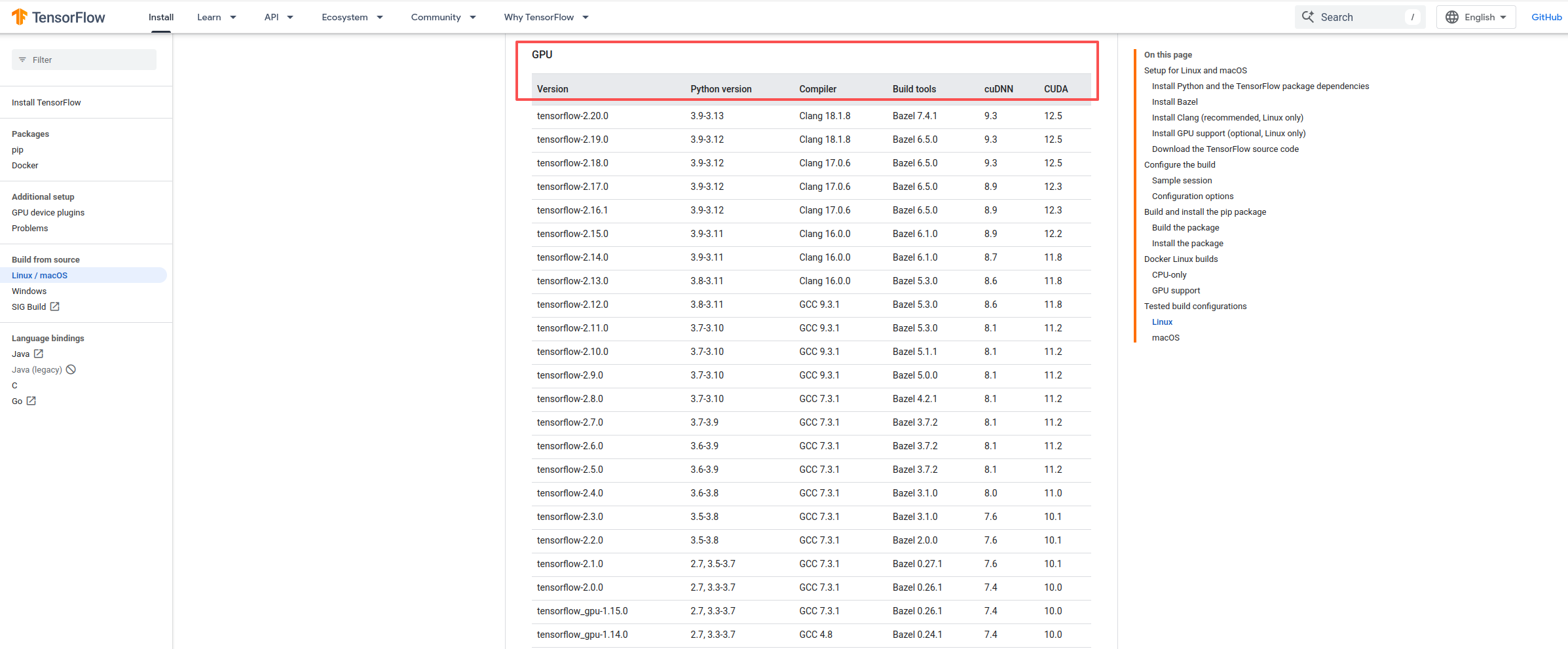
2.3 pip 或 conda安装
bash
pip install tensorflow==2.17.0 # 记得更换兼容版本2.4 验证&测试
python
import tensorflow as tf

# 1. 检查TensorFlow版本和CUDA适配信息
print(f"TensorFlow版本:{tf.__version__}")
build_info = tf.sysconfig.get_build_info()
print(f"内置CUDA版本:{build_info.get('cuda_version')}")
print(f"是否为GPU构建:{build_info.get('is_cuda_build')}")

# 2. 检测GPU设备
print("\n=== 检测GPU设备 ===")
gpus = tf.config.list_physical_devices('GPU')
if gpus:
    print(f"✅ 检测到 {len(gpus)} 个GPU设备:")
    for i, gpu in enumerate(gpus):
        print(f"   GPU {i}: {gpu}")

    # 开启GPU内存动态增长(避免占满显存)
    try:
        tf.config.experimental.set_memory_growth(gpus[0], True)
        print("✅ GPU内存动态增长已开启")
    except Exception as e:
        print(f"⚠️ GPU内存配置警告:{e}")
else:
    print("❌ 未检测到任何GPU设备")

# 3. 验证GPU实际参与计算
print("\n=== 验证GPU计算 ===")
with tf.device('/GPU:0' if gpus else '/CPU:0'):
    a = tf.constant([[1.0, 2.0], [3.0, 4.0]])
    b = tf.constant([[5.0, 6.0], [7.0, 8.0]])
    c = tf.matmul(a, b)

print(f"运算结果:\n{c}")
if gpus and c.device.endswith('GPU:0'):
    print("✅ 张量运算已在GPU上执行(适配成功)")
elif gpus:
    print("⚠️ 检测到GPU,但运算仍在CPU执行(需检查环境变量)")
else:
    print("ℹ️ 运算在CPU上执行(无GPU设备)")