前期工作
下载好数据库(mysql等)
实现步骤:
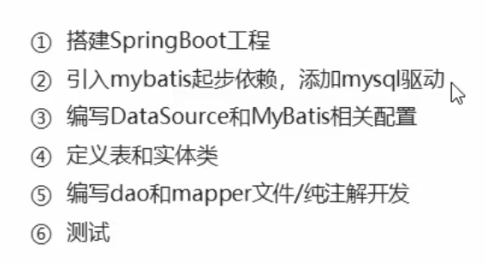
一.搭建SpringBoot项目
使用Spring initializr创建
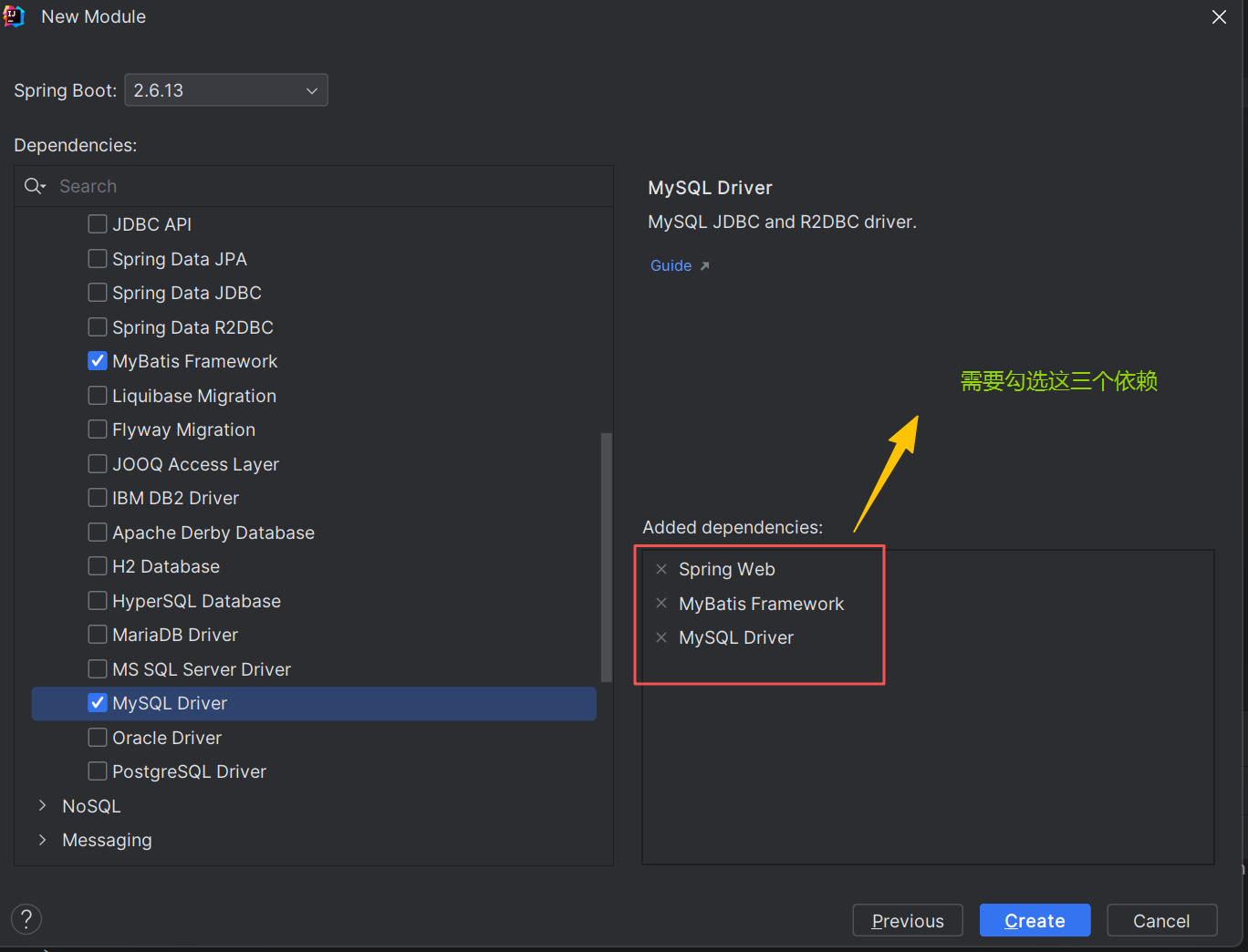
二.引入mySQL依赖和MyBatis依赖
MyBatis提供了由SpringBoot集成的starter启动器,在pom,xml中引入Mybatis启动器,代码如下
   <dependency>
            <groupId>org.mybatis.spring.boot</groupId>
            <artifactId>mybatis-spring-boot-starter</artifactId>
            <version>2.2.2</version>
   </dependency>
mysql驱动依赖,代码如下
 <dependency>
            <groupId>com.mysql</groupId>
            <artifactId>mysql-connector-j</artifactId>
            <scope>runtime</scope>
 </dependency>
三.创建数据库(表)和实体类
创建数据表t_user(演示案例)
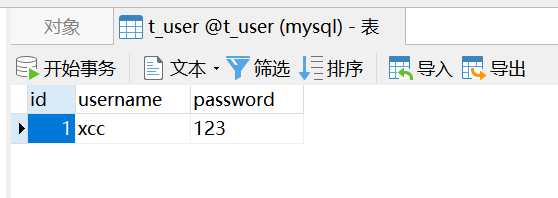
创建实体类Tuser(演示案例)
package com.example.springbootmybatis.entity;
import lombok.Data;

@Data
public class Tuser {
    private int id;
    private String username;
    private String password;
}
四.创建DataSource数据源配置和MyBatis配置
DataSource数据源配置,代码如下
#配置数据库的信息
spring:
  datasource:
    driver-class-name: com.mysql.jdbc.Driver
    url: jdbc:mysql:///t_user   #///代表省略了端口号和ip
    username: root
    password: root
使用mybatis连接数据库有两种方式:一种注解的方式,另一种是使用xxx.xml配置文件的方式
①注解的方式,连接数据库,实现对象与数据库之间的映射,然后进行基本操作
首先创建一个mapper文件夹(也可称Dao文件夹),然后再此文件夹下创建TuserDao接口,在其中添加getAllTuser()抽象方法。代码如下:
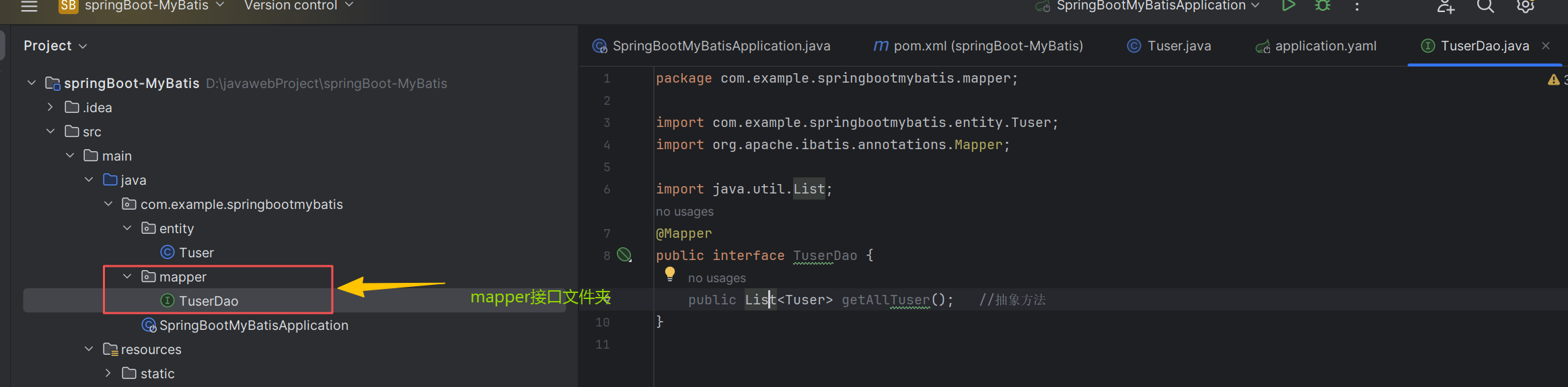
然后在getAllTuser()抽象方法上面添加注解(@select),代码如下
package com.example.springbootmybatis.mapper;

import com.example.springbootmybatis.entity.Tuser;
import org.apache.ibatis.annotations.*;

import java.util.List;
@Mapper
public interface TuserDao {
    @Select("select * from t_user")     //使用注解的方式实现与数据库的操作
    public List<Tuser> getAllTuser();   //抽象方法

    @Select("select * from t_user where id=#{id}")
    public Tuser getOneTuser(Integer id);

    @Insert("insert into t_user values (#{id},#{username},#{password})")
    public int addTuser(Tuser tuser);

    //当有多个参数需要注入时,需要使用@Param("id") Integer id绑定#{id}的值
    @Update("UPDATE t_user set username=#{username},password=#{password} where id=#{id}")
    public int updateTuser(@Param("id") Integer id,@Param("username") String username,@Param("password") String password);

    @Delete("delete  from t_user where id=#{id}")
    public int deleteTuser(Integer id);

}
最后在测试类中测试(增删查改)
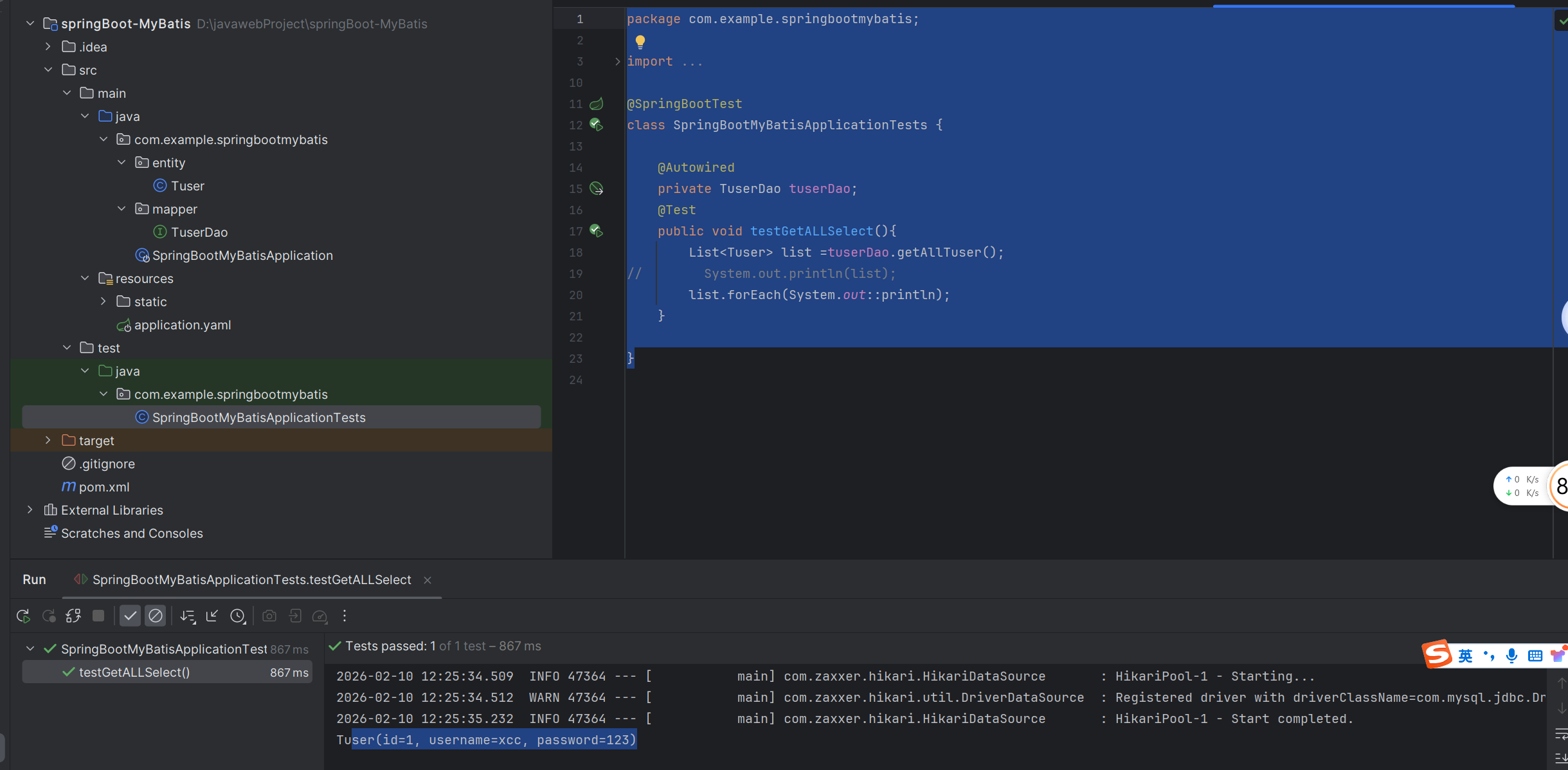 代码如下
代码如下
package com.example.springbootmybatis;

import com.example.springbootmybatis.entity.Tuser;
import com.example.springbootmybatis.mapper.TuserDao;
import org.apache.ibatis.annotations.Param;
import org.junit.jupiter.api.Test;
import org.springframework.beans.factory.annotation.Autowired;
import org.springframework.boot.test.context.SpringBootTest;

import java.util.List;

@SpringBootTest
class SpringBootMyBatisApplicationTests {

    @Autowired
    private TuserDao tuserDao;
    @Test
    public void testGetALLSelect(){
        List<Tuser> list =tuserDao.getAllTuser();
//        System.out.println(list);
        list.forEach(System.out::println);
    }
    @Test
    public void testOneSelect(){
        Tuser tuser=tuserDao.getOneTuser(1);
        System.out.println(tuser);
    }
    @Test
    public void testAdd(){
        Tuser tuser=new Tuser();
        tuser.setUsername("zhangsan");
        tuser.setPassword("123456");
        int i=tuserDao.addTuser(tuser);
        System.out.println(i);
    }
    @Test
    public void testUpdate(){
        int i=tuserDao.updateTuser(2,"lisi","123");
        System.out.println(i);
    }
    @Test
    public void testDelete(){
        int i=tuserDao.deleteTuser(2);
        System.out.println(i);
    }


}
②基于XML配置文件的方式,连接数据库,实现对象与数据库之间的映射,然后进行基本操作
首先创建一个mapper文件夹(也可称Dao文件夹),然后再此文件夹下创建TuserXmlDao接口,在其中添加getAllTuser()抽象方法。代码如下:
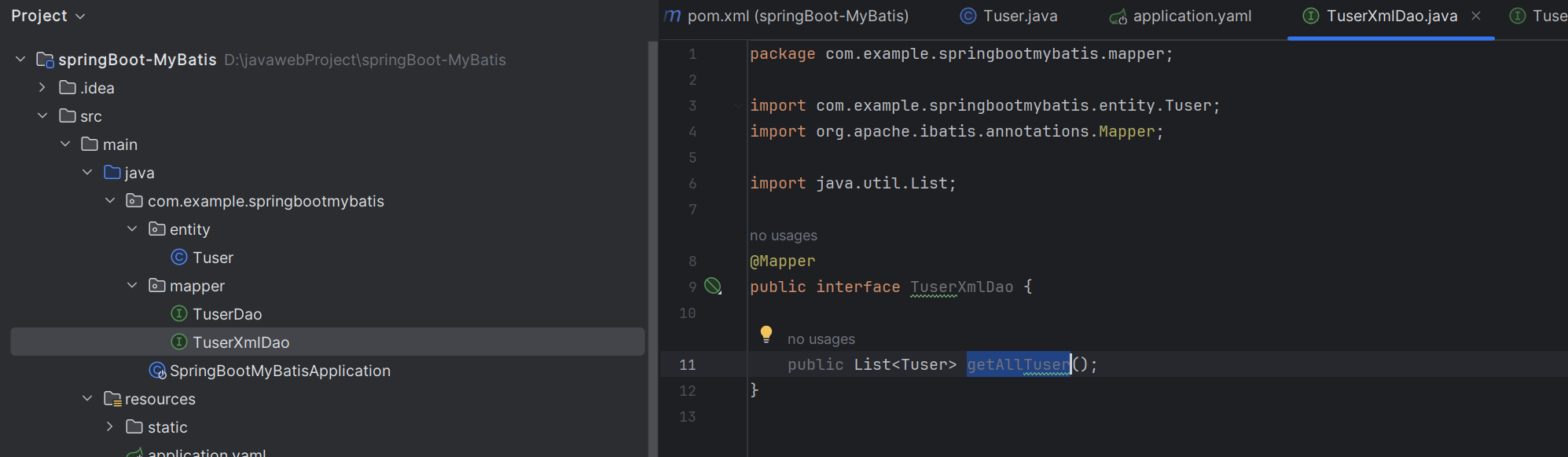
package com.example.springbootmybatis.mapper;
import com.example.springbootmybatis.entity.Tuser;
import org.apache.ibatis.annotations.Mapper;
import java.util.List;

@Mapper
public interface TuserXmlDao {

    public List<Tuser> getAllTuser();
}
然后在resource目录下,创建一个统一管理映射文件的包mappers,并在该包下编写与TuserXmlDao接口对应的映射文件TuserXmlDao.xml,代码如下:
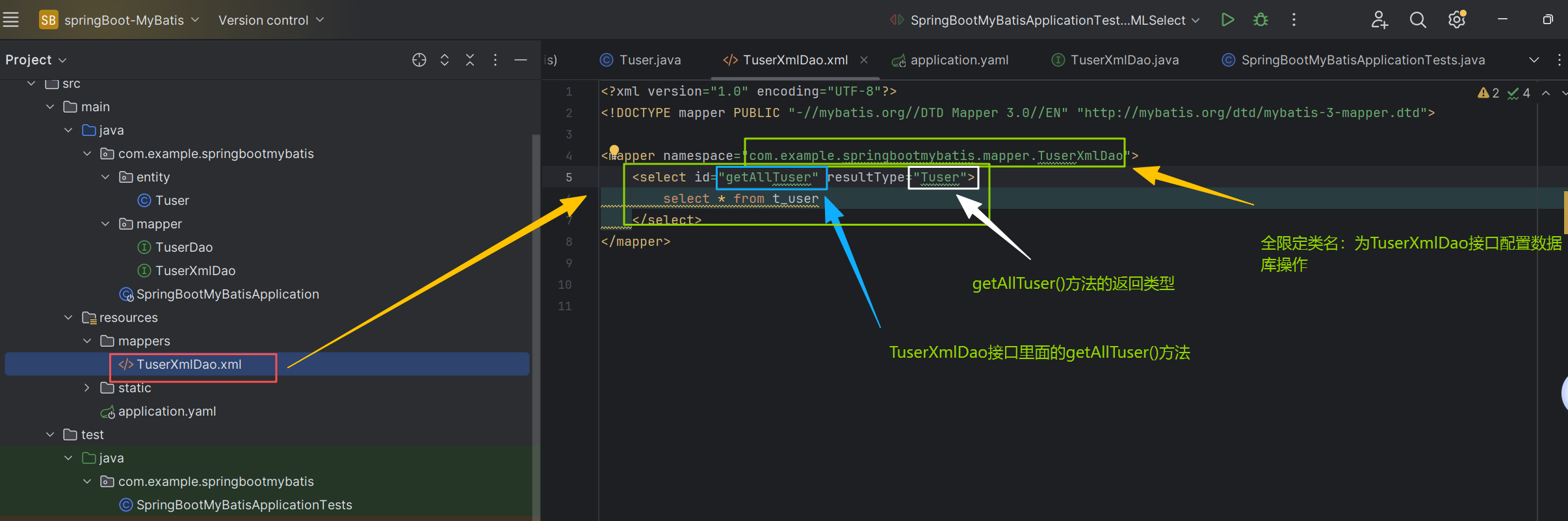
<?xml version="1.0" encoding="UTF-8"?>
<!DOCTYPE mapper PUBLIC "-//mybatis.org//DTD Mapper 3.0//EN" "http://mybatis.org/dtd/mybatis-3-mapper.dtd">

<mapper namespace="com.example.springbootmybatis.mapper.TuserXmlDao">
    <select id="getAllTuser" resultType="Tuser">
        select * from t_user
    </select>

    <select id="getOneTuser" resultType="Tuser">
        select * from t_user where id=#{id}
    </select>

    <insert id="addTuser" parameterType="Tuser">
        insert  into t_user values (#{id},#{username},#{password})
    </insert>

    <update id="updateTuser" >
        update t_user set username=#{username},password=#{password} where id=#{id}
    </update>

    <delete id="deleteTuser" >
        delete from t_user where id=#{id}
    </delete>

</mapper>
其次在application.xml配置文件配置MyBatis的Mapper文件下的xxx.xml文件地址,以及返回类型的包路径
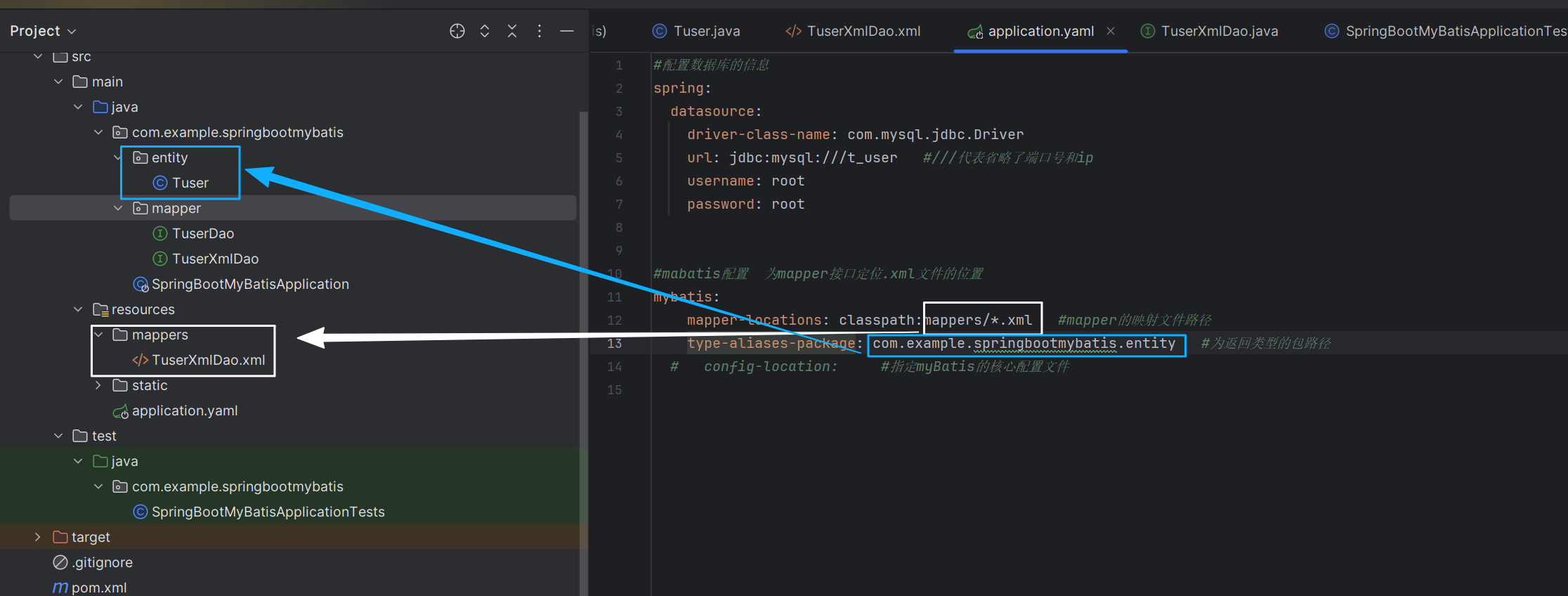
#mabatis配置  为mapper接口定位.xml文件的位置
mybatis:
    mapper-locations: classpath:mappers/*.xml   #mapper的映射文件路径
    type-aliases-package: com.example.springbootmybatis.entity   #为返回类型的包路径
  #   config-location:     #指定myBatis的核心配置文件
最后在测试类中测试(增删查改)
package com.example.springbootmybatis;

import com.example.springbootmybatis.entity.Tuser;
import com.example.springbootmybatis.mapper.TuserDao;
import com.example.springbootmybatis.mapper.TuserXmlDao;
import org.apache.ibatis.annotations.Param;
import org.junit.jupiter.api.Test;
import org.springframework.beans.factory.annotation.Autowired;
import org.springframework.boot.test.context.SpringBootTest;

import java.util.List;

@SpringBootTest
class SpringBootMyBatisApplicationTests {

    @Autowired
    private TuserXmlDao tuserXmlDao;

    //---------------------------------------------------------------------
    @Test
    public void testGetALLXMLSelect(){
        List<Tuser> list =tuserXmlDao.getAllTuser();
//        System.out.println(list);
        list.forEach(System.out::println);
    }

    @Test
    public void testOneXMLSelect(){
        Tuser tuser=tuserXmlDao.getOneTuser(1);
        System.out.println(tuser);
    }

    @Test
    public void testXMLAdd(){
        Tuser tuser=new Tuser();
        tuser.setUsername("zhangsan");
        tuser.setPassword("123456");
        int i=tuserXmlDao.addTuser(tuser);
        System.out.println(i);
    }

    @Test
    public void testXMLUpdate(){
        int i=tuserXmlDao.updateTuser(1,"lisi","123");
        System.out.println(i);
    }
    @Test
    public void testXMLDelete(){
        int i=tuserXmlDao.deleteTuser(3);
        System.out.println(i);
    }
}