目录标题
-
- 一、nginx能做什么
- 二、nginx.config示例
- 三、核心配置详细解析
-
-
- [1、Web 服务器](#1、Web 服务器)
- 2、反向代理
- 3、负载均衡
- [4、HTTP 缓存](#4、HTTP 缓存)
- [5、SSL/TLS 终止(https配置)](#5、SSL/TLS 终止(https配置))
- [6、URL 重写和重定向](#6、URL 重写和重定向)
- 7、访问控制和认证
- 8、内容压缩
- 9、虚拟主机(多站点托管)
- [10、WebSocket 代理](#10、WebSocket 代理)
- 11、访问日志和监控
- 12、安全防护
- 13、流媒体服务
- [14、API 网关](#14、API 网关)
- 15、微服务架构中的应用
- 16、跨域资源共享(CORS)
-
- 四、场景应用示例
- 五、常用命令
- 其他相关命令
-
-
-
- [1、查找占用 80 端口的进程](#1、查找占用 80 端口的进程)
- 2、Nginx请求测试
- [3、Windows 系统的进程查找命令](#3、Windows 系统的进程查找命令)
- [4、Windows 系统下强制结束 Nginx 进程](#4、Windows 系统下强制结束 Nginx 进程)
-
-
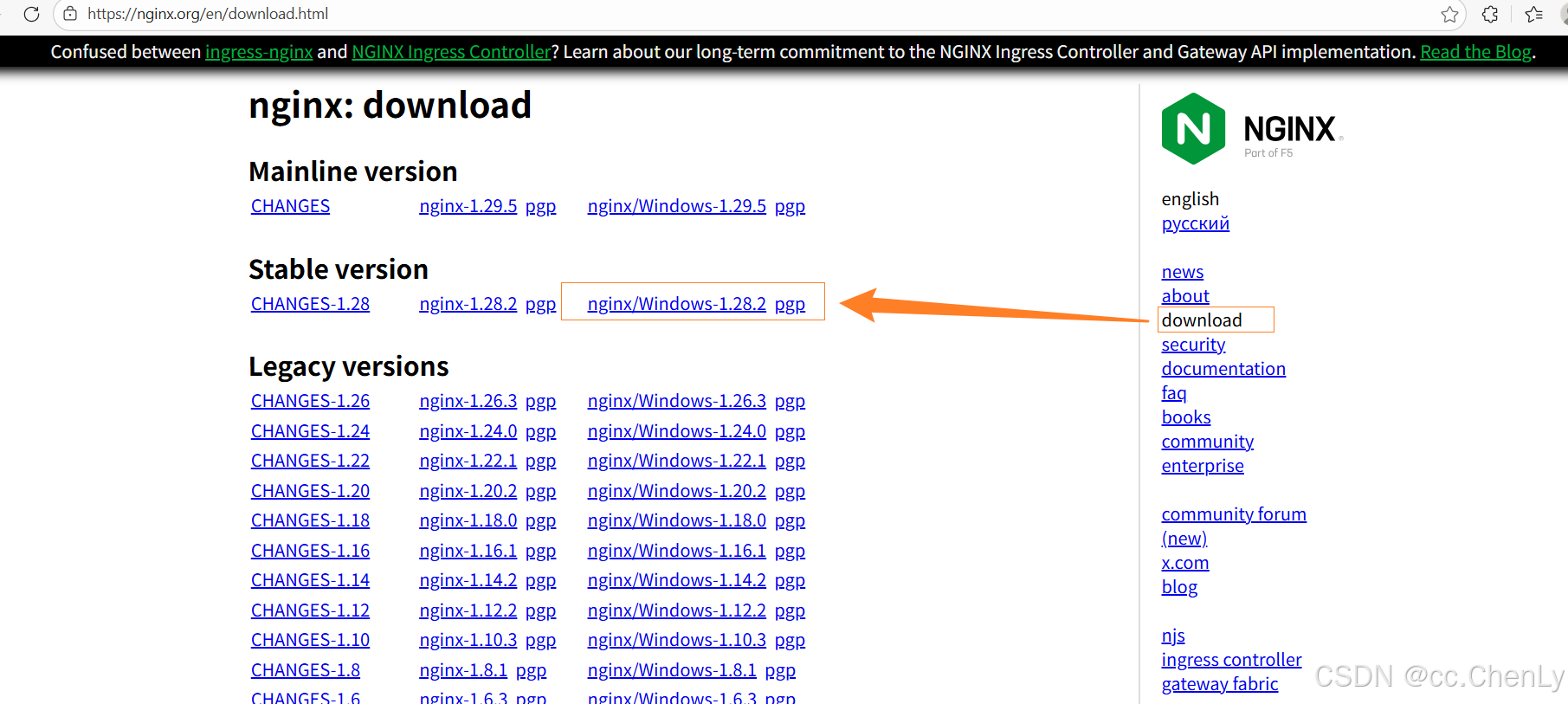
- 六、下载地址
一、nginx能做什么
Nginx 是一个功能强大的 开源 Web 服务器 和 反向代理服务器,具有高性能、高并发、低内存占用等特点。以下是 Nginx 能做的主要事情:
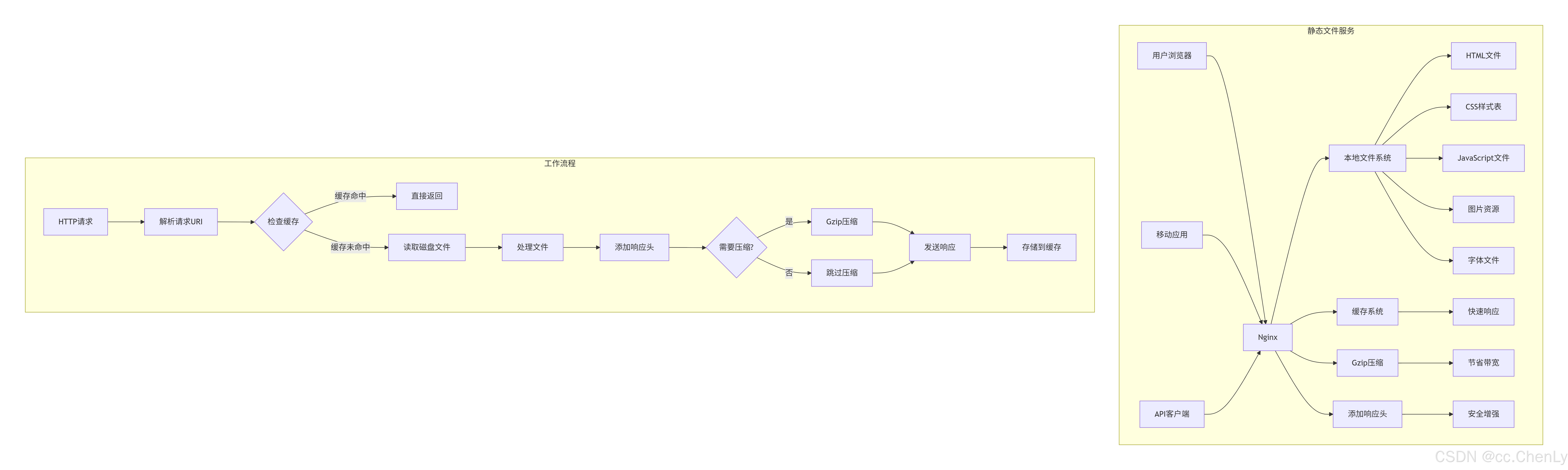
1、Web 服务器 (静态文件服务),托管静态网站(HTML、CSS、JavaScript 文件),高效处理静态资源(图片、视频、文档等),支持 Gzip 压缩,减少传输大小
2、反向代理 ,将客户端请求转发到后端服务器,隐藏后端服务器的真实地址,实现负载均衡
3、负载均衡 ,将流量分发到多个后端服务器,支持多种算法:轮询、加权轮询、最少连接、IP哈希等
4、HTTP 缓存
5、SSL/TLS 终止
6、URL 重写和重定向
7、访问控制和认证
8、内容压缩
9、虚拟主机(多站点托管)
10、WebSocket 代理
11、访问日志和监控
12、安全防护
13、流媒体服务
14、API 网关
15、微服务架构中的应用
16、跨域资源共享(CORS)
二、nginx.config示例
代码内ip来源网络
bash
# ============================
# 全局配置
# ============================
user nginx; # 运行nginx的用户和组
worker_processes auto; # 自动根据CPU核心数设置工作进程数
worker_cpu_affinity auto; # CPU亲和性,自动绑定工作进程到CPU核心
worker_rlimit_nofile 65535; # 每个进程最大文件打开数
# 错误日志配置
error_log /var/log/nginx/error.log warn; # 错误日志路径,只记录warn及以上级别
pid /var/run/nginx.pid; # 进程ID文件路径
# ============================
# 事件模块配置
# ============================
events {
worker_connections 20480; # 每个工作进程最大连接数
multi_accept on; # 同时接受多个新连接
use epoll; # 使用epoll高效事件模型(Linux)
accept_mutex on; # 启用连接互斥锁,避免"惊群"效应
accept_mutex_delay 100ms; # 互斥锁延迟
}
# ============================
# HTTP模块配置
# ============================
http {
# ========== 基础配置 ==========
include /etc/nginx/mime.types; # 包含MIME类型配置文件
default_type application/octet-stream; # 默认MIME类型
# ========== 日志配置 ==========
log_format main '$remote_addr - $remote_user [$time_local] "$request" '
'$status $body_bytes_sent "$http_referer" '
'"$http_user_agent" "$http_x_forwarded_for" '
'"$upstream_addr" "$upstream_status" "$request_time" "$upstream_response_time"';
log_format json_log escape=json '{'
'"@timestamp":"$time_iso8601",'
'"remote_addr":"$remote_addr",'
'"remote_user":"$remote_user",'
'"time_local":"$time_local",'
'"request":"$request",'
'"status":$status,'
'"body_bytes_sent":$body_bytes_sent,'
'"http_referer":"$http_referer",'
'"http_user_agent":"$http_user_agent",'
'"http_x_forwarded_for":"$http_x_forwarded_for",'
'"upstream_addr":"$upstream_addr",'
'"upstream_status":"$upstream_status",'
'"request_time":$request_time,'
'"upstream_response_time":$upstream_response_time'
'}';
access_log /var/log/nginx/access.log main buffer=32k flush=10s;
error_log /var/log/nginx/error.log error;
# ========== 性能优化配置 ==========
sendfile on; # 启用高效文件传输
tcp_nopush on; # 启用TCP_NOPUSH,优化数据包发送
tcp_nodelay on; # 禁用Nagle算法,降低延迟
server_tokens off; # 隐藏Nginx版本信息,增强安全
# 连接超时设置
keepalive_timeout 75s; # 客户端连接保持时间
keepalive_requests 1000; # 每个连接的最大请求数
client_body_timeout 60s; # 客户端请求体超时
client_header_timeout 60s; # 客户端请求头超时
send_timeout 60s; # 发送超时
# 缓冲区设置
client_body_buffer_size 128k; # 请求体缓冲区大小
client_header_buffer_size 4k; # 请求头缓冲区大小
client_max_body_size 100m; # 最大请求体大小
large_client_header_buffers 8 16k; # 大型请求头缓冲区
# ========== 压缩配置 ==========
gzip on; # 启用gzip压缩
gzip_comp_level 6; # 压缩级别(1-9)
gzip_min_length 1024; # 最小压缩文件大小
gzip_types text/plain text/css application/json application/javascript
text/xml application/xml application/xml+rss text/javascript
application/vnd.ms-fontobject application/x-font-ttf
font/opentype image/svg+xml image/x-icon;
gzip_vary on; # 根据请求头决定是否压缩
gzip_disable "MSIE [1-6]\."; # 对IE6及以下禁用压缩
gzip_http_version 1.1; # 对HTTP/1.1请求启用压缩
gzip_proxied any; # 对代理请求启用压缩
# ========== 缓存配置 ==========
# 代理缓存配置
proxy_cache_path /var/cache/nginx/proxy_cache levels=1:2 keys_zone=proxy_cache:100m
inactive=24h max_size=10g use_temp_path=off;
# FastCGI缓存配置
fastcgi_cache_path /var/cache/nginx/fastcgi_cache levels=1:2 keys_zone=fastcgi_cache:50m
inactive=60m max_size=1g use_temp_path=off;
# ========== 上游服务器配置(负载均衡) ==========
# 后端API服务器集群
upstream api_backend {
# 负载均衡算法:最少连接数
least_conn;
# 后端服务器配置
server 192.168.1.101:8080 weight=3 max_fails=3 fail_timeout=30s;
server 192.168.1.102:8080 weight=3 max_fails=3 fail_timeout=30s;
server 192.168.1.103:8080 weight=2 max_fails=3 fail_timeout=30s;
server 192.168.1.104:8080 weight=2 max_fails=3 fail_timeout=30s;
# 健康检查(需要ngx_http_upstream_module模块)
# health_check interval=5s fails=3 passes=2 uri=/health;
# 连接保持
keepalive 32;
}
# 静态资源服务器集群
upstream static_backend {
# 负载均衡算法:轮询
server 192.168.2.101:80 weight=2;
server 192.168.2.102:80 weight=2;
server 192.168.2.103:80 weight=1 backup; # 备份服务器
# 会话保持(基于IP哈希)
ip_hash;
}
# WebSocket服务器
upstream websocket_backend {
server 192.168.3.101:3000;
server 192.168.3.102:3000;
# WebSocket需要保持连接
keepalive 100;
}
# ========== 安全配置 ==========
# 限流配置
limit_req_zone $binary_remote_addr zone=api_limit:10m rate=10r/s;
limit_req_zone $binary_remote_addr zone=general_limit:10m rate=100r/s;
# 限制并发连接数
limit_conn_zone $binary_remote_addr zone=addr:10m;
# 安全响应头
add_header X-Frame-Options "SAMEORIGIN" always;
add_header X-Content-Type-Options "nosniff" always;
add_header X-XSS-Protection "1; mode=block" always;
add_header Referrer-Policy "strict-origin-when-cross-origin" always;
add_header Content-Security-Policy "default-src 'self'; script-src 'self' 'unsafe-inline' 'unsafe-eval' https://cdn.example.com; style-src 'self' 'unsafe-inline' https://cdn.example.com; img-src 'self' data: https:; font-src 'self' https://cdn.example.com; connect-src 'self' https://api.example.com;" always;
# ============================
# 默认服务器(处理无效域名请求)
# ============================
server {
listen 80 default_server;
listen [::]:80 default_server;
server_name _; # 匹配所有域名
# 返回444状态码,直接关闭连接,不返回任何内容
return 444;
# 或者重定向到主站
# return 301 https://www.example.com$request_uri;
}
# ============================
# HTTP到HTTPS重定向服务器
# ============================
server {
listen 80;
listen [::]:80;
server_name example.com www.example.com api.example.com static.example.com;
# 记录重定向访问日志
access_log /var/log/nginx/redirect_access.log main;
# 301永久重定向到HTTPS
return 301 https://$server_name$request_uri;
}
# ============================
# 主HTTPS服务器配置
# ============================
server {
listen 443 ssl http2;
listen [::]:443 ssl http2;
server_name example.com www.example.com;
# ========== SSL/TLS配置 ==========
ssl_certificate /etc/nginx/ssl/example.com.crt;
ssl_certificate_key /etc/nginx/ssl/example.com.key;
ssl_dhparam /etc/nginx/ssl/dhparam.pem;
# SSL协议配置
ssl_protocols TLSv1.2 TLSv1.3;
ssl_prefer_server_ciphers on;
# SSL加密套件
ssl_ciphers ECDHE-ECDSA-AES128-GCM-SHA256:ECDHE-RSA-AES128-GCM-SHA256:ECDHE-ECDSA-AES256-GCM-SHA384:ECDHE-RSA-AES256-GCM-SHA384:ECDHE-ECDSA-CHACHA20-POLY1305:ECDHE-RSA-CHACHA20-POLY1305:DHE-RSA-AES128-GCM-SHA256:DHE-RSA-AES256-GCM-SHA384;
# 会话缓存和会话票据
ssl_session_cache shared:SSL:10m;
ssl_session_timeout 10m;
ssl_session_tickets on;
# OCSP装订
ssl_stapling on;
ssl_stapling_verify on;
ssl_trusted_certificate /etc/nginx/ssl/ca-chain.crt;
resolver 8.8.8.8 8.8.4.4 valid=300s;
resolver_timeout 5s;
# HSTS (HTTP Strict Transport Security)
add_header Strict-Transport-Security "max-age=31536000; includeSubDomains; preload" always;
# ========== 根目录和索引文件 ==========
root /var/www/html;
index index.html index.htm index.php;
# ========== 访问控制 ==========
# 允许的IP段
allow 10.0.0.0/8;
allow 172.16.0.0/12;
allow 192.168.0.0/16;
deny all; # 拒绝其他所有IP
# ========== 安全限制 ==========
# 限制请求速率
limit_req zone=general_limit burst=20 nodelay;
limit_conn addr 10; # 限制每个IP最多10个并发连接
# 防止点击劫持
add_header X-Frame-Options "SAMEORIGIN" always;
# ========== 静态文件处理 ==========
location ~* \.(jpg|jpeg|png|gif|ico|css|js|svg|woff|woff2|ttf|eot)$ {
expires 1y; # 设置1年缓存
add_header Cache-Control "public, immutable, max-age=31536000";
# 静态文件交给专门的服务器集群处理
proxy_pass http://static_backend;
# 代理设置
proxy_set_header Host $host;
proxy_set_header X-Real-IP $remote_addr;
proxy_set_header X-Forwarded-For $proxy_add_x_forwarded_for;
proxy_set_header X-Forwarded-Proto $scheme;
# 启用缓存
proxy_cache proxy_cache;
proxy_cache_key "$scheme$request_method$host$request_uri";
proxy_cache_valid 200 302 12h;
proxy_cache_valid 404 1m;
proxy_cache_use_stale error timeout invalid_header updating;
proxy_cache_bypass $http_cache_control;
add_header X-Cache-Status $upstream_cache_status;
}
# ========== API接口代理 ==========
location /api/ {
# 访问控制
satisfy any; # 满足任意条件即可访问
allow 192.168.1.0/24; # 内网IP允许访问
allow 10.0.0.0/8; # 内网IP允许访问
deny all; # 拒绝其他IP
# API限流(更严格)
limit_req zone=api_limit burst=30 nodelay;
limit_except GET POST PUT DELETE {
deny all;
}
# CORS配置
if ($request_method = 'OPTIONS') {
add_header 'Access-Control-Allow-Origin' '*';
add_header 'Access-Control-Allow-Methods' 'GET, POST, PUT, DELETE, OPTIONS';
add_header 'Access-Control-Allow-Headers' 'DNT,User-Agent,X-Requested-With,If-Modified-Since,Cache-Control,Content-Type,Range,Authorization';
add_header 'Access-Control-Max-Age' 1728000;
add_header 'Content-Type' 'text/plain; charset=utf-8';
add_header 'Content-Length' 0;
return 204;
}
add_header 'Access-Control-Allow-Origin' '*' always;
add_header 'Access-Control-Allow-Methods' 'GET, POST, PUT, DELETE, OPTIONS' always;
add_header 'Access-Control-Allow-Headers' 'DNT,User-Agent,X-Requested-With,If-Modified-Since,Cache-Control,Content-Type,Range,Authorization' always;
add_header 'Access-Control-Expose-Headers' 'Content-Length,Content-Range' always;
# 代理设置
proxy_pass http://api_backend;
proxy_http_version 1.1;
proxy_set_header Upgrade $http_upgrade;
proxy_set_header Connection 'upgrade';
proxy_set_header Host $host;
proxy_set_header X-Real-IP $remote_addr;
proxy_set_header X-Forwarded-For $proxy_add_x_forwarded_for;
proxy_set_header X-Forwarded-Proto $scheme;
proxy_set_header X1-Forwarded-Host $server_name;
# 连接超时设置
proxy_connect_timeout 60s;
proxy_send_timeout 60s;
proxy_read_timeout 120s;
proxy_buffering on;
proxy_buffer_size 4k;
proxy_buffers 8 4k;
proxy_busy_buffers_size 8k;
# 启用API缓存
proxy_cache proxy_cache;
proxy_cache_key "$scheme$request_method$host$request_uri$is_args$args";
proxy_cache_valid 200 302 10m;
proxy_cache_valid 404 1m;
proxy_cache_methods GET HEAD;
proxy_cache_min_uses 2;
proxy_cache_lock on;
proxy_cache_lock_timeout 5s;
add_header X-API-Cache $upstream_cache_status;
# 记录API访问日志
access_log /var/log/nginx/api_access.log main;
}
# ========== WebSocket支持 ==========
location /ws/ {
# 代理到WebSocket后端
proxy_pass http://websocket_backend;
proxy_http_version 1.1;
proxy_set_header Upgrade $http_upgrade;
proxy_set_header Connection "upgrade";
proxy_set_header Host $host;
proxy_set_header X-Real-IP $remote_addr;
proxy_set_header X-Forwarded-For $proxy_add_x_forwarded_for;
# WebSocket特殊超时设置
proxy_connect_timeout 7d;
proxy_send_timeout 7d;
proxy_read_timeout 7d;
# 禁用缓冲
proxy_buffering off;
}
# ========== 健康检查端点 ==========
location /health {
access_log off; # 不记录健康检查日志
allow 127.0.0.1; # 只允许本地访问
allow 10.0.0.0/8;
deny all;
add_header Content-Type application/json;
return 200 '{"status": "healthy", "timestamp": "$time_iso8601"}';
}
# ========== Nginx状态监控 ==========
location /nginx_status {
stub_status on; # 启用状态页
access_log off; # 不记录访问日志
# 只允许内网IP访问
allow 127.0.0.1;
allow 10.0.0.0/8;
allow 192.168.0.0/16;
deny all;
}
# ========== PHP-FPM处理 ==========
location ~ \.php$ {
# 安全检查
try_files $uri =404;
# FastCGI配置
fastcgi_pass unix:/var/run/php/php7.4-fpm.sock;
fastcgi_index index.php;
fastcgi_param SCRIPT_FILENAME $document_root$fastcgi_script_name;
include fastcgi_params;
# FastCGI缓存
fastcgi_cache fastcgi_cache;
fastcgi_cache_key "$scheme$request_method$host$request_uri";
fastcgi_cache_valid 200 302 10m;
fastcgi_cache_valid 404 1m;
fastcgi_cache_methods GET HEAD;
fastcgi_cache_bypass $http_cache_control;
fastcgi_no_cache $http_cache_control;
add_header X-FastCGI-Cache $upstream_cache_status;
}
# ========== 默认Location ==========
location / {
try_files $uri $uri/ /index.html;
# 启用缓存
proxy_cache proxy_cache;
proxy_cache_key "$scheme$request_method$host$request_uri";
proxy_cache_valid 200 302 1h;
proxy_cache_valid 404 1m;
# 压缩设置
gzip_static on; # 预压缩静态文件
gunzip on; # 支持未压缩的客户端
}
# ========== 错误页面 ==========
error_page 404 /404.html;
location = /404.html {
root /var/www/html;
internal; # 仅限内部重定向
}
error_page 500 502 503 504 /50x.html;
location = /50x.html {
root /var/www/html;
internal;
}
# ========== 禁止访问的路径 ==========
location ~ /\.(git|svn|ht) {
deny all;
access_log off;
log_not_found off;
}
location ~* \.(log|sql|tar|gz)$ {
deny all;
access_log off;
log_not_found off;
}
# ========== 防盗链配置 ==========
location ~* \.(jpg|jpeg|png|gif)$ {
valid_referers none blocked example.com *.example.com;
if ($invalid_referer) {
return 403;
# 或者返回一张默认图片
# rewrite ^ /static/images/forbidden.png break;
}
}
}
# ============================
# API专用服务器配置
# ============================
server {
listen 443 ssl http2;
listen [::]:443 ssl http2;
server_name api.example.com;
# SSL配置(复用主域名证书)
ssl_certificate /etc/nginx/ssl/example.com.crt;
ssl_certificate_key /etc/nginx/ssl/example.com.key;
# 更严格的SSL配置
ssl_protocols TLSv1.2 TLSv1.3;
ssl_ciphers HIGH:!aNULL:!MD5;
# API专用配置
location / {
proxy_pass http://api_backend;
# API网关专用头
add_header X-API-Gateway "api.example.com";
add_header X-Request-ID $request_id;
# 详细的API日志
access_log /var/log/nginx/api_gateway.log json_log;
}
# API文档
location /docs/ {
root /var/www/api-docs;
index index.html;
# 缓存API文档
expires 1h;
add_header Cache-Control "public, must-revalidate";
}
}
# ============================
# 静态资源服务器配置
# ============================
server {
listen 443 ssl http2;
listen [::]:443 ssl http2;
server_name static.example.com cdn.example.com;
# SSL配置
ssl_certificate /etc/nginx/ssl/example.com.crt;
ssl_certificate_key /etc/nginx/ssl/example.com.key;
# 静态文件服务器优化
sendfile on;
tcp_nopush on;
directio 4m; # 对大文件使用直接IO
# 根目录
root /var/www/static;
# 静态文件缓存配置
location ~* \.(js|css|png|jpg|jpeg|gif|ico|svg|woff|woff2|ttf|eot|mp4|webm|ogg|mp3|wav)$ {
expires max; # 最大缓存时间
add_header Cache-Control "public, immutable, max-age=31536000";
add_header Access-Control-Allow-Origin "*";
# 文件不存在时尝试查找压缩版本
gzip_static on;
# 启用Brotli压缩(需要模块支持)
# brotli_static on;
# 记录静态文件访问
access_log /var/log/nginx/static_access.log main buffer=32k flush=5s;
}
# 图片处理(需要ngx_http_image_filter_module模块)
location ~* /images/(.*)\.(jpg|jpeg|png|gif)$ {
set $width "-";
set $height "-";
set $quality 85;
# 解析尺寸参数
if ($arg_w != "") {
set $width $arg_w;
}
if ($arg_h != "") {
set $height $arg_h;
}
if ($arg_q != "") {
set $quality $arg_q;
}
# 应用图片处理
# image_filter resize $width $height;
# image_filter_jpeg_quality $quality;
# image_filter_buffer 10M;
expires 30d;
add_header Cache-Control "public";
}
# 防止目录列表
autoindex off;
# 限制请求方法
limit_except GET HEAD {
deny all;
}
}
# ============================
# 管理后台服务器配置
# ============================
server {
listen 8443 ssl;
server_name admin.example.com;
# 管理后台专用证书
ssl_certificate /etc/nginx/ssl/admin.example.com.crt;
ssl_certificate_key /etc/nginx/ssl/admin.example.com.key;
# 严格的访问控制
allow 10.0.0.0/8;
allow 192.168.0.0/16;
allow 172.16.0.0/12;
deny all;
# HTTP基本认证
auth_basic "Administrator Login";
auth_basic_user_file /etc/nginx/.htpasswd;
# 根目录
root /var/www/admin;
index index.html;
# 管理后台配置
location / {
try_files $uri $uri/ /index.html;
# 禁用缓存
add_header Cache-Control "no-cache, no-store, must-revalidate";
add_header Pragma "no-cache";
add_header Expires 0;
}
# 管理API
location /admin-api/ {
proxy_pass http://admin_backend;
# 添加管理标识
add_header X-Admin-Access true;
# 记录详细的管理日志
access_log /var/log/nginx/admin_access.log main;
}
}
}
# ============================
# TCP/UDP流配置(用于非HTTP服务)
# ============================
stream {
# 定义上游服务器组
upstream database_backend {
server 192.168.10.101:3306;
server 192.168.10.102:3306 backup;
}
# MySQL数据库负载均衡
server {
listen 13306; # 外部端口
proxy_pass database_backend; # 转发到内部MySQL集群
proxy_connect_timeout 10s;
proxy_timeout 3600s;
}
# Redis负载均衡
upstream redis_backend {
server 192.168.10.201:6379;
server 192.168.10.202:6379;
}
server {
listen 16379;
proxy_pass redis_backend;
proxy_connect_timeout 5s;
proxy_timeout 60s;
}
# 自定义TCP服务
upstream custom_tcp_backend {
server 192.168.20.101:9000;
server 192.168.20.102:9000;
}
server {
listen 29000;
proxy_pass custom_tcp_backend;
proxy_buffer_size 16k;
}
}三、核心配置详细解析
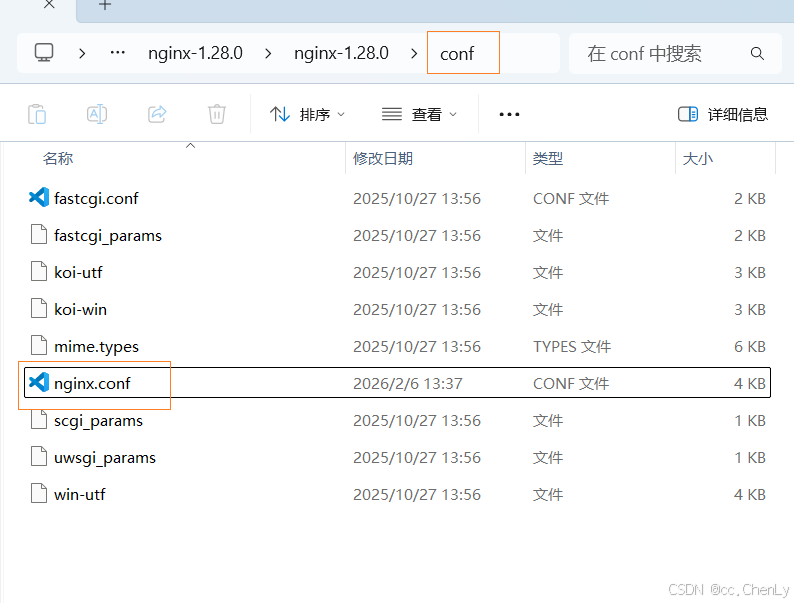
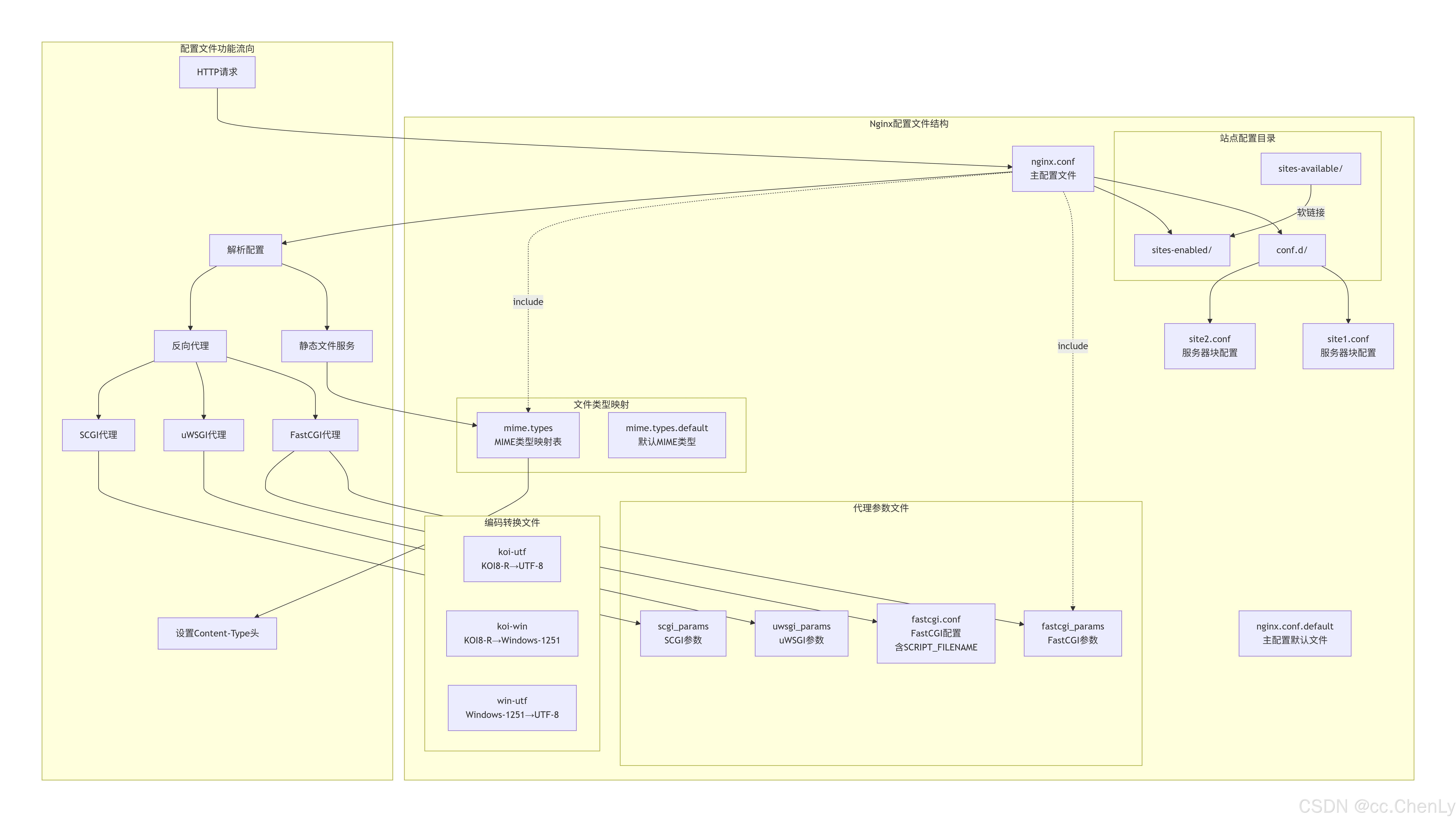
Nginx 配置文件在 conf 目录下,其默认目录结构如下。以".default"为扩展名的文件是 Nginx 配置文件的配置样例文件
conf/
├── fastcgi.conf # fastcgi配置文件,包含FastCGI相关参数,规范了SCRIPT_FILENAME等变量的传递
├── fastcgi.conf.default # fastcgi.conf的默认版本,可作为备份或参考
├── fastcgi_params # 旧的FastCGI参数文件,现在通常使用fastcgi.conf(它包含了fastcgi_params的内容并增加了SCRIPT_FILENAME的配置)
├── fastcgi_params.default # fastcgi_params的默认版本
├── koi-utf # 将KOI8-R编码转换为UTF-8的映射文件
├── koi-win # 将KOI8-R编码转换为Windows-1251的映射文件
├── mime.types # MIME类型映射表,将文件扩展名映射到对应的MIME类型
├── mime.types.default # mime.types的默认版本
├── nginx.conf # Nginx的主配置文件,默认配置入口
├── nginx.conf.default # nginx.conf的默认版本
├── scgi_params # SCGI协议的参数文件,用于向SCGI服务器传递变量
├── scgi_params.default # scgi_params的默认版本
├── uwsgi_params # uWSGI协议的参数文件,用于向uWSGI服务器传递变量
├── uwsgi_params.default # uwsgi_params的默认版本
└── win-utf # 将Windows-1251编码转换为UTF-8的映射文件
1、Web 服务器
bash
server {
	#前端站点
	location / {
	   try_files $uri $uri/ /index.html;
	   root   D:\web_Test\web;
	   index  index.html index.htm;
	}
}
2、反向代理
$server_addr Nginx服务器的IP地址
$server_port Nginx监听的端口
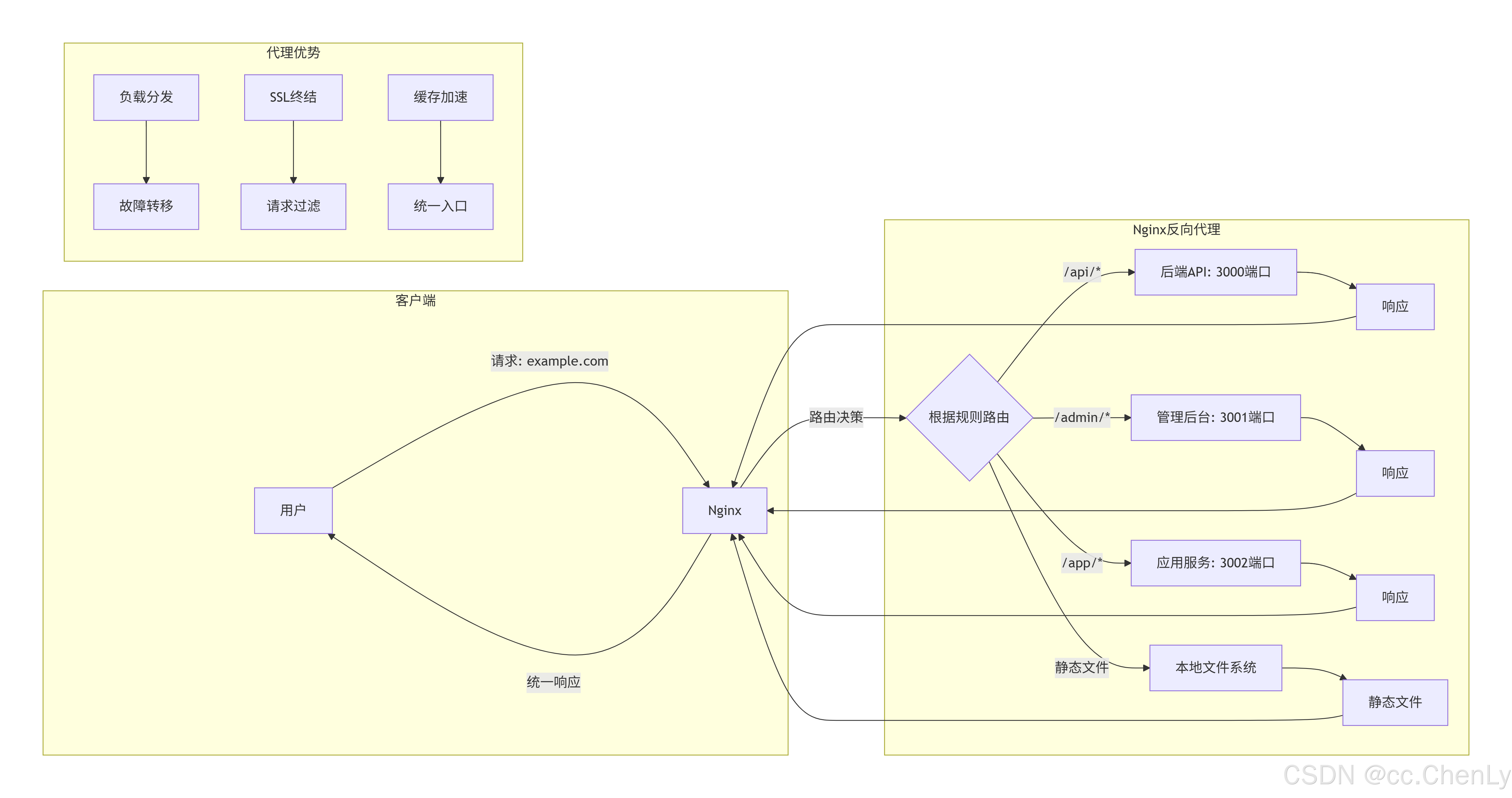
bash
server {
	location /api/ {
	    proxy_set_header X-Nginx-IP $server_addr;    #设置请求头
	    proxy_set_header X-Nginx-Port $server_port;    #设置请求头
	    proxy_pass http://127.0.0.1:9080/api/;   #转发请求的地址
    }
    location /api/test {
	    proxy_set_header X-Nginx-IP $server_addr;    #设置请求头
	    proxy_set_header X-Nginx-Port $server_port;    #设置请求头
	    proxy_pass http://127.0.0.1:9080/test/;   #转发请求的地址
    }
   location /api/webTest {
	    proxy_set_header X-Nginx-IP $server_addr;    #设置请求头
	    proxy_set_header X-Nginx-Port $server_port;    #设置请求头
	    proxy_pass http://127.0.0.1:9081/webTest/;   #转发请求的地址
    }
}
3、负载均衡
- 将流量分发到多个后端服务器
- 支持多种算法:轮询、加权轮询、最少连接、IP哈希等
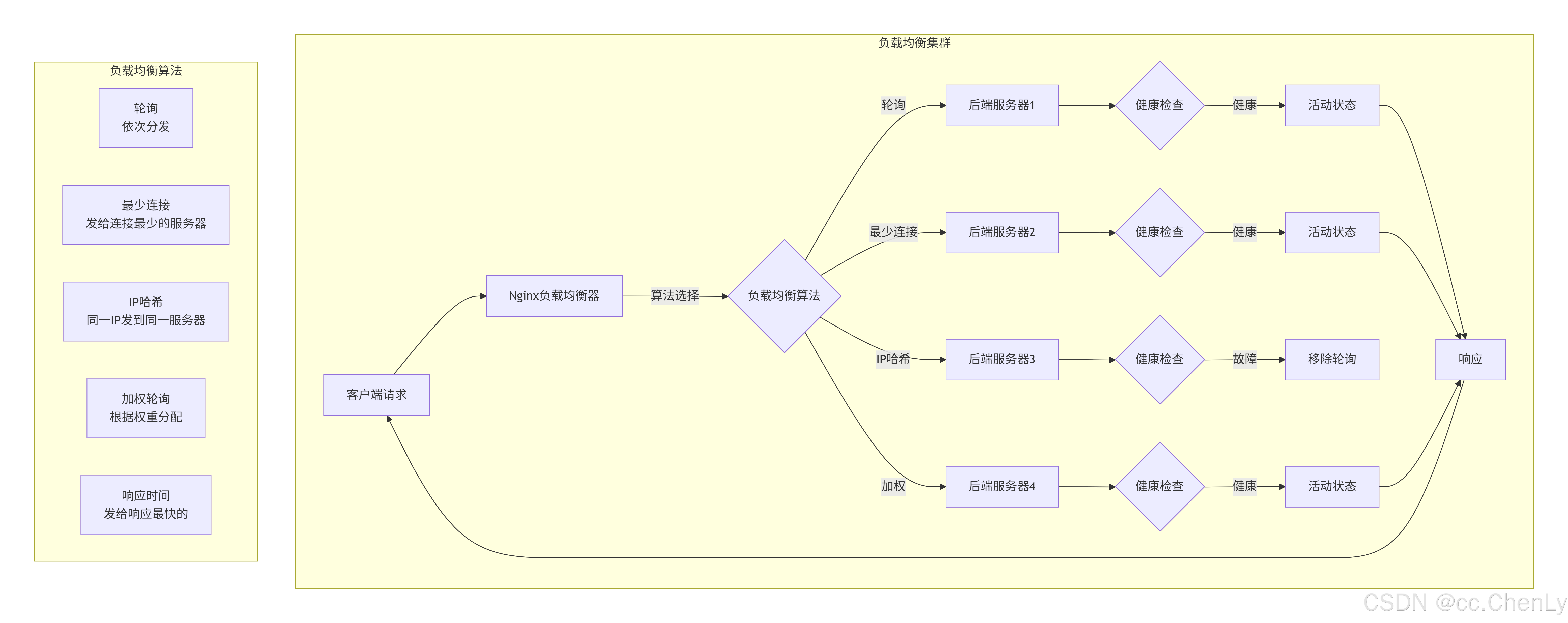
bash
upstream backend {
    server 192.168.1.100:8080 weight=3;
    server 192.168.1.101:8080 weight=2;
    server 192.168.1.102:8080 backup;
}

location / {
    proxy_pass http://backend;
}
4、HTTP 缓存
- 缓存后端响应,减轻后端压力 提高静态内容访问速度

bash
proxy_cache_path /var/cache/nginx levels=1:2 keys_zone=my_cache:10m;
location / {
    proxy_cache my_cache;
    proxy_cache_valid 200 1h;
}
5、SSL/TLS 终止(https配置)
- 处理 HTTPS 加密解密
- 支持多域名 SSL 证书,目前主流的ssl协议是tlsv1.2
- 自动重定向 HTTP 到 HTTPS
- proxy_buffering是Nginx中用于配置反向代理时的数据缓冲功能的指令。它的主要作用是在Nginx和后端服务器之间对数据进行缓冲,从而提高数据处理效率、减轻后端服务器的负载、提高用户的体验。当proxy_buffering被启用时,Nginx会将来自后端服务器的响应数据缓存在内存或者磁盘文件中,然后再将其转发给客户端。这种机制能够有效避免后端服务器过快地接收和发送数据,从而降低其负载。

bash
server {
    listen 443 ssl;
    server_name example.com;# 域名

    ssl_certificate /path/to/cert.pem; # 指定证书路径
    ssl_certificate_key /path/to/key.pem;# 指定私钥路径
    ssl_session_timeout 5m; # 客户端能够重用会话缓存中ssl参数的过期时间
    ssl_protocols TLSv1 TLSv1.1 TLSv1.2;   # 指定支持的协议,这里表示支持1、1.1和1.2, 如果只写1.2表示仅支持1.2。 OpenSSL版本要求 >= 1.0.1
    ssl_prefer_server_ciphers on; # 设置协商加密算法,优先使用服务端定义的加密套件

    location / {
        proxy_pass http://localhost:5566;

        # SSE 支持
        proxy_buffering off;
        proxy_read_timeout 86400s;
	}
}
6、URL 重写和重定向
- 美化 URL(去掉 .html、.php 扩展名)
- 301/302 重定向
- 新旧域名跳转
bash
rewrite ^/old-url$ /new-url permanent;  # 301重定向
rewrite ^/user/(\d+)$ /profile?id=$1 last;  # URL重写
7、访问控制和认证
- IP 黑白名单限制
- 基于 HTTP 基本认证
- 限制请求频率
bash
location /admin/ {
    allow 192.168.1.0/24;
    deny all;  # 只允许特定IP访问
    auth_basic "Restricted Area";
    auth_basic_user_file /etc/nginx/.htpasswd;
}
8、内容压缩
bash
gzip on;
gzip_types text/plain text/css application/json application/javascript;
9、虚拟主机(多站点托管)
bash
server {
    listen 80;
    server_name site1.com www.site1.com;
    root /var/www/site1;
}

server {
    listen 80;
    server_name site2.com;
    root /var/www/site2;
}
10、WebSocket 代理

bash
location /ws/ {
    proxy_pass http://websocket-backend;
    proxy_http_version 1.1;
    proxy_set_header Upgrade $http_upgrade;
    proxy_set_header Connection "upgrade";
}
11、访问日志和监控
bash
log_format main '$remote_addr - $remote_user [$time_local] "$request" '
                '$status $body_bytes_sent "$http_referer"';
access_log /var/log/nginx/access.log main;
12、安全防护
bash
# 限流
limit_req_zone $binary_remote_addr zone=mylimit:10m rate=10r/s;

# 隐藏 Nginx 版本
server_tokens off;

# 防止目录遍历
autoindex off;
13、流媒体服务
bash
location /video/ {
    mp4;
    mp4_buffer_size 1m;
    mp4_max_buffer_size 5m;
}
14、API 网关
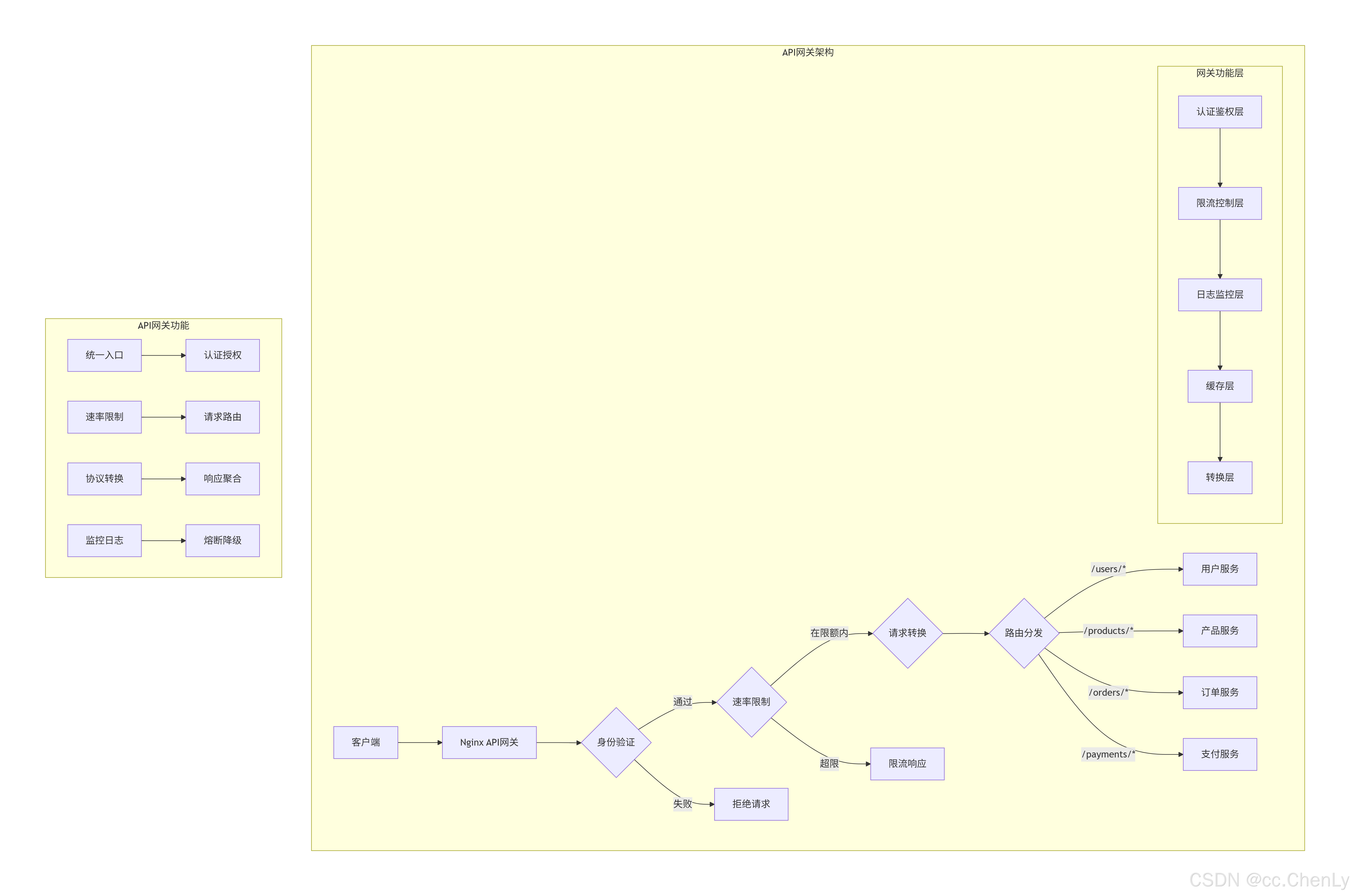
bash
location ~ ^/api/(users|products)/(.*)$ {
    # 路由到不同的微服务
    rewrite ^/api/(users|products)/(.*)$ /$1/$2 break;
    proxy_pass http://$1-service;
}
15、微服务架构中的应用
bash
# 根据不同路径路由到不同服务
location /auth/ {
    proxy_pass http://auth-service:3001;
}

location /order/ {
    proxy_pass http://order-service:3002;
}

location /payment/ {
    proxy_pass http://payment-service:3003;
}
16、跨域资源共享(CORS)
bash
location /api/ {
    add_header 'Access-Control-Allow-Origin' '*';
    add_header 'Access-Control-Allow-Methods' 'GET, POST, OPTIONS';
    add_header 'Access-Control-Allow-Headers' 'DNT,User-Agent,X-Requested-With,Content-Type';
}
四、场景应用示例
1、模块化配置管理
nginx.conf(主配置文件)
http {
    # 包含基础配置
    include conf.d/basic.conf;

    # 包含安全配置
    include conf.d/security.conf;

    # 包含所有站点配置
    include conf.d/sites/*.conf;

    # 包含SSL配置
    include conf.d/ssl/*.conf;
}
2、场景2:多站点管理
# conf.d/example.com.conf
server {
    listen 80;
    server_name example.com www.example.com;
    root /var/www/example.com;

    location / {
        try_files $uri $uri/ /index.html;
    }
}

# conf.d/blog.example.com.conf
server {
    listen 80;
    server_name blog.example.com;
    root /var/www/blog;

    location / {
        proxy_pass http://wordpress-backend;
    }
}
五、常用命令
bash
nginx -s stop // 1、停止当前运行
start nginx // 2、开始运行
nginx -s reload // 3、重新运行
其他相关命令
1、查找占用 80 端口的进程
bash
netstat -ano | findstr :80输出参考

2、Nginx请求测试
使用curl工具向本地服务器(localhost)发送一个HTTP GET请求,请求的地址是http://localhost/api/getLoginUser。
-v参数表示详细输出,会显示请求和响应的头部信息,以及一些额外的调试信息
bash
curl -v http://localhost/api/getLoginUser3、Windows 系统的进程查找命令
各部分含义
bash
tasklist | findstr nginx- tasklist:Windows 内置命令,显示当前运行的所有进程列表
- |:管道符,将前一个命令的输出作为后一个命令的输入
- findstr:Windows 的字符串查找命令(类似 Linux 的 grep)
- nginx:要查找的关键词(不区分大小写)

4、Windows 系统下强制结束 Nginx 进程
bash
taskkill /F /IM nginx.exe- taskkill:Windows 内置命令,用于结束进程
- /F:Force(强制),强制终止进程
- /IM:Image Name(映像名称),指定要结束的进程名称
- nginx.exe:要结束的进程名称