1.RV1126多线程处理输出OSD字符叠加图层的流程
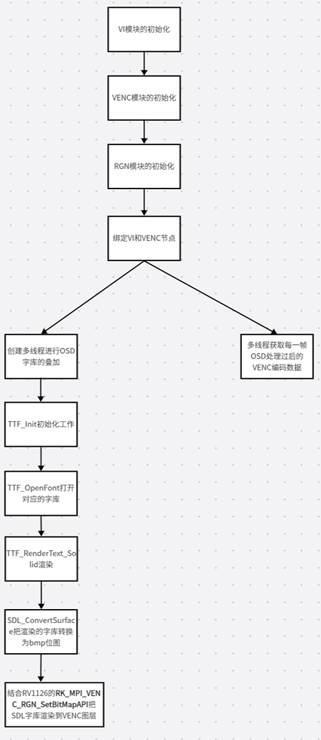
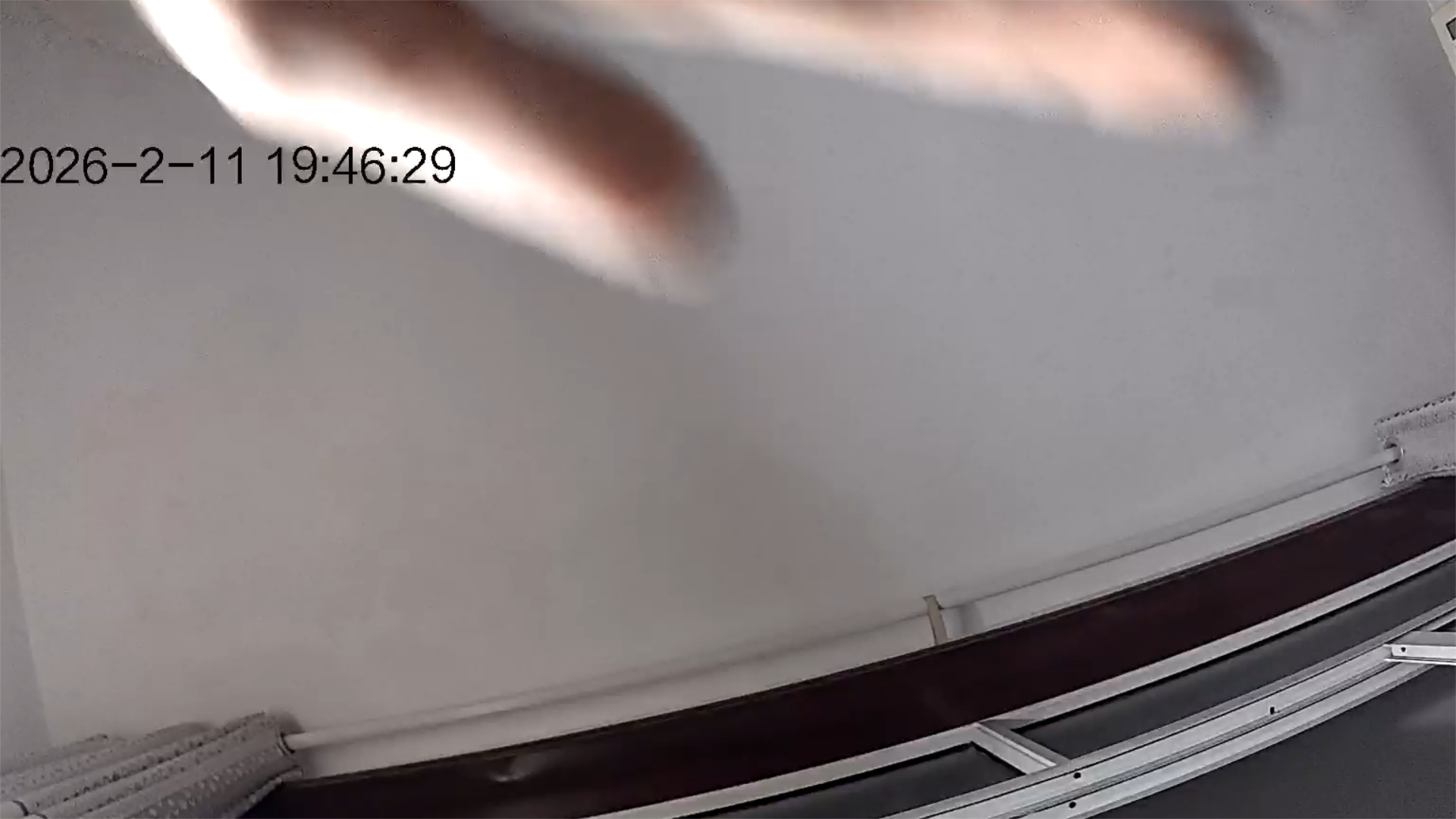
用RV1126多线程输出OSD叠加需要经过上面几个重要步骤,分别是VI模块初始化、VENC模块初始化、RGN模块初始化、多线程进行OSD字库的叠加(里面主要是进行字库的渲染和RV1126的OSD
2.代码
cs
#include <assert.h>
#include <fcntl.h>
#include <getopt.h>
#include <pthread.h>
#include <signal.h>
#include <stdbool.h>
#include <stdio.h>
#include <stdlib.h>
#include <time.h>
#include <unistd.h>
// #include "common/sample_common.h"
#include "rkmedia_api.h"
#include <stdio.h>
#include "SDL.h"
#include "SDL_ttf.h"
#include <time.h>
#define CAMERA_PATH "rkispp_scale0"
#define CAMERA_ID 0
#define CAMERA_CHN 0
#define VENC_CHN 0
//对某个数值进行对齐
static int get_align16_value(int input_value, int align)
{
if (align == 0)
return input_value;
if (input_value % align == 0)
return input_value;
return (input_value / align + 1) * align;
}
void * bitmap_osd_handle_thread(void * args)
{
pthread_detach(pthread_self());
int ret ;
TTF_Font * ttf_font;
char *pstr = "2026-2-11 19:46:29";
SDL_Surface * text_surface;
SDL_Surface * convert_text_surface;
SDL_PixelFormat * pixel_format;
//TTF模块的初始化
ret = TTF_Init();
if(ret < 0)
{
printf("TTF_Init Failed...\n");
}
//打开TTF的字库
ttf_font = TTF_OpenFont("./fzlth.ttf", 48);
if(ttf_font == NULL)
{
printf("TTF_OpenFont Failed...\n");
}
//SDL_COLOR黑色,RGB(0,0,0)
SDL_Color sdl_color;
sdl_color.r = 0;
sdl_color.g = 0;
sdl_color.b = 0;
text_surface = TTF_RenderText_Solid(ttf_font, pstr, sdl_color); ////渲染文字
if (!text_surface)
{
printf("TTF_RenderText_Solid error: %s\n", TTF_GetError());
return NULL;
}
printf("text w=%d h=%d\n",
text_surface->w,
text_surface->h);
//ARGB_8888
pixel_format = (SDL_PixelFormat *)malloc(sizeof(SDL_PixelFormat));
pixel_format->BitsPerPixel = 32; //每个像素所占的比特位数
pixel_format->BytesPerPixel = 4; //每个像素所占的字节数
pixel_format->Amask = 0XFF000000;//ARGB的A掩码,A位0xff
pixel_format->Rmask = 0X00FF0000;//ARGB的R掩码,R位0xff
pixel_format->Gmask = 0X0000FF00;//ARGB的G掩码,G位0xff
pixel_format->Bmask = 0X000000FF;//ARGB的B掩码,B位0xff
convert_text_surface = SDL_ConvertSurface(text_surface, pixel_format, 0);
if(convert_text_surface == NULL)
{
printf("convert_text_surface failed...\n");
}
BITMAP_S bitmap; // Bitmap位图结构体
bitmap.u32Width = get_align16_value(convert_text_surface->w, 16); // Bitmap的宽度
bitmap.u32Height = get_align16_value(convert_text_surface->h, 16); // Bitmap的高度
bitmap.enPixelFormat = PIXEL_FORMAT_ARGB_8888; ////像素格式ARGB8888
bitmap.pData = malloc((bitmap.u32Width) * (bitmap.u32Height) * pixel_format->BytesPerPixel);
printf("surface pitch=%d\n", convert_text_surface->pitch);
printf("bitmap stride=%d\n", bitmap.u32Width * 4);////bitmap的data的分配大小
//memcpy(bitmap.pData, convert_text_surface->pixels, (convert_text_surface->w) * (convert_text_surface->h) * pixel_format->BytesPerPixel); ////bitmap的data赋值
memset(bitmap.pData, 0,bitmap.u32Width * bitmap.u32Height * 4);
int src_pitch = convert_text_surface->pitch; // 2044
int dst_pitch = bitmap.u32Width * 4; // 2048
int copy_bytes = convert_text_surface->w * 4; // 2044
for (int i = 0; i < convert_text_surface->h; i++)
{
memcpy(
(uint8_t *)bitmap.pData + i * dst_pitch,
(uint8_t *)convert_text_surface->pixels + i * src_pitch,
copy_bytes);
}
printf("text w=%d h=%d\n",
convert_text_surface->w,
convert_text_surface->h);
printf("align w=%d h=%d\n",
bitmap.u32Width,
bitmap.u32Height);
OSD_REGION_INFO_S rgn_info; //OSD_RGN_INFO结构体
rgn_info.enRegionId = REGION_ID_0; //rgn的区域ID
rgn_info.u32Width = bitmap.u32Width ; //osd的长度
rgn_info.u32Height = bitmap.u32Height ; //osd的高度
rgn_info.u32PosX = 192; //Osd的X轴方向
rgn_info.u32PosY = 256; //Osd的Y轴方向
rgn_info.u8Enable = 1; ////使能OSD模块,1是使能,0为禁止。
rgn_info.u8Inverse = 0; //禁止翻转
ret = RK_MPI_VENC_RGN_SetBitMap(VENC_CHN, &rgn_info, &bitmap); //设置OSD位图
if(ret)
{
printf("RK_MPI_VENC_RGN_SetBitMap failed...\n");
}
else
{
printf("RK_MPI_VENC_RGN_SetBitMap Success...\n");
}
return NULL;
}
void * get_h264_data_thread(void * args)
{
pthread_detach(pthread_self());
FILE *h264_file = fopen("test_osd_venc.h264", "w+");
MEDIA_BUFFER mb ;
while (1)
{
mb = RK_MPI_SYS_GetMediaBuffer(RK_ID_VENC, VENC_CHN, -1);
if(!mb)
{
printf("RK_MPI_SYS_GetMediaBuffer failed...\n");
break;
}
printf("Get osd buffer success.....\n");
fwrite(RK_MPI_MB_GetPtr(mb), RK_MPI_MB_GetSize(mb), 1, h264_file);
RK_MPI_MB_ReleaseBuffer(mb);
}
return NULL;
}
int main()
{
setvbuf(stdout, NULL, _IONBF, 0);
int ret;
VI_CHN_ATTR_S vi_chn_attr;
vi_chn_attr.pcVideoNode = CAMERA_PATH; //设置视频设备节点路径
vi_chn_attr.u32Width = 1920; //设置分辨率的宽度
vi_chn_attr.u32Height = 1080; //设置分辨率的高度
vi_chn_attr.enPixFmt = IMAGE_TYPE_NV12; //设置图像类型
vi_chn_attr.enBufType = VI_CHN_BUF_TYPE_MMAP; //设置VI获取类型
vi_chn_attr.u32BufCnt = 3; //设置缓冲数量
vi_chn_attr.enWorkMode = VI_WORK_MODE_NORMAL; //设置VI工作类型
ret = RK_MPI_VI_SetChnAttr(CAMERA_ID, CAMERA_CHN, &vi_chn_attr);
if (ret)
{
printf("Vi Set Attr Failed.....\n");
return 0;
}
else
{
printf("Vi Set Attr Success.....\n");
}
ret = RK_MPI_VI_EnableChn(CAMERA_ID, CAMERA_CHN); //
if (ret)
{
printf("Vi Enable Attr Failed.....\n");
return 0;
}
else
{
printf("Vi Enable Attr Success.....\n");
}
VENC_CHN_ATTR_S venc_chn_attr;
memset(&venc_chn_attr, 0, sizeof(venc_chn_attr));
venc_chn_attr.stVencAttr.enType = RK_CODEC_TYPE_H264;//设置编码器类型
venc_chn_attr.stVencAttr.imageType = IMAGE_TYPE_NV12;//设置编码图像类型
venc_chn_attr.stVencAttr.u32PicWidth = 1920;//设置编码分辨率宽度
venc_chn_attr.stVencAttr.u32PicHeight = 1080;//设置编码分辨率高度
venc_chn_attr.stVencAttr.u32VirWidth = 1920;//设置编码分辨率虚宽
venc_chn_attr.stVencAttr.u32VirHeight = 1080;//设置编码分辨率虚高
venc_chn_attr.stVencAttr.u32Profile = 77;//设置编码等级
venc_chn_attr.stRcAttr.enRcMode = VENC_RC_MODE_H264CBR;//设置H264的CBR码率控制模式
venc_chn_attr.stRcAttr.stH264Cbr.u32Gop = 25;
venc_chn_attr.stRcAttr.stH264Cbr.u32BitRate = 2000000; // 2Mb
venc_chn_attr.stRcAttr.stH264Cbr.fr32DstFrameRateDen = 1;//设置源帧率分母
venc_chn_attr.stRcAttr.stH264Cbr.fr32DstFrameRateNum = 25;//设置源帧率分子
venc_chn_attr.stRcAttr.stH264Cbr.u32SrcFrameRateDen = 1;//设置目标帧率分母
venc_chn_attr.stRcAttr.stH264Cbr.u32SrcFrameRateNum = 25;//设置目标帧率分子
ret = RK_MPI_VENC_CreateChn(0, &venc_chn_attr); //VENC模块的初始化
if (ret)
{
printf("ERROR: create VENC[0] error! ret=%d\n", ret);
return 0;
}
else
{
printf("VENC SUCCESS\n");
}
ret = RK_MPI_VENC_RGN_Init(VENC_CHN, NULL);//RGN模块的初始化
printf("Create RGN ret=%d\n", ret);
if(ret)
{
printf("Create VENC_RGN Failed .....\n");
return 0;
}
else
{
printf("Create VENC_RGN Success .....\n");
}
MPP_CHN_S vi_chn_s;
MPP_CHN_S venc_chn_s;
vi_chn_s.enModId = RK_ID_VI;
vi_chn_s.s32ChnId = 0;
venc_chn_s.enModId = RK_ID_VENC;
venc_chn_s.s32ChnId = 0;
ret = RK_MPI_SYS_Bind(&vi_chn_s, &venc_chn_s); ////VI模块节点和VENC节点绑定
if(ret)
{
printf("RK_MPI_SYS_Bind Failed .....\n");
}
else
{
printf("RK_MPI_SYS_Bind Success .....\n");
}
pthread_t bitmap_pid, venc_pid;
pthread_create(&bitmap_pid, NULL, bitmap_osd_handle_thread, NULL); //创建OSD叠加线程
pthread_create(&venc_pid, NULL, get_h264_data_thread, NULL); //获取H264码流线程
while (1)
{
sleep(2);
}
RK_MPI_SYS_UnBind(&vi_chn_s, &venc_chn_s);
RK_MPI_VENC_DestroyChn(VENC_CHN);
RK_MPI_VI_DisableChn(CAMERA_ID, CAMERA_CHN);
return 0;
} 3.详解
3.详解
1.初始化RGN 模块:
RGN是RV1126图层区域功能管理的功能,比方说OSD图层、Bitmap位图都属于RGN模块。所以开发者要用到OSD功能都需要初始化RGN,具体的API描述如下:

第一个传参数:VENC编码通道号
第二个传参数:VENC_COLOR_TBL_S结构体指针,默认是NULL
RK_MPI_VENC_RGN_Init(0, NULL);
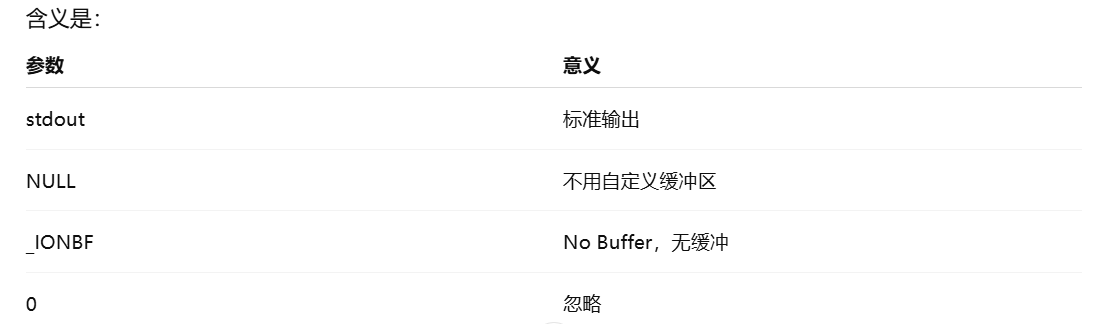
2.setvbuf(stdout, NULL, _IONBF, 0);
关闭 stdout 的缓冲,让 printf 立即输出 = 在printf 后边加fflush(stdout);

3.对齐函数
static int get_align16_value(int input_value, int align)
{
if (align == 0)
return input_value;
if (input_value % align == 0)
return input_value;
return (input_value / align + 1) * align;
}
4.创建osd叠加线程
cs
void * bitmap_osd_handle_thread(void * args)
{
    pthread_detach(pthread_self());
    int ret ;
    TTF_Font * ttf_font;
    char *pstr = "2026-2-11 19:46:29";
    SDL_Surface * text_surface;
    SDL_Surface * convert_text_surface;
    SDL_PixelFormat * pixel_format;

    //TTF模块的初始化
    ret = TTF_Init();
    if(ret < 0)
    {
        printf("TTF_Init Failed...\n");
    }

    //打开TTF的字库
    ttf_font = TTF_OpenFont("./fzlth.ttf", 48);
    if(ttf_font == NULL)
    {
        printf("TTF_OpenFont Failed...\n");
    }

    //SDL_COLOR黑色,RGB(0,0,0)
    SDL_Color sdl_color;
    sdl_color.r = 0;
    sdl_color.g = 0;
    sdl_color.b = 0;
    text_surface = TTF_RenderText_Solid(ttf_font, pstr, sdl_color); ////渲染文字

    if (!text_surface)
    {
        printf("TTF_RenderText_Solid error: %s\n", TTF_GetError());
        return NULL;
    }

    printf("text w=%d h=%d\n",
           text_surface->w,
           text_surface->h);


    //ARGB_8888
    pixel_format = (SDL_PixelFormat *)malloc(sizeof(SDL_PixelFormat));
    pixel_format->BitsPerPixel = 32;  //每个像素所占的比特位数
    pixel_format->BytesPerPixel = 4; //每个像素所占的字节数
    pixel_format->Amask = 0XFF000000;//ARGB的A掩码,A位0xff
    pixel_format->Rmask = 0X00FF0000;//ARGB的R掩码,R位0xff
    pixel_format->Gmask = 0X0000FF00;//ARGB的G掩码,G位0xff
    pixel_format->Bmask = 0X000000FF;//ARGB的B掩码,B位0xff
    convert_text_surface = SDL_ConvertSurface(text_surface, pixel_format, 0);
    if(convert_text_surface == NULL)
    {
        printf("convert_text_surface failed...\n");
    }

    BITMAP_S bitmap;                                                                                                                                             // Bitmap位图结构体
    bitmap.u32Width = get_align16_value(convert_text_surface->w, 16);                                                                        // Bitmap的宽度
    bitmap.u32Height = get_align16_value(convert_text_surface->h, 16);                                                                       // Bitmap的高度
    bitmap.enPixelFormat = PIXEL_FORMAT_ARGB_8888;                                                                                           ////像素格式ARGB8888
    bitmap.pData = malloc((bitmap.u32Width) * (bitmap.u32Height) * pixel_format->BytesPerPixel);

    printf("surface pitch=%d\n", convert_text_surface->pitch);
    printf("bitmap stride=%d\n", bitmap.u32Width * 4);////bitmap的data的分配大小

    //memcpy(bitmap.pData, convert_text_surface->pixels, (convert_text_surface->w) * (convert_text_surface->h) * pixel_format->BytesPerPixel); ////bitmap的data赋值

    memset(bitmap.pData, 0,bitmap.u32Width * bitmap.u32Height * 4);

    int src_pitch = convert_text_surface->pitch;
    int dst_pitch = bitmap.u32Width * 4;
    int copy_bytes = convert_text_surface->w * 4;

    for (int i = 0; i < convert_text_surface->h; i++)
    {
        memcpy(
            (uint8_t *)bitmap.pData + i * dst_pitch,
            (uint8_t *)convert_text_surface->pixels + i * src_pitch,
            copy_bytes);
    }

    printf("text w=%d h=%d\n",convert_text_surface->w,convert_text_surface->h);

    printf("align w=%d h=%d\n",bitmap.u32Width,bitmap.u32Height);

    OSD_REGION_INFO_S rgn_info; //OSD_RGN_INFO结构体
    rgn_info.enRegionId = REGION_ID_0; //rgn的区域ID
    rgn_info.u32Width = bitmap.u32Width ; //osd的长度
    rgn_info.u32Height = bitmap.u32Height ; //osd的高度

    rgn_info.u32PosX = 192; //Osd的X轴方向
    rgn_info.u32PosY = 256; //Osd的Y轴方向
    rgn_info.u8Enable = 1; ////使能OSD模块,1是使能,0为禁止。
    rgn_info.u8Inverse = 0; //禁止翻转

    ret = RK_MPI_VENC_RGN_SetBitMap(VENC_CHN, &rgn_info, &bitmap);  //设置OSD位图
    if(ret)
    {
        printf("RK_MPI_VENC_RGN_SetBitMap failed...\n");
    }
    else
    {
        printf("RK_MPI_VENC_RGN_SetBitMap Success...\n");
    }

    return NULL;
}
1.text_surface = TTF_RenderText_Solid(ttf_font, pstr, sdl_color);
它干了两件事:
- 用字体把字符串画成"位图"
- 生成一个 SDL_Surface,是8 位索引色(调色板),不是 ARGB8888。
它内部其实是:
- 0 = 透明
- 1 = 文字颜色
Solid 的特点
- 无抗锯齿
- 边缘锐利
- 速度最快
2.convert_text_surface = SDL_ConvertSurface(text_surface, pixel_format, 0);
把原来的 8 位 surface 转换成 32 位 ARGB8888 surface
- 按你给的 pixel_format 创建新 surface
- 遍历原 surface 每个像素
- 根据 mask 生成新的 32 位像素
- 处理 alpha
3.pixel_format->Amask
告诉 SDL:哪 8 位是 Alpha 通道
5.VENC 的 RGN 和 bitmap
在 RK VENC RGN 里:
bitmap 相对于 region 是没有"位置偏移"的。
bitmap 永远是从 region 的左上角 (0,0) 开始贴。
如果 bitmap 小于 region :
- 剩余区域保持透明
- 或者保留原值(看是否清零)
- 但不会自动居中。
如果 bitmap 大于 region ,直接失败。
因为:bitmap 不能超过 region 尺寸
6.surface 的 pitch 和 bitmap 的 stride 不一致(重点!)
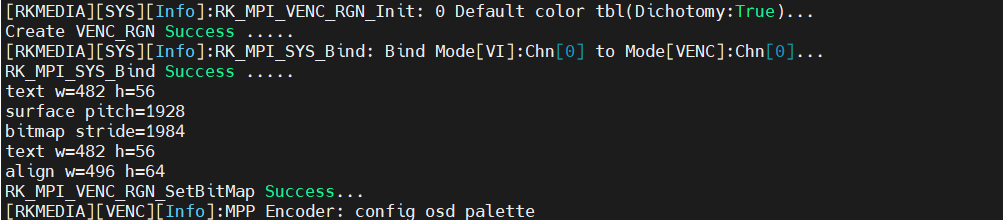
1.text w=482 h=56
这是字体真实渲染出来的尺寸。
真实有效区域 = 482 × 56
2.align w=496 h=64
宽度:
482 → 496 (16 对齐)
482 % 16 = 2高度:
56 → 64
56 不是 16 的倍数
最终 Region = 496 × 64
3.surface pitch = 1928 最重要的参数一
每一行 SDL surface 实际占用的字节数计算验证:
482 × 4 = 1928说明SDL surface:
- 没做额外对齐
- 一行就是 width × 4
4.bitmap stride = 1984 最重要的参数二
OSD buffer 每一行占用的字节数
计算验证:
496 × 4 = 1984
5.memcpy拷贝
cs
    int src_pitch = convert_text_surface->pitch;
    int dst_pitch = bitmap.u32Width * 4;
    int copy_bytes = convert_text_surface->w * 4;

    for (int i = 0; i < convert_text_surface->h; i++)
    {
        memcpy(
            (uint8_t *)bitmap.pData + i * dst_pitch,
            (uint8_t *)convert_text_surface->pixels + i * src_pitch,
            copy_bytes);
    }
for (int i = 0; i < convert_text_surface->h; i++) {
当前是第 i 行
1.计算 source 第 i 行地址
(uint8_t*)convert_text_surface->pixels + i * src_pitch意思:
从首地址开始 跳 i 行
2.计算 destination 第 i 行地址
(uint8_t*)bitmap.pData + i * dst_pitch3.只拷贝有效像素数据
memcpy(dst_row, src_row, copy_bytes);
例子:
1.图像不是连续紧密排列的
surface pitch = 2044 bitmap stride = 2048
source(SDL surface)内存结构
宽 511,ARGB8888
511 × 4 = 2044 字节SDL 没对齐,所以:
第1行:2044字节 第2行:2044字节 第3行:2044字节 ...内存排布:
|----2044----|----2044----|----2044----| ...
destination(bitmap)内存结构
你对齐后宽度变 512:
512 × 4 = 2048 字节所以 bitmap 内存是:
|----2048----|----2048----|----2048----| ...
注意:
每一行比 source 多 4 字节空位
如果直接 memcpy 会发生什么?
memcpy(dst, src, 2044 * 56);一条直线复制
实际发生的情况:
第1行:
dst[0 ~ 2043] ← src[0 ~ 2043] 正确但 dst 第1行真实应该占 2048 字节!
所以:
dst[2044 ~ 2047] 这4字节没有填第2行应该从:
dst[2048] 开始但你现在继续写的是:
dst[2044]于是
整行向左错4字节下一行再错4字节
结果就是:
每行逐渐错位 →倾斜
7.关于显示的问题
cs
    OSD_REGION_INFO_S rgn_info; //OSD_RGN_INFO结构体
    rgn_info.enRegionId = REGION_ID_0; //rgn的区域ID
    rgn_info.u32Width = bitmap.u32Width ; //osd的长度
    rgn_info.u32Height = bitmap.u32Height ; //osd的高度

    rgn_info.u32PosX = 192; //Osd的X轴方向
    rgn_info.u32PosY = 256; //Osd的Y轴方向
    rgn_info.u8Enable = 1; ////使能OSD模块,1是使能,0为禁止。
    rgn_info.u8Inverse = 0; //禁止翻转

    ret = RK_MPI_VENC_RGN_SetBitMap(VENC_CHN, &rgn_info, &bitmap);  //设置OSD位图
    if(ret)
    {
        printf("RK_MPI_VENC_RGN_SetBitMap failed...\n");
    }
    else
    {
        printf("RK_MPI_VENC_RGN_SetBitMap Success...\n");
    }
VENC OSD 的坐标系是:
编码器内部帧缓存坐标
不是显示窗口坐标。
VENC OSD 不是在"显示画面"上叠加
它是:
在编码器内部帧缓存上叠加
而这个帧缓存:
很可能不是 1920×1080
而是:对齐后的尺寸
注:
编码器内部坐标原点 (0,0) 是:
内部对齐帧的左上角
但你实际显示的视频:
可能经过:
- 裁剪
- 缩放
- ISP crop
- VI crop
所以你看到的画面左上角,
不一定等于编码器内部 (0,0)。
常见:如果你的视频源来自:
VI -> VENC很多 RK 平台:
VI 输出的有效区域
并不是整个 buffer
例如:
Sensor 实际输出 1944×1096
但你裁成 1920×1080
内部 buffer 仍然可能保留 padding 区。
这时:
VENC 的 (0,0)可能对应的是:
padding 区
不是可见画面左上角。