Ubuntu系统安装CodeX出现问题

问题描述:

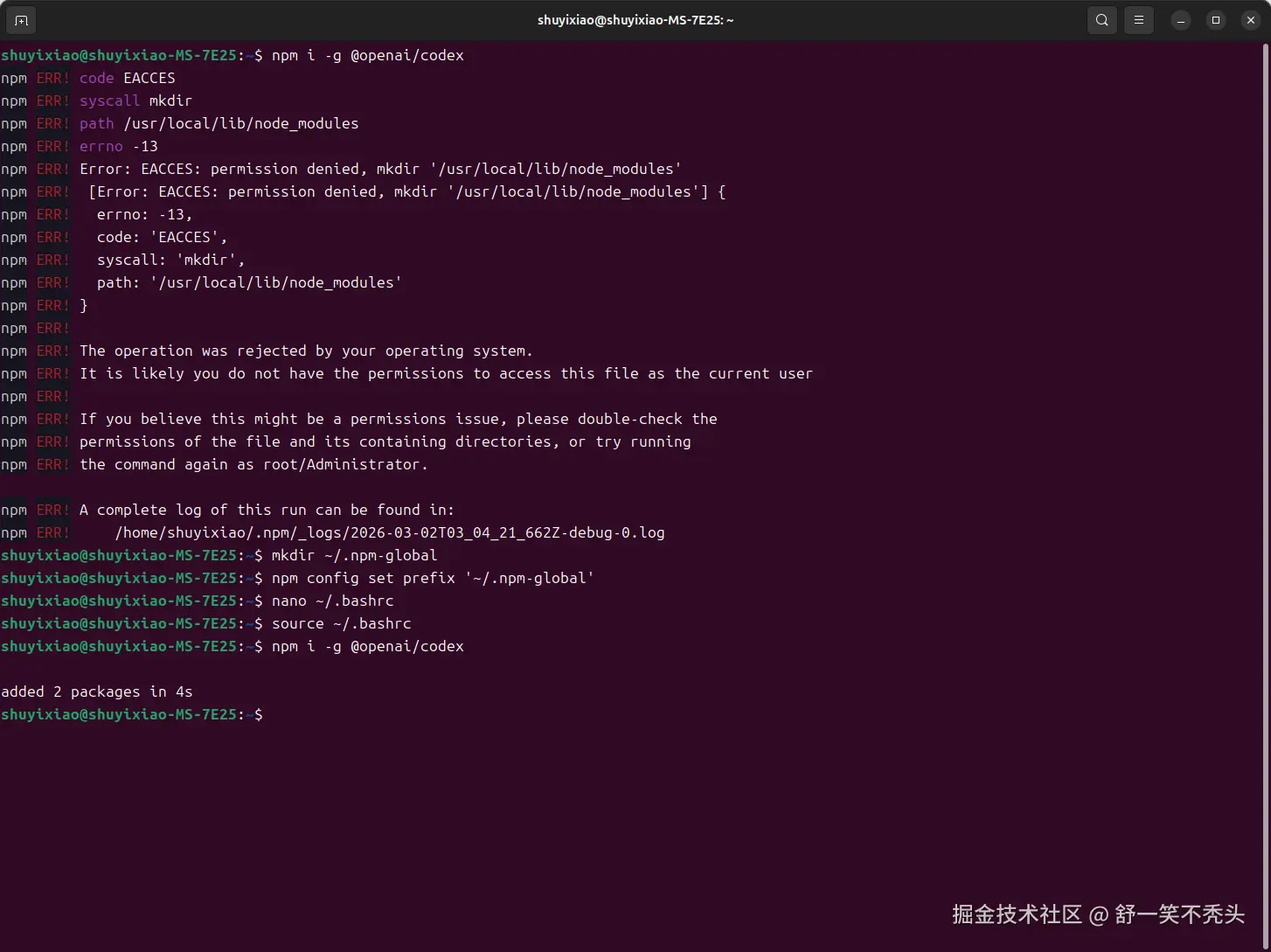
shuyixiao@shuyixiao-MS-7E25:~ <math xmlns="http://www.w3.org/1998/Math/MathML"> n p m i − g @ o p e n a i / c o d e x n p m E R R ! c o d e E A C C E S n p m E R R ! s y s c a l l m k d i r n p m E R R ! p a t h / u s r / l o c a l / l i b / n o d e m o d u l e s n p m E R R ! e r r n o − 13 n p m E R R ! E r r o r : E A C C E S : p e r m i s s i o n d e n i e d , m k d i r ′ / u s r / l o c a l / l i b / n o d e m o d u l e s ′ n p m E R R ! [ E r r o r : E A C C E S : p e r m i s s i o n d e n i e d , m k d i r ′ / u s r / l o c a l / l i b / n o d e m o d u l e s ′ ] n p m E R R ! e r r n o : − 13 , n p m E R R ! c o d e : ′ E A C C E S ′ , n p m E R R ! s y s c a l l : ′ m k d i r ′ , n p m E R R ! p a t h : ′ / u s r / l o c a l / l i b / n o d e m o d u l e s ′ n p m E R R ! n p m E R R ! n p m E R R ! T h e o p e r a t i o n w a s r e j e c t e d b y y o u r o p e r a t i n g s y s t e m . n p m E R R ! I t i s l i k e l y y o u d o n o t h a v e t h e p e r m i s s i o n s t o a c c e s s t h i s f i l e a s t h e c u r r e n t u s e r n p m E R R ! n p m E R R ! I f y o u b e l i e v e t h i s m i g h t b e a p e r m i s s i o n s i s s u e , p l e a s e d o u b l e − c h e c k t h e n p m E R R ! p e r m i s s i o n s o f t h e f i l e a n d i t s c o n t a i n i n g d i r e c t o r i e s , o r t r y r u n n i n g n p m E R R ! t h e c o m m a n d a g a i n a s r o o t / A d m i n i s t r a t o r . n p m E R R ! A c o m p l e t e l o g o f t h i s r u n c a n b e f o u n d i n : n p m E R R ! / h o m e / s h u y i x i a o / . n p m / l o g s / 2026 − 03 − 02 T 0 3 0 4 2 1 6 62 Z − d e b u g − 0. l o g s h u y i x i a o @ s h u y i x i a o − M S − 7 E 25 : npm i -g @openai/codex npm ERR! code EACCES npm ERR! syscall mkdir npm ERR! path /usr/local/lib/node_modules npm ERR! errno -13 npm ERR! Error: EACCES: permission denied, mkdir '/usr/local/lib/node_modules' npm ERR! [Error: EACCES: permission denied, mkdir '/usr/local/lib/node_modules'] { npm ERR! errno: -13, npm ERR! code: 'EACCES', npm ERR! syscall: 'mkdir', npm ERR! path: '/usr/local/lib/node_modules' npm ERR! } npm ERR! npm ERR! The operation was rejected by your operating system. npm ERR! It is likely you do not have the permissions to access this file as the current user npm ERR! npm ERR! If you believe this might be a permissions issue, please double-check the npm ERR! permissions of the file and its containing directories, or try running npm ERR! the command again as root/Administrator. npm ERR! A complete log of this run can be found in: npm ERR! /home/shuyixiao/.npm/_logs/2026-03-02T03_04_21_662Z-debug-0.log shuyixiao@shuyixiao-MS-7E25:~ </math>npmi−g@openai/codexnpmERR!codeEACCESnpmERR!syscallmkdirnpmERR!path/usr/local/lib/nodemodulesnpmERR!errno−13npmERR!Error:EACCES:permissiondenied,mkdir′/usr/local/lib/nodemodules′npmERR![Error:EACCES:permissiondenied,mkdir′/usr/local/lib/nodemodules′]npmERR!errno:−13,npmERR!code:′EACCES′,npmERR!syscall:′mkdir′,npmERR!path:′/usr/local/lib/nodemodules′npmERR!npmERR!npmERR!Theoperationwasrejectedbyyouroperatingsystem.npmERR!ItislikelyyoudonothavethepermissionstoaccessthisfileasthecurrentusernpmERR!npmERR!Ifyoubelievethismightbeapermissionsissue,pleasedouble−checkthenpmERR!permissionsofthefileanditscontainingdirectories,ortryrunningnpmERR!thecommandagainasroot/Administrator.npmERR!Acompletelogofthisruncanbefoundin:npmERR!/home/shuyixiao/.npm/logs/2026−03−02T030421662Z−debug−0.logshuyixiao@shuyixiao−MS−7E25:

解决方案

一个非常典型的 npm 全局安装权限不足(EACCES)错误

从报错看:

arduino 复制代码
EACCES: permission denied, mkdir '/usr/local/lib/node_modules'

意思是:

👉 你当前用户 没有权限往 /usr/local/lib/node_modules 写入文件

👉 这是 Linux / Ubuntu 下最常见的 npm 全局安装权限问题


✅ 解决方法(推荐顺序)

✅ 方法一(最快):加 sudo

直接用管理员权限安装:

css 复制代码
sudo npm i -g @openai/codex

然后输入你的登录密码。

✔ 这种方式可以立刻解决

❗ 但长期不太推荐频繁用 sudo 安装 npm 包


✅ 方法二(推荐长期方案):改 npm 全局目录到用户目录

这样以后就不会再有权限问题。

第一步:创建全局目录

bash 复制代码
mkdir ~/.npm-global

第二步:让 npm 使用这个目录

arduino 复制代码
npm config set prefix '~/.npm-global'

第三步:把它加入 PATH

编辑 ~/.bashrc

bash 复制代码
nano ~/.bashrc

在文件最后加一行:

bash 复制代码
export PATH=$HOME/.npm-global/bin:$PATH

保存退出后执行:

bash 复制代码
source ~/.bashrc

然后重新安装:

css 复制代码
npm i -g @openai/codex

✔ 不需要 sudo

✔ 永久解决权限问题

✔ 官方推荐方式


🔎 为什么会这样?

因为:

  • /usr/local/lib/node_modules 属于 root
  • 普通用户默认不能写
  • npm 全局安装默认写这个目录

🚨 不推荐的方法

不要:

bash 复制代码
sudo chown -R $USER /usr/local/lib/node_modules

容易把系统目录权限搞乱。


🎯 总结

你的问题不是:

  • ❌ wubangtu 系统不支持
  • ❌ codex 不能安装

而是:

  • ✅ Linux 权限问题
  • ✅ npm 全局目录写入权限不足

复制代码
node -v
npm -v
相关推荐
薛定猫AI2 小时前
Codex 与 Claude Code 全平台安装配置指南(Windows / macOS / Linux)
linux·windows·macos
ltl7 小时前
Transformer 整体架构:一张图看懂
后端
ltl7 小时前
Decoder 详解:为什么它天生适合生成
后端
ltl8 小时前
Encoder 详解:6 层堆叠到底在做什么
后端
程序员cxuan8 小时前
微信读书官方发了 skills,把我给秀麻了。
人工智能·后端·程序员
未若君雅裁8 小时前
Spring AOP、日志切面与声明式事务原理
java·后端·spring
zhangxingchao9 小时前
AI应用开发六:企业知识库
前端·人工智能·后端
kidwjb9 小时前
信号量在进程中的使用
linux·进程间通信
红尘散仙9 小时前
一个 `#[uniffi::export]`,把 Rust 接进 React Native
前端·后端·rust
红尘散仙10 小时前
一行 `#[specta::specta]`,让 Tauri IPC 有类型
前端·后端·rust