实验简介
一、Keepalived 实验环境设定
该实验主要完成 Keepalived 高可用集群基础环境的搭建,为后续虚拟路由配置和日志分离提供稳定的运行环境,核心步骤如下:
- 节点部署与基础服务配置
- 部署 rs1(172.25.254.10)、rs2(172.25.254.20)两台 Web 节点,安装 httpd 服务并配置不同的首页内容(分别标识 RS1/RS2),验证 Web 服务可访问;
- 部署 KA1(172.25.254.50)、KA2(172.25.254.60)两台 Keepalived 节点,完成 IP 地址和主机名配置。
- 本地解析与跨节点同步
- 在 KA1 配置 /etc/hosts 文件,添加所有节点(KA1、KA2、rs1、rs2)的 IP 与主机名映射;
- 通过 scp 命令将配置好的 hosts 文件同步到 KA2、rs1、rs2 节点,确保所有主机可通过主机名解析对应 IP。
- 时间同步服务配置
- 在 KA1 修改 chrony.conf,允许所有网段访问(allow 0.0.0.0/0),并设置本地时钟层级(local stratum 10),重启并启用 chronyd 服务;
- 在 KA2 修改 chrony.conf,将 KA1 作为时间同步源(pool 172.25.254.50 iburst),重启 chronyd 并验证同步状态(chronyc sources -v)。
二、Keepalived 虚拟路由配置
基于已搭建的实验环境,配置 Keepalived 实现虚拟路由(VIP)的高可用,核心步骤如下:
- Keepalived 安装
- 在 KA1 和 KA2 节点通过 dnf 安装 keepalived.x86_64 包,为虚拟路由配置做准备。
- Master 节点(KA1)配置
- 编辑 /etc/keepalived/keepalived.conf:
- global_defs 段:配置邮件通知、router_id(KA1)、VRRP 相关优化参数(如跳过地址检查、组播地址等);
- vrrp_instance WEB_VIP 段:设置 state 为 MASTER,绑定 eth0 网卡,虚拟路由 ID(virtual_router_id)为 51,优先级(priority)100,认证方式为 PASS(密码 1111),虚拟 IP(VIP)为 172.25.254.100/24(绑定 eth0:0);
- 启用并启动 keepalived.service,通过 tcpdump 验证 VRRP 通告包(tcpdump -i eth0 -nn host 224.0.0.44),通过 ifconfig 确认 eth0:0 已绑定 VIP。
- 编辑 /etc/keepalived/keepalived.conf:
- Backup 节点(KA2)配置
- 编辑 /etc/keepalived/keepalived.conf:
- global_defs 段与 KA1 基本一致;
- vrrp_instance WEB_VIP 段:state 设为 BACKUP,优先级(priority)80(低于 MASTER),其余(虚拟路由 ID、认证、VIP)与 KA1 一致;
- 启用并启动 keepalived.service。
- 编辑 /etc/keepalived/keepalived.conf:
- 故障迁移验证
- 在 KA1 停止 keepalived.service 模拟故障;
- 在 KA2 通过 ifconfig 验证 VIP(172.25.254.100)已迁移到 eth0:0,实现虚拟路由的高可用切换。
三、Keepalived 日志分离
默认情况下 Keepalived 日志混在 /var/log/messages 中,通过配置实现日志独立存储,核心步骤如下:
- 修改 Keepalived 启动参数
- 编辑 /etc/sysconfig/keepalived,添加启动参数:KEEPALIVED_OPTIONS="-D -S 6"(-S 6 指定日志输出到 local6 设施);
- 重启 keepalived.service 使参数生效。
- 配置 rsyslog 定向日志
- 编辑 /etc/rsyslog.conf,添加规则:local6.* /var/log/keepalived.log(将 local6 设施的所有日志定向到指定文件);
- 重启 rsyslog.service 使配置生效。
- 验证日志文件
- 检查 /var/log/keepalived.log 是否生成,完成日志从 messages 到独立文件的分离,便于后续 Keepalived 日志的单独查看与分析。
Keepalived实验环境设定
环境设定图
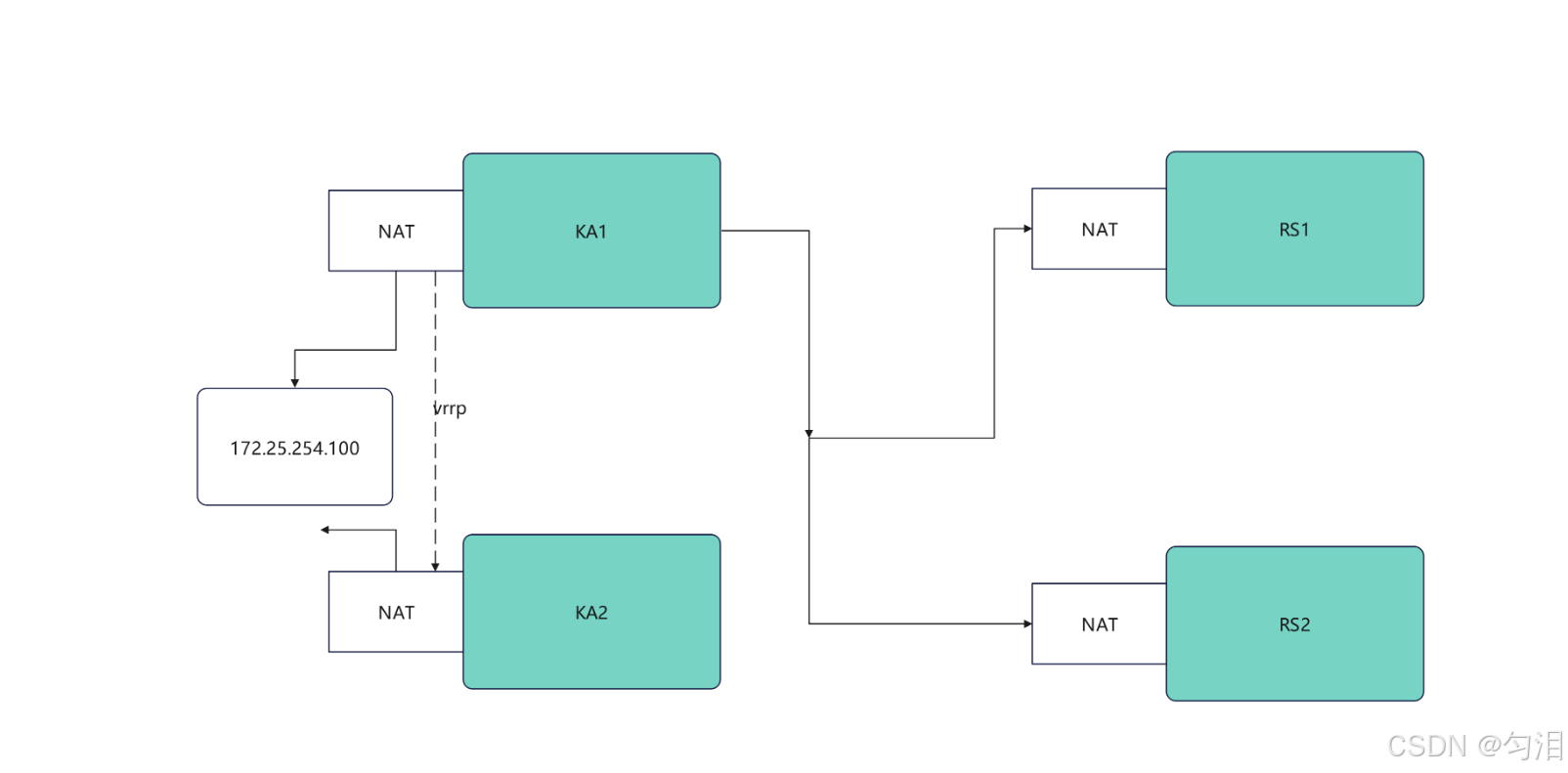
环境配置
#部署rs1和rs2(单网卡NAT模式)
[root@rs1 yxs]# vmset.sh eth0 172.25.254.10 rs1
连接已成功激活(D-Bus 活动路径:/org/freedesktop/NetworkManager/ActiveConnection/4)
2: eth0: <BROADCAST,MULTICAST,UP,LOWER_UP> mtu 1500 qdisc mq state UP group default qlen 1000
    link/ether 00:0c:29:d5:22:da brd ff:ff:ff:ff:ff:ff
    altname enp3s0
    altname ens160
    inet 172.25.254.10/24 brd 172.25.254.255 scope global noprefixroute eth0
       valid_lft forever preferred_lft forever
    inet6 fe80::874b:eea4:3fa5:e08b/64 scope link tentative noprefixroute
       valid_lft forever preferred_lft forever
rs1
[root@rs1 yxs]# dnf install httpd -y
[root@rs1 yxs]# echo RS1 - 172.25.254.10 > /var/www/html/index.html
[root@rs1 yxs]# systemctl enable --now httpd
Created symlink /etc/systemd/system/multi-user.target.wants/httpd.service → /usr/lib/systemd/system/httpd.service.
[root@rs2 yxs]# vmset.sh eth0 172.25.254.20 rs2
连接已成功激活(D-Bus 活动路径:/org/freedesktop/NetworkManager/ActiveConnection/4)
2: eth0: <BROADCAST,MULTICAST,UP,LOWER_UP> mtu 1500 qdisc mq state UP group default qlen 1000
    link/ether 00:0c:29:3a:be:ad brd ff:ff:ff:ff:ff:ff
    altname enp3s0
    altname ens160
    inet 172.25.254.20/24 brd 172.25.254.255 scope global noprefixroute eth0
       valid_lft forever preferred_lft forever
    inet6 fe80::3f1e:ef43:f726:4b12/64 scope link tentative noprefixroute
       valid_lft forever preferred_lft forever
rs2
[root@rs2 yxs]# dnf install httpd -y
[root@rs2 yxs]# echo RS2 - 172.25.254.20 > /var/www/html/index.html
[root@rs2 yxs]# systemctl enable --now httpd
Created symlink /etc/systemd/system/multi-user.target.wants/httpd.service → /usr/lib/systemd/system/httpd.service.

#测试
[root@test yxs]# curl 172.25.254.10
RS1 - 172.25.254.10
[root@test yxs]# curl 172.25.254.20
RS2 - 172.25.254.20

#设定ka1和ka2
[root@ka1 yxs]# vmset.sh eth0 172.25.254.50 KA1
连接已成功激活(D-Bus 活动路径:/org/freedesktop/NetworkManager/ActiveConnection/4)
2: eth0: <BROADCAST,MULTICAST,UP,LOWER_UP> mtu 1500 qdisc mq state UP group default qlen 1000
    link/ether 00:0c:29:8b:6e:34 brd ff:ff:ff:ff:ff:ff
    altname enp3s0
    altname ens160
    inet 172.25.254.50/24 brd 172.25.254.255 scope global noprefixroute eth0
       valid_lft forever preferred_lft forever
    inet6 fe80::2548:cded:e9d2:8517/64 scope link tentative noprefixroute
       valid_lft forever preferred_lft forever
KA1
[root@ka2 yxs]# vmset.sh eth0 172.25.254.60 KA2
连接已成功激活(D-Bus 活动路径:/org/freedesktop/NetworkManager/ActiveConnection/4)
2: eth0: <BROADCAST,MULTICAST,UP,LOWER_UP> mtu 1500 qdisc mq state UP group default qlen 1000
    link/ether 00:0c:29:94:28:97 brd ff:ff:ff:ff:ff:ff
    altname enp3s0
    altname ens160
    inet 172.25.254.60/24 brd 172.25.254.255 scope global noprefixroute eth0
       valid_lft forever preferred_lft forever
    inet6 fe80::7a00:745:7105:ccf3/64 scope link tentative noprefixroute
       valid_lft forever preferred_lft forever
KA2

#设定本地解析
[root@ka1 yxs]# vim /etc/hosts
127.0.0.1   localhost localhost.localdomain localhost4 localhost4.localdomain4
::1         localhost localhost.localdomain localhost6 localhost6.localdomain6
172.25.254.50     KA1
172.25.254.60     KA2
172.25.254.10     rs1
172.25.254.20     rs2
[root@ka1 ~]# for i in 60 10 20
> do
> scp /etc/hosts 172.25.254.$i:/etc/hosts
> done
#在所有主机中查看/etc/hosts

#在ka1中开启时间同步服务
[root@ka1 yxs]# vim /etc/chrony.conf
 26 allow 0.0.0.0/0
 29 local stratum 10
[root@ka1 yxs]# systemctl restart chronyd
[root@ka1 yxs]# systemctl enable --now chronyd

#在ka2中使用ka1的时间同步服务
[root@KA2 yxs]# vim /etc/chrony.conf
pool 172.25.254.50 iburst
[root@KA2 yxs]# systemctl restart chronyd
[root@KA2 yxs]# systemctl enable --now chronyd
[root@KA2 yxs]# chronyc sources -v

  .-- Source mode  '^' = server, '=' = peer, '#' = local clock.
 / .- Source state '*' = current best, '+' = combined, '-' = not combined,
| /             'x' = may be in error, '~' = too variable, '?' = unusable.
||                                                 .- xxxx [ yyyy ] +/- zzzz
||      Reachability register (octal) -.           |  xxxx = adjusted offset,
||      Log2(Polling interval) --.      |          |  yyyy = measured offset,
||                                \     |          |  zzzz = estimated error.
||                                 |    |           \
MS Name/IP address         Stratum Poll Reach LastRx Last sample
===============================================================================
^* KA1                           3   6    17    13   +303ns[+6125ns] +/-   69ms
Keepalived虚拟路由配置
Keepalived安装
[root@KA1 yxs]# dnf install keepalived.x86_64 -y
[root@KA2 yxs]# dnf install keepalived.x86_64 -y
配置虚拟路由
#在master
[root@KA1 yxs]# vim /etc/keepalived/keepalived.conf
global_defs {
   notification_email {
     yunlei713@qq.com
   }
   notification_email_from yunlei713@qq.com
   smtp_server 127.0.0.1
   smtp_connect_timeout 30
   router_id KA1
   vrrp_skip_check_adv_addr
   #vrrp_strict
   vrrp_garp_interval 1
   vrrp_gna_interval 1
   vrrp_mcast_group4 224.0.0.44
}
vrrp_instance WEB_VIP {
    state MASTER
    interface eth0
    virtual_router_id 51
    priority 100
    advert_int 1
    authentication {
        auth_type PASS
        auth_pass 1111
    }
    virtual_ipaddress {
        172.25.254.100/24 dev eth0 label eth0:0
    }
}
[root@KA1 yxs]# systemctl enable --now keepalived.service
Created symlink /etc/systemd/system/multi-user.target.wants/keepalived.service → /usr/lib/systemd/system/keepalived.service.

#在KA2中设定
[root@KA2 yxs]# vim /etc/keepalived/keepalived.conf
global_defs {
   notification_email {
     yunlei713@qq.com
   }
   notification_email_from yunlei713@163.com
   smtp_server 127.0.0.1
   smtp_connect_timeout 30
   router_id KA1
   vrrp_skip_check_adv_addr
   #vrrp_strict
   vrrp_garp_interval 1
   vrrp_gna_interval 1
   vrrp_mcast_group4 224.0.0.44
}
vrrp_instance WEB_VIP {
    state BACKUP
    interface eth0
    virtual_router_id 51
    priority 80
    advert_int 1
    authentication {
        auth_type PASS
        auth_pass 1111
    }
    virtual_ipaddress {
        172.25.254.100/24 dev eth0 label eth0:0
    }
}
[root@KA2 yxs]# systemctl enable --now keepalived.service
Created symlink /etc/systemd/system/multi-user.target.wants/keepalived.service → /usr/lib/systemd/system/keepalived.service.

#验证
[root@KA1 yxs]# tcpdump -i eth0 -nn host 224.0.0.44
dropped privs to tcpdump
tcpdump: verbose output suppressed, use -v[v]... for full protocol decode
listening on eth0, link-type EN10MB (Ethernet), snapshot length 262144 bytes
15:15:41.794259 IP 172.25.254.50 > 224.0.0.44: VRRPv2, Advertisement, vrid 51, prio 100, authtype simple, intvl 1s, length 20
15:15:42.794778 IP 172.25.254.50 > 224.0.0.44: VRRPv2, Advertisement, vrid 51, prio 100, authtype simple, intvl 1s, length 20
15:15:43.795120 IP 172.25.254.50 > 224.0.0.44: VRRPv2, Advertisement, vrid 51, prio 100, authtype simple, intvl 1s, length 20
15:15:44.795627 IP 172.25.254.50 > 224.0.0.44: VRRPv2, Advertisement, vrid 51, prio 100, authtype simple, intvl 1s, length 20
[root@KA1 yxs]# ifconfig
eth0: flags=4163<UP,BROADCAST,RUNNING,MULTICAST>  mtu 1500
        inet 172.25.254.50  netmask 255.255.255.0  broadcast 172.25.254.255
        inet6 fe80::2548:cded:e9d2:8517  prefixlen 64  scopeid 0x20<link>
        ether 00:0c:29:8b:6e:34  txqueuelen 1000  (Ethernet)
        RX packets 361  bytes 34067 (33.2 KiB)
        RX errors 0  dropped 0  overruns 0  frame 0
        TX packets 779  bytes 56320 (55.0 KiB)
        TX errors 0  dropped 0 overruns 0  carrier 0  collisions 0

eth0:0: flags=4163<UP,BROADCAST,RUNNING,MULTICAST>  mtu 1500
        inet 172.25.254.100  netmask 255.255.255.0  broadcast 0.0.0.0
        ether 00:0c:29:8b:6e:34  txqueuelen 1000  (Ethernet)

lo: flags=73<UP,LOOPBACK,RUNNING>  mtu 65536
        inet 127.0.0.1  netmask 255.0.0.0
        inet6 ::1  prefixlen 128  scopeid 0x10<host>
        loop  txqueuelen 1000  (Local Loopback)
        RX packets 132  bytes 12493 (12.2 KiB)
        RX errors 0  dropped 0  overruns 0  frame 0
        TX packets 132  bytes 12493 (12.2 KiB)
        TX errors 0  dropped 0 overruns 0  carrier 0  collisions 0

#测试故障
#在一个独立的shell中执行
[root@KA1 yxs]# tcpdump -i eth0 -nn host 224.0.0.44
#在kA1中模拟故障
[root@KA1 yxs]# systemctl stop keepalived.service
[root@KA1 yxs]# ifconfig
eth0: flags=4163<UP,BROADCAST,RUNNING,MULTICAST>  mtu 1500
        inet 172.25.254.50  netmask 255.255.255.0  broadcast 172.25.254.255
        inet6 fe80::2548:cded:e9d2:8517  prefixlen 64  scopeid 0x20<link>
        ether 00:0c:29:8b:6e:34  txqueuelen 1000  (Ethernet)
        RX packets 441  bytes 40033 (39.0 KiB)
        RX errors 0  dropped 0  overruns 0  frame 0
        TX packets 863  bytes 61593 (60.1 KiB)
        TX errors 0  dropped 0 overruns 0  carrier 0  collisions 0

lo: flags=73<UP,LOOPBACK,RUNNING>  mtu 65536
        inet 127.0.0.1  netmask 255.0.0.0
        inet6 ::1  prefixlen 128  scopeid 0x10<host>
        loop  txqueuelen 1000  (Local Loopback)
        RX packets 132  bytes 12493 (12.2 KiB)
        RX errors 0  dropped 0  overruns 0  frame 0
        TX packets 132  bytes 12493 (12.2 KiB)
        TX errors 0  dropped 0 overruns 0  carrier 0  collisions 0


[root@KA2 yxs]# ifconfig
eth0: flags=4163<UP,BROADCAST,RUNNING,MULTICAST>  mtu 1500
        inet 172.25.254.60  netmask 255.255.255.0  broadcast 172.25.254.255
        inet6 fe80::7a00:745:7105:ccf3  prefixlen 64  scopeid 0x20<link>
        ether 00:0c:29:94:28:97  txqueuelen 1000  (Ethernet)
        RX packets 341  bytes 29198 (28.5 KiB)
        RX errors 0  dropped 0  overruns 0  frame 0
        TX packets 286  bytes 24647 (24.0 KiB)
        TX errors 0  dropped 0 overruns 0  carrier 0  collisions 0

eth0:0: flags=4163<UP,BROADCAST,RUNNING,MULTICAST>  mtu 1500
        inet 172.25.254.100  netmask 255.255.255.0  broadcast 0.0.0.0
        ether 00:0c:29:94:28:97  txqueuelen 1000  (Ethernet)

lo: flags=73<UP,LOOPBACK,RUNNING>  mtu 65536
        inet 127.0.0.1  netmask 255.0.0.0
        inet6 ::1  prefixlen 128  scopeid 0x10<host>
        loop  txqueuelen 1000  (Local Loopback)
        RX packets 128  bytes 12679 (12.3 KiB)
        RX errors 0  dropped 0  overruns 0  frame 0
        TX packets 128  bytes 12679 (12.3 KiB)
        TX errors 0  dropped 0 overruns 0  carrier 0  collisions 0
Keepalived日志分离
[root@KA1 yxs]# vim /etc/sysconfig/keepalived
[root@KA1 yxs]# systemctl restart keepalived.service
[root@KA1 yxs]# vim /etc/rsyslog.conf
local6.*                                                /var/log/keepalived.log
[root@KA1 yxs]# systemctl restart rsyslog.service

#测试
[root@KA1 yxs]# cd /var/log/
[root@KA1 log]# ls keepalived.log
keepalived.log