1、创建项目目录
[root@localhost demo1]# cd ..
[root@localhost ~]# mkdir demo2
[root@localhost ~]# cd demo2
[root@localhost demo2]# ls
[root@localhost demo2]#
2、上传所需要的依赖库
利用软件将Windows里面的文件传到虚拟机中
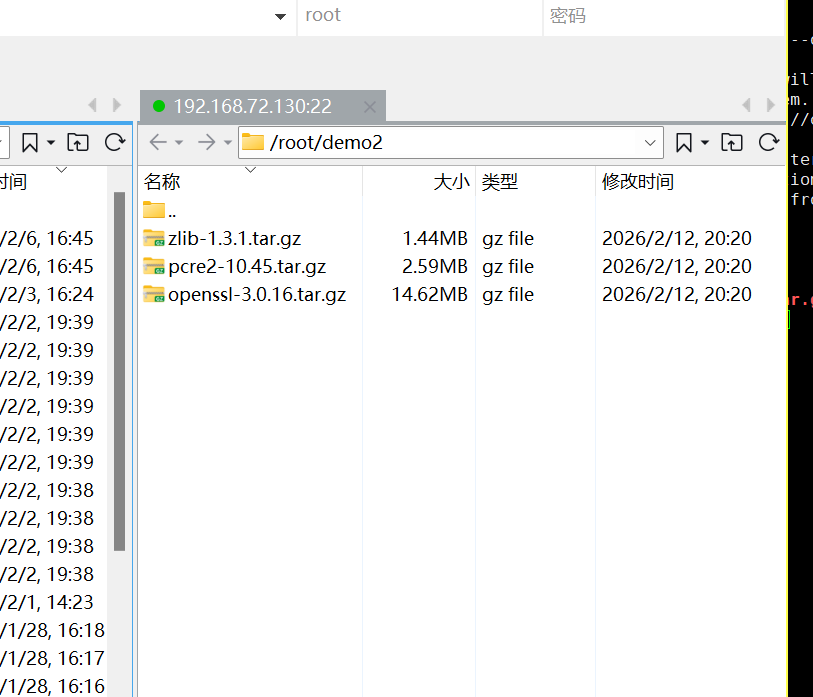
[root@localhost demo2]# ls
openssl-3.0.16.tar.gz  pcre2-10.45.tar.gz  zlib-1.3.1.tar.gz
3、编写.dockerignore文件
[root@localhost demo2]# vim .dockerignore文件内容如下:
Dockerfile4、编写Dockerfile
[root@localhost demo2]# vim Dockerfile文件内容如下:
FROM debian:bullseye-slim AS builder
ENV NGINX_VERSION=1.28.1 \
OPENSSL_VERSION=3.0.16 \
PCRE_VERSION=10.45 \
ZLIB_VERSION=1.3.1
RUN sed -i 's/deb.debian.org/mirrors.aliyun.com/g' /etc/apt/sources.list && \
sed -i 's|security.debian.org|mirrors.aliyun.com/debian-security|g' /etc/apt/sources.list
RUN apt-get update && \
apt-get install -y \
build-essential \
wget \
libpcre3 \
libpcre3-dev \
zlib1g-dev \
libssl-dev \
libgd-dev \
&& rm -rf /var/lib/apt/lists/*
COPY ./openssl-3.0.16.tar.gz /usr/local/src
COPY ./pcre2-10.45.tar.gz /usr/local/src
COPY ./zlib-1.3.1.tar.gz /usr/local/src
WORKDIR /usr/local/src
RUN wget https://nginx.org/download/nginx-${NGINX_VERSION}.tar.gz && \
tar -xzf nginx-${NGINX_VERSION}.tar.gz && \
tar -xzf openssl-${OPENSSL_VERSION}.tar.gz && \
tar -xzf pcre2-${PCRE_VERSION}.tar.gz && \
tar -xzf zlib-${ZLIB_VERSION}.tar.gz && \
rm -f *.tar.gz
WORKDIR /usr/local/src/nginx-${NGINX_VERSION}
RUN ./configure --prefix=/usr/local/nginx \
--sbin-path=/usr/sbin/nginx \
--modules-path=/usr/lib/nginx/modules \
--conf-path=/etc/nginx/nginx.conf \
--error-log-path=/var/log/nginx/error.log \
--http-log-path=/var/log/nginx/access.log \
--pid-path=/var/run/nginx.pid \
--lock-path=/var/run/nginx.lock \
--user=nginx \
--group=nginx \
--with-http_ssl_module \
--with-http_v2_module \
--with-http_realip_module \
--with-http_gzip_static_module \
--with-http_stub_status_module \
--with-threads \
--with-stream \
--with-openssl=../openssl-${OPENSSL_VERSION} \
--with-pcre=../pcre2-${PCRE_VERSION} \
--with-zlib=../zlib-${ZLIB_VERSION} && \
make -j $(nproc) && \
make install
FROM debian:bullseye-slim
LABEL maintainer="1062080730@qq.com"
LABEL author="jock"
RUN sed -i 's/deb.debian.org/mirrors.aliyun.com/g' /etc/apt/sources.list && \
sed -i 's|security.debian.org|mirrors.aliyun.com/debian-security|g' /etc/apt/sources.list
RUN apt-get update && \
apt-get install -y \
libpcre3 \
zlib1g \
openssl \
&& rm -rf /var/lib/apt/lists/*
RUN groupadd -r nginx && \
useradd -r -g nginx -s /sbin/nologin -d /nonexistent -c "nginx user" nginx
COPY --from=builder /usr/local/nginx /usr/local/nginx
COPY --from=builder /usr/sbin/nginx /usr/sbin/nginx
COPY --from=builder /etc/nginx /etc/nginx
COPY --from=builder /var/log/nginx /var/log/nginx
RUN mkdir -p /usr/local/nginx/html \
&& echo "hello jock | welcome to nginx! | version 1.0" > /usr/local/nginx/html/index.html
RUN echo '#!/bin/bash' > /start.sh && \
echo 'hostname > /usr/local/nginx/html/hostname.html' >> /start.sh && \
echo '/usr/sbin/nginx -g "daemon off;"' >> /start.sh && \
chmod +x /start.sh
WORKDIR /usr/local/nginx
EXPOSE 80 443
ENTRYPOINT ["/start.sh"]5、构建镜像
[root@localhost demo2]# docker build -t myapp:2.0 .
[+] Building 149.6s (25/25) FINISHED docker:default
=> [internal] load build definition from Dockerfile 0.0s
=> => transferring dockerfile: 2.92kB 0.0s
=> [internal] load metadata for docker.io/library/debian:bullseye-slim 0.2s
=> [internal] load .dockerignore 0.0s
=> => transferring context: 111B 0.0s
=> [internal] load build context 0.0s
=> => transferring context: 1.51MB 0.0s
=> [builder 1/10] FROM docker.io/library/debian:bullseye-slim@sha256:b32674fb57 0.0s
=> => resolve docker.io/library/debian:bullseye-slim@sha256:b32674fb57780ad57d7b 0.0s
=> CACHED [stage-1 2/11] RUN sed -i 's/deb.debian.org/mirrors.aliyun.com/g' /et 0.0s
=> CACHED [stage-1 3/11] RUN apt-get update && apt-get install -y libpc 0.0s
=> CACHED [stage-1 4/11] RUN groupadd -r nginx && useradd -r -g nginx -s /s 0.0s
=> CACHED [builder 2/10] RUN sed -i 's/deb.debian.org/mirrors.aliyun.com/g' /et 0.0s
=> CACHED [builder 3/10] RUN apt-get update && apt-get install -y build 0.0s
=> CACHED [builder 4/10] COPY ./openssl-3.0.16.tar.gz /usr/local/src 0.0s
=> CACHED [builder 5/10] COPY ./pcre2-10.45.tar.gz /usr/local/src 0.0s
=> [builder 6/10] COPY ./zlib-1.3.1.tar.gz /usr/local/src 0.0s
=> [builder 7/10] WORKDIR /usr/local/src 0.0s
=> [builder 8/10] RUN wget https://nginx.org/download/nginx-1.28.1.tar.gz && 15.2s
=> [builder 9/10] WORKDIR /usr/local/src/nginx-1.28.1 0.1s
=> [builder 10/10] RUN ./configure --prefix=/usr/local/nginx --sbin-path=/ 132.1s
=> [stage-1 5/11] COPY --from=builder /usr/local/nginx /usr/local/nginx 0.0s
=> [stage-1 6/11] COPY --from=builder /usr/sbin/nginx /usr/sbin/nginx 0.0s
=> [stage-1 7/11] COPY --from=builder /etc/nginx /etc/nginx 0.0s
=> [stage-1 8/11] COPY --from=builder /var/log/nginx /var/log/nginx 0.0s
=> [stage-1 9/11] RUN mkdir -p /usr/local/nginx/html && echo "hello jock | 0.2s
=> [stage-1 10/11] RUN echo '#!/bin/bash' > /start.sh && echo 'hostname > /u 0.3s
=> [stage-1 11/11] WORKDIR /usr/local/nginx 0.0s
=> exporting to image 0.9s
=> => exporting layers 0.6s
=> => exporting manifest sha256:15a80c5044e6ac05d8a901a83c8e253c50a64ac2c87a111f 0.0s
=> => exporting config sha256:83a42a7af5875058003ec8f02986fc177686912733daf1227e 0.0s
=> => exporting attestation manifest sha256:3219af0d7ac08bed11fbfc548ca6d7078c73 0.0s
=> => exporting manifest list sha256:6fceaf9ba5fbdf95fa0eb927006ed71a07de194a936 0.0s
=> => naming to docker.io/library/myapp:2.0 0.0s
=> => unpacking to docker.io/library/myapp:2.0 0.2s
6、查看镜像
[root@localhost demo2]# docker images
IMAGE              ID             DISK USAGE   CONTENT SIZE   EXTRA
busybox:latest     e226d6308690        6.7MB         2.22MB
flask-app:1.8      e98cf1077931        519MB          132MB
myapp:1.0          1e5e1bf6d447        308MB           79MB
myapp:2.0          6fceaf9ba5fb        141MB         35.7MB    U
nginx:1.28.1       0a1f2fb3231e        237MB         65.7MB
python:3.14-slim   9b81fe9acff7        176MB         45.5MB
redis:8.4          73dad4271642        203MB         55.4MB
7、运行容器
[root@localhost demo2]# docker stop myapp
[root@localhost demo2]# docker run --rm --name myapp -d -p 80:80 myapp:2.0
465e4d210303b400722c732ce48a0e4ed01549ddfb15daae144ce2842a0483c88、访问测试
[root@localhost demo2]# curl localhost
hello jock | welcome to nginx! | version 1.0
[root@localhost demo2]# curl localhost/hostname.html
465e4d210303