Ubuntu datasophon1.2.1 二开之六:解决CLICKHOUSE安装问题
背景
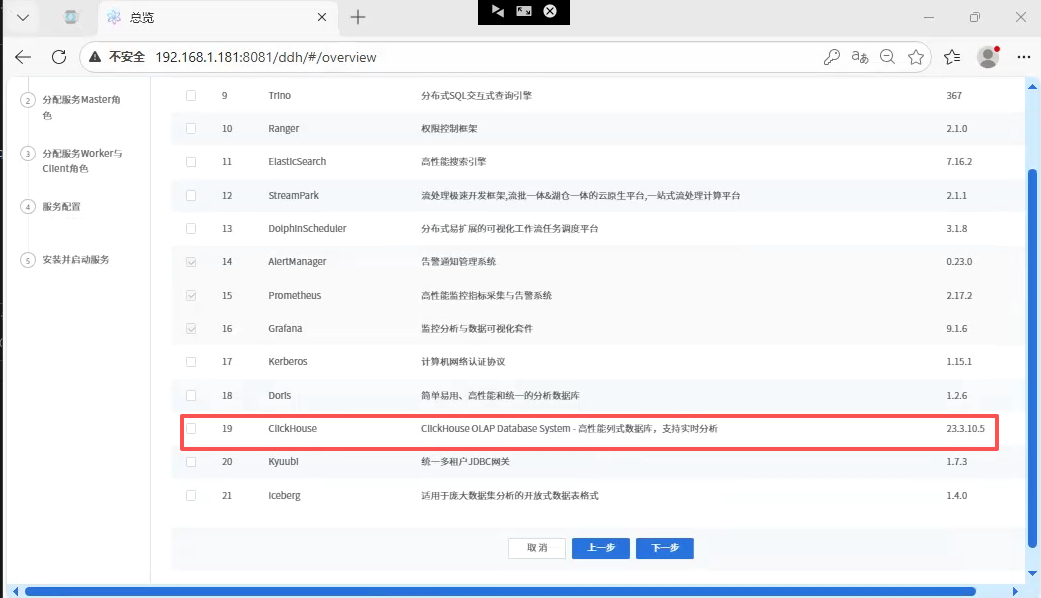
安装完HIVE之后,就剩下spark,flink,clickhouse。安装spark,flink比较简单顺利。准备安装OLAP 数据库clickhouse,发现datasophon 1.2.1 组件没有,没办法只能添加一个。
问题
如何添加clickhouse组件呢?首先下载跟操作系统匹配的clickhouse版本。其次了解为datasophon添加组件需要做哪些事情。后面详细说明
解决
下载ClickHouse
我的ubuntu版本为:
javascript
Welcome to Ubuntu 24.04.2 LTS (GNU/Linux 6.8.0-90-generic x86_64)

* Documentation:  https://help.ubuntu.com
* Management:     https://landscape.canonical.com
* Support:        https://ubuntu.com/pro
所以选择23.3.10.5版本,我下载了好多:
clickhouse-server,clickhouse-keeper-dbg,clickhouse-keeper,clickhouse-common-static-dbg,clickhouse-common-static
实际到后面只用到:clickhouse-common-static-23.3.10.5
下载地址:https://packages.clickhouse.com/tgz/stable/clickhouse-common-static-23.3.10.5-amd64.tgz
在DataSophon配置ClickHouse及定制策略代码
下载完clickhouse之后,下面开始搞配置了。要做三件事:
1.构造tar.gz包
在临时目录创建cickhouse-23.3.10.5,目前结构如下
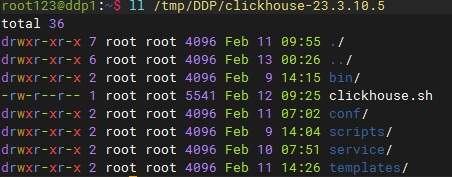
接下来说每个目录放入什么文件
bin目录 :就放clickhouse的二进制文件:clickhouse
这个文件来自common-static-23.3.10.5-amd64.tgz,把这个文件解压,然后看到如下图文件,复制到bin目录即可
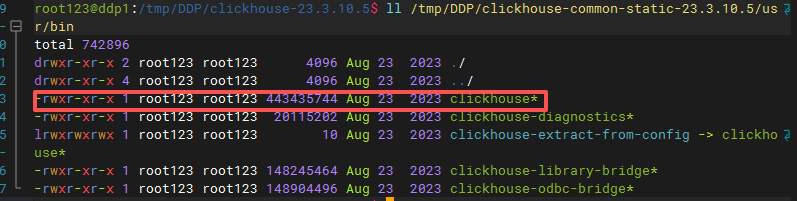 clickhouse脚本文件: clickhouse.sh负责启动,停止,查询clickhouse进程状态的脚本,包装后供datasophon调用,内容如下:
javascript
#!/bin/bash
# ClickHouse 服务控制脚本 for DataSophon
# 位置: /opt/datasophon/clickhouse/clickhouse.sh

set -e

# ============================================
# 基础路径 - ✅ 修正为实际路径
# ============================================
CLICKHOUSE_HOME="/opt/datasophon/clickhouse"  # ✅ 直接使用软链接路径
CLICKHOUSE_BIN="$CLICKHOUSE_HOME/bin/clickhouse"  # ✅ 修正二进制路径
CONFIG_DIR="$CLICKHOUSE_HOME/conf"
LOG_DIR="$CLICKHOUSE_HOME/logs"
DATA_DIR="$CLICKHOUSE_HOME/data"
TMP_DIR="$CLICKHOUSE_HOME/tmp"
PID_DIR="$CLICKHOUSE_HOME/run"  # ✅ 使用有权限的目录
PID_FILE="$PID_DIR/clickhouse-server.pid"

# 颜色输出
RED='\033[0;31m'
GREEN='\033[0;32m'
YELLOW='\033[1;33m'
BLUE='\033[0;34m'
NC='\033[0m'

log_info() { echo -e "${GREEN}[INFO]${NC} $(date '+%Y-%m-%d %H:%M:%S') $1"; }
log_error() { echo -e "${RED}[ERROR]${NC} $(date '+%Y-%m-%d %H:%M:%S') $1"; }

# ============================================
# 核心函数
# ============================================

# 获取进程PID
get_pid() {
    pgrep -f "clickhouse.*server.*config.xml" | head -1
}

# 检查是否运行
is_running() {
    local pid=$(get_pid)
    if [ -n "$pid" ]; then
        echo "$pid"
        return 0
    fi
    return 1
}

# 创建目录
create_dirs() {
    mkdir -p "$PID_DIR" "$LOG_DIR" "$DATA_DIR" "$TMP_DIR"
    chmod 755 "$PID_DIR" "$LOG_DIR" "$DATA_DIR"
}

# ============================================
# 服务控制
# ============================================

start() {
    log_info "启动 ClickHouse 服务器..."

    # 1. 检查是否已在运行
    local pid=$(get_pid)
    if [ -n "$pid" ]; then
        log_info "ClickHouse 已在运行 (PID: $pid)"
        return 0
    fi

    # 2. 创建目录
    create_dirs

    # 3. 检查二进制文件
    if [ ! -f "$CLICKHOUSE_BIN" ]; then
        log_error "二进制文件不存在: $CLICKHOUSE_BIN"
        return 1
    fi

    # 4. 检查配置文件
    if [ ! -f "$CONFIG_DIR/config.xml" ]; then
        log_error "配置文件不存在: $CONFIG_DIR/config.xml"
        return 1
    fi

    # 5. 获取端口
    local http_port=$(grep -oP '<http_port>\K[^<]+' "$CONFIG_DIR/config.xml" 2>/dev/null || echo "8123")

    # 6. ✅ 启动命令(去掉--daemon)
    log_info "执行: $CLICKHOUSE_BIN server --config-file=$CONFIG_DIR/config.xml"

    nohup "$CLICKHOUSE_BIN" server \
        --config-file="$CONFIG_DIR/config.xml" \
        > "$LOG_DIR/clickhouse-server.log" 2>&1 &

    local start_pid=$!

    # 7. 等待启动
    sleep 3
    local new_pid=$(get_pid)

    if [ -n "$new_pid" ]; then
        echo "$new_pid" > "$PID_FILE"
        log_info "✅ ClickHouse 启动成功 (PID: $new_pid)"

        # 等待HTTP就绪
        local waited=0
        while [ $waited -lt 20 ]; do
            if curl -s "http://localhost:$http_port/ping" 2>/dev/null | grep -q "Ok"; then
                log_info "✅ HTTP接口正常 (端口: $http_port)"
                break
            fi
            sleep 1
            waited=$((waited + 1))
        done
    else
        log_error "❌ ClickHouse 启动失败"
        tail -20 "$LOG_DIR/clickhouse-server.log"
        return 1
    fi
}

stop() {
    log_info "停止 ClickHouse 服务器..."

    local pid=$(get_pid)
    if [ -z "$pid" ]; then
        log_info "ClickHouse 未运行"
        rm -f "$PID_FILE"
        return 0
    fi

    log_info "停止进程 (PID: $pid)..."
    kill -TERM "$pid" 2>/dev/null || true

    local waited=0
    while [ $waited -lt 30 ]; do
        if ! kill -0 "$pid" 2>/dev/null; then
            break
        fi
        sleep 1
        waited=$((waited + 1))
    done

    if kill -0 "$pid" 2>/dev/null; then
        log_warn "强制终止进程..."
        kill -KILL "$pid" 2>/dev/null || true
    fi

    rm -f "$PID_FILE"
    log_info "✅ ClickHouse 已停止"
}

# ============================================
# 状态检查(仿HDFS风格)
# ============================================
status() {
    local pid=$(get_pid)

    if [ -f "$PID_FILE" ]; then
        local file_pid=$(cat "$PID_FILE")
        if [ "$pid" = "$file_pid" ] && [ -n "$pid" ]; then
            echo "ClickHouse is running (PID: $pid)"
            return 0
        elif [ -n "$pid" ]; then
            echo "ClickHouse is running (PID: $pid) but PID file mismatch"
            echo "Consider: echo $pid > $PID_FILE"
            return 0
        else
            echo "ClickHouse is not running (stale PID file)"
            rm -f "$PID_FILE"
            return 1
        fi
    else
        if [ -n "$pid" ]; then
            echo "ClickHouse is running (PID: $pid) but PID file is missing"
            echo "Consider: echo $pid > $PID_FILE"
            return 0
        else
            echo "ClickHouse is not running"
            return 1
        fi
    fi
}

restart() {
    stop
    sleep 2
    start
}

# ============================================
# 主函数
# ============================================
case "${1:-help}" in
    start)
        start
        ;;
    stop)
        stop
        ;;
    restart)
        restart
        ;;
    status)
        status
        ;;
    *)
        echo "Usage: $0 {start|stop|restart|status}"
        echo "  start   - Start ClickHouse server"
        echo "  stop    - Stop ClickHouse server"
        echo "  restart - Restart ClickHouse server"
        echo "  status  - Check ClickHouse status"
        exit 1
        ;;
esac

exit $?
配置templates: 这个存放生成xml的freemark 模板,用来生成xml
涉及文件如下图:
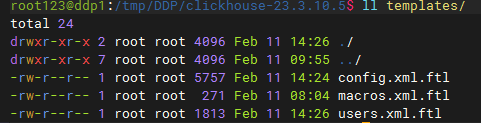
下面列出各个文件内容:
config.xml.ftl:
javascript
<?xml version="1.0"?>
<yandex>
    <!-- Generated by DataSophon -->
   <users_config>conf/users.xml</users_config>
    <!-- Network Configuration -->
    <listen_host>0.0.0.0</listen_host>
    <http_port>${http_port}</http_port>
    <tcp_port>${tcp_port}</tcp_port>
    <interserver_http_port>${interserver_http_port}</interserver_http_port>

    <!-- 最大连接和内存配置 -->
    <max_connections>${max_connections}</max_connections>
    <keep_alive_timeout>3</keep_alive_timeout>
    <max_concurrent_queries>100</max_concurrent_queries>

    <!-- ZooKeeper Configuration -->
    <zookeeper>
        <#if zk_address?? && zk_address?has_content>
            <#list zk_address?split(",") as zkNode>
                <#if zkNode?contains(":")>
                    <#assign parts = zkNode?split(":")>
        <node>
            <host>${parts[0]}</host>
            <port>${parts[1]}</port>
        </node>
                <#else>
        <node>
            <host>${zkNode}</host>
            <port>2181</port>
        </node>
                </#if>
            </#list>
        <#else>
        <node>
            <host>localhost</host>
            <port>2181</port>
        </node>
        </#if>

        <session_timeout_ms>30000</session_timeout_ms>
        <operation_timeout_ms>10000</operation_timeout_ms>
        <root>${zk_root!'/clickhouse'}</root>
    </zookeeper>

    <!-- Cluster Configuration - 动态解析 cluster_hosts -->
    <remote_servers>
        <${cluster_name}>
            <#if cluster_hosts?? && cluster_hosts?has_content>
                <#-- 创建分片映射表 -->
                <#assign shardMap = {}>

                <#-- 解析每个节点定义 -->
                <#list cluster_hosts?split(",") as hostDef>
                    <#assign hostDef = hostDef?trim>
                    <#if hostDef?contains(":")>
                        <#assign parts = hostDef?split(":")>
                        <#if parts?size == 3>
                            <#assign shardNum = parts[0]?trim>
                            <#assign replicaNum = parts[1]?trim>
                            <#assign hostName = parts[2]?trim>

                            <#-- 初始化分片数组 -->
                            <#if !shardMap[shardNum]??>
                                <#assign shardMap = shardMap + {shardNum: []}>
                            </#if>

                            <#-- 添加副本到分片 -->
                            <#assign replicaInfo = {"host": hostName, "replica": replicaNum}>
                            <#assign currentList = shardMap[shardNum]>
                            <#assign shardMap = shardMap + {shardNum: currentList + [replicaInfo]}>
                        </#if>
                    </#if>
                </#list>

                <#-- 按分片编号排序后生成配置 -->
                <#list shardMap?keys?sort as shardKey>
                <shard>
                    <internal_replication>true</internal_replication>
                    <#list shardMap[shardKey] as replicaInfo>
                    <replica>
                        <host>${replicaInfo.host}</host>
                        <port>${tcp_port}</port>
                    </replica>
                    </#list>
                </shard>
                </#list>
            <#else>
                <!-- 默认配置(如果未提供集群节点列表) -->
                <shard>
                    <internal_replication>true</internal_replication>
                    <replica>
                        <host>${hostname}</host>
                        <port>${tcp_port}</port>
                    </replica>
                </shard>
            </#if>
        </${cluster_name}>
    </remote_servers>

    <!-- Macros (每个节点不同) -->
    <macros>
        <cluster>${cluster_name}</cluster>
        <shard>${current_shard}</shard>
        <replica>${current_replica}</replica>
        <hostname>${hostname}</hostname>
    </macros>

    <!-- Path Configuration -->
    <path>${data_path}</path>
    <tmp_path>${tmp_path}</tmp_path>
    <user_files_path>${user_files_path}</user_files_path>
    <format_schema_path>/opt/datasophon/clickhouse/format_schemas/</format_schema_path>

    <!-- Logger Configuration -->
    <logger>
        <level>${log_level}</level>
        <log>${log_dir}/clickhouse-server.log</log>
        <errorlog>${log_dir}/clickhouse-server.err.log</errorlog>
        <size>1000M</size>
        <count>10</count>
    </logger>

    <!-- 查询日志 -->
    <query_log>
        <database>system</database>
        <table>query_log</table>
        <partition_by>toYYYYMM(event_date)</partition_by>
        <flush_interval_milliseconds>7500</flush_interval_milliseconds>
    </query_log>

    <!-- 慢查询日志 -->
    <trace_log>
        <database>system</database>
        <table>trace_log</table>
        <partition_by>toYYYYMM(event_date)</partition_by>
        <flush_interval_milliseconds>7500</flush_interval_milliseconds>
    </trace_log>

    <!-- 压缩配置 -->
    <compression>
        <case>
            <min_part_size>10000000000</min_part_size>
            <min_part_size_ratio>0.01</min_part_size_ratio>
            <method>lz4</method>
        </case>
    </compression>

    <!-- 合并树引擎配置 -->
    <merge_tree>
        <max_suspicious_broken_parts>5</max_suspicious_broken_parts>
        <max_part_loading_threads>16</max_part_loading_threads>
    </merge_tree>

    <!-- 分布式表引擎配置 -->
    <distributed_ddl>
        <path>/clickhouse/task_queue/ddl</path>
    </distributed_ddl>
</yandex>
users.xml.ftl:
javascript
<?xml version="1.0"?>
<yandex>
    <profiles>
        <default>
            <max_memory_usage>${max_memory_usage}</max_memory_usage>
            <max_memory_usage_for_user>${max_memory_usage}</max_memory_usage_for_user>
            <max_partitions_per_insert_block>${max_partitions_per_insert_block}</max_partitions_per_insert_block>
            <use_uncompressed_cache>0</use_uncompressed_cache>
            <load_balancing>random</load_balancing>
            <log_queries>1</log_queries>
        </default>
        <!-- readonly profile -->
        <readonly>
            <readonly>1</readonly>
            <max_memory_usage>5000000000</max_memory_usage>
            <max_partitions_per_insert_block>100</max_partitions_per_insert_block>
        </readonly>
    </profiles>

    <users>
        <default>
            <#if default_password?? && default_password?has_content>
            <password>${default_password}</password>
            <#else>
            <password></password>
            </#if>
            <networks>
                <ip>::/0</ip>
            </networks>
            <profile>default</profile>
            <quota>default</quota>
        </default>
        <datasophon>
            <password>${datasophon_password!'datasophon123'}</password>
            <networks>
                <ip>::/0</ip>
            </networks>
            <profile>readonly</profile>
            <quota>default</quota>
        </datasophon>
    </users>

    <quotas>
        <default>
            <interval>
                <duration>3600</duration>
                <queries>0</queries>
                <errors>0</errors>
                <result_rows>0</result_rows>
                <read_rows>0</read_rows>
                <execution_time>0</execution_time>
            </interval>
        </default>
    </quotas>
</yandex>
macros.xml.ftl:
javascript
<?xml version="1.0"?>
<yandex>
    <macros>
        <cluster>${cluster_name!'datasophon_cluster'}</cluster>
        <shard>${current_shard!'1'}</shard>
        <replica>${current_replica!'1'}</replica>
        <host>${hostname!'localhost'}</host>
    </macros>
</yandex>
文件内容我就不解释了,有兴趣的,可以问问ai。
其他没提到目录都是空的
打tar.gz包
javascript
cd /tmp/DDP
tar -zcvf clickhouse-23.3.10.5.tar.gz clickhouse-23.3.10.5/
记住,先走到clickhouse-23.3.10.5上层目录,然后再执行打包,否则打包后,里面目录结构不对
复制到/opt/datasophon/DDP/package目录,并重新生成md5签名文件
javascript
cp /tmp/DDP/clickhouse-23.3.10.5.tar.gz /opt/datasophon/DDP/package
cd /opt/datasophon/DDP/package
md5sum clickhouse-23.3.10.5.tar.gz | awk '{print $1}' > clickhouse-23.3.10.5.tar.gz.md5
2.配置组件配置文件
这个文件比较重要,datasophon-manager启动时,会把它加载到组件列表里头
为了有版本管理,我是先在datasophon-api模块里添加,然后复制到
/opt/datasophon-manager-1.2.1/conf/meta/DDP-1.2.1/CLICKHOUSE目录
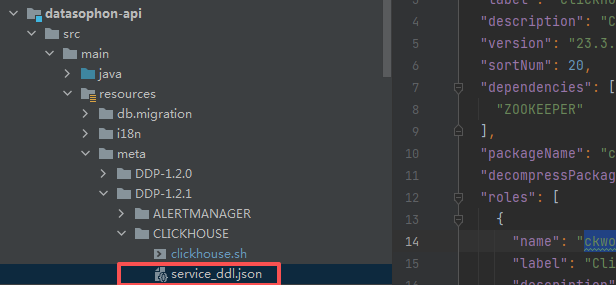
service_ddl.json内容为:
javascript
{
  "name": "CLICKHOUSE",
  "label": "ClickHouse",
  "description": "ClickHouse OLAP Database System - 高性能列式数据库,支持实时分析",
  "version": "23.3.10.5",
  "sortNum": 20,
  "dependencies": [
    "ZOOKEEPER"
  ],
  "packageName": "clickhouse-23.3.10.5.tar.gz",
  "decompressPackageName": "clickhouse-23.3.10.5",
  "roles": [
    {
      "name": "ckworker",
      "label": "ClickHouse Worker",
      "description": "数据存储和计算节点",
      "roleType": "worker",
      "cardinality": "2+",
      "logFile": "logs/clickhouse-server.log",
      "jmxPort": 0,
      "startRunner": {
        "timeout": "120",
        "program": "clickhouse.sh",
        "args": ["start"]
      },
      "stopRunner": {
        "timeout": "60",
        "program": "clickhouse.sh",
        "args": ["stop"]
      },
      "statusRunner": {
        "timeout": "30",
        "program": "clickhouse.sh",
        "args": ["status"]
      },
      "restartRunner": {
        "timeout": "120",
        "program": "clickhouse.sh",
        "args": ["restart"]
      }
    },
    {
      "name": "ckclient",
      "label": "ClickHouse Client",
      "description": "查询接入节点",
      "roleType": "client",
      "cardinality": "0+",
      "logFile": "logs/clickhouse-server.log",
      "jmxPort": 0,
      "startRunner": {
        "timeout": "120",
        "program": "clickhouse.sh",
        "args": ["start"]
      },
      "stopRunner": {
        "timeout": "60",
        "program": "clickhouse.sh",
        "args": ["stop"]
      },
      "statusRunner": {
        "timeout": "30",
        "program": "clickhouse.sh",
        "args": ["status"]
      },
      "restartRunner": {
        "timeout": "120",
        "program": "clickhouse.sh",
        "args": ["restart"]
      },
      "externalLink": {
        "name": "ClickHouse UI",
        "label": "ClickHouse UI",
        "url": "http://${host}:${http_port}"
      }
    }
  ],
  "configWriter": {
    "generators": [
      {
        "filename": "config.xml",
        "configFormat": "custom",
        "outputDirectory": "conf",
        "templateName": "config.xml.ftl",
        "includeParams": [
          "http_port",
          "tcp_port",
          "interserver_http_port",
          "zk_address",
          "zk_root",
          "cluster_name",
          "cluster_hosts",
          "data_path",
          "tmp_path",
          "user_files_path",
          "log_dir",
          "log_level",
          "max_connections",
          "max_memory_usage",
          "current_shard",
          "current_replica",
          "hostname"
        ]
      },
      {
        "filename": "users.xml",
        "configFormat": "custom",
        "outputDirectory": "conf",
        "templateName": "users.xml.ftl",
        "includeParams": [
          "default_password",
          "datasophon_password",
          "max_memory_usage_for_user",
          "max_memory_usage",
          "max_partitions_per_insert_block"
        ]
      },
      {
        "filename": "macros.xml",
        "configFormat": "custom",
        "outputDirectory": "conf",
        "templateName": "macros.xml.ftl",
        "includeParams": [
          "cluster_name",
          "current_shard",
          "current_replica",
          "hostname"
        ]
      }
    ]
  },
  "parameters": [
    {
      "name": "http_port",
      "label": "HTTP端口",
      "description": "ClickHouse HTTP接口端口",
      "configType": "map",
      "required": true,
      "type": "input",
      "value": "",
      "configurableInWizard": true,
      "hidden": false,
      "defaultValue": "8123"
    },
    {
      "name": "tcp_port",
      "label": "TCP端口",
      "description": "ClickHouse原生TCP端口",
      "configType": "map",
      "required": true,
      "type": "input",
      "value": "",
      "configurableInWizard": true,
      "hidden": false,
      "defaultValue": "9000"
    },
    {
      "name": "interserver_http_port",
      "label": "内部通信端口",
      "description": "ClickHouse节点间通信端口",
      "configType": "map",
      "required": true,
      "type": "input",
      "value": "",
      "configurableInWizard": true,
      "hidden": false,
      "defaultValue": "9009"
    },
    {
      "name": "zk_address",
      "label": "ZK地址",
      "description": "ZooKeeper集群地址,格式: host1:port1,host2:port2",
      "configType": "map",
      "required": true,
      "type": "input",
      "value": "",
      "configurableInWizard": true,
      "hidden": false,
      "defaultValue": "${zkUrls}"
    },
    {
      "name": "zk_root",
      "label": "ZK根路径",
      "description": "在ZooKeeper中的根路径",
      "configType": "map",
      "required": true,
      "type": "input",
      "value": "",
      "configurableInWizard": true,
      "hidden": false,
      "defaultValue": "/clickhouse"
    },
    {
      "name": "cluster_name",
      "label": "集群名称",
      "description": "ClickHouse分布式集群名称",
      "configType": "map",
      "required": true,
      "type": "input",
      "value": "",
      "configurableInWizard": true,
      "hidden": false,
      "defaultValue": "datasophon_cluster"
    },
    {
      "name": "cluster_hosts",
      "label": "集群节点列表",
      "description": "集群节点配置,格式: 分片编号:副本编号:主机名,多个节点用逗号分隔\n示例: 1:1:ddp1,1:2:ddp2,2:1:ddp3,2:2:ddp4",
      "configType": "map",
      "required": true,
      "type": "input",
      "value": "",
      "configurableInWizard": true,
      "hidden": false,
      "defaultValue": "1:1:ddp1,1:2:ddp2,2:1:ddp3,2:2:ddp4"
    },
    {
      "name": "current_shard",
      "label": "当前节点分片",
      "description": "该节点所属的分片编号",
      "configType": "map",
      "required": true,
      "type": "input",
      "value": "",
      "configurableInWizard": true,
      "hidden": false,
      "defaultValue": "1"
    },
    {
      "name": "current_replica",
      "label": "当前节点副本",
      "description": "该节点在分片中的副本编号",
      "configType": "map",
      "required": true,
      "type": "input",
      "value": "",
      "configurableInWizard": true,
      "hidden": false,
      "defaultValue": "1"
    },
    {
      "name": "hostname",
      "label": "主机名",
      "description": "当前节点主机名",
      "configType": "map",
      "required": true,
      "type": "input",
      "value": "",
      "configurableInWizard": false,
      "hidden": true,
      "defaultValue": "${host}"
    },
    {
      "name": "data_path",
      "label": "数据目录",
      "description": "ClickHouse数据存储路径",
      "configType": "map",
      "required": true,
      "type": "input",
      "value": "",
      "configurableInWizard": true,
      "hidden": false,
      "defaultValue": "/opt/datasophon/clickhouse/data"
    },
    {
      "name": "tmp_path",
      "label": "临时目录",
      "description": "ClickHouse临时文件路径",
      "configType": "map",
      "required": true,
      "type": "input",
      "value": "",
      "configurableInWizard": true,
      "hidden": false,
      "defaultValue": "/opt/datasophon/clickhouse/tmp"
    },
    {
      "name": "user_files_path",
      "label": "用户文件目录",
      "description": "ClickHouse用户文件路径",
      "configType": "map",
      "required": true,
      "type": "input",
      "value": "",
      "configurableInWizard": true,
      "hidden": false,
      "defaultValue": "/opt/datasophon/clickhouse/user_files"
    },
    {
      "name": "log_dir",
      "label": "日志目录",
      "description": "ClickHouse日志文件路径",
      "configType": "map",
      "required": true,
      "type": "input",
      "value": "",
      "configurableInWizard": true,
      "hidden": false,
      "defaultValue": "/var/log/clickhouse-server"
    },
    {
      "name": "log_level",
      "label": "日志级别",
      "description": "ClickHouse日志级别",
      "configType": "map",
      "required": true,
      "type": "select",
      "value": "",
      "configurableInWizard": true,
      "hidden": false,
      "defaultValue": "information",
      "values": [
        {
          "value": "trace",
          "desc": "TRACE"
        },
        {
          "value": "debug",
          "desc": "DEBUG"
        },
        {
          "value": "information",
          "desc": "INFORMATION"
        },
        {
          "value": "warning",
          "desc": "WARNING"
        },
        {
          "value": "error",
          "desc": "ERROR"
        }
      ]
    },
    {
      "name": "default_password",
      "label": "默认用户密码",
      "description": "ClickHouse默认用户密码",
      "configType": "map",
      "required": false,
      "type": "password",
      "value": "",
      "configurableInWizard": true,
      "hidden": true,
      "defaultValue": ""
    },
    {
      "name": "datasophon_password",
      "label": "DataSophon用户密码",
      "description": "DataSophon管理用户密码",
      "configType": "map",
      "required": true,
      "type": "password",
      "value": "",
      "configurableInWizard": true,
      "hidden": true,
      "defaultValue": "datasophon123"
    },
    {
      "name": "max_connections",
      "label": "最大连接数",
      "description": "最大客户端连接数",
      "configType": "map",
      "required": true,
      "type": "input",
      "value": "",
      "configurableInWizard": true,
      "hidden": false,
      "defaultValue": "4096"
    },
    {
      "name": "max_memory_usage",
      "label": "最大内存使用",
      "description": "单次查询最大内存使用(字节)",
      "configType": "map",
      "required": true,
      "type": "input",
      "value": "",
      "configurableInWizard": true,
      "hidden": false,
      "defaultValue": "10000000000"
    },
    {
      "name": "max_memory_usage_for_user",
      "label": "用户最大内存使用",
      "description": "单用户单次查询最大内存使用(字节)",
      "configType": "map",
      "required": true,
      "type": "input",
      "value": "",
      "configurableInWizard": true,
      "hidden": false,
      "defaultValue": "10000000000"
    },
    {
      "name": "max_partitions_per_insert_block",
      "label": "单次插入最大分区数",
      "description": "单次INSERT操作允许的最大分区数量",
      "configType": "map",
      "required": true,
      "type": "input",
      "value": "",
      "configurableInWizard": true,
      "hidden": false,
      "defaultValue": "100"
    }
  ]
}
这个文件告诉datasophon,你的组件叫啥名称,版本号多少,依赖组件是啥,对应tar包,有什么角色,每种角色如何启动,停止,重启,查询状态。涉及哪些配置文件,每个配置文件如何生成,使用什么模板,需要什么参数。每个参数是输入还是什么的,显示还是隐藏等等
3.定制策略处理代码
刚开始我没想弄个策略文件,后来启动时,提示需要zk目录,这个目录必须事先创建,但是zk目录只能创建一次,后面再创建会报错,如果安装集群的话,势必会引起重复创建文件。所以引入策略文件,使用redis 锁来保证只能创建一次
下面列出涉及文件:
ServiceRoleStrategyContext:
javascript
/*
 *  Licensed to the Apache Software Foundation (ASF) under one or more
 *  contributor license agreements.  See the NOTICE file distributed with
 *  this work for additional information regarding copyright ownership.
 *  The ASF licenses this file to You under the Apache License, Version 2.0
 *  (the "License"); you may not use this file except in compliance with
 *  the License.  You may obtain a copy of the License at
 *
 *     http://www.apache.org/licenses/LICENSE-2.0
 *
 *  Unless required by applicable law or agreed to in writing, software
 *  distributed under the License is distributed on an "AS IS" BASIS,
 *  WITHOUT WARRANTIES OR CONDITIONS OF ANY KIND, either express or implied.
 *  See the License for the specific language governing permissions and
 *  limitations under the License.
 */

package com.datasophon.worker.strategy;

import org.apache.commons.lang.StringUtils;

import java.util.Map;
import java.util.concurrent.ConcurrentHashMap;

public class ServiceRoleStrategyContext {

    private static final Map<String, ServiceRoleStrategy> map = new ConcurrentHashMap<>();

    static {
        map.put("NameNode", new NameNodeHandlerStrategy("HDFS", "NameNode"));
        map.put("ZKFC", new ZKFCHandlerStrategy("HDFS", "ZKFC"));
        map.put("JournalNode", new JournalNodeHandlerStrategy("HDFS", "JournalNode"));
        map.put("DataNode", new DataNodeHandlerStrategy("HDFS", "DataNode"));
        map.put("ResourceManager", new ResourceManagerHandlerStrategy("YARN", "ResourceManager"));
        map.put("NodeManager", new NodeManagerHandlerStrategy("YARN", "NodeManager"));
        map.put("RangerAdmin", new RangerAdminHandlerStrategy("RANGER", "RangerAdmin"));
        map.put("HiveServer2", new HiveServer2HandlerStrategy("HIVE", "HiveServer2"));
        map.put("HbaseMaster", new HbaseHandlerStrategy("HBASE", "HbaseMaster"));
        map.put("RegionServer", new HbaseHandlerStrategy("HBASE", "RegionServer"));
        map.put("Krb5Kdc", new Krb5KdcHandlerStrategy("KERBEROS", "Krb5Kdc"));
        map.put("KAdmin", new KAdminHandlerStrategy("KERBEROS", "KAdmin"));
        map.put("SRFE", new FEHandlerStrategy("STARROCKS", "SRFE"));
        map.put("DorisFE", new FEHandlerStrategy("DORIS", "DorisFE"));
        map.put("DorisFEObserver", new FEObserverHandlerStrategy("DORIS", "DorisFEObserver"));
        map.put("ZkServer", new ZkServerHandlerStrategy("ZOOKEEPER", "ZkServer"));
        map.put("KafkaBroker", new KafkaHandlerStrategy("KAFKA", "KafkaBroker"));
        map.put("SRBE", new BEHandlerStrategy("STARROCKS", "SRBE"));
        map.put("DorisBE", new BEHandlerStrategy("DORIS", "DorisBE"));
        map.put("HistoryServer", new HistoryServerHandlerStrategy("YARN", "HistoryServer"));

        // TEZ Server service
        map.put("TezServer", new TezServerHandlerStrategy("TEZ", "TezServer"));
        //kyuubi
        map.put("KyuubiServer", new KyuubiServerHandlerStrategy("KYUUBI", "KyuubiServer"));
        map.put("ckworker", new ClickHouseWorkerHandlerStrategy("CLICKHOUSE", "ckworker"));

    }

    public static ServiceRoleStrategy getServiceRoleHandler(String type) {
        if (StringUtils.isBlank(type)) {
            return null;
        }
        return map.get(type);
    }
}
这个文件其实就加了一行,告诉datasophon,clickhouse ckworker使用策略类名
javascript
map.put("ckworker", new ClickHouseWorkerHandlerStrategy("CLICKHOUSE", "ckworker"));ZookeeperPathService:
javascript
package com.datasophon.worker.service;

import com.datasophon.common.Constants;
import com.datasophon.common.redis.utils.RedisLockUtil;
import com.datasophon.common.utils.ExecResult;
import com.datasophon.common.utils.ShellUtils;

import org.slf4j.Logger;
import org.slf4j.LoggerFactory;

import java.util.ArrayList;

/**
 * ZooKeeper 目录管理服务
 * 使用Redis分布式锁控制ZK目录创建,防止多节点并发
 */
public class ZookeeperPathService {

    private static final Logger logger = LoggerFactory.getLogger(ZookeeperPathService.class);

    // Redis锁配置
    private static final String ZK_PATH_LOCK_KEY = "datasophon:clickhouse:zkpath:init:lock";
    private static final long LOCK_TIMEOUT = 300;      // 锁超时时间(秒)
    private static final long LOCK_WAIT_TIME = 30000;  // 等待锁的时间(毫秒)

    // ZK客户端路径
    private static final String ZK_CLI_PATH = "/opt/datasophon/zookeeper/bin/zkCli.sh";

    /**
     * 创建ZooKeeper目录(带Redis分布式锁)
     * @param zkServer ZK服务器地址,格式: 192.168.1.181:2181
     * @param zkPath ZK路径,如: /clickhouse
     * @param createSubPaths 是否创建子目录
     * @return 是否创建成功
     */
    public static boolean createPathWithLock(String zkServer, String zkPath, boolean createSubPaths) {
        logger.info("🚀 =========================================");
        logger.info("🚀 ZooKeeper 目录创建开始");
        logger.info("🚀 ZK服务器: {}", zkServer);
        logger.info("🚀 ZK路径: {}", zkPath);
        logger.info("🚀 创建子目录: {}", createSubPaths);
        logger.info("🚀 Redis锁键: {}", ZK_PATH_LOCK_KEY);
        logger.info("🚀 =========================================");

        try {
            // 1. 先测试Redis连接
            logger.info("1️⃣ 测试Redis连接...");
            boolean redisConnected = RedisLockUtil.testRedisConnection();

            if (!redisConnected) {
                logger.warn("⚠️ Redis连接测试失败,尝试直接创建ZK目录");
                return createPathDirect(zkServer, zkPath, createSubPaths);
            }

            // 2. 检查目录是否已存在
            logger.info("2️⃣ 检查ZK目录是否已存在...");
            if (isPathExists(zkServer, zkPath)) {
                logger.info("✅ ZK目录已存在: {}, 跳过创建", zkPath);
                return true;
            }

            // 3. 使用Redis锁执行创建
            logger.info("3️⃣ 使用Redis分布式锁执行ZK目录创建...");
            boolean result = RedisLockUtil.executeWithLock(
                    ZK_PATH_LOCK_KEY,
                    LOCK_TIMEOUT,
                    LOCK_WAIT_TIME,
                    () -> {
                        logger.info("🔒 在Redis锁保护区内,开始创建ZK目录");

                        // 双重检查
                        if (isPathExists(zkServer, zkPath)) {
                            logger.info("✅ 在等待锁期间,ZK目录已被其他节点创建");
                            return true;
                        }

                        return createPathDirect(zkServer, zkPath, createSubPaths);
                    }
            );

            logger.info("🎉 ZK目录创建结果: {}", result);
            return result;

        } catch (Exception e) {
            logger.error("❌ ZK目录创建过程中发生异常", e);
            logger.error("  异常堆栈: ", e);

            // 异常降级:尝试直接创建
            logger.warn("🔄 尝试直接创建ZK目录(绕过Redis锁)...");
            try {
                boolean directResult = createPathDirect(zkServer, zkPath, createSubPaths);
                logger.info("直接创建结果: {}", directResult);
                return directResult;
            } catch (Exception ex) {
                logger.error("❌ 直接创建也失败了", ex);
                return false;
            }

        } finally {
            logger.info("🚀 =========================================");
            logger.info("🚀 ZooKeeper 目录创建结束");
            logger.info("🚀 =========================================");
        }
    }

    /**
     * 直接创建ZooKeeper目录(无锁)
     */
    public static boolean createPathDirect(String zkServer, String zkPath, boolean createSubPaths) {
        logger.info("🔧 开始直接创建ZK目录(无锁)");
        logger.info("  ZK服务器: {}", zkServer);
        logger.info("  ZK路径: {}", zkPath);
        logger.info("  创建子目录: {}", createSubPaths);

        try {
            // 1. 检查zkCli.sh是否存在
            if (!isZkCliAvailable()) {
                logger.error("❌ zkCli.sh不存在或不可执行: {}", ZK_CLI_PATH);
                return false;
            }

            // 2. 创建主目录
            logger.info("  创建主目录: {}", zkPath);
            boolean mainPathCreated = createSinglePath(zkServer, zkPath);

            if (!mainPathCreated) {
                logger.error("❌ 创建主目录失败: {}", zkPath);
                return false;
            }
            logger.info("✅ 主目录创建成功");

            // 3. 如果需要创建子目录
            if (createSubPaths) {
                logger.info("  创建ClickHouse子目录...");

                // ClickHouse需要的子目录
                String[] subPaths = {
                        zkPath + "/task_queue",
                        zkPath + "/log",
                        zkPath + "/log/log-1",
                        zkPath + "/blocks",
                        zkPath + "/replicas",
                        zkPath + "/metadata"
                };

                for (String subPath : subPaths) {
                    if (!isPathExists(zkServer, subPath)) {
                        boolean created = createSinglePath(zkServer, subPath);
                        logger.info("    子目录 {}: {}", subPath, created ? "✅" : "❌");
                    } else {
                        logger.info("    子目录 {}: ✅ (已存在)", subPath);
                    }
                }
            }

            logger.info("✅ ZK目录创建完成");
            return true;

        } catch (Exception e) {
            logger.error("🔥 创建ZK目录异常", e);
            return false;
        }
    }

    /**
     * 创建单个ZK路径
     */
    private static boolean createSinglePath(String zkServer, String zkPath) {
        try {
            ArrayList<String> commands = new ArrayList<>();
            commands.add(ZK_CLI_PATH);
            commands.add("-server");
            commands.add(zkServer);
            commands.add("create");
            commands.add(zkPath);
            commands.add("\"\"");  // 空数据

            logger.debug("  执行命令: {} -server {} create {} \"\"",
                    ZK_CLI_PATH, zkServer, zkPath);

            ExecResult execResult = ShellUtils.execWithStatus("/tmp", commands, 30L);

            if (execResult.getExecResult()) {
                String output = execResult.getExecOut();
                if (output != null && output.contains("Created")) {
                    logger.debug("  ✅ 创建成功: {}", zkPath);
                    return true;
                }
            }

            // 检查是否是因为已存在而失败
            if (execResult.getExecErrOut() != null &&
                    execResult.getExecErrOut().contains("Node already exists")) {
                logger.debug("  ℹ️ 节点已存在: {}", zkPath);
                return true;
            }

            logger.error("  ❌ 创建失败: {}, 错误: {}", zkPath, execResult.getExecErrOut());
            return false;

        } catch (Exception e) {
            logger.error("  创建异常: {}", zkPath, e);
            return false;
        }
    }

    /**
     * 检查ZK路径是否存在
     */
    public static boolean isPathExists(String zkServer, String zkPath) {
        logger.debug("检查ZK路径是否存在: {}", zkPath);

        try {
            ArrayList<String> commands = new ArrayList<>();
            commands.add(ZK_CLI_PATH);
            commands.add("-server");
            commands.add(zkServer);
            commands.add("ls");
            commands.add(zkPath);

            ExecResult execResult = ShellUtils.execWithStatus("/tmp", commands, 30L);

            if (execResult.getExecResult()) {
                String output = execResult.getExecOut();
                boolean exists = output != null && !output.trim().isEmpty() && !output.contains("[]");
                logger.debug("  ZK路径 {}: {}", zkPath, exists ? "✅ 存在" : "❌ 不存在");
                return exists;
            }

            // 错误输出中包含"No node"表示节点不存在
            if (execResult.getExecErrOut() != null &&
                    execResult.getExecErrOut().contains("No node")) {
                logger.debug("  ZK路径 {}: ❌ 不存在 (No node)", zkPath);
                return false;
            }

            logger.warn("  检查ZK路径失败: {}", execResult.getExecErrOut());
            return false;

        } catch (Exception e) {
            logger.warn("  检查ZK路径异常: {}", zkPath, e);
            return false;
        }
    }

    /**
     * 检查zkCli.sh是否可用
     */
    private static boolean isZkCliAvailable() {
        try {
            ArrayList<String> commands = new ArrayList<>();
            commands.add("test");
            commands.add("-f");
            commands.add(ZK_CLI_PATH);

            ExecResult execResult = ShellUtils.execWithStatus("/tmp", commands, 10L);
            return execResult.getExecResult();
        } catch (Exception e) {
            logger.error("检查zkCli.sh失败", e);
            return false;
        }
    }

    /**
     * 从ClickHouse配置文件获取ZK地址
     */
    public static String getZkServerFromConfig(String installPath, String packageName) {
        String configFile = installPath + Constants.SLASH + packageName + "/conf/config.xml";
        try {
            // 这里需要根据实际的config.xml格式解析
            // 简化实现,可以从文件中正则匹配
            // <zookeeper> <node> <host>xxx</host> <port>2181</port> </node> </zookeeper>
            String content = cn.hutool.core.io.FileUtil.readUtf8String(configFile);
            String host = cn.hutool.core.util.ReUtil.get("<host>([^<]+)</host>", content, 1);
            String port = cn.hutool.core.util.ReUtil.get("<port>([^<]+)</port>", content, 1);
            if (host != null && port != null) {
                return host + ":" + port;
            }
        } catch (Exception e) {
            logger.warn("解析ZK地址失败", e);
        }
        return "192.168.1.181:2181"; // 默认值
    }

    /**
     * 从ClickHouse配置文件获取ZK根路径
     */
    public static String getZkRootFromConfig(String installPath, String packageName) {
        String configFile = installPath + Constants.SLASH + packageName + "/conf/config.xml";
        try {
            // <zookeeper> <root>/clickhouse</root> </zookeeper>
            String content = cn.hutool.core.io.FileUtil.readUtf8String(configFile);
            String root = cn.hutool.core.util.ReUtil.get("<root>([^<]+)</root>", content, 1);
            if (root != null) {
                return root;
            }
        } catch (Exception e) {
            logger.warn("解析ZK根路径失败", e);
        }
        return "/clickhouse"; // 默认值
    }
}
这个文件完成帮clickhouse使用redis加锁方式创建zk目录,创建前判断是否存在
ClickHouseWorkerHandlerStrategy:
javascript
package com.datasophon.worker.strategy;

import com.datasophon.common.Constants;
import com.datasophon.common.command.ServiceRoleOperateCommand;
import com.datasophon.common.enums.CommandType;
import com.datasophon.common.utils.ExecResult;
import com.datasophon.worker.handler.ServiceHandler;
import com.datasophon.worker.service.ZookeeperPathService;

import java.sql.SQLException;

public class ClickHouseWorkerHandlerStrategy  extends AbstractHandlerStrategy implements ServiceRoleStrategy{
    public ClickHouseWorkerHandlerStrategy(String serviceName,String serviceRoleName) {
        super(serviceName,serviceRoleName);
    }

    @Override
    public ExecResult handler(ServiceRoleOperateCommand command) throws SQLException, ClassNotFoundException {
        ExecResult startResult = new ExecResult();
        ServiceHandler serviceHandler = new ServiceHandler(command.getServiceName(), command.getServiceRoleName());

        logger.info("ClickHouse 服务角色处理开始,命令类型: {}", command.getCommandType());
        logger.info("是否为从节点: {}", command.isSlave());

        // 只在安装主节点时创建ZK目录
        if (command.getCommandType().equals(CommandType.INSTALL_SERVICE) && !command.isSlave()) {
            logger.info("🚀 =========================================");
            logger.info("🚀 ClickHouse ZooKeeper 目录初始化");
            logger.info("🚀 =========================================");

            String installPath = Constants.INSTALL_PATH;
            String packageName = command.getDecompressPackageName();

            // 从配置文件获取ZK地址和根路径
            String zkServer = ZookeeperPathService.getZkServerFromConfig(installPath, packageName);
            String zkRoot = ZookeeperPathService.getZkRootFromConfig(installPath, packageName);

            logger.info("ZooKeeper服务器: {}", zkServer);
            logger.info("ZooKeeper根路径: {}", zkRoot);

            // 使用Redis分布式锁创建ZK目录(完全参考HiveSchemaService模式)
            boolean createSuccess = ZookeeperPathService.createPathWithLock(
                    zkServer,
                    zkRoot,
                    true  // 创建所有ClickHouse需要的子目录
            );

            if (createSuccess) {
                logger.info("✅ ClickHouse ZooKeeper目录初始化成功");
            } else {
                logger.warn("⚠️ ClickHouse ZooKeeper目录初始化失败或已被其他节点初始化");
                // 不返回失败,继续启动服务
            }

            logger.info("🚀 =========================================\n");
        }

        // 启动ClickHouse服务
        logger.info("启动ClickHouse服务...");
        startResult = serviceHandler.start(
                command.getStartRunner(),
                command.getStatusRunner(),
                command.getDecompressPackageName(),
                command.getRunAs()
        );

        if (startResult.getExecResult()) {
            logger.info("✅ ClickHouse服务启动成功");
        } else {
            logger.error("❌ ClickHouse服务启动失败");
        }

        return startResult;
    }
}
这个是策略文件,参考其他策略文件改写而成,就加了调用上面的创建zk目录服务即可
最后
直至今天,大数据组件一条龙,终于通关。实在不易。
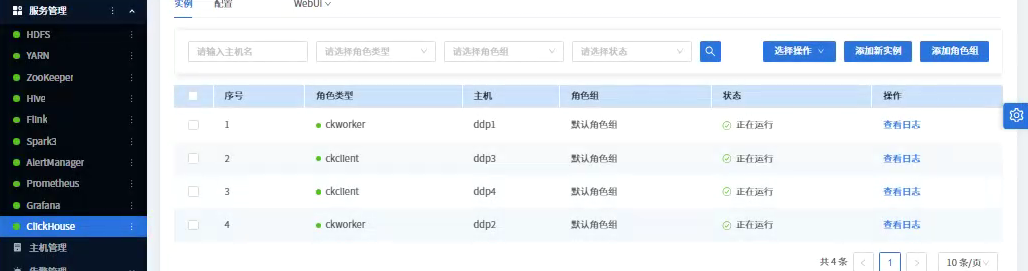
成果截图:
为了方便大家,我把包和源码分享出来:
包:通过网盘分享的知识:DDP-1.2.1(ubuntu)
链接: https://pan.baidu.com/s/5n1JvjkldxLwiLEO-y1ut5g
源码:https://gitee.com/longsebo/datasophon.git
分支:Akka
如需沟通:lita2lz